Transcripts
1. Introduction: Hi. Welcome to my class. If you are an artist
and in particular, a surface pattern designer
that share the work on print, on demand website,
or wish to do it. But it doesn't like the
part where you have to find an effective title, a compelling
description, and tags to make your work visible
on this platform. This glass is the one that
you don't want to miss today. I'm so happy and thrilled to share with you something
that I created that made my life so much easier that I couldn't
just keep it for myself. Basically what I'm
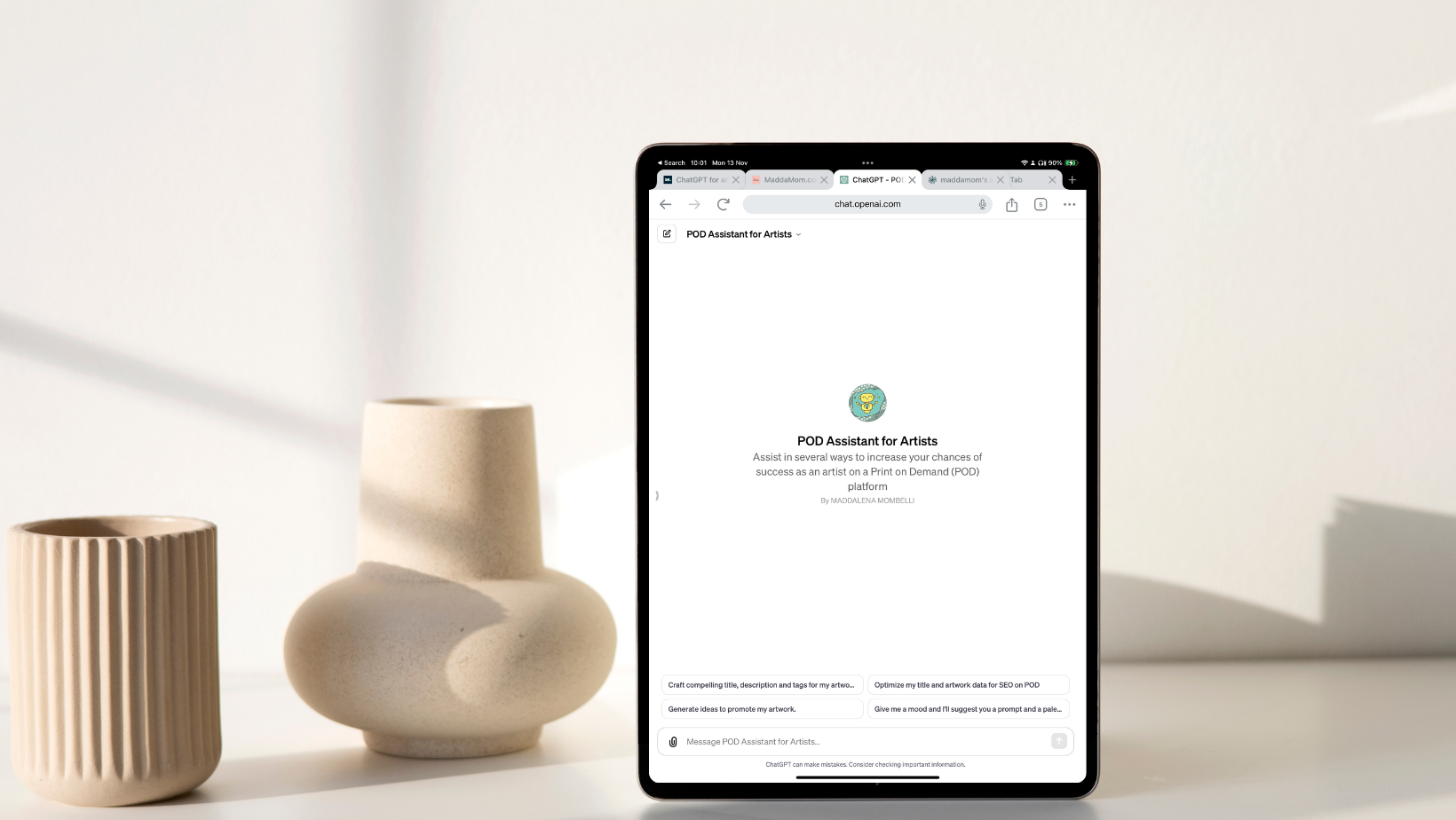
going to do is to show you how you can use, let's say, a plugin
that I created for PT. Basically is like
a specific version of char GPT with the purpose to help artists to create
and optimize the title, the description, and the
tags for their creation. Today we're going to do it
using as example, spoonflower. Spoonflower is a platform where you can
upload your pieces. As in this case, for example, having it in fabrics, om, decor, wallpaper and so on. The point is that I wanted to show you how you can make fun, the process of creating
title description and tags. Well, if we didn't meet before, my name is Madam. I'm an artist with many passion, many accent, and also with the background in computer
science and usability. In particular, I love
to be productive. I am productive, not organized. When I find a workflow or tips and tricks that
help me to do it, I'm so happy to share it and to improve also
the life of others. I hope this class is
going to be super useful also for you and be
tune because later. Exactly. I'm going also
to share the link of the plug in that I
did for char GPT. If you know me here in the
platform in Skillshare, you know that I already
release a class about EI and Ch GPT in
particular some months ago. This one is more
specific, but again, if you want a general
introduction for creative and my
favorite way to use a Cha GPT even though Cha Chi PT is evolving
so much, definitely. I suggest you to watch
also that class. But now grab your cup of
coffee and let's start. What we're going to
do is talk about your project and the
outline of the class. See you in the next video.
2. Class Project: I'm so thrilled to see how an easy and effective
workflow in creating tags, titles, and descriptions
can help you increase the visibility
of your beautiful works. While I do recommend,
first enjoying the class with no
pressure, just a viewer. I really can't wait
to see how you'll use the new skill and
tools to get results. Please don't forget to
upload your project, check out student project, and keep us posted with your
discovery improvements here. What I'm expecting to see in
the project gallery from you remember the ultimate goal is to improve your own POD shop. The first task is to explore your existing
spoon flower shop. Or if you don't have it yet, the folder where you're
saving your pieces, pick a pattern that has potential look for a design
with elements on trend or like in my case simply to name as muffin doughnuts
presents party. This pattern was
not searchable and then visible at all
on my spoonflower. Do you see the name? Well, look for failure. These are great starting
points to improve. When you choose the design, take a screenshot and post it right away in the
project section. Then interact with GPT. Use the plug in and get your improved title
description and tags follow up by applauding a second screenshot or a comment or the link
to show the result. I'm truly, truly excited
to see your chosen design to give you feedback and to boost our design
visibility together. One short note, if you don't
have access to GPT yet, worry, post a screenshot anyway, or a link to your chosen design. The design that is in need of effective tags,
description, and title. Yes, A simple photomop downloaded from your POD
should work just fine. Mentioned in your
project that you don't have access to ChargPT, but that you are curious about its potential for
your chosen design. I will be there to assist
you with my plug in. I'll share my feedback in the comments along
with the title, description, and tags from
my own chat with Pepino. Yes, I've affectionally named my ChargPT Pepino even before knowing that I could
develop my own plug in. Remember this class
is more than just, a series of lesson is
about growing together. I love this class to be also the starting
point to connect with other creative surface
pattern designer interested in improving
their workflow. Also with the support of effective new tools
and tips and tricks, I can wait to see your projects and I'll see you in the
discussion section for news updates and bonuses in the next video for
the class overview.
3. Class Outline: Hi again, and now it's time to see what is going to
happen in this class. First of all, remember
our goal is to create effective and
compelling titles, Description and Tax
for a design that we created To do so in this class I created three user case scenarios to stretch the system and
see how it's working. In the first one we will see the interface in char
GPT and my plug in. But we will also see how we will upload a file from our computer. This file specifically will
not just be a pattern, but will be a pattern
already in a mock up photo. So I will applaud like a photo of a final product
with my design. And I will ask char
GPT to help me to create title description tag and we will see what happened. I will do it in real time. I will not edit it, so you
will have the big picture. The second example is
very fun too and useful too because I ask ChargGPT to help me to create a Tito
description tag for the last pattern I did for Spoonflower
Challenge competition. Useful writer, I will not just see what happened in
this case and how I interact, but I will also show you how I can go back to this
query and then just copy and paste or modify
directly then in Spoon Flower to make my
pattern ready to go. Then the third and last example for this class is
related to the fact that you might have also many designing spoon flower that are already
available for sale. But if you are like me, they didn't
description and tags, they did have a title,
maybe a random one. They need to revisit this part to make it
visible to the public. I will do exactly like this one. In the third case, I will
show you how I will do or take a screenshot of
something that is already available in Spoon
flower in my shop, and then I will do the reverse. Then I will update
that same design, hopefully make it more
visible and so on. I hope that this
is useful for you, and I'll see you
in the next video to start to work. Finally
4. Optimizing from a Mockup: First of all, I need
you to login in GPT. This one is something that
you have to do by yourself. I will share the
link, but you will be asked to provide your
own information. That will be the E
mail, the birthday, and also a phone
number to send you an authentication
code to log in. Let's say that you
have the pro version, then you will use my link
and you will reach here, as you may see on the top,
you will have it here. Here you have directly
something that are generated for getting
the goal that we want. That is optimizing my
title and artwork data for CEO on print and demand. Or give me, I will develop
more idea on this. Plug in Betwun. What I want you to try now
is craft a compelling title, description and target
for my artwork. I will push it and
see will happen. We are in real time
and my connection is, Let's see what PT is replying
to me automatically. It will say that he will be
glad to help you with it. Will ask me, could
you please applaud your artwork and provide
any context or theme associated with data
such as whether it was made for a specific challenge like a spoon flower challenge, or any other details
relevant to the design. This information will be GPT to craft the most effective
title description in tags for your print
on the main website. What I wanted to
show you is that, again, as a pro user, I already have
access to this one now that will allow me
to upload a design. This one is for another
demonstration that I might put as a
bonus of this class. Let's say that I will try to. I did the design and this one is a mockup image is already
on a final product. I will just applaud it as it
is and see what happened. Let's see if we will
recognize that I want the tag and description for this
design. Let's wait for it. It might be tough because this mock up actually is not flat. I don't know if you will be able to recognize
the poppy flower. Let's see. Thank you for
sharing your design. I see a beautiful
pattern. Thank you. Definitely motivating
that will work. Where on various
home the core items give the nature of the design. I craft a title description
and tags suit ball for a platform like bubble
society six and spoonflower. As I told you, the plug
in that I made is already for the print on the med
website that I use the most. But here we're working
with say spoonflower. Wow. Title is vintage
blossom elegance. Artistic red poppy
field floral pattern, home decor. Pretty
amazing, right? Because my mockup didn't have any information
about the type of flower. Who here I got error. The error of the time is because of my bed connection
here in Switzerland, I might try to regenerate again, but after now, I was very
happy with the result. Let's try again. This
one is a real time demo, so you can see also
how long does it take? It's taking some time again. Thank you for
applauding your design. Is very polite based on the image provide,
blah, blah, blah. I see a beautiful
pattern featuring red puppies with green foliage and on a neutral background. This design could appeal to
customer interest in flora, pattern on the core and
nature inspired them here, a crafted title description
tag for your artwork that you can use across this
print on demand website. Vibrant red poppy bloom, elegant flora table
design for whom the core enthusiastic adorn your space
with the essence of spring. This elegant
tablecloth featuring vibrant red puppies set against a serene neutral drop brings a burst of nature
beauty to your home decor. Immerse yourself as
you can see here. It just gave me like
a short description because you will see
that in spoon flower we need to have a part with a description that is not
longer than 150 character. Then it will provide me also an additional
description if you want to put this one in the second field
related to description. Now medically, let's see
the tags that in this case a long tag is not just like
red or puppy tablecloth. It's right to combine more
of them to make it even more effective for
our visibility. The tags are already written, separated by, I can just copy and paste
them in spoon flour. I'm actually pretty happy
with the quality of the tags, but as PT is reminding us, we have always to
check and customize the description in this result according to our
preferences to our design, but also according
to the platform, of course, where we
are appling them. And we can interact more
also with GPT to make it even more feasible
for our niche. Definitely, I'm pretty
happy about the result we got in a few minutes and
it was fun to do it. What do you think? I'll
see you in the next video.
5. Enhancing for a Challenge: Now in the example number two, what we're going to do is to ask a GBT to create the title, description and tax for a design that I created for a
spoon flower challenge. That actually I have to pad today and finish
today because the spoon flower
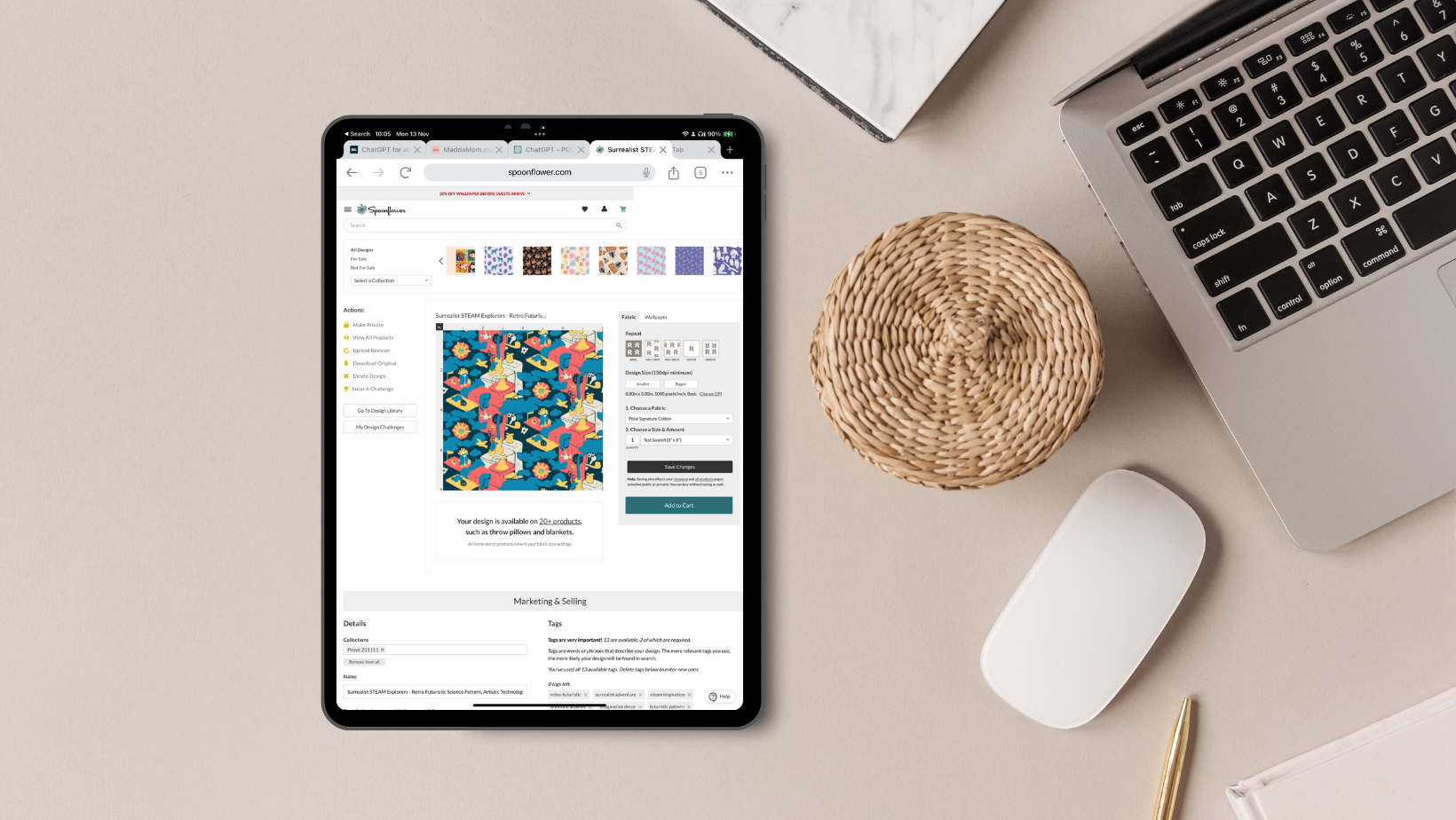
challenge deadline is today specific one. What I did is simply add my design to be
clear in my folder. The design had the
title that I gave it. Gbt received a Jpeg file with this title like
Surrealist Steam Explorer. This is what provided me back
after applauding this one, are provided me a lot of elements that I think
are super interesting. It was just saying like, okay, the title should include the fact that it's a
steam element explorer, the surrealism to futuristic, bold, primary color, and so on. I will share this with you
in the resources you can. But what is more important is that I simply provided
him the photo, the Jpeg, and then I told
ChargTI did this one. For this challenge actually, you can also check
the challenge. I simply provide the
link that is this one. Then according to the
description of the challenge, I asked him to contextualize the description
and tag came out, he gave me this description. The second part as I want
divided like in two words, tax and all of them
are pretty effective. What I wanted to show you
now is how I will use this content to finish the upload of my design
in Spoon Flower. I'm giving for granted that you will figure out
you already did figure out how to open
a shop in Spoon Flower, also, how you can
upload a design. I will just enter the
specific design now, as I did normally actually, I did applaud this one
yesterday when I finish it, but I didn't do anything else. The title was taken
from the file. That's what I wanted to show you is that now I can go here, simply get now the title that
I like, copy paste here. In this case, again,
you can check it and decide what you
wanted to change. Like I will leave a
Surrealist steam explorer, tropitic science, pattern, artistic
technology, engineering, abstract design in
bold, primary colors. I will take away the primary and then I will
just leave colors. Then for the description, I will take this part. It's a little bit longer
than 150 characters. This happen, you might want to just take away
the extra part. I will take away this one. Imagination. Oh yes, this part, I think we don't need it Step into a world where science
and imagination convert. I think for me it's
fine like this. Then I will just move it
here on the description. I will get this one here too. Dive into a visual
exploration discovery. This simple, perfect
for accent wall, or creative spaces or paper, invites a spirit
of curiosity and futuristic fantasy into a
room crafted for thinkers, dreamer and pioneers
is attributed to the bon dress realm where
art meets technology. I love it, I love it. I will keep it like this. But what is more important? I'm able now to fix the tags. I will just get this one here, put it here, and add the tags. They were more than 13. Now I can, usually
I do like this. I copy and paste them here too, just to have it
in the same page. Then I check which one I like. Like scientific,
imaginative, futuristic, I think will not work so
well, so I can take it away. Educational design,
artistic exploration, engineering, heart
technology team. Primary color, also primary
color, I can take it away. Mathematical beauty of
creative science explorative, even if Scat think is
fine and bold statement, I will put this one
steam inspiration. Then I have one more like
surrealistic adventure. I think I also like to futuristic. Maybe I will, let me see if I can take
away something else. Technology team, maybe I
will take away this one. I will put to futuristic team. Let's see if I will
get all of them. Not sure because it's,
it's not getting it. I will just to futuristic. Just remember the last words. The last choice is always yours. Not P reminder. Before we jump to
the last example that is one of my favorite improving all design is that remember that in the
resources of this class, I'm going also to
applaud for you the screenshot of this
chat that I had with Pino, so you can read it
in your own time and check all the details. I hope that this example
was useful for you, will also help us to do not procrastinate our next omission to the spoon flower challenges. And now I'll see you
in the next video.
6. Reviving Old Designs Without Tags: Dulce in fund for
example number three, I wanted to embarrass
cha GPT but also myself. With this example, what
I'm going to do is, first of all to show you that
I'm not saying a good one, but at least putting
title description and tags can help
you find a design. If you don't, even one of your favorite design might
be very hard to find. Do you want an example?
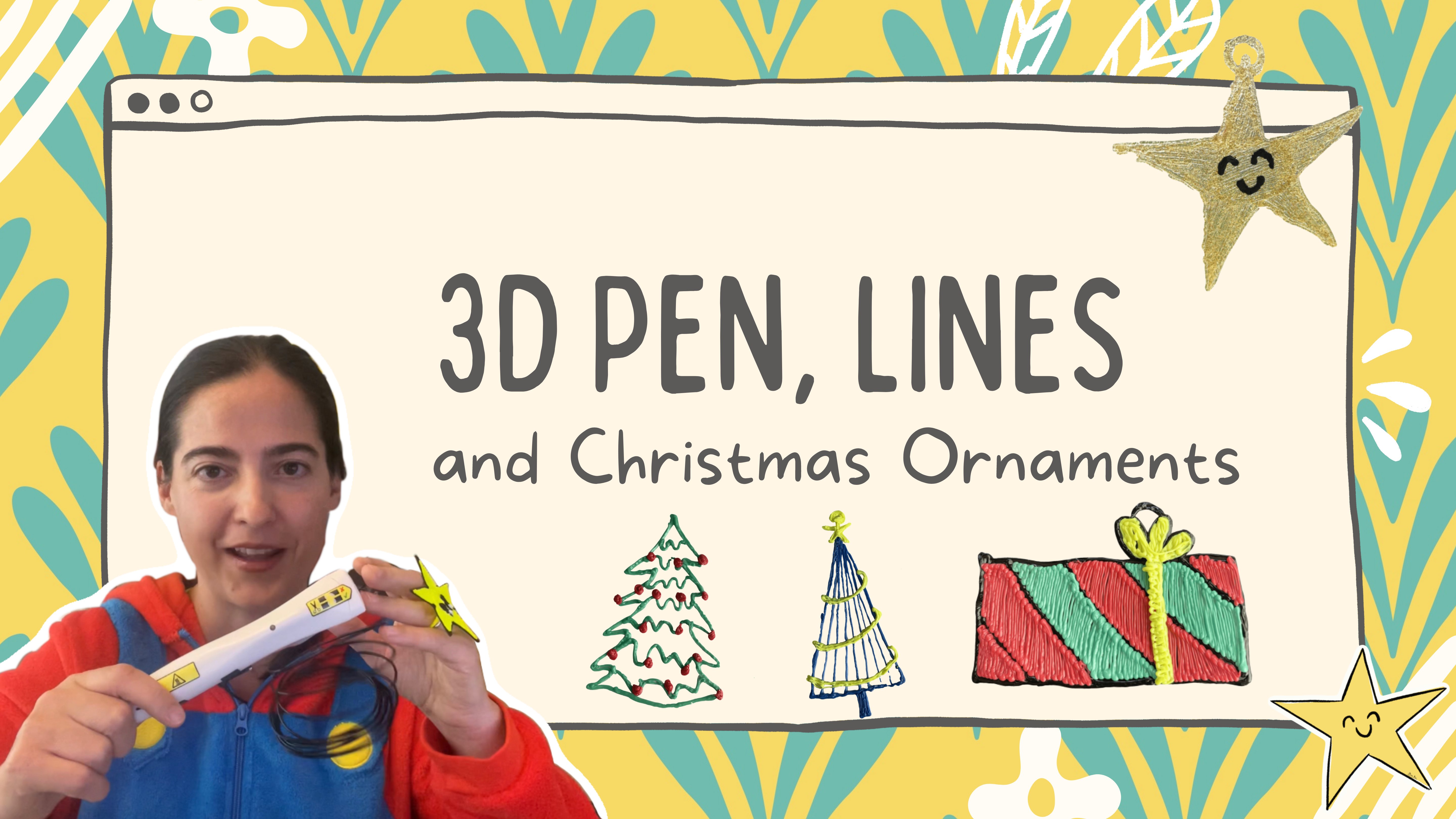
I show you this one. I do have also this
design printed as a swatch for wallpaper. It's one of my beloved
ones because I use it as a background also of many projects or video that
I do related to red pen art. That is one of my passion. It is for sale for sure in my Spoon flower shop because
I have it in front of me. So I think I activated it. I did it for something
that I care because I do a lot of classes also with
kids related to red pen. But I have like this
idea that most probably I didn't do an effective job
title description and tags. Let's go in my spoon flower and let's try to find the pattern. Then we will try to feed it. I will show you how by
feeding this pattern to GPT, I got tag description entitled to update and
make visible my work. For example, the first thing that I try to do here is already the third trial is like I put
three D pen in spoonflower. I don't think there
are many pattern about three D pen, right? If I put three D pen, by the way, I do have
a pattern that I did even before this one, that I call three D pen. Wow, The pen project, at least I have
something that I tag. It will be interesting to
see how I did the tag. I don't see for
sure this pattern. I will try to put it like I will put my name again. A pattern coming out. This one of the three
pen, but not this one. You see, even if I
know that there is this one and I
wanted to find it, I cannot find it. I suppose that the only
way I have to find my own pattern is to go
through my own shop, say, go here, This here. Actually, I did put the
title with the three D pen. The title was there. But as you can see, there
is no tag, no tug at all. There is just this title
that is the one that I did, I suppose in procreate. My point is that this
one didn't work. As you may see, it's so
difficult to find it, even though I'm searching for a pattern that is
an absolute niche. Yes, a pattern that I already order should have also some
visibility, I suppose. Well, whatever is done is done. Let's recover from this one, let's say the image
directly from here. We don't need to find
the original one, impropriate on the
water software. We can just use this one
to feed my plugin in ChachiPT to get the data that this pattern deserved
to be discoverable. I just started. I provided him just the image. I did tell him as a comment that was a three D pen tool and was a repeat pattern
on spoon flower. But it seems that he didn't
pay attention on this. It was just focus on trying to understand what was inside my pattern to provide me title, description and tag as
requested by my plugin. Say in his point of view, this one was a
stylish hairdresser, essential pattern
that by the way, it could be a good
idea to implement but was not what is inside the
pattern in this example. I just want to tell you
that can make mistakes, many of them you just have to continue to dialogue with him. For example, I
didn't say too much, I just say clearly they are three D pen tools,
he replied to me. Thank you for the clarification. Given that the design
feature three D pen tools, let's revise the title, description and tag accordingly. Then he gave me
already a good result. It was blah, blah, blah, blah, blah, blah, blah. That was a good but I had
like the opinion that this description didn't
reflect the fact that he should be knowing
what is a tre D pen. I ask him and be careful, I ask him in Italian. This is something
else that I want you to tell you with my plugin. You can write in
different languages, but the answer will be
back in English because most of the print on the men the platform are
based in English. Don't worry, I ask him, do you know what is a Tre D pen then he replied to me, yes. A tree pen is a handheld device that allow
you to draw with plastic. And as you draw the blah,
blah, blah, blah, blah, It's not this one, but if you want to see
what is a T D pen, you can check other videos. He craft directly adjusted
the title description tag. With this in mind, he said,
depen, crafty adventure, intricate tool and
supplies pattern for creative makers
and no vista. And then embrace the
word of Td creation, blah, blah, blah,
blah, blah, blah. Then you know what? I tried to explain why I did this
pattern for spoonflower. I'm not expecting people, for example, to know what is a Td pen is a specific niche. I wrote it in Italian. I did this pattern thinking
that artist or hobbyist of the three D pen art could want this kind of design as a compliment
for their studio. For example, as a wallpaper
or also as a background. As I do when I'm doing
the photo of the project, just using it on my
desk as a background. Gpt said, okay, understood. With the context that this
design is intended for artists or pen enthusiasts to use as a complimentary
element in their studio as a wallpaper or a backdrop
for project photo on. Here's how I would
craft now the title, The final title is
this one is like innovative artist studio
pattern dynamic crafting tools, wallpaper and project back drop design transform
your creative space. With this three
pen tools pattern, it makes more sense like elevate your studio
with a design that speaks to the heart
of innovation in this thing, blah, blah, blah. The tags are very cool. Backdrop art, studio pattern, creative wallpaper,
crafting, tool design on. But I was not happy still. I ask him please. I wanted to change the
sentiment more on the direction of celebrating this
modern crafting. The fact that it will be
perfect for showcaing, this for enhance, also say the environment where tree pen lover
will make this creation. I have the final, final one that is
absolutely what I wanted. Actually, I think I got to
more than what I wanted. But now let's speed up a little bit my video because it was getting really too long. If you want to get more
detail on this one, again, you can just go in the
resources of this class and you will be able to see all
the chat that I had with GPT. I will always be more
than happy to add additional video and
bonus explanation. If something is not clear, please just keep in contact in the discussion part and
through your projects. Here I was just continue
to do what I did in the example to filling the information in Spoonflower
after having the draft on GPT and do the final modification
and updates that I need. I think it's truly just a
matter of practice and build this healthy routine to make our work reachable,
visible, and viable. Also, now you have all the tool to improve your
current spoonflower shop. To use even past mistakes to practice and to get better knowing that from now on
when you do a design, thanks to the help of Ch
GBD and this plug in, you have no excuse
anymore to postpone. That's all for now, and I'll
see you in the final video.
7. Final Thoughts: Wow, we made it to the end. Thank you for
watching this class. It means a lot to me. I hope it was useful for you. This class was not plan, they were at class plan. But I did it because
I think it might be really a game
changer for many of us. This is one of the class
that I wish I had. Please let me know if
it was useful for you. Please remember to share your project because this
one will really make my day. I wanted to see how you
implemented this idea, how you will use my P. And this one can also increase the visibility
of your spoonflower shop. And I will love to connect
also there in social media. If you like, please don't
forget also to push the fallen button because
in this way you will be notified when I will
release new classes. In the meanwhile, you can
also if you didn't yet, my previous one related to my five favorite way to
use chip for creative. It was recorded some
months ago but they're still like my favorite
five ways to use chip. You might want to
check it too if you wanted to support also my journey here as a
skillshare teacher. Please don't forget
to leave a review. This one will really
help me to reach also more student and be encouraged and motivated
and continue this journey. That's all for now. Thank you. Thank you. Thank you again,
and let's see you soon, bye.
8. Bonus Lesson: 2025 Updates: Hi there. I'm back for this bonus lesson
because guess what? Yes, Pepino needs a restyling. So I just wanted
to tell you that Pepino is working still greater in general as a
supporter for artists in getting effective
title description in tax. It works amazingly, for example, for Red bubble as it is also the process of
editing and uploading. But you might need a style for spoon flower because
I'm pretty sure that if you are an artist
in spoon flower, that the procedure, I mean, the part related to
title description in tax has some updates. And well, at the end, the reason why I'm doing also this bonus lesson
is because, um, I wanted to ask you,
would you like to have an updated version of pepino or do you want a
brand new version? Because I know that many
of us, me included, even though I already have a
kind of ready version to go, I still like to go back to
our plug in and use it. So I don't want to to
give a shocking update, and then you are not aware of. So please let me know
if you wanted to continue to have also
pepino as it is, or if you want me to
uploading the new version. So my data is coming mainly because the example in this class were based
in spoon flowers. So this is why this is why
I'm doing this bonus lesson where I will show you how I'm still using it also in a
current spoonflower challenge. And also how this one makes
seal sense, but of course, it requires also
a little bit more of decision on your side. That is absolutely
fine because one of the best way to use pino
is not just, let's say, a pure assistant in
generating data that makes sense for your pattern and your design to be more
visible on this platform, but also to improve in
this creative journey. So let me continue and
show you what I mean. It's exactly Spoonflower as updated how the
description tags works, especially for
design challenges, how is the connection between
tattoo description in tags for a pattern that is participating to a
spoonflower challenge? So what we're going to
do right now is use a real case example on a
real spoonflower challenge. This actually is
going right now. So if you're watching
this class now, you might want to participate
to this challenge, too. And let me also show you
exactly how we can use pepino to get them effectively,
but at the same time, how to tweakle it,
how to shape it in a way that the
meaning, the story, the inspiration behind the
pattern is still showing up in conjunction with the fact
that that pattern might be used to participate to
a spoonflower challenge. B tune because
there are many many news that I want to tell you. The first thing is that I will be using in this
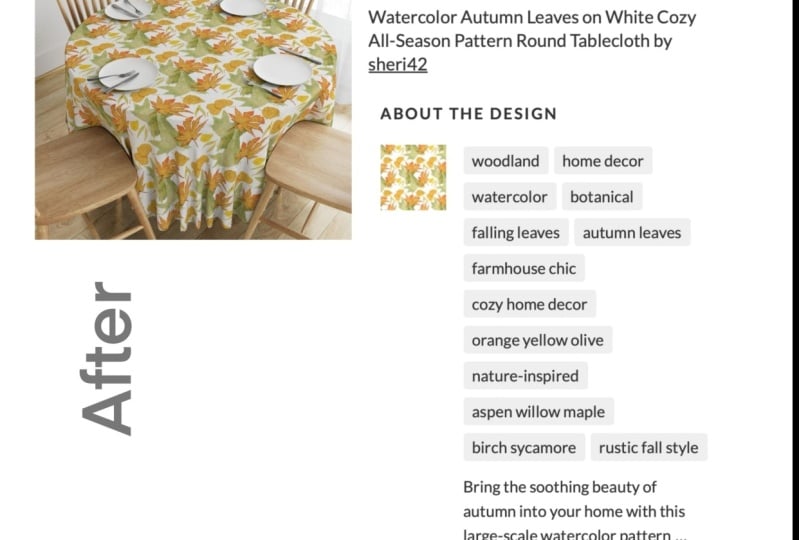
bonus as an example, a pattern that is not mine. I will be featuring
Sherry design. Sharing is an amazing artist and she was supposed
approach in this class. I definitely encourage you
to go cheer in the project, but also in whole channels. My point is that there is a current spoon flower
challenger. About Paisley. And I think this design is absolutely amazing
for this team. I'm not sure if
Sherry will use it. Maybe it's not
also a new design. So, you know, in
spoonflower challenges, you need to have a fresh design to be participating
in the challenge. But I think this design
is the perfect example we can use to see how we can again, reshape title description
in tags to get real people find our design while also
try to be consistent, coherent and adhere to the requirement of a spoon
flower challenge entry. So Again, remember to check the design of Sherry even in spoon flour, and are you ready to
see it in action? Just a short reminder
to access pepino, you just need to go
to the resources. From the resources,
you will be able to access the PDF that
will allow you to get to all the information
and resources for pepino. Once you're here,
you can proceed as I did for the one of Sherry that
I will show you right now. Basically, I already did this work for the
pattern of Sherry, and I will just show
you through because I guess that is interesting and
important to see how it is. But again, it's a bonus lesson and I don't want to take
too much of your time. But if you have any
question or feedback, just let me know. So basically what I did was a screenshot in
spoonflower of the design. You see here. And then I upload it in my pepino
plaguin and they said, Please optimize this
one for the challenge. I put the reference
of the challenge. You can put the link
to the challenge, you can put what is
the requirement, and so on. I will work. Then I got already
an amazing, I think, suggestion on how to
proceed and also how to brainstorming on pattern
for this challenge. So for example, I
got vintage pasty, floral pattern, elegant Bo
botanical fabric design. I think these are
so good, right? And I got as a first sentence, a beautiful detailed
paisley floral pattern with vintage bow charmer. You can take away, for example, part perfect for fabric
wallpaper on the core because now in spoonflower we
have less character to use. But again, the main point is
that pepino is giving you a copy that you can
modify, update, reduce. This one is up to
you, but I think that the base is already, so strong. I will put this example in the resources so you
can read in detail. Also if you are participating
to this challenge, you might get some
inspiration from the tags or also some inspiration to design your entry for this competition and
then reusing the tag. For example, like a vintage
based, bow fabric, botanical, natural inspire,
Bohemian, intricate, this one overall input that you can use and I think
are super useful. Here is one update that some of you might
already notice if you're using my plugin since I
released the class is that I already add this section that is called the
website description. Basically, I thought
that was important to know coherently to title tags
and description generated. Also, let's say,
copy that we can reuse in our own website or even in social
depends on you. But something that is
not just let's say for the platform of printing demand, but also your own personal page. Or if you are in general, also building your
portfolio somewhere else, this one could be also
a starting point. To communicate tutor what
your design is about. For example, in this case, you can see that is this
vintage paisley floral pattern is a standing blend of classic
and modern aesthetics, featuring intricate
botanical details and an elegant color palette. Ideal for fabric, W
paper, home decor, it's perfect for those
who love both style, nature inspired motive,
and artisan designs. Whatever you are creating
custom clothing, upholstery, or decorative accents, this paisley printer add a
timeless charm to any project. Design it for
repeat sems repeat, sorry, design it for
seamless repeat. This high quality printer. I mean, of course, this
one you can update it, for example, if you are not sure about the Okay, let's
say it like this. If I didn't test this
pattern on fabric yet or in any specific fabric or if I don't have a
suggestion about the fabric, I will remove this part like
this high quality print. Okay? Because if I'm not
sure I don't like to put it, I don't feel good, and I think this one is absolutely
reasonable, right? But if the idea
that I got is, A, if I wanted to use a sentence like this one
for a future design, it would be nice
actually to have it printed and to see
if I can say, right? So my point is this interaction with Pepino is always a way also to brainstorm for the next phase that
is very important. Is the phase where you
really think about it's not just an ideal
customer avatar. It is a customer
scenario, right? But here we are about the thing that I wanted
to show you specifically, is that I know Sherri, and I know that this
specific pattern was done inspired by a book
of Eric Carla. In her actual description, let me see if I can read it. I cannot enlarge it sorry, she added this sentence that was First of all, she also
added the references to the fact that she
did a collection on this one, that is amazing. And also, she said
that is inspired by the Sehr collection for my great grandson children
books by Eric Carl, a house for Hermit Crab. Well, Er Carl is also one of my favorite author
and illustrator. So this one speaks
so much to me. I was like, I do like what
Peppina suggested us already. But I was like, can
you please consider also this part and I put a screenshot of that
description spoon flour, about the inspiration
behind this piece. And as a result, of course, pepino pickup that
what I wanted is this connection to the
storytelling and the love for children books that made also
this pattern very special as a connection has a moment
on the artist's life, but also, you know,
this special connection that will make sense also on people like us love to
read the bed story, right? So here by new result, that is sea shore
paisley fabric. You can take away
fabric now that we need less character
in Spoonflower. And also, I think pabl is
not so useful in flower, so I'm not saying that
the pena is perfect, but it's very good
in helping us. Coastal bull, floral pattern
inspired by storytelling. I love this part.
It's fantastic. I mean, I might even go further. And so, for example,
seeing this, I would say, like seashore, tasely coastal both
floral pattern, inspired by bedtime stories, for example, something
like that, right? We can personalize
it and make it ours. And that's just a check again. I'm going to put this
one on the resources, but I just wanted to read it
because I wanted to know. And it's like whimsical, seashore inspired pasty
pattern with floral detail, perfect for fabric with
paper and home decor. Again, my remove because the
character available with p flower are less this
part of fabrics and so on. Especially because fabrics
f will rank the design, but I really love it. And also the second part, inspired by the ocean and the beloved
children book a house of Hermit Crab by riiKarla this intricate
paisley design blend, coastal Charm with
vintage boo elegance. Oh, my gosh. This is
exactly the feeling that I get by watching this
pattern from sharing. And it's ideal for
storytime blankets. This is something that
you want to put there. Writing fabrics is
not so effective. But putting in the
extra description like ideal for
storytime blankets, pillows and creative
sewing project. This pattern is a
beautiful addition to any beach them and nature
inspire space. I love it. I love it, and I think
it will really trigger the algorithm to get the
right people to your design. And let's see the tags like seashore Paisley,
coastal fabric, bowl floral, Ocean Inspire, storybook fabric, beach decor, nautical printer,
whimsical pattern, Hermit crab Team,
Marine Paisley, elegant wallpaper,
Children's room. I think these tags are
really a strong base to make the effectiveness of the data of this
pattern out there. And let me conclude with
this one and then again, please check the references you want to know more
about this example. Even for the website
description, we have bring the charm of the sea horse of sorry,
I can re not thing. So let's check the
website description. Bring the charm of
the seashore into your Om with this
coastal paisley fabric inspired by the beauty
of the ocean and the storytelling
magic of a house for Hermit crab by Erikar. This intricate floral paisley design blends vintage elegance with Beachy winsky making
it ideal for pillow, blankets, children decor, ocean them project available in
multiple fabric types. This one, again, you
might want to check, of course, in
spoonflourT is through. This versatile print is perfect for kilting kitting,
tint, right? O decor, and so on. I mean, the point here is that while I'm
reading this copy, if I would be Sherry, I would already make sure
that this pattern has also a scale smaller enough to be interesting for kilter
because according to Pepina this pattern has
potential for kilter too. So why not to do it? Again, this bonus is
getting too long, so I will close now, sorry. But please check it and let
me know what you think. I wanted to know your input and I wanted to see it applied. This one is really,
really important for me. Apply what we are looking in this lesson
in this exercise, Peppina is there to help you, making help you well
and effectively. And to conclude, I just want also to tell
you that if you like, I'm also arranging
in this period, collective collection for the upcoming
spoonflower challenges. So here you might see, for exam, for this that was for
the past cheater quilta. It was really
fantastic, actually, to create a collection with other talented artists and friends and promote
them together. So I think also this
one was a I mean, the reason why this idea
came out is also because when you participated to
this collective collection, I will be checking your
title description and tags. And to be honest, I
will also reuse them for a carousel, a
collective carousel. So not all the design, some of them, but I mean, go
and check all the details. The main point is that
you will be eligible to participate to this
collective collection that makes much more fun
also to practice on spreading the word
about our design. As you might be
eligible exactly for extra person perks that
you can check there. But going back to
the main question of this bonus lesson
is for spoon flour. You see, we just check
still working well. But it's true that, for example, the field are not done like before that you can
just copy and paste. You might need to reduce some character or
something like that. What would you prefer? You want an updated pepino for spoon flour right here that will substitute
the actual one. Or since this one is still
working well and you might maybe you're used to it and it's working perfectly
fine for red bubble, for example, you want
to keep it as it is, but you want me to
do a separate one, a new version dedicated
to spoonflower and the new upgrades that are reflecting the
upgrades of the platform, please let me know. This one is really important. Last but not least, I'm trying to get in
better too on this. Please share this class with
your fellow artists that might be interested in having this support for their
surface designer journey. It is important for
this class and what is more important for
me is that I do think that if you will
put in action what you are learning
here with someone that you know with a friend, is easier for both and it's also much funnier and enjoyable. Remember, also, you can post your question and project,
post your project. They really make my day. And if we're not ready to do, so yeah, remember to
like the project there. And remember, you
can also go and check the collective
collection that are going on, and even like on the design of these amazing talented
and brave artists can the difference. And, remember, we can
always cheer our peers and connect with the
community in a way that is like collaboration
over competition. And I'm sure that this one
makes a lot for many of us. Plus, about this specific
class, if it's possible, remember also to leave a
review because this one will allow me to continue
in this journey, and yes I mean, I'm
still very bad. I didn't say this part. So I just wanted to say, remember, stay productive,
but what is more important is stay
happily creative. And I hope that Pepino will
support you in this one. I'll see you soon. Bye.
 Madda Mom, Procreate & Productivity