Transcripts
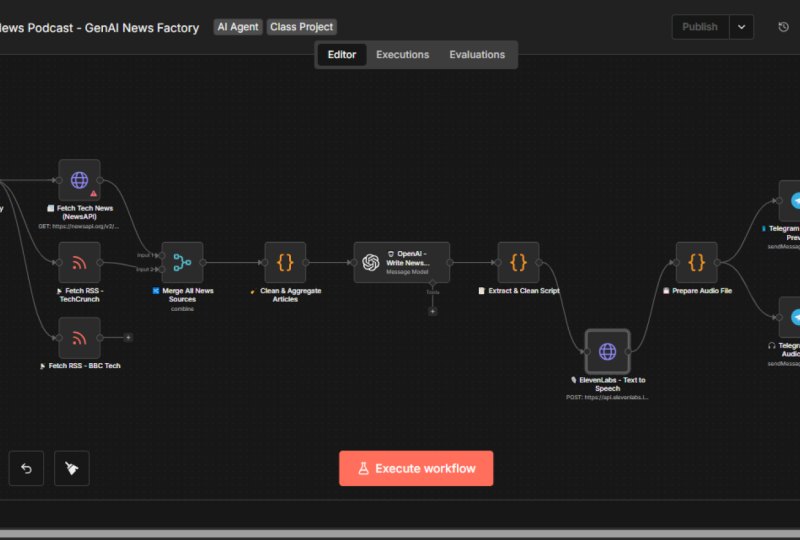
1. The Vision Architecting Your Personal News Factory: Hey, everyone. Welcome. I'm
so excited you are here because today we aren't just building another
boring chatbot. We are building a
personalized news factory, a media house that works exclusively for you
and the people you love. Imagine your dad wakes up and instead of disappearing
into a silent, endless scrawl on his phone, he hits play on a personalized news podcast sent straight to his Telegram. It's the morning headlines
transformed into a story the whole family can
actually enjoy together. But here is the magic
we have engineered. He chooses the voices, whether it is calm, professional narrator to start the day or a high energy do like Marcus and Sarah to keep the kids laughing while
they eat breakfast. Have built the logic to
bring his morning to life. We can make the show fun, entertaining and snappy, but we never compromise
on the truth. This is live real world news. We aren't just letting
an LLM make things up. Our agent hunt for
actual current events happening right now and
turn them into a script. It's a perfect blend of personality and 100%
verified facts, and it doesn't stop at English. We have put in a
lot of hard work to ensure this factory
speaks your language. Whether it is Hindi, Spanish or French, your news
should sound like home. You even get to set the vibe, make it a serious briefing for your morning commute or a fun gossip filled
show for your break. I build this for
my own family and seeing their reaction
to hearing their name and their interests in their native tongue was the Aha moment I want
to give you today. In this course, I'm developing
this live with you. You will see the logic, the wires, and how we
handle the real world tech. We will use Antin
to manage the flow, open the eye for the brain, and 11 laps for those
stunning human voices. By the end of this, you'll have a fully automated system
that runs while you sleep. Grab a coffee, open your laptop, and let's turn this
vision into reality.
2. Naming the Mission & Building the AI Brain: Before we write a
single line of logic, we need to start from zero. Look at this blank canvas. This is where your
vision takes shape. First, we are going
to name our workflow. I'm calling mine abri AI. For those who don't know, Kuber means noche and
a cubby is a newsman, the person who always
has the inside scope. By adding, we are signaling that this isn't just a newsroom, it is an intelligent
automated news force. Yes. This is the
name of my workflow. Defining the persona now, let's bring Kubri AI to life. We start by dropping an agent AI agent node onto our canvas and now we need
to define the prompt. We will use both user
message and system message. So this is the user messages where we will put
the dynamic stuff, right, a news category that can vary for every single
user requirement. So we will take that
into user messes and then system message is the place for, you know, rules. So this is the system
prompt we have defined. If you look at it, our prompt gives the AI a clear identity. We have told it you are the executive producer for
the Marcus and Sara show. This is something we
can always customize. If you want different name
for the show, that's fine. Then we are saying you
never invent news. You only discuss what
you find in your tools. This is important because if we do not give
instruction like this, then LLM can hallucinate
and make up the news at its own without actually surfing on the Internet
and fetch the real news. We don't want AI hallucionation. We want live news. We want to know what is
happening on the streets of Mumbai or the fields of
Manchester right now. Let's copy these
messages to our node. So I'll so this will be a user messes and here's
the system messes. And system. We have written a special instruction into the heart of our prompt. Before you write
a single dialog, you must use your tool to
fetch the latest headlines. Cabri AI is now blind
and waiting for eyes. In the next step, we are going to build
the fetch News tool. This is the bridge that connects our agent's brain to
the global news grid, ensuring every word it speaks is backed by
real time facts. Let's dive into our
parameters and give our Kubri AI its eyes. Oh
3. The News Engine Fetching Real Time Truth: Let me add this tool, click New and I want to
request STTPRquest tool and the name of tool as
we have defined inside the Agent prompt has
to be fetch News. Now that we have
defined the AIS brain, we need to give it its
primary source of truth. Choosing the engine before
landing on our current setup, I evaluated several options, News API, Google News, and even building
a custom scraper. But we eventually settled
on news data DTO. Why? Because of azility. It allows us to pass
multiple categories in a single request that superquery
we discussed earlier, and it gives the agent precise control over
the response size. Whether we want five
headlines or 50, the agent can decide based on the user's needs if you are using news data
API, of course. Now let's talk about the
plug and play architecture. The beauty of the
system we are building is that it is provider agnostic. I'm teaching you to build
a reconfigurable system. If tomorrow you want to switch to a different
news provider, you don't have to rebuild
the whole factory. You simply swap the API
endpoint and the secret key. The rest of your logic
remains untouched. This is how professional systems are architected, isn't it? In the real world, we use curl. I'm going to assume you have a basic understanding of
what a curl command is. But for those who
are new to this, I want to demystify what
you are looking at. In the world of AI development, curl is our universal language, whether you are using OpenAI, ElevenLabs or news data IO. They all give you a curl
command in their documentation. It is basically the
API call, right? Think of a curl command as
a digital delivery note. When you send a package, you need four things the address or what we call the endpoint.
Where's the package going? In this example, it
is newdata dot IO. Then the method, are we getting
info or posting new data? So it is defined over here, and then the security pass, your API key that proves you have permission
to enter the building, then the cargo itself. The specific news category or voice names you want
the API to process. Basically the payload.
Why this matters for you, I'm showing you the curl method because it makes your
system future proof. If you find a better
news API tomorrow, you don't need to
learn a new tool. You just grab their
curl command, import it into Nitin, and your factory keeps running. You are building
a system that is modular, reconfigurable,
and professional. Now, in order to create
the fetch news tool, all we need is
this curl command. Firstly, let me make
sure it is working one. I'll just go here,
paste it, hit enter. And you can see you
have started getting the news. That's a good news. Now, perhaps what I don't
like about this one is only available in professional
and corporate plans. This is something I want to avoid because if I
don't remove this, it is going to create
extra noise in the response and that noise has to be processed by the LLM, which will consume extra tokens. No good, perhaps what I can
do is make it like this. It's the same statement again, except that we want to
exclude certain fields, and we have limited the
response to size of ten. Let me hit enter.
All those warnings of only available in corporate
plans are removed now. That's a good news, isn't it? Now, let's take this statement, go to Nitin, and you don't have to fill
anything manually. Just say Import curl, paste the statement here, as is and click Import. Now let me make one
small change here. We have hard coded these
categories over here. Right now, we have this
value as hard coded, but in real world, we want
our agent to drive this. You just click on
this magic sign and let AI do the magic. How cool is that? With this, our fetch
news tool is all set. Let us try to run it and see if the things
are fine till now. So our AI agent
should be able to use the fetch News tool and get the news and create
a conversation for us. So let me delete this. You don't want it. I want
to trigger it manually. I'll select manual trigger, connect this to AI
agent. This is good. Then chat model, we need to add. I'll select OpenAI chat model and want it to be creative
and I'll select GPT five. GPT five latest. In order to use this model, you'll need to add
your OpenAI key. It's very straightforward. You just click on this
Create New credentials, go to your platform open.com, create a new secret key, give a name, select a project, and create the secret key, and then grab the secret key, go to ANATN again
and paste it here. That's all you need to do in order to set up the
OpenAI account. I hope you'll be able to
do this independently. Okay, so with this, the model is added to our agent. So basically, now
the agent will use this particular model for its reasoning and action and
chain of thoughts, right? Okay, this is good. Now we are all set
to trigger it. So let me give it a try. So you can see it made use
of this fetch news API ones. That's why this is in green, let me go to the ASN
and there we go. See, it's talking
about the new year, which is basically
happening now, agent will not know it directly, as well as I could see
these are real news. Bingo, that's a good news. Our AI agent is able to
use its tools in order to fetch the news and then create the output exactly how
we wanted it to be. With this, we have
successfully implemented and tested the brain and the
engine of our caber AI. Well that's a very good start. Now in the next lecture, let's work towards giving voice to our cubre
AI. See there.
4. Giving the Factory a Voice Integrating Human Like Speech: We have successfully built our
brain and our news engine. But a newsroom without a voice
is just a silent database. Now we move to a critical step, giving the factory a voice. We aren't looking for
robotic text to speech. We want a human performance that captures the wait for
a breaking story. To achieve this, we are
integrating 11 labs. They are undisputed leaders
in generative voice AI, setting the global standard for emotional depth
and voice realism. When you hear an
ElevenLabs voice, you don't just hear words. You hear the breadth,
the cadence, and the authority of a
professional broadcaster. Now, for our project, we need to choose the voice of our performers so we can go to the voices and look at the
library of the voices. This is entirely for
your creativity. I do not want to
recommend any two voices. You can go with two male
voices, two female voices, one male voice, and one female voice in whatever combination
that you want to use, as well as you can choose
voice for kids and maybe that will be
even cute idea where kids are discussing the news
and keeping you up to date. As well as you don't
have to choose the voices that speaks English. You can go with a wide variety of languages that
ElevenLabs support, and what we are
asking for you is just go to any voice
and copy its voice ID. Basically, you have to find
two voice IDs like this, which you can give to your
performers of the show. Yes. Now, before we
automate the entire flow, we need to prove
the connection x. Think of this as the handshake between our logic and our voice. I have already done the
heavy lifting here. I have spent the time
navigating the documentation, identifying the most
responsive API endpoints, and selecting the
specific voices that shoot our
newsrooms authority. If you'd like to experience that research journey yourself, you are more than welcome to dive into the technical
documentation. However, for this session, I'm skipping the
trial and error to show you the final
optimized result. This is the curl
command that works. Let me show you right away. Let me go to the terminal. Paste it here. It doesn't
work in Powershell, it seems. That's okay. And let me
prove it right away. So let me paste the curl
command here, hit Enter. Go to this place. You can see this file podcast temp
three is created over here. It's downloaded from ElevenLabs.
Let me play it for you. So you can see it is
working already, right? The curl command works
and that's the point. You might want to run the
curl command yourself and download this podcast and hear
it. That's perfectly fine. What I want to do right now is start integrating into
Ant and workflow, and for that, we will
need a request node. So STTPRquest click on this. And import the curl command, which I already copied. I'll just import it
here right away. As you can see, without having
to fill all these boxes, the node is correctly created. Let me try to hit
executive steps and ensure things are
fine, and there we go. You can see this podcast
dot MP three file is getting downloaded. Means the request went to ElevenLabs with the
conversation that we wanted to send and ElevenLabs process the text and created the
MP three file for us, which is available right here. How cool is that? Well, we have already done the hard work. Now it is about, see, here is this conversation that
we are passing to 11 labs. In our scenario, it
will not be hard coded because news can
change and accordingly, the podcast discussion
will change. So what I mean by
that is whatever is there inside these
inputs will change, and that's why we
cannot hardcode it. I'll just drop this. And what is this input
will look like in real time will be this
output of the agent. Let me drag and drop this
and that's it. No, my bed. Let me put it here, cut and
put it here. That's it. Now, every time this asient
generates a new output, automatically, the
updated values will be passed to 11 labs. Let me name this as
11 labs as well. This is pretty good. Now the last thing,
as you have seen, ElevenLabs expect
these inputs in a specific format where
no voice ID is like this, then the tone of the
text and then the text, there are no special characters allowed in it and all of these, we want to ensure
that AI agent produce output which is sootable
for 11 labs, isn't it? That's very important thing. For this reason, we
will go to AI agent, go to the system prompt
and add this instruction. We want output in this
particular format only. Don't worry, we have currently
hard coded the voice ID, which we will fix
later, which is fine. But this is an example of few shots prompting
where we have given an example that
we want output in this particular format only without any markdown or filler. And that makes the output
shotable for ElevenLabs, which will be processed
without throwing errors. By putting this
mandatory output format, we have ensured that AI agent
will produce an output, which will be processed by ElevenLabs without any
issues. How cool is that? We have now built the vocal codes of our
machine and mapped our agents output directly into our ElevenLabs
request node. We are officially
ready to step beyond individual components and look at the ecosystem as a whole. In our next session, we aren't just testing
a single node, we are verifying the entire
pipeline, the news engine, the AI agent, and ElevenLabs
is working in perfect sync. We will hit Execute to
witness how real time data flows through the brain and emerges as sophisticated
human voice. It is no longer just
a technical exercise. It's the moment these
independent tools become a unified
living newsroom.
5. The Moment of Truth Running Your First Pipeline: The wires are connected, the brain is primed, the voice is ready. Now we flip the switch. In this session, we are running the full pipeline
for the first time. We are going to
trigger our agent, let it hunt for the
latest cricket signs and global security news, and watch it hand
that script over to ElevenLabs to create our
very first news podcast. I am already excited. Let's hit the execute button. Okay, ElevenLabs is at work. Just a fun fact. Whatever text to speech operations
we are running, we can actually check those on ElevenLabs in the
history tab over here. 15 minutes back, these are the operations that
we ran in the past. That's cool. Good
troubleshooting tip. How much I'll pay.
I'm a poor man. They keep begging me
for more payment. Please give me some credit. Alright. I could see ElevenLabs
is completed in Green. Let's see what is
there. And Bingo, there is 1.9 MB file means my podcast is
ready, I would say. Let me view it. Sarah, did you catch the
news about Usman kawaja? He just announced
his retirement after a 15 year career in
the Baggy Green, finishing his storybook run with the Fifth Ashes
test in Sydney. I did, Marcus. It's
a powerful moment. He didn't just step
away quietly either. Kowaja also spoke out about racial
stereotypes in cricket, really reminding
everyone that sports still have work to do
off the field, too. It's like technology feeding on technology to leap forward. And that ties straight
into semiconductors. South Korea's tech giants
are feeling fresh pressure. Oh, my God. Look at this
quality of our new show. How good it is, isn't it? Good thing is, it worked
in first go because we have already added this
mandatory output format. Without this, it was certain
that it would have failed. Alrighty, the factory
is officially open, but how my users are going
to use this application? Should I advise them to come to my Antin workspace and
click this manually? No way we are going to
take that stupid decision. Well, let's meet in
the next lecture and we are going live on
Telegram. See you there.
6. Going Live Connecting Your Factory to Telegram: Until now, we have been
pulling the levers ourselves inside an
aten. That changes now. We are moving out
of the lab and into the real world by connecting
our workflow to Telegram. We are no longer just
running a script. We are launching a service where users specific
request, like, give me the latest
news on soccer or what's going on in
Bollywood triggers this entire automated
production line and get the podcast
delivered at the same place. In order to give a
face to our cubre AI, we have decided to use Telegram. Let's go to the Telegram and we need to go
to boat father. Here we will have
to create new boat. Give this instruction. I
want to create a new boat, a new boat, how are
we going to call it? Please choose a name. We need
to give a name to our bot, I'll say, I want
to give this name. Good. Let's choose a
username for your bot. I'll select the same user no
bode. This is the username. That's it. How cool is that? Okay, so our bot is
created successfully. We have got the STTP
API and the token. So let me copy this and go
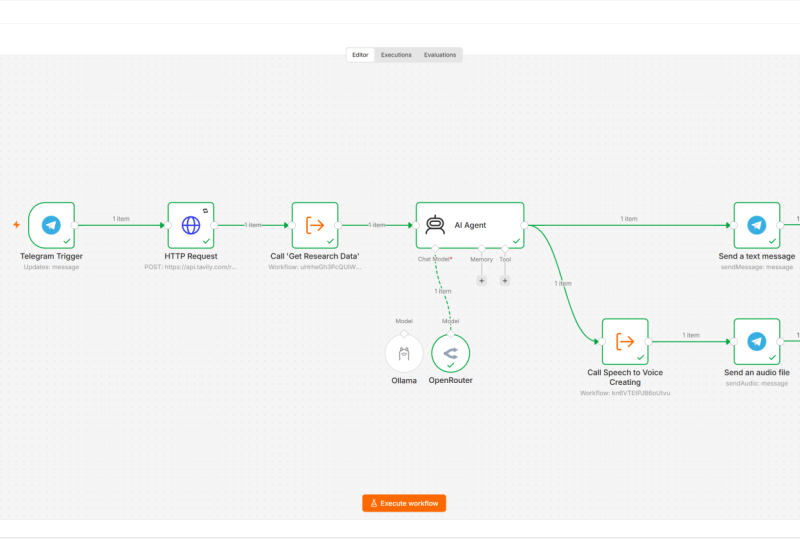
back to the Antin workflow. Now, remove this work when
click Execute, remove this, add Telegram, what we are interested in is
on messes trigger. All right. So this
is the trigger, let me add to the new Telegram
board that we've created. So I'll just add the access
token over here and save it. Connection is tested
successfully. That's good. Go back and you can see, this is the Telegram trigger. Let's connect it
to the AI agent. So let's connect it and
it's time to test the same. For this, I'll go to my boat. Now we need to test this. So in order to test,
I'll save the workflow and click Execute workflow.
Now go to Telegram. And this is my boat. I'll just say start
and you can see the boat is already
running. Let me stop it. I just wanted to test if it
is getting triggered or no. Now, one important
thing we need to do go to AI agent in the user message, go to expression,
make it full screen. Here, this cricket, Bollywood, generative I, and semiconductor,
that is a dynamic thing. Every time user can
change that requirement. I would want to make it
based on the user's message. This time user head start, so this is the text.
I'll put it this way. That whenever user triggers
with a different requirement, this user message prompt is updated accordingly.
That's good. Go back and as you
can understand, our intention is not just to trigger the
workflow with this. We also want to deliver the
result on the same place. For that, what we can do is add another node and it'll be
Telegram node one more time, send an audio file. Yes, that's what we want
to send and who triggered the x hat ID will have
to be put it like this. The file that we want to
send is the binary file. What's the name of
the file? Well, it will be coming from
the ElevenLabs. ElevenLabs, as we have seen, create the file with this name, right? Podcast tempi three. Where it is specified, let me show you in the 11 labs, we go here, it is here. File output, we have already
set to podcast temp three. For this reason, the
same filename has to be used in the Telegram node
where we are sending the file. Essentially, what this
node is doing is send an audio file to the same person who
triggered the workflow, and the audio file will be
named as podcast tempi three, which you have to send as a
binary file. That's about it. Let me save this and it
is moment of truth now. Et me go live with this. I'll just say from
inactive to active, let me make it like this. Got it so that I don't have
to execute every single time. We are live with this,
so I'll go to Telegram. I'll say what is
going on in soccer, Bollywood and Elon mask. Let's see, I do not want to intend any particular
meaning for this. It's just that I want to test, please don't take me wrong. Let's see if the execution
is started and indeed it is. It is running for last 17
seconds, let it complete. I wish I could see
the live execution. It's very hard for
me to sit idly and see what and wait
for the results. I wish I could see which note
exactly is running right. Very hard for me to sit and wait for this
workflow to complete. I wish there was a way to see exactly which nod is getting
executed at the moment. Live feedback is
something we have. All right. There we are. The workflow is completed. So let's see. Alright, so the AI
agent was executed and everything is completed
in green means on Telegram, we should be seeing
the podcast file. And there it is. Yes, it's 2
minutes long to MB in size. Let me see what is there. Sarah, did you catch
that wild Afghan drama? Gabon's national team
just got suspended entirely after their disastrous
campaign in Morocco. They even banned
Pierre Emric Obama ya. That's some serious fallout after losing 32 to Ivory Coast. Yeah, that's harsh, but shows how high the
stakes are in football. Meanwhile, in the college scene, Indiana made history with a 38 to three blowout
against Alabama in the. No point in playing
the audio now. Maybe I'll just attach it so that you can
go through it later. All right. Take a second look
at what you have achieved. You haven't just
built a simple bod. You have engineered an end to
end media production line. You have combined API
architecture, real time filtering, and neural voice synthesis into a single user
responsive experience. You're moved beyond
being a consumer of AI and become an
architect of it. Your personal newsroom is
officially open for business. Go ahead and send your board a command and hear your
creation speak back to you. Please don't forget to
send the feedback to me. I really want to know
whether your father, kids, and everyone in family
like this family tool or no. Well, that's it for now. Thank you so much for your time.
7. The Architecture of Memory Moving Beyond Hard Coded Logic: All right. Phase one was about building the news factory
and that part works. We can fetch news, process it, and turn it into a podcast or a new show exactly
the way we want. The entire pipeline
runs end to end. The real limitation, however, is that everything is
hard coded in the prompt, the tone, the style,
the format, everything. Every listener gets
the same experience regardless of who they are
or how they consume news. Phase two is about
breaking that rigidity. Different people want the same news
delivered differently. A father listening at the end of day prefers
something calm and professional while his kids want the same updates to be
energetic and playful. Some users want to give
voice instructions, other wants to send
using text messages. So prefer English,
others another language. The shift we are making is from a system that merely produces content to one that adapts the experience to
the person consuming it. Now you see the real problem. A tool doesn't know
who is talking to it. Let's fix this in phase two. To make this work for everyone, we have to move away from
one size fits all code. We are going to use
a simple Google set to act as the permanent
memory for our factory. I have set up two tabs in our Google seat that will
act as our command center. First, we have the user's tab. This tracks chat IDs, names, languages, and personas. It is how the system recognizes your dad versus your kids
the moment they hit play. Then we have the voice
configuration tab. This is our casting agency. It ensures that when the
system sees Hindi and fun, it pulls the exact
ElevenLabs voice ID needed for that vibe. Now, I could only grab
these many voice IDs, but as per your requirement, you can just create
your own characters, the languages that
you want to support, personas and accordingly,
go to ElevenLabs, search for the voices. For example, you want
to search in the Spanish and explore a couple of voices yourself and maybe, you know, pick it voice
ID and you want to update that in your
voice ID for the anchor. That's how you start
supporting it. It's very straightforward,
isn't it? If none of the user
requirement matches with this, then this will be
assigned to the user. So we will not
disappoint anyone. If we cannot match,
still we will serve the news in
the default tone, at least, right? How kind of us? And if you think about it, this isn't just about
the spread seats. It is about scalability. By putting these
preferences in a seat, you can add 100
friends to your bod without ever touching
a single node in ten. You are building a
system that adapts to the human rather than forcing the human to adapt
to the machine. That sounds sane, isn't it? We are about to build a sophisticated logic chain
in the registration block, and I want to make sure
you are ready for it. Before we move forward, take a moment to set
up your foundation. Please import the Google Set
template to your account and please try to connect your NTN workflow
to the Google Set. It's very straightforward. Please go through the document and you'll be having this memory connected is what allows the brain we are about to
build to actually function. Let's head to the next
lecture and build the onboarding agent that finally gives your family
a voice. See there.
8. The Onboarding Agent Automating User Intent: So now that we have got
our Google set ready, you might be thinking, great, I'll just send the link to
all hundred people I want on my Telegram boat and ask them to fill in their
details, right? Did you think like that? I mean, surely, everyone will
stop what they are doing, open a spreadsheet,
and perfectly type in their news category
language preferences in a couple of minutes, right? Wrong. Let's be honest, asking your dad or your
friends to fill out a spreadsheet just to use a chat board is a recipe
for a coast town. Besides, we have much
better things to do with our lives than manually managing
rows of data, isn't it? So instead of doing the
heavy lifting ourselves, we are going to integrate the onboarding process directly
into our antin workflow. Let the machine do the boring stuff so we can stay focused on
the big picture. Yeah. Sounds good. All right, let's try to
revamp our workflow. So first of all, I'll just try to place these things aside. So this is not the stuff I'm
going to work at the moment. Rather, I'll just do one thing. I'll cal it, and I'll call
it News podcast factory. Yeah. So this stuff is working and whatever changes
are required on this, we will do separately later. Immediately, what
I want to do is whenever a user sends a
message, first of all, what we want to do is a look
up on this Google seat, whether the user is
already present, whether he's active or in
the onboarding state, right? So basically, either user is not present at all
or he's added, but not yet given the
preferences, right? So that way we want to build. So what we have to do is add
this node of Google seat, and what we want to do is Gros. I have got my Google Seat
account added already. All I need to do is sit
within the documents. I'll have to search for Cabri
AI and look for user Stab. Sounds good. What is that we are looking for in this seat? Well, we are looking
for chat ID. There is one chat ID coming
from the Telegram trigger. We just have to ensure
whether it is present in the Google Seat or no.
How do we do that? Firstly, let me trigger this so that I start getting
the values here. In order to get values, what I want to do is firstly not concentrate on this
news podcast factory. I'll delete this and
execute the workflow, and from Telegram, I'll try
to send one demo message, maybe simple dot, right? Just I want the
workflow triggered. And now if I go here, I'll see these values
to be populated, right? So here what we
want to do is add a filter on chat ID column. And what should be the chat ID? It should be the one coming
from Telegram trigger, right? Execute step. And yes, see? Now, because my user is present, that's why it is
going over there. If I just delete this, let me just change it, right? So that now the chat idea
will not be present. So let me execute it again. And you can see now data is
not found because essentially the chat ID that is coming from the Telegram trigger
is no longer present in the Google
Seat. Very simple. Now, based on this, we
want to create our logic. So there could be
multiple scenarios. One is the chat ID was never
added into the system. So user was never part of this, and in that case, user will
not be added over here, so it will be new user. Okay. Now, let's look at what logic we are trying
to build for onboarding. So there are three
scenarios possible. One is the chat ID which has triggered this workflow is
never part of Google Seat. In that case, we will call
it a new user and send it to a particular node where user can be added to
this Google Seat. That's one. Secondly,
user is part of the seat, but still node has
given the language, persona and news categories which are default for the user. That case, we will
call it onboarding. Means user is there, but not yet actively using it, and not yet activated
in our system. We don't know who is that user. It's just that name we
know, not the preferences. Or third rule is the
user is there as well as we know their preferences and they're active
in our system. Three routes possible. Correct. So to
create these rules, let's go to add a new node. So let's add a new node, switch. And based on my explanation, I'm sure it'll be very
straightforward for you. So what we are interested in is the chat ID coming
from this one. So let me momentarily
change remove this, save it and execute it again
so that data is populated. Based on this data
coming from Google Set, we want to make our logics, rules number one is
chat ID is empty, and this would mean
the user is new user, we need to onboard the user. Second rule could be we
can look at the status. Look at the status and check if it is equals to on boarding. Right? Third rule, I'll say
onboarding in this one. And third rule is this user
is present as well as active. String equals two is
equal to active because the chat ID is a number and we are using the string
operation over here, so we have to
toggle this button, convert types where
required, right? Very simple. And now
let's execute this step, and it is saying this is active. This is active user. Attentive. And yes, indeed the data is flowing exactly
how we wanted it. This is an active user, so we can see this item is
shown in the output, right? Just for my reference, let me execute it one more time. The previous one good step. The thing will go
and in the routes, if I run it now, Now, I want you to notice
something very important. Whenever data is not there
in this Google seat, when we execute the workflow, we are trying to mimic
that user is not present. You see the control
never went to switch. Means in this case, after this Google set, no further node
will be executed. That is a big trouble, isn't it? Well, not such a
big trouble also. It's very simple. Since we
have opened this already, let me rename it also. We should always
rename our nodes to make them reflect what exactly is the purpose
of that node in our tool. This is cosmetic. Go to the settings and
say always output data. This is a must. Now if you execute step there
will be some data going. Empty data is also fine, but at least control will
go to the next step. If we execute it now, you can see new user
because the user is not present in our system
anyways. That's cool. I think if you are clear
on this much logic, you are going to do absolutely
fine in this workflow. If not, then please maybe watch this
lecture from beginning, but you have to be very clear on what this switch
is doing here. Not very complex, but
we need to understand. Awesome. Now, as per
our architecture, there are three
scenarios possible. User is new, getting onboarded
or active user, right? Active user is actually
very straightforward. We will just connect
active user to our news factory and they'll
just be using our product. But what about the new user? What we want to do with them if the user request is not
present in our Google seat? Well, zero marks for guessing that we want to add
the user, right? In case user is not
already present, let's add him or her, correct? Let's do this way. We will first notify the user that you
have been onboarded, send a text message, whom do we want to send the messages? Well, go to the chat trigger
and grab the chat ID. To this person, we want to send a message and what
is our message? Well, go to make it big and x. This is what we will send. We are welcoming to personal newsroom and we are
asking them to send by text or voice message their
preference so that further news can be sent to
them in their own style. This is a perfect on
boarding message, I believe, and not just we
have to stop here, but we will also add the
message to our Google here. Very straightforward.
Let me do it quickly. See it, and I'll say
see et cheat add or add add or update rose where we want to update to our Hubri AI. User seat. And what is
that we want to update? So far, we will have
only the chat ID. So chat ID, we can get
from the Telegram trigger, so I'll simply
grab it from here. We can also get the first name. So let's grab this
one also. What else? Maybe we will just
update the language and personal user has not provided yet, so
we can't update. There's no point update
during last update as well. So for the status, we
will just say onboarding. Because the user has
been added already, see that, you know, the
status is getting on board. So onboarding.
That's the status. And don't forget this. We have to select
everything on chat ID, which is our primary
key in Google Set. Yeah. Let me go back to
Canvas for sending a text. I'll call this node as ad user, and this one can be more
it reflects better, what exactly this node is doing. Sounds very good.
Let me save this and now send my row entirely, I want to remove,
delete row and let me execute the workflow and send a simple high to this
workflow to get triggered. You can see immediately
we have got these messes as well as our
data is now added over here. Not yet provided our
preferred language, persona or news category, obviously it is not added, but whatever it could add, our Antin workflow has added it and started the
onboarding of the user. How cool is that? I'm sure you are already impressed with
this work and believe me, after completing this lecture, you are very close to make
this Antin workflow to fulfill the requirements of every member in your family or
your friends circle. Well, that's it for now. Take good care of
yourself. Thank you.
9. The Text Based Onboarding Engine & Data Normalization: All right, we have got our
user's foot in the door. They just hit the start and they are sitting
in our Google seat. But a chat ID alone
doesn't make a newsroom. We need to know their soul, what they care about,
what language they speak, and the vibe they want. Yes. Look at the canvas. Most users will simply reply to our welcome
message with a text. We have sent the
onboarding message. Most likely people
will send the message. As a product developer, what is our next goal? Well, we should synthesize the necessary details
from the user's message. So you're saying if it is Hindi, so we need to send the
language to Hindi. They have given the vibe as fun, so we need to look at what
is closest to the fun. For Hindi closest is playful, not the professional one. We need to set the vibe
or persona to playful in that case and the user
cares about AI and cricket. So we need to set
the news category to AI and cricket in
that case, correct? Now, as you can rightly realize, it'll be waste of effort
if I write a program to parse these details and grab the necessary
intent from this, right? Because there is some better
alternative available. Well, you are damn right. We are talking about an AI agent that does this work for us. Basically, what we
want it to give is the messes and
from there onwards, that agent has to look into
this voice configuration, match the user's intent with the configuration
that we support and initialize the user and basically change the
onboarding status to active. That's the intent we want to do. If you got it, we are
on the same page. Let's see how we go about it. For onboarding user messages, I'll simply add an agent. I'll call it an agent
for onboarding user like this and we need to define
the system and user prompt. Let's work on system
message first. These are the prompt
I've written. As we discussed, this prompt is about asking agent to use
this particular tool to look into the Google
set that we have given it and it has to basically
do the data validation, whether the language
and personal user is asking for is supported
by our product or no. If it is not, then it will initialize the details
with a default. Right? So that's
what we want to do. Now you can read this prompt in detail and understand
what we are doing. For now, what I'm
going to do is put this message into
the system message, and user message is also
very straightforward. All we are doing is uh, getting this user message. And basically, you can get it from the Telegram.
What is the message? Here the message was this. I'll just get rid of this one now and directly get
it from the Telegram, maybe, I'll say this is the
user message. Fair enough? No, no, there is a catch here because how
NATN works, right? I will not be able to fetch this message from
the Telegram regger. So what we need to do is
basically add a set field O and I'll just say set
on wording preference. That's the preference
coming from the user, and here we need to get this Telegram trigger messages
first. The the messes. Okay. So all that we have done here is we have put a
set node in between. So what it does is basically look at the
Telegram trigger, grab the message, and set this property in the JSON, okay? And once the control
reaches the ant, it will simply grab that value from here and use it, right? So why we have to put
this set node in between because AZN with the tools
run in a different context, and it will not be able to access the trigger
point directly. So that's why we need
this in between. Okay? Let me add the tool. So what's the name of
tool we are giving? Giving Loup support voice
configuration, right? So fine. I'll just
grab Google Seat tool, name it like this and specify which seat
we are using, right? So our configuration is in
the voice configuration. So I'll just specify the seat Google seat and the tab inside which
our data is there, which we on boarding
agent to consult, and we need to add a chat model. I'll go with open
air chat model. This is very basic ask. There is not a lot of chain
of thoughts involved in this, so I'll go with
this ChatGPT four, not five, in this case. This is fine. Let's save
it and run the workflow. I'll just send this
default message and firstly this is
fine. Execute it. Okay, control came to on
boarding user and indeed, my message was passed correctly,
which is a good news. And yes, there we go. With the help of the
prompt that we have given, it was able to identify the language, persona,
and interest. How cool is that, right? That's something we needed.
Beauty of this is it has followed exact output that we
asked it to give in, right? This is something
very good, very nice. So what is next we need to do? Now, if you look at this, this is a single line string. This is basically
everything inside. Output. I do not
have necessarily access to persona or
interest directly. So precisely what we need to do is grab the exact fields
from this string. Something we do in
coding a lot, right? So I'll just need to write
a small code for this, and I'll prefer JavaScript. Python is still in Beta. And I need to put
this code, okay? So Jason output, it
will get me the output, then I just want
these fields to be written in the
format that I want. And because the user has
completed the onboarding, so we can call it active now, right? This is fine. Then next what we need to do is just add the
data to Google set. So append or update Rowan sit. I'll call it update user data. And where this data will go, it will go in the
abrisUser stab. So we want to map
each column manually. Our chat ID is the primary key. First name is already updated, don't want to touch it,
and rest let's do it. I'll get the chat ID from here. Chat ID, and rest of the details are
available in this code. Language is language, persona, interest will go into the news category and
status is active. Last update I can get from
the variables and context, which is NAF let me go. This good. Let me execute the
step. And there we go. It is executed correctly, so I should go to Google Seat, and you can see the
data is filled into our Google seat in exact
way how we wanted it to be. How cool is that? Now,
what next we can do is basically congratulate the
user on successful onboarding, for that, what we should do
is send a Telegram message. That's the mode of
communications. Okay. So let me click here, add a Telegram, send
a text message. The name I want to give
is onboard in greetings. This is good and whom
do we want to send? By now, I'm sure you are comfortable with
how I'm dragging and dropping the
details on this node, the text message that we
want to send is this. User is all set to
use our platform. If they want to send
on demand message, they can send this format
or any format, that's fine. Uh, because it is the agent at work which will
take care of this. Otherwise, we will anyway send the messages sharp at
eight in the morning. And how we will ensure the
message is sent to user at eight in the morning we
will work towards that. Don't worry. I promise you'll be able to understand this
as well as you'll enjoy it. Yes? All right, let
me hit this as well. Execute step. Yes, message should have been sent
and indeed it is, right? So this the message,
user is on board, the flow is working perfectly
fine. How cool is that? Now, friends, I
know the screen is starting to look like a
bowl of digital spaghetti. It is getting complicated
because we are going to add more nodes and it
is only going to get slightly more
complex gradually. As an instructor, I'll make
sure you get the things clearly and I'll gradually
increase the complexity. I'll not dump the things
in a random order on you. I'm sure you are
with me. Still, if you are finding it hard to track every single
connection and the node configuration
I'm doing live, I have provided the exact
version of this to you. So basically, okay, let me download it and I'll
provide this at this stage. Basically what you have to do is come to the workflow
and import from file. That's all you will
have to do and these nodes will be magically
created for you, right? I would say this is
another creative way of staying in sync
with me, right? Now, at this point, what I request you to realize is how crucial this
onboarding user is. It is able to parse the
message from users, understand the
intent, and exactly update this seat as per the
user's requirement, right? But while doing this, it ensure
that whatever persona or language it is assigning is indeed getting supported by
the voice configuration. That is very, very important,
as you understand. For our workflow. We are
not just sending a message. We are building a
profile. But wait. What if the user is driving or what if they just hit typing? We should do something
about them as well. Right now we are
anyway supporting the text message for
onboarding the user. In the next lecture, we'll start supporting the voice command
from the user as well. And believe me, though we are
making it slightly complex, but it is indeed very important for increasing the
adoption of our product. Well, see you there. Thank you.
10. Multi Modal Upgrades Implementing Voice Message Onboarding: Welcome back. We have
mastered text messages, but to build a truly
elite product, we have to meet the user where they are and
where they are is often busy on the move
and preferring to just talk. We are about to
turn our bot into a multi modal powerhouse by supporting voice
messages on boarding. Excited? Yes, that's
what we want. Okay, so it starts with Okay. Let me minimize it a
little bit and we'll focus on this agent
thing slightly later. So I'll just put it this way, not focusing on this
one also for now, so I'll just put it here. Right now, what
we are saying is, if the user is getting on board, they'll send the message. That message could be
either text or voice. Now, voice and text needs to be interpreted
differently, right? First thing we need
to do here to make our workflow intelligent
is add a switch node. So let me add here. And name of this will
be voice or text. If it is voice, it will
go into one channel. If it is a text message, it will follow a
different route. That's the expectation. Nothing complicated
about it, right? So I'll say if it
is text messages, add a routing root let me
add a Telegram trigger. If it is a text messages, Telegram trigger will definitely have some text over here. We will make logic
based on that. If it exists, means
it is a text message, execute the step and
it is working fine. This is good. It was anyways
working fine earlier also. Now let me send a voice message. But before we do that, I need to change
this to onboarding status so that message
indeed comes here. If it is active, it will definitely go into a
different route altogether. Now I'll send a voice message. I want the news in English, make it professional, and I
care about science a lot. Some messages I've sent. Let me save and execute the workflow. Okay. It came here, but did not go after this, right? Let's see. Yes. So there was no text
in it and there was no route without it, it
did not go anywhere. I have done this
exactly to mimic this because I wanted
this voice ID. So file ID is this. And if it exists, If it exists, then it
is a voice message. Very straightforward,
very clever. Let me make it like
this, execute step. And, if it is voice messages, it will go into this route. If it is text message, it
will go into this route. Just for look and
feel I want to make a voice first and then text
messages, this is good. This sounds good. If
it is text message, it will follow this route. If it is voice message, it will follow another route. Good. Now this is superb, but what if it is
a voice message? Can we give it to
our agent directly? No, our ChatGPT model is good for text
message processing, but it will fail to understand
the audio, isn't it? So we need to first
download the file and give it to a model that
understand voice, correct? So let's first download the file and we will do
this by going to Telegram. Get a file, not a download file, sorry. Get a file. Which file it is the same file whose file
ID we have kept here. So get this and download the
file. That's what we want. Okay. Exactly. This is good. File is getting downloaded. What next we need to do is
convert this voice into text. I'll say OpenAI. We need to make an OpenAI call and what we want to do
is transcribe the file. Transcribe a recording. It has to match with this data. Yes, input field is fine. I'll hit this execute. My account is already connected,
and you can see this. That's the message I sent right in front of you a
couple of minutes back. And OpenAI is able to detect that message and
give us the text. How cool. This helps a lot. Now we can give this
text to same agent again and make it work with
voice command as well. Basically, we are not using another agent just
for this requirement. So to merge this voice
and text into one medium, we will use merge node, and I will disconnect this. I add the text message
also to this merge node only and then give it to set on boarding
preference. Okay. Basically what we want to do is whether the message
is voice or text, get it merged here and before we go to the
onboarding agent, it should look like one. That's the ask here and then in the onboarding preference,
let me execute this. Earlier we had set this
onboarding preference only to read the
Telegram text message. But now we have messages
coming from the audio as well. We need to create an
or condition here. I'll get this message and
just cut this cut this, remove here, go to this
Javascript, paste it here. And hit. That's it. If message is coming from audio, it will take this else
it will take from the Telegram trigger,
which is fine. It's good. Nice and
rest of the message, rest nothing we need to change. I'll just execute this and
execute this agent as well. To see, yes, indeed it
is able to recognize English professional and
my interest in science. That's good. Means rest of the
flow we need not to touch. It'll work exactly
in the same way. I just, why is
this polo and all? Okay. What is this? Okay. Because I was
moving the text to slightly this side to keep the screen less
occupied for you, right? That's additional
effort I'm putting. Please appreciate that, man. Okay, let me execute this. Now text should be
passed the way we want, and next that we want to do is add the data to Google seat. Yes, working like Msic and
then send the text message. To Telegram user. Every unit is coming together
and working like one team. That's the power of
ant and workflow, and that's the power of
Generative AI, I would say. Now, in case you are
wondering why we are having this merge
and this set node, basically, whether the input was text or a voice transcript, they both should meet
at this merge node. In this session, we have
introduced the support for voice command for
onboarding a user. So using OpenAI is
Whisper model and this merge node is making sure whether the input was text
or a voice transcription, they both meet at the Mrs node. This is beautiful engineering. We have funneled two
different ways of communicating into one
single stream of truth. Yes. We then use set onboarding preference
to keep our data clean and pass it to our
onboarding user agent. Now, let me put little effort to make our screen
less cluttered. So how I want to do is this, and this has to be
here, and this. I love this, by the way. After putting a lot of effort
in building something, it is totally acceptable to make some effort in making it
look more presentable. Yes, I hope I'm sure you agree with
sticky, add a sticky note. Change the color.
I'll prefer this one. No. Change color to
this one, maybe. Let's call it registration
and onboarding agent. That's a good name. Make it big and everything
is grouped inside this. What we're doing here even adding the user was
part of the onboarding. You can call it registration or initial entry or anything, but it was also part of the onboarding only.
We have done that. After that, user sending the preferences and
saving those is again, part of the onboarding. We are naming it as registration
and onboarding agent, and this will make it
look better for you. Now if I do this, I have to
bring this one here because I had kept it aside
because we wanted to focus on registration
and onboarding agent. But which we have
beautifully completed now, so it's time to focus on news podcast factory one more time to produce the actual news. Yes. But before we move on, I'm downloading and making this workflow in this
state available to you. In case you found it
hard to follow with me, you can just import this
file to this workflow, and we will be in
sync one more time. Yeah. All right, the
registration is complete, user is in the system. Now it's time to start
producing the actual news. Let's move to the news engine in the next session.
See you there.
11. Turning Chaos into Structure The 'Edit Fields' Translator: Hey, there, a warm
welcome to this section. We have successfully
onboarded our users. They have a profile, a
language, and a vibe. But now comes the
most important part, giving them the news, their personalized news podcast, which they are craving for. Let's work towards
that in this session. I'm sure you are excited. Yes. Okay. Look at this. While completing
onboarding, we bought support for both text
and voice messages. The good news is we
definitely want to bring this support when a user are
asking for the actual news. We do not want to
they might want to type that they are interested in generative science
and soccer news, or they can send a voice
message for the same, right? Good news is it
will not be rework. We will just have to copy paste. I'll just do Control
D on this one. I'm still doing it
one by one for you. This message will come to
here and voice or text. Query, Ls. I don't like
this voice or text query. Naming is something everyone
can do better than me. Voice or text query. Then again, just like earlier, we will have to do this. I'll do Control D, it is here, and you need
to put it like this. If it is voice messages, get the file and
transcribe the news. This is good. Firstly, we will categorize whether the user has sent a voice message or text messages
intent for the news, and then we will get the file, transcribe the recording
just how we did it earlier, and then we will send
the message to AI agent. Okay. Now, there's some tricky. Now, this slightly
tricky concept here. I want you to understand
the challenge first so that when we work
towards resolution, you will have fair idea why we are doing it
in a certain way, News podcast factory is one, but way to invoke
could be multiple. User might send a voice message, user might send a text message. Or we have also promised
them to deliver a news podcast every
eight in the morning. The same agent has to be
fed data in different ways. Sometimes we will get it from the seat directly because the
message is scheduled one, user never send anything. Sometimes from voice and
sometimes from text. This is understandable.
Now, in order to make it happen
at scale in NA ten, we have to use the set node. Let me execute the
workflow to execute these nodes perfectly so that we have data while
adding the further nodes. Let me execute it, and
I'll say soccer news in 2026. Here's the text. This is pretty good. Now we
need to add a set field here. We will call this news intent
received in voice mode, and we will say we want
to add it manually. We need to fetch
the search query, which is this text very easy, as well as we will need
to get the chat ID. So I'll call it chat ID internal and we will
get it from Telegram. You'll perfectly understand when we stitch it with the AI agent. So this is what we need to do. Now, same thing we need to repeat for the
text message also. So in interest of time, I'll just do it myself. I'm pausing the recording, okay? Okay. Here it is. Basically, what we have done is, if user sends a text message, we will get the search
query and we will get the chat ID internal
with this value. And, uh, this is fine. Then this is something here. This is beautiful. Now we are almost there already. Next, what we need to do
is add another set node, and now we are doing
the normalization. Just a repeat of this, I have search query and the data will be coming from the search directly
from the JSON, as well as I have another
field for chat ID internal to which data will
come from. Hat ID internal. Assumption is if the user has sent text messages or voice
messages, I don't care. By reaching here, it
has been become one. It is now uniformed. This is what we
call normalization. Now the next thing we need to do is look into the Google set one more time and get the user preferences based on the chat ID that
we have received. Get Rose. Our set is Cabri AI and it is user stab in which
we need to look at. Here, let's add a filter. We want to look into
chat ID where it is matching with Jason chat ID. Coming from the previous field. Execute previous node. Let's execute the previous
node. There is this chat ID. That is something
we need to drag and drop and when we execute, it will go ahead and
get the data from the Google Seat working
like Mzic again. Let me rename this
to fetch user. Another node that we
want to fetch is C, by getting the data
from the user stab, we've got the persona
and this news category. We are yet to get the voice
configuration for this. Like, what is the
anchor one name? What is anchor two
name, their voice ID? All these details we have to get from the voice
configuration. Obviously, you would ask why not to put these data also
in this tab only. Well, my friend, it is needed
because we do not want to no repeat the same voice IDs for each user multiple times. Tomorrow, if you want to
make a change in this, this is one single place where you can simply
make the change. If it is users, then
you have to do it at several places, not good. That's why we have to
manage the two taps, just in case you are thinking
it is just boring job. It is needed, please
bear with me. Get as in seat and
we are fetching the voices this time
so fetch voices. And from where we
fetch the voices from Cabri AI, and
what is the tab? It is voice configuration. Now, the user's data is
available with us, right? So we can make the filters
around this very easily. Language has to be
user's language. Okay? Then add another filter. Persona has to be
the one specified by the user. And that's it. With these two filters, it will be able to identify exactly which anchor voice and, you know, we are interested in. So this is good.
Let me hit Execute. And you see, yes. So English and professional, these are magic at
the row number five. So yes, there it is. Basically, user is asking
for Brian and Sarah, in these voices,
that's the magic. All right, we are all
set to send this data to our AI agent and get our
personalized nude show done. So let me connect to this. And there's some
changes needed in the AI agent prompt from earlier time to now because a lot of things
we have done now, right? We need to accommodate those. So here are the updated
user and system messes that we need to update
inside our agent. Basically, this is
the incoming request coming to our agent, and these are the
users' interest, right, news category, et cetera are coming from the Google
seat that we have to feed to our agent to get the personalized
news show, right? All of these prompt
changes are to support the new features
that we are bringing in in order to increase the
adoption with Google Seat coming in and audio and text and
voice message support, onboarding, et cetera, bringing
some extra complexity, which has to be handled
inside the prompt, right? Let me copy and paste
this to our agent prompt. As you can see the
soccer news in 2026, that's the message that we
wanted to send to the agent, and it is correctly
coming over here. Which is a good sign.
Let me execute it now. And there we go. The tool was invoked by
the agent and it has done the necessary work to create a soccer news podcast for us. That's exactly what we
wanted to achieve, correct? Well, we are almost done. Most of the features
that we planned are already delivered.
This is good news. Only one feature
we are left with. How about sending this
personalized podcast daily eight in the morning to the users so that they
can consume and we want to bring that smile on the face of our
family and friends. Let's implement it in
very next session. See there. Thank you.
12. The Gift of Time Scheduling Automated Morning Shows: Hey, there. Welcome
to this session. We have built the brain, the ears, and the memory. But now we are going
to add the heart. Think about this why we
started this journey. It wasn't just to see nodes
turn green on screen. It was to bring a smile to
our family and friends. Imagine your dad, your sister, or your best friend waking
up to a notification. They hit play and they hear a high quality
professional nude show designed specifically for them in their language about
the topic they love. No scrolling, no noise,
just pure value. It's not that we are going to stop the text or voice messages, it's just that we want to add further value
to our workflow. For this, what are
we waiting for? Let's implement it right away. I'll just add schedule trigger. And how often we want to
schedule maybe daily 8:00 A.M. I will automatically be
triggered at every day 8:00. In case 8:00 A.M. Is
early morning for me, but if you want to
fine tune it further, that's your choice entirely. Schedule trigger don't go that
side, you come here. Okay. Or scheduled trigger. Now scheduled trigger, while it is very interesting
will work differently. It has to scan the entire users. The users who are onboarded
will be skipping this, but the user who are active in our system has to be chosen and according to their language and persona news category, et cetera, we have to create the podcast and send
to them one by one. A new podcast for each
new member, right? That's something we promise. So let's add this
using Google Seat. There's no data
coming from the user, we have to rely upon what
we have in our Google Seat. That's the reason why we wanted to build this
permanent memory. I'm sure you are liking this
way of connecting the dots. I'll select Cabri AI, I'll select the users,
I'll select Filter. Status should be active. If you are not active on our system, you
are missing a lot. And there are eight items
which satisfy this condition. Though we have more
than this in our set, but only eight of
them are active. So we need to send personalized
news to each of those. By inclusion of these set nodes, we have already
made it very easy. I'll just add a set field, and this time we will call
it Schedule News intent. Search query will be hard
coded value this time. It will be schedule briefing because there is
no search query, but still we want to
use the same agent. We have to create this field, but we will have a
hard coded value for it and we have already
asked the agent to use the user's interest in case schedule briefing is
provided as a search query. The moment the agent
will see this, it will know that it has to get the data from
Google Seat only. There's no preference
from the user coming in. What is the chat ID internal? Hat ID internal will be
chat ID coming here. This is coming from the
Google sit this time. Very easy Execute step
and we have the data. If we have this data, just like we have done it
for voice and text intent, we can give it this
one also to format search intent so that the data
can be given to the agent. I missed this earlier.
Let me put it this way. You see, even fetch user and fetch voice is working of
the internal news factory. It's not really dependent on whether it is voice
or text messages. It's strictly core
part of the agent. So I want to bring it
inside this and that's it. Look at this beauty now. We now have bot support
for voice text, as well as scheduled messages. Without a user having
to ask for the podcast, it will be delivered
automatically in their mornings and make
their mornings beautiful. How curl is that? Please import this workflow in your antin
and don't forget to try. And in case you are more
lazy than I can imagine, let's connect again
one more time, and we will try
all these features and ensure things are
in perfect order. Sit there. Take care.
 Vijay Pooja