Transcripts
1. Introduction - Functions: Hello and today we're going to be talking about functions and formally now functions are like verbs. There, the action words in a formula voice sentence. That's the best way to understand Excel functions and, formally on their so many functions that are provided with Excel that tell Excel what to do . So when you put in a function in your formula, you make your formula. Excel now takes a particular action on your data bees, so it gives Excel instructions on what to do. And the best thing about it is that it's autumn. It's our job, so things that you would spend hours doing manually when you use a formal ally function, Excel now takes over the automation off those rules from you. So in this lesson, we're going to be looking at Villa. Cops were going to be looking ahead. Slow cops. In other words, maybe you have two that are basis, and in one database you have all the information you want, and there's information in another database that you want it took. They want Excel toe pick automatic honey into your own database is based on a reference If , for instance, you have employees eight um you want Excel, Toe peak? Maybe their salaries from another file or another sheet? The Villa cop function will enable this to be done automatically. Hedgerow copies the same as a local on. We will look at it. The only difference is a real cop is a vertical look up on hetch like copies Horizontal. We will look at them in the next lessons. Look at practical examples on how you can new USVI look cops in your day to day activities . Well then go into conditional functions telling excel to look into a situation. Does it? Is it true or is it false? Does it comply with what you've asked it to do or it does not comply. So based on its being true, Excel will carry out one action on if it is false, it will carry out another action. So those are conditional functions. If andi on or who look at those ones, we'll also be looking unless that formula so nested formula is when the results off one formula is used as inputs in another formula. Well, look at that in details on the other end off the class will be doing a project so I'll be asking you to use the files provided to carry out the examples that we have given and then to post them in the project section off the class. So my name is Linda Deal and I have more than two decades off experience, work experience working as a hitch. Our professional top management levels in my organizations. Andi, during this period of have have had the need to use a lot of excel for my job, too. Carry out the assignments that were required at the time, so let's see.
2. What is VLOOKUP?: now, if you look up is a vertical look up, and it's used to find data in a cell. In another table worksheet a workbook using a reference AL in the current worksheets. So if, for instance, you have data on employees performance, you know nominally in one sheets and you have a salary review sheets, which doesnt have names. But it has the salaries, and it's linked to its percentage of performance. For instance, you can use the debtor in the salary she to can pull it into the employee database. Based on every look up for you. We look upto work. The data must have a field that is common to both sets of data. If, for instance, you have stuff idea employees, I d number in Wal file, and that's what you're looking for in the other file. You need to have it exactly the same in the other file, so it can be anything. It can be the employee name. If you want to use the employee name and you're sure the names are spelled exactly the same , that should be the common i D. In the two sets off data now, normally, what is preferred is to use a unique identifier, and that's a cell content that is unique to every record. So if you have a database, for instance, most often the transactions each of the records has to have a unique identifier for employees that are basics is usually the employees I. D number because employees could actually have the same first name and surname it has happened. So once you have a a unique identify air in both databases, you be able to link the information we're looking.
3. Structure of a VLOOKUP: Now the structure off V look up is equals V Look up and then you put a bracket open and then you put the identify. You refer to the particular identify yourself, comma the range in the new sheets, or in the sheet where you have the detail looking for comma. The column number starting from the column where the reference de ties you count the number of columns comma on false forced means that it will look for an exact match for the identify and will not take approximates or nearest in value results. What we're saying is that the structure is as follows who put on equal sign on equal sign is compulsory for all. Excel formally. So after the equal sound retyping V look up on, we opened the bracket. The first parts off the formula is the reference or the data that we're looking for and that is supposed to be similar in the two sheets. We put a comma after this, and then we put arrange to search in the new sheets, which normally is a fixed reference. So we put the fixed range that needs to be searched in the new sheet on where we have the data coma. Then we put the column index from the reference information in that new sheets who put the column reference to the rights. How maney Pamela columns to the right is the information we're looking for, comma. And then we put a force, which means it will look for an exact match and not take approximate values.
4. Practical Example VLOOKUP: So here we have our data bees. It's stuff, information, fictitious stuff. Information. Onda. We want to find the bonus that is applicable. Toe each off this stuff here by virtue off their great. So if the person is on grade five, for instance, would want to pick a particular figure as a bonus. If the person is on great 10 for instance, we want to pick a particular information as the person's Bonos, and we have a bonus document here which actually provides the bonus for each off the greats . So want to pick this bonus as it is provided here into our employee database is based on the information here. Now it doesn't matter if the information is in the same work book, that is, if the information is on to worksheets in the same workbook or if the information is in two separate files. Just have the two files open so that you can quickly click on the reference cell. The source data on on the data that you're looking for at the same time have them both open . So if we go back to our detail on the formula that he said, we said that the formula starts with unequal, saying all functions in excel start with the equal same. So we type equals v Lacob and we opened the bracket on. The very first thing we're looking for is the look up value. The look of value in this case is the greed. So we wanted to go to the other document. I'll find the greed. So we've clicked on D two, which is the reference we put a calmer and then we go and select the data that is supposed to look through so we can select from here all the way to the end. And that is our data. Now, if you look, it are selected the bulls sheets because that's where I digitize. And it has selected from a one to be 13 from Cell A one to Selby 13 and then we put another calmer and then it will ask us for the index. So if, for instance, this information is in the second column, from where we have the reference information who have to say, Look in column two coma and then we type false, which means it needs to give us an exact much not that for the purpose off simplicity. We have put this information in columns am be Actually, the information could be in columns, E and F. It could be in the middle of another database. Are not just at the beginning. What we need to take away is that you are looking for the information with reference to the reference Khanum. So if the reference column is in column E on, the information you're looking for is to the right off it. In column F It is still column two. So you are counting from the reference column. So we closed the brackets on when we press enter. What happens now is it has picked the Bonos for great five. Now, if we were to drank this information down in Excel, it's going to copy this information down. But recall that in our formula we have a one to be 13. If we drag it down, it's going to drag down. A one is going to be a to in the next cell a three in the next cell, which is not what we're looking for here. We wanted to continually look for the range a one truth be 13. So because of this, we have to make our formula here absolute. Now, making a formula absolute means you're making the formula not to shift in reference to where it is when you're shifting the formula down, you want the cells to be absolute to continually refer to the same cells. So to do that, we press. Therefore, when we are edit mode or when we are in this area, so we press. Therefore, on some laptops, you need to press function F four, especially the laptops that would use the air four key to projects on a projector or two duplicates gone to another screen. So you press therefore or function F four as your computer meat has your laptop requires, and that will put a dollar in front off a and in front of one, and we put function with press F four again in front of this. That way, when we're moving this formula down, a want to be 13 will remain constant. Obviously, we want D to to be shifting to the next from D to two D three and D for on going down that way all the way to D 19 so we don't need to make that one absolutely leave. It's related. So once we're done here and we press enter, we can now either come to the corner and double click all the way down or we pull it down. And we have all the data for Bono's so we can go ahead out. Formatted as we wish. Let's repeating for the number of these absence. Now, if we look at absence data, we have the data. Each stuff I d. Maybe this has pulled from an absence management system. Each stuff I d has the number of days absent during the month or during the period under review. So here, what is the unique identifier? Munich, identify our is be stuff I d. So if we're looking for this information to pull into our employees that abi's we go back to our data and we use RV. Look up equals to be Look up. We put in brackets open on this time instead of looking for the great. We're actually looking for this. Start fighting. So it is B two. That is the reference it is be true. That is the identity fire. And then we put a comma, our range or our look up area is on this sheet, so we select this data all the way. We'll put a comma on. The information is in column from the from the debtor that we're looking for, which is the employee data. This is column one. It is in column two. We put a comma on. We put false to return the exact value. So here now we've seen that stuff I d. A. 01 was absent for 15 days so we can go ahead and make the references absolute. As we said before by pressing, I have four or function, therefore so that we have the entire database all the time and we can double click to feel our data, and that's how we use a V look up.
5. Practical Example HLOOKUP: now a hitch. Lacob does exactly the same thing only that sometimes the information you are using could be arranged horizontally. So a hitch look up is exactly the same as a V. Look up only that this time is refusing. Columns were referring to the rules. So in our data bees, if, for instance, we want to pick this information from Hey Hitch, look up. Maybe your information is provided in a in a horizontal manner. You will now use a hitch. Look up in the same way as a real look up. Only that you be using rules so would would say Hetch, Look up Brackets open for the bulls by greed. We were referring to the grid. So we're still using the grade as I reference will put a comma on. We go to the data that is organized horizontally and we also ask you to look for the data. So remember the information we want now the reference that ties in Rule one the information is in row two. So we're going to put this a to theaux m three as our has a range and then we ask it's to look for the information in route to we see false. So in the same way we'll get our information. But we've used a hitch. Look up, and once we have puts our absolute reference by pressing F four on the range, we can now drag the data down to the end off our employee databases. So that's how it is. A. We look upon a hitch. Look up to link information into sheets to work books together, and it permanently remains a formula. So whenever you change the information in the sauce area, it'll automatically affect what you have here.
6. Conditional Functions: now conditional functions are formally. Are the commands that ask Excel to analyze the condition. An example? Look at the condition and see if it is true on reports a particular value on If it is false , it will reports another value. So what? We're going to be looking at our if functions and functions on our functions. So the structure is first of all, the conditional statements. So there's an if there's an and these on all our there's and not the second structure is the logical test. So it's either is asking us to find out if something is equal to something else or if it is not equal to something else. If is greater or smaller than something else if it's greater than or equal to something, or if it's less than or equal to something else. And then the next part of the function is to return the value if the above condition is met and to return another value if the above condition is not met or if it is false. So let's look at it functions and see some areas where an it function can be used to deliver results so we can tell excel to say Okay, look through this database and if the person is above 18 years old in this cell reports that he's on adults. If not report that he's in minor. Or we can say something like, If the subject has spent five years with the company, put 15 days and we'll leave in this column. And if not, he's only entitled to 10 days and will leave. So put 10 days. We can say something like if the person's performance is above 75 Report, Pass and, if not reported, feel so coming back to our Excel databases. We have this information here, and we have some fictitious and length of service. So lessons you may want to apply a policy which says that if people have spent five years with the company, they're entitled to 15 days leave. But if they're less than five years with the company, they entitled to 10 days leave. We can use a function on if function to create that, so to type in a formula here we would start with equals. If you have a small letter, does not matter. The condition is the length off service. If the length of service is greater than five value. If truth is greater than five. Wanted to return 15 and if it is not value, the false wanted to return 10. So here it would return. 10. And if we click food click to drag down, we'll find out that for every instance where the length off services upto five and above you have 15. And if not, you have 10 days. Leave on and formula or the earned function is used when you want all the conditions to be met. So you have several conditions. You want all of them to be met before it gives you before it gives you the value, if true, and the value of force. So an example would be if the subjects performance is above 80%. Andi. He's in the sales department, then returned the value of true or false. Oh, if a subject has spent five years with the company, Andi, he is a manager, provide a car allowance. So it's in essence, saying, If all these conditions are met, then it is true. If all the conditions are not met, it's not true. It's false. So coming back to our detail less a gym. We have a situation where we want to pay a Bono's to hey stuff who has spent five years with the organization. Onda, who is in sales department. In other words, the present must be in sales department on. The person must have spent five years with the company who would now be required to use on and function to pull out the data. So we go into our cell and we type in equals two. And so we're saying that they lent off. Service must be greater than five. Andi department must be equal to sales and we put it in inverted commas because it is a text. So if we have a situation like this, we put the and function and we're saying that these two conditions must be met. So we have G two is greater than five. Si two is equal to seal, so the person must have in length of service that is greater than five here on. The person must be in the department sales. Now, if you put this function like this is going to return either true or false, because we've not put what is should do if the value, if the value is true. I've value is force. We have not put the if component. We've just put the hand. If we enter here, no, we can find out that this is force because the two conditions have not been met. If we drag down, this formula will find out that the only place where the conditions are met Uh, here, where the people are in sales departments on their length of service, is more than five years. So if you look at this other person who is a sales department, he has 50.8 years off service. This person has three years of service. This is a straight on and formula which can be used in an if formula to use an and formula . You want to check that all the conditions are met. On the other hand, using on all formula means any one of the conditions can be met for the value to be true. Now, an example would be a situation where you have a policy that says that be employees can be either 50 years old or he has spent 10 years with the company. And then you tell excel what to do. So it's either his 50 years old or he has spent 10 years with the company. Either of those conditions being met, the results will be true. Another example could be a sales person who are sold one SUV during the month. It's either here sold one SUV during the month or he has exceeded his sales target. If either of these conditions are met, computer bonus or do something else, as the case may be so in this situation will no use an and formula, because if we is an and it's looking for all the conditions to be met on all function is looking for just one of the conditions to be met. So are playing the or function to our database? Let's assume now, instead of saying we want him to have, um to be in sales department, Andi have five or more years let off service. We wanted to be either off the too, so we'll say bonuses paid to either seals all five close years of service. So, in this case, instead of using B on and function, we use or so we're studying Excel, that however, the M length off service, which is G two, is greater than five coma. Oh, the department's is equal to while the department is he quotes of sales. So here now we're going to have a lot more true because it's looking for people, the people in sales and all the people whose length off service is above five years. So if we compare the two, we've used exactly the same formula only that we have used and in this column, and we've used all in the other column here, no on all formula is looking for either the conditions to be true. So everybody is true. Apart from these two people whose conditions both of the conditions, neither of them fits the criteria, we can see that they're in different departments. So that criteria has field on their length of service is not
7. Nested Formulae: no. When we talk about nested, formerly, it happens when one formula is used as the value, if true or the value if false, off the main formula. Now that might appear be complicated, but if we look at it in detail, it's very easy to understand. So what it means is that it's looking for a condition on if the value is true, do this formula or enable this new if formula and, if the value is false, enable another formula. So his rabbit given us a value. It is now using a formula as the value, if true, or the value of false. Remember our leave example Where if the subject has spent more than five years with the company's entitled to 15 days? But if not, he's entitled to 10 days. Suppose there's a policy again there says that he's only entitled to these leave. These, if he has spent one year or more with the organization, would have to include a nested formula to be able to have the results we require. So to come back to our formula for leave formula, Remember, we said that if DT is greater than five, it should return 15 if not each, return 10. Now we're saying if the person has not spent upto one year with the company in the first place, this formula should not even come into play. So what, we're going to do this formal? I will remain. And then we'll add another formula which says, if less as you were starting again, the length off service, his greater don't one value, if true, is that it should do. This formula on value is, if false, would now be zero. So what we have done here is to see that if G two is greater than one, that's the length off service. If it is greater than one, the value. If true, that is, it is now greater than one. So the value, if it's greater than one, is that it should do this. If formula, which we had before, which now tells it to apply 15 days or 10 days as the case may be, the value if false, will now be zero. Now, if you observe these Feagles, there is no person who is entitled to know. Leave these. But if we run this formula that we have modified down, we'll find out that here and here the formula has reverted to zero because their length of service is less than one year. Another nested formula would be, it's less. Type it here. Grades 1234 Our money just in our organization. Grades 567 AIDS. I see no stuff. Andi. Job groups. 9 10 11 12 Junior stuff. Yes, As you know, we have this information and we want to return the status off our people based on their greed. We're going to say that you've brackets open and we're looking at the great now. So best D to if it is Kabul eight. Which means it's 9 10 11 and 12. It should return value if true, Junior comma on the value, if false. So if it is not above it. We wanted to do another a formula if the value if it is false. So we put another if and we can type it if we want Sadie to. If he's greater done. Four. Which means it is 567 on eight. It should return. Seen you, and if not, it should return manager. So the formula, in essence, is saying that if the information here if d to is modern. It SUPT. Is 9 10 11 and 12. It should tell us, junior, and if it is false, that means it is less than eight. So it should do another if formula. And that formula is saying that if the D two is greater in number than four, it should return senior value, if true, on the value of false is manager. If we double click, take it down to the bottom will find out that it has sorted for us. Who are managers like this person who is on great for and these are the two people this person's are great for hungry to their managers has we have specified here. So if want to apply invested formula again to our remember we have an aunt formula here we have a on or formula here if want to apply. For instance, See Bono's want to put a bone also want to put a figure there? Two. Whereby it is true, we can now put our if formula here. I say that if if this formula returns true coma, it should give a bonus off 100,000 naira coma. If not, it should give zero. So we can see now how nested formula has taken our initial on formula. And we have converted the end formula into our condition. So if this condition is met the two conditions which is length of service on the department , it should pay 100,000 naira if not what you pay zero because it returned a false you see that it has returned zero figure which will be the case for all the false we have here. Once we get to true where we have the conditions being met both off them, it will return the bonos. And if we go down further where we have false, it will return zero. Now the same thing applies here where we said either the person is in sales department or the persons length of service is a both five years. Once apply the same bonus to this formula here we can use the or formula as our condition say if this returns true, it should give us 100,000. If not, it should return zero. I will now see that if we put a condition where either of the conditions being met should be true, we'll see that be payment of the Bonos will now apply toe all those who are either in sales department or whose length off services are both five years. So we can see that about two people here because of their length of service on because they're not in sales department. So two people here do not qualify, so this is also invested him for a nested formula.
8. Countif, Sumif and related functions: And before we go, look at count. If some if count ifs and Summit's those kind of functions now account if or some a function county full counts and their currencies off a particular information once certain conditions are met. Some. If would do the same thing only that it was some the data instead of counting their currencies. So coming back to our documents if you want to do account, if we can come to this condom, for instance, maybe want to know how many women we have there, we go with puts in counts. If, of course, we have to put the equal saying for every function that we put the area we wanted to count from. And then we see Female, which is represented by F so said it's looking the range find wherever we have issued. Count it and then we have 10 count ifs, on the other hand, enables us to take several ranges like we can check inside this range Coma. Four female Oh, for F. We can look in another range like state of origin, for instance, which is hinged to tow hitch 19 we can puts or your, for instance, if we close the brackets here we'll find out that it has countered within this range the females in this area on within this range it has counted the females that are from or your state's. So obviously we found only one person. So to show us how you some ifs some If give it's some Toto. So let's see it should some if the amount here is 100,000 so we'll suddenly for pull the range I would put the criteria so you to give us 400,000 which is an example, which is a sum total off the instances of 100,000. So that's an example of some. If so, some ifs with an s at the end will enable you also to select different criteria for different ranges up to more than 120 different criteria and ranges
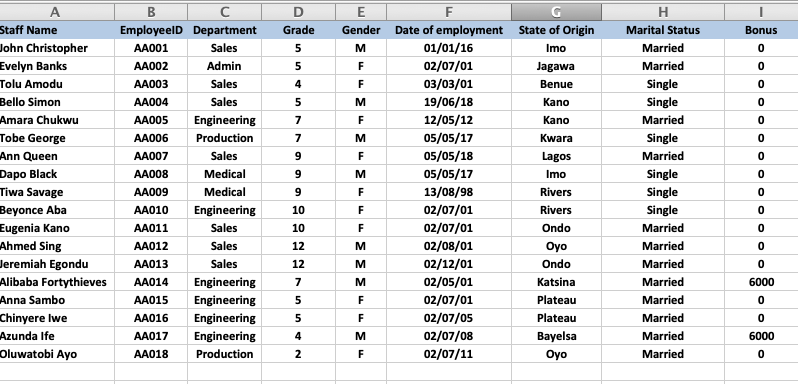
9. Project and Final Words: Hello, You, This period lent about functions in excel on formally functions for me and like verbs in a sentence. And the formula is the sentence itself. So you have different components off the formula. Now we've looked at V, look up as a function. We've looked at hitch. Look up, both of them find daytime in another sheet or another, file another part of the same worksheets and pull it into your database. Once there is a common reference, So you ask you to look for a particular keen on. Once it sees it, it should move 23 or four. Space is to the right, as the case may be on, deliver the information that exists in that column into your file. So we've looked at real cops that are critical and hate cops that are horizontal lookups. We have also looked at conditional functions. If Andi and or now these functions look for a certain criteria for certain criteria, and when they are true that it only sets in valley when they're false, they return another value and they can be used as input into an if formula, and they become nested inside the if formula. So we've looked at all that. We've also looked at county ifs and some ifs on things other formally like that. If you want to find an average, you can use average if you can use count if you use some. If you can use so many other similar functions in excel in the same way no, I invite you to make your projects on post them in the project section off the class. Now the projects involve the 1st 1 we invite you to make in the file provided. And if I'm on and formula in the first cell that is going to return 6000 whatever currency you like in the cell, once those conditions are met and the conditions are that the person or the employees should be male and should be in engineering departments. So this obviously means that you would need an aunt function to return. True for meal on engineering and there you need an if function to deliver 6000. If those conditions are met, Andi, you will return zero If the conditions are not met so value if troop will be 6000 value, Air Force will be zero and I'll be showing my my example in the project section. The second project would be for you to use your own databases or your old files. So creative file any file that has two sheets. I make sure no one is like a data bees where you have some information that you need to pull out from another sheet or another that Zampese and use a V look up to pull the information from that sheet into your doctor bees. So I invite you to do those two projects and post them in the project sectional. And I'll be available for any questions. Thank you very much. Take care.
 Linda Adiele, MS Excel teacher | HR expert | Artist