Transcripts
1. Introduction: Now to finally start journaling, and doesn't this
look like a cute and simple setup to start to it? You can create the
sweater stuff seriously. So let's finally hook you up to a simple journaling
template. The action works. Hey, I'm calling been taskbar,
and I'm an architect, writer, and digital artist
who's based in Addis Ababa, Ethiopia over the
past seven years at facilitated several
participatory design sessions, like the Berkeley prize funded community
Fellowship Program, where I guided a coupon
booksellers to come up with a design for mobile Labaree that they can use to send
books more efficiently. I've also conducted visual brainstorming sessions
and it's Sandro and work for organizations like the David and inside
Packard Foundation. Best within plus within
it, E capitalists. But none of these
projects start as a simple idea that I just
quickly jot down in my journey. Now when I tell
people a little bit by my journaling habit, I feel like they
get the impression that it's a writers thing. Vitamin E see journaling
as a writing exercise. I see it as a thinking practice. I believe that it could deepen anyone's experiences and help us keep track of our
ideas and ourselves. Now if you've got an
idea that you find intriguing or meet
an observation, but you feel to note
it down somewhere If you're probably not
going to remember it well, whether it's a few
days from now, weeks, maybe months from now, quickly tap down somewhere. Probably remember one word from that idea and be able to
search for it and find it. Now this class is for you if you've tried journaling before, but found some of the techniques out there quiet, intimidating. Or you're a very busy
parents student or professional who wants to have
some time for Mindfulness, stolen moments
throughout your day, or you're a creative horse, keep track of your ideas on a day-to-day basis so that
you can reflect on it later. No, maybe pursue an idea from
there one day this class, I'll show you how to set up a supersedes the
journaling complex using a document
that will download from the Projects and
Resources section. You will also download
or open notes app of your choice on your
PC or on your font. And you set up the journaling
template you're going to be using for the coming
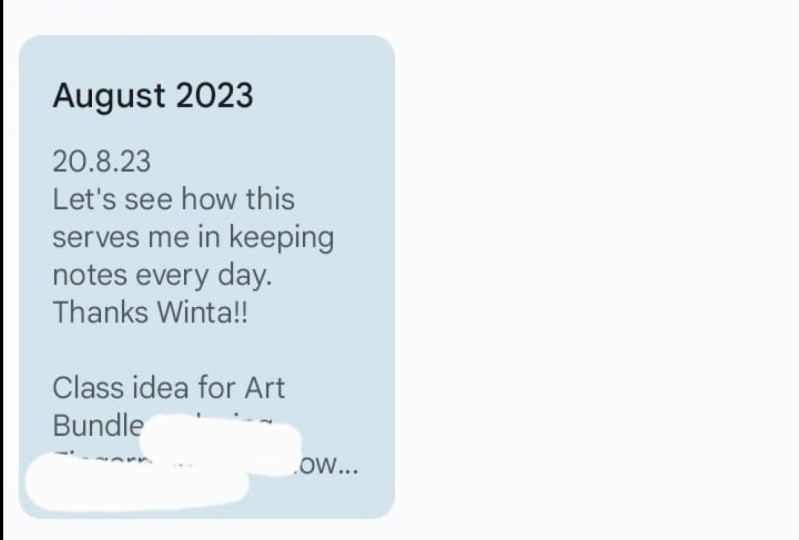
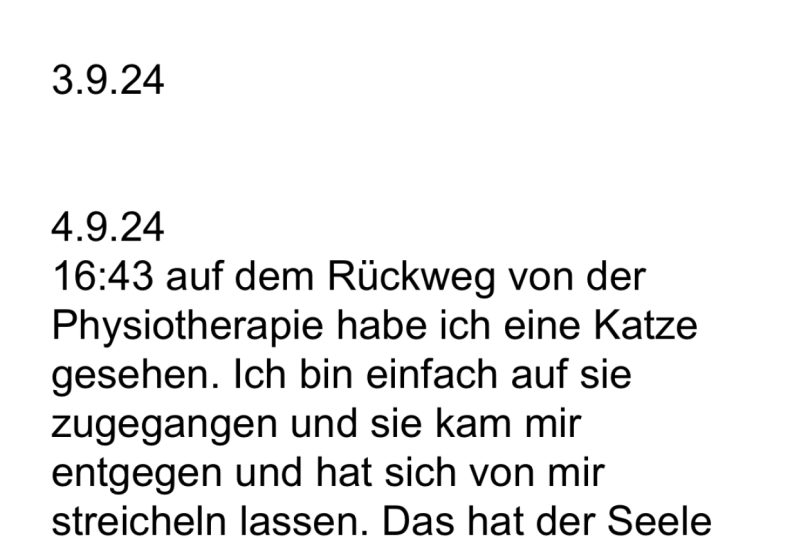
several months for your class projects. I wanted to take a screenshot of an entry for today using
it journaling pumped out with sharing with
you and upload it along the short description when it comes to keeping
journaling habits, I really don't think it gets
much simpler than this. Personally, this
journaling method has helped me in every
area of my life and my mental health
and I'm positive your future self would thank
you for starting this habit. So let's get too shabby
2. Class Project: So for our class project, you're going to be
needing your phone, your PC, your iPad, wherever you take notes, and you need to
download the document I shared in the Projects
and Resources section. And that's it. That's
what you're going to need to create your
journaling template. In the next lesson, I'm
going to be talking about this journaling
habit a little bit more in whites helped me and how I think it
would help you as well. See you in the next one.
3. Set Up Your System: Before we get into setting up the journaling template itself, I just wanted to talk a little
bit more about how I was journaling over the years
and what it meant to me. I was born and raised
in Saudi Arabia my whole life and I
immigrated to Ethiopia, my dad's home country for the first time in my late teens. I was excited about the move. I was also a little
bit worried about mindset shifts that
I found would be inevitable Given that
I'm being immersed in a completely
different culture for the first time in
my life really, I was little bit worried about turning into a kind
of person that I wouldn't really be
able to recognize and being able to write
about the confusions I faced and what turned out to be a chaotic journey really helped me stay anchored in some way and keep track of my
thoughts over the years. I didn't always use the template I'm about to share with you. But it really helped
when I didn't make a big deal out of the journaling
habit when the phone or sketchbook or whatever
I needed to just write down my
thoughts was readily available to me and it
was somewhere that I can access over and over and
not be able to lose easily. Over the past several years, I've been trying to make journaling as easy
to do as possible, so I have no excuses
whenever I got an idea what I had an observation I just
wanted to write about. So it's all about trying to reduce the friction
between where you have the idea and when it's written down as
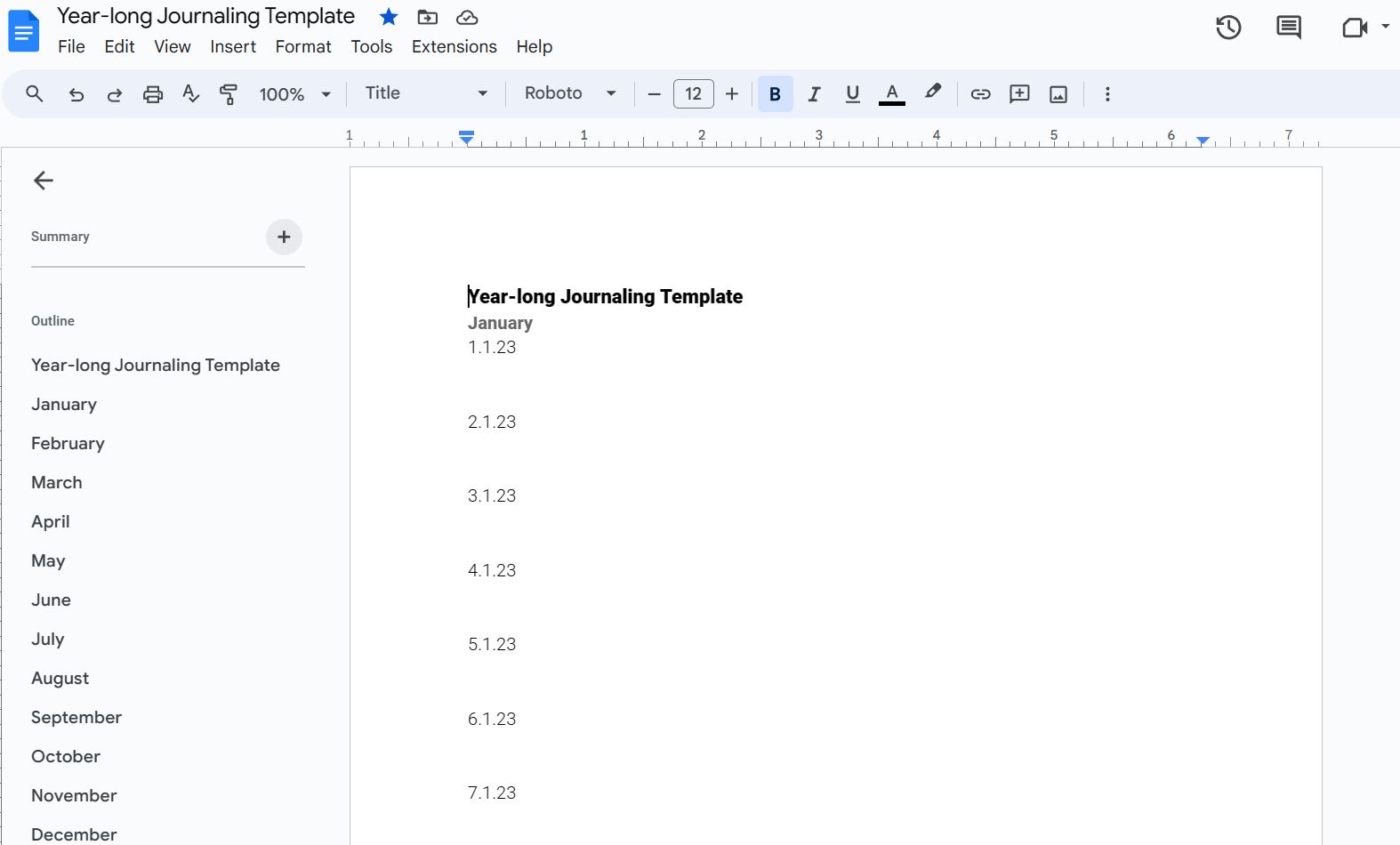
much as possible. So let me show you how I do it. There's a document in the
Projects and Resources section called year long
journaling template. That's the document I want
you to be able to open first. It's a public access document, as in anyone who can see this link can open it
and the same file, but you can't edit on
it because I didn't give editors editing permission. But if you want to copy this, and let's say you want
to continue to do this exercise for the
coming several years and maybe you're watching this class from the future like, I don't know, 2024 or 2025. So in that case, you might want to go to File, click on File, make a copy. And you're gonna
write down your name. So let's say your name
is Amanda or Mindy. You'll just come in this your
long journaling template and then you will make the copy. Now this document is yours, so you can ignore the
rest of this class. You can write down
your journal entries on this template itself, on this document file. All you can continue to follow along and do it the
way that I do it, which is Copy each
separate month into a separate note file
so that it would be easier to access each
month block-by-block, instead of scrolling all
the way down to September, just to write down two sentences About the third day in September or the fourth
day in September. But otherwise yet, you can open this template and if you're
going to make the copy, and let's say if you're
going to access this in the future and this
template becomes outdated, then you would go to
this as a suggestion, I have click on
one of the years. So this says 2023
or 23 in short. I want you to select
it and then select, Edit and then find and replace. Now, you're going to be
replacing all the instances of the number 23
with the number. Let's say you open
this in 2025, 25. Now, I'll select Replace All and magically is going to turn
all of my 2023 is into 25s. So this also means that the day 23 would be switched
to 25 in every month. But like I think that would
be easier than going and replacing all 365 days
with 25 instead of 23. So this is a method
that I suggest if you're going to be using
this template and future. Otherwise if you're
in the current year, you or something I would
suggest you do is Copy each month a separate note file. So I'm gonna be showing you
how to do that real quick. You're going to be, I'm
going to be opening Google. I'm gonna be using Google Keep, but you can use app and
notes or something. Notes or any other notes, app of your liking,
of your choice. As long as you're able to open separate nodes for each month, that's good enough,
that's only need. And preferably, it would
be good if you can access the Notes on your phone. So it can also be Evernote. For example, I love Google
Keep because first of all, it has an offline
feature on the phone. You can write down
notes in places where you have no Wi-Fi
or internet access. And it would upload it to the main cloud or to your
account when you have internet, so you wouldn't be limited
by that is what I'm saying. So I opened a Google account for the purpose of this class. I'm gonna be going to my to the top-right corner on
the Google homepage. And I'll press on this. I don't know why it's taking
its sweet time to open. Let me refresh this page. Maybe try. Been nice. It's it's it's a new
account, so yeah. So I'm gonna be
opening Google Keep. It's the little
yellow widget thing with a white light bulb Like the local skew, it looks a bit too much like the slides logo, but it's fine. Now this is an
empty, blank slate. You might have this
or you might have a note app that's already
messy and full of nodes. Either way, I needed to
open a new app, sorry, a new note, and go
to your template. You know what, I'm going to
be using the Copy I made. So let's say I want to
stay in the future. I want to stay in 2025. I'm gonna be
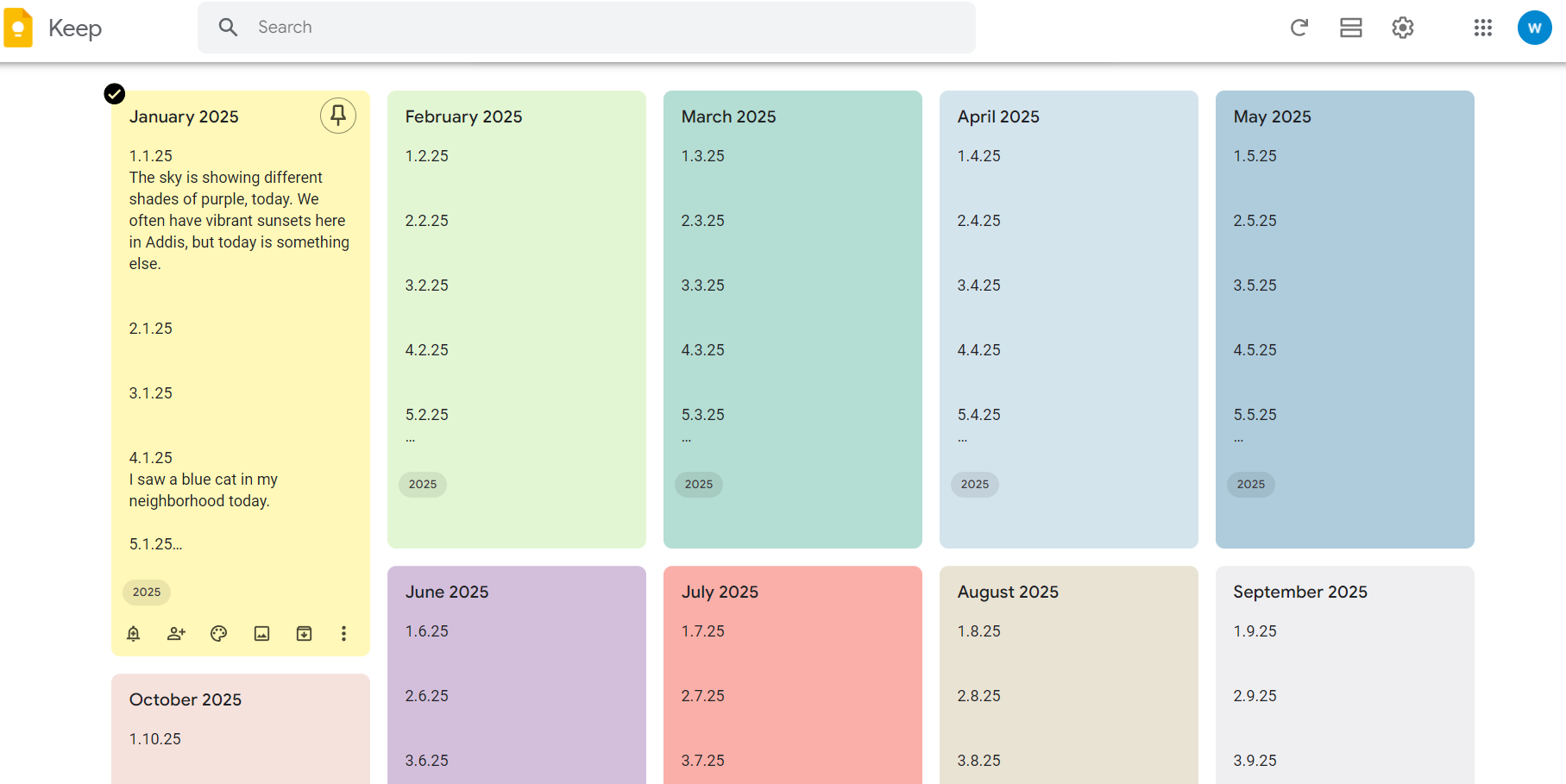
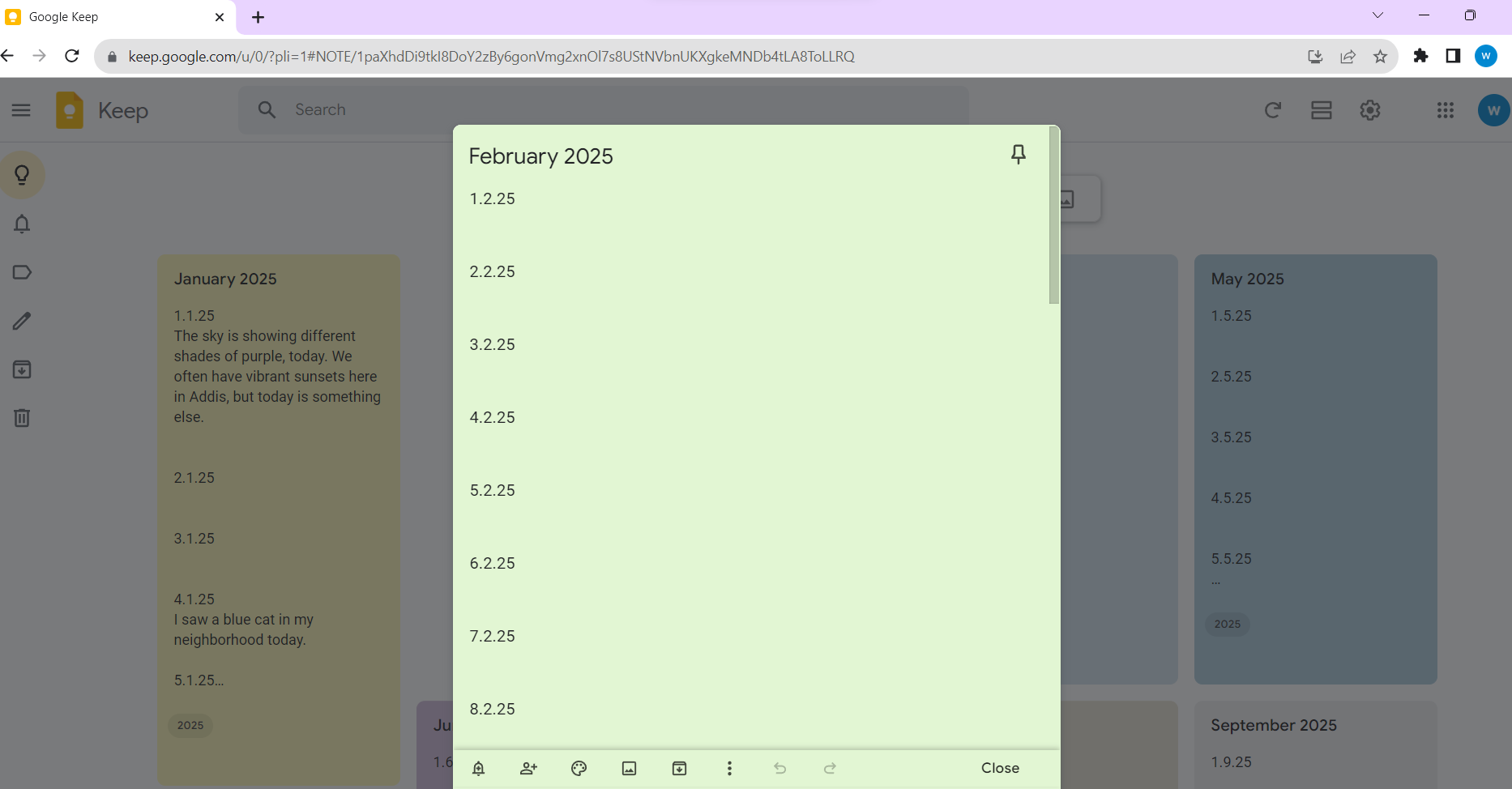
clicking on January, let's say it's January 2025. And I'm gonna be selecting all
of the dates from January. And we'll right-click copy or
Control C, both ways work. And Control V or paste. And you see all of the dates
are ready to enter here. Now here's the trick. This is very, very simple, but since I already
did all of the legwork of entering the
dates one by one. It means when I get an idea, let's say it's the 4th of January or I want to
write down something. I can just Open the
note and be like, Okay, where's the
4th of January? Open. Select that section. The 4th of January and then
write down, I don't know. I I saw a blue cat
or something of blue cat in my knee today. Now I wish I could
be that lucky. Imagine seeing. So all I need to need it to
do was open the homepage, Open Google or Google
Keep write down. I saw a blue cat in my neighborhood or
whatever it is that I want to write down my whole goal with this entire
thing, like I said, was to reduce the friction as much as possible so that
even if you have a, a silly idea or you
made an observation, or you want to
remember something, you can just open the thing, open your note app, note file, and then just write
down whatever it is without having
to enter the date, without having to enter spaces. You already have a date, the month where, which is
dedicated to these days. And space like literally
even the spaces here literally you only have to click on that area with a cursor and just
start typing away. To me, that's the easiest
way to build a habit. It's to kill any
excuse you might have, go from having an idea, making observation to
writing it down in seconds. So I'm just going to be cutting this Control X or
right-click and cut and then Control V or right-click
paste, January 2025. So that's the title
of this note file. So I'm gonna be doing this
for all of the month's. You can follow along with me. I'm gonna be
fast-forwarding this part. One more thing that I
would suggest you do is to bookmark this page. So if you're going to be
using Google or Firefox, Internet Explorer, proton,
whatever use. Click the star. I think it's the same thing
in several of the Internet Explorer's or their
browsers that I mentioned, you will add a bookmark. So it's gonna be appearing
on the homepage. Let's say you're going
to open your homepage. You're going to have
Google Keep here, again, reducing friction so you have no excuses when you want
to write down something. The title, and I am done. So now, once you're
done with this, one more thing I wanted to
add was to that you can pin the note that you want if
you're on Google Keep let's say you're writing down
something in October 2025. You can pin that note
and then you can unpin it when it's not relevant anymore or when you
move on to the next month, let's say move on
to November 2025. You've pinned November 2025. When you're done writing
that month's worth of nodes, we can move on to
December 2025 and so on. One more thing
that I like to do, which is completely
unnecessary, but still cute, is you can just select the background colors
so I like making my notes. He goofy writerly. Pink. Okay, So another
thing is if you open this journaling
template in the middle of the year or towards
the end of the year. You can access whatever
month you want through the outline on your left here so you can
just press August To take your right to
August, September, because I kind of
added subheadings that way so that you can just access the
month's as you want. It's quite easy to do that. Now I'm going to be
showing you how I can access these notes on my phone. It's splitting much
the same thing, but I also like using a typing tool called
Microsoft SwiftKey, which allows me to type with my fingers like just go on
magic wand, deal with it. And I want to show
you how I do that real quick or what app I use. And that's one of the reasons
that I can take notes on the call in public
transportation in the middle of
family gatherings, boring meeting while waiting in a government office or in my
dentist's office or clinic. I think that's one of
the coolest things about being able to quickly
take notes like that. It doesn't matter what
your lifestyle is. It doesn't matter if
you don't have time to sit down and write or journal, you can use tools that are
so easy to get the hang off that you only need a few seconds to note down
the thought that you get. Sometimes these ideas, they
only come to you once. So I really think
it's cool if you're able to capture as many
of them as possible. So yeah. I just
wanted to show you how I set everything
about my phone and what that looks like next
to my laptop screen. So I'm gonna be opening
the police door. I believe we can find the same
things in the Apple Store. I'm just gonna be
typing and keep, but you can find any
other notes app of your liking that you can
do something similar on. Keep as the one with
the yellow thumbnail and a bulb in the middle. My needs updating
and apparently and now I just wanted to show you the other app that
I'll be downloaded, which is called Microsoft
SwiftKey per there. This can take sometimes
get the hang off, but I believe we can make your journal writing much,
much more efficient. It makes typing so much quicker. And it looks like that. So I just wanted to show you
that I love to also have the Google Keep
on my home screen so that when I opened my
phone, It's right there. So you can just set it to
be at the home screen. And when you first log into
Google, Keep it might, it would ask you for your
email and I'm signing in with the account I created
for this class specifically. And this is what it
looks like on the phone side-by-side with
my laptop screen. And it looks slightly
different compressed, but it's basically
the same thing. All the month's are right there. Now one adjustment I like
to make is to add colors. So I'm gonna be changing the
colors in the bottom panel. You can change the
color of each note. And I feel like this
makes each month different from the
next one for me and it's a fine detail that I like orphan feature
in this application. So I can just refresh
this on my phone. And it would be shifting
everything over to my PC. All the changes would be there. I can even make all these
changes offline on my phone. But once I get an
Internet connection and I refresh it, all the changes, whether it's colors or nodes, would appear on my
laptop or my PC, see. So it would be on whatever
device I'll be using. Now I want to show you how
I use Microsoft whiskey and how any note I enter
my phone directly, goes over to my laptop or wherever I'll be
accessing this account, this Google Keep account. And I just swipe from letter to letter to
create the words. You can use any
keyboard barrel-like. Using this one, you can
set Microsoft SwiftKey as your default keyboard on your settings, your
keyboard settings. And it takes some time to get used to this and it
makes some mistakes. But I think it's really mixed the typing
process really fast. So you can just go
from letter to letter. It would predict what word
you're trying to C. So C, I'm going to be
refreshing this on my phone and that it's just
pops right up on my PC. And this is it. This is just what I do. Phone
4. Day's Entry: No, I believe that writing
down daily observations is not just a cool exercise and a way of having a moment
of self-reflection. But it's also potentially
useful in the future. Like when I used
to wear my braces. It wasn't very long ago. It was something
that I had to follow up monthly or every three weeks, had to go to my
dentist's office and I would often forget what
day it was that I want. But since going to the
dentist clinic with a very stressful thing for me or something that I had
to plan ahead of time, or something that will
take up a chunk of my day. I would write down about
it or I would write down while I'm in the dentist's
office waiting for my turn because
there's a line of other patients waiting
for him when I'm want to go to my dentist the next time and I'm trying
to remember when was the last time
I went since we agreed that I'll be coming
to him every three weeks. Just go to my phone and write down dentist,
like the word dentist. And it would bring up the last time I wrote about my
dentist appointments. And then that's how
I would find out. When was the last time
I went to my dentist. So it's literally has a
practical purpose for me. And I did this several
times because I don't tend to have
the best memory and overtime this also
becomes a way of archiving different eros are different periods in your life. And when you write down about the things that you
feel optimistic about, or the strange, quirky happenings in your part of
town or in your neighborhood. Like you saw, new cats
started be famous, started fighting and
becoming more territorial. Or a new kiosk Open around
your area and they're stocking items that
the other kiosks in the area don't stop. So it becomes a
way of you writing down things in a positive
light or in a unique life and things that seem
trivial or seem very unnecessary to write
about or to invest time, noting down, making a big
deal out of it or whatever it turn out to be really
special when you look back at it in retro spec, when you open your note from three years ago or
five years ago, randomly land on a month
or a day angle happen. I just wanted to
show you how you can search for your
day's entries, what you can write about, like I just wanted
to share an example that I had written about. So I don't know if this is
available in upper notes. I think it is available in Southern Notes apps,
the search feature. And this is kind of
the main thing that makes digital journaling
superior to analog journaling. For me, it's the
ability to be able to search for keywords
and find them. I'm just going to be
going graphic design. Graphic design. And it's gonna be showing me
all of the different notes where I write down these words
verbatim graphic design. Okay, I also want
the word trust in their I don't trust
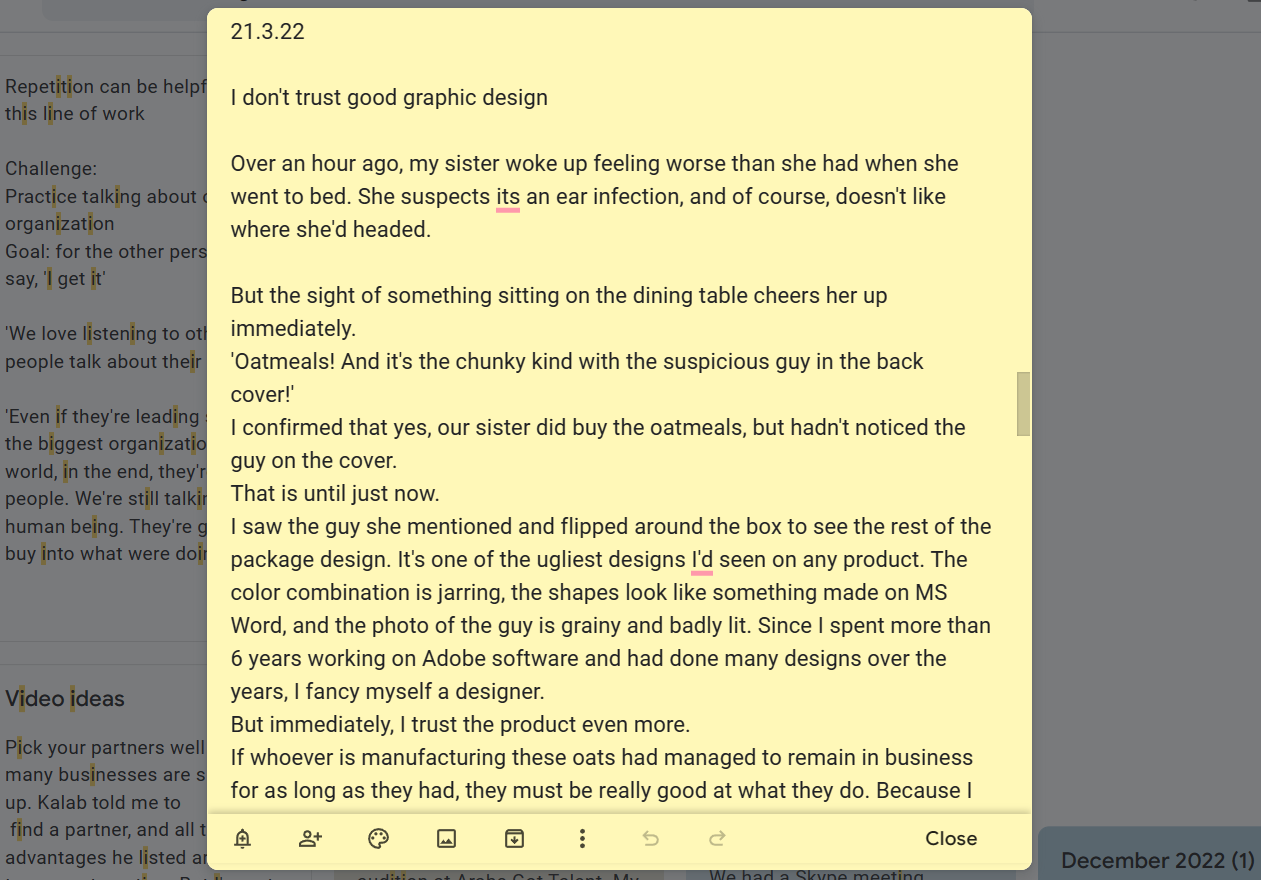
graphic design. Good graphic design. It's probably from March 2022. I think it's this one here. Now, this is a note that
I'd written down last year, I think pretty much
today last year, I just started writing it when my baby sister
asked for ultimate. Oh, yeah. And my other younger system that less than a
family by the way. And I live with my
siblings and my mom, my sister, but my baby sister. And the design on
the oat milk sorry, on the packaging was so bad. I just saw and I was just like, wait, this is what my
baby sister asked for it. And I just realized that like I've been
noticing a trend year. The worst the packaging, whether in hair products
or in food products, the better the product
tends to be, at least here. So I don't know, I just
made that observation and I just started writing
doubt about it and writing down examples. I'm just also pulled a few
quotes that my sister said set and how my baby sister reactant
when she saw the package. I'm just going to be this part, but the size of
something sitting on the dining table tears
her up immediately. Oatmeal is the chunky kind with the suspicious
guy in the back cover. I confirm that, yes, our sister goodbye
the automobiles but hadn't noticed
the guy on the cover. That is until just now I saw the gushy mentioned
and flipped around the box. See that less of
the package design. It's one of the ugliest designs
I'd seen on any product. That color combination
is joining the shapes look like
something made on MS Word. And a photo of the guy is
grainy, end badly lit. Since I spent more than
six years working on Adobe software and had done
many designs over the years. I fancy myself a designer, but immediately I trust
the product more. I don't know if I'm going
I would publish this on Medium or as an SCA or whatever. But like it's something
that I wrote down at the moment and read
that again and went, Yeah, I agree with this person. I think she's onto something. So this can be your day's entry or it can be any other
observation you made. It can be an observation
about your health. For example, I tend to get migraines almost
every three weeks, every month, sometimes
twice a month even. And I started noticing my
triggers mostly mentally, but also sometimes I
would write down that. Okay. Today, I was exposed
to the smell of gasoline or I stood under the sun for a long time and as I predicted, I got a migraine attack and I would write down
things like that. And let's say if I want to
search a keyword, migraine, I'll be getting a few results are a few different
knots would pop up and I'd be able to find what we're my
triggers last time, when was the last time
I gotta migraine? Usually I don't like to write when I get when I get migraines, I just want to rest
in the dark alone. But when the thing passes, sometimes I want
to knock down what happens so that I can keep track of it and be able to avoid it if possible next time. And now you can use
this to take stock of other daily happenings like a color of the trees
that day or the weather, if there was something
unusual about the weather, Let's say it started
raining earlier. You're like, Man, I'm
seeing weird patterns. This hasn't been happening
for the past three years. Why did it start raining
already or why is it this hot? Like you would probably
note down the temperature at this time of the year
too early for that word. So I suggest that while it's great to take stock
of all of your feelings. So I don't about the things that really affected you negatively. To write about painful events and thoughts that
you can't really say to your loved ones or
you're not ready to share yet. I also suggest that
while this would be your safe space for
writing down about those negative
feelings or thoughts. That this also becomes a
place where you get to dream, where you get to write about
things in a positive light. What do you see the
quirkiness and things? And see things would
childlike sense of wonder. Because I believe that when
he started writing like that and that's how you
pick up on your reality. A lot of times you're going
to be painting an era of your life or certain memories in your life in a positive way. And when you look back on it, it's really going to make
your cheer up and really make you even change your
outlook on your life. And be grateful for all
the wonderful things that are happening and
do happen every day. So yeah, that's it. If this is what
you want to write about for today's and three, and you're okay with
sharing that with us, please take a screenshot
of what you wrote for today and upload it in the Projects and
Resources section. By the next lesson, I'm
going to be sharing another journaling prompt
that you can use instead. See you there
5. Interstitial Journaling: Now interstitial Journaling is something that I
wanted to try out. I've been doing
Aspect Fit before, but I wanted to see
how it would look like the way tony Stubblebine explained it in his
Medium Article, which I have linked below. And it's mostly about being
able to transition from one project to the next most
organic manner possible. So as human beings in general, we're not really great
at multitasking. It always costs us something to move on from one
project in the next. But this method of journaling helps us beats procrastination. You will not only be tracking what is getting done,
what is not getting done, just ticking boxes,
but you're also being able to devise what
you want to be doing next. So you finish one project, you review it,
you're like, okay, I finished writing down
an e-mail or I finished drafting out and outline for this article or whatever it is. And then you will probably
also no downtime. So when you went down
the rabbit hole, I opened Twitter or Instagram. I don't know how
I ended up there. Or you're gonna be
remembering the train of thoughts or train
or links that led you to that place so
that you'll be able to avoid that land mine next
time you come near it. And you'll also be able to write down about what you're
gonna be doing next. So you'd be like, I'm gonna
be starting by writing down a draft of my script for
my next Skillshare class, for example, while
you're doing that, you're amping yourself up, you're becoming impatient
to actually do it. At least that's how it
felt in my experience. I just wanted to show
you how I was doing. Get really quick. It was for 40 01:00
A.M. and I was like, I had just written about a
story mom told us about. People are rarely so blond
to the each other here. So hearing about
how that woman talk to the one that my mom met at the health center was
almost comical to me because of how
absurd it sounded. It's rare in
something that stuck to me even though I
heard the story like it's been a couple
of days already. And then a few minutes later, I went back to work, which is working on this class, preparing what I'm
gonna be doing today. I set that, I'm gonna be
switching off my laptop when I'm done because
both work and rest, our actual productive things. Scrolling on
Instagram, scrolling on TikTok is not resting. So I was like, I'm gonna be switching off my
laptop the moment I'm done. So it was kinda like helping
me be accountable to myself. I already told myself out loud, you wrote it down that this is the last thing
I'm gonna be doing. And then I'm going to
be going to steep. I'm not going to be wasting time looking up some random
thing on Google, are going to waste my time with some pressure sleeping
minutes or hours. I wrote that and
then I said that it also feels like having
accountability partner. Yeah, I wrote about
that apparently. Okay. I didn't just think that and writing down what
I'm doing itself, it helped me be
more mindful and I think I'm gonna be
doing this more often. Yeah, I said I'm gonna be
switching a PC off. I pray. And I'll probably
sleep minutes later. And I think that's
exactly what happened. I don't think I
scroll on my phone. I scroll on my I
don't think I scroll my phone and when file
probably wasn't much. I hope so this is how I tried out this interstitial
journaling methods. And I think it's pretty cool. I think it's something that I'm gonna be using more often. I hope one of these to work. Well. I hope that you
can write an entry today based on either this prompt
or the previous prompt, or maybe something else
that came to your mind and share that with us in the
Projects and Resources section. And if you're using
Google, Keep like me, I just wanted to show you
how you can compile all of your month's of the
year in one document file. But if you're using
some other notes app, there's another way you
can do that as well. Now in the next lesson,
I just wanted to show you how you
can compile all of your month to notes to create a document with your
year's journal entries. She in the next lesson
6. Compile Your Entries: Now if you continue
this journaling habit and you keep on journaling, even if you missed a few days of Journaling here and there, you can compile all of your month's nodes
in one document, whether it's six
months or a year, and have it compile in a PDF file or like a document file that
you can later access. I just wanted to
show you how you can quickly do that
and Google Keep by importing those month's notes
into a Google Docs file. But if you using Up and Oat
or some other notes app, you can individually Copy each month and trees
and paste it on a separate document
file and do that for each month until you have all of the month's
let's say six months, 12 months in that
document and then label it 2022 or 2023 or 2025, whatever year you're gonna be watching this end
so that you can export this either as a
document file or as a PDF file. And you can have
this in one document in one place if you want
to access this later on, I just wanted to show you how I do it on Google Keep though. I've already done it for like
two years or three years. And I want to show you
how you can do this. So now I just wanted to go through all of the month's and
see that there an order. And I want to show you how
I exported to Google Docs. So it's all arranged
month by month. One thing I like about the Google family or the
Google situation is that when you move something from
Google Keep to Google Docs, it's going to be making the
titles bold automatically so that you be able to see where one node ends and the
next one to start. So I find that pretty cool. So I'm gonna be showing you
how I do that real quick. I will select control a. This is again, the
Google Keep homepage. If you use your Google Keep
to write down other things. You can also add all
of these to a label, so they're all in one
label and then select all of that and copy
it or imported, exported, sorry to Google
Docs so that it's all in one file and you can
export it into PDF format. But let me, let me show how
I do it in a level actually, because I feel like you might use your notes app
for other things. I'll call this 2025. All of them are in
the right order. January, February, March, April. I messed up August,
and maybe that's okay. I'm gonna be able to fix it once it's exported in
the Google Docs. So I'm gonna be selecting all and then Copy
to Google Docs. It's going to take
a few seconds and it's going to be
ready to go soon. Now I opened the dark. And here you go. January. Since all
the titles are there, you can outline
the titles again. So I want to Update Heading one too much so that it's can be written
in the outline here. So I have January here, I have February when
it's all written down. It's a different story.
It's pretty cool. I'm going to show
you how mine looks. 2020-202120. I believe I have one for 2020, but I'm not sure
somebody to do that. Once you've done this, can label your document as 2025. Journal entries. You have all of your once here and then you
can go to File. And I forgot, download,
download as PDF. You can download it as a PDF. And here you go. Your PDF would be ready. I forgot to add a title, will be good to add a title. So I'll just put
that title here, makes you feel like you've
published a book or something. It's also cool to see like how many words you
type that year. So like, I'm gonna
make this big. And like also, like if you
want to check your word count, you can select
everything control a, and then go to Tools, I believe, and then
press word count. And would show you here like
how many words you typed. Thousand words really yours. I would write like
30,000, 40,000, I think even more words and probably most of it
wouldn't go anywhere, like it would stay with me. So I just wanted to show
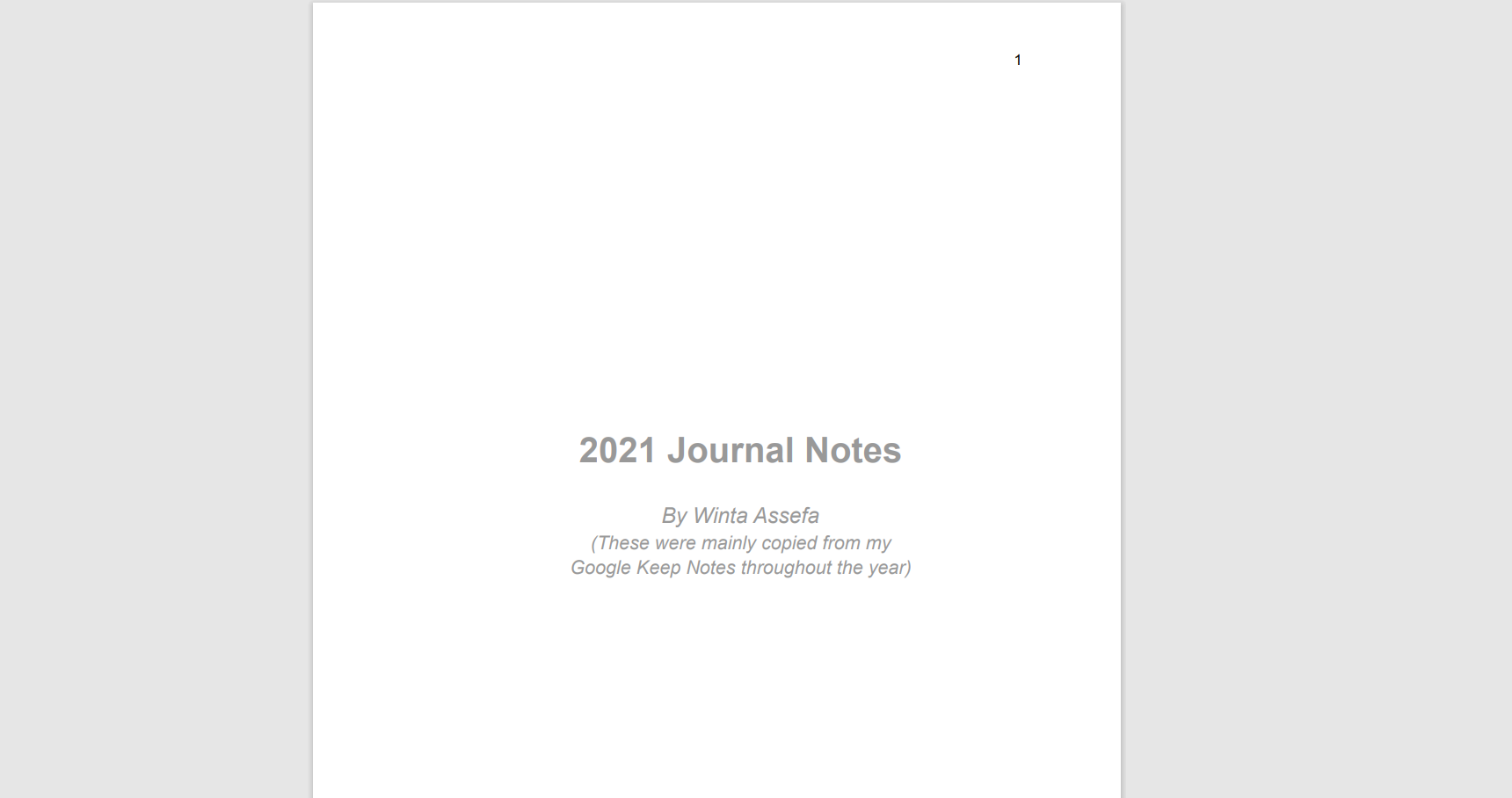
you how I titled my other. So this is my 2021
journal notes. I dedicated a page to the title he wrote
down by winta Assefa These were taken from
Google Keep snot start the year and then I start
with January 1. Actually, this year
I did not start with January when I
started with January 3, I think first and second, I don't know why it
and write and I wrote about my university experience
on the 4th of January. This was a few months after
I graduated during 2020, we all know at least most of us would know what
happened 2020. And I wrote that a
little bit about my university
experience while it was still fresh and I was looking
back at it and going, okay. That was something so
this is my 2021 notes. I added page numbers so that
you can access it by page. There's 182 pages and this
is my 2022 journal notes. This is the beginning of it. I didn't make a fancy entry page for this one order title
page for this one, I just called it simply
2020 journal notes immediately go to
the point here. I started on the 9th of January. Now this is one
more thing that I think would be useful for you. If you don't write anything
for several days in a row, you can just cancel those days. Lactose dates, just
select them and backspace and move them so
that they don't take up space. But otherwise, I like
leaving them so that if it's just a few days after I
missed writing in those days, I can go back and write down a sentence or two from what I remember so that I have some record or some
recollection of that day. It can be something as simple as our family friends visited from Sweden or
something like that. Or we went out to dinner, maybe that's why I don't
have any time to sit down and write something
or take note of something. Sometimes I write things to other people in these nodes and then I copied and pasted in
an e-mail box or something. And that's it. Really know if you continue with this habit and you have
a compiled document, let's say with six
months, 12 months, maybe 14 month's
worth of entries. You can share a screenshot
of the title page. You don't have to share what
you wrote down and Update your project in the
Projects and Resources section so that I can see that, okay, you've compiled
your month's entries. I find out pretty cool
because I can check out my 2021 entries in one
place, my 2022 entries. And then sometimes
I would strangely easily see a pattern between
what I wrote down in, let's say January 2021
versus January 2022, I would have similar
anxieties or similar worries or joy or
things I'm optimistic about. Maybe it would be a
bit over ambitious. And I would have
similar sentiments, let's say in August 2021 or August 2022, even August 2020. So like keeping track
of these patterns tells me a lot about my self
in how I'm evolving, how I'm growing, the
cycles that I keep repeating and maybe the things that I need to work
on personally. So we're nearing the end here. I'll see you in the next lesson.
7. Closing: Now when it comes to
journaling habits, this one has been pretty
easy for me to maintain, has been low friction
and very easy to just go from idea to written
notes somewhere. And I really hope that helps
you out just as much if you enjoyed this class
and what we to include a few things
in future classes, you can limit a class review
that would be a great help. And you can find an
article that I wrote about this journaling
template or Medium. I left the link in the
Projects description section. You can say hello
on social media, instagram, YouTube
Medium, mostly. If you've written anything
following this class, even if it's a single sentence, I hope that you take
a screenshot of that and upload it in the Projects
and Resources section. And you can check out my
other drawing classes here on Skillshare. Thank you so much for spending your precious time with me and I hope that you haven't abundantly
blessed day and beyond. See you next time.
 Winta Assefa, Architect & Visual Communicator