Transcripts
1. Class Introduction: Running an art business means doing a lot more than
just making art. There's pitching,
pricing, contracts, newsletters, and
social media posts that can take up so much time. Hi, I'm Chris Ruff, and I've been a surface
designer for about 12 years, and I'm also a
Skillshare top teacher. In this class, you'll
discover six ways that you can use AI
tools like ChatGPT, Claude, and Gemini to help
you with those tedious tasks. Now, right off the
bat, I want to say, I know that AI can be kind of a controversial topic,
especially for artists. But now that it's here to stay, rather than completely
avoiding it, which I know some
artists are doing, I decided I want to
find ways to use it and harness it to
help my business, not just undermine it. And because you're
here, I assume you're curious about some
of those things, too. So let me show you how you can use AI as a business assistant, also an IT department, or a legal advisor and
creative collaborator, but not for making art. That part is strictly your job. Along the way, you'll learn
how to write better prompts, to get the best results. Learn to recognize red flags and when to question
AI's answers, and how to use it for help
with pricing and contracts. So if you've been a little
bit intimidated by using AI or just not sure where
to start, don't worry. It's simple and easy. And at the end of the lessons, I'll be providing you with some options for your project, which, of course, is to try using AI, so that'll be a simple
way to get started.
2. Ai Basics: First, let's talk about
exactly what kind of AI I'm talking about. And that is using a chatbot like Claude or
ChatGPT or Gemini. They're all free,
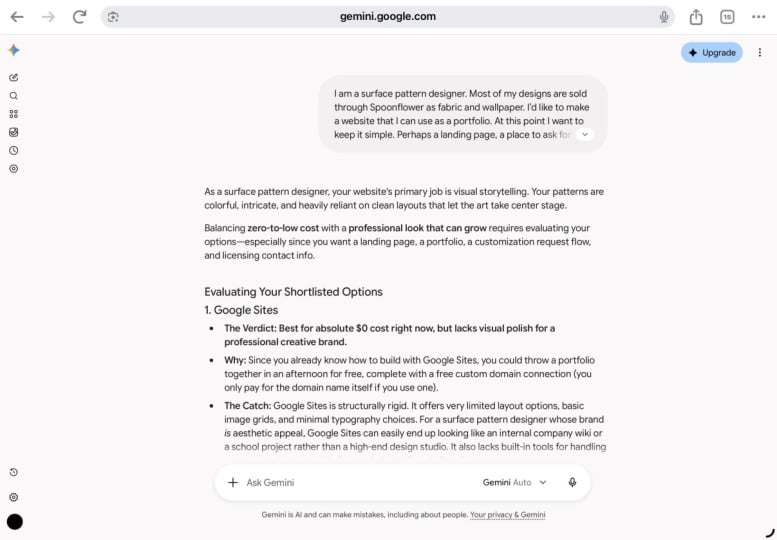
they're super simple, and they're web based apps. Here's one of the home screens. So once you make an account, you can just type
something in and hit Go. That's it. And the
response is immediate. Now, some people just use AI as a glorified search engine, ask a question, get an answer. But the real magic happens when you start thinking
about it more as a conversation and
a collaboration. So here's the difference. Question, who painted
Starry Night? Answer, Vincent Van Gogh. Now, here's a start
to a conversation. Why do you think so many
people love this painting? Asking an open ended
question like that can really get some
interesting responses. So a collaboration
looks more like this. Can you write a report about it? And then maybe you'd get
something back like this. But the more details you offer, the better the result will be. So maybe you say
something more like, I'll be presenting it to my daughter's second grade class, so I'd like to keep it
short and simple and fun. And here's the result. Now,
like most collaborations, the first draft may
not be quite right, so go ahead and be
generous with feedback, and that will help refine
the final product. Now, it's important
to note right away that AI isn't flawless, and sometimes it can have
complete hallucinations. That's actually
the tech term for when it just makes stuff up. So if you're suspicious
of an answer, just like in a
human conversation, push back with something like, that doesn't sound
right. Are you sure? And you can ask for the sources that it used to get the answer. Another thing you'll
quickly discover in AI is it's sort of wired
to boost your ego. I laugh whenever I get
answers like these. I'm pretty sure I'm not nearly as exceptional as
AI tells me I am. One last thing
before we dive in, every chatbot has
privacy settings. So if you don't want your
chats used to train AI, your first question should be to ask where
those settings are. In the settings,
you'll also find one that's something
about turn on memory. Claude calls it generate
memory from chat. ChatGPT says enable memory, and for Gemini, it's under
personal intelligence. What this means is
that the chatbot will have the ability to
remember your past chats. Know that can sound
a little creepy, but if you want to get
the most benefit from AI, I do recommend enabling it, because over time, it will learn what tone you
prefer in your writing. I'll start to remember and avoid words or phrases
you don't like, and it will be able to
reference past conversations. So you're not starting from
scratch with each new chat.
3. SEO & Product Listings: The first way to use AI in your art business is for
SEO and product listings. This is probably my
favorite use for AI. I have a spoon flower shop, and one of my least
favorite tasks is coming up with
titles, descriptions, and keywords for each and
every listing I upload, it happens to be a great task
for AI to do instead of me. And this would work
for EtS and Print full or really any
place you sell art too. When you write a prompt for
this, be very detailed. You'll hear me say that
a lot in this class. Start with your goal
to rank high in search results and include
the required parameters. The more the better.
Addition to those, I like to add
something like this. Please include a
color in the title. Don't just describe the design. Also include the
style, the mood, and who might be
interested in the design, like women and kids, as well as possible uses. So here's the full
prompt that I use. Now, this is much longer
than my usual prompts, but I knew I was going to use
this over and over again. So I took some time
to develop and test it and even ask
Chachi P T for input, asking things like,
does Spoonflowers algorithm prioritize
the first words in the title, stuff like that. I also stressed that I wanted the keywords to be
something that a customer would actually type
into the search and ask for it to
maximize the number of characters in the title and
description and not to use flowery language like a touch of or gives you
the impression of. Since these just use
up too many characters with things that people aren't actually
going to search for. Notice at the beginning
of the prompt, it says, Analyze the uploaded image, and this is the
coolest part of it. You can just upload
a ow Res image of your artwork and AI will analyze it and use that
to build your listings. So I drag my Low res artwork anywhere on the page and it
comes up with the result. And here it is. So it gives me a pretty good title
and description. And then for the keywords, I ask it to make 25
keywords and break them down into categories like colors and subject
and style, et cetera. Spoonflower only
allows 13 keywords, but I like to have
some extras so I can pick and choose
the best ones. Now, it won't get it
right every single time. And in this case, I didn't think the description was perfect, so I asked it for another try. I said, I don't think the second sentence works very well. I don't think the design
is for autumn decor, and I'd like more
searchable keywords in it, like romantic or cozy or
bedroom wall or cottage. Also, please maximize all
the available characters. And so it makes another attempt, and I love in this case, it wrote one and said, Okay,
that's 216 characters. Let me press harder. And then it wrote another one
and said, This one is 221. One more pass to squeeze
every character, and then gives me a
final one and says, This is 237 characters. So I love that it pushed itself forward to give
me the best result. By the way, my
spoonflower prompt is available in the
class resources. So you can just download it
and try it out for yourself and see how quickly you
can make product listings.
4. Tech Help: We use so many different apps in our businesses these days. That's why number two is
using AI for tech help. It's so much faster
than Googling for answers or
solutions to problems. It kind of feels like having your own little IT department. So you can just ask a
very specific question, like in Illustrator, how do
I convert colors to Pantone? And it'll map out
a very specific, step by step way that you
can solve that problem. Now, it doesn't always
get it perfectly right. Often that'll happen
if it's not using the most up to date
version of the app. But whenever that happens, like you reach a dead end, you can take a screenshot of that dead end and upload it
to the chat bot and say, This is what I see.
What do I do next? And it'll analyze the image and give you a different
route to find the answer. So moving forward,
whenever you have a tech problem, just ask AI.
5. Pitching: You're self employed, a lot of your time is spent
pitching your work. And so any help
with that is great. One of the first things
you need for a pitch is a way to describe your work
to a potential customer. Anyone else struggle with that? So I was floored when someone told me they
used AI for that. Yep, start a chat
with something like, please look at my website
and describe my style, and, of course, upload your URL. I think this is a place
where AI really shines. It can literally look
at all the images on your website and define
a cohesive through line, basically sort of describing
your signature style. Isn't that cool?
Here's the description it wrote for me and some
of it's pretty silly. You work lives at
the intersection of contemporary sophistication
and accessible joy, never childish,
blah, blah, blah. I would never use those things, but there are some really interesting
insights in here and little phrases and
sentences that I can use in my
marketing materials. Now that it knows my style, it can also help me evaluate
potential companies. In the chat I write, I'd like to pitch my
work to ABC company. Do you think it's a good fit? In this case, it tells me, yes, it would be a
worthwhile company, but then warns me that they
do a lot of greeting cards, which is not the focus
of my portfolio. I tell it, well, I
was really thinking about the gift wrap
and the notebooks, and it says, Yes, that
would be a good fit. I ask for help writing a
pitch letter, here it is. It grabbed some of the
info from my website for a quick bio and then writes a quick description of
my work. Cool, huh? Now, one thing it's
not really good at is general company searches. Like, give me a list of ten
companies I should pitch. But I've gotten better results when I ask something
more specific, like find similar companies to the ABC company or a much
narrower focus, like, are there any fabric
companies that do masculine quilting
collections, or ask for a list of companies that specialize
in kids bedding? So those are some tips for using AI to help you with
the chore of pitching.
6. Writing Marketing Content: In addition to pitching, in creative businesses, we end
up doing a lot of writing, various marketing materials or what I call feeding
the content beast, like newsletters and
Instagram posts. Here's an example. I'm doing a pre recorded presentation for an online summit for artists
and surface designers. Here's the first draft
of my transcript. Can you write a short
description for promotional materials
and my speaker page? It should be conversational
but still professional. And no business speak, please. Notice all the
details in my prompt. I tell it what it
is that I need, how it's going to be used, and the tone and length I want, and I dropped a PDF right into the chat for reference.
Here's what I got. The ability for AI to
instantly go through all of that information and condense it down into this little
bit is so helpful. For newsletters, a blank page can sometimes feel so daunting, so I might just ask for
random ideas at the start, and they'll tend to be pretty generic without any context. But even if I don't
use any of them, it usually spurs my own ideas. And then I write a
messy first draft and ask it for feedback. I usually add something
like be brutally honest, signaling that I'm not just
looking for praise here. I want an objective opinion. So it usually takes a couple of rounds of back and
forth to get it right, and I'm very careful to retain my own voice
in the article. I don't want it to sound
like a robot wrote it. So I'll push back on
certain words or phrases that sound too formal or just don't sound like words I use. And then I remind it that my audience are creative people, not boardroom executives,
which it seems to default too. So even though it does still take some rounds
of back and forth, it's still faster
than if I'd written it on my own and so
much more readable.
7. Contract Help: Number five is contract help. Raise your hand if you've ever signed a contract
you didn't fully understand or God
forbid, never even read. I know legal ease is
really hard to understand, but there could
be some bad stuff in there that you'll
really want to know about. So let AI be your
legal assistant. Copy and paste the whole
contract into the chat, maybe take out the names and addresses first
for extra privacy, and then ask AI to summarize
it in plain English. Next, you can ask it if
it sees any red flags. And take a step further and ask whether the contract
sounds fair to Artists. So this will either offer you some great insights that
will help you negotiate better terms or put your mind at ease that you're
signing a fair deal.
8. Pricing Advice: My last tip for using AI in your business is
help with pricing. That's a task we all struggle with because there are so
many factors involved. For example, what if someone wanted to license
your art for mugs? Would a 3% royalty be fair? Well, AI can help with that, but you'll need to
provide more information. Ideally, all of these things. But if you don't have
all of them yet, here are the minimum
details you need, quantity, price,
and exclusivity. Let's see what Claude
says in this case. A company is interested in licensing my designs
on coffee mugs. They will be making about 10,000 mugs with a retail
price of 14 99. They asked for exclusivity
in ceramic mugs only. What would be a fair rate?
And here's the answer. It suggests 5% 8% would be a common range and
gives reasons why, as well as other things
you should consider, like getting an advance
or a guaranteed minimum. Now, here's a giant disclaimer. Use AI pricing only
as a baseline. Sometimes the numbers
aren't that accurate. One thing that helps is to add something like
this to your prompt. If you can't find
adequate information matching my criteria, please say so and
don't just guess. You can also ask for resources. In this case, when I asked where the information came from, it cited general knowledge
of the industry norms, not from anything specific. That's a big red flag. So I asked, Can you research
some published numbers? Now it digs a little
deeper and senses, I'm serious and don't
want generalizations. And I get a more
specific answer. So AI isn't a perfect
fix for pricing, and this is an
important but with a large number of
newer designers that are entering the market, with little knowledge of the
financial side of licensing, it can be a super useful tool. Even if the prices may
not be all that accurate, the foundation of
the advice is solid. And that helps people understand
the value of the art, the language of licensing deals, and all the factors
to consider before quoting a price or
evaluating an offer. And if everyone got
in the habit of using it, even experienced designers, I really believe we
could start putting some upward pressure on a market where artists really
aren't paid that well, and prices have been
stagnant for years. So I do hope you'll
give it a try.
9. Your Project & Final Tips: Those are my six ways of
using AI to take some of the drudgery out of running your art business.
Now it's your turn. Your project, of course, is to try out one of these six ideas. Pick the one that
intrigues you the most or the one that will help you with your most immediate needs. Let's go through the options. For SEO, your project is to create a new spoonflower
or Etsy listing, or you could have
it rewrite one of your current listings to see what improvements
it might make. Don't forget that my
spoonflower prompt is available on the
class resources. Just download it and then
you can paste it in the chat and upload an image of your pattern, and
you're good to go. For tech help, your
project is to dream up a question that has stumped you and see if AI can answer it. Don't forget that
if you get stuck, you can take a screenshot
of the dead end, upload it into the chat, and then ask for more guidance. If you want to choose
pitching for your project, ask AI for a description of your style based
on your website. And if you don't have a website, you can also just upload
images of your art, and, of course, the more
images you include, the better your result will be. Maybe you want to try
collaborating with AI on a newsletter article
0R Instagram post. And don't forget to ask for brutal honesty when
you ask for feedback. Then there was contract help. Your project is to copy and
paste a recent contract into the chat and then ask for a
summary in plain English. Hopefully, you won't discover any unhappy surprises buried
in all that legal ease. And lastly, there was
the pricing option. Your project is to make up a licensing scenario
with a product, a quantity, and the sale price, and then ask for guidance on a fair price or royalty rate. Once you've completed
your projects, tell us about your experience. Take a screenshot of your
prompt and the response you get and upload them to
the class project page. No matter which
project you choose, make sure your prompts
are very detailed. The phrase garbage in garbage out definitely
applies to AI. So the more information
you include in the prompt, the better the
outcome you'll get. And don't forget to
question the results. Remember, AI is best when it's a conversation and
a collaboration. So push back when you need to, both for accuracy and to
retain your own voice. Of course, the ideas
I've given you here just scratch the surface of
what you can do with AI. I've had it write recipes for me, develop travel itineraries, research products or companies, and I even had it write a
knitting pattern for me. At the beginning,
I pointed out that AI is new and a little scary, and there are real
environmental issues that need to be resolved. But the help that can give you in your art business is real, and I think you're really going
to benefit from using it. So thanks for taking this class. I hope you'll check out my other classes here on Skillshare. You could learn how to make
mockups or repeat patterns, earn some tips on
drawing an Illustrator. Get files ready for
print production, as well as I've got a couple
great classes about color. On my profile page, you'll also find a bunch of free resources like
a color library, a color conversion cheat sheet, plus a mock up guide, a production glossary, or Illustrator
drawing inspiration. They're all free. If
you'd like to join my mailing list and get my monthly newsletter where
I announce new classes, plus news and tips about the
surface design industry, you can use this QR code
or go to chrisrug.com. In the meantime, have
fun exploring AI.
 Kris Ruff, Surface Pattern Designer & Coach