Transcripts
1. Introduction: Hi, my name is Vicki Conley. I live in radio, so Dan's Mexico, and I've been an art course through since about 2007. I enter many jury shows and have found over the years that good photography of your pieces really counts in the judge's eyes, you can have the best art going, but if your picture is bad, you won't get in. I'm here today with five hacks to help you take better photos of your quilts. Hack number one, pn, The coiled square to a clean design wall. Hack number to use a camera on a tripod and center the camera lens to the center of the quilt. Hack number three, feel the camera frame with the quilt. Hack number 4, use even lighting. And hack number 5, make good use of your time by having several pieces ready to photograph. Let's jump into the lessons.
2. Getting Started: Before we get started on the lessons, Let's go over what you'll need. You'll need to set up a design wall, which I'll show you about in a minute. You'll need pins, both large and small. I use Coursera's pins and then little tiny one inch pins with small heads. I dedicated clean, smooth fabric for your background that goes over your design wall, a laser level, and a tripod, a camera that you can also put on the tripod, photo lights and some photo editing software. I'll explain all of these more as the lessons go on. Here are some tips on how to build a design wall. Design wall is really helpful in your art practice as well as will meet all your photographic needs. I made my design wall out of these two foot by four foot ceiling tiles that you can purchase, either singly or in a box of eight at your big box store. We first put them up on the wall using large flat head nails. And that lasted about ten years before they started pulling away from the wall. We redid it by using construction glue and glued them to the wall when I redid it. Another option is to use foam insulation board. This comes in four by eight sheets and you need the one inch thick size. You can also put it up with construction glue or nails. A third option is foam core board that comes in 20 inch by 30 inch sheets and is three-sixteenths of an inch sit thick. This is good to use if you don't have a wall in your studio that you can dedicate as a design wall. This is a smaller option and is very portable. You can buy this foam core board at your hobby store. The file step is to buy a large piece of white flannel and pin it to your design wall. This way periodically you can take it down and wash it. You can see here though, that that flannel does get dirty and stained after using it for many years. So in the next picture, you'll see that I put the white blackout curtain fabric up over the design wall for photography only. I keep this fabric on a roll so that it stays nice and smooth and doesn't get wrinkled and stays very clean and use only for my photographs. Okay. Let's photographs some quilts.
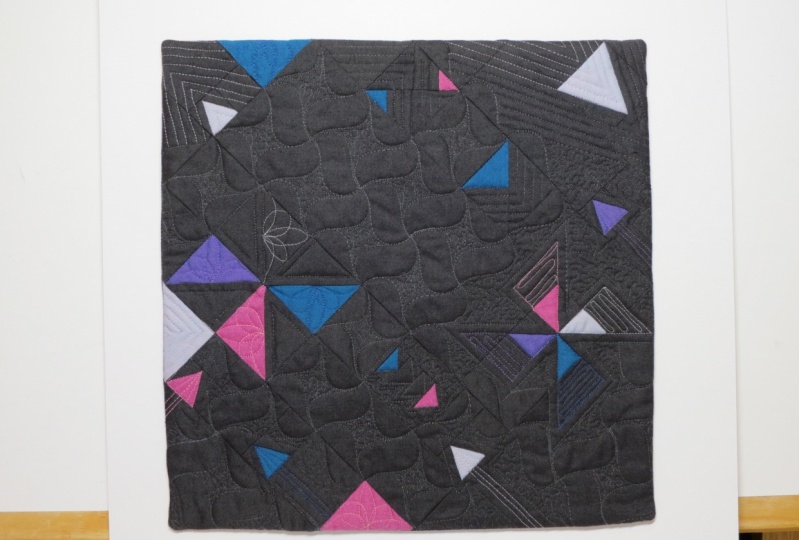
3. Pinning up the Quilt: This first lesson, we're gonna talk about painting our coil to the design law are my design while it gets really dirty when I use it all the time. And so I thought a piece of white blackout curtain fabric from a big box store. I keep this fabric on its role when not in use to make sure it doesn't have any wrinkles and stays very clean. I've also marked the center spot on it, or I will be painting the center of my quill. This center spot, if centered in my light frame, which I'll talk about in a later lesson. I use the rowboat tools, cross liner, laser level. It will show vote horizontal and vertical or both together. And I find this really, really easy to make the quilt square against the wall. You must have it on a tripod. Average or laser level is set up, you're ready to find the center of your quilt. You can do that easily and quickly by folding your quilt into quarters. This is a real small one, so I could have just guessed. I'll put a little pin through the back of the quilt where the center is. Now that we have the center of the coil, we're going to pin it right on that center thumb tack. And we're going to align the top edge with the top laser level line. And we'll just use a couple of big pins to hold it in place. Then I can go back and adjust the feet of the vertical level. So it's right by the edge of one side of the quill. It's not quite on the edge, it's a little off. You can just tug it a little bit. Okay. And it was a large pin. Then I'll move the level the vertical level to the other side. Get it close to that top corner, and then pan the bottom corner. Now that I've moved my level to the floor, I can check the bottom for squareness as well. And if I need to pull one side or the other, I can do that. Just a little bit about the pins. The big pans you see here on the top are large courses pins easy to grab, heavy duty enough to really hold the weight of a quilt as you're trying to maneuver it onto the wall. That small pins underneath are about an inch long with tiny little heads. Those are the ones when I get it squared up on the wall, I use these to pin through the back edge of the finished quilt. Now, it is very important when you start painting with the small pins, that one you pin through the back part of the binding or the facing, so the little pin doesn't show. And two, you want to pin it all the way around. If you don't, you might get really bad shadows. If the quilt is a little bit uneven or flocks around, you don't want to get a bad shadow and your photograph. So you want to put a few pins all the way around. And as you pin it with a small pins, you can take the large pins out. And I'm just flipping these pins at an angle. So they go into the design wall to hold it. But they don't show on the front. There's a little part on the side here that was just puffing out. We're not working with a totally flat object like a painting. So it does require just a little bit more pinning to make it totally flat. Let's sum things up. Hack number one, make sure you have a very clean design law or use a dedicated piece of white fabric covering your wall before you paint your quilt up. The second part is makes sure you pan your coil very square to the design law. Join me in the next lesson where we'll talk about the camera setup.
4. Camera Set-up: Now that you've got your quilt pinned to the wall, let's talk about cameras. You don't need necessarily a DSLR camera, although that's what my husband uses to photograph my pieces, lots of people do use their cell phones. But it's important that if you do use a cell phone, that you get it on a tripod. And if you want to set your setting so that you find the actual middle of your quilt, which is right here. It's 63.5 inches from the floor. And that is the instance that you want, the center of the lens on your camera, exactly the same height that you measure up here. So we measured over there on the design wall that the center of the quilt was about 63.5 inches from the floor. That's where you want the syndrome. Your lands at exactly the same distance from the floor. And you want your camera to be very square and not tilted up or down. Your tripod should have level that will assist you in making sure that it's square on with the design law. Here's an example of the cell phone set up. Your cell phone camera needs to be perpendicular to the wall and the floor and centered exactly to the center of the coil. You don't want to set your camera off at an angle or looked down at an angle. You can see in this next photo, the quilt fills the frame showing the edges of the coil and is square in the, in the photo. The next example shows if you set your cell phone camera at an angle to kind of look down at the quilt so that you could fill the frame. When you look at the finished picture, it's like a trapezoid in the frame and is not square in the frame of the photo. You do want to fill the frame as much as possible with the quill, but you still want to show the edges of the quilt about an inch or so around all sides. You also don't want to shake the tripod when you take the picture. So it's a good thing to use your timer setting on your camera, or use a remote control to snap the picture so that you don't wiggle the camera when taking the shot. Another thing you should do, if your camera is capable of it, is cake different exposures of the quilt, and then look at the different pictures that you have to choose from in Photoshop and choose the best exposure. Let's review the camera setup. First, put your camera on a tripod. Then adjust the tripod so the camera is perpendicular to the floor and the wall. Next center of the lens to the center of the coil. Then fill the frame with the quilt image showing all the edges. Make sure it's in-focus. And then use a timer on the camera to activate the shutter or use a remote control. And if your camera allows, take images at different exposures. Now we'll talk about how to best fill the frame with your quilt in your camera setup for a rectangular quilt that's horizontal. You want your phone or your camera in a horizontal setup. If your quilt is vertical, you want to turn it and make sure you're in a vertical setup. Otherwise you won't be able to get the picture of your quilt filling the frame as big as possible. Here's an example, shows how the different aspect ratios that you set your camera at, or the different orientations will give you vastly different amounts of pixels in your picture. The top picture was taken at a horizontal view with the camera and an aspect ratio of 16 to nine, you see that there's a lot of empty space on either side of the little quilt. The next one down on the left was a vertical aspect ratio. And there's a little bit less space around the quilt. And the third one was taken where I change the aspect ratio to one to one and the quilt fill the frame. This next picture shows you where I cropped each one of those. The first one that was the horizontal orientation with an aspect ratio of 16 to nine, only gave us 1793 pixels in the vertical direction. The second one taken with the cell phone camera in the vertical orientation cropped, gave us about 2184 pixels tall. And the third one where I actually change the aspect ratio in my phone camera to one-to-one. Fill the frame with the piece of art that gave 28, 32 pixels tall. You want to get many pixels of your artwork as possible. You don't want a picture with lots of empty space that you're going to crop and lose resolution. One of my big hacks is that if you have a large vertical quill, but you have a horizontal piece of fabric on your design wall. I hang those large quilts horizontal, take the photos and then turn them back to their vertical orientation in Photoshop. Let's sum up this lesson. Hack number two, make sure your camera is on a tripod and that it's very level square to the design wall. Also make sure that the center of the lens is that exactly the same height from the floor as the center of your quilt? Hack number three, make sure you set your camera at the correct orientation to match your quilt vertical or horizontal. And choose an aspect ratio where the image of your coil fills the frame completely. Join me in the next lesson where we'll talk a little bit about lighting.
5. The Importance of Lighting: Let's talk about lighting. It's very important to have even lighting across the surface of your quilt. This can be hard to achieve. For example, in a room with overhead lights, the top of the quilt often looks much brighter than the bottom. This uneven lighting contributes to bad pictures. You can see in this photo that the background behind the coil is much darker and grayer on the right side than on the left side. Let's talk about some things you can do to fix your lighting problems. It's very handy and built this light frame out of scraps of molding and attached LED lights all the way around. We hang it from the light in the top of the room. And when not in use, we pull it out from the back and we hang it out of the way. Include take it down. But this seems to work really well for us. Okay. So you can see this is the quilt with no lights in our plug this in. What a difference lighting makes. Another hack for improving lighting, especially on a large quilt that still may be a little dark at the bottom, is to set a white board on a surface right underneath that can reflect some of the light backup onto the quilt. In this case, I've used a large piece of white star foam board, but a large white poster board would also work. If you can't build a light frame like we use and you have a little more floor space. I would advise buying some free standing photo lights. Here's a couple of examples that I saw on Amazon and they're very reasonable. You can set them on the floor on either side of your coiled and you should be able to achieve nice even lighting. To sum up this lesson, hack number four is used even lighting, either a homemade setup like I showed you or vice and freestanding lights where you can like the quilt from either side. Join me in the next lesson, we're all do a little demo of how I resize my images in Photoshop Elements.
6. Resizing Your Photos: Now that you have your pictures taken, you need to open them up in near photo editing software. I use Photoshop Elements and I have the 2020 version. This program is very affordable, usually about a $100. And you don't have to pay for the monthly fee for the more advanced Photoshop. Sweet. This seems to work just fine for resizing images. I have two pictures here you can see down in the corner. One, this one was taken out the aspect ratio of one-to-one with my cell phone camera. And this one was taken at the 16 by nine. So we're going to crop both of these down and then compare the size we get in the resulting pixels. The first thing I do when I work on a photo is duplicated. So we'll start with this one with the 16 by 9. I'll duplicate it and then I'll close the original to make sure I never mess up the original image. Then I'm going to use the crop tool. I didn't leave a whole lot of background space on this photo. But really when you take your images of your quilt, you should leave a good amount of background about an inch or so around all sides so that you can see the edges of the quill in the photo. That's usually what the submission calls for. So I've got this one cropped. And now I'll go back over here to this other one. This is the one that was taken at the one to one ratio with the cell phone camera. And again, first thing I'll do is duplicate this one. Close down the original. Now we'll use the crop tool. And this one doesn't need quite as much crop B. Try to do it about the same as I did the other one. And we'll say crop. Okay, so now we're going to compare how many pixels we have on each of these images. I'll go to resize image size. And so you can see that this one that we took at a one-to-one ratio has about 27, 100 pixels. So let's take a look at the other one. This is the one that we took with the 16 by 9 ratio. And this one has 2200 pixels. So we have quite a few more pixels after we've cropped with the photo, where we fill the frame with the photo. So that's the first thing I want you to notice. Okay, so then we're going to come back to this one. This is the one that was taken at the one-to-one ratio that filled the frame. And we'll check the pixels again. We have the 27, 100 pixels, so quite a few more than the other image. And if we look at that size, we can see that it's at a resolution of 72 pixels per inch, which is usually just fine for showing on the screen. But for print quality, that's usually not good enough. You usually they want a resolution of 300 pixels per inch or dots per inch. So if we were to put this up and just change the resolution to 300, now we have over 11 thousand pixels. Well, you just can't manufacturer pixels. So that won't work. That back to 72. So if we want to up the resolution to 300, we're going to take 2710 pixels and we're going to divide it by 300, and we're going to get nine. So that means we could actually change the inches, nine inches, and change the resolution up to 300. And now we still have 27, 100 pixels. So we have not made anymore pixels. It is so important to have a lot of pixels, but not to make more than what you captured in your photo. So now we have a picture that's nine inches by nine inches and would print at 300 pixels per inch or dots per inch for printing. So sometimes a call for entry will want a different size and you may have to resize again. We just got a call for entry yesterday that wanted an image that was only six inches by six inches or six inches on the biggest side at 300 DPI. And so if I was to use this image again, I would make a copy of it. And then work on the Copy and then resize it again to what the entry called for. And so we're already at 300, so we know we have good resolution, but they don't want to picture any bigger than six inches. So I would change this to six. And we lost pixels this time. So you can see because of that, you always want to start with a picture that has just as the most pixels that you can get. I hope that these lessons have been helpful for you to be able to take better pictures of your quilts and understand a little bit about how to resize them for call for entries.
7. Class Project: Okay, now let's talk about your class project. First of all, I want you to create your setup for your photographs. Make it clean, cover design, wall, good laser level, a tripod, and a camera. Gets him photo lights, and get your setup all ready to go. Then I want you to take a photo of one of your quilts, take it into the photo editing software and crop it and resize it. Then upload your image of your quilt to the project area of my Skillshare class. I can hardly wait to see your pictures. I know you can do this.
8. Use your Time Wisley: Hack number five is just to use your time wisely. It requires a lot of effort to set things up to take these photos. So it's a good idea to have multiple coils ready to go on the day that you are going to do your photography. I hope you've enjoyed my class and please send me an email if there's any questions you have. Thank you for watching.
 Vicki Conley, Art and Design