Transcripts
1. Master How to Create Gangster Gorilla AI Videos for TikTok & YouTube Shot: I welcome you to this amazing AI video creation
mastery course. So in this curs, we are going to be
learning how to create danar Gorilla AI video for
TikTok and YouTube Shorts. My name is George Steve. I am a senior software
developer at Emmoir Global. I have a very good interest
in creating AI videos, and using the most recent
AI video technologies, I have started creating
so many videos that I getting lots
and lots of views. And today, I want to
teach you how to start creating your own
Gangster AI Gorilla. Video. So I'm going to
share with you all the tools you need to get this
done and how to get started. Then we go ahead and create this video,
publish this video, and then go ahead and upload
that either on YouTube, and then you upload that
on TikTok or Facebook or any social media outlet
that you love so much. So this video is a step by
step guide for YouTube bus and for people who are interested in creating
TikTok videos. Let me go ahead and show
you how to create this. But before then, let's go
ahead and watch a demo video of the design of the video we are going to
create in this course. So late in the morning. Shadows fade. The road is pre whispers move through fields of
green peaceful moment, quiet Bress L. Feel the and fT stand still. Hotel. Calm guide the shore Cows drip with silences
golden skies end of day. Re still that don't call. Holding grace,
embracing all in still. His know Come little guy. So Alright, so I hope you see the
video you just watch now. So that is a typical
video of what we are going to create in
this course step by step. So join me in the cas. Let's get started immediately and then see how
this actually works, how to create our characters, how to animate our chacors, how to create the
music background, how to dip down to the cap code, and then publish our
video style by style. If you have interest in building a video like this, join
me in this course. Let's get started immediately. Thank you so much, and I'm
going to see you in the case.
2. Step 1. Generate Your Story and Image Prompts: I welcome you to this
amazing video lecture. So we are about to start creating this video
step by step, and the very first
thing we need is to head over to ChatGPT. Right on your ChatGPT, you go ahead and copy the prompt action
provided for this lesson. Go ahead and paste
the prompt here. It says, develop a sequence of highly detailed cinematic
scene prompts written in the style of a movie script to visually narrate
the fully story. And the story start
with the Rod incident. A local walks along a mystery
ruda out from a distance, a boss approaches with a headlight cussing
through the fog. Suddenly, the boss strike
the cow and spits away, leaving the animal
injured on the road. Then the next one is
the gorilla's arrival. A sleik black truck pulls up the driver is a
gangster gorilla. Tied in a scarf,
tied with a scarf, tied around his head, a heavy good necklace, a grispy white pull
shed and blue jeans. He steps out, loses the injured cow and
stops to intervene. Then the next one is the rescue. The Gorillan lifts the
cow into his truck, drives to a lay and
tas to the wood. Inside his hideout,
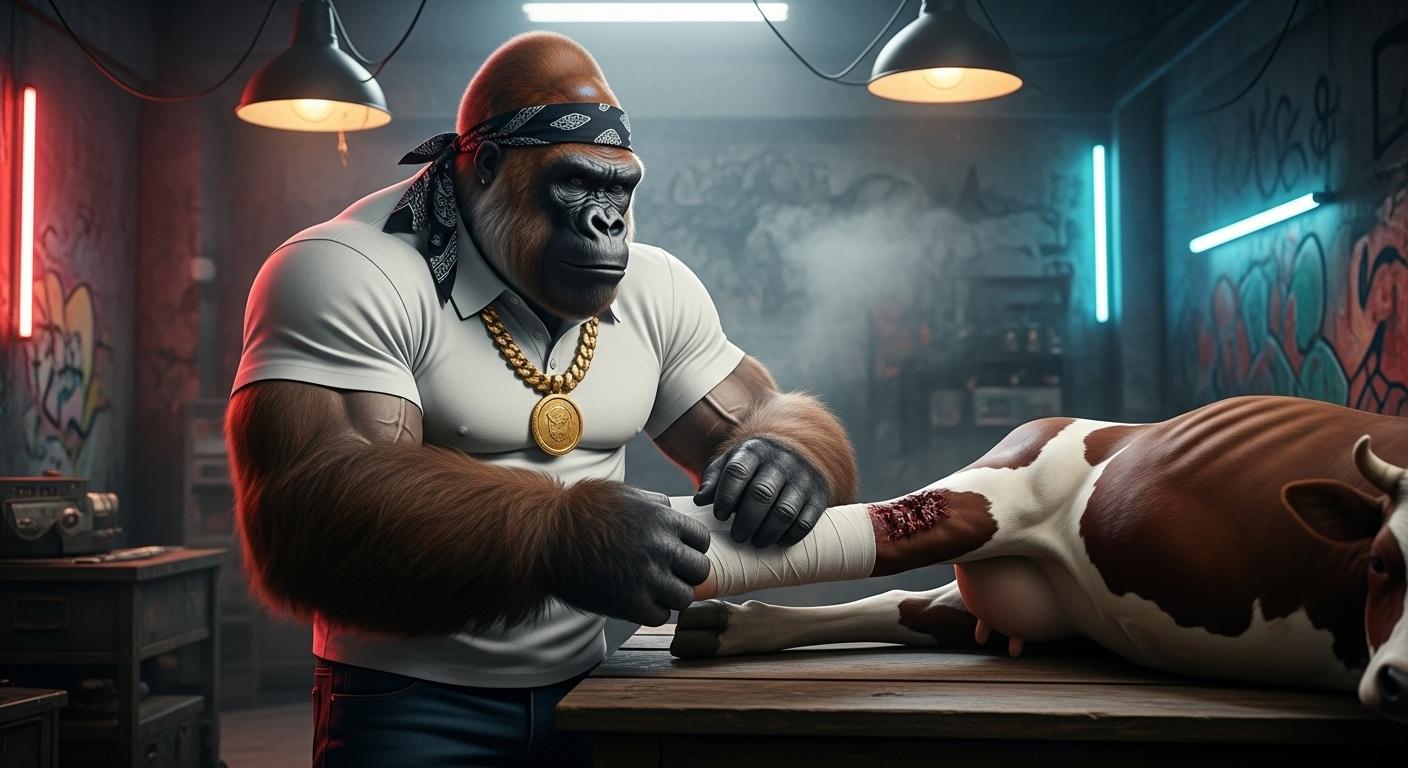
filled with new lights, graft walls, and smoky ambience. He carefully bandages
the cow's leg. Healing and a trust, the
cow recovers over time. Once healed, it
leads the gorida to its home and introduces
him to its siblings. The cow reassures them the
gorida is trustworthy. Then the next one
is the celebration. The cow climbs into
the grida's truck, and he drives them
all to his leg. There he provides food, music, and new
light festivities. They eat, dance, and
make merry together in a showy, joyful atmosphere. Then the next one is
the market place. Later the gorilla loads all
the cow into his truck again but this time drives them
to a boss room marketplace. There he sells them
to butchers who are actively cutting
meat for customers. Large bundles of
cash are exchanged. Then they pay off
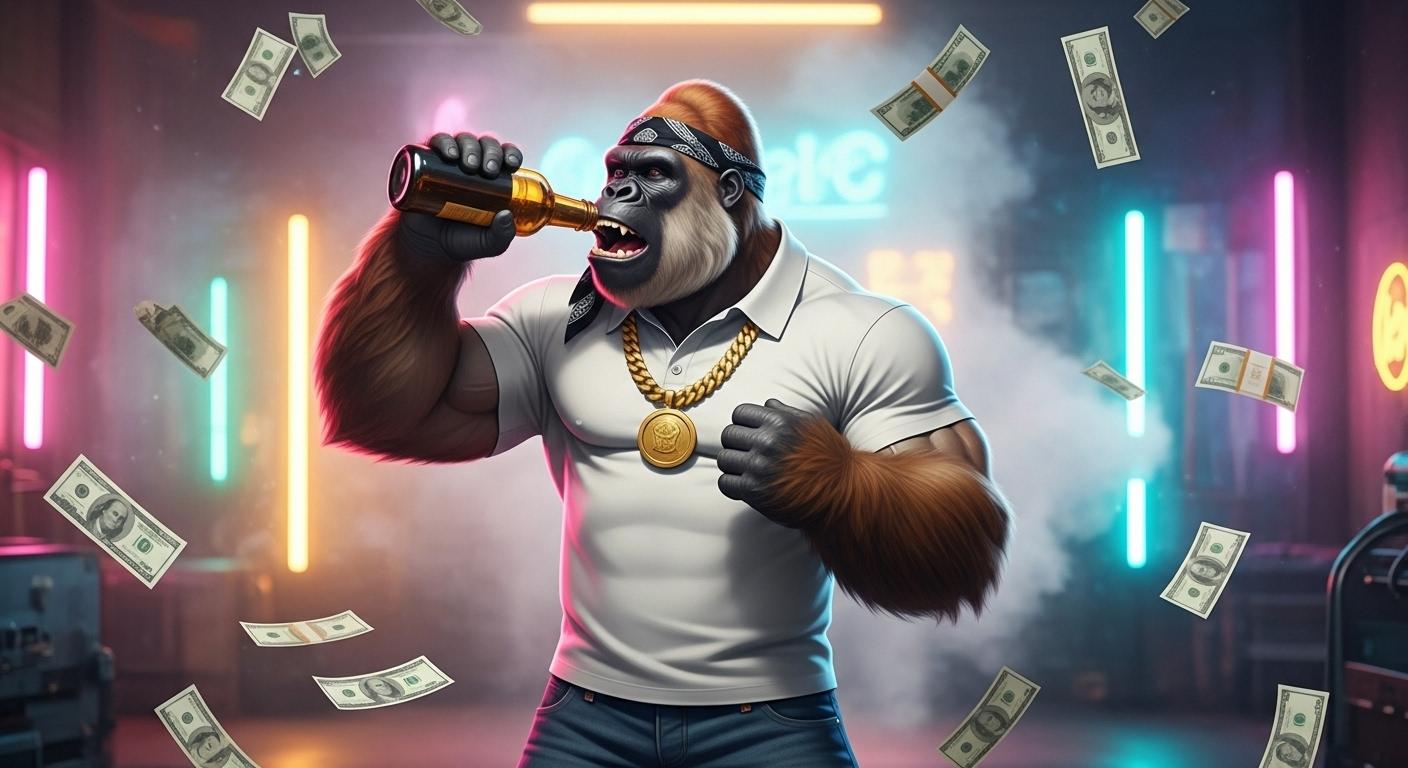
back at his sleigh, the gorilla Glifry throws
stack of money into the air, dances widely as the we rain down and drinks partly
why sharing of his wards. So additionally,
quite descriptive forms highlighting
the main elements. One is the gorilla in muscular, style Gorilla wearing
a scarf on his head, a good necklace, and a white
polar shed and a blue jean. And so, I've made
all these and I created all this sours you
can be able to generate this. So copy the prompt PETA and
let's create this study line. From this study line,
we can now go ahead and create the images, which will help us to
build this story, right? So let's go ahead and
continue with this. So it says the root incident. From the road incident, we head over to the next scene, the Gorillas arrival, then the rescue, the
healing and trust. Then we have the celebration, and then we have
the market place. We have the scene, the payoff. Then we now create
prompts for the Gorilla. Then the cow, the bus
that hits the cow, and the gorillas struck. This is what we are
going to use to create a stories, right? So, based on this story, all we need to do now is go ahead and copy
the second prompt, which we're going
to use to generate this image or
generate our images. Pas that prompt here. It says, based on
the story above, create a sequence of ten cinematic images that visually narrates
the key scenes. Go ahead and hit on this, and it to generate
the images for us. So I can see the image one, two, three, and we're expecting to get about ten
scenes for this. So anyone that is
not actually day, we go ahead and include it. So we have these ten scenes
actually created for us. So in the next video lecture, we go ahead and start
creating images step by step. Thank you so much, and I'm going to see you in the
next video lecture.
3. Step 2. Generate Images for Your Video: In this video lecture, I welcome you back
again, and right now, we go ahead and start
generating image step by step. Now, based on the image and based on the scenes you
have actually created, you have to read along in order to understand
what this actually does. This is a wise and conn gollla that helped a cow that was
knocked down by a bus, then took the cow to his house, bandaged the cow,
then feed the cow, and made the cow heal. Then the cow took the
gorilla to his own house, showed him to his siblings, and trusted the gorilla so much, and then asked the
siblings to join him or how to attend party in
the gorillas house. So they all went. The golala fed all of them, they enjoyed. The next day, the Gorilla took
all of them to the market, sold them out to the butcher and made huge amount of money. Now, whenever you're
creating your images, this story has to be in your brain in order to
know what you are doing. So first of all, we are going to get
we ask HAG TP to give us the descriptive prompts for each of these
main characters. The very first one
is the Gorilla. Now, head over to Google, and the best thing
to use is the whisk. So with Wisk, we can be able to generate the consistent
character right here. Now, go over to Wiklabs dot google FX and write this idea. We go ahead and click on Enter two and
right this side here. The next thing we have
to do is first of all, go ahead and click on
subject in order to create the elements or the
characters you're going to use for this
image production. So first of all, I'm going to enter this for the
gorilla and let me make this gollla to be brown creamy
gollla instead of black, so it's going to look
so beautiful, right? Now, I added a brown creamy muscular
Gangster style gorilla. Exuding charisma
and intimidation. He wears his clf tied
around his head, a heavy gold necklace, a grips white boy
shirt and blue jeans. His presence is
commanding, half the ward, Bose, half likely Savio
and click on Generate. So it's going to divorce the
character for the gorilla. So now, this all half. Let's go ahead and
view that. So this is the gorilla gonna be
easy for these purples. Right, so you see that
is actually mean. Alright. Now let's go ahead
and copy the next prawns. I'm gonna see gentle cow. And over here, I'll go ahead
and add another collector, and Guide and press that. So you can always if
you're trying to create an image right here and it's
not you're getting an arrow, go ahead and ad, create
a gentle cow with soft, satiful eyes, injured and
veritable after accident. What's no, I won't want to have that injured
at this moment. I just want to have a gentle
cow walking on the road. Working on the road. So create a gentle cow
walking on the road. And let's go ahead and get that. So it's going to
create that for us. Alright, now you
see the cow half, and I love the
beauty of this cow. Then the next one is
a large modern box, and this is what I need. Let's go over, create
another character, and I'm going to add that. And I'm going to see create
a large modern boss, and it's going to
create that for us. So we now have the first
character, the Gorilla. Then the next character is
the cow and then the boss. And after the boss,
you're going to create a anal one for the truck. So this is what we
have for the boss. Then let's go ahead and create. The next one is this so let's
go ahead and press that. So I'm going to see crud. Let's change this
from black to blue. It's going to be a blue colour. I don't want that to be dark. That is why I'm checking
everything that goes to black to be blue, right? So we want to use
all these to create images so that the image will always be
consistent, right? So let's go ahead,
we're told that. Alright, check it out.
This is what we have. So we go ahead and let's go
ahead and recreate this. We're going to make the
back to be open back. So go back and copy this. I will say a block is all going
to be a heavy duty truck. It's going to be a simple truck. Let's go ahead and copy that. And to remove the gorilla
that is right inside there. So go back and recreate this. So always click on a plus sign. We want to say, create a blue heat chalk with
crumbly tail oversized wheel. And okay, let's go ahead and say oversize
wheels because that is kind of chuck that
Gorilla will always write. So let's check it out. This is what we have, and
this is kind of chuck I want the Gorilla to always write because Gorilla is a gangster. Now we have this. Now
let's head over to the images and go ahead and
copy the very first one. And this shows the cow. Let's go ahead and
say, I'm going to select only the cow right here. And then we go ahead and enter prompt and let's go
ahead and create that. So we need to select
this to always be 19 by 16 expect ratio
because we want this to be for elect
TikTok or YouTube Shorts, and it's going to
make sense, right? So I show you select this
portrait 19 by 16, right? So not 16 by nine expect ratio. Now we have this created. We can actually select
the very first one. Now, we go ahead and copy this. That is the boss that is coring. Go ahead and select this. Okay, we can select the two. And the cow and the boss. Let's check it out sure we
have something so cool. So we now have the boss
coming across to the cow, and that looks good. Now, we go ahead
and select this. And this says is for
the gag style gorilla. So go over and
select the gorilla and b ahead and enter this. So we're gonna
select this truck. Say, inside the
sleek, blue truck. Same place you have black,
I'll change that to blue. And then we go ahead
and create this. So this is for the Gorilla. So you can see that the Gorilla is actually
riding the chuck. Now, let's go ahead and
select the next one. So at this moment, I will
head over this idea, and I'm going to generate
every remainder one buy stop, and then we move ahead, right? So go ahead and select this, and let's go ahead and say
in the trucks creches, it holt beside the
in George cow. So I'm going to
select the cow now, and then we select Gorrira
and then we select the truck, and then we go ahead
and create that. So now I'm going to
create every one of them, and then we continue again. Right now, I have been able to create all the images
that we needed. Started from the cow walking, then the bus coming
across the cow, and then the Gorilla driving. And then the Gorilla stopped
to help cab the cow. Then the Gorilla took
the cow into his truck, went home, bandage the cow. Then the cow now has
trust on Gorilla, and then the cow took
gorilla to his siblings. Then the Gorilla packed all
the cow into his truck. Then he went home and
fed all the cows, and then to the cows to the
markets to the bushels, who paid him handsomely. Then the goira is now
making him Merry. So you can see how
beautiful the story is, let's go ahead and
guess at it now. Quit on the loop of this, and let's guess at it, guys.
4. Step 3. Animate Your Image for Your Video: I will call you back again.
In this Video lecture, let's go ahead and
animate all these images. So inside weeks,
you can actually animate all these
videos step by step. So anytime you move
your mouse, yeah, you can click on Animate, and then you generate that. So if you click
on this, it says, Away to generate videos
that are not landscape. Aspect ratio because this
is for mobile device. Now, what you need to do is you can head over to
twos that are free. One of the tools is Hero AI. So ins that Hero AI. If you actually have a free account and you go ahead and
create a free account, you're going to be
giving 100 credits. And that's 100 credits,
you can use that to animate your video, right? So you can create
so many accounts in different accounts and you'll give credits that will help you to create
all your videos. But there's another one again, and that is the
Google AI Studio VEO. So let's go ahead
and see AI Studio. So we have AI studio, and you can go ahead and click on this very first
one right here, and it's at a I studio. Right here, you
have nano banana. You can actually use nano
banana to create these. You have Native speed
generation, right. Then head over to
generate media, and there SIDA, you can actually go ahead and
move over to Video. Now, if you create a new account using your
Google account, you're going to have
ten generations. So with this ten generations, you can actually go ahead and
start creating your video. And creating this
video is very simple. All you need to do is to
generate video with video. Click on this, add Image to the prompt and upload an image. So anytime you click and want to prove an image is going
to always bring up this, so you have to unrest
select acknowledged. Now, if you want to start
creating this video, I will advise you do one thing, and that is always start with something
that is captivating. Io starts with the cats with the cow walking alone
I want to start with the cow and the boss coming together and then
they collide.EsIDA, the description is going
to be very simple. Because you don't need to make something ambiguous, right? If you don't know how to
do that, you can tell ChatGPT to create different
videos based on each scene, and ChatGPT will
help you do that. So while SIDA, all I have
to do is, I'm going to say, create a video
where the boss hits the hit the cow as it works along the route. Now, one thing with this is that Os ratio you
select nine by 16 expect ratio. That is hit right here. So always select nine
by 16 aspect ratio. And because you are
using a free vasion, there will be too many people actually using this
at the same time. So sometimes you always tell you that you're on a que
qui had a hit and run, and this we now start
to generate, right? So bus hits cow on road. So that is actually
being generated, and with our time, if you
go ahead and get that done. So let's go ahead
and see this video. Go ahead and click
on this. And you're going to see the video of this of boss Hid the cow,
and you can see that. So now you can go ahead
and download this video. So all you need to do is
to click on download, and the video will actually
be download for you. Alright, so in that way, you can go ahead
and delete this, then upload another video. So we're going do
that step by step. Let's go ahead and
upload another video. So let's go ahead. We have uploaded on that video. I'll go ahead and see,
create a video of the Gorilla driving driving and singing to a song. So this shows the gonilla
driving and singing a song. And let's go ahead
and generate that. Right now, we have ne to
create another video. Let's go ahead and
check the video, and you can see
that the gonila is actually driving and
singing at the same time, and that is so cool. Alright, now, let's
go ahead and create all these videos one by one and get all of them
downloaded on our system. Right, so I'll actually
credit almost all the videos, and this is the very last one. Sky ahead and take it out. And I can see that Grill is not very happy dancing and
throwing one up in the A. And this is the vinyl
part of this video. So go ahead and do just
exactly the same thing. And when I pulled I thought
to let you know is that, this video was only VEo
two before previously, but now we have VEO
three right inside here, and that is really very amazing. So go ahead and put this down, and if you have any equation, go ahead and use the
eutionEser section and I'm going to get back
to you as soon as possible. Thank you so much,
and I'm going to see you in the next video lecture.
5. Step 4. Generate Background Music for Your Video: I will call you back again. So in this video,
we go ahead and generate a music
background for a video. So we would like to add a background or you go
ahead and add a caption, maybe you touch ChaGTP to generate a detailed
voiceover for you so you can be able to generate a voiceover for this and explain how this
actually happened. But nevertheless, we want
people to follow along, and then they will go
on to understand that what happens at the end
by imagination, right? In that way, all I
need to do is to tau ChaGTP to write a
lyrics for this, go ahead and pace
this prompt says, write a short lyrics to generate a calm and rocking
song for this video. And let's go ahead
and get that done. So with this, we go ahead and create a short song for this, and that will help us to go
ahead and create a song. So have the rigs. I have
us to create a song, go ahead and copy that, and now head over to snow AI. So right inside Snow AI, you can go ahead and use this to create any type of music you want for your
project, right? So I will advise you to actually use that
because it is free. You have the free type
and the paid type, right? So with the free type, you can be able to generate
whatever you want. So move over to Custom, right. So we inside Custom
because you have generated our rerics and go
ahead and paste the gris you've just generated. And now you can make
that to be emotional. The tie. You can make
that to be emotional. You can make it to be classical. You can put R and B or any
type of style you want. And A, you go ahead and
add a title for this song. And this title I can call
out to be Gorilla and cow. So Gorilla and cow, if you click on Advanced Option, that is where you can
be able to set this to maybe female or male, right? Anyone you can choose maybe
female or you choose male. So let's go ahead
and cress that. And now I would always
like to go to the advance, but no problem it's part of this lecture to understand
what everything actually does. Now we have gorilla and cow, and then go ahead and
generate this song. So you don't actually
take much time our song we generated, and whatever we
have here is been to use as the background music, okay, so that it or
always look so nice. So right inside the workspace
or beside the workspace, you can name this
workspace anything. Right here, you're going to have different songs that you
have actually generated. And let's go ahead and check this song and
see how cool it is. Soft light in the morning air. Shadows face. The road is pare. Whispers move through fields
of green, peaceful moments, quieres reason L go feel the rif Time stands still. Son. Calm soul Cowtrip where silence says
Golden skies end of day. Every step that gentle
call holding Greece, embracing all Reed and slow. Let it go feel thef Time stands still. Heart know. Calm will guide so Right, so that is the song we have. All you need to
do is to go ahead and click on these three dots, you get over to download. You download this as an
MP tries, and, you know, if you're using
the free version, there is no commercial license that is actually backing you up. So if you need a
commercial license, that's why you can go
ahead and upgrade. But if you don't need
a commercial license, all you need to do is to go
ahead and click on download, and then you go ahead
and download the song. And in the next
with the lecture, go ahead and put everything
together and make a video ready for use. So thank you so much and
I've gotten to the stage. I think I've done
something so cool. So thank you so
much, and I'm gonna see you in the next
video lecture.
6. Step 5. Edit and Publish Your Video: I'm very excited
to welcome you to the last stage of
this amazing project. So the Gorilla and the cow, the project is so amazing. We have gone from ChatGPT down to images where we
created all our images, and then we moved
ahead over to Sno and created a music Brad. And that is amazing. Now,
let's head over to Cov Code. So right our calf Cod, go ahead and download all the images you animated
from Google V three, and then we go ahead
and upload them. Sure that you silence all your videos
you've created from Google Vo three or
if you use VO two, or if you use Hello AI, anyone who actually used
any of the free AI today, just go ahead and silence them. And let's go ahead and
create something amazing. So I've just made this and
I put everything together, and it is time we go ahead and listen to the amazing video. And the next thing is you can go ahead and add transitions to your images so that it's in between your
video so it can look amazing. But nevertheless, we
can go ahead and get started because it's really very awesome and very amazing. Let's go ahead and
check it out, guys. So I believe from
here, everything will look good and I'll
guide and put it back. So this is the media, and it covers everything
we've actually done. So now that we have
everything ready, let's go ahead and play this video and
check it out, guys. Oh feel Time I know. Come with clouds drift with silence days. Golden skies and day every step co ho embracing feel Still I know come with good Alright, so you can see
amazing video just created and everything we are met with free AI twos, and
that is really amazing. So go ahead and put it down
and share with your friends. And I believe at
the end of this, you've gotten something so cool at the end of this
amazing project. So I'm so glad
you're here, and I'm going to see you guys
in the next video. Thank you and see you then.
 George Steve, Senior Software Developer & AI Content Creator