Transcripts
1. Introduction: Welcome to today's class, a beginner's guide to
the IT service desk. I'm your host, Matthew, the service desk coach. My mission is to
coach and mentor those that are beginning
their IT journey and Korea. And I'd like to thank you
for giving me your time. In this class. I'll be guiding you through
the fundamentals of what a service desk and what
the core duties of a service desk analysts will briefly discuss some of
the key outcomes that are service desk is responsible for an industry best
practice methodology to enable IT businesses to
achieve this outcome. Next, we'll talk about
general IT troubleshooting. At which point I'll provide
a framework you can adopt and apply in your
current or future position. I'll go into detail about how to best compiled
ticket notes. You'll also be provided
a code script outline we can adopt immediately to handle
him down telephone calls. And I'll delve a little further
into corporate etiquette. At the end of the lesson, you'll have gained a
working knowledge of water service desk is and how you can best
performing the role. You'll also walk away with
practical frameworks, which will have your
manager or team leader coming to you
as the go-to person. With that said, I'll
see you in class.
2. Project Video: Thanks for joining me. Before we begin the
course content. I'd like to share a quick note. After having completed
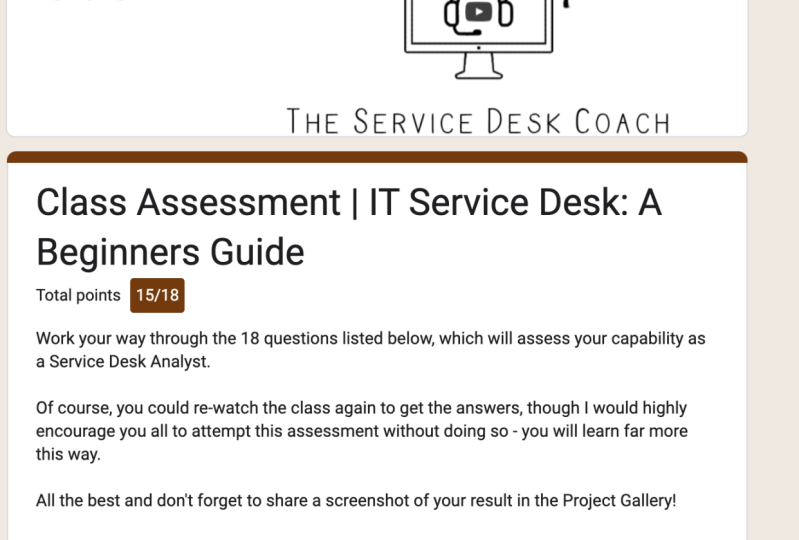
this course. And 18 question,
multiple choice. Online tests will be
made available for you. Once you've finished the course, head over to the project tab, where you will find
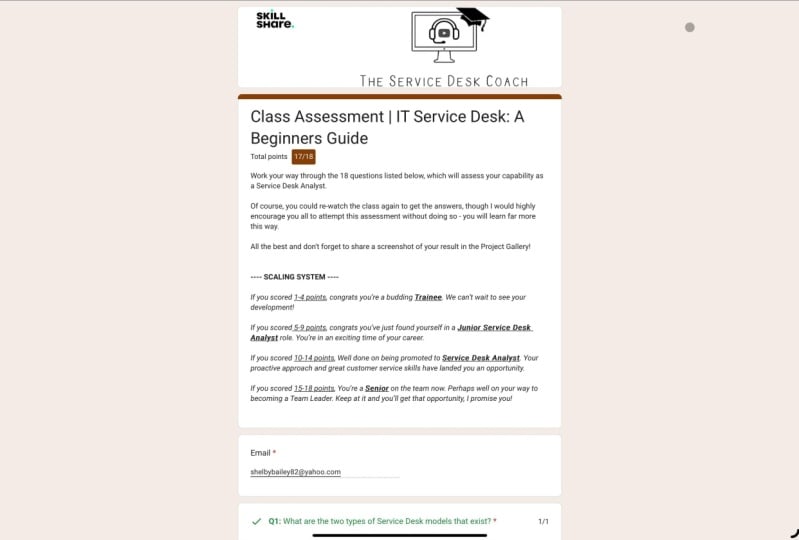
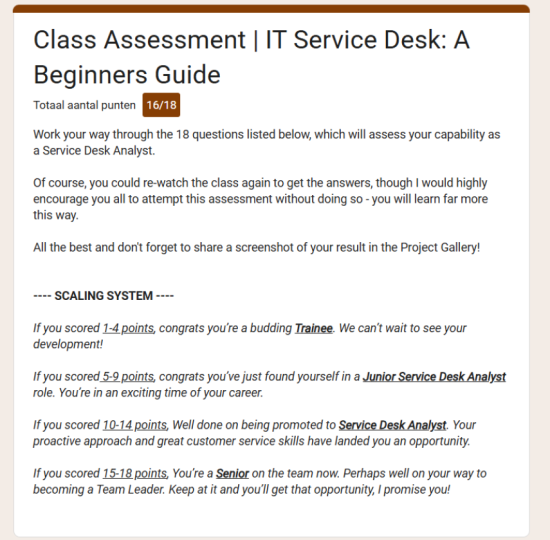
the instructions and web link to take the test. Off. The 18 questions
for ranking bands exist. If you school one
to four points, you're a budding trainee. Good effort, you demonstrate premise and we can't
wait to see you. What development? School, five to nine points. Congratulations.
You've just found yourself and if Junior
Service Desk analyst's role, you're in an exciting
time and go Korea. If you school, tend
to pull ten points. Well done on being promoted
to service desk analysts. Go proactive approach in great customer service has landed you a great opportunity. If you school 15 to 18 points, you're a senior on the team now, perhaps well, on your way
to becoming a team leader, keep at it and I can assure you you will get
that opportunity. Make a note to
return to this video after you have completed the
test to see how you ranked. You can take it multiple times and I would
encourage you to do so. Learning from our mistakes, after all, is how we learn best. Lastly, please upload a
screenshot of the test result into the project gallery to close out the deliverable
for the course. If you have any questions, head on over to the
discussion tab and ask away. Without further ado. Thanks for watching, and let's
get into the first-class.
3. Lesson 1 - Service Desk Responsibilities: Lesson one, service
desk responsibilities. Before we can effectively understand how to perform
as a Service Desk Analyst, we must understand what
a service desk is. Simply put, the service desk is the central and primary point of communication for customers
into the world of IT. If a company chooses to
outsource its IT service desk, it can choose for it to be
structured in two ways. They can adopt
either a dedicated all leveraged modal choice is dependent on the customer's business requirements
and budget. Dedicated service desk
model uses a set number of service desk analysts
dedicated to supporting one customer's
IT support requirements. A leveraged service desk modal, or sometimes referred
to as a shared model, is when a set number of
service desk analysts provide IT support
to multiple clients. If you're just starting
on a service desk, it's easier to begin
in a dedicated model. As it means, you
only need to learn one customers sets of IT
processes and procedures. After you've gained
some experience, you'll be ready to take on more clients in a
leveraged tomato. Most customers will
contact the service desk whenever they need the IT
support group to do anything. This is because they will need a ticket number to
track the issue. E.g. say, you were
going to contact your mobile telephone provider because you wanted
to phone number, you would need to contact the service desk line to
facilitate this change. It is no different
from Mr. Joe Bloggs. We need a password reset
on Monday morning. E2 would need to call his IT service desk and requests that he's
password reset. The agent would then ask
a series of questions to verify his identity and then proceed to
reset the password. Now, there are a few
ways that customers or users can interact or engage
with the service desk. Oftentimes, they will
go through well, they may email through
their request or issue. It is then the responsibility of the service desk analysts
to receive that call or email and create a ticket for it in the ticketing tool
set used by the company. Assigned from taking calls, making callbacks, or
responding to e-mails. The service desk analyst is responsible for managing
their own queue of tickets. This will usually
involve ensuring that your assigned tickets updated
at least every second day. This leads to the next
core responsibility of a service desk analysts, which is to create
or update knowledge. Inevitably, there will
be periods of downtime, which is when you can
focus on improving processes or procedures
are already in place. Oftentimes, maintaining
knowledge is not done very well. This is an area that separates
those analysts who are deemed good on those who
are thought of as great. Now that we have a
foundational understanding of what a service desk is
and what the role in bulbs. Let's continue in the course
to learn more about an SLA. Thanks for watching. I'll see you in the next class.
4. Lesson 2 - What are SLA's: Lesson two. What's our SLAs? Slas stands for service
level agreement. It's an IT industry
known term used to refer to key metrics that
define if an operational team, such as the service desk, is meeting agreed
with expectation. There are different types
of SLAs that exist for the service desk and let's
focus on some of those now. One SLA that exists
is called coal and so the definition of the coal and so SLA is
that for each month, the service desk must answer at least X percent
pulls within seconds. An example of this is
that 80 per cent of goals must be
answered within 20 s. If the service desk achieves or exceeds this
metric for the month, the SLA is green. Conversely, the SLA is red if the service desk
fails to meet this metric. This type of SLA is shows that a service desk analysts
will be available to answer a user's
full within 20 s. Sure. That may be closed, that
take a little longer. But most calls are
answered quickly. And most clients are
comfortable with this type of approach. Its popularity. Companies with larger
budgets that would like heightened
availability can request cool answer SLAs as high as 99 per cent within a
set number of seconds. Another key SLA that is reported on monthly ticket
resolution time. Typically, resolution time is the amount of time that exists between when the
customer first opens a ticket and when that
ticket is then resolved. Or different priorities can
exist for a ticket 123.4. Each ticket priority will
have its own defined SLA. But don't worry, as a
Service Desk Analyst, it's rare that you'll
be handling anything other than a priority
three or priority for. A common example of a priority
for ticket resolution, satellite is five business days. Simply, a priority three ticket may have a heightened SLA, such as two business days. Usually, priority two
and priority one tickets are handled by a separate team. Due to the business
critical nature of those types of tickets. They often come attached with very tight resolution SLAs
ranging anywhere 2-6 h. Having a separate team ensures adequate management
and oversight is in place to ensure IT
service providers meet those agreed
client expectations. Lastly, another common SLA for the service desk is
a term called FCR, stands for first
call resolution, sometimes referred to as
First Contact Resolution, is a metric used to measure the percentage of
customer inquiries or tickets result on the first call versus those that
need to be loved. Investigation. An example of how this works, say service desk received
100 calls for the month and 65 of those calls the service desk were able to
resolve on that same quote. This would mean that the FCR percentage for
the month would be 65%. And industry average for FC sits anywhere in the range
of 60 to 70 per cent. If you find yourself
performing higher than this, it's usually a good
sign that you're in a high performing team
and you may be ready for a new challenge.
Thanks for watching. I'll see you in the next class.
5. Lesson 3 - Introduction to ITIL: Lesson three,
Introduction to ITIL. You may be wondering
what ITIL is. Well, to start as
ITIL stands for information technology
infrastructure library. It's a framework used by IT companies and
professionals that standardizes the delivery and maintenance of IT
services in the business. More commonly is
Practices known as ITSM, which stands for IT
service management. There are five cool streams that underpin ITIL
as a framework. Service strategy. This design, service transition. So this operations and
continue service improvement. Today, I'm only going
to discuss two of those five streams and their relationship
to the service desk. Service operations and CSI. Let's talk about
service operations. This dream relates to the
delivery of IT support, the area of the framework the
Services operates within. I'm going to talk
specifically about full key ticket categories that exist within
service operations. Category one is called
incident management. I tilt defines an incident
as an unplanned interruption to quality reduction
of an IT service? In basic terms, it means something is broken
and not working. Ticket type correlated to this category is
called an incident. A real-world example of this type of ticket
would be if someone calls the service
desk and said they compute a suddenly froze
and is now unresponsive. Statistics, but log
a ticket and then begin the process of
troubleshooting the issue. Now, there is also a requirement to
prioritize each incident. Incident priority ratings
are determined by choosing an impact school and cross-referencing it
against the agency school. In the incident
management matrix. The matrix will look like this, and it will tell you how to determine the priority
rating of a ticket. Tickets can have
a priority of P1, P2, P3, or P4. E.g. a. Ticket, the high impact and low urgency would be
prioritized as a P3. According to the incident
management matrix. Every company will have
its own variation of the incident management matrix
and the table listed here. Because a guide or anything,
you should always refer to your company's specific
incident management matrix. Which brings us to Category two, which is called
request fulfilled. Until defines a
service request as a formal request from a user for something
to be provided. E.g. a. Request for
information or advice, a request to reset a password, or request to install a
workstation or a new use of IT. Ticket type correlated to this category is
called, you guessed it. Requests. Category3 is
called problem management. As I tilt defines it. A problem is a cause or potential cause of one
or more incidents. These types of tickets are usually raised by
IT support staff proactively and usually occur after analyzing any repeat
types of incident tickets. Once a trend is identified, a problem ticket is created
and work undertaken by IT support staff to identify the cause behind
the repeat tissue. Lastly, category four is
called change management. I till defines a change
as the addition, modification or removal of
anything that could have a direct or indirect
effect on IT services. An example of when a change
ticket would need to be created is if a networks
which needed to be replaced. Network engineer
tasks to perform this activity would need to create a change
ticket to capture, be changing and why
it needs to change. Network engineer would also need to list any potential risks that could arise from changing this variable in
the IT environment. And what the remediations
to those risks. As pods are, the final step in the change
management process. Network engineer is to then seek approval from the
change approval board, will have the full proceeding to perform the list and work. This layer of the service
operation stream ensures that the appropriate IT
governance practices are in place to safeguard an
unplanned outages. The final stream
we will discuss on this phi tilde Crash Course is CSI, continue
service improvement. The title of the category
defines it perfectly. The entire stream is aimed at continual learning from
prior successes and failures and aimed constantly to
increase the efficiency and effectiveness of IT
services and processes. Doing this proactively
will maintain positive relationships and will ensure your team is operating
as efficiently as possible. It really is a win-win approach
to IT service management. Each of the concepts
discussed in this lesson, we'll be exposed to you in practice as the
service desk analysts. Will. Having a
solid understanding of the principles we
talked about will give you an edge over those that fail to or choose to not
understand this. That was a beefy
video, everyone, I encourage you all
to re-watch this one before proceeding
to the next lesson. Once you're already, I will join you there. Thanks for watching.
6. Lesson 4 - Common IT Troubleshooting, and the '5 Points Method': Lesson four, common IT troubleshooting and the
five points method. One to the technical aspects of the service
desk analyst role. The key outcome
quiet Service Desk Analyst is to solve or escalate, use it issues or queries. To do this effectively, you will need to
understand how to perform effective troubleshooting through a process
of elimination. In its simplest form, the strategy behind troubleshooting
by elimination is to individually test all
potential sources that could be
causing the problem. Once you've identified the
source of your computer issue, you can then apply the relevant documented actions to solve it. Five points of good
troubleshooting using the Elimination approach
will usually be enough to either
resolve an issue or no, you will need to escalate to
a senior engineer to assist. I define the five points
method as the capture of five independent attempts to troubleshoot and
resolve a user issue, usually listed in bullet points style within the ticket notes. Often it is best
to remotely access the user's workstation to perform troubleshooting
activities. Here is a top five list of common troubleshooting
steps and questions that often work well with
the elimination method. One, what's the issue
you're experiencing? And how long has this
been occurring for? Two, what's the outcome
you are trying to achieve? And what is blocking
you from doing that? Do you have a
workaround available? Can you show me or
replicate the issue? Have you colleagues ever
been impacted by this day, currently impacted by
this issue at all? They may already
be a ticket load potentially even with the
solution and then reapply it. So this is a worthwhile
question to ask him. He is a list of IT troubleshooting steps
that you can try. One, close the
effected application from the Task Manager
and reopen it again. To attempt to restart
the workstation. Three, check if the
user account is locked out due to consecutive incorrect
password attempts. Perhaps. Check if the
workstation can access the Internet or
personal network drive. By attempt to re-install
the application, will the device driver. While this is not a comprehensive list
troubleshooting steps. So questions using a combination of the examples provided, both boss track
your effectiveness and efficiency as a
Service Desk Analyst. That's a wrap on the
five points method. Remember to take
this on board as a key takeaway.
Thanks for your time. Let's hop into the next class.
7. Lesson 5 - Working Remotely: Lesson five, working
remotely with the nature of the service desk
analyst's role comprised mainly of remote base
support via phone or e-mail. Many current job
listings are offering hybrid working arrangements
with some employees, even offering fulltime
working from home physicians. There are a few
considerations to understand as part of
this working approach. In this lesson,
we'll aim to cover a few key items you'll
need to be aware of. One, you will most likely need to connect
to a VPN each day. This is a virtual
private network that allows you to connect your
corporate data securely. Everything is monitored to ensure that you only
use your workstation in line your companies IT security
policies and procedures. To ensure you have a strong
Internet connection. You'll be remotely
accessing virtual machines, which consumer high
amount of bandwidth. If you want to be
successful in the role, ensure you get at least
50 to 100 megabit per second on your
internet download speed. Three by the right hardware. Ensure you get a
wireless headset, wireless cable, and
wireless mouse. You'll thank yourself six months into the role that
you went wireless. Accompany that with at least two side-by-side
24-inch monitors. This should be the
minimum for your setup. The more the better. You can never have
too many screens. The ultra wide monitors are
of course more expensive. But in my opinion, though that up to
exceptional productivity. Small final step to this piece. It's important that you have
an external HD cameras, but any meetings that
you're invited to pull. Lastly, just as you would
be working from home, many of the users you will be supporting also be
doing the same thing. So keep this in mind as you
perform your troubleshooting. It's good to check on the
status of their VPN connection and internet speed as it may
be a cause of their issue. Right? So now that we've
covered how to work remotely, let's move into the
practical side of the road. Constructing a ticket. I'll join you in the next class. Thanks for watching.
8. Lesson 6 - How to Construct a Ticket: Lesson six, how to
construct a ticket. Everyone taking this class
needs to be able to leave this series knowing how to
construct good ticket nights. The approach outlined
in this lesson, we'll guide you towards
being able to do that. And we'll enable you high-performing
service desk analysts. Let's get straight
into what a ticket. A ticket is a record of work
performed when needing to be performed by IT
support personnel to maintain the IT environment, fix issues, and
resolve user requests. As we know, there are many
ticket categories there. As a Service Desk Analyst, you will cool function is to only raise incidents
or requests. Therefore, with exception to
obtaining the user's name, we should be categorizing the
ticket as soon as possible. This is likely a good
segue to discuss the most basic information items that need to be
captured for a ticket. Here's a list of common information that
you need to capture. Contact details, such
as the use his name, phone number, email
address, and location. Ticket category, which will either be an
incident or request. Ticket classification. E.g. whether the
ticket relates to hardware, networking
on application. Priority, which as we know, is determined by selecting the appropriate
impacting urgency. And the description,
which is where you will utilize the five points method to form your
troubleshooting notes. In the main body of
the ticket notes, commonly referred to
as the description. We need to use the ticket
structure displayed here. Always. If this is the one thing you
take away from this class, that you always apply the relevant structure to your incident or request ticket. You can see that the incidence scenario
has two subheadings. The first one is issued, followed by a couple of lines of texts to describe
the uses issue. The second one is
troubleshooting. And as alluded to earlier, this is where we apply the five points
method in practice. Document all your
points in this section. The request section.
You will notice the structure is
largely the same. However, the subheadings
have changed. The first one States requests, and we'll provide an
area for you to define what the user is
requesting concisely. The notes section is
then a spot for you to jot down any actions
you have already taken. When need to be
taken by the team, you will be assigning
this ticket to. Now, let's go through
a scenario and have a look at how we should apply the above structure in practice. Has called the service desk advising that every time
she sends an email, it the app box folder
and never sends. She's asking for help with this issue and is currently
working from home. Here is an example
of how a record of that conversation should
be noted in your tickets. As you can see in the
top left-hand corner, the relevant contact
details are captured. In the bottom left-hand corner. We have the additional
priority and categorizations. In order. At the top, in the middle, we have a short summary
of what ticket is about. Slightly below that, we have
the body of the ticket. Take note of this structure
used in this ticket, with it being an incident. You will see the issue and
troubleshooting sub-headings, a good breakdown of
what the issue was, and the five points
method in action, which ultimately led
to a resolution. The more practice and repetition in creating
tickets you have, the more natural
this process will become a quick tip, right? No ticket nodes with the
outcome so that anyone can open your ticket and
understand what's happening and what actions
have been taken already. That was a chunky session. Everyone grab a quick glass
of water and then I'll join you in the next class to discuss some basic code scripts.
9. Lesson 7 - Basic Call Scripts: Lesson seven, basic
coal scripts. I'm going to walk through the
process of taking a call. To start off with. It's
common to feel nervous if it's the first
time you're taking calls in a service
desk environment. The key thing to
remember is that you aren't expected to know
how to solve everything, to take your time and
ensure you gather all the relevant
information required. Now, there are three
simple cases to a cold. Phase. One, answering the call, phase to taking action, and phase three,
ending the course. Your job is to
effectively transition the coal through the three
phases in an efficient manner. Placing a cola on hold
is not always required. Though. We will discuss how
to approach this as well. And usually falls under
phase two of the coal. Firstly, let's break
down into three phases. Then I'll play an
example interaction with the cola with the notes from the breakdown put into practice. Phase one, answering the coal. This is where you want to be opening with a
consistent grading. And in time, this habit will embed itself into
how you operate. The initial greeting is perhaps one of the most
important parts of a cool as it quickly establishes the tone and roadmap for
the rest of the code. It's important to maintain a positive tone of voice,
not a negative one. Like this. Gathering the user's name at the beginning of the coal
is also best-practice. Use the coolest name as
much as possible and begin building a rapport with them immediately from
the startup code. An example of a good grading. Welcome to the service desk. My name is Matthew. How
can I help you today? A variation of this that also
works as a Service Desk, Matthew, speaking,
How can I help you? Let's juxtaposition those positive examples
with the poor are greedy. Hello, service desk,
How can I help? There's no
professionalism in this. Automatically, the
callable thinking rude, having not introduced
yourself during the answer. It's easy to get caught
out on this one. So keep this tucked away as lessons to revisit
12 to 18 months from now phase to taking action. This is the part of the
phone call where you will be asking questions and
troubleshooting the related issue. Oh, query, someone
has cold about. Hence the name taking
action. You guessed it. This is the time
within the coal. When you need to apply
the five points method. Start asking those questions and recording the
notes and the ticket. It's advisable to
log your notes as you're receiving
information from the user. It will also help you in performing your process
of elimination. This part of the coal is also the time when only
if the quiet across, you can remotely access a user's workstation and review what it is
they're trying to do. It could be a simple fix. You already know, like
connecting to WiFi. Sometimes you will need
to place the user on hold while you're performing
any troubleshooting steps. The key thing to do
here is to ensure you ask them for permission
before doing so. When you take them off hold, you should also thank them for
their patients in waiting. I wouldn't recommend
placing someone on hold while you
work on the computer. I would, however,
encouraged building a discussion around the neutral
topic, like the weather. Weather from this will go a long way in building
trust and not just you, but also your entire team. With that said, once you've taken all the actions
required for the goal, you can then proceed
to end the quote. Phase three, ending the code. You're at the finish line now. It's time to end
the call and give the cola send off that
wants to come back for. Once again, it's key that a positive tone of voice
is used in phase three. Begin by asking them if there is anything
else you can do for them today or if there's any other
information that you need. Once you've answered
any last questions. Again, acknowledgment that
everything is complete. And then state very simply, Thanks for calling the
service desk The great day. So that's a wrap on
the three phases. I've developed a cold
scenario to listen in on demonstrating that
theory into practice. But those were the Keen IO. There are strong chances
that elements of this call will appear in the final multiple
choice Project. Service Desk. Matthew speaking, How
can I help you today? Hi mathy. My name is Kate. I'm working from home today and my VPN isn't accepting
my new password. Can you help me, please? Absolutely. Cate I would just need to check your
account status. Can I please have
your last name? Sure. It's cake example. Perfect. Thanks, Kate. Okay. Are you getting any
error messages at all? Well, the message I can't keep saying my cat password
is incorrect, but I locked in yesterday
from home without any issues. I did reset my password
yesterday before I logged off. The new password doesn't work. However, the previous
phosphate does. Okay, thanks. I'm looking at your
account now and it's showing is locked out where you connected to the VPN when you reset your
password yesterday. Now, the VPN Autodesk
connects up to 8 h and I stayed back. Does
that make a difference? Unfortunately,
yes, it can impact the corporate network being notified of a password
change on your laptop. That said, The next time
you're in the office and you connect to a corporate
Wi-Fi network or a docking station, the password will
update automatically. Until then, proceed using your previous one
as a work-around. Okay. That's easy enough. Okay. No worries. It. Ok. Is there anything
else that I can help you with today night? That's all. Thanks, Matthew. Thanks for calling
the service desk. Kate. Have a good day. Okay. So I'm sure you caught a
glimpse of the base flow there. Answering the coal, taking
action and ending the code. Degrading was in place. There was no need to
place the user on hold. The five points
method was used to identify the issue and
provide a work around. The coal was wrapped
up into a boat, leaving K with a great
customer experience. That is the essence
of a service esco. Well done on pushing
through this lesson, I encourage you every watch
and perhaps even writing out the goal script for
the service desk agent to help in memorizing the lines. Next up, email etiquette. I will see you in
the final class.
10. Lesson 8 - Email Etiquette: Lesson eight, email etiquette. The theme of today's lesson is email etiquette. Let's
get stuck into it. An email can be broken
down into five areas. The greeting, the opening line, the body, the concluding
statement, and the signature. Let's go into detail on
each area. The great team. Here are some examples
that you can do, whether you are emailing a group or an
individual directly. Good morning. Good afternoon. Good evening. Hi Keith. Hello, team. I'll which one you
use is up to you. Use the most relevant
one for each email type. Let's discuss the opening line. The type of firstline will
depend on whether you are replying to an email thread or constructing a
new email thread. If it's a new email thread, state exactly what it is you want to achieve from this email. In his little words as possible. This will give you
an audience contexts for the rest of the email body. If it's a reply email. See below for a couple of common examples I
personally use. Thanks for your
patience. Thanks to your prompt response.
Onto the body. This is where you want
to write everything relevant to supporting
your opening line. This part of the email
can take multiple lines. Therefore, be sure to use paragraphs and limit your
sentences to two per paragraph. It's also vital to maintain wants based on the
e-mail itself. So make good use of
those line breaks in the page and keep those
paragraphs visually separated. It doesn't matter how
good the content is. If the reader sees a wall
of text, they will move on. This is also the area to place any images or directions
for ticket resolution. The concluding statement. This is the line that
transitions you'll email from the body
to completion. So just keep it
simple and positive. A few examples include let me know if you
have any questions. If you have any
issues or concerns, please don't hesitate
to contact me. Should you need any
clarification on this process? Feel free to set some time in my calendar to discuss rhythm. Lastly, we find ourselves
at the signature. You'll be provided a
branded signature. In the case of bull company, he worked for insure, you amend the required fields
and have this setup as a default signature in Outlook for all new and reply to emails. Before the automatic signature. However, it's important
you add your sign off. I've listed a few
common ones here. Warm regards. Many things. Hold the best. Sincerely. We got a client who gets those are the five areas
that make up an e-mail. Following that
framework for any email you write will keep
you in good stead. And we'll have your
manager taking notice of your Great
Britain skills. Here's an example of an email which
demonstrates the greeting, the opening line, the body, the concluding statement,
and the signature. Email etiquette
is a big subject. And the concepts discussed in this lesson at a basic level. If you want more
content on this, let me know in the
discussion tab. With that said, I'll see you in the final video for
a few final words.
11. Conclusion: Welcome to the final
video. You made it. That's a wrap on this
glass. Everyone. Well done on making it
through to the end. Mastering the principles
and frameworks guided in this class will enable your success as a
Service Desk and others. But remember, it's even more
important to be effective. Before being efficient. Understanding how to perform the basics of the
role the right way. And then went to try
and get faster at doing that through
practice and repetition. This approach is far
better than skipping corners and delivering a
sub-optimal user experience. If I may pop up with
some final advice, be patient with yourself. Progress is a side
effect of consistency. Consistently aimed to
improve by 1% per day, as opposed to trying to do everything all at once
and being overwhelmed. The person who
improves 1% a day, 365% better over the
course of a yield. That's quite a big number. And we'll certainly have, you'll manage out
what team lead up, taking notice quite quickly. All the best in your IT career. And please share this
with your colleagues and friends if you
think they could find value in any of the content delivered until the next class. Thanks for watching
and have a great day. This is Matthew, the service
desk coach signing off.
 Matthew L'Abbate, Service Desk Team Leader & Coach