Transcripts
1. Welcome & Introduction: Welcome to the Google Search campaign TutiLs for beginner. Hi there. This is Mahman. Whether you are a
small business owner, a marketing enthusiast, or someone curious about online advertising, you
are in the right place. Google Ad is a powerful platform that can help you to reach your potential
customer when they are searching for a product
or service like yours. In this detail we'll cover everything you need
to know to get started with your very own
SARS campaign step by step. Best Special Coker, here is the keyword and
monthly Sears volume, 6,600 and cost per clique $0.91. SAS Volume 6,600 means 6,600 peoples actively search and Google to purchase
Special Cooker. Here, top four search results from sponsor means that these
are SAS campaign results. Don't worry if you
are new to this. We'll take it step by step, making sure you understand its concept before
moving to the next. By the end of these tutorials, you will have the
confident and knowledge to launch your fosters
campaign with comfort. Along the way, I will
share tips, tricks, and best practices that help you maximize the effectiveness
of your campaign. You are ready to drive in and unlock the potentials
of Google Ad. Great. Let's get started. If you have any
questions or need further assistance,
feel free to reach out.
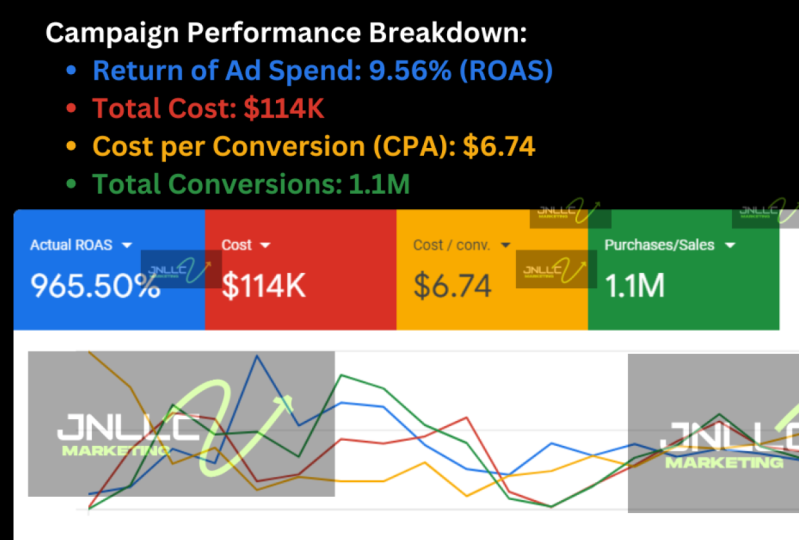
2. Google Ad case study, Campaign Structure and Matrix: Welcome back. In this campaign, we generated self 254 k. Total is spent 27.6 k and
cost per clicks $0.88. So Thus, we generated 254 k from 2,077.6 k at span, it means that our Ras is
approximate ten x plus, which is 1,000 persons. Let's check out some
quick Google metrics. RAS means return on it spends, how much you spend and how much you get returns
from arity spends. For example, a campaign spend total 500 bucks and
conversion value is 3,000. It means that they got 3,000 returns from the
500 bucks at spend. 3,000 divide by 500
means that as is six. Cost per equisonF example, you spent 100 bucks and
from this 100 bucks spent, you got 20 conversion or sell. Hundred divided by 20 is
mean that your cost per equis your CPA is five. Conversion rate. Conversion rate about how many clicks you
got and number of results. For example, from your campaign, you got 100 clicks and
out of 100 clicks, gives me that hundred
visitor visitor de restore or website
and I Totals, you made five sales. So five d by 100 in 200, I mean that 5% your
conversion rate is 5%. This is really pretty
good conversions. But in some cases, it could be 10% or 15% depends on your
business goal at copies, how good you offer or
product or services. Normally in commerce conversion
rate is like around 3%. Number of impressions. Impression is about how
many people see read. It's about your visibility. Click through rates.
Click through rates is very important for any campaign. Total number of impressions,
number of clicks. For example, our campaign got 25 clicks and
from 100 impressions, means that our CT is 25%. T 5% is really pretty
good click rates. It's all about how
copies and how you copies apps to insist the visitors click
and visitor websites. If you have good
copies, for sure, you'll get the good
conversion, good click rates. In your next slide, we'll
talk about Campin structure.
3. How to create a google account: Hi there. Let's check
out how to create Google Ad account to kick
off your first campaign. After visiting google.com, you will see a
dashboard like this. Navigate to sign in. In this stage, you will be redirect logged in
your Gmail account. From Google, G 997,202 as your
Google verification code. After logged in, you will see
a new interface like this. Here's the option, create your first campaign or
Escape campaign creation, create an escape
campaign creation. In the stage, you have ability to change
your billing country, time zone and currency. After account creations,
you will not be allowed to change following information.
Click on Continue. In the account type section, you have ability to
select the right type of account, individuals
or organizations. If your organizations,
put your company name, your billing details, code, and click on submit. Once you submit it
all the account information and billing details, you are ready to kick
off your first campaign. Thank you. If you
have any question, feel free to leave comments.
4. Campaign Structure: Welcome back campaign structure. As I said before, ole campaign extreme easy to set up and don't need enough optimizations. To understand
campaign structure, I create two examples campaign
one and campaign two. Campaign one consist one group using mixed k phrase
mats and mats and campaign two
consist three group based on ward mass type. A group one, broad
math Q group two, phrase match at group three, exact match and each ad group consists one d. For
better results, you can create multiple type
at copies under one groups, you can create the ads
for better results. In campaign one, I
did not consider broadbatkRason is
that if I use or you use broadbas t you
have less control over the campaign because Google
may drive irrelevant traffic, who you are not
exactly looking for. Even you are creating
multiple groups, you may consider to use
group two and group three, like a Frese mats
and mass Q only. But for the test purposes or
explore new d in that case, you can consider to
run campaign for Broadmt Depends on
your situations.
5. Create New Campaign and Goal: Welcome back. Step one, create a new campaign. You are just a few step away to launch your fast campaign. After clicking on new campaign, you will redirect to a
new interface like this, where you need to select your
right campaign objectives. See, as we set traffic,
apps promotions, awareness and considerations,
local store visit, create a campaign
without goals guidance. Sales objective usually used for commercial store to
drive online sales, for example, real estate
or other local businesses. It can be used for
Janet call it as well, like home service and other West traffic is objective to drive more traffic
to your website or store. As promotions, get
installed your As engagement or pre
resistations for Fs. Awareness and consideration
reach a broad audience and wield interest in your
product or services. Usually, these type of
objectives used for brand awareness
for the new brand. Local store visits
and promotions. Drive visitor to
your local store, including restaurants and other. Those businesses
providing service in their local store and consider
to customer to visit them, they usually choose this
type of campaign objectives. Create a campaign campaign
without a goals guidance. You can also create a campaign selecting these options
without any goals guidance. Thus, we are going to launch a campaign for Comer
store to generate sales. We will select sales
then click on Continue. Step two, select campaign
goal to purchase, make sure to remove
other objectives. Those were running campaign
for e commerce store and our objectives to capture
purchase or conversion value. In that case, it's mandatory
to purchase as our goal. If your account is totally new, in that case, you may
not see purchase goal. In that case, you need to set up conversion tracking to visit
all these campaign goals. After selecting
campaign goal purchase, then click on Continue.
6. Bidding Strategy and Target Location: Welcome back step five. In the sections, you
find winning City. We prefer to select
click instead of conversions and set
maximum cost per click $1. It helps you to
contol your cost. Then click next step six, select your
advertising locations, and in target, select presents people regularly in your targeted locations. We also recommended D select Sun tw partner
and display networks. In locations, you can target country or specific
Jeep or city. Okay. For example, you would like to
target specific Zep carious people only. Select your target location
properly and make sure you select presence people in or regularly in your
target locations. Here's the option to
select the languages. If you're tag audience
in different languages, you can also include them. Okay. Once you've selected your target locations and target peoples are regularly in your target locations,
then click. Okay.
7. Keywords Match types help control which searches can trigger your ads: Welcome back step seven. Google king keyword
you want to bid for. Keyword mass type contll
such as Tiger reds. What is the difference between broad Match phrase Match and act mat keyword in
Sarch advertising? Broad Match. If you use iPhone case, Broadma keyword in advertising. You ads will appear for any
type of relevant keyword. For example, iPhone case, iPhone reviews, iPhone features. But though you have planned
to sell iPhone case, or you would like to
sell iPhone case, so you don't want
to show your ads or appear ads for iPhone reviews and iPhone features,
other things. Broadma has less
control on your visits. Frist iPhone case. You only appear for iPhone se relevant
Qs only For example, it could be appeared
for blue iPhone case, black iPhone case,
red iPhone case, iPhone case, water fro other. Exact iPhone case, only
appear for iPhone se Q only. Considering budget control, prize match and
exact match is best one to use on your verizing broad match has
low control on your budget. To find most relevant
keyword or do research. Google has awesome
free Q research tools. Navigate to UD accounts
tools and settings. Then click on Q Planner. From the Q planner, click on discovered
New Qs Here's options to put Q sums to find more relevant Q you
may use for your advertising. You can also change
the locations, for example, you can change country or other
specific cities, state, whatever you want. We're searching
for United States. Then click on get results. You find all relevant
keyword here and make a plan which keyword you can use for your advertising
and which are not. Best hacking boards has
22,000 monthly service polem You can also include Brand trams or
non Brand Tram as well. Thus broad masked has
less control on the cost. We consider to use pres
mats and exact mat only. We use best hacking boards
and best exact mat. Faster is a prism
and exact mascu. You can also get more relevant
Q by putting your WTR or providing your
product name or service. Google will bring more
relevant Q for word botzing. Once you provide all
the s accordingly, then move to next step.
8. Ads Copy- Fill out Headlines and Descriptions: Welcome back. Step eight, fill out headlines
and descriptions. You can use maximum
15 headlines. At least three headlines are
required, Max 30 characters. You can use maximum
four descriptions, at least two descriptions are
recued Max 90 characters. In addition, you can also use
four cyclins, for example, about pays, contact pace, best selling
products and others. Here is one good example of
s campaign for hoteling. If you see the headlines, New York budget Totels. They also use their nips
example.com at the title. Official sites over
1,000 plus hotels. In description, book Comfortable
Hotel in New York City. 24 by seven customer service, budget accommodations, easy online booking,
no cancellation fee. Okay. You copies everything because whether the visitor
click on your ad or not, it's all about your copy. Trying to make attractive copy to get good click through rates. In addition, make sure that your ad copy is most relevant
to your learning page. In a recites, you'll see
a interface like this. The first option is final URL. Final UL is about your
history or learning page. Make sure you have
access certificate, AT PS headlines,
Bast hacking woods, work in confidence, top boards for superior quality words, dess unbeatable quality
for all chains. You can as it before you can use Max four descriptions
and 15 headlines. As example, demo I use headlines and the
descriptions for. After filling out the stairs properly, moving to the next.
9. Set budget and Publish Campaign: Step nine set buzzet and
publish your campaign. This is the final
and last stage of your campaign creation and
launch your fast campaign. In this stage, you need
to set your daily budget. Based on our Q sets volume, Google recommended $35 per day. Here is another
recommendations is $142.28 0.0 $1 per day. You can use your
own custom budget. I consider to use ten
or spend $10 per day. Based on our budget here
is weekly predictions. Weekly clicks, 2,464
and maximum weekly cost $70.08 Av CPC 0.03 c. After
running campaign few days, we'll see the true CPC. Once you set your
own custom budget, you are ready to
publish your campaign. If everything is okay,
click on publish. Thank you so much. If
you have any questions, feel free to leave
commerce or contact us.
10. Extra: Setup GA4 for eCommerce Tracking using Pre configured Google Tag Manager (GTM) container: Hither, let's check out how
to set up Google Analytics four for Cammer checking using pre configured
ZTM Container. After login on your
Google Tag Manager, you will see a ageboard like
this. Here is your tag. Click on it been then
click on Import Container. Choose your Container file. Click on existing
default workspace. Click on confirmed. Click on variable,
all the variable is loaded and imported
properly. What next? Heading to your Google
Antics Click on Data Stream, then copy your measurement ID. Then go back to your
Google Tag Manager again. From the tag options, click on New Click
on Google Tag. Click on Plus Sign. Then again, click
on the Plus Sign. Click on Content. Put your Google Altex
Z four measurement ID. Put a name here. Click on S. From Tiger, click on Initial
legislations, all pages. Again, put the name. Okay. Click on Sap. Then click on Event tag, and replace this tag your
own Google ante four tag. Click here. Tag found and
connect it. Click on Sap. You're almost done.
Copy this tag. Go to preserve site. Click on New Plug in M At this plag in. Then I already
installed this plag in. Click on settings. I replace this ID using
your own ZTM container ID. The stagnor ID. Make sure this option is
turned on and save changes. Click on event. And Itecations per,
click on Comer, then make sure you
turn on tracking comers and also enhance Kmers. If you need it, you can
enable other options as well. Just save changes.
You are done here. Now, go back to your ZT
again, published. Okay. You're done. If you
would like to check your website, tag is there. For other platforms,
you can set up tag, copy this head tag. Click on your ZM container. Copy this tag, go back to head. Again, go back to your
then copy this body tag, Paste and click on safe. To download the
preconfigured TM continuer, you can visit this blog and
download this continuer. I'll put this link
on the descriptions. If you have any comments or any questions, feel free to ask. Thank you.
 Mahibur Rahman, Certified Ads Strategist