GHL- Setting Up Local SMS Services for Cost Effective Communication | Mahibur Rahman | Skillshare

Playback Speed


1.0x


  • 0.5x
  • 0.75x
  • 1x (Normal)
  • 1.25x
  • 1.5x
  • 1.75x
  • 2x

GHL- Setting Up Local SMS Services for Cost Effective Communication

teacher avatar Mahibur Rahman, Certified Ads Strategist

Watch this class and thousands more

Get unlimited access to every class
Taught by industry leaders & working professionals
Topics include illustration, design, photography, and more

Watch this class and thousands more

Get unlimited access to every class
Taught by industry leaders & working professionals
Topics include illustration, design, photography, and more

Lessons in This Class

    • 1.

      Send Local SMS to any country through GHL

      3:17

    • 2.

      Setup Local SMS workflow for any country on GHL

      7:03

  • --
  • Beginner level
  • Intermediate level
  • Advanced level
  • All levels

Community Generated

The level is determined by a majority opinion of students who have reviewed this class. The teacher's recommendation is shown until at least 5 student responses are collected.

19

Students

1

Projects

About This Class

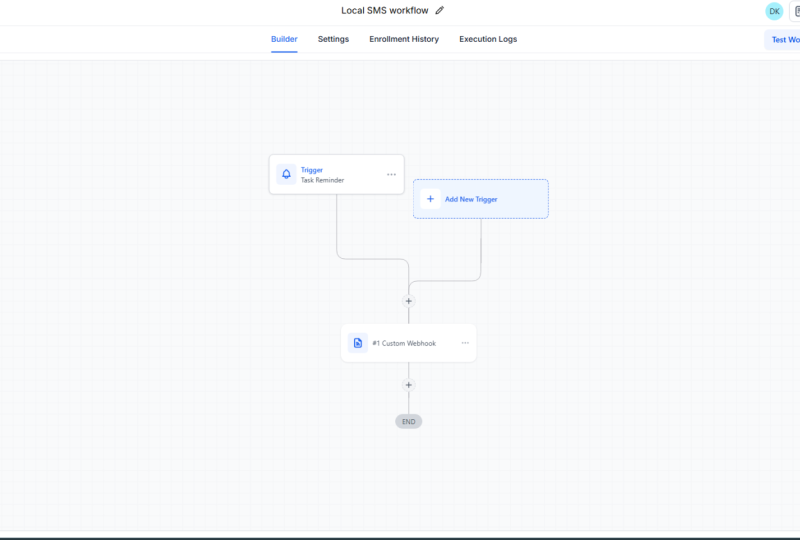
In this class, you’ll learn how to connect a local SMS gateway with GoHighLevel (GHL) workflows using a custom webhook and JSON API.
This hands-on approach helps you send automated text messages directly through affordable local providers, eliminating the need for expensive international SMS tools.

By the end of the class, you’ll be able to:

  • 🔔 Trigger SMS directly from GHL workflows.

  • 🔗 Connect your custom webhook to your local SMS API.

  • 💰 Reduce communication costs while keeping clients instantly informed.

Perfect for digital marketers, agencies, and business owners who want to deliver instant local messages to clients and leads—without overspending.

👉 Check the Google Doc below for full JSON code examples and step-by-step setup guidelines:
📄 https://docs.google.com/document/d/19pUFjnaovW9U5WYHoIy1CeumUGe9bIYdQ7RNIBPVy90/edit?usp=sharing

Meet Your Teacher

Teacher Profile Image

Mahibur Rahman

Certified Ads Strategist

Teacher
Level: Advanced

Class Ratings

Expectations Met?
    Exceeded!
  • 0%
  • Yes
  • 0%
  • Somewhat
  • 0%
  • Not really
  • 0%

Why Join Skillshare?

Take award-winning Skillshare Original Classes

Each class has short lessons, hands-on projects

Your membership supports Skillshare teachers

Learn From Anywhere

Take classes on the go with the Skillshare app. Stream or download to watch on the plane, the subway, or wherever you learn best.

Transcripts

1. Send Local SMS to any country through GHL : Hi there, Local SMS solution for GHL user. If you are GHL user and your local SMS number not available on DHL to purchase this solution for you. This is a custom solution using local SMS API. So you can send SMS to your customer or prospect from your local number. Even number your country number is not available on DHL. If you go to settings and click on phone number, and on the right top corner, you'll see add for number to purchase. In this country list, all the countries is not available here. So if your country currently not listed in this list, to purchase number this solution for you. Let's head into this workflow. How we can solve this problem? What exactly we need? Of course, you should have a GHL account, and you need to create a customer workflow, and then need to add a custom Wybook. In the contract workflow to trigger the workflow, you need to add pastomtagO you can use specific action. For example, inverse sent the workflow automatic trigger. Being a user user there's so many options to trigger the SMS. In the custom way fog, you need local SMS and API plus JSON code. Don't worry, I will provide JSON code and guide you step by step to build your own custom SMS API solution. Why do you need to use this? Number one, local SMS. You customer get SMS from your Native number, so who build trust. Number two is a low cost. In some countries, if you use international number, SMS cost is very expensive. In some case, $0.30, even $0.60. Even some case, I found that it around $1 per SMS, which is not feasible for business. You just need to pay for custom premium WIV cost per actions, one cents and your local SMS provider actual cost. I will details guideline in the description and past so that you can implement your own. In the next video, I will show details how to do this. Here is your API URL and the adjusting code. See you soon. 2. Setup Local SMS workflow for any country on GHL: Welcome back. In this session, I will guide you step by step how to set up your cost effective local SMS solution using GHL. Step one, create a workflow. You need to create a workflow. Then in workflow for the custom webhook, you need this code. I will provide this Google Doc link in description so you can usually copy this and use for your own. You just need to replace this aptken and your local SMS provider send ID. In the message sections, you just need to change this text. Whatever SMS you would like to send. All the guidance is here, so you can follow this. Okay. Let's move into GHL to set up this. Okay. After login on GHL, you see dashboard. From the dashboard, click on automation. From the automation, click on create a workflow. Is it from scratch. Okay, change the name. For example, you want to send SMS for your customer only. You can create multiple workflow based on your needs. So trigger should be your own, whatever you like to prefer to do. For example, maybe it could be a create a order or create an invoice. Okay, so maybe we can use a tech or maybe trigger on specific purpose. For example, order invoice. Invoice sent. If someone you send a invoice in a situation, you want to send SMS. Here is a click on in the plus sign, then custom. Custom Here need your local SMS provider API URL. So you need to get AP RL from your local SNS provider. Number two, you need a code. Copy this code exactly. Then go back to your GA label customer book. Just replace this code. Again, you will get API token from your local SMS provider and sender ID. Actually, is number will display to your customer as a sender. Here is the contact number, I like customer contact number, and here is your messes. If you want to send for example, the specific amount of shopping, maybe thanks for your order your invoice, in that case, click on here and pick any value from your amount. For example, if I say order value You can pick the invoice number. In that case So you need to customize your SMS as per your need, based on your business or based on your objective of sending out SMS. Once everything is done, just click on SI. And click on Pubish. You're done. So what will happen? A invoice sent from your digital account at the same time, our SMS will fire using your local number to your customer. You can also customize your for other purposes. For example, you want to do some marketing in that case, maybe you remove this thing or you can duplicate this workflow, for example, if I want to create another workflow for the Tiger is Again, I got a customer. Here I need my APA URL. I need to replace this API token and Sandra ID and customize these texts within the invited comma and click on SD. So you can use any tag to fire SMS. So contact tag I can use a contact as a tag. Contact Contact creation. Contact has a tag. For example, equal to AVC, which means that if any contact has a tag with AVC, specific SMS will fire. You can also do recurring sending SMS. You can also send to your other workflow or you may have a wait time like one minutes. So there is no limitations. You can do anything what would like you to. Thank you so much. I think you can do it yourself, and this documentation will be on the description or projects, so you can have a look on it to follow these actions.