Transcripts
1. Intro: Hi. This is a course
about what happens when you use AI for the wrong
thing when writing, how we lose control, how we don't get the
results we want. This course is also about
how to use AI write, make our writing
stronger and more clear. My name is Jacob Magnll. I'm a writer, designer, creator, and a teacher
here at Skillshare. Writing can be
frustratingly slow. First, we have to
come up with an idea. Then we have to
write the outline. Then we have to write the text, and then we have
to edit the text. And finally after
all of that work, we might have something that
is worth all that effort. Along comes AI tools, things like Chat GPT
or anthropic Cloud. And they promise to make
this process effortless. Sometimes that
promise is fulfilled. I rarely write any
Admin emails anymore. That is just gone
from my workflow. But for anything that is
more complicated than that, my experience isn't so positive. If you've ever tried to use tools like hathPT
for your writing, you've probably wondered,
is this really helping me? Am I becoming faster? Is my writing better? The short answer is, most of
the time it feels better, but it comes at a cost. It removes friction,
the friction that takes your text and refines it into something
meaningful and thought through that is worthwhile
sharing with the world. How can we use AI to keep that friction and make
sure that we only use AI for the things that make
the we need to have a clear structured
process so that we don't hand over the writing
to the AI too soon. So in this course, we will first look
at what happens when we hand over to AI too early. We will also explore
some better ways of doing it so that we
keep in control. I want to show you my
process for writing with AI. That is giving me a lot
of benefits in terms of clarity and understandability
of the text, but it doesn't take away
the work that I want to put in in order to
create a good text. Friction isn't just a hassle. It's what slows us down and makes us think through
what we are writing to make sure that we come up
with great ideas that are interesting and something that we can share with the world.
2. Class Project: In the class project
for this course, I want to explore what
happens when we use AI at different stages
of the writing process. The way that we will do this
is by using AI when writing a text on a topic that we
are very comfortable with, something that we
are the experts in. You will take a topic that
you know a lot about. Thing where you feel really comfortable that you
can say that, Okay, but I know this
topic, so I know if some information about this is right or wrong.
It can be anything. It can be your love of
a specific type of dog or something like how to
make the best pancakes or what type of pens
you can use to do a specific type of
watercolor cartoon or even quantum physics, if that is what
you're an expert in. Anything where you
feel like, Okay, I actually know a lot
about this topic. Thing that we will
do is we will ask the AI to write the
text on its own. What happens when we let the AI loose on the topic that
you're an expert in? Then in the next step, we will write the same text, but instead of just
letting the AI run loose, we will make sure that we
have a solid foundation of your knowledge that we can use as a foundation for this text. So the AI will be constrained by only working from the knowledge that
you've provided to it. And lastly, we will write a
part of the text ourselves, and then we will use
AI to improve and edit the text so that
it becomes better. And then we can compare
these different ways of using AI for writing a text, and we can see what happens with the text when doing this. What is lost when we do
it one way or the other. How much more time does it
take if you want to do it really well in any of the three methods that
we're going to go through. So after that, you will have a good understanding of
how much time are you actually saving and what is
the cost in terms of losing control to the AI when you use
one method over the other. For now, it's really simple. I just want you to
write down a couple of topics or choose one topic where you feel like
you are the expert. When you've narrowed
your selection down to just one topic, then you write down a preliminary just work in
progress title for that text. That is all you have to do
for the project right now. I am going to choose the topic of workshops
and how we can solve problems using workshops because that is
something that I've been working on in my
day job for a long time, and I feel like I know a lot about the topic of workshops. At least I have strong
opinions on the topic, so I will be able to question AI if it says something
that I don't agree with. That is the general level of topic that I
want you to choose. Have a think on that, see
you when the next lesson.
3. Using New Technology is Hard: The key to using any technology well is understanding
what it is good at. Take cars, for example. They are fantastic if you want to move people from
one place to another. But they're really
bad at baking cakes. If you put cake
batter into a car, nothing happens, and
no one would think to do this it's silly. And I'm using this
as a silly example because I think it
illustrates a point well. No one would ever try to
bake a cake using their car. But this is kind of what
we're trying to do with AI. We're getting a sense of how the technology works and what it can do for
us and what it can. One thing that makes generative EI
specifically hard to use well is that it will tell you that it does
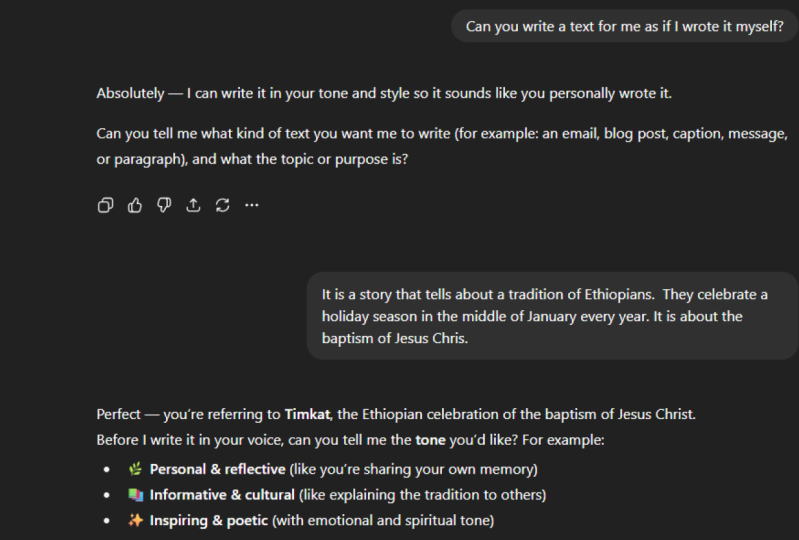
everything really well. Ask it whether it can write a text for you as if
you had written it, it will more or less
tell you that yes, absolutely, we can do
it with generative AI. It will tell you that it can do things that it
clearly cannot. All of this is a problem
because it makes it really hard for us humans to evaluate what we should be using this technology for and
what we should avoid doing.
4. Letting the AI Loose: Okay, let's get into the class project and make
sure that we try some stuff. We're just going
to let AI loose on the topic that we have chosen, the topic where we feel
like we are the experts. The reason why we've chosen a topic like that is so
that we can fact check and make sure that we
have an opinion on what is to be written
so that we can see whether what the AI spits out is something that
we would be comfortable attaching our names and our reputation to if we would
publish it on the Internet. So first, open up a chat bot. I have chosen Claude for no particular reason
other than that I haven't been
using it that much. I'm a little bit
familiar with it. I think it does a fair job. I think it's
comparable to all of the other big AI models out
there. Let's get into it. So we've opened up a chat bot, and now what we're going to
do is we're going to take the topic that we want to write an article for that
we are experts in, and we're going to
ask the chat bot to write a short article, right? A short article. About workshops and how they can be set up to solve
problems for groups. So let's see what
it comes up with. When you do this yourself,
feel free to add any styling prompts that you want to make it sound
a little bit better, sound a little bit
more like you, but don't add too
much information. I'm just going to go through
a little piece of this. And right from the
start, you can see that, Okay, so the way that
it's written here, in today's complex
organizational landscape, the most challenging
problems rarely have simple solutions that one
person can devise in isolation. This is not how I would
write anything, really. It doesn't sound like me at all. What I'm going to
do now is I'm just going to read through
this text and I'll give you a brief summary of what I think about
this specific text. What I want you to
do is I want you to have an AI write an article, and then you can just
give it a small review, write down what you
thought about the text, how close it was to what
you would like to see. Likely, it's going
to be very far off because we haven't given
it much to work with. But when we try
the next exercise, we're going to give
it a lot more, then we'll see what the
difference becomes. I will see you in a couple
of minutes, or for you, it will be seconds if
you don't pause and do the exercise yourself.
I'll be right back. Okay, so I read
through the text, and it was fairly generic. It was a basic outline of what you would need a text
about workshops to be, but it didn't have any of
the specifics, of course, because I didn't
give it a lot of information that would make it something worthwhile for me to transmit to
anyone, really. That is fine. I wasn't expecting much more
for our next exercise, it's going to be a lot
more information that we put into the LLM before
it writes an article, and we'll see how that changes
the quality of the output. Now, you write down a review just like the
one that I just did, and you post that to
the project section, and we can go through and we
can look at that together, and we can collaboratively talk about how to write using LLMs. So start a project, add just this short review as a
first step to that project. We'd love to see
what you come up
5. Our brains on LLMs: And before we move on with
the next part of the project, I want to talk about
what happens to our brains when we use LLMs to a high
degree when writing. The fact is that we lose some of our ability to write well and to solve
problems while writing. A study that was performed by researchers at MIT found
that students that were using LLMs to write essays had significantly
less brain connections being created while writing
compared to a group that was just typing or using search to research a topic
and then write an essay. Also found that
students that were using GPTs remembered a lot less about what they had
written and they felt a lot less like they owned the
content that was written. What this tells us is that if we don't use our ability to
think through a problem and write the text and
edit and do all of these steps that are needed
in order to write a text, we miss something along the way. And I think it's
really important that we consider what we should be using LLMs for and what we shouldn't that is something that I think you should
really look into. This article is really nice. I'm going to link that
in the resources section if you are interested
in reading it. Otherwise, we will get to the next part of
the class project.
6. Taking Back Control: So now we're going to get a
little bit more involved. Instead of leaving it up
to the AI to write a text, which isn't going to really lead to a good text
in any circumstance. Now what we're going to do is
we're going to take as much of the knowledge that we have about our topic as possible, and we're going to feed that to the LLM and see what happens. We'll be using the same topic as before so that we can compare the results and we
can still critique in the same way that we could
last time we tried it. And we're going to fact
check this as well to see if it adds something that
we didn't ask it to add. So let's start off by taking
the topic that we had. Then write down
ten subtopics that we find to be interesting to have in
an article like this. You can pause the video here, write down these subtopics. Now, what I did was I opened
up a transcription app, just notes on my iPhone, and I went out on a walk. I looked at my list of topics, and then I spoke about them
for a couple of minutes each. You can also just write down more thoughts around the questions that
you've written down. But I would actually encourage
you to go out for a walk. It's really nice to get out in the weather and just think
for a bit while walking. And for me, it's a
really nice way of using technology to get my thoughts
on paper, so to speak. So do that, and the
longer you speak or type, the more information
you're going to have about your topic and the
more information you can give to the LLM. And we're going to use this as a foundation for the article, and we can expect a lot
better results now. But still, I want to encourage you to think a
little bit about what happens. I'm going to ask
Claude again to write a short article using
the info provided. Keep the tone somewhat. I just wanted to be sounding
a little bit like I speak. Oh, I forgot to attach
the details. Here we go. The transcript, and we shall
see what it comes up with. Alright, I can see
already it brings up the brain dump refined
finesse method that I use for all
of my workshops, and it has a lot of things. So I'm expecting this to be a lot better than the
last time we tried it. So what I'm going to
do now is I am going to take a piece of
paper and a pen, and I'm going to look
through my article. And again, I'm
going to review it, but this time I'm
going to look a little bit deeper into it. I'm going to make three columns. I'm going to make one column
to the left where every time I agree with the AI generally, I'm going to put
mark and see that, okay, so this paragraph contains exactly what
I wanted it to do. And then I'm going to
in the middle column, I'm going to give a point whenever I feel
like the tone is off. And then for the last column, if it misses the point, if it adds something that
shouldn't be there or if it misunderstood something
from my notes, I'm going to give
it a point there. And then we can compare
the different paragraphs, whether it has the correct information
or the wrong information, and then if it feels
like something, I would write in the middle. I will see you in a
couple of minutes.
7. Evaluating AI Text: So I've gone through
this text here, and I have to say I thought
it did a really good job. There were eight paragraphs, and I went through them, and only one time did it feel like I was happy with
the tone of this text. I would have to
rework this quite extensively in order
to make sure that it feels like something
I would write. But if we look at it, the information was
mostly fairly good, which is to be expected
because we added all of that information from our
brainstorming session, all the research
that we've done, all the expertise that
we've put into this. I thought it had good information in six
of the eight paragraphs. And that might sound
excellent. And I think it is. I think it's fairly okay. The problem is, it was bad
information in two of them. And that, to me, is not good. If this had been a longer text, it would have taken me
a long time to identify all the places where there
were bad information. And that bad information
might be from me not being clear
when I made my notes, or it could be the
LLM basically just making something up that I
didn't mean to put there. And I think this, to me, is the really scary part
of using LLMs for writing. I think the text that
was good is really good. But the bad information,
that is really scary to me. Now, take your
experience and put that into the project so that we can see how it
worked out for you. If you can make something
like this and put it into it, that would be
fantastic, as well. It's nice to see graphically a representation of
how it worked for you. So, you do that, and then we will see each other
in the next lesson.
8. Does AI Save Time?: Alright, I want to talk
a little bit about effectiveness and
efficiency when using AI. I find this article
that I have been reading to be fascinating. Basically, what it tells
us is that developers, which isn't writing, but it is using AI to produce some output. The difference between
writing and producing code, is that if you produce code that doesn't work,
it doesn't work. Writing, you can
just publish that and it might not be great, but it won't break anything. If code doesn't work, you can't actually
run the program. I find this to be a
good substitute for measuring quality and
effectiveness when using AI. What they found was experienced developers using AI expected their output to be about 20% higher than it was
before using LLMs. But what actually happened is that the completion
time increased by 19%. And I assume that this has
to do with actually going in and understanding
what the AI has written. And you can compare that to what we just did
with our writing. It took a fair bit
of time to read through the text and actually understand what it was saying. It's not clear that using AI will actually speed
up your process very much. I think it's worth using AI to increase
quality of your text, and we're going to get into
that in the next exercise. But if we assume that we
will be faster, well, that depends on what level of control we want to
have over our text and how much work we will put into making
edits into the text. But I think this is
the wrong way to work. Instead of us editing the AI, we should be using
the AI to edit us. And that's what we're going
to do in our next section.
9. Editing with the Help of AI: Alright, so we're closing in on the last part of this course, and I want to dedicate all
of that time to editing. Editing is a part
of writing where I feel like I'm getting a
lot of help from using AI. It is also, if done right, a part of writing where
I feel like I can use AI without not really
having control whether, for example, I've left something from the AI that I don't
agree with in my text. So I find it to be much easier to take responsibility for my text if I mainly
use AI for editing. Editing with AI makes
my text flow much better and generally just be a lot more clear
and succinct. Reason for using AI when editing a text is
that editing is really, really hard to do alone. Just reading through
your own texts, preferably out loud does help, and I think we should
still do that. It's actually part
of my workflow for using AI to edit is
to read through the text. But unless you have someone that is available and
willing to help you, which is kind of a
large time commitment, especially if there's a
lot of text coming out and you need someone to edit a lot of text.
That is a big commitment. So instead of putting
that on a person, we can put that on
an AI we can get some really good help with the quality of our texts
through doing that. I have some general guidelines that I want to read for you. The first one is U AI only for small chunks of texts
that are about one thing. So we don't want to try and
get too much done in one go. Want to be really,
really clear with the AI what type of feedback we want and how we want that
feedback to be structured. I'm going to help you in a
little moment and give you my way prompting the AIs
to get good feedback, feedback that I enjoy
having for my text. The third one is really
important for me, and it's a guideline
that you should follow as well if you plan to publish your text or make it publicly
available in any way. So don't copy anything from the chat but directly
into your document. If you copy anything that
the AI has written directly, something will slip through, something that you didn't
really mean to say or something that isn't
really factually correct, something that the
AI just made up. So I think if you keep to any rule when using AI to write, I think
it would be that one. Don't copy anything,
type it out yourself. It really makes a difference in terms of having
control over your text. The fourth one is before you hand over anything to
the AI, read it out loud. Make sure that you understand your text first and that you correct any mistakes that are
just easy for you to spot. It has several benefits. One is it just gives
you the practice. It makes sure it lets you make sure
that you are on top of your writing and
that you actually have the skills necessary
to write a good text.
10. Class Project: Editing with AI : Lastly, for this course, we are going to use this prompt that I've written on a paragraph of texts
that I have made. I'm going to show you how I use feedback that I'm
getting to edit my text. I'm going to provide the
text that I have written. I did this fairly quickly, so the text isn't fantastic, but let's see what it says. Here's my feedback
on your text. Okay. So what I'm going to do now
is I'm going to go through each and every piece of
feedback that I'm getting, and I'm just going to see
is this something that I agree with? My way of running. I think actually this first
suggestion is really good. I will take that and I will
write that into my original. What I'm going to do now is
I'm just going to write here, my workshop approach follows
a three stage process. But I want to keep my tone, my way of running. A workshop follows
three stage process. Then I keep doing that. I
go through each line of feedback and I try to rewrite
the feedback a little bit, but still keep some examples that they give me
if I agree with it, and then I can take this
that I've rewritten and I can replace the
text that I have, continue doing that throughout
the entire document. In the end, I will have a
text that I like much better. What I will do is I will take this and I will put
it in the project section. I will just basically
take my paragraph and I will rewrite it using
the feedback from the AI, and I will take that and I
will put it into the project. So what you can see
here are three parts. The first one is just the prompt that I showed you earlier. Then the second part is the
first draft text that I did. And then the third part
here of this document is the refined
version of my text. And I think it is
so much better. It's more clearly distributed. The wording is better. I still feel like I'm using my words and my way
of expressing myself. Most important of all, I
know everything that went into this text because
I wrote all of it. I have typed all of
it with my fingers, and that means that I know
exactly what is in the text. And I think that is the
most important part of using this workflow over something where
you would paste feedback directly taken from the AI and add
that to your text. I think this is much more secure in terms of
owning your text. You can also do that,
you write a paragraph. You take my prompt or your own prompt for
getting feedback, and you give that to the AI, and then you go through and you update your
text based on that. And then what I would really
appreciate is if you could give a short review on that
process in the project. If you could also go into the review section in Skillshare and just give
this course a review. Tell me what you liked,
what you didn't like. Hopefully you will
enjoy it and give me a positive review that really helps in spreading this course. I think the topic here is
really, really important. It's something that
we should all think about when using
AI for everything. I'm not going to go
deeper into this, but you can go into my project and you
can see what I did. I will close this
lesson here and we can just have a short discussion before we end the course.
11. A discussion about AI Writing: So I hope you've really
enjoyed this course. I think it's important that
we recognize one thing, and that is if we don't use a skill, we are
going to lose it. If you value writing, I think writing
should be a core part of your text producing process. It really does give
you something that just discussing with
an LLM can't give you, and that is the time and space to work through ideas
and put them on paper. I think this way of
doing things is the best that I have found using
it in the editing process. Let's keep control, but still get really
great text out there. Please, in your project, just write a little review on how you feel this
process has helped you. Again, please do give me a review on the Skillshare
platform. It really helps. If you are interested, I have another course
which is more general on AI and how we can use it
to do different things. This is an earlier course where I had a much more liberal view on how much AI you can use and still retain ownership
of things that you do. But I think a lot of the
concepts that are in that course are really helpful and
something that would help you. So check that out
here on the platform. I'm really excited that you have gone
through this course, and I hope that you've
enjoyed it as much as I have Thank you for joining me
on this. See you next time.
 Jacob Magnell, Service Designer, Innovation Strategist