Transcripts
1. Welcome To The Class: Productivity, procrastination, and planning. These are the buzzwords have completely dominated the self-help and online working domains. But what do all of these three components aim to achieve there into achieved time and management. This the thing that we feel like we're lacking all the time. We feel like we don't have enough time to do what it is that we need to get done. But for the most part, what's lacking is our organization and the way that we're actually managing our time itself were told to wake up at five AM in the morning. We're told that the billionaires don't take breaks, were told that they dock take days off and wait to feel guilty for taking days off. But none of this is true. Let me first, my name is Dr. Meaney on it. And in this course we're going to be exploring the ways in which we can manage our time more efficiently using different tools, using automation, and using different processes. This course will provide you with a toolbox that you can adopt into your daily life to help manage your time better. So I graduated with a PhD in cancer research from UCL University, during which I've started a YouTube channel and I now have a 140 thousand subscribers. And I create content that helps students graduate and I helped diversify the face of academia. More generally, I share tips and productivity, habit formation, and optimal thinking. I found that the page Doctor, I was an academic platform that connects PHD researchers to university students, but once support in anything that they need academically. Now, I only have about 20 sort of fill our employees and managing around the clock 24 hours, seven days a week minus 5 is an education. So I teach and I lecture up with secondary and university level. But most importantly, I have a one-year-old son, a little doorbell, one-year-old. And I also am a wife, a sister, and a friend. Now, all these things mean I'm juggling so many hats at the same time as you can probably imagine, especially with a one-year-old. It means that my time is never able to be sort of fixed and I've had to really adapt to be able to formulate this toolbox that enables me to prioritize, automate, and set smart goals for all projects I'm working on. I've always been really interested in, in kind of parallel projects and kind of working on multiple things at the same time, especially with doing a PhD, you really need to be sort of working on different projects at the same time, visiting experiments at different times. And it's something that I've had to sort of find cheer over the last decade. I've just been engrossed in listening to podcasts, reading books, and just learning from others in ways that they are able to work around that time best and manage the 24 hours that we all get in this course, I'm going to be giving you actionable tasks in order to help you with those small wins and allow you to very quickly add it to your routine today.
2. How The Brain Works: In the following video lessons, I'm going to be sharing my tools I've been using in order to help me with the most effective time management solutions that work for me. Especially with someone like me who has a number of numerous competing demands. However, as a biologist myself, I could not possibly just give you the tools without actually telling you what the most important time management tool is and matters of rain, the thing inside here, one of my favorite books on the neuroscience behind the brain and sort of how the brain actually works is this book is hold the organised mind, thinking straight in the air. Overload a highly recommend grabbing this book and taking a look at it because it really delve into the neuroscience and sort of the biology behind how our brain actually works. And this is really important for us to understand the optimal conditions, the operating needs in order to work at an optimum. And without this, with really struggle regardless of what kind of time management processes we put into place. Things like sleep, a good diet, and taking regular breaks are all really important, as well as implementing tools I'm going to be mentioning today, we think about the way that the brain works leads to what the anatomy first, we have something called the prefrontal and the frontal cortex, which is sort of like just at the phone here. Frontal cortex is right there, and it's essentially the CEO of your brain. So it's the part of your brain but dictates the actions and the processes and the way that the rest of your body works through signaling and through the use of its cells that are called neurons are brain is Sir act. It's a highly metabolic, highly energetic organ, considering nice about 2% of our body weight. It actually uses about 20 percent of our energy expenditure during the day. And the reader, why is this the processing like your neuron and your cells are making all the time, literally every single second thing that it needs to do to keep the different organs of your body alive. These neurons are continuously communicating with each other to help processes information. But actually, research has shown that a lot of the energy is not only spent on this, but also on learning. So consolidates in your learning. Putting things that you might have looked at and seen and read during that day into your long-term memory. So taking that and converting it from your short-term memory to your long-term memory is something that's quite energetically high. And so all of this, all with us happening constantly is all really important in helping you manage your time better. And then show back in the days to come, in the weeks to come, you're able to work more productively and efficiently overall, some of the things I like to do to maximize my brainpower is to firstly eat a balanced diet, and secondly to take regular breaks. So not to work too long. And I'll be talking about a technique that I do use that helped me with. So like the short sprints of work, then need to have a healthy work-life balance. I am all about play. I do as much as I have lost to do. I also play very hard, and that's really important. And fourthly, is to get a good night's sleep. Now the book that I mentioned earlier has a massive chapter about sleep. And I think really important, really, really important not to cut out on sleep without sleep is very difficult to work efficiently and to work effectively during the day.
3. Reframing Procrastination: Procrastination. Like I said earlier, this is one of the buzzwords that has just been circulating. The worlds of productivity and self-help. Procrastination is the act of delaying or putting off tasks until the last minute or even past the deadline. The way actually has origins from the Latin word procrastinators is evolved from the prefix Pro, which means forward and questioners, which is off tomorrow. So you're putting forward something to tomorrow essentially. So we always think of procrastination as the devil is the evil thing that stops us being productive. And if you've read any self-help book or if you've watched any videos about productivity, you'll hear the word procrastination somewhere, then are far apart. And there's a good reason for that. Procrastination is most definitely the enemy of time management. That is, without a doubt, try to think about the last time you procrastinated. I can probably think about it and it was literally like two hours ago and not that long ago. I mean, most of us procrastinate multiple times within 24 hours, and that is pretty normal. But it's important to know how to prevent, how to minimize, and how to come out of a procrastination what, in order to use your time more effectively? Him study, they found that procrastination actually is more about being focused on managing a negative mood than it is to do with being lazy or kind of being sort of not a great time manager. Essentially, as a problem to do with your actual mood and how you feel. And then this is an interesting way of putting it because actually when you think about it, I mean, think about why you procrastinate most of the time. It's to prevent yourself from completing a task that isn't necessarily going to make you feel good. So that task might be something that you don't enjoy. It might be something that we do find interesting or something not just generally fine, boring to the fact that this task you find at quite aversive, it leads you to unpleasant feelings and negative mood, and that is what you are trying to avoid. And so hence you procrastinate in order to stop yourself from ending up feeling those emotions. And that makes sense. And I think it's quite an interesting way of looking at it. But it's important to remember that there will always be tasks that you need to do that you don't necessarily enjoy. That may not have a structure, that may not have a purpose, but actually you just have to get it done. And so how are we able to manage our time best in order to just get these tasks done?
4. The Pomodoro Technique: And so the first method that I'm going to tell you about is the Pomodoro method. And now this is a method that allows you to beat procrastination improperly, the most, probably the simplest way and the most effective way of beating procrastination. It's actually a very popular time management method and you've probably heard of it before. And it's based on the premise of 25 minutes focused work sessions with frequent short breaks. And this helps to promote sustained concentration and to kind of stave off that mental fatigue. So by having a very short 25-minute burst of energy work and you're able to sort of focus on something a lot better than you are if you just sat down for three hours. Most likely in-between that you will procrastinate quite a bit. This technique is great if you enjoy kind of a gameified goal-setting method. So the fact that you only have 25 minutes. So we'd like a game. How much can you get done? Works really well? And secondly, if you're easily distracted and you need to kind of combat any temptations around you. You know that you only have 25 minutes and you just kind of just have to get done in that time. That's a really good way of to stay away from social media, etc, for 25 minutes. The third is if you struggle with open-ended deadline, so it helps you set sort of artificial goals. So if you're someone who has an SH2 in a month's time and you're just not able to get your head down and get it done. This is a nice way of just having that 25 minutes of focused time in order to save yourself a task that you need to get done in that time. And the last one is for collaborative or teamworking. Lots of us love to work together, which is great. But Fama experience and I'm sure a lot of us end up just talking to each other and kind of end up speaking about what you're doing more than actually doing. So this is a really nice way of saying guys, 25 minutes, we're just going to get something done and then we'll have a short break afterwards. This works really well. It sets boundaries and it means that you're all on the same page for that set amount of time. It's a very easy, very, very simple method and that's why I absolutely love using it in my daily routine or whenever I feel like I need that sort of burst of focus. Essentially the way it works is you number 1 and need a list of tasks. So what are, what is the task, but you actually want to do, make sure they're all actionable goals that things that you can actually do in that time. So a good example of that would be to say, search for 10 research papers for this essay that you're about to start to write. So you can know that you need to search for papers on PubMed and you're finding 10 of them. That's a really good way of setting an actionable task. A really a bad example would be to say, start writing this essay. Saying just start writing this essay. It doesn't mean anything. It doesn't give you any direction. And you kind of start to five minutes without having defined what it is that you want to do. So make sure that the task that you set yourself for that time is actionable immediately. Then he set a timer. There are a multitude of apps that you can use for this. I wouldn't recommend any of them. I don't really need it, honestly. And if you want to go down the simplest, simplest group, all you need is your phone, a timer on the phone and just press start and literally time 25 minutes. And you're good to go, put the phone away, put on airplane mode, put on silent. And then once you're done with the time, you then take a five-minute break and join up breaking, just kind of refresh your thoughts. Laboratory, grab an apple, grab something to eat quickly, go to the bathroom. And then he would start again after around four Pomodoro. So about 25 minutes times for about two hours, you want to take a bit more of a prolonged break. So you might want to go for a little walk around the area for 15, 20 minutes. You might want to grab lunch, you might want to call a friend, you might want to just stop there altogether. This is a great technique, but I wouldn't really recommend it for sort of a whole day's worth of work. You really want to use it when you want to focus kind of just meticulously on this one task for a short amount of time, so an hour or so. And I find that it works extremely well. For me. I've got a voice, I've got a one-year-old when he goes to sleep. I know that I have maximum and hours. So I'm able to use that Pandora for at least one round. And in that one round, I don't even know where my phone is. I don't know. Like if I'm hungry, I stopped feeling any sort of hunger and his immersion. I just get it done during those 25 minutes for ever needs to be done. And I find that this works so, so well to eliminate distractions and helped me focus, start watching the next video, the actionable task I'm going to tell you to do right now that will take you one minute, is to just think about a task that you are working on at the moment this week. What is it that you want to complete? And can you break that down into maybe three or four 25 minute blocks? So for example, I went to film each video tomorrow. So I know I need to do one per meter sprint of researching. So watching all the videos and the kids online, finding out what's, what's happening right now, are people talking about, then I will do public two sprints of scripting. That's actually writing down what it is. I want to say, look now research papers, thinking about death. And what's going to be interesting, what's going to help you guys? And then the last thing that I'm going to do is actually prepare. So that will be four sprints for the last sprint is preparing, so that might be empty. My SD card charging my battery is thinking, well like when I'm going to film scheduled meetings in my calendar. And so after that last about two hours, I will be ready for filming. And that means that I've just gotten it done. And that could otherwise take me one to two days to get done.
5. Getting Things Done: The second method that I used to beat procrastination and he's my time better is called the getting things done. And task management system, or GTD for sure. And it will system produced by productivity consultant David Allen. And now it's based on one main premise. The fact that the more information bouncing around inside your head, the heart, to decide what actually need attention. So as a result, you end up spending more time thinking about the task than actually doing them. So this information kind of accumulates and it piles up in your head and you end up not actually doing any of them. And this is so common for us. And this is probably the number one reason why time is wasted with thinking about what to do more than actually doing it. So we're there in person, but we're not doing anything here was he observed that our brains are better at processing information than storing it. So the premise of this whole system is the fact that you want to find ways in storing information. Indifference with software or different in writing it down or labeling or automating. Rather than storing all that information in your head and then trying to retrieve later when you want to get something done. So the Getting Things Done system is based on five simple practices and may help to systematize the clutter is actually a jog that's going on up here because it all happened. So the first thing is capture everything. To catch everything means that you're capturing anything that causes your mind. So this could be a fault that you have, an idea that you have to do something. Now that you've read just anything that you've thought that's interesting, capture it and to put it somewhere. So for me, I usually GET requests for like videos that people want me to film from Instagram. I might think of one in the shower. The shower was the best place to think by the way. I think of them and rather than just keeping them in my brain, I actually have a list that I write down of videos that pop-up. So when I actually want to film, I'm not just sitting there thinking and trying to think about video ideas. I've got a massive bank of ideas waiting for me. Another way that I do this is by creating the labels in an online source, an app that you might want to use. So I use Evernote. I also use notability and also my email, email as well. So I'll label everything as it comes in. If I want to read it later or think about it later, I've got labels for things. So I might have like, this would be great for YouTube videos. This is a great business idea. This is great for funding. And this is just interesting for like No my child. This is interesting for myself, career, etc. So I know that if I'm in a mood to look at things to do with my career, I can just go to the label in my e-mails will enable in my notes. And I can just acquire all that information really quickly. So the second is to clarify. Now this step is the step way of processing what you've captured. So the stuff that we've just talked about, that you've captured it, processing it, and you're able to kind of action really quickly. So if I've labeled the email as, you know, this is something that I need to respond to, something that I need to kind of follow up with. I'm able to action that straight away and I know why I need to do next with it. So it's not just sort of sitting idly in my brain for me to think about what to do next. And some of the things that I do to help me with this is firstly, to just get whatever is an ECP done, done if expense take me less than 21 to two minutes. So if that means to saying yeah, sure, that's fine too an email, just do that straight away. If that means I need to quickly send a payment or I need to quickly send an invoice and it will only take me a couple of minutes. I just, um, I've just gotten into the habit now of just doing it straight away. This means I'm able to manage my time better chair, because when I actually have that kind of prolonged half an hour of time, I'm not thinking about these menial little tasks. And my to-do list, my actionable to-do list is a lot clearer. I've clarified that in my head. And encompasses clarification is having really specific to-do lists. Now, I think one of the worst aspects of time management is to do less. The other very vague and quite ambiguous and leaves the door open for procrastination essentially. And that's why this combat sit quiet quite well. So making sure that when you have a to-do list, To Do list is something like an incomplete this essay or stopped on this pull it. What exactly is it that you need to do? Do you need to empty SD cards? Do you need to do research team to script? Do you need to find and customers? Do you need to do it? What is it that you actually need to do? By clarifying that and write an honor to-do list. It means that when you actually come to do it, you're not flapping around and trying to figure out what the first step is. You already have that written down. The third practice is to organize, and this encompasses putting things in the right place. So adding dates to your calendar as you get them, dedicating projects to other people if you can, sorting out your tasks in some sorts of order. And I really liked this one because this one find really helps me, helps me with my future self and also helps me right now in clarifying what I need to do with my time. And one of the best ways that I like to do this is using post-it notes. You will find that if you open up my laptop, you often see a coast, one person who just won on my laptop. I tend to include the task that I want to do and in an organized way. So you'll find that I have like a youtube kind of list. I'll have a list for personal, for home, for work. And so I'm able to kinda look at those lists quickly and in a very organized way and decide what to do first. The fourth is to review, and this is the thing that I think people do nice. And that's why I think it's really important to mention here is to always look over the, what you've done in the past. Be it last week, be it today, be it last month, last year to look over and to sort of iterate your processes. And for this, I recommend a daily view and also a weekly review. I don't really recommend using reviews anymore just because I find that I think thinking too, I mean, yes, very long time. So I can have sort of overarching goals, but I need to look at is what's happening on our daily lives scale. So when I say review, I don't mean writing out the long sentences and journaling. Good. Fair. Fair enough. Light up. I don't have time for that. So what I think about what I think about reviewing is actually just looking over my notes, are saying why I've got that done, advocate for tomorrow. That's what I need to get done and happy with things that are quite work out, but this is how I'm going to change it and somewhere different different tomorrow. And just kind of mentally reviewing my to-do list and mentally reviewing sort of my progress, if you like. And the last is to engage. And engaging means getting, getting work started on the thing that's important to actually just prioritizing. And we all have those really long to-do lists, but choosing the thing that's the most important and just getting it done. So engaging with your to-do list. So we'll be talking a bit more about how to engage with the to-do list in the following videos. Well, speak a bit about, um, how I decide and prioritize on the most important tasks. But as you can see, Getting Things Done, this is a huge sort of project management tool that goes to sermons, much depth, not highly recommended to look into if you think that this could work for you. And as it's more of a sort of lifestyle change and more of something that you implement in every aspect of your life.
6. Minimimal Viable Goal (MVG): You've started your day and you have a massive to-do list really long. And he ticked off a few things, few things in and get done. The things that you've ticked off where necessary, the most important priorities. But anyway, the day is finished now and you're disappointed. You're feeling a little bit under the weather, you're fitting a little bit upset ISL you feel dissatisfied with how much you got done and the fact that you were not productive. And this is all to comment, we are hits all time and I also have these emotions. The way that I've ever convinced is to think about my day through the lens of a minimal viable goals, Schools, my MDG. And this is basically a way that means that I am little after my sanity in a look, after my mental health and through ensuring the, I'm not leading myself to disappointment and to dissatisfaction and sort of a feeling unsuccessful at the end of the day. How, what does this mean? What is the mpg and VG is one thing. So one task, one actionable task, one goal that you know that you can get done today. And if you do, you'll be happy and you'll be satisfied with the outcome of the day. So this means that you're not beating yourself up day regardless of whether you've gotten all 10 things ticked off or not, you've got you have done that one thing and anything else done after that means that you've gone above and beyond. I love this. It works so well for me because as someone who's infectious, as someone who works hard, I find that I never feel like I've worked hard enough. And that is the problem. If I was to compare like how much I did during the day to mimic a real person. I'm sure did so much more. But I never see like that. And not just an issue with self-regulation issue, I think a lot of us suffer from and never ending cycle of needs get things done, not doing enough. But you are doing a lot and you just never feel satisfied with how much you've done. This works really well. So sometimes my m vG can be something that's continually, so it could be welcome on this particular project and I want to get it done by the end of the week. And so I just have to do something towards it each day and that's that's that's enough. And I think that's one way of looking at it. So it could be something I've just been putting off for ages. An example for that could even just be as simple as contacting someone, reaching out to someone, update your LinkedIn page. I mean, these are all really small, menial in a meal talks. If they've been on your mind for a month and you haven't done them, it is bothering you and it's something like, you know, that if you get done, you will definitely feel like I had a productive day because you haven't been able to get it on before. And so that m vG really varies. It can be a one hour task, it can be six hour task. It can even be, like I said, a five-minute task, but it's tossed that, you know, that if you get done during the day, which you should be able to, then you will feel satisfied with the outcome of that day. But for the most part, you do need to prioritize that MVP should ideally be something that is a priority and something that you know, that helped me to boards. Can you move the pin Along of that project? The action for this, really this video would be to write down one task that on your to-do list and that will fit into each of the Bs kinda short time-frames that, that could be your MVP. So for example, write down a 10 minute tasks on your to-do list that you know that if you did today, you feel satisfied by down a 30 minute task that's under to-do list that you'd feel satisfied doing and write down a longer, maybe 12 hour task. But it's been on a to-do list for ages over interesting to get done. And again, but you feel like you'd be satisfied if you were able to get examined and then maybe try to tackle one of them today and see how you feel at the end of it.
7. Prioritising - The Basics: Prioritization is the key to successful time management. It means that the time that you have been given and a time that you have available is being used to complete tasks are actually going to help you move forward in the project that you're working with and move forward towards a goal, but you are trying to achieve, there's no point of just getting lots of things done, but actually they aren't important at all. That Liddy is essentially a waste of time. And so prioritization, if done well, is essentially your success the key to success? And so in this lesson, we're going to be talking a bit about how to prioritize and some tools that I use to help me prioritize when I don't trust myself to may pick that thing that is the priority and being a mother has helped elevate my prioritizing skills, especially because I have such a limited time when he naps during the day. I have an hour here, an hour there in the evening when he goes to sleep, I might have two hours or something in the day if he goes to his grandparents or the mat work? Again, no, I have such a limited amount of time and so I've really had to sort of take prioritization to the absolute next level. And these are the tools that I find to be the most useful to help me. But having a pressure and knowing that an hour means that you kind of prioritize by default and that sort of what's happened to me. But I think, you know, in a situation where you don't have that pressure per se and you know that you have the whole day available, it's a lot harder to then decide and execute the priority task. And so I use two very simple methods to quickly prioritize. The first being the Eisenhower matrix and the second being the Kanban method, both of which I'm going to be mentioning in the next video.
8. Eisenhower Matrix: So the first method that I love because of how simple it is and just how dynamic it is and how it just, just simplifies the whole prioritizing experience is the Eisenhower matrix, also known as the Time Management Matrix. And this really allows you to eliminate time wasting activities and just get rid of things that you don't really need to do and identify the focus on the goal progression. So what is that task, but you need to do to help you get moved to the next step. Now the Eisenhower matrix is really, really easy to talk. All you need is a piece of paper. I can do it on well, on your phone if you want to draw a two by two table and label the top with urgent and non-urgent. The left-hand side columns, important and not important, access it. You then need to fill out your table with the tasks that you have got planned for the day. So for the urgent important section, this would be something that has a really, really close deadline possibly. And there's maybe a consequence of that would occur if you don't get it done. So this could be maybe an essay due in a week. This could be something that your line manager or work needs you to do by tomorrow. It could be if you're a business and you need to respond to some customers, um, or you to respond to something in me that would be urgent and important and then you have not urgent important. So something that you do need to get done, maybe pay pay a bill, but it's not urgent right now. You have maybe two weeks to do that. You'd have a month to do it. Um, but it is important, so just schedule that in and make sure that you're giving yourself a deadline or some sort of time to be able to do it in the future. And then he got urgent, not important. So something that does need to get done, but it isn't important for you. So if there is a way that you're able to delegate this and offload that to somebody else. Definitely tries way of doing that. The one thing, the one thing I like to do about this, I now have management and who helped support me with my channel and with an, I guess my online presence. And so it, although spawning to collect collaborative e-mail and as urgent is not something that I feel like I need to do is not important for me. And so that's something I'm able to delegate off to my team and that's sort of my can do very easily. And then the last box is not important and not urgent. So why are you even wasting time doing it? And these tend to be tossed that we actually by default start first just because we then easiest to do and they're sort of low risk, sort of as a tends to be sort of low impact. But actually they're not important and not urgent. So just get rid of it and maybe you ask the late today or just if it's not urgent, not important, it doesn't actually needs to be done at all. I loved this method. I find it so simple to just sit down, joy yourself a quick table and quickly fill in the different boxes with your tasks. And then you know exactly where to start. You know to start in the important and urgent section first and then email to schedule the next part, to delegate that in the next part, It's just delete the last part. It helps to prioritizing so much and you just can't deny what's in front of you.
9. Kanban Method: My second method of prioritizing is a lovely method called the Kanban method. And this is a very, again, very simple methods that are used very quickly and to help me visualize my productivity and my workflow using essentially just a board and some cards. And the Kanban method allows you to visually track your work in progress and quickly identify what needs to happen when it's happening and what's happening right now. And the beauty of it is that you only need three things. Easy, super quick. So our brain actually prefers official information if Professor images to text and letters, words and visual aids are a lot easier for our brains to process them words are. So having that sort of a kanban board where you're able to sort of visualize what it is that you need to do now before next. And what has been done is a lot nicer on your brain and a lot lighter on your brain. And remember what we said about the brain being the number one and it sort of see a herb, everything treated well and it will give you, return it back to you in dividends. So there's bison that you need is a board or a space. And this could be a whiteboard. It could be space in your desk, from your desk on the wall. It could be given via an app. So there's apps that can allow you to do this digitally. I've passed need for analog iPads and ink, pen and paper. I like satisfaction of like moving the Post-it Notes along and actually writing things down. But anyway, only need Fastly is a blank space. The second thing that you need is a cod. So this is an individual item at that moves from one column to the next. So in the case of a whiteboard, you might have a post-it notes and on that person or you write down the different tasks that you need to complete and the newest costs. If it's an app, then obviously you just have to include that in the columns that you have been given. And then the third thing is the columns. The columns are the workflow steps. So the most simplest version of this are having three columns. The first is to do, the second is doing, and the last is done. So your task goes from binary to do this too. I am doing this too. This is done, been completed. So you can easily see how a task is moving from needs to be done, currently being done, and it has been completed. It's a very, very lovely way. I like to use Kanban boards for like a week. So I don't like to use them for too long just because I feel like I just, I like to kind of clear things dynamic and keeping the meringue, but I like to sort of use a board for a week. So at the start of the week, everything will be in the to-do and then I'll move things along to be doing. And then kind of to the done column as the week progresses. Who does this work best for? Well, this works best for if you want a very simple visual method to help you keep, you know, kind of complex projects on track. So let's say you need to write an essay, right? That's one massive goal. Within that you have subtasks, so you need to do some research. Maybe define a title, maybe find a title that you're going to be researching about. You need to then we have the papers. You need to write down summaries. You don't need to write down introduction, plan, the essay, et cetera, et cetera. So all of these points I just mentioned would be different cards. And these cards would move along as you go along. And as you can imagine, you're not going to have all the cars in the doing section at the same time. That wouldn't make sense. So you may have maybe define the title and do some literature. Those can both be doing. And then once you've done that, you can then go to the next one. And it just really helps you breakdown projects. And it also helps with maybe tracking priorities and working with a team. It also helps allow people who have a more visual workflow and those that prefer seeing things like I definitely unlike that as well. And I I think it also helps to just change things up. I'm not someone who just uses one time management method. I'd like to implement a number of them depending on the project that needs to be worked on, the mood that time HE in the amount of time that I have. If I if it's a task that I know it's going to take a week. I might use a Kanban method. Whereas if it's something, if it's a task I just need to do today, I might use the Eisenhower Matrix Really quickly prioritize and deciding what it is I need to get done. Just bear in mind that there's a few things that you want to think about with the Kanban method. And the first is that the Doing column should have the least number of cards within it. It wouldn't make sense to feed, be doing everything. Make sure that the number of tasks and the tasks that you're giving yourself unrealistic. As I said, one cause shouldn't be writing an essay because then you end up with it in the doing column, four weeks of your tasks should be tossed that are sort of standalone, actionable, and that help you work towards your goal. And lastly, allows you to identify sort of bottlenecks and any issues that are happening with your system. You might find that actually you are spending a whole day choosing a color to make the social media post. When actually, that shouldn't have taken you that long enough that you can be determined by looking at your Kanban board and saying right, this has been doing all day and it really should have been. So it helps identify those things a little bit as well. And obviously I find his message really, really, really useful. I use post-it notes and I just find it the easiest way of managing my time and allowing it, allowing talk and allowing toss to sort of move through this light continually funnel process. Satisfying at the end to see all the, everything, all the cards in the done column.
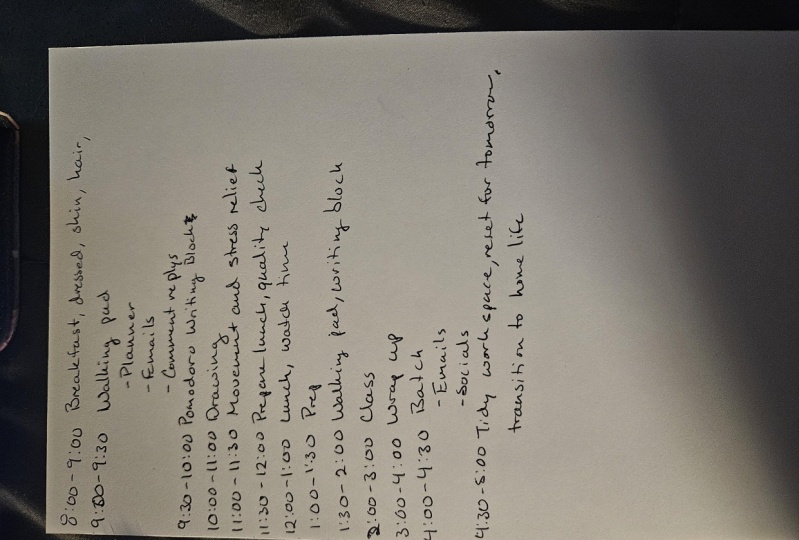
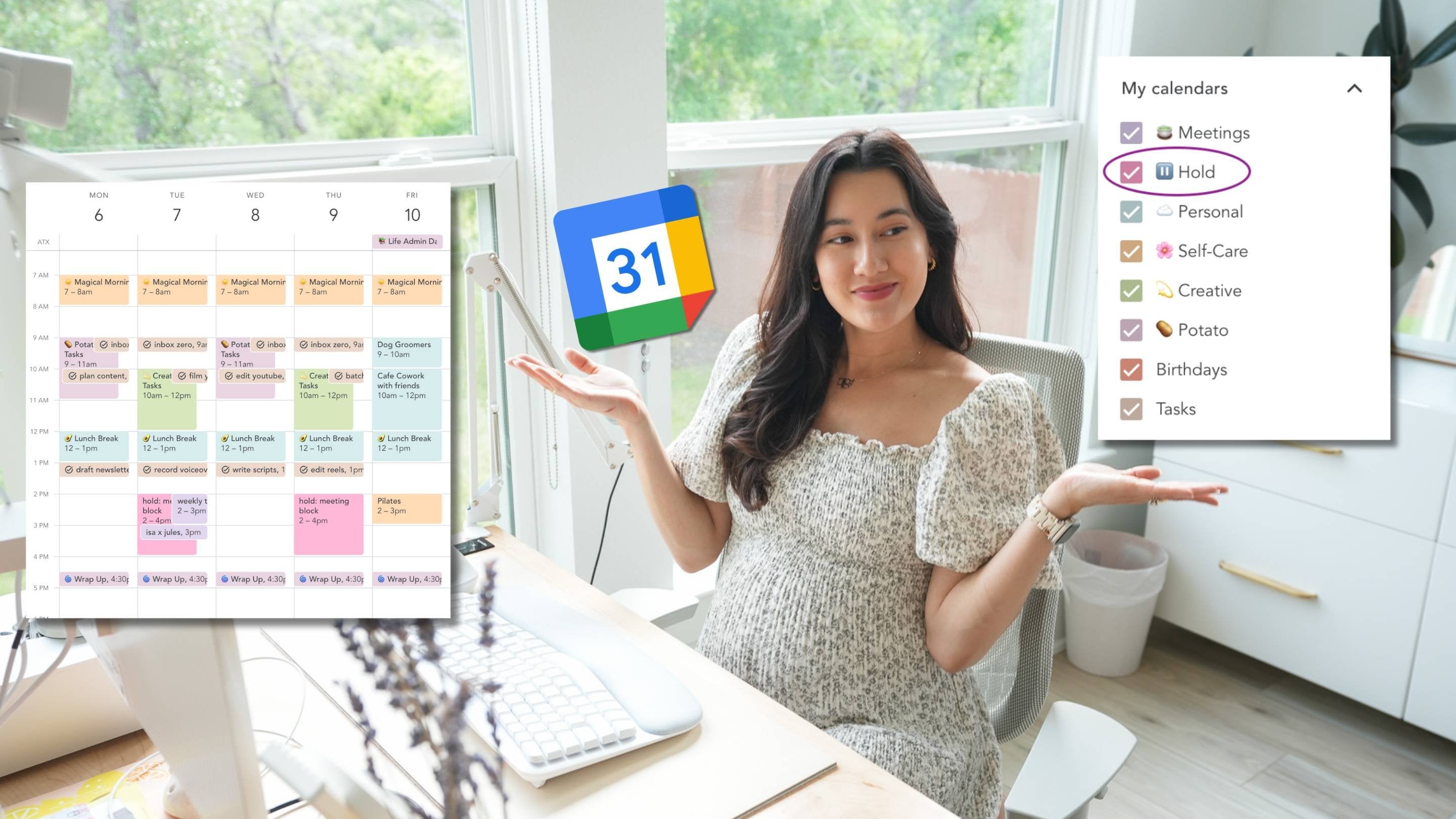
10. Time Blocking: Time blocking sounds quite intimidating and it sounds very meticulous. And I think for a lot of people having to block how every single minute of your day or every hour of your day is something that isn't necessarily very desirable and completely agree with this. And I think time blocking something that I think needs to be used in quite specific way in moderation. However, I do find time blocking of very, very useful to help me manage my time in some instances. And what is time blocking? The time locking allows you and force actually forces here to fill up the time with pre-commitment and a plan of action. And so you actually avoid the effects of the Parkinson's Law. And the Parkinson's Law if you haven't heard of it for states that work expands to fill the time that has been allotted for it. So what that means is if you've given yourself a day to complete something, you will take a day. Whereas if you've given yourself an hour to complete that same thing, you probably completed in that hour. And so that is what Parkinson's you look, that's the premise of Parkinson's law. And I find that time looking really helps to eliminate the data sort of expansion of sort of time to do something. And as a result of giving yourself sort of artificial, really fixed deadline, it helps to boost your willpower faults of peak productivity. So if you're someone who would have normally taken a whole day to do this thing. Lonely only have an hour means that you will just be super productive for that hour and use your time a lot better. A bit like I was talking about earlier where I know that I only have an hour to get something done. I'm going to get it done in that hour and my productivity is going to be sky high because I've only given.
11. Automation: So one of my lowest effort, but actually highest output time management and tools in my toolbox is automation. And the reason why I say this is because automation to me is the act of work getting done without me actually doing the work. And lovely, right, wasn't I say this first? Well, automation is a great way of sort of adding into your schedule things that are sort of working behind the scenes for you to help you manage your time better for when you actually want to get something done. So one of the things that I found quite difficult is having multiple inboxes and multiple streams of communication, egypt channel comments there. I've got an Instagram and Twitter iPads comment there. I've got a business website, I've got a business email about personal email management email, there are just so many communication streams I'm dealing with on an app on a regular basis, and I receive hundreds of emails. And one thing that I found quite difficult was finding a way to respond to them quickly without spending all day replying to emails and kind of signposting where this person needs to go. And so I've been able to use automation in order to help me sort of book that work without actually doing it myself. Until I give you six scenarios and six ways that I've added automation into my life in order to help me work smarter, not harder. So the first is setting up automatic e-mail replies. As I mentioned just now, I receive so many e-mails from a number of different avenues. And so I've got an automatic reply that directs and sort of signposts the sender sort of where to go. So if you're sending me email for a request for collaboration, there'll be in that automatic response will tell you you sort of what to do next. You might be emailing Support from the page doctor. And so I am able again to tell you what website to go to to do that and what you want to direct you to format. It also helps you manage expectations. You know, when you see that in all come through in your head, you're thinking where it ends reply back straight away. But actually my automatic reply says that I've seen your email. I'm quite busy right now. I will respond in the next couple of working days. And so it helps manage expectations and allows the sender to know that you're, you know, you are going to get to them and their email has been seen. A second is a setup recurring series of invoices, series of emails. This really depends on sort of what it is that you do. But for me, I've got my mentees. I've got customers who pay for subscriptions on a regular basis and rather than having to manually send out an invoice every single month, I'm able to just set up a recurring series of invoices and that will send it to that customer every single unit, first of the month for the next four months. And it really helps that that automation really helps manage my time. And because that would otherwise take me 10, 15 minutes to do, you know, every every first month. The third is for scheduling of your social media post and also in my kit you to post that as well. Most of us here we have like personally Instagram accounts. We may have business accounts online. We may have a small business that we are running. And so one thing I find really useful and to help manage my time is to schedule or those posts in one go. And Canva is a really nice place and they recently have set this up for you to be able to do it. Which is amazing because I tend to divide all of my posts on camera anyway and thumbnails and things like that for YouTube. And so being able to schedule and have everything go out, you know, kind of ink in increments is really, really useful. So there'll be times when a person goes out, I don't even know it's going out, but I've scheduled it in the past and so work is happening even though I haven't actually done anything. The fourth way is to backup your phone, book, setup, backups of your phone, or your hard drive or your laptop or your new data automatically. One thing that you sit on my mind a lot was that I had so many photos on my phone of what my son when he was younger, OF MY of holidays and I just hadn't backed up my phone in the months, years. And so one thing I did was set up automatic backups. And so now I know that there have to think about it and it means that my data is safe. It means that my my photos, I'll say and if this is work-related, be you and you know that you need to have something available for you for work all the time. And then you know, the pool's going online and available for you. And this is a really important one, especially for those writing your PhD thesis or an essay. The number of times I've heard and move left question, I lost all my work. That should never happen. Ever. You should always be saving your work and writing your work on an online platform. So somewhere that Dropbox, somewhere like OneDrive and Google Drive, just, it should always be written and backed up at all times. The fifth way that I helped automate my life is using templates. Now, this is not necessarily the best example of automation because you are working, but it does help with time management immensely survive and starting a presentation or starting a, an image or an infographic that you're designing Walton starting out from scratch. And you're able to use templates that have been designed for you. And I are available for you to use from places like Canva. And what I tend to do is I don't just take the template and use it. Just like that. Attend to change the colors, change the font. But at least I've got sort of a base that I'm using and I'm kinda have that inspiration. That's that thought process already there for me. And it saves so much time rather than a presentation taken me five days to even think about the design and the colors. It's already there for me. And I recently had a pitch deck presentation that I had to present for my business, the page doctor. And I was able to just set pitch deck presentations on Canvas. And there are hundreds of them that are able to select from. And I just changed some of the images. I changed the font color and the size is, and I just input my information and it was an absolute lifesaver. I could just be creative and think about my content and not have to think about the design. And the last, it may be something that you haven't heard of before and it's called its website would if this then that, and it's a really cool way of automating. So what else to do is to connect apps together. So you can basically say, if something happens, then this has to happen. And like I'm, I'm almost certain there's no limit to what like and how this can work for you. So for example, it can say, you can say something like if I reply to this e-mail, then set a reminder on my phone to it can literally be anything. If I post on Twitter, then follow up by pursuing the same thing on Instagram. If I do this, then do this. If a customer pliers back, then send them, like it literally has no limits to what you can do. It has connections to the majority of apps that most of us use and for work, personal and payments, whatever. So you're able to kinda connect all of those atoms together in a really nice, very, very classy, very classy way. And it allows you to sort of just streamline that a little bit. So do check it out. It could be very useful to you. So as I mentioned, automation is Bay is such a nice way of allowing me to work a bit smarter and also not work and still be working. And it definitely allows you to look good in front of customers, in front of your colleagues when you're getting cookies, sponsors, and responses that are meaningful and mean that you actually want to follow up on what you've said.
12. Task Batching: So I've left my biggest secret to the last video, and that is Task batching or dispatching on tasks. And this is, like I said, my biggest secret and I've left it there because it really is something that has absolutely changed my time management and productivity and that has Task batching. So what is Task batching? And it's essentially a planning process that groups similar activities together to improve focus and productivity. So basically doing the same thing in a very similar thing in one city, rather than spreading them out throughout the day or spreading them out throughout the week of doing the various time. And this tends to be sort of low-value tasks. Things like replying to emails, checking inboxes, and looking at messages, looking at social media and these low-value tasks really kill our time. The kid off occurs. They kill off that activity and they just, they need essentially lead to procrastination. And so rather than checking your emails sporadically throughout the day, having batching way of seeing why I'm going to write emails at nine AM, at one PM and at six PM. So you're batching that task really, really helps to streamline day and to kind of cut out those distractions. And actually if we think about how, how the brain works is really difficult once you've turned off from the task that you're working on, to check your emails or to look at your messages. It's really hard to then get back into that loop again, it's really hard to then go back to what you were doing. In fact, there's many studies that have shown that the majority of people don't go back to what they're doing purely because of how difficult it is and how much FAA does really take to go back to that task once you've been distracted and before you know it, you are in this cycle. It's horrible cycle of checking emails, responding to emails, going back to work, but do five minutes. Oh, an e-mail came through checking that e-mail, doing something to it. Okay. Going for a walk and come back to try and Chinese scholar work again. Notifications come into your phone, okay, checking that you're in this rut of menial tasks and and you're not able to focus for prolonged amounts of time. And batching really helps with this. So how can you implement it into your daily routine and into your productivity? So 11 way that I like to do is if I schedule it, actually just scheduling, scheduling tasks that I want to batch. So for example, I might want to say right in the morning, I'm gonna give myself 30 minutes and just go through e-mails. And that is the task that I'm going to do. And those have all been bashed right there. That's absolutely fine. And then I'm not going to check it again until like six PM until five PM10 ordinary midday. And this really helps. This is one way of batching. The second way that I batch, and this is probably the best thing. The idea is batching YouTube videos. So as I mentioned, I post on YouTube and I tend to try to record as, as little as possible. So rather than setting up and trying to make sure that I've got a quiet space and everything, you know, is is how I want it to be when I'm filming. Things like lighting, things like your being, you know, early in the morning. These are all things that I really can't control. And so by batching, I'm able to guarantee that I have those conditions by Wundt, pull those conditions so I can control what time I'm filming. I can control the fact that I'm always I'm going to get good lighting, I'm going to get quiet and everything. And so what I do is I skipped my videos in advance and with the knowledge that I'm going to film, you know, today. And then I'll just back to back film about sticks videos, 68 videos. And that means I've got content for a month, just from one day when one day or morning or filming. All I do is I just change what I'm wearing. So I might change my blazer, I might change the color of my scarf, and I just get going and it really, really helps with consistency. It helps with time management. Because the way you, for example, film and set things up in the twitchy about she's charged SD cards are empty and not just that, we need to make sure that you are in the right mindset to film. And I'm not in the right mindset to three times a week to film. But I do know that if I know that I'm gonna do it today, I will set myself up and to be able to film that, you know, all that, all that content in one day. And so I'm really helping with my time management skills. And it looks like I'm being really consistent. Me every single week. Blatchley videos that come out had been filmed a month ago. Another way is to batch sort of different types of work. So some people like to batch all of their meetings, that video call meetings on a specific day or time. So if you find that you're really productive in the morning, then don't have a video call meetings in the morning, have them in the afternoon where you probably would have not been that productive anyway, so at least that way and meetings out of the way. Another thing that people might like to do and this has more to do with like your lifestyle is to meal prep. And this is a massive example of batching. And we do this sometimes on the weekends or cook like four different options. Maybe like a pasta dish, meat debt, she condition fish dish, rice dish. And so what that means is during the week, we've got everything cooked for us. It'll be really messy when we're cooking. On that one day, there were lots of dishes that we never have to cook again for that week because simply just alternate what we eat and just saved us a lot of time rather than cutting onions every single day. Every single day by batching, you're really helping yourself sort of condensed that quite low.
13. End Summary: The time management committee be controlled through a number of different ways. And ultimately there isn't one right way, there isn't a wrong way, there isn't the best way. There's just different ways that work for you. And when I decide is simply by looking at what it is I need to do, how much time I have, the kind of mood that I'm in, the the day of the week, the time of day, all these things can be determined the time management methods that I would use. And I always make sure that they're simple. None of these things require much effort, that it requires you to use it. Complex system. They're all very, very easy ways of beating procrastination ensure that you have focused and making sure that your your mindset is ready to start work as soon as you know you need to get something done. I would highly recommend that you try out some of these methods I've mentioned today. Just give yourself one day to try out this method. One lake trout, this method, these methods I presented today and expanding on today in this course are due months, years of iteration and years of like kind of learning how I work best and what works best for me. So I definitely recommend that you take your time in finding out what works best for you. And then you're able to then that into your week and into your life in order to manage your time best. So my name is Dr. imine on S, and I'm really pleased for you to have gone to the end of this video. And if you have reached the end of this course, then thank you very much for watching. And do follow me on my platform here. That gets follow me on my channel on YouTube as well, which is just dots coming to us and also on my insulin page and the same handle, a lot more kind of content about time management and productivity.
 Dr Amina Yonis, YouTuber + Founder of The Page Doctor