Transcripts
1. Introduction - Learning and Technology: Hey, thanks for clicking
on this introduction. My name is Frank, and I appreciate your
interests in how to use technology to study and
learn more effectively. I'll introduce myself in
the course in a moment. But first, I wanted to talk
a little bit about you. I'm really hoping that
by taking this course, you'll be able to get the
results that you're looking for in using technology to
learn more effectively. My goal in creating this course is to
achieve one objective. Introducing you to tools that can help you in
your learning journey. No matter where you are in that journey or where
you want to go. In fact, if I get even
one comment that I helped someone use technology to achieve better
learning outcomes. I'll consider it a huge win and be happy that
I created this course. So that's the goal. It's all about you. As I mentioned,
my name is Frank. I've been teaching technology, infrastructure, networking, data engineering and analysis in post-graduate programs and
industry for over 25 years. Which might make
you think that I'm a pretty technical guy and I am. But I also love
learning and education. I have a master's
degree in learning and technology from rural
roads University, which is both a
great university. And it's the place where they
filmed the X-Men movies. Although Professor X was not one of my professors awhile back, I also started a YouTube channel called learning and
technology with Frank, where I discuss Learning
and Technology. And I even have a podcast
called the learning mindset, which is more about
education theory, science, and other topics
related to education. More specifically, my passion is in using technology for
better understanding. After all, by using tools to leverage the
effectiveness of our work, we can achieve so much more with the important distinction
that we need to use the right tools at
the right time in the right way to achieve outcomes important
to each individual. And that's where I'm hoping
to do with this course. There are plenty
of courses, books, and resources on building
knowledge systems. Some of the ones that
come to mind for me are Getting Things
Done by David Allen, The Seven Habits of Highly
Effective People by Stephen Covey and building a
Second Brain by Tiago Forte. There are many more, and I've certainly read
a lot of books around educational best practices and self-development over my
many years as an instructor. But roughly speaking, most of the learning and
productivity systems that I've seen
involves something similar to the following
phased approach. One, capture an organized
to review and remember. And three, create and apply. This is also how this course is organized, but with technology. So if you have an existing
system that you like of this course as adding a little bit of
technical spice to it. Specifically, we'll look at digital tools that can
help us perform and manage the phases of learning and productivity more
effectively and efficiently. Some of the tools we'll be devices that add value
to the way we learn. And some will be software
that supports our learning. In every case, we'll ask ourselves the following
three questions. One, does this simply replace something that I'm
already doing to? Does this replace
something I'm doing, but make it more efficient and add some type of value to it. Or three, does this
allow me to do something that I wouldn't have
been able to do if I didn't have the
technology to do it. Now spoiler alert, most technology is in
the second category. We enhance what we do, we make it more efficient. Technology that's
simply replaces what we do but adds
no real value, isn't usually worth the time, effort, and expense of
acquiring your learning. Technology that
transforms the way we do something and absolutely
unlocks brand new capabilities. Well, those are super exciting, those are new, and
they're not as common. Now I'm glad you're here. I look forward to interacting
with you in this course, sharing ideas and
improving the way we use technology to study and
learn more effectively. Let's go.
2. Hardware and Devices for Learning: In this lesson, we're
going to take a look at some of the hardware and
different devices that we can use for studying and learning
the various devices that we have can be used to help us learn or they can distract
us from learning. But in this course
we're going to focus on the positives of
how they can help. There are three
general categories of devices that we'll
take a look at. First, we have mobile devices
like smartphones, iPhones, Android phones with almost
instantaneous access to the programs they run. Laptops and tablets are also very portable and
mobile devices as well. And they potentially have
more power than just a phone. But they also have a
little bit more friction around how long they take
to get ready to use. It's often easier to
take a quick photo or recording with your phone than
it is with a laptop, e.g. the second type of
device would be a dedicated desktop computer. Desktop computers tend to
be devices that require you to be in an office or a classroom in
order to use them. There's definitely
a bit of an overlap between desktops and
laptops systems these days. But think of this
category more as a device or hardware where
we have to have a place, we have to go to that device, we have to boot that device up. Take a little longer to start that device login
to that device, and we can open
specialized programs on that device that might
require more power. The third category for
this course would be dedicated devices such
as an e-book reader, a scanner, audio
recorders that are used to capture
lectures, e.g. a. Drawing tablet, different
devices that can be used to enhance our abilities around any of the other aspects
that we've looked at. The lines between all of these devices and categories
have blurred over the years, with devices in every category becoming more powerful
and doing more things. E.g. we could have a laptop with a touchscreen
that we can draw on, or we can have a tablet that connects to an
external monitor and a keyboard so that we can use
it as if it was a laptop. Some of these enhancements are built into new generations of hardware and some of them are
unlocked by using software. E.g. you can add an external keyboard and the monitor to an iPad
and then have a system that rivals and sometimes even exceeds the capabilities of many laptops and
desktops systems that are only a few years old. So where does this all leave us? What should we use? The key and using any
device is that we want to avoid any friction that
that device may cause. We want to make
sure that we get to our learning tasks as
quickly as possible using the right tool for
the job that we're doing at the right
stage in our learning. When we look at capturing, the phone comes to mind. It's in my pocket,
it's instantly on. It has the ability to
capture ideas quickly, different thoughts
that I'm having, images, videos, notes, audio. It can do a lot and it can
do a lot very quickly. But what's the
drawback of the phone? It's smaller in
terms of keyboard, use it as a smaller screen. It potentially has
space limitations. So while it might be perfect for taking those quick notes, is it a good choice
for organizing those notes and then
writing a research paper? So great for capture, maybe not that great for
organizing and creation, for organizing information
and creating content. Maybe a tablet or a dedicated computer system
might be more appropriate. They'll offer the larger screen. They're easy to use. Keyboards. The keyboards on those
devices are easier to use. And this is now great
for the organization and the creation phases of
our learning workflow. But they do take longer to
start up and load programs. So the capturing phase of our workload may
be less efficient. Now, in the case of tablets, they often sit between
a phone and a computer, allowing quick capture,
organization and creation. And I will admit
that my iPad Pro is probably my favorite device to use for research,
study, and learning. If I had to name just one
single device that I think has the most reach when it comes to learning
with technology, I might be a bit biased and lean towards a powerful
tablet device, but you don't have to run
out and get a tablet. Any device can be adapted
to each of the phases of learning and can be used in each of the
phases of learning. I've added keyboards and
external monitors to an iPhone, and it worked great
for organizing my notes and creating
content on the go. It wasn't as ideal as a
full-size keyboard setup with a full-size monitor that I would get with
a different device. But it was very portable
and it was very functional with a little
bit of friction involved. Well, one device can
be adopted across multiple areas of the
learning lifecycle. There it's most people or many people have more
than one device. Maybe they have a
phone and a laptop, or a phone and a computer. And this creates many benefits, but it actually introduces
some new challenges. If we are using
multiple devices, we need to look at how
we can move content easily between those devices
because it's a workflow. So we have to be able to use a program on my phone to
take a photo for reference. And then I wanna be at
that photo to appear on my laptop when I'm ready
to organize things. And maybe I want it available
to me when I create a website or an essay
on my computer? At this point, it may seem
overwhelming with all of the possibilities of all the different
hardware that we can use. And we haven't even touched
on the software yet. We'll look at that in
the upcoming lessons. But don't despair. The best device to use for learning is the device you have. We need to create a
workflow and think about hardware across each
step of learning. And depending on what
we have to work with, there will be some
adaptation that we can make in order to make the
devices we have work. So now it's your
turn to think about the devices that you
have to work with. Do you have a phone? Do you have a laptop? What is it that you
have to work with that you can use to introduce technology into your
learning workflow when you make a list of the
hardware that you're using, phone, tablet, laptop, computer, and any specialized
devices you have. Think about how you'll
use them to capture, how you'll use them to organize, and how you use them
to create content. But watch the rest of the
course because we're going to go through each of
those three phases in a little more detail. And I'll demonstrate each of these phases on each of
the different devices, but have that list of the
devices you have available so that you can participate
and decide for yourself. Here's what I need
to do in order to be more effective in capturing, organizing, and creating content with the devices you have. One of the things that
we're going to do no matter what hardware
we're using, is create consistency for
each learning action, we're going to
reduce friction and we're going to
ensure that we build a learning workflow that
maximizes how we use technology. Learn more effectively. Now, let's go look
at each phase in the learning lifecycle and the devices and the
software that we can use and the processes we
can use to make that flow very well and learn more
effectively with technology.
3. Step 1: Capture Source Material to a Central Place: As we look at learning, the first thing that
comes to mind is, what are we going to learn? The topic, the subject and
the reason for learning. Having a passion for the
topic at hand is important. We may also need to
look at learning things for one reason or another that are
less motivating. But regardless of the topic
or the why of learning, one thing is fairly common. There are, there's more material about the topic that
we're studying, then there is time or ability
to absorb it quickly. What did we do? We collect, capturing, and
organizing the topics, the subtopics, the facts, and the skills we need to
both immerse ourselves in the topic as well as edit the materials to
match our needs. As we enter this initial phase of learning, we have a goal. And that goal is to
find and collect the relevant content that we can use to learn the subject
that we're trying to learn. We want to be able to pull the information no matter
where it comes from, whether it comes from
a book or online, a website, a library, a lecture, or any of the many ways that we can find information that we want to learn from to simplify
the process in our heads, it might be easiest to divide the materials
that we're looking at, the source material into
analog and digital sources. Analog sources might
be something we can see here or experience, given that we're using technology to assist
in our learning. And given that technology
is in many cases digital, we often need to convert
those analog sources into a digital format in order to progress through
our learning process, we could use the term
digitizing to reference the act of moving content
from analog to digital. Traditional
non-technical tools that are analog to analog, might include things
like a notebook. So you have a
textbook and you take physical notes on that textbook. It might be index cards, physical index cards
that you fill out. And there's other ways of
taking that content and placing it into a different analog format for later study. But the challenge with these systems is
that they don't take advantage of the many things that a digital system offers, such as search and sort tools. So we want to create
a digital resource from those analog resources, we want to be able to
make that conversion. We want to use technology. Some of the different
tools that we might use to digitize analog content would be things like digital note-taking instead
of paper note-taking, or digital index cards instead
of physical index cards. There's also some specialized
tools that we can use, such as a book scanner with OCR. So I can use optical
character recognition. Using these tools, we can
digitize papers and books. And then when they've
been digitized, we can then further navigate them with the intention
of collecting just those elements that they contain for the learning that
we're trying to achieve. If I'm doing any type of volume, I'll use these Caesar
book scanners. I have this one here, e.g. for a lot of my research
and archival work, part of the capture
process for that. Then I have these two
really nice portable ones that we'll use in different
parts of my office. Or I will actually carry
this one around with me in order to capture things. Say, if I'm in an
archive or a library, if we have a physical book and we want to turn this
into a digital form, we have a number of
different options available. One of the options we can use an app on our phone
called Microsoft lens. Microsoft lens will
allow us to go in and we can do a number
of different actions. So e.g. I. Can take a picture of
texts that is on a book. I can confirm that. I could go into the book. I can extract data here
and you can see that this process is a
little bit slower. But if I only have one page or a couple of pages or a
diagram that I want. I can go in here
and save it into my organization
system, let's say e.g. if I'm saving into my OneNote, I can save it directly
into my OneNote. And I do this quite
often when I'm reading information and I have a physical book that
I want to digitize. Note-taking is an area with a lot of different
choices though. My only advice in the
note-taking area is to select one program for taking notes and
then stick with it. All of the programs
for note-taking have different features and
they evolve over time. Trying to find that
perfect program would be a time-consuming and
generally fruitless activity. There's no one perfect program. In my opinion, there's not one clear winner for
digital note-taking. Those that love a
certain program will definitely disagree
with that statement. And I'm always amazed at
how passionate people are about one program
over another. But the last thing we
want to do is waste time concentrating on the tool
and not the activity. So we want to make
sure that we have a digital note-taking tool
that meets our needs. And maybe later on we can always convert it
from one to another, but don't go chasing the best note-taking app that
some advice I have for you, going back to the previous
lesson on hardware, we should also ask
ourselves what devices we want
to take notes on. Based upon how we prefer to take notes, do we want to type? Do we want to write
with a stylus? Do we want to use some
sort of audio device? We want to have the option
of making sure we choose the right input method for the way that we
prefer to take notes. Maybe we want to use all
three at different times. We can even go so
far as maybe using a smart pen that writes
on actual paper. But then digitize is that
handwriting, as we write, that's a bit more specialized, but it might be a good
solution for some folks. We also want to ask whether
we're using multiple devices. If we are, do we have a program, a single program that will run across all of those devices and allow those notes to
be available no matter what device we're using
at any given time. We'll look a little
bit more at that in the next lesson on
organization of learning. But what's important is
that when we're capturing, we want to make sure that the
program that we're using to capture into is going to be able to run across
multiple devices. And that's gonna
be able to support all the different formats of source material that we identify as being
important to us. Audio, video, note-taking,
whatever the case may be. We can also use different tools that will extract information from analog sources and
transform that data. E.g. we could record a lecture
using an audio recorder, then transcribe
that lecture into digital notes using
transcription technology, which can be time-saving. It's inexpensive, often
built into the programs, and it results in a digital
artifact of the lecture in a different format that might be more suitable for
different needs. We can even translate our content into
different languages a lot of the time if the
material we're studying is already
in a digital format, part of our work has
been done for us, but we still often
need to move it from one digital format to
another digital format, or from multiple systems
into one preferred system that we can use to collect and organize the learning
path that we want. As an example of this, we may have an e-book
and we want to take notes on certain passages or
concepts from that e-book. We can have the book open
next to us and take notes. But because the book
is already digital, we can just copy and paste
the portions of the book that contain our desired
learning outcomes depending on the software. This can also help us later in the learning process
when we're writing papers, consolidating
our learning. Any other activity
where we need to provide a reference to the
original source material. Digital resources help
us maintain a lineage of materials a lot easier
than analog systems, which can also help
us if we need to return back to the
source material to clarify concepts or expand our understanding of what
we're trying to learn. There is a learning curve
for any tool you select, but it's better to learn
more about one tool then to learn just a little bit about a whole bunch of tools. So we want to make
sure that we're selecting our tools
appropriately. And at the end of
this lesson will have an exercise
where you do that. Now, it's time for you to think about and plan your
collection phase of learning. First, take the list of
hardware devices you created in the last lesson will
need this when we begin to list the tools
that we're planning to use. Now, make a list of the type of sources you use or plan
to use for learning. Will you attend lectures? We'll be reading physical books. Will you use e-books
or their websites? You'll go to try to be as complete as you can in
creating this list. It'll help you when
it comes time to plan your collection activities. The next step is to
determine which of these resources are analog and which of these
resources are digital. This should be easy, but it's important
because now we need to ask ourselves
the following. Where will I put the
information I collect? This will normally be a
note-taking system of some sort, one note evernote notion or
whichever one you prefer, you'll want to take
some time to get to know whichever one
you decided upon. And I'd recommend taking
a short course that focuses just on the mechanics
of the tool you choose, but choose one and stick to it. Switching collection systems is a great way to waste time. Later on if you really
do want to switch, a lot of times they'll have
import export features. But again, it's better
to stick with one, at least during the
initial collection phase. We're going to ask three
important questions about that collection area that the note-taking app that
we're going to use, we're going to say, can I
use this on all devices, regardless of operating
system or device type? Remember that list
that you created. Think about can you synchronize
it across those devices? So if you take a
note on your phone, will it appear in
your laptop, e.g. then you're also going
to ask yourselves, Can I use the software with or without an
Internet connection? So can you take notes if you don't if you're not
connected to the Internet, will the repository
of all your notes be on the internet or will you
have a local copy as well? We have local copies on
each of your devices. And I'll speak about a concept
called cloud computing and the idea of centralized Cloud Storage in
the next lesson, where we talk about
organization, you might want to visit
your first choice of note-taking app after you
take that lesson circle back. But for the most part, they'll all the
major note-taking applications work across multiple devices and multiple operating
systems these days, because that's really
what the market demands. As you answer the questions about the note-taking
application, remember to consider the
devices you will use. Personally, I use both apples and Windows to Apple
and Windows devices. So I use mobile devices as
well as desktop systems. My answer may differ
from someone that is a complete Apple ecosystem user or a complete Windows
ecosystem user, that cross-platform
compatibility might not be as important to them. Okay, so now we know where
the information is there, we know where the sources, we know whether it's
analog or digital. And we have a plan
on the tool we're going to use to collect it into. For the analog material. We're now going to ask
how do we digitize it? Are we going to take notes
manually in a digital format? Are we going to scan
using a specialized tool? Are we going to record
it using an audio tool? We want to transform it into
a format and into a place where we can
interact with it for organization review
and creation. The next phases in
the learning process for the digital
information sources, we'll ask ourselves, how will we move it from
one place to another? Can we use copy and paste? Is there a built-in
note-taking functions in the tool that allow me to
highlight and export my notes. By completing this exercise of inventorying everything
and understanding how you're going to use it, you'll start to build
confidence that no matter how information
arrives to you, you'll have a way to capture it. And this is the first step
in the learning process. This is the first step of taking control of your
learning process by using technology to collect the information that
you need to learn.
4. Step 2: Organize to ONE System: Now that we've collected the material that
we're going to learn, we have a plan for collecting the material we're
going to learn. We're going to move
to the next phase of our learning process, and that is organization. There is a little bit
of a trickier though. We don't just organize
material in terms of ensuring its place where we
can find it grouped properly and
technically organized. We do all that, but
we also are going to cognitively organize the
material by interacting with it. We're starting to
manipulate when group and review and we're going to start
remembering these things. We're going to
start synthesising. We're actually
going to enter the learning phase of learning. Now, this is not a
small subject area, and this course is more on
technology for learning. Learning is a topic
that's deep and evolving, but we can benefit from adding our technical tools to
the organization of our collected material and
letting those tools play a role in our cognitive
organization of the materials. Which at least in
part is a way of saying that we've
learned organizing material in your memory
in a way that you can retrieve it is one
definition of learning. Maybe by using
technical tools to also organize the
material and retrieve it, we can aid in the process of committing the
important material to memory and letting
our lovely brains do their work in the
biological realm. Okay, that's starting to
get a little bit off topic. We'll concentrate on the
technical organization here and the way that we can facilitate study techniques using
that organized content. In the last lesson, we collected the elements
of the topic that we're learning by bringing them all into a digital
note-taking system. That's the collection phase. Now we've progressed
to the organization of those notes into something
that we can learn from. As we gain more skill in the organization of our notes and the collection of materials, we can actually
start collecting and organizing some elements
at the same time. E.g. if I have a notes framework that's
built ahead of time, when I collect the information, I can place each of the
notes that I've been taking into a specific
location in my system. That's handy but
will still have to interact with the
material and likely reorganize the collected
material in a way that allows us to review group and to begin to
understand it better. Especially if we have
multiple sources that will give us perspectives
on the same topic. We want to make sure that
we can re-mix that and take a look at the organization that actually gets into the
third phase of learning, which is the remixing
and recreation. But a simple way to do this
reorganization with software is to allow us to restate the collected
material in another format. So e.g. I. Might create a mind map of
the material I collected and then import and export
this data that I have in the mind map to and from other portions of my
note-taking application. Other tools that I can use in the organization is I could
tag all my notes and that will allow me to create built-in grouping
tools that I can then search those tags and sort
them according to those tags. So that allows me
to make connections between different
notes that I've taken. To benefit even more, I could take my notes and
restate the material. So what I can do is take a note and write it out
in my own words, may be using an
electronic flashcard. Tools such as Anki. This tool allows me
to not only create that Spaced Repetition
activity that is so useful, It's where I review a concept over time for better learning. But it also allows me to
group and ungroup and regroup those materials in a way that has definite learning benefits. This is all part of organizing the material so that I
can understand it better. Something very useful in my
organizational system is to create that single
repository to draw from and load into this single source
that all my tools connect to will provide a
place where I can keep all of my
collected information, as well as the modifications that I make to that information. But I want to collect
everything into one place and have
multiple devices. Should I throw everything away? Should I throw all of my devices away except
for one of them? Well, no, we're not going to do that because we have
something better. And that's called the
internet and the cloud. We can use cloud
services to synchronize across our devices and keep them all up to
date with our work. In the last lesson, we
looked at making sure that whatever collection system we used could work across
all of our devices. The way that many of these
devices do that is to use their Internet
connection to push data to a Cloud storage account. And then devices can pull from that cloud
storage account. So one device could push
information up to the cloud, another device could pull
it down from the cloud. And if all of my
devices are doing that, they can all be
synchronized together. So if you capture a
note on your iPhone, the software will push it up to the Cloud when it's
connected to the Internet. And then on your computer the next time you
load the software, it'll pull that note
from the Cloud. This provides a
great way to keep everything synchronized
and organized. Now, it's your turn
to try this out. If you have two devices, use the software that you
selected in the last lesson for note-taking and take a
note on your first device. Does that note then appear in the same program on
the second device? If it does, that's great. Your notes are
synchronizing and you have a central system
that you can use to begin a more organized way of collecting and organizing your materials
that you need to learn. If not, why not? Maybe you have to press a button to sink
or maybe you need to connect both of those devices to the
same cloud service. That's usually in the
settings of the software. Maybe it's not possible,
in which case, you might actually want to
reconsider the tool that you're using to collect
your learning material. Because we don't want to
create islands of information. We want to have a central
repository of our learning. Now as a bonus activity, what happens when you disconnect of device
from the Internet? Are the notes that are on
the device still available? And when you reconnect
to the internet, do they then appear
on the other device? If you're in a situation
where you need to collect or work with materials when not connected
to the Internet, then you need to ensure
that your system works. There's no use using a system that is locked to
the Internet and doesn't allow you to share or organize information if you
don't have the Internet. Finally, think
about how you will organize materials in a way that allows you to review them in a different but organized way. To suggestions I would
have would be to try creating a mindmap and
using a flashcard deck. Next, we'll take our
learning to the next level, creating and applying
our knowledge to really make our
learning effective. Using our knowledge is the ultimate test and
ultimate goal of learning. Let's go have a look at
reviewing, revising, remixing, and creating with the things that we're learning.
5. Step 3: Create in a New Way: We've already come a long way and our learning
process by using technology to help us collect
and organize information. But the final stage
is where we actually begin to commit that
knowledge into our brains. Cognitively be able to work
with that knowledge and really apply and understand the knowledge that we've gained. In most cases, we want to
learn for some purpose. We either want to
develop a new skill or we want to understand
something more deeply. The best way to
do this is to put the learning to use
writing a paper, a blog post, creating a website, building a giant robot. Whatever outcome is appropriate to the type of knowledge
that we've acquired. Can technology help
us here as well? Absolutely. And it would be strange if
we couldn't use technology, given that this is a course about technology and education. But there are many, many ways that we
can use technology to express and demonstrate
our knowledge. If the goal of our
studies was technical, like writing a computer
program or learning to use a specific
computer application, then using technology to demonstrate knowledge
is pretty much implied. However, there are
many things we learn that aren't
specifically technical, but that we can use technology to demonstrate our knowledge of. Now, the demonstration
of knowledge doesn't mean that we have to share that demonstration with others. We can, but the first audience
will always be ourselves. We want to demonstrate and prove our new knowledge to an
audience of one ourself. This can take several forms. We can review and revise the
materials into a new format. Remixing the content
in new ways will allow us to better
understand the materials. Technology provides many
opportunities for this. We can use something simple, like a flashcard to
create study notes, reorganize, and space them
out for spaced repetition. We can get more
complex and rewrite the information into a
blog post or even create a personal website that
we can use as a way of tracking and revisiting the
information in the future. We can even get more
involved and create a video, maybe a video or some sort of complex reworking
of the information into a brand new format. All of these
mechanisms require us to interact and
review the content. With that, we took our notes on. Something that will benefit
us by applying and committing our knowledge to move are organized notes
into new formats. We can use import
and export tools, which allow us to easily place information together
to break it apart, to reformat it as needed. Anything that helps us learn
it and understand it more. All of this interaction is
reinforcement of learning. It's deepening and sharpening our knowledge and our skills. The technical skills that we
can use for this are huge. There's so many of them. We can use writing software
from simple tools such as a text editor to a word
processor like Microsoft Word. We can use specialized
tools like Scriven juror, or even an academic
tool like Notabene. Writing is a significant form of communicating our knowledge
to others and to ourselves. Even if we aren't planning to present our knowledge to others, which is a good way to learn. We can still use presentation tools to create a presentation of our knowledge, even if it's just for ourselves. It forces us to reorganize
our learning even more and structure it in a
way that's understandable. Even if the audience is one, creating a presentation
will force us to that organizational activity of sequencing the knowledge and that will help us
understand it more. Another great way to
re-mix and review is to build a creative project with our knowledge, such as a video. We can use simple video tools such as clip chap in iMovie, many others to
create a short video of our knowledge
that we've acquired. How about a website? There are many free or
inexpensive tools that will allow us to create a
website of what we've learned. We don't even have to
publish the website. But like writing,
presenting, and filming, the act of building and
creating is the activity that allows us to promote deeper understanding of the
subject we're studying. So now it's your turn. You might still want to
put some of the skills from previous lessons
into practice, running through
the collecting and the organizing phases before
you complete this activity. But you can also use something maybe that
you've learned about in the past and reinforce
that knowledge. This activity, or even you
could take this course, you could reinforce
your knowledge in this course and create
something from that. So the activity is to write a summary of what you've
learned or create a short presentation as
if you are going to share your learning with someone
else or create a little video, film yourself talking about
the new knowledge that you've acquired and how you're going
to apply it in the future. The power of imagination
is quite useful here, you can pretend that you're responsible for sharing your
knowledge with someone else. You can imagine them as you prepare your creative summary
of what you've learned. There's a lot of
tricks with kids. A lot of times what
we'll do is we'll say, Look, here's a stuffed animal. They have to explain
what they've learned to that stuffed animal. A lot of times people
will teach their pets. I don't think the pets
are necessarily going to go out and program a computer by speaking and verbalizing
and creating and remixing, it actually integrates
that knowledge and you become better at understanding
whatever subject it is that you've wanted to learn. And technology can
help you do that.
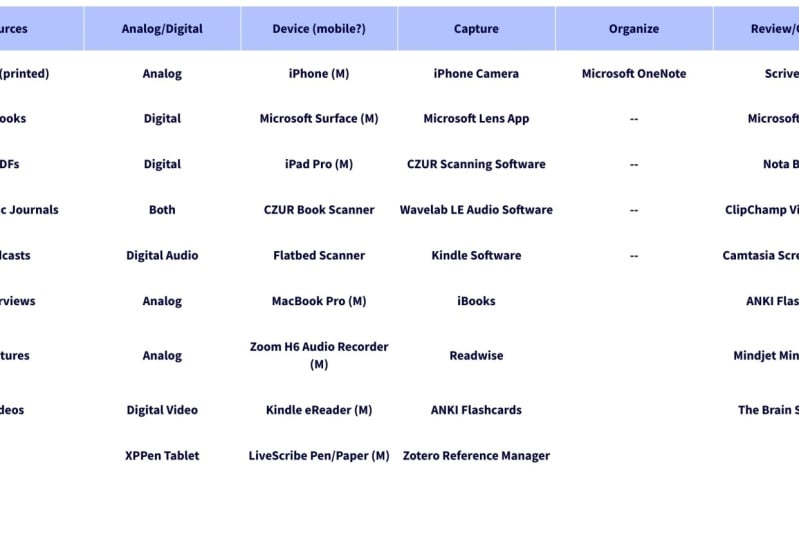
6. Course Project - Create a Learning Technology Plan: The project for
this course is to create a table that
will help you in understanding how
to use technology across each of the phases
in the learning process. You can see an example of an empty table for
you to complete. What you're going to do is put your own information in each of the columns
of that table. You'll want to keep this
table handy as a guide in your own efforts to
improve your learning in the future with technology, making sure that
it's productive, making sure that you
really are cognisant of what technology can be
used to help you learn. What we're going
to do is break it down into the following columns. The first column are going to be the sources you
use for learning. You're going to identify the sources you use
to learn new things. And don't worry, you can find new sources
as time goes on. But you're going
to keep this table handy and just keep a list of all of the different places
you go to learn new things. Then we're going to identify
in the second column, what type of source is
it, the source type. For each of the sources, you're going to identify, whether it's a digital
source or an analog source. And this is going
to help you with your planning for
how you're going to capture and collect
information from that source. In the third column, you're going to take a look
at the devices you have. What devices do you
currently have? You can also add devices that you want to acquire
in the future, but it's an inventory of
the technology you have. You're going to identify
whether it's a mobile device, knowing whether you
can take it with you and whether you have it there for doing
the collecting and each phase of the
learning process, knowing whether a
devices mobile or not will help you understand
how you're going to use it. So identify whether it's mobile or whether it's something
that's stationary. In the next column, we're going to look at the
capturing collection phase. What apps and tools will you use to capture information
from those sources? Don't try to use too many. Align each tool to each
source so that you can say, no matter what the sources
I have a tool that I can extract the information from
might be analog-to-digital, might be digital to digital. But you wanna make
sure that you can have a tool for each source. Maybe you have a tool that can capture from multiple sources. That's a good tool indeed, they want to make
sure that you look at each tool and say, okay, this tool can capture from these two sources
and make that map. Then in the next column
we're going to say, how will we organize it? Now, there's a bit of a
trick to this column. It really shouldn't
have too much in it. It might just have one
note-taking application, might be that you're
going to take your notes with one particular program. You're going to synchronize
across all your devices. You're going to
have one place for your learning to be stored. Try to keep that
organization in one place. Trying to keep multiple
systems and juggle those multiple systems is
actually not a good idea. So that column should
really only have one, maybe a couple of other
devices for organizing, but ultimately everything
should land in one place. The final column is the review and create column
where we're gonna look at apps and tools that we can
use to Review and Create. This will leave us with a
fantastic table that can act as a reference and allow us to study better with technology.
7. Conclusion: As you've seen from this course, there are many
technical tools that can help us study and
learn more effectively. The ones I've presented here are really just a few of them. Trying to create an exhaustive
list would be exhausting. What I hope that you've
gotten by taking this course is some exposure to a few tools that you
might not have heard about and that might
be useful to you. A key takeaway from this
course will be that the learning process you
use is more important. And then what we can use
is use technology to augment and improve
with technical tools, aiding in that learning process. The process being collecting, organizing, remixing,
and creating. I'm hoping that by
taking this course, you can look at any new tool
that you might see offered. And they'll always,
because they'll always be new
technologies coming out. And you can ask
yourself a question, what does this technology do? And at what stage of
learning could it be useful? Is it something that's
worth using for learning? Will it make my learning
more effective? And at what stage would have
make it more effective? Now the biggest
takeaway that I hope you've gotten from
this course is that you've looked at
technology and realize that it's not necessarily
the solution. Technology is just leverage. It's leveraging a
learning process that begins and ends with you. Your style of learning
and your interests and your goals and
your dreams will drive what it is that you
want to learn and technology can help
you in that learning. We want to maximize
your learning. We want to make sure that you're successful in your learning. And we want to use
technology where appropriate to help
you in that process. Thank you so much for
taking the course. Now it's your turn to teach
me by commenting and letting me know about your favorite
technologies for learning. Letting me know
which of the ones in this course were useful for you. Letting me know what
areas would you like to see maybe more depth
in in another course? Would you like me
to cover something that I briefly talked about in this course that
you'd like to see more depth on in future courses. I hope to see you in
those future courses. I hope to create more
courses that will help you learn better and learn
better with technology. Thank you for
watching this course, taking this course, and I'm looking forward
to your comments. Also, you can review
the course and let me know where I can
improve the course, where I can improve
future courses. And I'll definitely be
checking all that out and commenting back and trying to interact with you as much
as you interact with me. Thank you again. Take care.
 Frank Bergdoll