Transcripts
1. Class Introduction: You've been told
1 million times. Post consistently
show up every day. Stay active on social media and you want to. You really do. But every time you sit
down to create content, your mind goes blank. You stare at that empty screen
wondering what to post. What would your audience
even care about? What hasn't been said
100 times already. So you end up recycling the
same topics over and over. Worse, you don't post at all because nothing
feels good enough, and that cycle continues. If that sounds familiar, you're definitely not alone. Hey, there, I'm Kristine. And one of the
biggest breakthroughs in my social media
marketing career was realizing that running out of ideas isn't
actually the problem. The problem is not knowing
where to look for them. Content ideas are literally
everywhere in your DMs, in online communities,
in your own experiences, in trending content
and podcasts, and even Google searches. The opportunities are endless. You just need a system
for capturing them. Whether you're a content creator building your personal brand, a social media manager
working with clients, a business owner promoting
your products or services or anyone creating
content on social media, this class is for you. In this class, I'm
going to show you exactly where I find my
content ideas and how you can build a never ending
content bank that keeps you posting consistently without the stress or creative burnout. Here's what we'll
cover together. How to mind your audience's
questions for content goal. Where to find online communities overflowing with content ideas, how to use AI tools, TikTok Creative Center, and Google Trends to
brainstorm strategically. How to tap into your
own expertise and turn everyday experiences
into engaging content. How to repurpose what's already working and multiply
your content output. By the end of this class, you'll have a running
list of content ideas and a clear strategy for finding more whenever
you need them. No more staring at
blank screens, no more, I don't know what to post, panic, just a steady
flow of ideas. You can pull from anytime. Sound good. Let's dive in.
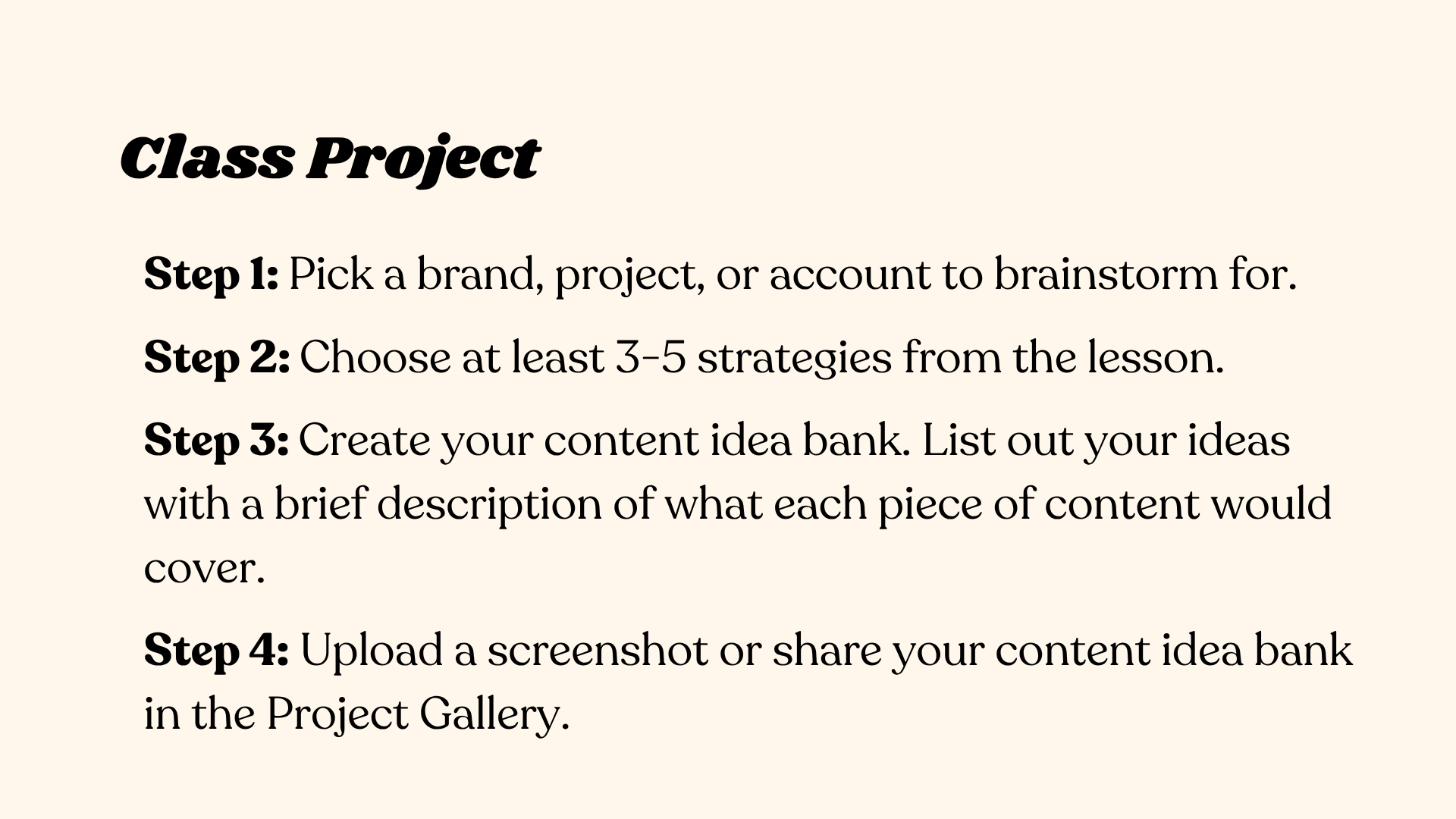
2. Class Project: Let's talk about your class
project because this is where you take everything you learn and actually apply it. For this project,
you're going to create a content idea bank with at least 15 to 20 content ideas for a specific brand or account. Here's what you'll do. Step one, pick a brand, project or account
to brainstorm four. This could be your
own personal brand, a client you're working with or even a made up brand you
want to practice. Step two, choose at least three to five
strategies from the lesson. For example, you might
explore audience questions, check a relevant
online community, use an AI tool, and tap into your own expertise. Step three, create
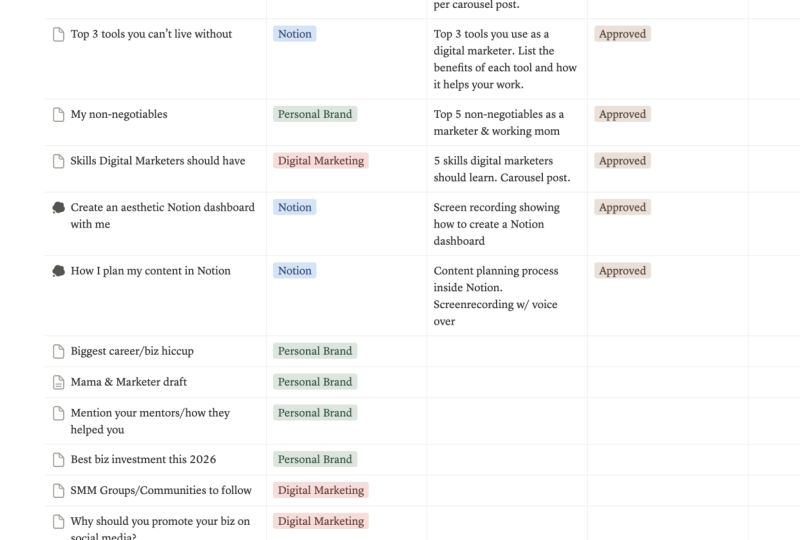
your content Ida bank. You can use a simple Google Doc, a Notion page or your Notes app, whatever works for you. List out your ideas with a brief description of what each piece of
content would cover. Step four, upload a screenshot
or share your content idea in the class project gallery. I personally review
every submission and leave feedback
to help you grow. Now, here's my advice. Don't overthink it. Your ideas don't have to be
perfect or fully fleshed out. The goal is to practice
spotting opportunities and building the habit of
collecting ideas consistently. And remember, quantity
matters here. More you brainstorm,
the easier it gets. You'll start to see patterns, notice what your
audience really needs, and develop an instinct
for content that connects. I can't wait to see
what you come up with.
3. Where to Find Content Ideas - Part 1: Okay, let's talk
about the thing that stops most people
before they even start. But, Kristine, I don't
know what to post. Coming up with fresh, engaging content ideas
can feel overwhelming, especially when you're
trying to post consistently. But here's the truth. Content
ideas are everywhere. You just need to
know where to look. Let me walk you
through my favorite go to sources for content ideas. Number one, your
audience's questions. This is pure gold. What are people asking
you in the DMs? What questions pop
up in the comments? What problems are
they trying to solve? Turn those questions
into content. If one person is asking, dozens of others are
probably wondering the same. Here's how to do this. Check your DMs regularly and screenshot questions
that come up repeatedly. Read through comments on your posts and note
common themes. Now, if you have an email list, look at replies to
your newsletters. And finally, Pay attention
to questions during calls or conversations
with clients or followers. Here are some examples. Say you're a fitness coach
and people keep asking, How do I stay
motivated to work out? You can create a carousel with five actionable
motivation tips or a real showing your morning routine that gets
you pumped up for the gym. Now, for example, you
are a virtual assistant, and clients keep asking you, What tools do you use
to stay organized? You can make a video walking through your favorite
productivity apps. The beauty of this approach
is that you're creating content you know people want because they
literally ask for it. When you hit a creative blog, online communities are
absolute treasure troves. Check out CRA, read it, Facebook groups in your niche, linked in discussions,
and even blog comments. These places are filled with real questions your
audience is asking. Questions you can answer
through your content. Here's how to do this. Join two to three
Facebook groups where your target
audience hangs out. Browse relevant sub reedits and sort by top posts
from the past month. Check CRA for popular
questions in your industry. Read comment sections on popular blog posts
in your niche. Here's an actual example. I once joined a Facebook
group for digital marketers, and I noticed so
many people were asking about
influencer marketing. How to find the right
creators to collaborate with, how to reach out
without being awkward, and what to include in
collaboration contracts. These questions kept
coming up over and over. So I turned them into content. I created a talking
head video breaking down an outreach template
for contacting creators. A quick TikTok tutorial showing exactly where to find
micro influencers in your niche and a
carousel post about common mistakes that kill
influencer marketing campaigns. That one group gave me weeks
worth of content ideas. Now, here are more examples. Let's say you are
a food blogger. You can join Beginner
Cook's Facebook Group, notice people struggling with Meal Prep and
create content like five easy meal prep recipes for busy week nights or how to meal prep
without getting bored. Now, let's say you are a
travel content creator. You can check travel
forums for questions like, I X destination safe for
solo female travelers? Then create honest travel guides addressing safety concerns. Keep yourself up to date
by doing lots of reading. Dive into topics related
to your industry. Blogs, websites and newsletters are fantastic sources
of inspiration. You can sign up for
newsletters like later.com, answer the public next draft, or find industry specific
newsletters that deliver the freshest information
straight to your inbox. Tools like Feed also help you keep track of websites
and blogs you follow. So you can spot trends and spark new content ideas without
hunting all over the Internet. Now, here's how to do this. Subscribe to three to five
newsletters in your niche, set aside 15 to 20 minutes
weekly to skim through them. Highlight interesting
stats, trends or insights. Bookmark articles that spark
ideas great for content. Here are some examples. You read a later.com newsletter about Instagram's new
algorithm update. Turn it into a carousel post, something like three things Instagram's new algorithm means for your content strategy. Next, you see a stat in
a marketing newsletter. Video content gets
100% more shares than text and images combined. You can create a real
reacting to this stat and encouraging your audience
to try video content. You read a productivity blog that mentions the
Pomodoro technique. Then you create a
behind the scenes post about how I use Pomodoro
to batch create content. Finally, you saw an industry
report that shows that 70% of consumers prefer
to learn about products through content
rather than ads. So you turn this into
an educational post about content marketing versus
traditional advertising.
4. Where to Find Content Ideas - Part 2: Make the most of your
time by listening to industry related
podcasts while you're on the move during your commute at the gym
or while doing chores. You'll pick up
valuable insights, fresh perspectives and ideas you can turn into content later. Here's how to do this. Subscribe to two to three
podcasts in your niche. Keep your notes up
open while listening. Jot down interesting codes,
statistics or concepts. Note episode timestamps for
ideas you want to revisit. And if you want,
you can listen at 1.5 speed to get
through more content. It's totally up to you. Now, here are some examples. You're listening to
a marketing podcast, and the host mentions that
people don't buy products. They buy better
versions of themselves. This can become a carousel. You're not selling a product. You're selling a transformation. Sounds interesting, right. Next, a podcast guest shares
their morning routine. Now, you create a real showing
your own morning routine. Here's how I start my day. Someone on a business
podcast talks about their biggest failure
and what they learned. You can create a vulnerable cost sharing your own business
failure and lessons learned. Check out what other
competitors or other creators in your niche
are putting out there. Well, copying is a big no no. You can learn a lot by
seeing what resonates with their audience and giving
it your own unique twist. Tools like Basumo
can help you find trending topics and popular
content in your industry. See what's getting
the most shares and engagements,
then ask yourself. How can I add value
to this conversation? In my own way. Here's how to do this. Follow five to ten
creators in your niche, not to copy but to observe. Note which post formats
get the most saves shares. Is it a carousel or a real? Look for content gaps? What are they not talking about
that your audience needs? See what questions people
ask in their comments. Here are some examples. You notice a competitor's casel about five Canva hacks
got 500 plus saves. Instead of copying, you
create your own unique spin. Or Number two, a creator in your niche posts a myth versus reality
reel that got viral. So you create your own
version with different myths. Number three, you use
Busumo and find that posts about morning routine are performing well in the
productivity niche. Instead of copying it, you put your spin on it. Here are some ways how to
add your unique twist. You can add your personal
story or experience, take the opposite position
or offer a contrarian view. Go deeper with more detail
or specific examples. You can also update information
with fresh insights. Focus on a specific sub niche. For example, instead
of social media tips, focus on social media
tips for introverts. The skills and
experiences you've built over time can make
incredible content. Share your unique insights, your wins, your failures,
your lessons learned, whether it's how you
automated a work process, your favorite
productivity tools or a behind the scenes look
at your creative workflow, there is an audience
eager to learn from you. Here's how to do this. First, audit your skills. What do you know
that others don't? Think about your journey. What did you struggle with
that you've now mastered? Document your processes. What do you do regularly
that others find impressive? You can also share your tools. What apps, resources or
systems make your life easier? You can also be vulnerable
to your audience. What mistakes have you made
that others can learn from? Here are some ideas from me. I share influencer
marketing tips on TikTok, my creative process using
carousels on Instagram, Notion tips on my
Instagram story and reels, a day in a life work
blog on YouTube and even some lifestyle related
content on Instagram. Here are more examples. Let's say you've
mastered a skill. Let's say you've
overcome a challenge. Now, if you have a unique
process, you can try this. If you use helpful tools. Now, if you're creating
behind the scenes content, the key here is to share
what feels natural to you. You don't have to be an
expert at everything. Just share what you
know and what's worked or hasn't worked
for you. All right. Those are six powerful
strategies to find content ideas by tapping
into real conversations, industry insights, and
your own expertise. Now, let's shift
gears and talk about something that can seriously speed up your
brainstorming process. AI and tech tools. These tools can help
you discover trends, analyze what's working, and generate ideas faster
than ever before. Let's dive into the text
side of content creation.
5. AI Tools for Content Creation: Now let's talk about
the AI tools that can take your content ideation
to the next level. Technology has made it easier
than ever to spot trends, analyze what's working and brainstorm ideas in
minutes instead of hours. Here are the AI and
tech tools I use to stay ahead and never run
out of content ideas. Stay with me because we will be having a lot of demos here. Use AI tools to brainstorm. This is a game changer. Tools like ChatGPT Claude or Jasper can help you brainstorm content ideas
when you're stuck. Just give it some context
about your brand and audience and ask
for content ideas. Of course, you'll still need to refine them and
make them your own. But it's a great starting point when your brain feels fried. Here's how to do this. Use specific prompts that give AI context
about your brand, audience and content goals. Here's a sample AI
prompt you can use. I'm a bland. State your role or niche, who helps blank your
target audience with blank the main
problem you solve. My content pillars are blank. Now list three to four themes. Generate ten content ideas for Instagram that would
resonate with my audience. Include a mix of
educational posts, behind the scenes content,
and engagement posts. Don't worry, you'll find this AI prompt in our workbook
in the resources section. Now, let's turn that
into an actual demo. Let's say you are a
fitness coach and your target market are
busy mums in post Artom. Here's your prompt. I'm a fitness coach who helps busy mums get back in
shape after pregnancy. My content pillars
are quick workouts, healthy eating, mindset,
and postpartum recovery. Generate five content ideas
for each content pillar. So let's try to do that. Amazing, with the help of AI, we were able to generate five content ideas for
each content pillar. AI already suggested
the content format, content idea or title, and a brief description of
what the content is all about. AI also suggested
different content formats, such as reels, carusels, story series, and static
posts for variation. We also have different
content goals tips to educate relatable content, Q&A for community
building, and more. You can always
pick the ones that resonate with you and
your brand the most. All you have to do is to
expand on that content idea, add your personal take, and get ready to create AI
already brainstorm for you. Now, let's do another example. Let's say you are a virtual assistant looking for clients in the
ecommerce industry, and you specialize in
social media management. Here's your prompt. I'm
a virtual assistant specializing in social
media management for e commerce brands. My content pillars are
social media tips, productivity hacks, client
success stories, and VA life. Generate five TikTok
content ideas. There you go. Since this is for TikTok, AI suggested mostly
video content ideas. So I use Claude for this demo, and Claude also asked if I needed help in writing
the script. Let's type. Amazing. Now, pick the ones you think best fit your
brand. Refine it. Of course, you don't want AI to just create your
content for you, right? Otherwise, it would sound like, Well, AI, not you. Add your personal touch, your personal take based
on your experience. That's what sets you apart
from other creators. Your personal brand,
your unique journey. Then prepare your smartphone, TikTok account, and
get ready to shoot. Take these ideas and
personalize them with your own voice examples
and experiences. Use the sample prompt that I gave you and practice with it until you refine your process for content generation using AI.
6. Tech Tools for Content Creation: First, is TikTok Creative
Center and creator Insights. If you are creating
content for TikTok, use the TikTok Creative Center
to see what's trending, such as top hashtags, popular sounds, and
viral video formats. Meanwhile, Instagram's
Creator Insights also shows you trending
audio and topics. These tools help you jump on trends early and stay relevant. Oh Visit TikTok
Creative Center at ads.tiktok.com slash
BSAs CretVCenENext, check trending hashtags
and trending Songs. Then look at top ads for inspiration on
what's resonating. Now, on Instagram,
check the real stab and note which audios
have this specific icon. Save trending sounds to use
later when they're still hot. Here are some examples
to get you started. You see a trending
sound on TikTok where people show
versus content. For example, morning routine as a corporate girl versus morning routine as
an entrepreneur. Then you adapt the idea and
give it your own twist. For example, planning content the hard way versus
planning content with noi. Next, the TikTok Creative Center shows day in the live
videos are trending. Now, you can create
a day in the life of a social media manager
showing your actual workflow. Now you saw on Instagram
creator insights, this type of carousel
posts are trending. If you're a blank, your profession,
stop doing this. So you create if you're
a content creator, stop doing these five things. Next, keyword research
and Google Trends. Even though we're
not making keywords the main focus here,
they still matter. Understanding what people
are searching for in your field can guide
your content strategy. Now, you can use tools
like keyword tool dot IO, Word tracker and
WordStream to give you lists of related
keywords that spark ideas. While Google Trends
is amazing for identifying what's popular
on the web right now. Here's how to do this. First, go to Google Trends
at trends doggle.com. Then type in broad
topics in your niche, check related queries for specific questions
people are asking. You can also compare search terms to see
which is more popular. Use keyword tools to find long tail keywords or
more specific phrases. Here are some examples. Number one, using Google Trends. You're a fitness creator
deciding between creating content about home
workouts versus gym workouts. Now, Google Trends shows home workouts has three
times more search volume. So you create Number two, using keyword research. You use keyword toool dot IO
and type content creation. It shows people are searching
for AI content creation, how to start content creation, AI tools for content creation. So you turn this into content. You can use Google Trends
to compare topics. Let's say you're torn
between creating a course on Instagram reals versus
Instagram stories. So you go to Google
Trends and it shows Instagram Reels has
been consistently higher. With that data, you prioritize
Reels content first. Number five, seasonal content. You check Google
Trends in October and see Halloween costume
ideas is spiking. Now, as a fashion
content creator, you create All right. Those are the AI and
tech tools that can seriously level up your
content ideation process. But before we wrap up, I've got a few bonus
tips that will help you make the most
of all these strategies. Let's jump into
some practical ways to maximize your content ideas.
7. Bonus Tips: We've covered a lot of ways
where to find content ideas. Now, let's talk about how
to make the most of them. These two bonus strategies will help you
stretch your content further and make sure you
never lose a great idea again. Number one, bonus tip, repurpose what's
already working. Look at your past content. Which ones got the most saves, shares, comments or
views. Start from there. You can create follow ups, expand on those topics, or turn them into a
different media format. One great idea can become five. Ten or even 20 pieces of content across
different platforms. Here's how to do this. Check your Instagram
Insights for top performing posts
for the past 90 days. Look at TikTok Analytics for videos with the
highest engagement. Note which blog posts
get the most traffic and see which emails get the
highest open or click rates. Here are some examples. Number one, expanding
on a popular post. Your Carousel posts
five Canva Tips for beginners got 300 plus saves. You can create follow up
content such as this. You can create a real
and deep dive into just one of those tips
with a screen recording. This will serve as an
educational post and give meaningful tips or behind the scenes
of your process. Next, you can write a blog post, 20 Canva tips for
beginners, a full guide. So you can repurpose that one successful content
and turn it into a blog post. And expound on it and make
a full guide about it. Also, you can make
a YouTube video. Watch me Design in Canva
using these five tips. You can do a screen
recording and teach those five tips and make it
as a full YouTube video. Using your Instagram stories, you can host a Q&A answering questions that
people asked in the comments. For email marketing, send
the carousel post to your email list along with
some exclusive bonus tips. Those exclusive tips can only be accessed by those who have
signed up on your email list. Number two, cross
platform repurpose. Let's say your
Linked in post about productivity got
great engagement. You can repurpose that
to other platforms. You can turn the Linked in post into an Instagram carousel, create a TikTok sharing the same tips in a
trending format. On threads, you can write a thread breaking
down the main points. You can also record
a YouTube short with the same content or even expand it into a
full YouTube video. Number three,
seasonal repurpose. For example, your
how to stick to your goals post from last
January performed well. So you update and
share for this year. So this January, create how to stick to your goals
2026 edition. Add new insights based on what
you learned last year and updated statistics
or examples or include a what W for
me this year section. One piece of content can
become an Instagram Carusel, a TikTok video, an Instagram
reel, a YouTube short, a YouTube long form
video, a blog post, an email newsletter, a thread, a linked in post, Pinters, pin, and more. The opportunities are endless. All you need to do
is work smarter. By checking your
analytics regularly, you'll know exactly
which content is worth repurpose and which
platforms to prioritize. Number two, bonus tip. Take notes everywhere. Don't dismiss those
random thoughts, conversations or
sparks of inspiration. Jot them down immediately on your phone in a
notebook, wherever. I keep a running list
in my Notion app, and whenever
something interesting pops into my head,
I add it there. Then come back to it when
it's content planning time. Over time, you'll build a content idea bank that
you can pull from any time. Here's how to do this. First, choose one place to
capture all your ideas. It can be your Notes app, a Notion page, a
Google Doc, et cetera. Create a simple system. Just jot down the idea plus
a brief note about it. Third, review your
idea bank weekly and flesh out the best ones. Don't judge ideas as
you capture them. Just write them down
and set reminders to revisit your idea bank
when content planning. Here are some examples. You had a random thought
while grocery shopping. Why do I always forget
my reusable bags? Turn that into a content idea. How I finally remember to bring reusable bags,
habit stacking. Next, a conversation
with a friend. Your friend says, I wish I
could work from home like you. Turn that into content ideas. Fly remote jobs. You can start with no experience or the reality
of working from home. But do take note your content ideas should
connect with your audience, solve their problems,
and provide real value. Creating something your
audience doesn't care about won't attract
engagement or build trust. Use these strategies to
brainstorm ideas that truly resonate with your
target audience and make their lives better. Trust once you start
actively looking for ideas, you'll realize you have way more to talk about
than you thought.
8. Final Thoughts: And that's a rap. You made it through
the entire class. I'm so proud of you
for showing up and investing in your
content creation skills. When you started this class, maybe you felt stuck
constantly staring at blank screens or worried you'd
run out of things to say. But now, you have a lot of proven strategies for finding
endless content ideas. You know exactly where to look, what to pay attention to, and how to turn everyday
moments into engaging content. Let's do a quick recap of
everything we've covered. First, mining your
audience's questions and online communities
for real problems to solve using AI tools, TikTok Creative Center and Google Trends to discover
what's trending, tapping into your own expertise and learning from competitors
in your niche and repurpose what's already
working and taking notes everywhere to build
your content idea bank. The truth is, you're never going to run out of
content ideas again. No if you implement even just three to four of these
strategies consistently. If you haven't completed
your class project yet, I really encourage you to do it. Create that content idea
bank with 15 to 20 ideas. Apply what you've learned and upload it to the Class
Project Gallery. I review every submission, and I'd love to see
what you come up with. Now, before you go,
here are some tips. Build the habit. Set aside 15 to 20
minutes once a week to actively look for content
ideas using these strategies. Put it on your content calendar, make it non negotiable. Next test, what works for you. Not every strategy will
resonate with everyone. Try them all, then
double down on the three to four that
feel most natural. And give you the best results. And finally, check your
analytics regularly. Know what's performing well, so you can create more of what your audience
loves and your purpose, your best content across
multiple platforms. If this class help you feel more confident and equipped to
find more content ideas, I'd be so grateful if you'd
leave a class review. It helps other students
find this class, and it gives me insight
into what to create next. And don't forget to
hit Follow button. I've got more classes
on content planning, social media strategy,
productivity tools, and creative content creation. If you love this class, check out my other class on easy content planning
process for beginners, where we take these
ideas and turn them into an organized batched
content calendar. If you want to stay connected, you can find me on Instagram at Kristine Socials
and at Skillshare. Alright, friend, you've got
the strategies and the tools. Now go build that
content idea bank and create with confidence. You're never running
out of ideas again. Thanks for being here
and see you next time.
 Kristine Sacdalan, Digital Marketer & Course Creator