Transcripts
1. Intro & Class Breif: What's up, everybody,
My name is, I'm a professional artist
for more than ten years, specializing in traditional
art as well as digital. You can see some of
my favorite words. Doing deals. I managed to gain more than 900
thousand subscribers. Social media, when which I teach and showcase
some of my best works. But enough about that. In this tutorial, I'm going
to teach you how to draw your favorite character
with three steps. First, we've got the
sketching process in which we learn how to draw the face and body using geometrical
shapes and guidelines. In the second part will teach you how to ink your drawing. And finally, in the third stage, we're going to color the join using Copic markers
or colored pencils. So without further ado, your pencils down to business.
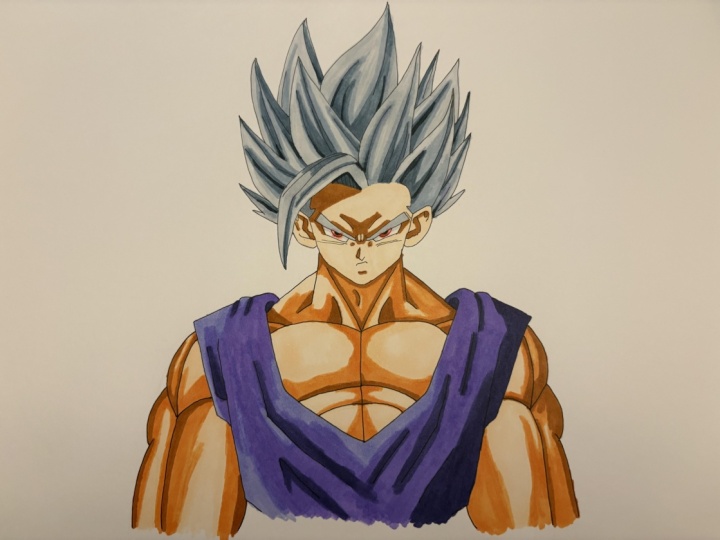
2. Sketching & Inking Beast Gohan!: Okay, So today we are going
to draw beast go hand. That's the new form of Guan
from the upcoming movie, DragonBoard, super, super hero. Now before we start, if you guys check
the description box, you can see all the
materials I'm using for this tutorial with
Amazon product links. So without further ado,
let's get started. As you guys can see, I drew a perfect square. Each side is four centimeters, but you can draw it in any size. You want to. Just make sure to use a suitable papers size. So this is gonna
be a frontal pose. First I'm going to
start by drawing the shape of go hands face, the square, help us
keep the symmetry. Next we'll draw the
wrinkles between the eyes. Then we'll draw the eyebrow. As you can see, it gets
thicker towards the edge. And finally, to draw the
eye will use three lines, two diagonals, and
a curve underneath. Next we'll draw the
iris and a tiny pupil. Next we'll add some
lines above the eye. And of course the
famous checkmarks. Awesome. And now we'll do
the same for the left side. And if you guys want, you can take a ruler and just crossed the lines from the eye. That way you can make sure
to keep the same symmetry. Once we're done with that, we'll draw the nose
following these steps. Then with a very tiny gap, redraw the mouth by using three lines will
indicate the bottom lip. Now we'll draw the hairline. As you can see,
I'm starting from right and then go to left. I'm doing that to keep the same symmetry to get
a more accurate look. Awesome. The next step
is to draw the ears. So first I'm going to draw
the shape of the ear. And only after I'm going to
add the details of the ear. Awesome. And next we'll
draw the spike of hair. It's a big spike of hair. I'm going to make
it a bit thicker. And of course get rid of
all the unnecessary lines. And we add some random lines
in the shape of the hair. Awesome, So now
we're going to zoom out and we'll draw
the rest of the hair. So first I'm going to start by drawing the shape of the hair, just some guidelines to help us keep the right proportions. Now in this form, the
hair goes way high. But I don't really
like how it looks in the reference from the movie. It seems a bit too high, like kinda ridiculous
in my opinion. So I drew it a bit smaller. I think it looks much
better like debt. So next we'll add some random lies in the
direction of the shape, just like we did before. And now we can move
on to the torso. So first I'm going
to draw two lines to indicate the neck. Then two lines for the
trips, the treppe muscles. Next I'm going to draw
the shape of the torso. Rough sketch. Will pull
a line in the middle, then add two lines for the neck. And then we'll move
on to draw the good. Next we'll draw
the chest muscles. Following with the
shoulder. The tricep. And the bicep will
do the same for the left side and finish up with the
chest and the abs. Awesome. Next we'll add
some quizzes for the gay, just going to refine
it a bit more. And then we'll get rid of all the unnecessary
lines. Just erase them. Awesome. We are done
with the first step. Congratulations. And now we
can move on to the next step, which is the inking process. So usually I'm using 0.2 or 0.3. That's the size of the
tip for the aching pain. Although for the
facial features, for example, the
eyes and the nose, I'm using smaller
teeth like 0.05 or 0.1 just because it can
help me be more accurate. They'd been said with
the inking process, what you want to do is rotate the page just
like I'm doing. You want to have a firm grip on the pen and just go
all over the lines. A steady hand, you can do it by either pushing lines
or pulling lines. This process takes a lot of time to master a
lot of practice. So don't get this encourage. If the line doesn't look sharp
enough at the beginning, the more you practice, the more you will
get better at this. Awesome. Now that we are done
with the inking process, we are going to get rid of all the lead by using an eraser. Make sure to clean it very well because we don't want
to smear it after. Once we use the Copic markers.
3. Coloring Beast Gohan!: Awesome. Once it's cleaned, these are the Copic markers we
are going to use. The colors I chose
are arranging from the brightest color up
to the darkest color. For example, we got the
brightest color for the skin, then we've got the
midtone for the skin, and then the darker
stone for the skin. Sometimes I can use four colors. Then you can even use
five colors if you want. But typically, I'm going
from three to four. So we're going to
start by coloring the gate will use
purple colors for that. We are going to start by using the darkest tone coloring in
the direction of the shape, of course, by using some
nice brush strokes. Next we are going
to use the midtone, that's a slightly brighter tone. And again, coloring in the
direction of the shirt, in the direction of the quizzes. Next, I'm gonna go back
to the darker stone again because I want
to get more contrast. Now, we're going to
blend the colors, will blend them by using
the midtone again. And then we'll use the brightest stone to
blend it with the midtone. Awesome. Once we are done with that, we can move on to
the skin tones. So again, we'll start
with the darkest tone, coloring in the direction
of the muscles. We'll do that for their
facial features as well. This is the old school
shading of Dragon Ball. I will take that shading any day rather than the new style. I think it just
looks so much more dramatic and overall more
fitting to the anatomy. Next, we'll use the midtone. Now. Apologies, I
forgot to record. I'm coloring the right hand, but it's basically
the same process as coloring this arms. So just follow the
steps for this drawing. I want the light
source to come from both sides just to get
them more genetic look. Because you guys can
see some bad luck. Get drunk while they
filled in the smoker. Somehow some job flow
right on glands. So we'll try to fix it. Because that thing will
also happen to you. So what I wanna do is
first soak that ink. And I will do that by using
the colorless blender. This one number 0. So first, I'm going to make
sure that it doesn't have any other inks attached to it because they don't remember
the last time I used it. Okay. It looks pretty good. Just in case I'm going to
fill it with some alcohol. As you can see, I got the coffee refill of
the colorless blender. So just going to fill it up. Just because I've
been using it a lot and I ran out of the alcohol. So as you can see,
I depict few drops. Its okay. I think that's about it. And as you can see, I got
that orange spot right here. So I'm just going to take. Hello splendor. And I'm going to pull,
push some lines. Trying to make tried to
make the area is brighter. Okay. So right now, it doesn't seem good because
you are not done yet. So next, I'm going to use the
darkest tone of the good. Is it again? That's dV 08. And I'm going to add
some shade right here. I'm going to add some
more shade here. It's fine. Don't worry. Because it's very dark. It will cover all the spots
that we heavily asked by now. My mistake. Okay. Next I'm going to
use the midtone, That's bd for the brightest stone. That's the v two. Okay? And now it's fixed. So whenever stuff
like that happen, don't freak out, don't
throw away a join. Calm down and see
how you can fix it. Okay. I happened to me a lot. And only because those
mistakes happen, I figured out how
to resolve them. So hopefully that will
work for you as well. Awesome. I think that's pretty good. Now we can continue
with the skin tones. We'll do the same for the face, leaving the areas
that sticks out more. For example, the cheeks, the nose, because
they stick out more, they get more light. And finally, we'll use
the brightest stone. Blending of the colors. Awesome. Next, we'll
color go hands, eyes. In this form, the eyes are red flag before we start
with a darker stone. Moving to the mid tone. And finally, the brightest tone. Now, if you want, you can also
use the colorless blender, a marker that soak some of the ink and therefore
make it look brighter. Next we'll add some shadow
right below the eyebrow. We'll do that by using
some gray tones. Awesome. And now we can
move on to the hair. The hair, you can either use bright gray colors are very
bright purple gray colors. For this tutorial, I'm going
to use purple gray colors. Just like before. We start
with a darker stone, adding a little bit
to all the spikes. Next, we'll use the midtone. And again, I'm coloring in
the direction of the shape, in the direction of the
lines we drew earlier. Next, we use a brighter tone. And finally, blending all the colors
with the brightest tone. Awesome. If you guys want, you can add a very,
very bright purple. That's BV zeros 0, just to get a very
nice purple tint. And finally, I'm going to use the colorless blender
to soak some of the ink just to get
more highlights. So this is how you draw beast go hand from the
upcoming movies superhero. You guys enjoyed this tutorial, please let me know how you
did in the comment section. Thank you for watching
this tutorial key being awesome as always, and I will see you on
the next video. Peace.
 Yair Sasson, Artist