Transcripts
1. Introduction: In this era of texting, tweeting, abbreviations,
and emojis, writing an effective e
mail has become a bit of a lost art as someone who receives hundreds
of e mails a day. I can tell you firsthand, there's a lot of poorly
written e mails out there. But with this course, hopefully, I'm going to give you
the tools and tricks you need to be more effective
with your e mail. Hi. I'm Melinda Emerson, and my nickname is
Small Blady and I'm regarded as America's number
one small business expert. I am excited to be
here with you today. I am a keynote speaker, an expert coach, and a social
media marketing expert. I've run an online
business since 2008 as the publisher of
succeed is your boss.com, and social media marketing and e mail have always been
integral to my business. This class is for anyone who has to send an e
mail to their boss, a colleague, or anyone
in corporate America. I wanted to teach
this class because e mail is a good
communication tool, but it's often misused. People get themselves
in trouble with e mail. So I wanted to provide some best practices so
that people could get the information they request or get their point across
a lot more effectively. I want my students to slow down when they're
doing their e mails. If they spend just one
or two extra minutes to just double check everything, they will be more effective. They will send less
e mails with typos, and they will get their requests answered a lot more quickly. I want students to use the
tips that I'm going to share today to write
an effective e mail, and I'm going to give
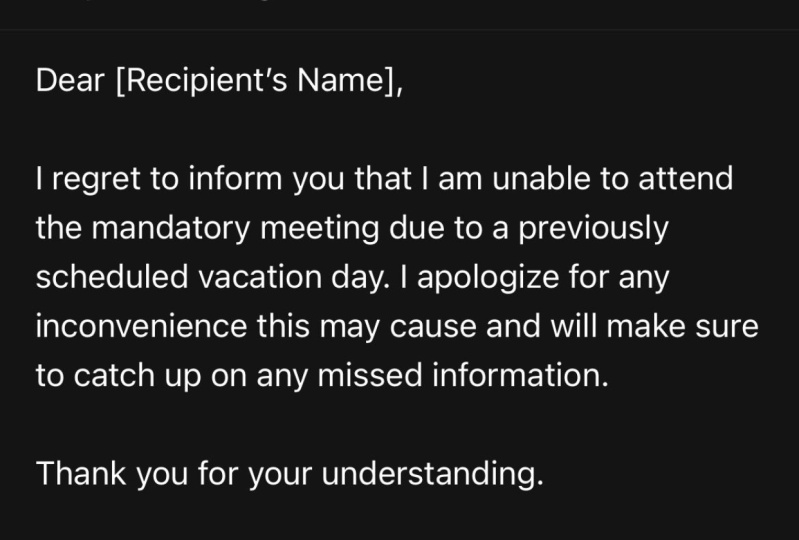
you a practice scenario. Let's say your boss
has invited you to a mandatory meeting that conflicts with a previously
scheduled vacation day. How would you communicate
that in writing to your boss. Please draft your sample e mail and post it in the
project gallery. Now, let's jump into it
and get started. Okay.
2. Breaking Down a Bad Email: Bad e mails often have
several elements. They're either too curt, have the wrong tone, too informal, no greeting. There's all kinds of typos, grammar areas or my favorite
CC to too many people. I don't want this
to happen to you. In today's lesson,
we're going to break down these kind
of things to avoid. The next time you
send an e mail, it will be well received. This is a perfect
example of a bad e mail. First and foremost, there's
no personalization. It just says high
space question mark. Well, if you're sending
somebody an e mail, why wouldn't you bother to at least put their
name in the email. Then they immediately
go into a pitch. Hi, we have a
webinart coming up in a few weeks we thought you
might be interested in. Then it says you're going
to hear from managers at these companies about what kind of manager support
they actually want. They'll share insights
into why peer coaching has worked and what other
solutions have failed along with these powerful
stories of how this tool has unlocked and increased
collaboration belonging and leadership growth. Then they got three logos, and then it says,
Register here to join us. Well, first of all, they
haven't even bothered to figure out whether or not I'm the right client even
for this content. They haven't bothered to
personalize it to me, and it goes on way too long. For me, this is a fail
of an e mail because I don't even care about
what they have to say because it says high comma. It looks like a spam
e mail. Bad news. Here's another e mail. Interestingly enough, this is an e mail actually from
someone that I do know. You see here, it says Melinda, but it's not space properly. This is bad grammar. You want to make sure that
if you're doing an e mail, it's like writing a letter. You need to put my
name in a comma and then a space so that you can
start a whole new paragraph. Slaming all this stuff together makes me
think you were in a hurry and you didn't care any more about it than to
send it like that. Look at how long this e
mail is. Oh, my goodness. It goes on and on and
on what I'm reading, what I'm writing,
books I'll recommend. Then oh by the way
at the bottom, he says, in order my book. I'm not reading
this, and I'm not clicking on anything
in this e mail. Because again, this
is spam almost to me. This is actually from
someone that I know, but they're talking
about something that I don't care
anything about, part of the reason
why I don't care is because how they approached
me in the e mail. So this stuff matters, sending e mails with
grammar and typo issues, sending things that are too informal or have no
personalization at all. All of this is perfect examples of why this is not the way you want to communicate to anyone inside your business or
externally to your business. When it comes to bad e mails, don't let your bad
texting behavior become your e mail behavior. No abbreviations or mojes. Keep it friendly,
not too casual, and you'll be a lot more
effective with your e mail. Next up, we're going to talk about proper email etiquette.
3. Proper Email Etiquette : Have you ever received
an e mail that left you wondering who in the
world sent this or worse? Have you ever sent
an e mail that you regretted sending
after the fact. Sending a bad e mail can make someone really think
twice about you, being the person that sent it? It's like having a
bad first impression. Once someone has a poor
first impression of you, that could have
repercussions down the line. The speed of e mail and the
convenience of it has made it the number one choice for communication in
corporate America? But you need to
make sure that you know proper email etiquette. Because when you send
an effective e mail, you put yourself in a
positive light and you never know that could set you up for potential promotion
down the line. I just want everyone to spend an extra minute or two to
re read their e mails. That way, you don't risk miscommunication
or embarrassment. Let me give you a scenario. Let's say you need to request a couple of days
off from your boss. Well, sending an e mail
is really effective for that because you want to make sure they don't
get the dates mixed up. But let's say you have a
situation with a co worker, maybe let's say they
might be trying to bully you to take on
some of their workload. Is that something you
should put an e mail? Absolutely not. Request a
meeting with your boss, or request a meeting with HR and ask for some help about how
to manage the situation. There are just certain things you shouldn't put in writing. Always think about whether or not it's even appropriate
to send an e mail. When it comes to
making the go no go decision for whether or not
you should send an e mail, I'm going to give you a couple
of tactics to consider. First, If it's a secret, don't put it in a e mail. Anything you put in e mail can be forwarded
to someone else. Secrets should be told
to someone face to face, not put in writing. You also want to avoid
offensive comments. If someone sends you an e
mail like that, delete it. Don't forward it,
don't share it. Really don't spend much
time even looking at it. Someone sends you
something that is racist, sexist, pornographic,
something like that. Immediately get rid of it. You don't want to get
caught with anything like that in your
business e mail. Do not shout in your e mails. When you use all caps or a
bunch of exclamation points, people perceive
that as shouting. You always want to be polite and friendly and have a
sort of even tone. You don't want to sound
emotionally happy or emotionally sad or angry. You always want to stay factual. And not emotional
in your e mails. You also don't want to respond
too quickly to e mail. Take the time to read it. Maybe you might
need to re read it, but pay attention who
is CCD on this e mail? Because maybe someone
CCD a bunch of people, but you only need to respond to one or two people
on that e mail. Also, you want to make
sure that whenever you send an e mail, sign your name. You don't want to have somebody having to scroll all the way down to figure out who sent this e mail, put
your name in there. Somebody can figure
out who sent it. Then you also want to
take in to respond, do not forward chain e mails. Start a fresh e mail so
that you'll be at the top. Sometimes it's very difficult to fish through a chain e mail. Make it easy for the person you're sending the e
mail to respond to. Lastly, use priority
flags with caution. If you always want to
make something urgent or always want to put a red flag on something in
someone's e mail, Eventually, people
will tune you out. You're going to become
the boy that cried wolf. You want to be
very careful about how you make things urgent,
shouting at people. You want to make
sure that you keep your e mails tight and
that they have a purpose. If you don't know
what that purpose is, don't send the e mail. As a recap, don't put any
of your secrets in e mail. Make sure you're not
shouting at people. Always sign your e mails, don't forward all
these e mail chains. And just make sure you always think about whether
or not should I even send an e mail or should I pick up the phone
or request a meeting? You want to make sure that
you are communicating effectively so that you
do not get misunderstood. Next up, we're
going to talk about how to craft an
effective e mail.
4. Constructing an Effective Email: Everyone has the ability to
send an e mail that is open and responded to quickly and leaves them in
a positive light. What I'm going to do is
give you some tactics. So the next time
you have to send an e mail to your
boss, a colleague, or even an external customer, you're going to send them
an e mail that is going to be well received
and well done. Now, this is an example
of a successful e mail. First of all, let's look
at their subject line. Is your content
strategy working? Okay. I think that's
a fair thing that would get me to click
and open an e mail. Now, let's scroll down and
look at how she addresses me. She says, Hey, Rojo Fam. Repurpose house is the
name of the company. When they call me Rojo Fam, I think that's probably
how they refer to their prospects in
existing customers. I actually don't mind
it because it's very consistent with the
brand of this company. Let's look at how
they do this e mail. Our amazing client client's
name is a brand sorceress. As such, she truly knows
what it takes to create content that speaks to
the target audience. Now, you guys do see
in the first line of this e mail that
they're using some amges. However, I get it. This company is very
quirky and silly anyway. That actually goes
along with their brand. If this is not something
that you would normally do, do not do it because that's really not appropriate in
business communication. But because I'm familiar
with the brand, I'm not turned off by this
because it's consistent. You just want to make sure
that you don't do things that draw negative attention
unnecessarily to you. This is basically an e mail profiling one of their clients. They said she excels
at making sure that both her own clients and her own business stand out in the busy social media landscape with great branding and content. She values the power of messaging to make
content for you, which is why we're so humble to share Chantel story of her
experience with our team. We couldn't help but share, I mean for real. When someone calls you epic, you might want to share
it with the world. Now, here's something
interesting. They put here's a bed A P
P agency owners thoughts. They didn't curse in the e mail. They put asterx but we know how they were
referring to this company. But my point is that all
of this is on brand. They have a video embedded and this e mail is fairly short. All of those things are good. I'm not sure I would have used the the emojis around
brand sorcerers, but who calls one of their
clients a brand sorcerers, a company that would use
emojis in an e mail. Certainly, there are not hard
and fast rules to things, but I think what you
want to be more than anything is consistent
with your e mail. Let's look at another example. Here's one. The e mail
tag line is trend alert. Trend alert. I want to find
out what the latest trend is. Hey, Melinda, Stay trendy,
this upcoming season. Spring and summer
is the perfect time to show off what you got. Take a look at our new
magnetic eyelashes and stay put together on long road trips with our car seat organizer bag or make your patio
as cool as you can, with the fireworks stay light. Are you ready to become
the top of the town? Click here to shop for today's
top sellers, your friend. Now, I do not know Ian, but let me tell you what I
appreciate about Ian's e mail. Number one, he referred to me
by my name in this e mail. Number two, his e mail
is short and sweet. I love e mails that
are brief and tight. He put links to anything I might need and he signed
it, your friend Ian. I think that this is
an effective e mail because it is short, it's to the point, I
know what he needs. He's being friendly, he's not being offensive or even pushy. He's saying, Hey, I
just want to let you know these things are
out here and available. So there's a lot of different
ways you can do e mail. But here are some of the other tactics I want to share with you that you may want to think about as you're
building an e mail. Number one, the subject line
of the e mail is important. You do not want to do things
like a bait and switch. Don't put a promise
in an e mail, and then when someone
reads the e mail, it doesn't have
anything to do with the subject line that you
put to get them to open it. Do not do that. You don't
want to aggravate someone who you're trying to get to engage with you or do
something for you. The second thing
you want to do is don't write these e
mails that are four, five, six paragraphs.
Use bullets. Sometimes people are skimming
e mail very quickly, and you want to make sure that they have all the
information they need quickly so that they
know how they can help or can decide if
they want to help. Another thing you want
to do is make sure you keep your e mails to one topic. Mails are supposed to
be quick and brief. You don't want to
be coming up with two or three different
issues in one e mail. That sounds like a phone
call or a meeting. Make sure that you
keep your e mail to one issue and make one
request in your e mail. And the last thing
I want you to think about are the legal
ramifications. Anytime you send an e mail
from your place of business, that is a legal record
of correspondence. And what that means is that it's subject to subpoena
should something happen, should a lawsuit happen, should a vendor or a co worker
effort to sue the company. So you want to make
sure that you don't ever communicate in an
e mail in a way that is going to put yourself
or your company in any kind of liability
or financial jeopardy. So make sure if you don't want your
grandmother to read it, don't put it in the e
mail at work either. That way, you always
make sure that you're not subject to any kind of lawsuit or any suspicion at all regarding how you
communicate with others. Now, if there's only
one takeaway that I can give you to take from
this lesson, it is this. Keep your e mails
brief, less is more. No one wants to
read all of that. Make sure that you are specific and direct
and not belabors with a whole bunch of
unnecessary details. If you make your request quick, somebody can say, yes, quick.
5. Effective Email Tools to Use : This lesson, I'm going to set you up for success
with your e mail. I'm going to share
with you my top tools to make sure I never send
an e mail with a typo, and I'm going to show you the apps that I use to
quickly set appointments with people so that we
don't have too many back and forth e mails
about scheduling. Here you'll see, I'm drafting an e mail to my friend Erica. I'm telling Erica it was such
a treat to work with you. I am sure that you are busy. But let's get together. Okay. Next week for
a recap meeting. Now, normally, when you send
someone an e mail like this, then you have to go on
your calendar and figure out what the reminders might be or some dates
you want to throw out. What I do instead is I have this really
cool app called Max. Let me show you what it does. I click on Max and I
say share availability. It takes me to my e
mail calendar and I can just go and pull a
date next week and I'm going to send Erica two options for us to have
a quick recap meeting. Then I go over here to
share availability, and I'm going to make
it a Zoom meeting and my personal Zoom is already in there and I hit
Insert these times. Boom. I'm done. Now look here where I put my mix Max,
cut my message up. I'm going to go back down here and I'm going to bring
my e mail back up top over this e mail and I'm
going to delete this here and I'm going
to send it to her. What's so cool about this is that It's going
to send it to her, and it's going to let her pick which time she wants
to meet with me. It also put some lines up under some of my
communication and let me know. I've got some grammar
errors in here, so let me see. What do I got? Oh, I was. Do you know what's popping up, giving me the suggestion? It's my grammarly. My grammarly is helping me make sure that I don't embarrass
myself with this e mail. Oh, I found something else that I have here
that's redundant. I have let in here twice. I got to I said, Let's get. So it fix that for me. So I put my MXMx invite
in here, my grammarly, which is my grammar software that fixes any typos
or grammar errors. Double check my e mail, and then I'm going to always close my e mail
with a salutation. Okay. And I'm going to say
looking forward to it. And I'm going to hit Send. The best thing about
my resource mix Max is that as soon as she clicks which appointment
that she wants, it'll automatically go on
her calendar and mine. Now, if she uses outlook, she's got to use a special
adapter for it to outlook, but I use Google calendar, so it works seamlessly
with Google calendar. Another really cool app that I have used that has
saved me a lot of times from being embarrassed with a bad e mail is this
app called Hemingway. Let me show you guys
the Hemingway app because this app is
actually really cool. Certainly, grammarly will catch spelling and grammar mistakes, but the Hemingway
app really goes into not just helping you with your grammar and
your sentence structure, but it will also
give you a grade for how readable your e mail is and it makes suggestions for maybe some other ad verbs
you might want to use, whether or not
you're using pactive voice or active voice. And it'll show you the
word count of your e mail. This is really important because the most important thing
you want to be is brief. If it can show you all
of these things and it'll highlight how to make
it better color coding it. If it wants you to change
the adverbs, that's blue. If it wants you to phrase
something simpler, it'll put it in purple. If if your sentence is
really hard to read, they'll make it red, and
that's like alert alert you need to fix this
sentence in this e mail. All of these things, they really break it
down and I believe they help you
understand the tone of your e mails a
little bit better. This is another
great app to use. Now, another one that
a lot of people use for scheduling is
actually Calendar. I really like this app as well. I prefer mix Max just
because it opens up my calendar and I can see when I'm available to
send an appointment. But calendar works very well also because it allows people to actually set up when they want to have an appointment
with someone, and it's free. You can use Calendly to help you schedule meetings without
back and forth e mail. You can set it up for what days you're going
to be available, and anybody who
wants to schedule an appointment with
you will be able to just go in and click on your calendar and see what
times you have available. Now, you have to remember
to go back in and update it as you get people that take
time off of your schedule. But you definitely want to use a tool because if you're
requesting a meeting, you want to make it easy for people to do business with
you and schedule a meeting. What I want you to do is
find out if your company is already subscribed to any of these tools
I've mentioned. If not, find out if your boss or IT will sign off on
you getting it so you can be more effective the
next time you've got to send an e mail to anyone. Okay.
6. Final Thoughts: Thank you so much for enrolling in my e mail marketing class. I hope I've given
you all the tips and tricks you need to be
effective with e mail. There's no reason for you
to be misunderstood or embarrassed with your
e mails ever again. If you have any questions, be sure to leave them for
me on the discussion board, and don't forget to post that e mail homework
assignment I gave you earlier in
the project gallery. I wish you well with
your e mail marketing.
 Melinda Emerson, Author and “SmallBizLady”