Transcripts
1. Introduction to the Course: Hello, welcome to AutoCad, fundamental bio kill uncle. And I'll be your
instructor through the phase of this course. Autocad exists, cuts software that is used
globally in the engineering, construction, and
design industries for drafting a modelling. It is built assist in creating, modifying, optimizing, and sharing accurate
information on drawing. This is an autocatalytic
because that's where we will introduce you to some
drawing fixtures. And likewise, there is
a project that we hate, the learning process
doing this course. And the following
would be covered. During this course.
We'll be looking at our hints or face
getting started with B, also cut in surfaced to then
also some drawing tools. The basic drain to that
we have in AutoCad, some basic modification tools
that will aid our drain. Then the projects will
be developing a project of IT projects to work
in hearts to guard. Likewise, dimension
after dimension, our work after that
mention our drain. And also looking at leader in cases with dimension
cannot work in some drained and
leader can also look at how we can add our
work, our projects. And now I dry and then we'll look at their
management as well on how to recognize various
aspects of our work. Then look at stacks, look at how we can bring
in texts into our drain, then as well table and
now to have a table for bill of quantity
on our drawing. Or whenever we are looking at some assembly drain
where we need to have various parts of Detroit. He also look up blocks. Block we enable us to be
able to keep some drawing in library so we can always
use them over and over again. There will also be looking
at external reference, which is confidence in
your work bringing in another file or the AutoCad
file into the current drain. And we also look at the
parameter equal strength. The various aspects of
econometric clustering give us a good unbalanced drain and will be drafting our
projects as well. So it predates will
be working on is an isometry predicting
after the isometry patch, we'll look at the orthographic
parts of that communicates the top side and right
view of Detroit, which could be the first angle and third angle projection. Then lastly, we'll be
plotting our work. We'll look at, we'll look
at how we can plot seats, then presents it to whosoever will be keeping it
to 0 and also printing out. They work. It is my pleasure and great privilege to walk you through this journey
of learning. Patoka Tuesday. Thank you for watching, and I'll see you
in the next video.
2. Getting Started with AutoCAD: Hello, welcome to AutoCad. Find that mentor. In this course, we'll be looking at auto card on what
AutoCad can do. As you all know, AutoCad is a drafting unimodal into
as well that can be used in engineering industry
with beads in construction, civil architecture, mechanical,
electrical, or chemical. You can name it. So make use of
autocad as a trusted to basically me immediately trapped into, in this industry. This course, we will
looking at what we can achieve with AutoCad
for drafting I'm drawing. Before we start. This video is an introduction to how to get familiar with
the AutoCad interface. This is the welcome
page that shows us the recentering that has
been done in recent time. What you write you
off to anyone. So by the time you
install your gut, you won't have a recentering. What you can see the
AutoCad, some UFA. So we have various templates that you can work with in
order to be working with. It defaults, templates,
and elsewhere you can open a system for right now, click on new nuclei,
I click on him. I have this. I have this, right? Yeah, It's what we call the workspace where
we do our drawing. The course so that you can
see is called a cross a. Now we have the
application menu. This is my application
menu where most of the file management
system shows up here. On peak. It's a new five-year
want to open an existing file to save
and relax our application. Then, then also have what is called the
Quick Access Toolbar. Now a quick access to the application menu
fixtures right here. Then also I have, I can also bring on love that feature out to be part
of this weak acid is true. So for instance, I can
bring how this sounds. This is layer and
I can dig it out. If I want to. Then I have my ribbons. So my ribbons are on w
as pioneers in the zoo. So the line, polyline
circle more for the exam. These are our read me and they
belong to various Spanish. Visit drop-down arrow. Right here is where
we have the Tituba. This Tituba contains
the name of Detroit. So if I change
this drawing title to the construction of a silo, that is what we
are going to have media and not
trying three right. Time, if I could save it
as construction of solute, that's what the dots DWG, the DWG is CAD file extension. Then do not forget this is our workspace where all
the drain to please write. And I have my status
where status bar, this is the status by where
most of the precision to have the green line, which I can turn on or turn off. And I can snap to
my grid points, I can snap to migrate. Alright, then I have
the dynamic inputs. So after-tax outflow, response
to syntax of command. And this is the command
line for AutoCad, right? If my dynamic inputs is on, then I will be able to
see whatever I typed. Yeah, at z will give
me various surjection. First line, if I have
Prisma L for line, you can see various
option, right? But if my Dynamic Input
is off, my answer. So to show that CDL is
Shane and my command line, that's just one of the
usefulness of Dynamic Input. And it's very essential that you put it up whenever you are working with a particular
coordinate system, which is the absolute
coordinate system. If you don't put it up, then if you need to
anti coordinates for a particular line
or magical objects, it will go somewhere else. So you have to be
with that in mind. Then add the A2. So the how to read, she just got this F. It's easiest to. I have our drain
orthogonally to the streets. It's gonna be in 90-degree. That's what auto does. Then I will just call
the polar tracking. That can help us
to track according to various precise angles. Right? Then I have the ISO drafts. The ISO draft. I'll post to walk on
the isometrically. Wish we have various
left, top, right. I also have the object snap, that can help us to snap to various aspects of our objects. Point. Again, mitophagy
drain midpoints, center of the drain. If it is on an IV,
they're all selected. You get selected according
to pass you on to peak. And I also have the linewidth. Right? Now, one thing about this is if you come to
this customization, you can end up bring it on, bring it, take it off. So for instance, I vow
to take off my language. They can click on
now, which is gone. Then I can bring
it on back, right? So it's very common
that you can have this feature on it to
API, for instance. This is my dynamic
input I can take, you can see is know your body
scans TV on, bring it back. Right? So we have the navigation tools. This is Zoom and lives. So if I click, you have various type of
Zoom with your mouse. You can do all that
with the mouse. You can actually using
the middle mouse to zoom in and zoom out and putting the medium as you can
pan around your drawing. Now, let us look at some of the settings that you need to consider whenever you
want to start a drawing. For instance, we
have the unit cells and so you need to
set your units. And the shortcut for
units is you enter. So I have various type
of length at that. Now, what texturize
the CMA engineering fraction as my own industry, we use decimal most of the
time and we have precision. So you copy your precision
according to your taste. For instance, if I should
pick is L points zero as my precision and I
draw a line of 1.27, then it's, we definitely
are present means it's 1.3 because my
precision is in there. But if my procedure
is zero point, then it's not good
to leave it as 1.27. That is one usefulness
of rescission. And likewise, my units, I can change it to server. You need that appeal to me according to the drawing
I'm about to make. Then another thing that we can mine his most of all
these precision. If you go towards your drafts, which chatbots is D. And then I have it's most of them yet,
the polar tracking. And she's just not most of them. And I'm making, put the
I here, right here, I can change to
either orthographic, isometric, this
mitre attack mass. Now we helped me to drop in an orthographic button, right? And if I want to change
isometric idea here, right? So basically, these
are all you need to know about the
AutoCad interface. During the course of this
AutoCad fundamental, we'll be looking at
how we can make use of all these tools to work
and to actualize me. And thank you for watching. See you in the next video.
3. Basic Drawing Tools: Hello, Welcome back. In this video, we'll be talking
about the drawing tools. So we've been focusing on the basic drawing tools that you'll be needing
for your drawing. Now, to statutes, need to
locate where we can get all this drain to
look at this drug pi. Now, we have most of
the tools they need. And the first that we have on these lakes is the line too. The line so easy to
use most of the time, most of the time make is
over the lines and most of them when it comes to the
3D aspect of Autopilot. So I see no, that's AutoCad response
to command syntax. So this command line
you can actually type, or even on your
workspace, you can type. If if your dynamic inputs is on, then you actually
see the list of any order option that fall into the category of the alphabet. That's you, that's you press. So immediately I press L, which the shortcut for for line is L. So it brings out
liner first for me. Wish it is highlighted. Rights holder of shown that
fall within the hair orange, if you praise, who then
is to bring out Sean. So now that I calm down, you pick my life. I enter the line command
and one's a hint, it's the space-bar or enter key. In AutoCad, be reminded that there are three keys
that we make use of. A keyword. We make the escape key or
the Enter or Spacebar key. Now the ends are and the spacebar keep
perform the same work. Work is to activate your command or to
live here Command Y, the escape key is to
leave your command. I want to know about AutoCad is whenever you are done with a particular common ion to
return back to the command, you don't actually necessarily have to go and pick
the command again. If you are sure that once
you use a command and you just click on your
spacebar on your answer. To take you back
to that command. To activate my line command, I'm going to use the Enter key. So it's open now. And instructional CDs, it
says specify first point. I specify my first point. So I can pick anywhere
to specify my first one. Then again say actually what's
specified in ness points. Then I can go on to give oxygen need to specify
the next 0.2 lambda. Time I'm done, I can
use my Enter key or the Escape key to
move command, right? So how then to have a
perfectly straight line, I can make use of the auto. The ATO will make my
dream to be in auto mode, be able to draw orthogonally. It will restrict my
flute orthogonality. Say if my auto is on, which the F sharp is F divided, puts it on right, then I can have
my straight line. You can see, again, I'll be perfect straight line
that I want this to be ten. This needs to be. Then
if I want to close it, I can just enter
C to close it up. So I have this, right? So I have the puffy streets. So this is wrestling
with in life. Then we have the Nestle
wishes the polyline. The polyline is used
just like line, right? It's just that from
the word pulley, it's doing join every, are all segments of the line to join them together in your
avatar as a single entity. Unlike this tau, I have
it as just one ends. These are just different entity. What if I'm to be drawing something like this
with the polyline? And the shortcut is P. So P is this is five. This as five. So we've
satisfied the time I'm done. Now. Another guy, we have
two type of selection, the window selection and
across selection, right? So do that in the window
selection is like this, where the cross
selection is latest. So if I should use
my cross selection, so just take it easy to
highlight everything. So he's seen it as one
single entity, right? If I should use my
window selection, even if it's almost at the last part of the horse
gets its wants to select it. Once, cross selection and just speak into V to select all. What to select all these
out to make sure that I move my selection all overheat. So you can see the difference between
a line on a polyline. Some of the other
different again, is looking at these and these are the grip
some grid points. I right? Yeah. I have the square
grid points everywhere. And the middle one I can
use to move my line is restricting my movement
orthogonality because my auto mode is on sale. If I take it off, I
can move anywhere so I can take this
MU why we do this. I can stretch it and
I can lengthen it. Led to my line length. Alright. And I can
stretch it back. Now. That's for inland. Well for polyline in
pull in line, which I, this is also equally, that is 0 point,
this grid point, the square grid
points here is to stretch the devices
and stretch uveitis. And I can add another batches. So I have a rectangular grid
just like this as well. So younger it angular grid. If you click on it, you can put your mouse on it. Then we have this trash. You have the advert is, and we also have the convert
to accelerate and converge. So this is, I can just decide to write it. Sounds like this. So I have this, right? So this is one of the difference between a line and
a polyline, right? So if first-time fully
line being the first ones, then we have alpha. With alpha weeds width, you can increase the width. So that is that
on line and pull. Now we have this
circle, this circle, we have about six ways to
draw a circle, 123456. So the first one is the
same type of radio. So what does this mean? Is that what? I'll pick my central force, then specify the
radius of this circle. So I can say, okay, I want those are secondary
experience playing five. Then after picking my sensor, now back to this, my spiel about to go back to that combine to pick the
center of the circle. I'll pick the center
of the circle. Now. I just specify radius of circle. Then it printed out the
option of diameter. So I can actually convert these into diameter, that entry, a parameter that will be
in diameter if figures, that would be in diameter. So I can decide to see that the diameter of this circle are inside D to
change it to them. Then I can say, I want
it to be seven, right? So a wish this is the
center diameter as well. You can just input your
diameter directly. Then with two points. So this is to draw a
circle between two points mindset to draw circle between these points and these points. I have a separate picking
two points, right? Then I have three points. So since the drug
between three points, now let's draw one
to this points. Three points. Then
I also have tan, tan radius, so you identify it. Then specify the radius. So this is a tight end, is also another tie against. Now able to recognize all these. Let me tag in the midpoint
the same time because my object snap is on and those are the ones
that I've selected. I've made sure that those parts of the objects are selected. Get this. It's called drafts setting. If you come down here,
you see it's here. This is my object snap. And if I click on this area, then I have my snap
setting that tone on. So like I was able to add l
to pick the tides are added fight titans on my drain
because target is on, if I should put it off. And I want to add, in fact, Italians are finding it difficult to actually
find the tangents. Or my drawing. I'll be finding it difficult. Or if I should put off. And put them back. When you've actually
put all my center, I want you to identify the
center of this circle. I'm finding it
difficult to identify the center of the circle on it. But if it is on site
to bring it out, this is the center
of the circle and I can do anything for you to get to this sets and you can click
on Object Snap citizen. In this dialogue
was cogs of them. This is where you can
put it on satellites. The objects that you want to be included in your workspace
by the time you are working. The way I love to walk, I just like putting on
everything then I can flu. Well, when you're working right? Now, back to this, times our radius and radius. I'm going to pick this,
this to this day. Then our gives the
radius of a video. So let's see. I have this. Then. Last of all we have on the
lakes is tan, tan, tan. So you identify three tangents. I can say this is my
face diencephalon. So I have that, right? So that is that on the frame
rate to draw our sake, Gu, then have the hack, the app, the app. We have about, I think about
12 ways to draw the app. Or 11, 123, 456-789-1011, of which a lot of them I just repeated in various
arrangements. So aside the three points
and the stats and direction, looking at the stats center, n is still the same
thing as centers. That is just the way you como drainage that are different or the same
thing. So far eastern. Have mine. Let me add a line. A line. A line of ten. Alright. And I, Oh, yes, I'm having about ten units. So I have something
like this, right? Using this, let me put
augment how to put stuff. So picking the first one, Misha is Josie three points. So asked me to pick my face. And my third point,
I have the app. Now if I want to use my center, center Heyne and
the shortcut for our sea floor
spreading of an arc. So if you pick this
senza, start saints. And so if I want to draw
my hacky in this pattern, then these points
will be my stats. Then set up in the
center of the line. Then how big the end. So how good at, but if I
want to draw it this way, blood is three, then this
point to be my stats center. And I'll pick became. So it's the same
thing with this. If I should Greek Santa stats n, it just means that I'm
going to pick my center of my stats and hint.
That's what it means. Right? Then we have the angle. So that's center angle. So this center. Now, if I'm angry seconds, that should be angle
of one right triangle, then I have lengths. Does saints are links. So that's center. And the length of the
line is ten, right? Then, right, then I have
stats and direction. And it starts big my end and I can specify the direction I
want to direct it, right? Then you can also enter Good Ideas in
the same pattern. We should just take a look
at it and check it out. You can add L, bring up with them, then the continuous one, the last approved to continue from where we
stopped in the last app. Just for continuously over
but that's OK. Then we have the rehab be the Rectangle
and the Polygon, a tango. So looking at the rectangle, if I pick my rectangle. And so it's really
asked me to pick my first find and I got to
pick the order of points. To draw this rectangle, we can actually use
it dimension as b. So if I click my
first line, now, the length is where is the figures I've been
highlighted right now. So what I'm going to do if
I were to make that adds, I want to make it let's say
2 " I'm just going to enter. Now it's the Tab
key to jump to do which hits the target
density, jump to the width. I can make that part 15. I have some ladies. So another way to also draw this is after picking
your first band, we can use the area
on dimension, right? So if I want, let's say for
instance, I want my, my rectangle to be
area should be 20. So we know that area is
length times breaks rate. So we should be five, could be five times four, it could be two
times ten, right? So I'm going to pick
a for area enzyme. So I want my hair to be
trained, see, right? So once I specify the length, then it recalculates the
odd my legs to be five. You'd bring it out. If I should check to
see that my length is five and my width
is four, right? So that's that. Then. Another way that we can use is by using
the d dimensional, which I've shown just
inside D for dimension, then you can specify the length, the length of the area of
the length of the rectangle, and decide that I
want the length to be nine and replace the seven. Then to bring it up and asks
you want to place it, right? Then the last one is, you can just actually
use the rotation tool. You can rotate it out for
you and then you can rotate. Your preferred angle. Young girls is C, then you can then inside the
dimension of the area of it. So by the time you are done
with this and you want to draw any other sick
We had our time. We're going to be
endowed with Tish value, rotary, rotation value
that you've ain't. So you have to take
it back to zero. Then add the polygon. Now, there are two
ways to actually, there are two polygons that are, two type of polygon
that can be gods. In B, we have the inscribing circle and circumscribe about disabled. So to demonstrate this, I will just draw a
circle of radius five. So if I pick my polygon, me, the shortcut is P with, now the shortcut or
rectangle is r is c, right? Then for polygon is P 0 L. For polygon. Then if I click. So you asked me
that actually enter the number of sides that are
insured guy ran into three, then you have your trunk. And there's no way we're
going to pick this. Then. Number of sizes. I want six. Let's go for
pentathlon, which is five. Then asked me to pick the
center of the circle. So it's not necessarily you
actually have is say, well, I just want to use
this circle to split the inscribing circle
and circumscribe about. So I'll pick this. Now let's look at
inscribing circle. Now, knowing that the radius
of the circle is five, so I'm going to enter five. Now because of it is inscribing, say Woo, Then E to
be inside this. Gray back to the
command again now, once five, then I'll pick
this sense out of this. Now this time around, I
want circumscribed about saving our anti-derivative
of five in for radius, then have this outside. So this is the difference between inscribing
circle and start transcribe this circle of
the polygon that we have. Then lastly, we have
so we have the strata. So we have medially two
ways of drawing leaves. So we have the same
length and radius. So you pick the center face, you specify the
half of the length, then you pick the radius. Then the second one is
full length and radius. So barista and let
me draw a line just. So let's say for instance, I want a matter of
hours to be ten, right? So now, if I pick my loops and then shows prefer
earliest stage shortcut, if you pick this first one. So I'll pick the central force. Then the lens. The lens is what is phi
because that line is ten, so five to the alpha of
myelin denounce mile radius to be, let's say 3.5. I have this, right? If I have. Now, let's
look at second one. So this circle I say we, I should pick your
food lengths than specified radius out
to draw the elders. And the other one is elliptical, arc it to pick various points, then it gets an
open space on it. We should be like, OK. I should specify as
its end points of the earliest big deal does is
finds, verify the distance. This is, this times this. So as far as stats of angle. So then moving on. Sounds like this.
So in a nutshell, this is D major drain
tube that we're talking now that we have in order
to have a lot of them, if you click here, we have
some other drainages. We have them here are
basically, basically, these are the one that
we will be making use of more during the course
of this training. Thank you for
watching this video. I'm going to see you
in the next video. Thank you.
4. Basic Modification Tools: In this video,
we'll be looking at some of the modified
to us that will be used during the
course of developing an appropriate first and he
lays out the move command. The move is to move
our objects from one of the aims of
walking into Canada. So M for move, com diets may move, move, move. So to move this, I'm bringing it inside
to ask me to select, select it, then enter. So pick the base point. That is where I want
to move it from town, like to move from the center. This is similar
format and you can actually select more than one. Oman. Don't want objects. Then I have the copy. Copy is still having duplicates. I hope just like to copy this. I'm going to select the objects. Select now hold this. For. Right. Now. I can copy more than once
because of my mood is on once you look at this, CO is this just for copy? Now I have mod yeah. So currently I'm on multiple. If I change the single copy once a month, then I can. Also, I read, click
on leave for hiring. Then aspirin, number
of array inside, say I want five of it. It's up here. I'll read it. Then. I have my dates rotate. It will rotate, rotate
to rotate my objects. If you have something like this, select narratives, which
they should, right? Jasmine select, they
hoped it selects it into the base point of
rotation where I want to digit from this
first point and I can specify my
angle of rotation. Now, if I should
put my Otto Hahn, then it will restrict the orthogonality of
these shortcut for this, if it's calm down. Just wanted them. Like I said, using the shortcut of
FH my go-to is so if I should pick my lungs to
restrict it to go now, I can take it back. This is my second, take it back right. Now. Then I have the chimp
command, Trim command. I can trim off any. I don't want to take
away all this works. Let's now on that shame
or so after a stint. So the work interchangeably
all down my shift key. And click on this
link it to extend it. And clicking
existing, refresh you come to my esteemed
properly now. And I hold down my
Shift key to trim it. Or if I know Diane sheet, you to stain them to trim
off this part when young the Incident Command Shift with my fillets. Fillets is to give
your objects a cough, h, because fat is. Now click this. Once I play tennis versus
face of the newer. Before you do that, you have. You do that, you have
to specify your radius, alpha my radius, and then
give it a radius of 0.5. Firstname. And then
the second fillets. That place I have chamfer
and shared code for Shafi'i. Each peak shelf for Schaeffer laughter
space phi two distance. So if I do that, I'll enter D finite distance. The first distance
should be 0.15. The second is time should
be zero points, one. So the first line I'll select
to click my first distance. I'm going to pick this
is a tip is open. Then this chamfer h. And then I also have the
Stretch command, this Trish, I can use stretch. Now, let's do you make is Australia and most
mixture that I made, my selection from the vertice. Let's select this. Then I can stretch it out. It's what selecting this button. Select the selection from straight to stay under Modify. I can also mirror, shelter this out for me. So if I show if I should have something like
this, Something like this, I can just have an
imaginary line that I'll pick someone to mirror
this past week, my mom asked me to
select the hotels. The audience being
asked to specify the first mirror line
and second line. This. Now the question
is I want to replace the source of the
distances. I was saying. Well, what if it asked me to
was if I pick yes, ladies. And then erase it, you get x. Then I have my scale. The scale is killed. Your hoped it by inputting
the scale factor. Pigment scale. Objects. Shown to scale these objects. Let's do. They asked me to
pick my base point, pick this as my
base, my asymptote, the scale factor, then our first 0.5 to be my scale
factor C, reduced skin. That is scale. Then a
half S float, right? So this will help me to explain one of the difference of line and a polyline as well. So if I show you all know that fully online, I
joined taking them. Right? So if a shelf, it fully length of a rectangle is also made
up of protein and say, no, this was this rotation up take place because rotates
my rectangle earlier. So I'm going to take it
back. Angle of rotation. Then I have this file.
Now. Let's imagine explode and shot first. Saturday of these issues. This, I'm going to
actually not be phi is really if I just
selected, everything is one. Right? Now, Pigma is fluid
and select the hobbyist, and now it's Enter. So right now I have them
in various segments. So meaning I can convert
my holy land into a line. Likewise, I found that smile
line into polylines as well. Right? The forest stand.
So the diff command to call it pulling that line. So line, this is glued. Why the command to land into polyline is trying to have
them individually, individual. Right? Now. We oscillate this. Why isolate just the
short book John? Sue them as one
entity right now. I'm only tail out
that this is true. Then we have offsets. Just to give it a distance that gives you a similar objects
distance from each other. So I'm shocked by the school of sets of sets here on
the modify panel. Now click offsets in
a specified distance. So distance, want to pick
a mouse's ansi B is 0.5. Answer, then maybe opiates and bring it in or out of sets. Another way. If you're not sure about your offset distance, we can Use the true answer
C. Then I can sell it. Then offset it. Human rights, that is LC. Then I might erase. You can erase that
updates on my screen. Right. Now that I'm done. I it's not exactly the moment ugliness. If I assume mistakenly selected what I don't
want, I can use this. Whoops. So bring it back, right? No. Not obvious cleaning
right now is my hair. Is the hair. Have
three types of valley. Have a rectangular bulla, hurry, and I have the parts. And all these tools
as obviously will be useful when developing
our predicts. So I'll pick my hurry. Rectangular. So for instance, if I should have this, is this circling it? Second is we have
selected notice this into a hurry by default
in this photograph. So to change the
direction, I'll use this. And to increase leads
right from here. I can then use this
to increase it. Yeah, My coulombs and rural
sites by a ratio equals five. Then to increase the
distance between them. This, then my column
should be fine. To use this to bring it to you actually input the distance. So this is our angular polar
array, something like this. And have a smokestack we get. I wanted to go there
and it's making my cooler objects enhancements to specify these center points. So I'll pick my center points. So the items, the total angle to fill this
item is steering system. So right now I have six items. If I extend this to 180, it to shrink them. And I can still reduce
the number of items. One just for this part.
Now sounds like this. So this is my h2 loud
enough parts are the parts will be along
a path like this. Then it's my bad. I then asked me
to sit at my part of my path is a path graph. Then now the items we take
the full length of my paths. Unless I actually just
reduce it. This way. I can explain, explain, special, and then some other things to take and can actually
reduce the number of items. These are the basic
differences that we'll be making use during the course
of developing our footage. Thank you for watching us
move on to the next video.
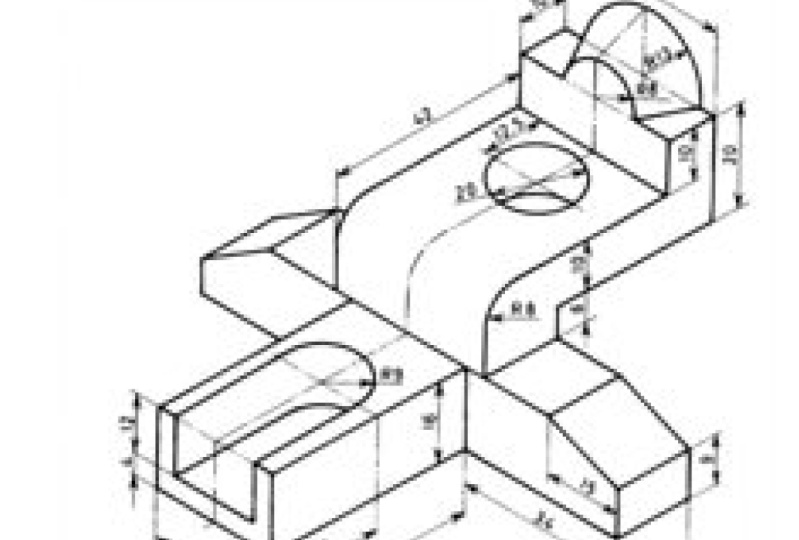
5. Developing the Project: Welcome back. In this video, I'll be talking on
isometry drain. And this will also lead us to walk in on the project
for this course. For this course is
an isometric drain, which I have it here, showing us how to
Abby replica of this. Welcome to my drawing
to shop open. And I'll be first. You need to do is to change your working space
to isometric plane. To do that shall keep a sharp
D S wishes drafts setting. I will eat into my snap grid. Snap type. I'm going to pick isometric
snap as metrics now. Now click, Okay, so let's notice what will happen
on this interface. And see does change its orientation and
macros AS way as change. And to have more upgrades. Dry are loved to make sure
that my output is always one. Then if I should. Nucleus is very high, what is called ISO plane. Isometric drafting the
various type of orientation, the reverse type of orientation. I have my rights. I have ISO playwrights. Lifts an answer, Plato. If I just you can see
it's changed to right. You can see the shortcut
shift, this is F5. And they split my function key. Change my orientation because
whenever your holidays on, you need to always
change directly. Because the auto be restricting
you on some dimension. I'll pick my line. Now trying to draw
these objects. Let us analyze this. Objects is looking
at this, right? I have this packs
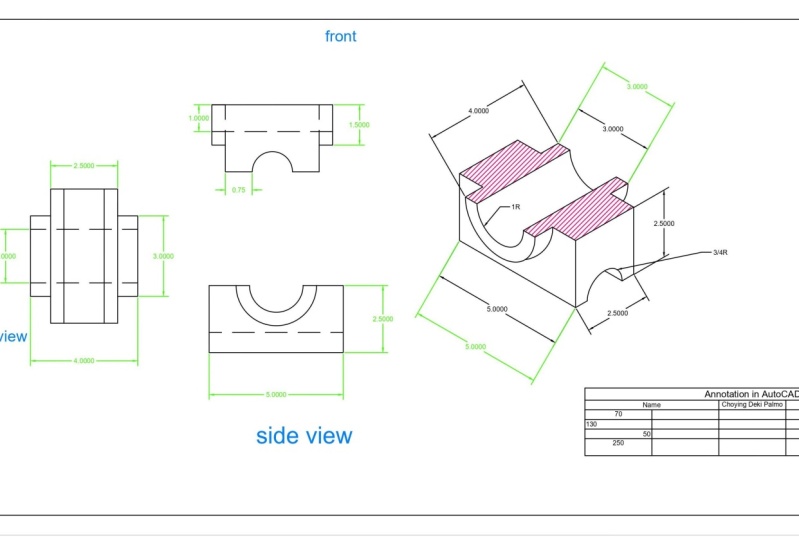
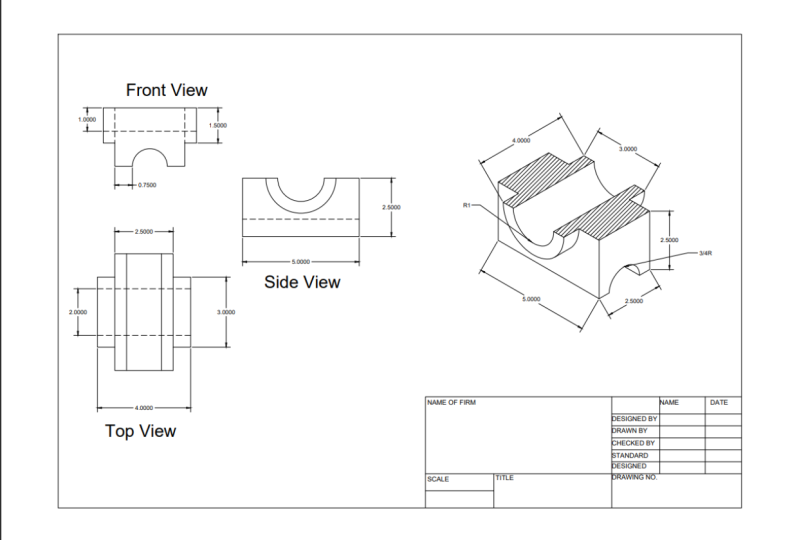
from year to year two before and have saved this
part is for this side is 2.5. So four -2.5 will give us the difference on this side and give us your
friends on this side. So four -2.5 would give us 0.5. So we have 1.5 left. So one point, 5/2 is zero point. So this side, it will be
easier for myself, myself, and then we have from
year to year five, and forget here to be three. So five minus three
will give us two. Then 2/2 will give
us 12 into so many. Here to here is one. From here to here is one. Then we have yet to be three. I will have the radius
of this quiz to be one. So if the radius of
this visit is one, then the diameter will
be two minus two. Now give us one. So one
in two places as 0.5. So this patch is open, the Open. Now, this one,
let's work on this. Now that we know our dimension, I'm going to pick any points. So I'm going down, we know that 2.5, right? So we assume that this
is in millimeter. So to go, so our units are
hit the shortcut of you and I'm going to leave
it as a decimal. Then my precision, I'll
just speak is open. So then my units, you get to pick millimeter spooky, assuming design minute. Then pick my line. This week is to plants
fight communists. Three will be what?
It should be one. Then this way, myself, 5.0, 0.5. So if I am to move like this, the CV for the open five. This is deltoid itself. This works. I'll use one. Right there. I want to change my orientation. I use my fine Schottky. F5. The chin minorities
now bring down vertically. It is 2.55. Now let's exchange. Genes. Have five spots. And I don't want to
go off right, 2.5. Then let me come this way. So that would be one, right? It's the escape
the land command. This end points. So this should be 2.5 as well. So I'm done with this. Do something that I'll
make my works easy yet. Now, in isometric, we
don't make use of sick. Because second one gives me the pathway if I
were to draw safely. Density is not fitting well. What do we use this?
We use the ISO safe. To do that. You have to select. So as this end, if I say that out of the command line or
show to pick ISOC, that is absolutely about it. Or I guess pipeline
command lives. Then selects I associate
with LC circuit. I say, alright, let me
share that as well. Then I licensed separately. Then I can draw me to know that the radius
of displaces 3/4, 3/4. So we can actually calculate that steady divided by
four would give us 0.75. Or I can steal is equal to 3/4, which will give
me then this bus. I would love to
just use my stent. This then this. Then I will join this this
using my drink joint. I have this as one. The reason why I did that, so that I can have
the main points here. So I'm going to
draw an ally list. So the first pair lives,
diameter is three. The second and the
diameter will be two. Radius here is one. So we need to draw iso second. Printing make points.
Jamie rotation. So first one is three. So I have to change my diameter, so I'll pick diameter
D for diameter. The knowledge that three to
the function as a circle, I'll specify the center. Then this time around.
Now let's write down. It's got to be. So I have this. So what I'm going
to do right now, I'm going to copy
this to save a copy. Don't forget the shortcut
for what we see, you. Make a copy and I'll
pick this face to be my base points in lots of copies that we
already copied it. So I'll be copying
my distance of four habits here as well. So right now I can delete this. If I should delete this, I'll just trim out or calm diet. So 12. So I'm done. Here we are. We have our ship, right? So you can give
it a try as well. Knowing that this
is the predates, the project in this course is to work on an isometric drawing. So you can ask for a
pick up in isometric, drink and work on needs. And you can ask repeat this
whole pathway and walk on it. In the next video, we'll
be talking about how to dimension this drain
to try and mention it. And also attaches at this drain. In action is drawing. The reason why we
be putting ads. So please, because
it's as it will serve as a section for the drawing because this is my
section I drawing. In the next video, we
will just stick cylinder. So you can look out for various isometric
drain and walk on it. Thank you for watching.
6. Dimension: Alright, in this video, I'll be talking about
some dimension. So it is very essential
that we dimension or work. That's part of the
detailing that will be communicated to
the manufacturer, the fabricator or whatsoever that will be
constructing a project that we actually design. So it is very
essential that we put some level of
detail on our work. So we will be walking you through the process
of dimensioning. In this video, we have
various types of dimension. The dimension it's
those can be found on daddy annotation panel. We have some tools that are under this annotation panel that belong to the annotation. We have the texts
dimension to be leader. Right now, I will be talking about dimension and
in subsequent video, talking about the order. And addition to
looking at dimension, you can see I have a
general dimension, Rabia. And if you click on this lock, have access to various
dimensioning tools. That's a year, whereas
dementia need to, you can always pick up and
use them for your work. So now, let us look. If I should click on the STEMI, which is the generic dimension. I can use it to them. Actually dimension. They had any parts of an object or a drain
that I've worked on. I'll pick a factor. So now this is telling me the length of this
drain as a habit. If I come to a place
like this as well. Now, be restricted because
of my birthday is on. First author is this one. So I'll put up my
heart to F needs. This is my hot right? Now. If I combine to take it back. So we've done the outline, I can have it vertically. Right? Now. Back to the command. With this, I can also use
it to dementia my readers. You can see that for my
diameter and use that for dementia my diameter
as Revit reference, then I can use us to
specify my readers. So this is degenerate
dimension that you can use any shortcut is d
m, M dimension. Now I'm going to delete
all that dimension I have. Walk you through all
that types of dimension. Now, I'll come down
here, take this. So I want to use my
linear dimension. So the linear dimension, we strictly linear position
vector or resumes. So big myelinate. Like if I should use my linear, it's really give me
any Vertica, right? Of y. And horizontal mode as well, which I won't have
the outline mode. That's perfectly suits
this outline shape, right? So using ECA, I can apply it. Right. Now. If I want to dimension this bus, they now have school
my Pigma aligned. Pick from these paths. So how we align, right? So same tech I see is my
Vertica or linear dimension. Then I have my Angular
to the Avalon dimension. Are we able to pick
the chain two angles to know the lab dimension between this path and this path. I'll select the path and out to specify where
I want to have you. So this is telling me that the angle between this point and this point is one degree, right? So our wish we know that the angle between this
path and this path, we definitely be 90 degree. 90 degree. So you can look out for are you want to
please you dimension. So what if I have an app? Yeah, let me having this part's right. So picking my arc length so I can ask me to select
an app of poorly. This will give me the
accolades for this. So that is dimension, right? Then I have radius. I can preview the radius
to attach this circle. And the radius of this say, if I choose, select Disable. So you really want to decide where you want to
please your dimension. Next. I want to place outside or E. So this one out and put it in. So this is telling me the house that stands for
radius is telling me that this is the radius of
this particular set, right? And flashy car and
pigment, **** it. Then I can select this. This is the diameter
of this sacred rights. Without this diameter. Now, most of all our dimension
and I have them in arrow, a arrow, right arrow, feud. We'll come back to that. Let's look at the
ordinate dimension measured the horizontal
or vertical distance from an origin points. So first time from an RDD pines
color coded data, future. So if I have something
of this search, right? So like I said, that's easy to measure the
x, y coordinates dimension. So if I click this box, so this is what
I'm going to have. By the time I come to my y, my y coordinates, this is my x. This is our coordinates. Right? What does it do? Its work. These are the coordinates. Alright? Then I have the jug. Jug is applied to a circle. And if I apply it to this, then I'll be able to
say This is too large. Sums like this. All right, so let's then ask
me to specify the center. Now. As I read this. Now, every dimension
that we looked at, dimensional command out
the apps, chatbots. So if you raise them, so you have five
day millenia Yeah. The radius. Yeah. They are out there. Right now. If I want to make
changes to my dimension, 12, make changes
to my dimension. The dimension. So I can actually
just call this part. Then this is for my dimension. Right? So I'll click this. Then I'll click on
Manage dimension style. Then I can come to modify, say this is one I coaxial so
you can create your new one. I need to take most of the progressive from
the previous one. So I'll click on modify,
Right? So, yeah. I can work on our
eye once my hair, my symbol and Harwood
to look like. Finally we use a close field. So you can decide, say you want an oblique
or an architecture, depending on your tastes
and what you want. Then you specify the ROA, the size of the house, and also the text. You can actually stick on diet and increase or
decrease the texts. And also the primary units, the units you actually wants, and also the precision that you want. So
you can see this. So if I change this
to 0.0, right? Instead of having 5.45 Year, 5145 is five, so I will
definitely have 5.459. Alright. The line also, you can check on how you can make
some changes to your line. I often give your
dimension line sickness if you want to give
it any sickness. And also if you want to increase the spacing or
decreases baselines. So every modification that
you want to do is you can just look down to these points and say Cassio
notification, modification. Modification rather
modification to the star of your dimension line
IN dimension texts and Primary Units. Time,
I'm done, I'll click. Okay. And I'll click Close. You can see this has
changed, right? That's Gene. Shortcuts to, that is, if I have that name study, you have this call, right? And if you come to you and
now you're gonna teach, you have on that dimension, you have lots of dimensions. Style can use as well. So if I have something that
is a guy, HIV is continuous. Continuous. We continue from
where I stopped effects. This is actually pick the
last. This now work on. So then this way to just continue from where
you stopped, right? Let's see, that's a
tango and major changes. I have this dimension. Say if I click this, I can actually make
this dimensional line and asked me to select
the dimension line. I want to add my
job to pick these I mentioned and I'll specify
the aspect answer. Alright, so that's a quick
one on dimension line. Now let's go to our projects. If I found dy, let us quickly
dimension this radius. So yeah, we'll be making use
of alignment lats, right? Let's see it. I have right? So we add this to
be 2.5, right? Yes. So I'll pick my line. Answer. None staff on this
points to this point. These identity. That's my screen aggressive
form yet to you. This time from this part
and this part, right? Now, we're still on here. So this is just
dependent on how you want to deal of time
dimension. Okay? So let's look at one, ascertaining a
naturalistic dimension. Gets a year basis, give us one. So that is, you can go
around this dimensioning. Now. Some pods that we can use dimension line was we
have to use Is leader. In the next video, we'll be talking
about leader high use of AI we can apply. That's good because if
I use my radius for this is not identifying
it as a circle or an arc. So I can use either reduce
dimensional or the, or the dimension of flux. So in this type of situation, what are we using? Is the leader, right? So now just a quick one. If I want to actually change the angular dimension
of this column, and then you have what is called My hope lick, my pattern itself. So I have to ask them selected. I'll select this answer. Then. You asked me to sit
at the anger onto industrialists and go fancy. So he's going to move the Veda. And that's this if
Creek one on dimension. In this video, I'll
be talking to you about using our leader. Thank you.
7. Leader : In this video, I want to
quickly talk about leader. Leader is used to make
description, to unhide objects, to communicate some level of
details to the interpreter was working on the drawing
that you are giving house. So for instance, I have
this line yourself food and smile on weeds,
polygon inside. I want you to assume that this one's my screw around
in machine plots, right? So instead of meat dimension
in every field one by one, that is rarely that comes in. Instead of media as calming and picking the amygdala readers. So I need to describe
this slider. Need to start doing
that one by ones. We hope my leader,
you take my leader, you to ask me to
specify where I want to put the location
of my second, just pick any right. Then it lands me the ability or the assets to the x will
say, Wow, I want to display. So looking at this,
I have 123456. I would say six equidistance. Know, true or not. This pan lot of and I can
make my own, **** it. I see 2.5 right. Now. What's server that
sees this will have a better understanding
that this is actually talking about or V naught
that I have in these joints. So this leader that I've
already described as, right, I have, my hardware, is the same thing. If I want to make some changes, I'll click here and click on my money motility assays to be able to just
like our dimension. The same thing here.
Then the data structure. And I have my contents, words, no, display
on my drawings. Or do I how much it takes? One block. I want I
don't want anything. Silvers, you already swapped
with magic as Danielle, I can actually say my text. And I want my text
to appear as well. Then if I pick this, you can see what I see James on route to the mean. Then also I can decide to
say I don't want these type, I want this line. You can see all nine, which doesn't make sense, right? So you can just play around with the understanding
that we use. Now, close that out. Then I have, I'll
add more so you can actually sell it in
watching gains two starts. Say, Oh, this out what
I'm referring to, but this will defeats the purpose of we're just
having a clean work. So I can pull my answer. So I have this. Now that goes back
to this, right? So in this drawing, we will be using that
to actually specify our our dimension in this joint. So we bring in us the drain. Then we can finish off
with the dimension. So now use leader
for this class. Specify that this binds, is that this point is one. Then I have is site search tree. Then Susan, TV spots. Let us finish off
the dementias now, you can see that with leda
able dimension Dispatch to call me kids, that the units That's belong, this is the dimension that belong to that part of
the mind of Detroit. So going back to this, so right now we are done with dimensioning of our projects. Thank you for watching. In the next video, we'll
be talking on ACh. Then subsequently we also talking about layer managements. See you in the next video. Thank you.
8. Hatch: Hello, welcome back.
In this video, I'll be talking about designers and drafters. They use repeating patterns, what we call repeating patterns. Repeating patterns are
called attach to feel a region in a drawing
for various purposes. It is being used for
various purposes. To show a cross-sectional
view of a drawing. We use to indicate some
components of an assembly drain. We use ach and also to indicate
Nigeria for beers drink. So we have various types
that we can actually use. So we have types on Piazza. So the type is used to
specify where to query. Predefined user
define a costume, hatch pattern, and various
patterns that we have. Display selection
of the ansi and iOS standard that are
in those drab piece. And we have calls as
well that can be used as background color for projects
and for every touch, this angle and this
is cubed as well. So let's just quickly look at what are we trying
to explain so far. If you look here, if I click on this darker
edge and ingredients, because they walk in hand. If I have, for instance, I have this rectangle. I can actually attached
to this rectangle. Now, I can use, I use the shortcuts or come
down here to pick my hatch. Digit is each patch, so I'll click Enter. So actually, that's
not the structure. That's also bad. It's trying to give to me says, assume its peak in points. Was an ACH. Work
within an end clues. Parts or includes boundary. May begin, as you can see when
I talk about the patterns, could be an assay
or an ISO standard, not an answer 131. So if I try to apply this here, you can see what it looked like. These are various
patterns can see. Then I have solid, so solid. You just like you have in
color to your drawing. And it's just a single color that I can play with that I can pick to fill in
into the rectangle. And if I want more Paula
aside in this follow, if I want to move
follow, flip on Mofolo, then come to this place where I can start mixing
this type of color. In this color that's already
follow various angles. Right? Time under group. So you can see that
that is for solid right there going back
to my Hatch command. Now, let's try to
apply some ash. Picking the color because of the last option is
I choose, right? So now let's try to, which is attached to this drain. I'm going to pig, if I click diet, have access to a large number
of hatch patterns that I can peek and apply
to this drain, right? Ledgers. Say if a shift for instance, peak, this is R1. Now it's taking the pattern, is taking the color. After the lectures. I'm going to change
the color, right? Let me start this, right to apply this to this. Now, for this, I set my
transparency and I can also say it now seemed
to really follow Zach. I said the transferring
heat congrats. Now, if I was to change
the angle of this, I can either increases
or decreases. And if we know the angle
you want to walk with, you can actually see what's going on. Let's see. Once I enter, then I can increase and
decrease the scale. And see that's what's you're actually walking. See that. Then I can pick another or this times
this and this. Now. These are also taking
the pattern of this safe try to chain graph. You see the two as change. Only wanted to read
these to read like one. That's then let's quickly go back at it. Now, I'll select this time. I do that. I can actually make some adjustments should
it spots on my eyes. Now, the point is most
of what you see here. Yeah, What can be fun even
going up to the edge. So this is the awards
you can find the width. So I want to remove
the esophagus, select it, then
right-click and erase. Let me I want it. Right. Then I'm done. After that. Then pick up my order arch. So big in that hatch. It's time to live
for another person. Applying. Write in number of patterns to choose from. Greek. Recites. See that a whole lot. They can just
actually work weeks, dash and so on. So that is how ACH work. Now, going to our Then there's this
something I would like to explain on the edge. If I should double-click
on this and I know I can increase
my transplant. I decrease my transference. Alright? I'm also a half. We have pattern. So L gradients, rider,
condyle, African ingredients. Gradients will be in two colors. And you can choose the
various type of gradients, pattern within type of ceiling, depending on what you
want to appeal to you. And says is brilliant
ingredients are mostly policy. You can find it and
change your quality. What is required for
your work as well, you can decrease
and increase it. Transparency. And if
you click on see, since it's still like the
opposite of that pattern that you can see
at the right time. And then I have this. Now going into our projects. I want to ask this path
answer. So I dispatch. So the nodes, these parts, these objects as
a cross-section. So Rick, my pattern, I'll use in this than I can. Yeah. So that is
how to be a bar, actually our objects, right? Thank you for your time. In the last video, we talked
about layer manage mix.
9. Layer Management: Welcome back. In this video, I will be walking you through
the layer managements. So we've talking about layers. Layer is a concept that allow grouping of drawn
geometric distance and separate category according to similar features and
some common themes. The similar features
could be the line type, the line weights, blank color, the color you're
putting into your tray. And most of the
time we make use of layer when the drain is complex, when is it light drawing? To be you'll be able
to identify and recognize parts of Detroit. There are some
paths that we take, some similar similar features and there is need for you to
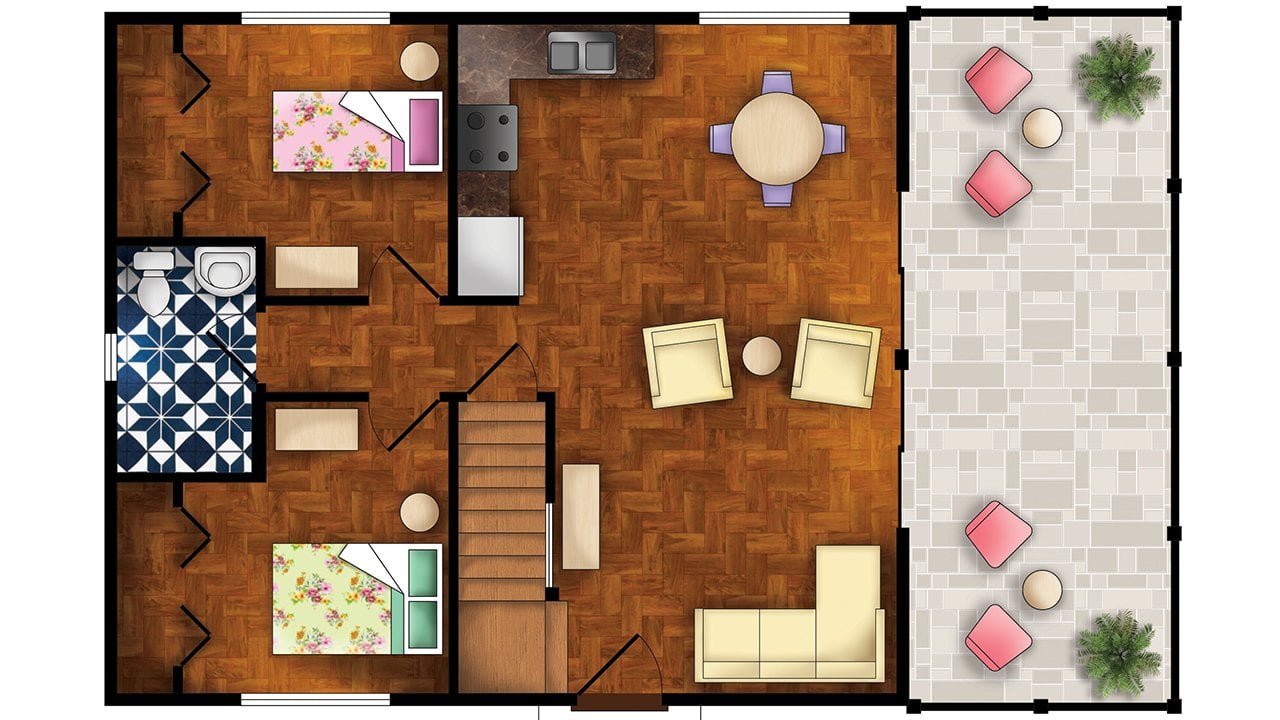
be able to add it Friday. So this is a drain
newsletter, house plan. This plan of various components
does various components. Each of the components
have to be on layer. So that's e to be easy to identify each of the components. So there's what we call
the layer properties. So if I click here, then how I have a box, the layer management
box that comes up here are where
we are going to say it's all the properties
attached to the various layer. That will be great. If you
look at this point right, after quite a long life, no mass of the element
that is in this terrain. Let's just look at it. So we have C and then name. Your name is going to name your layer according to what's appeal to
you was, you know, you can quickly use
to identify them on Freeze log parts is that we
will be talking about asthma. They have functions
that they perform. And they are to LP to be able to maneuver
around your drawing, your behavior, to navigate
around your drawing with ease, without one or two components. This dropping one another. Then we have some properties
like color or each identify various aspect of
Detroit line type language. So on. Now, how many dahlia is to create a newly
accreting Yulia? If you want to phrase a newly a viewports to
frozen and new reports, then the delete a layer and
to make it easy, I currently, now if we look at this
range, are currently IS, is currently the default layer, two for every five. It as a default layer, which if you call to check here, this is the default layer. We have. This green mark is making us to know that this
is currently, so far is type. I want to make this recurrently. I'll click and I'll click this. This is currently
equivalently a magnitude. Then I can go back and
now for the Delete, you can actually delete. So for instance, if I
want to delete this, it's going to tell me that no, I can delete these because these are the
layers I can delete. Default. The current layer. Therefore, I only work in
that layer constitutes containing objects and style
reference dependence layer. You can actually delete them. Now, let us just look at one
or two things on Israel. For my dimension line. If I should highlight quietly, this is telling me that I'm
currently on default layer. So if I show I like this,
nine-tenths change. Yeah. Now it's telling me that
they are at isolated is an annotated dimension
layer, as was saying. Now, let's add something
else like this. Now, this is also on
another layer right here. It's telling me that
warm air to move out. Now, I also have my wall layer. Room cochlea as well. So this build up just to make sure that we can actually identify each of them. Now let's talk about some of these properties is that attach. So now if I issue, we are out of my own
of freeze isolates. Look right, It's an
absolute opposite of that. Where we have the graph of
where we have isolates, we have on isolates, freeze door, lock,
and unlock. Right? Now. If I shoot of Ilia
put off everything, right, then I can use
it to put it on back. If I show isolates, any objects around what
isolates will be gone. And every other thing. Then I can isolate. Then TO freeze matter. If I freeze the layer
most of the time, if frozen, Leah
always regenerate. On an alpha notes. You can eat it. Toys and we can
look and use this. See, a reflection
of its weights is faded and the potluck is telling us that
this has been locked. Was T you can ohmic any
modification on it. It has been locked. So you can only see
a reflection on it, but you can't actually
do anything on it. So I can unlock it. Select all this will
help us to be able to work with so far is that
if I want to work on this, on this, right, and finding it difficult to
have access to the Slack and just put it off this layer. Then I'll be able to
walk on that path. I have already done that. So that is one of the essence. We can actually
decided to lock this. Then are we able
to work on this? One, The other part of the
drawing that is close to eat, then unlock right now. So that's this, that
if I come down here, I can actually use the log
for each of this layer. You can use them here. For instance, if you go
to make up very top, you see y is gone. And I can put it on back. Now, let's look at this. If I come to my layout, one of us has to do is I'm
going to double-click. Now. I want to phrase it. If you freeze this wrong. Now are frozen this right. Let me go to my model space. You can see that I'm
saving my room tag here. What's the room tag? Is? The tag is no
longer what is CA so this is one of the difference
between when you freeze it, you put it on, so on. I'm going to toy. And to do that, I can just come here and
look for this, is it? Then? Now he's back right? Now. Let us look at on
and off this layer. And I come to my Boolean space, you can see it is gone. Yes. So this is one of the difference
between freezing Ilia and puts the needs of
my various layouts, the parts that you
freeze, the layer. It doesn't affects it
every other, please. Just particular to adapt points. What's if you put it on our E2, fits it in any other place. So that's this that I'm going to double-click
outside Alice creates. Let's look at how we
can create layer. So to do that, I'll be
getting back to our projects. I'm going to create a new layer. Now to do this, I'm
going to click this. So we will be calling this
rebellion, this dimension, and give it a color like this, depending on what's
appeal to you. Then. Now you can see that this takes the cholinergic various
and sundry supply chain. This is another color, depending on the company. So now let us limit
it to those two. For now. Now. I can come down here and make
one like you can call me. And decided to make this
make currently at first. Then after making that clear, I can use my ACh and 3D. You can do it that way. I can actually use my default layer to still
work this the right time. And then I can select
the column value. I say, Oh, I want you to
take the probability of this event changed this
nephron dimension. I can, this one I
currently write, then pick up my
dimension to start. I mentioned this. That's the great
Roman for the leader. Just to take the same color. This is radius. So we have something
like this right? Now. I'm sure you can now work
with the layer right there. You can create a layer for, you may now date as well. Which layer fluids. So this is just our layout works and how you can
work with it, right? So thank you for
watching this video.
10. Text: Welcome back. In this video, we were looking at texts. It is very important to give
some words to our drawing. So, and this is where we
have two type of deaths. If we click on this, right-click on this app, the dropouts of multi-line
text and several entities. Starting off with
a single ethics is simulated test is used to enter several lines of texts that can be
rotated our ship. And it tastes that we
type them in displayed on the screen of which each line of text is set
frequently as objects. So if I hit select
my single line text, now, it asks me to pick my mind. I'm starting off
for them as well. We have to specify my height
So the height will stand as the font size is
0.2 from my eyes. And I can actually set
the angle of rotation. Remember, it can be
rotated and resize, that wants it to be zero. Then I can say, and I can zoom to
see what I'm typing. Now, if I want to jump to in S9, personally, I keep
typing into people. Have to eat my attack you
to type Monday night snack. Now, that is our
synchronized decks. One of them done. Then I
can hit my Enter twice. I'll click outside. So I have this. So what if
I pick my single line text? And this time around, I want to actually increase my fonts
per day now to rotate it, rotate to the right angle. So you can see how
D2 display, right? So that is our single line. So I can say, alright, so that is
our assembly language. Then I can click out. I use my SQP because c.
So I get two treats, everyone of them separately. Alice separate objects. As long as the single
line, single line. Once in a while, these
single line is that by default the texts
are justified, so there is no option
for late justification. Right? Now let's quickly look
at the water line takes. The multiline tastes can be used to create
several paragraphs. As the saying goes and
what's not online textbook. We are using a detox that
we can format the taste, appearance, columns,
boundaries unless. So, if I should click
on watch line texts. Now, then asked me to draw out the paragraph pitch intervals wherever you want
to make the right. Then I have what
is called a ruler. If I click on my ruler
to really see that, if I should click on the
ruler, then I'll have it. Right. Now. Let's just quickly
type things you wish. The, the, these, these
are tiny rights. Yet our text editor where we can actually
carry us and justification of formatting operation on your server takes
phrase San Martin. Decks. You can see that by the time
I'm done with this part, it jumped to the next one, but I'm I'm done with
the end of the page, the junk to the next line. So that is one thing that
is single line Codename. Sorry, I can add lights. And if condyle is
telling us that the current height
for this is 0.5. So if I change to 0.0, we see that this is 0.5, right? Because if these water
sits in our lives right? Now. Also here we can actually, because one of the formatting that we can now can be done. So I can say to make it both would again make
it to the Tadic. One thing is Control I. For each article for
a country before. Just like our word package
or Microsoft Word, it's work everything out. First and if we write
this, I go to sell. Let's say I can apply my superscripts and
actually applying my subscripts as
subscripts cluster. So if I shouldn't
make any lights, and I click here, I can actually make it
an opec is a lowercase. Then I can strike through
as well depending on Save out we want that. Then also I can
underline as well. Most of what we have
on our Microsoft now and then there's what
is called match for. Now, if I should probably change this color of this search, then I can also
change my font style. Font style. Alright, and so on. Now, I also have
my justification. Justification or do I want
to position my decks? This same ties it, all right? Bending our slave, our free
speech and also outbreaks. Yes. So for instance, the thymocytes now wants number later. If you picked number, then I can start
itemizing will say, well, I want to say minus. You see that bleakness. Jump to the next number. Essentially we're from normal
prolactin going to be, let's go back to number all
I want to use later on. So part B is lowercase. And I can, I can
give my line space and also I can make
some justification. Then I have the symbol. We have various type
of similar yet. So let me briefly
touch on this map. If I click on
MarsProperty asked me to select this, professor
Massoud this and say that. The
property of this. So what I did is I like
this. Click on my mask. Select one to answer,
chain to national. Once I'm done, I'll click. Now very rough to symbols. We have various type
of single degree. The plus or minus diameter sewer serve as to whether you need for your work? I tried. We can look for
your cmos substrate. Now, if Pat venture, you could not find the
particular symbol that you need, then you can click on all the time you click on
others in Italo, who's console, where we have various
type of font size, font style, then our
various type of symbols. So here we have lied number of symbols, give strolling down. I see, yeah. Like numbers or
symbols. Symbols underlined. So if I click here, then
I have various fonts. So if I pick a random forest, you see it's affects the
type of seamless That's, that's called a PA. So for instance, if I want
to go back to our area, area black, and I'm
dying to pick this. Once I select the patch
plus symbol first, isolate an African selects. I'll click this again. These are not true
consulted on this one. I'm done with all my selection. Now click on corporate
or B, so I'm done. Now. Now this is my
control V to paste. So these are the
symbols I will copy. The dialogue was,
the order was right. Then looking at coulombs
on the display, type in PJs is being displayed based on the
colon that we just say. If I click not belong, then it's time to
expand. Whenever. If I pick through it
and see if you can just play around
this one are high the black lines, right? So by the time I'm done, by the time you're
done with snow, Oregon and click on
Plus text editor, writes this editor, which
I will do crazy. Ebitda. Now for the single leg dx, if I call on this
and I click here, I have my minus textile, yarn, the money texts,
and I'll be able to manage my singular like this. So I can pick the type
of font that I want. I want the font style. Like I can specify my eyes. Do we factor public? And then you can
create a new one that's after the Oregon once. So that is actually where you can make some changes to once. This single line
tends to look like. Alright. So this is all I
will be explaining on texts. So I have stated we have the single line tips and we
have the motor line test. So we get to use them depending on how you actually want
our text to appear. Thank you for
watching this video. See you in the next video.
11. Table: Welcome back. In this video, we'll be talking about table. Most drawings required,
table in which some information about
it drain is displayed. E.g. the drain of an assembly drawing
needs bill of quantity, bill of material rather, in which the table provide
information about the number of paths of the giant geonames, the material on position as material
composition and so on. So that is one of the essence of we have in a table in our drain. If I come down to this place, my table even from the
from the annexation plan or you type assets,
the shots books. Say if I click here,
I have this right? So this is the body rows
and columns that we have and the width then the data row. This is telling me, this is a preview of it. So it's telling us that if
phase row will be our tight, the second row can be an Ada. Rose will be D.
That's our inputs. You can make a change to it yet. So you can say it's
a circle we want the first row should
be Ada as well. Depending on what she
wants to commit data, depending on what ever you want. That's okay. This
should be data. All right, So my
time here at dawn, probably you want it to be Cs by six. I'm done. I'll just click, Okay. And I can insert, you can see I have
123456 for my columns. Why? My rows as presented. Right now. Right now, I have some fissures
under a table cell yet. So you can insert a cell
above and you can add below, then you can delete
a room as well. Without bicycle our
dice, I read it, I can delete it is
followed and four column, I can satisfy the right
or by the legs, right? If I shift, click this part, I'll be able to delete. Then I can also make
a sale to each other. It can make cell teacher. You see that you can
make yourself, right? So you just double-click
on this and then you can write to a server once it right. Depending on what's
right. My time. It's the Tab key to
go to the next one. Server. It's the topic in S1. Right? Now. Another thing that
you can note is you can actually make some population just like the ACL
sheets in the table. So if I double-click
your eyes here, I'm giving this a figure. C. Calm down and gave
this to be lines. Nancy, I'm Diane, give
this to the fifth. Now. I can actually make or I can make my text
to be at the center. If I come to my description, I can make it to be
at its center, right? See this as well. Make it center. This sentence right here, we have the Nama
settings for our texts. Can change your fonts. Fonts color. Like here. Now, if I click on this cell, I can come to my formula and actually put any
formula. I can click on. That issue is, so this is telling me that it's calculating the
song of a three plus, you will recognize this, that this is under
the column of a. So a3 to racial of aces. Then if I click out, so it has calculated the
sum of all these rights, I can decide c. For that. You can decide
to say, Okay, I want. The average should be an
average of all these. Calculate the average. So some of the Microsoft
Excel formula, you can perform it. So going back to your table, you should click on this. We can actually insert
table from another file. You may have done. Zell solution or equal
data in a cell phone, they can bring it out. Yes, if I click That's alley, then it's telling
me that I have not happened that money, yes. Wow. Drink the top nine
credits in new data. So I could just create one. Okay? Okay, Say It's OK. Now. That's really key. Now I can browse to bring it out right now,
just tweak here. Take it my part, my document. I'm going to pick this Pokemon. So I have now it's also
privileged that I'm bringing in, but if it's very
likely to click Okay, and this is easy, I can say, Okay, then bring it out. So you can see I impose
the data for Microsoft. This was done in Microsoft Edge. If I click here, then under this,
I can manipulate. I can make some efficiencies. So here you can live your
life always line type and the border as you can make some changes and now you
want that to appear. Ions. Then this output table, this sets an audit table. We don't. And by the time you
want to make the changes, they can make them according
to the data. And tight. This is where you can
make some changes here. So settings to your right
to equal pay claims, you can also create a new one. So this is one of the function. Are we table this
out to make use of your table? Thank
you for watching.
12. Block: Welcome back. In this video, we'll be talking
on block. Block. The block is a
collection of objects. Objects that are made of drug, two lines separate underlies that's forming more
complex entity. Normally represents and
objects in a real-world. Unlike each chair, door. Or it could be any
type of furniture. And we'll use the log to actually reduce the
size of our drawing. And again, we can reuse
them over and over. Aka. The block can also continue in non
graphical information, which could be which are texts, objects now got caught. Some of the attributes also
have to look and attributes. You can also add an
iPad next block, which we can italic
websites to eat. We're there to know
my body formation of what we tried to
represent on your website or to a far we make his
luck in drawings just to do what I'm most importantly, so that we won't keep
drawing what we know. We always use most of them
over and over, I hate it. So for instance, if
the average drawing, so on that's actually develop
a beauty plan, right? Which I need. He most of the time
this particular, a particular type of shape. I want to use it
over and over so I can convert it to look and not just keep drain
them over and over again for a sign and have these, these are singular entity. You can see I can move this. So they are same,
right? Single scene. Right now it's on gratitude. And look, I want to zoom, that is zero if the
cooler rectangular shape. So to do that, now everything about blood
you can actually do is right-click on is that I actually do not
have any current. So then I have my great
love. My block editor. If you just type as well, then add this up comes out. I've loved definition
of reach as well. So currently I do not have
any block in the drain. So I want to create
the new block. And to do this, I will just name is rectangular. Now, these points are where
do I want to give it form even a requirement
and I specified what I want to pick it. Right? I don't want to
specify onscreen. I want to pick it. I want this one to
be my mind. Then. It doesn't recognize
any objects. Yes. I have to pick that. Oh, I want to pick
my audits now, our day I want to do
today, I'll get there. I want to retain a
convex blocker do it. So I want to retain
the counts upon what's the updates
you look, right? So I'll click my selection, then I'll select Enter. So now it's showing
that I'll have selected and objects that are to be run to
make it annotative. Right? Then my thumb
under tan chain D, the iPad link is whenever
you want to coordinate it to a website or wants or
appellate to avoid pitch, that by the time
you click on it, it will reference
the page or a recent far on your device. You can also iPad empty tree. So you can check through this. But I don't want to
do that right now. You can see what data to go about it whenever
you hyperlink, it's easy to show a display. A simple data is rapidly come anytime you want I or
Control and click on, it's going to shift and click on it to go to the file
or the worst sign that you've hyperlink there, but you can give it a
description if you want. Then by the time you're
done, click on OK. Now, this is telling
us that this Look, this is nine block you
can see with now we now have it as a single entity. Sandy, see that? It's telling us that
this is Niagara. Then I can move it just from
the base points any way. Thereby come to my insights. And how you see this is the
block that Abby, right? Then I can stress by Irish
here because this is unmuted. You see, it's telling
me that you are creating this set the scale of which the antigen is Standards Registry so you
can set your scale right. Now. Big issue with one ratio one. Now let's briefly look
at these songwriter. Let's copy this. And I'll answer as to make it amounts to
take it away from below. Now, I want to
create a new block, something new to S
then the annotative. So let me add something right. Now. Relax, might look like this. Now, I have answered some of
my objects this time around. I don't want this to be
Analytics if I don't want it. Sir, I just wanted
to scale uniformly. I allow a student right now. I'm don't know if the
difference is reduced. Alright? So that is now giving me the symbol nights is analytics you what this, if I click Run it, is
giving me this symbol, the annotative symbol like this. Tap on my cool. So now we are doing this. Are we able to scale? This? Scale is if I count in certain activities through my pointer
instruction, right? So that is the difference. Now one thing about all this is by the time I
create a new drain, if I create a new drawing
on this new drain, I tried to bring up my insights. I can see that, right? Because, oh, I didn't
save my block. I have to save my
blog for future use. Because this block that
I've created here, they can call it the
equivalent to this drawing. I'm drawing on this. On this drawing. What if I should close it
and move to another Joanne? I won't have access to it again
because I didn't save it. So that is where what we
call Rights Blog comes. Rights blue. So if I think that then
I have this so far, Yes, where you can ash artistic, creative block form
yet and saving. Yeah. Right? So if our robots
and I write them, what I want to do,
I have a block. Bring out the blog. I want this. Alright, then I can converse. So where do I want
to save it to you? I want to say I can call mine. I want my destination to
chain this time around. I want my documents based
on our proof and teaching. Oh, say does this seem right? If I go to another
country, you sat, right. I can resend. You, send loading from it. I can see it skews
shift one we created. I see this. I can bring it out. Alright. And then
I have it here. Right? Now let's look at a
law firm, library Austria. And I can I tried to keep kids from this
and bring it out. So that's this out. We can always have a look
because I've saved it. I can always join. Now there's something else that you can do to
take our stocks. If I call this, if I should go to what is for Design Center, I can add them. Now. Before that. I can make edits
into this block. So if you do that, ours is called block editor. I can edit it or not ready to up our lights on it and
click on this in place, ladies and please, I'll
be able to use this here. So you can see
it's not broken it down to a single entity. I can write it as lambda. Now click on save changes. Made, the change to eat. Right now. Then located here. And whenever I click here, click on this one out. Let's come to this. This way. I can actually walk
on it to my load, dynamic load, say some, ladies, I can just give it a parameter. This option on. It's safe. For instance, if I flip, it can. And then I flip here and I can put six. Right? Now, go to Options. Big the flip after my
time into maybe parameter and ask me to select
an absolute answer. Alright, so I have it flipped so I can
develop. Good luck. Flip my needs. Then when
I click on it exceeds, thus flip to the other side. So this is where
I get to change. I've loved to dynamic time. I'm done with the test, please. Oh, I didn't say that. I didn't see that. Oops. Go back to my text editor. Let's do it another way around. So that's my flip. Now once you have this option, then select the objects. Right-click, you see that That's clusters. Then I'll click on Close block editor years out and make a
chain to make Yes. So now if you can't see it, I can flip my upper right. That's our that's what I
said IS the Design Center. It's Enter. It takes me to my, to my fire alarm printouts
from what I've loved. Next I can use. So you can see then I'm sticking to design
sensor right now, right? Yeah. My design center, alveolus, actually very
big peachy for teaching. Teaching. Kitchen. I can pick my block. Then I can pick various blog how once you use right
inside the envelope, you can see that HE based, it's fancy, I brought it up into differently. You see that? That is Outlook. Design Center will add it back. See different type on
densa and survive. You need we have for yeah, actually the fastener imagery. You can also see that this is right. Now, this is our its work. Then I have money to view
more of my dynamic block. Then I can go to, as we call it, the two pilots. Pilots. Pilots can be found
on the view, the view tab. So I click on two pilots and
a half or these three here. We have put for inferior
and for matrix. So this is what makes
you say if I bring out. Now, you can see that
whenever you are doing an architectural drawing app to actually keep drawing in
the door or window or save, I just play around its
way to get family of once you have your blog that you need not to stop working, shopping yourself to see if I click on this, I can flip it. You can see that I can
use this to control. I want. If I click here, then
I have various ocean. That's how you can open. This is going to open
in tasty degrees. So if I open it in
for five degree, I would change
this to 90 degree. I close this. Right. Same thing. If I
come to see you. Zone electric car mechanic. If I pick out this, maybe working on this and can
have access to various size of this VOCs sentence for
architecture as well. For Cebu, you can just
play around around them to actually know what's you see. I saw on here and
just play around it. So basically this is all you
need to know about block, or you need to know about. I hope this video
helped you along. We thank you for watching. See you in the next video.
13. External Reference: Probably are working
with someone else. I need to bring in what
the person has done. All. You actually have enough fine. And once you bring
it into your work, this is where external
interface clumsy. So again, the shortcut,
for instance, electrons is ester
type X-ray have the shutter for reference. And if you look at the insights, then here we have the external reference where some of the some
of the features, some of the ravens to carry out the scenario
friends can be fun. And for shirts are
just type the Esref. Each enter. Data was an external reference manager
box display on my screen. And from the box able to attach a new reference weeks
for my current drain. This is grandly telling me that I'm currently opening
documents here. The name of the document is wishes do what
we've done a year. This gives ****. Right? Now. This is the size
tetanus status, it is open. This is size. It is current and the
dates that it was done. Right. Now, if I click on this, this is telling me
about some older type. So that could be
attached to a hydrogen. So we can actually stay attached DWG knowing that
autocad is a DWG file? Yes. Then your photo
gallery is DWG. You can bring in an AutoCad
file into this drain. Likewise, we can
attach an image into the dry beads JPEG or PNG of anytime we
can bring in an image, I have some videos or the
Mu of drawing as well, dW, df, also a PDF
file and route points. So these are the type of file
I will actually attach to our drawing using the
external reference option. Then yeah, by the time
we bring in some grain, we can refresh this visa to
reload or references that are attached to this drain in
case they are now sharing. Right now, I will be attaching
or file to this drain. So let us look at this. So first I love to
attach an image. I need to take me
to browse away. I can browse for image
element to drink it. I would just share. And now we're able to bring
an image in this folder. I have a PDF and also in this mode because the pathway
for these word lists, this pathway was imaged. That's why the early file
I can see in this document is going to now click on Okay. Then I can industry as far
as pretty on our notes. Now unlocked to specify
that I want to scale, it's kinda scale it. Or you can input your
scale factor on each year, or you can say no. You want to specify
advancement as well. You can also rotate it on the screen if you
want. If you don't want. If I click here,
she knows more of the details of what I'm
about to bring him. Right. I didn't actually cookie. Once I've done that, I'll be able to bring
in is like I see, you specify in Sasha. Then scale factor. I can input my scale factor nine that this will be very beach
out to reduce it to be, to consider my scale factor
to zero, fine to enter. I have this right. So now this is what, fine he knew to bring this
image into these five rights. Also. Likewise, if we should
loop, we can as well. Ringing ringing a PDF file. Like I said earlier, these are the type of file type that we can
import into this drain. The battery attached
PDF for instance. Now, coming back to
this Skillshare, I now have a PDF because that's what's the pathway
I went through right? Now. This is telling me now, okay, I just want to preview
this now open a PDF file. Now once I've done that, then this, I have three pages. So I have three pages service. Now, you can decide to pick any page you
want from the period. So if you have a PDF
file, as many pages, you can pick one that you want
to import into the drain. We're in a situation like this. I love to import every, every an athlete quirky. Three of them. That's why
it's such a big tree. You can see that for P3. So add them different
than it does, attach them differently, right? Yeah. You can decide to refresh
badly once you bring in is not display refresh. So now these are the PDF file that
imports into this drain. With SDN our reference. You can bring in so on. What are your, what are you done in this? You can read it. Now. If I click on this image, if I select it, I have option on how I want it to
appear on my screen. This privately telling
you that this is an S, 10 s. So to show the image of return that I can increase, my brightness, decreases
more than any contracts. If you wanted to hide it. Then for the PBL as well. After that, they have Astrium. Same thing you can
do to each side. Wants to display your answer. One of these is
already in its fixed. That's alright. So like I said, area, these are the
type of file attach. So your PDF to dry and rider.
14. Parametric Constraint: Welcome back. In this video, we'll be looking at parametric
constraints. So symmetric pulse
train is just to give some level of control and
restrictions to our work. Do AutoCad is not
strictly a matrix. So that is why most of
the time we add the mic is what you might find
this interesting time, we'll see how it's
being used and to prepare you for
all that software. So now I'm talking about
parametric in AutoCad we have actually two types of
the parametric constraints. So the geometric clustering found to my parametric tablet, geometric clustering and
dimensional constraint. Now the geometric pulse train
is to control the look, the shape of your object, its way up to put it
in a puff Fritz mode. Why did dimension up on
Australia the dimension it to control you're trying
dimension of your trials. So whenever you're inputting
new dementia, it's effects. Immediately. There's different between my dimension and
dimensional constraint. Now, the startswith. Coming to this value, we have some features
for geometric incidents, the linear concentric
law and the like. Now, to demonstrate
that Rao rehab, I just draw some funny lines. Right now to make
his own copy this. The start sweets. I want to
make this line vertical. This is now well, alright, instance provenance
and grace treatment. Right? Now, if you zoom it, you know that this is
not impacted graph. You see this slant,
right? Awesome. This is not the profits. So this correction,
I can call me like this is my geometric constraint. It's asked me to
pick the objects. Select the objects, I want
to apply a constraint. So definitely don't want
to apply it on this. I'm going to click on it. See, it's make the streets. If I should take
this as well. Right? Then for my outline, horizontal CBA applies here. See that? Isn't that right? There is called
the concept trick. To ask me to pick this
circle Citrix mean, we have to use Angular app
to be at the same center. So I want this to
have the same center, so I'll select the
second object. So now we share the same center. Right? Now, I also
have the right. If I ask you to ask me
to pick two points, I'll pick this point and this point and see
jamie together. Then co-linear as well. Let me try this. C2. Then linear to each other. Then I have equal to, equal to, we'll take the same
to make them before. So for instance, I
want this circle, this circle, three
equals to this. Let me use this soundness. Let's see that. Then. Dive into this. I say, Well, I want
this to be a tiny, they are tangential
to each other. So if I try to move these
chats with each other, whenever I have a rough, then I can apply my nice smooth. Yeah. You mean it
close up for it. Then we also have
these symmetric. So when we have two objects that are symmetric and
inside the cell, these semantic have to one another. And Sigma. And asked me to
pick a symmetric, right? So this is a geometric matrix. So let us look at an example
one that's first draw some random objects, something like this. Now let's walk minus
guitar, string. I'm going to marries into
rentals to each other. Then Vertica. Let me increase
this vast password. Right? Now if I use equals,
equals, equals this, then again, like Greece, now have a perfect square. So which my parliamentary
question, geometric. Now, the symbols on this high indicating that they are
constraints on the objects. And your work can be
fully constraint. And that constraint or over constraint for central ID,
this is fully question. Now, if it appeared that
it look rodeo constraints you can decide to shoot
or the classical era. Alright? Are you going to
say you want to? But that doesn't mean
that the constraint is normally steal the show. Now, I can also pass through
my work was auto question, will you give me a good profit? Looks like click here. I have the option to
pick what's I want to be displayed right out and yet give out and make his
mouth auto constraint, how it should be
done and all that. It should be done. Right? Now, let us look at
dimensional constraints. Two dimensional
constraint will affect dimension if I have
a straight line. All right? Are you right? Now I can apply conventional
constraints are linear, we have arisen time. So if I want to apply this, then is going to mean that
this dimension one is 0.339. So I can decide, looking at the lens does pay
attention to this. So I can decide that I
want the line to be ten. Now click Enter.
See what happened. It's increases in
light of which if I have something like
this and I use no, my dimension, one dimension. Fine. So I double-click to change my
dimensions like that. Alright? Then IC does
not change here. What's the length? So this is the one
of the words you prove for parametric
constraints. If I double-click again, I thank the sight to see. I want this to be 7.5. I see that it's in
length. Alright? So I can do the same thing. I can decide to say, oh, I want my D2, D1 times. That will be my d1
is something quite. Now I'm going to
give me about 15. So you can see what album then. I cannot call me. I'm using my equal to I, so I want to just distribute
cluster this many. You can apply them
simultaneously. So that is how it will
then alpha align us way. If you have it drain that
is outlined can apply. Scapula as well. Then upright. So to give you meter radius. Now, if I click on
this bar meter, this is actually showing
us some of the common, That's our imputes, right? So for this center
though we have five. I've done I've dimension
to use I mentioned here. Or wish it is. My dimension tool
is d1 times two. This is gangliosides is Connie. I say, okay, I know and do
one tends to zero, fine. Alright. Alright. I'll reduce it. I can control my, my finger reduce parameter. Now. We can delete
the constraint of it. So by the time we believe it
clustering, then it's gone. So for instance, how
something like this before, I'll be able to move
this anyway, right? Well, if I place a low
fixed constraint on it, and I tried to watch the movies. You see, it's only
restricted to that point. Streets me. So whatnot, if I should
delete the kras gene. Gene on my screen is gone. I'll be able to give
me if I apply eating. And I said, Oh, I
didn't concentrate the day right onto like
deletes the constraint. That's the way I
can move within it. We can do this constraint on either the geometric constraint
or D dimension I plus j. So I hope with this video, you'll be able to find
your way on how you can make use of your
parametric question. Thank you for watching.
See you in the next video.
15. Orthographic Projection of the Project: Hello, Welcome back.
In this video, we will be proceeding
on how we can get the orthographic
view for this drawing, which could be the
first angle projection or the chord progressions. With all the information
that's on this isometric view. We'll be making
use of them to get our top front and side view. Before we continue. You agree with me
that we all stay on the isometric workspace. Gases, so good. So a workspace where
we'll be able to, I have the orthographic view. We have to go Java at
drafting settings and change this back
to auto graphic, which is the red
diagnosed apps out. We're going to type
the S which is just perform for drafts and setting. Answer. Yet we are chronically
on isometric snap. Somebody to change this to
rectangular snap and click. Okay, and I can see that
the dark phase has changed. Now. The information yet we'll be
making use of them to have. So you sign in front
of you to proceed. I'm going to change my layer
and make it differently. Now. Starting with the front view. Front view. I know that from year
to year is four, right? And you know that this is zero, is one yet is 0.75. Videos stats. Now, alright, to put on my home. Right now, I'm looking to start. So this will be R out
to be false, right? Have this alcohol is we write down my one. Right? Then, communists, right? I can actually
needs to be three. Then. This is one site. Right? Now. I want to save this one. I'm used to offset
distance of one. Is right, one. Still gain. So again, maybe
they'll find myself, I'd rather she really
helped my effect. I'll make my circle. My circle then I'll
put the meat went for. My secondary data or myself
will be zero minus zero times zero plus is l
by itself I actually, because if we shou, divide 3/43 over foggy, give us the open self. Mispriced 0.75 for the radius. So right now I'm
going to change, then I'm going to
change this line. Dash line means Gen Z dash nine. So to do that, I'll have to come
to mind as well. This side I'm going to
do some work to my line. Sound. Then. Look for one that's up here. Right? So Garmin, go
back and read it. I tried to appear. Okay. So let's proceed. So I've also wants to
drop the top view. I know that okay,
from here to here, this is 2.5, right? Then no, because of these fats seasonal
pricing. Dismissed. Please. We are going to consider
the side as well. Consider wishes from
year to year three. We also consider this
other side that is 0.5. And let's get this done
right to my land, to 0.5. All right, then how this should be a fight? What I will do, I mean, so
since this time around, I'm going to offset by z open to all states. Winter of say this time I
went to assess this demo. I am because I achieved wants to get resolved, which
I've said bye, bye to know while we are
setting red one, right one. So I'm just right now. Then I can draw my line is 0.50 point itself. I'd rather write,
sound fair for me, call me, give them our debts. This point, and so on, right? So 53. Big my head points, right? So now I can get
rid of all this. Now. Then. Okay. I need to have
osteocytes, right? We'll find my file. So save this. And
then I would extend, understand this first instance. It's a broken lamps. So I'm going to use your dash. This, right? Yes. So yeah. This is already talked. Look like how do you train? It looked like that
to be read from the top is going to reflect. Then for this side, spirit us look at this
side of the joint. Is this right? So here we have in our
five, we have 2.5. Then the distance from
this place downward, that should be if we were
to look from all done, then mean giving us 1.5 and
then our second square. So now let us quickly
look at how we can give the side view of this drink. Alright, now, for the site, mentor our reality familiar with dementia from
these spots, right? So I can offset
this time around. I can say by 1.75, all become obsessive about
1.75, which refund the top. And if I want to offset from
this passage would be 0.75. Let me go surf supervisor. So I'm going to
change this hashtag. Alright, so then our picnic set points that we have two second year which
we use as a second for. One is radius of one. The radius of 1.51 orange. So now I can shrink. Now if you add two
dimension this right now, so you can actually
just insurance. My God, I mentioned your doc if I'm right, then alright. I didn't know that. Okay. Yeah. Here, there was 1.5 as regulation enough from
here to here is 0.5. Alright, great. So you can just go
ahead and dimension, you'll watch one through five. It doesn't guarantees. And this just really
wants to She's doing their rights and so on, so forth. So looking at this, this is our assembly done, this, right? The singular length. Can. This is my front. Alright? Now I want to change
this so we can, you know, you can go on and create
new decks, right? Alright. All right, so now I can copy this. Alright? So now this is my, this is my dog. Right? So now our oxygen does. I'm searching. I
have this, right? We have this. So you can give this a try. Now, in the next video, we'll be looking at how
we can plot our drain. How we can plot. Plotting is just trying to produce it
out of the CFO presentation. Alright, so we're looking at it. Right. Thank you for staying
with me on this journey. See you I didn't SVD.
16. Plot/Publishing: Hello, welcome back. So this will be
our last video for this course on
AutoCad fundamental. Yes. The final stage of this
is false of plots, our drain we issue will be
given to the manufacturer. I will say about that.
We'll be working on needs for interpretation. Right now. Let us move ahead. Lots this out. If you go to layout. So we have the model
space and we have the layouts space and
also layout sweet. So with this path, you can
actually get to print. So we have what is
called the viewport. Viewports. These viewports
actually display words. We model space. And if you click on next year, we have access to various scale of which the viewports
can display. The objects are the joints
that we have in Agra. Yeah, right now you
can actually print. So if you right-click here, you can go to what
is called loss. Before we plot. At times, you might need to
make some settings to your manager who have what's called the
page setup manager. You can modify the
viewports or you want to do viewpoints to see. So we have videos
paper size here. Now you can pick from, so this is part where
you do all this and this is what two
plus one to plot. That really helps if I want to be type of lots in at once. I don't need to
because I add there's no name on layouts or not. They've actually rename
it will display, right? So I can actually say okay, DWG to PDF, right? And I want an A4, which is tonight seven by two. Now, what I want to plot, I'm plotting the layouts, right? If I should privilege, this is what I'm going to have. So you can see this
is not good enough. That's cut off the
edge right over. So then you need to start
making some settings on, on our issue display.
Making some sense. Alright, which we'll call
flashing right-click. And go to my player. But I won't be going through all these CDOs aspect
of making decision. I guess good to do
parts that I see. And I consider very easy for us to be able to work
with right now. And again on another thing, if you actually want to
print these pathways, you can see this is out of, this is why it is not
actually showing that path because it is out of the pads. This dot, this dashed line. Once our drain is out
of It's the zone. This way. If I reduce
this ratio mortgage, then I go back to my diagram
and I click on this. It's come to these
places. So my layouts and the four that
I've chosen before, if I should previously as
C is not display, right? So this is how you can
get by that as well. Now, I love doing my plotting,
the energy gadgetry. Double-click to have access to a server and you can
move them to make sure they are altogether before you write some time
we're doing it outside. And you can go
back to your page. Setup manager will save our
changes and we need to eat. I can create a new one
and you can rename it. So let us look at another way, which is my pillow of actually lots of issues
under my model space. So let's say for instance, that I already have
my title block. Yeah, that's not how 3D. So you should be able to
develop your dice with luck with everything that we've spoken about in this
course of this train. So for instance, if we show a tight too long
already I did Choi, I'm just going to
be assuming I'm not creating a title block,
actually recruiting. Alright, so let
us assume that we have tight to block
for these drawing. Reach. Okay. That's too small. I'm not going to do that. Yes, I'm only working
on attaching, but now let us assume that this is what I wanted
to write on this face. So I will just go to my floods, which is this entropy. Right? Connie? Then it's asking me what do
I want to pull up this time around our imports
it because I do have India layouts. That answer. So if I want, I can
actually click here. Then printing out
name of the layer, then what our goals
were to click on. I'm not going to
even importance. Importantly, you want to
actually bring all know that drain into this
previous plots. Now let us look at the periods of t is now your machine
as any previous blocks. So I'm just going to
leave this as no. Now DWG to PDF, PDF, right? Then. This I don't want to eat three D is
not in large drain. So when we have in
life drawing that is mainly competence is a three. For his time that unlike
engineering drain, it needs to be on an A3 paper. That's what's yet. I'm just going to use A4, which is two and
I assume by two. Then this time around. Now we can do is what I
want to use so forth. Let us look at this, refresh you look at it this way, right? And that there will be an issue. So you've actually
preview display to only pick out what's it, fancy, fancy device,
bring it up. So as if we use a stent. See that this is quiet, okay? If it's right. But what if we have our
title block on this part? So this one loop, which, Alright, then we can
actually use layouts. We can actually use
when the rider, if I pick window, then after choosing sets up, the plots are deeper. Look at this versus giving me. So what I'm going to use
right now is display, sorry, window rather peak. So for our peak,
so let me go back. We're going to use my window. And this is why it's
not displaying anything because I've not actually
any different new window. So I'm just going to click on this and I can pick
where I want to, lots of these points, right? So I have this and make
sure that it is fit to be baby is not feasible to
buy gas you there I'm already having centered
up by the fashion. Say the anesthesia is equal
to I just read pass lemon. Useless. So now you can see, so let's assume that
I'm going to add a rectangle to fill in the
frames of the diets or so. Okay. The distance on this point? Yes, ma'am. Okay. If you read drying it off to move at this
time, that distance. So I assume that this is
my tie to look alright. Thousand that this is tight. So we have, okay, we have our name.
I like drawing. So by the time we're done, so we want to print this with the assumption that you fill
in whatever they need to be. Yeah, let me delete that assumption. Alright, so let us
brings about this. So we are going to be
using window, right? Okay. You're saying
it's changes through A4 and these two little window. So right now I can now
select these points. So now let's preview that. I'll center it for the plot. So this is what we have. These I experience
will be on EVA. Write this as k plans to
look at something else. You can see it, right? So we have this right. Now. For our dimension is always address table that we actually
admitting monochrome. And any other colo, Long Beach. We notice the thoughts in C needs I'm going
to pick more local. So let's look at this. Give us. Now, you can see more
clearly right now, my timeline. Right now. It's three loci series. Right? Now series, this series is generating is our standard
that they produce. If she looked like this. This is what we have. Seeds. This is what we have,
then we can print it out. I'll send it to server, will be sending it to review it. So here we have isometric. We have our autograph
also on this, right? So it's been a wonderful time walking through
AutoCad fundaments. Wish we focus on the Tuesday. So I want to thank you for
following me on this journey, for learning with me. If you have any question, I dropped beats and
I'll be expecting you review on this
course so I can't walk more to ensure
that I gave you the best in any subsequent
courses that are making. Thank you for
staying with me and do have a wonderful time
working with auto cut. In what slaver industry. That's your hat on in. Thank you. My name is Abby. Bye. Thank you. Thank you. Thank you.
 Bayo Kilanko, Design Engineer (CAD)