Transcripciones
1. introducción Microsoft Word de cero a experto: Hola ahí, mi nombre es Dan y tú y yo llegamos a aprender Microsoft Word juntos. Ahora bien, este es nuestro curso basado en proyectos. Por lo que comenzaremos con una carta comercial formal, miraremos un boletín de noticias de la empresa y luego pasaremos a un documento de informe de negocios más largo, así
como algunas características de pantalones de lujo con PDF y videos interactivos. Ahora, he hecho este curso para principiantes. No es necesario tener ninguna experiencia de palabra previa ni
ninguna experiencia de diseño gráfico o de edición de escritorios. Empezaremos por lo básico, pero trabajaremos rápidamente en las características más modernas de Microsoft Word. Trabajarás con, imágenes, logotipos, tarjetas de empresa específicas, crearás plantillas corporativas y estilos reutilizables, personalizándolos
automáticamente usando mi homenaje. Aprenderás a hacer un boletín mensual con enlaces y videos listos para compartir y comentar. Aprenderás a hacerte cargo de documentos largos, limpiarlos y agregar gráficos profesionales, tablas
infrográficas y mucho más. También hay un archivo de ejercicio descargable en un imprimible [inaudible] que puedes usar. Entonces amigo mío, es hora de pasar de Microsoft Word cero a word hero, y de que te conviertas en el mejor usuario de palabras en tu oficina. Vayamos al curso. No está por ahí, eso es sólo un todo pero siento que esa es una buena manera inspiradora de señalar el final.
2. Archivos de ejercicios, archivos completados y hojas de trucos: Hola ahí. Hablemos de los recursos que vas a necesitar para este curso. Ahí hay algunos expedientes de ejercicios. Habrá un enlace en la página aquí en algún lugar donde
podrás descargar los archivos que vamos a usar en este curso, así que ve a hacer eso. Lo que también he hecho es al final de cada video, lo que hago es guardar mi documento de Word exactamente a lo que
quise decir para que si estás teniendo problemas con los tuyos puedas descargar los míos, comparar los dos y ver donde estás. Habrá un enlace en cada pantalla de video para eso. La otra cosa que puedes hacer es que he hecho una hoja de tramposos. Ahí hay un video luego al final de este curso, por lo que puedes ir a revisar eso. También hay una versión imprimible en PDF. Aquí habrá un enlace en la pantalla, donde podrás hacer clic y descargar una hoja imprimible donde lo imprimes al disco y te ayuda a acelerar, y se ve impresionante. Entonces ve a hacer eso, y lo otro antes de seguir adelante es que las revisiones, es un poco temprano pedir críticas. Pero si te gusta el curso, te gusta el estilo en cualquier etapa, deja caer una reseña porque críticas, me gusta, comparte ese tipo de cosas es como muchas de las plataformas donde distribuyo mis cursos, así es como deciden cómo buenos son y qué tan bien se clasifican, y cuantas más críticas me den, mejor exhibo, más clientes obtengo, y mejor hago. Entonces no tienes que hacerlo, pero si te resulta útil el curso, salta ahí y dame una reseña. Eso sería encantador. Está bien, eso es todo. Pongámonos al resto por supuesto.
3. Crear una carta empresarial formal Microsoft Word 2016: Hola ahí. En el próximo par de videos, vamos a estar construyendo esta carta formal de negocios aquí en Microsoft Word 2016. Empecemos. Primero lo primero, abramos Word y estoy usando Windows 10 y Microsoft en 2016. Para abrirla da clic en el pequeño icono de Windows me parece que es solo más fácil donde el fondo dice preguntarme algo. Voy a dar click en Word y ahí está ábrelos. Genial. Esta es nuestra pantalla inicial. Se puede empezar con un documento en blanco, que es lo que vamos a hacer en este video. Pero lo que puedes hacer si quieres quizás ahorrar algo de tiempo, y trabajar desde una plantilla en la parte superior aquí hay búsqueda de plantillas. Se puede poner en digamos membrete, golpe retorno. Necesitas estar conectado a la red porque hay un montón de cosas que descarga de la red mientras está funcionando. Algún tipo de conexión a internet es útil. Ya puedes ver lo pongo en membrete y tengo algunas opciones. No hay una cantidad enorme. Cuando se trata de escoger una plantilla, muchas veces llegas a jugar con las palabras que usas. En lugar de membrete, si lo pones en letra, obtienes una gran diferencia en cuanto a los resultados, ¿puedes ver? Esto podría ser más lo que estás buscando y esto es lo que vamos a estar apuntando para nosotros. Echa un vistazo a través de esto. Esto podría ser que encuentres algo aquí como trabajo hecho, salte toda esta serie de videos y simplemente empiece a trabajar desde estos membretes aquí. Estas plantillas me parecen un poco duras porque hay muchos bots automatizados en ellas. Si eres nuevo, es posible que los encuentres no tan útiles como parecen ser. Ahora, aunque no uses estas plantillas porque hay una especie de bits de automatización en ellas. Encuentro ese lenguaje en ellos. Es realmente útil, si necesitas no lo sé. Esta de aquí, una carta confirmando tarjeta de crédito perdida, necesitas tener esa pre-escrita. Entra ahí agarra el texto y úsalo para tus propias cosas. Hay algunas cosas útiles y luego hay algunas menos que inútiles, como esta de aquí. No es agradable y útil. Carta de rescisión del empleado para mostrar un desempeño deficiente. Es una especie de guión y escrito y hay algunos buenos y hay algunos interesantes. Pero de todos modos, no vamos a empezar con plantillas. Lo que vamos a hacer es que vamos a dar click ir a casa. Vamos a empezar con un documento en blanco. El primero que hacemos con cualquier documento es darle un guardado. Se puede ver en la esquina superior izquierda, hay este pequeño disquete viejo click Guardar. Donde vamos a pegarlo, Depende de ti adónde va a ir el tuyo. Probablemente lo más común es si haces click en navegar y si vas a tus documentos de la izquierda, voy a hacer una nueva carpeta aquí para poner todos mis archivos. No los vuelques aquí, puedes, claro. Pero en la parte superior aquí dice nueva carpeta. Si estás usando una versión antigua de Windows a veces puedes hacer clic con el botón derecho y ir a Nueva carpeta. Habrá un poco diferente. Con esta nueva carpeta aquí, en realidad, voy a renombrarla, hacer clic derecho en ella, vamos a renombrar. Estos van a ser mis archivos de clase de palabras y vamos a poner todo hoy en esa carpeta. Cuando has hecho una carpeta nueva y golpeas guardar, en realidad no va a entrar dentro de ella hasta que hagas click en ella donde dice doble clic. Ahora estoy dentro de mis documentos, que está en estos archivos de clase mundial. Voy a darle un nombre a éste. Ahora cuando se trata de convenciones de nomenclatura, puedes darle lo que quieras. En mi caso, voy a llamarlo traer tapas de lámpara va a ser la empresa y
ésta va a ser una carta de crédito que estamos escribiendo. Al final de estas cosas muchas veces puedes agregar un V1, V2, V3, para cualquier ajuste que
hagas, vendrás y dirás volver, nunca llamarlo final. Final es el beso de la muerte. Si lo llamas final, tendrás dos finales fueron visitados. Apenas un V1, V2 funciona muy bien. Hagamos clic en Guardar. Esa es la cosa súper fácil fuera del camino. Pasemos al siguiente video.
4. Cómo cambiar pulgadas a cm en Microsoft Word: Muy bien, en este video vamos a buscar cambiar las medidas. De acuerdo de pulgadas a centímetros, o centímetros a pulgadas depende de ti. Ahora, estoy basado en Dublín y todo aquí es tipo de tamaños de métricas. Necesito cambiar el mío a pulgadas porque ahí es donde está la
mayoría de mis audiencias a ustedes podría estar haciéndolo al revés. En primer lugar es el tamaño de página. De acuerdo, entonces lo que vamos a hacer es a lo largo de la parte superior aquí, esto se llama tu cinta y en la parte superior aquí, está bien, este gran trozo aquí, y puedes ajustar la cinta bien, al hacer clic en estas diferentes opciones en la parte superior, vamos a conseguir un diseño. Entonces puedes ver que la cinta se ajusta. Lo que vamos a hacer es que vamos a hacer tamaño y verás que la mía está ajustada a A4. De acuerdo, ese es el tamaño normal de letra, pero en EU va a ser [inaudible]. De acuerdo, así que así es como cambiar el tamaño de página. A continuación, lo que tenemos que hacer es cambiarlo de, puede ver en este momento la mina puesta a pulgadas solo porque cambié la mía un poco antes, y así podrías estar a centímetros. Para cambiar esto a través de ok, lo que vamos a hacer es ir al archivo luego bajar a opciones, y luego ir a este llamado avanzado, y luego si te desplazas todo el camino hacia abajo, eventualmente
encontrarás debajo de o está ahí? Está aquí abajo en alguna parte. Ahí está el bajo exhibición. Está bien y medidas [inaudibles] te centímetros, obviamente cambiarlo o milímetros depende de ti. De acuerdo, entonces voy a dejar la mía a pulgadas en este momento porque eso es lo que necesito. De acuerdo, vamos a dar clic en Aceptar. Una cosa genial que puedes hacer justo antes de irnos es que digan que estás tratando dicen que necesitas sangrarlo en dos centímetros. Está bien. Se puede ver que está fijado en pulgadas ahí. Está bien. Lo que puedes hacer es simplemente escribir dos y luego escribir la palabra cm para centímetros, y luego si haces clic fuera de la caja, puedes ver que hace la conversión por ti. Si eres como yo, tratas con mucha métrica y pulgadas, vale. Simplemente puedes dejarlo establecido en uno y simplemente forzarlos ahí dentro. palabra [inaudible] hace los cálculos por ti. De acuerdo, entonces voy a poner mi espalda a cero, cool, así es como cambiar tus unidades e incrementos usando Microsoft Word 2016.
5. Cómo dar formato al texto como un profesional en Microsoft Word 2016: Hola ahí. En este video vamos a hacer esta carta. Vamos a ver el formato tics que hace que suceda, sobre todo mirando las cosas como el espacio afters, huecos
que aparecen entre estas líneas. Por lo que el espacio después y el interlineado también cubrirán las fuentes
básicas y los tamaños de fuente. Vamos a meternos en ello. Entonces primer paso, vamos a traer nuestro texto, así que vamos al archivo y vamos a abrir, y te he dado algunos tics. Obviamente solo puedes escribir tus cosas, copiarás y lo pegarás de un correo electrónico, pero tengo algunas cosas para nosotros. Entonces haz clic en abrir y lo que vamos a hacer es dar clic en navegar y tienes que averiguar dónde has descargado los archivos de ejercicios. Los archivos que se pueden descargar desde el sitio. Por lo que he puesto el mío en mi escritorio, podrías estar en documentos, puedes ver que se llama Word Exercise Files. Intenta encontrarlo. Entonces aquí está el texto con membrete. Por lo que abrió eso, voy a seleccionar todo esto, voy a copiarlo. Puedes golpear “Control C” o puedes golpear copiarlos. Ahora voy a ir a cerrar esta de aquí, al tener una pequeña cruz en la esquina, y ahora vuelvo a mi carta original que me siento. Yo solo voy a ir a pegar y puedes ver que aquí hay una gran opción de pasta, o puedes usar el control V, depende de ti. Fue traída a través de mis tics. Todavía no está formateado, así que eso es lo que vamos a hacer a continuación. Primero lo primero es, quiero jugar con este margen superior. Mi carta está sentada demasiado en la página. Por lo que para jugar con márgenes iban a ir al layout. Vamos a ir a márgenes, y se puede jugar con sólo los prefabricados, o se puede bajar a, se pueden ver sólo los márgenes del espacio desde arriba y la izquierda y la derecha. Hay una opción estrecha que puedes ver lo hace más cerca, y hay algunas diferentes que vamos a ir a personalizar y así volver a la normalidad. Ahora voy a ir a Márgenes Personalizados, y lo que quiero hacer es que quiero un buen margen superior grande de 2.5 y solo se adapta a esto más adelante puedes cambiar reglas. Vamos a hacer click Ok, y es sólo va a hacer un mejor espacio agradable desde la parte superior. Puedes ajustar la tuya si tienes una carta muy larga. Probablemente va a necesitar ser un poco más alto para caber en toda la copia. Ahora en este video, no vamos a cubrir cosas como si tuviera todo el texto aquí y voy a la palabra casa, aquí es donde encontrarás todas las macetas básicas. Por lo que se puede ver negrita y cursiva y subrayar. Espero que puedas seguir destrozando estos y arreglarlos por ti mismo. Pasaremos por algunas de las más difíciles para llegar ahora. Probablemente el más grande en cuanto a la disposición de tu texto es algo llamado espacio después, o se confunde con el interlineado. Por lo que el espacio entre estas líneas aquí, me gustaría que estas se agruparan todas. Por lo que necesitamos jugar con algo llamado espacio después. Ahora, la gente lo confunde con el espaciado de líneas. Ve ese espacio entre estas líneas aquí, en realidad
es un espacio bastante agradable entre estas líneas, pero es la brecha que va después o 10. Entonces hay un retorno ahí y se baja
al siguiente párrafo y ahí hay un espacio y eso lo llaman el espacio después. Entonces busquemos cambiar nuestro espacio después. Entonces, resaltemos todo este texto aquí y pinchemos en casa, y en la cinta aquí, hay una opción. Es éste de aquí. Tiene un pequeño espacio entre íconos,
líneas y párrafos. Suelta eso, y puedes ver que puedo jugar con el espaciado de líneas, hacerlo más grande y más ancho, pero eso no es lo que quería hacer. El interlineado se establece en cero, pero todavía hay espacio entre ellos y se llama interlineado. Si hago clic en eso, se puede ver que tiene un valor predeterminado de ocho puntos entre él. Por lo que hay ocho puntos después de cada uno de estos párrafos o giros. Por lo que podrías teclear en cero aquí y todo se irá bien. En realidad es una manera más fácil. Entonces vamos a ir a deshacer la parte superior aquí. Este pequeño error de revertir aquí esto es deshacer, significa que he hecho algo mal y vuelvo un paso, puedes ir de nuevo hacia adelante, retrocede casos y hay
deshacer, rehacer, y así quiero quitar eso, ir a la misma lugar. Hay una opción que dice, se
puede ver que dice quitar espacio tras párrafo que simplemente envía de vuelta a cero como hicimos hace un segundo agradable. Ahora hay un espacio, un espacio más grande entre aquí, eso es sólo porque tengo que regresar. Ya he pasado y he puesto un manual de regreso y tú podrías hacer eso. Si nadie está buscando, puedes simplemente poner retornos y tienes un buen hueco ahí dentro,
y eso está bien, pero eso no te convierte en un precio de Microsoft Word. Continuará en partes. Voy a deshacerme de estos retornos. Adiós. Está atascado a su lado, pero podemos simplemente agregar nuestro espacio después. Entonces después de las Islas Caimán, está bien. Cursor tan pesado parpadeando en cualquier parte de aquí, voy a decir que es mi línea. Puedo ir a las opciones de interlineado y voy a
configurar esto a un espacio después de que te ocupes de puntos en lugar de pulgadas. Cuando estás tratando con el espacio antes y después, es
lo mismo que la fantasía de una fuente de ocho puntos, fuente 12 puntos, te ocupas del espaciado y del mismo tamaño. Entonces me voy a poner en 20 aquí, de acuerdo. Doy click Ok, y solo pone un espacio más grande entre estos dos.Ahora el espaciado después de estos chicos, vale, voy a querer todos estos solo para
asegurarme de que estén configurados para algo que me gusta. Entonces voy a seleccionar a todos estos tipos, y voy a decir, me gustaría que fueras el espaciado entre líneas del mismo establecido en ocho, lo
voy a subir hasta 12, solo ábrelo un poco. Se ve más profesional en mi opinión. En cuanto a este espacio después de aquí, así que voy a dar click sinceramente, bien. Puedes resaltarlo o tener tu cursor parpadeando ahí dentro, Depende de ti. Vuelve aquí arriba y vamos a poner un trozo grande. Entonces en lugar de 12, vamos a poner 50. Agradable. De acuerdo, solo da el lugar para una firma, pesar de que la mayoría de la gente acaba de dejar esa firma fuera estos días. Ahora puedes ver aquí hay un hueco entre estos dos y es el valor predeterminado de ocho puntos que queda por encima. Entonces voy a resbalar a estos dos tipos, subir hasta aquí y me voy a poner, quitar espacio después, impresionante. Por lo que el espacio después se utiliza para separar párrafos, el interlineado, sin embargo, es el espacio entre estas líneas. Se puede ver que estos tipos son mucho más apretados que estos tipos que hacen el espaciado de líneas. Si quiero agarrar todo esto y simplemente abrir eso, las líneas entre aquí, es que puedo subir hasta aquí, interlineado y se puede ver como lo hago más grande, se separan. Está bien, pero la mayoría de las veces lo mantendrás apretado, vale. Interlineado de 1 o 1.5 y jugar con un espacio después de él para separar los párrafos. Muy bien, la última cosita, súper básica seleccionada todas asegúrate en casa, puedes escoger una fuente y puedes escoger una talla. Por defecto, la mayoría de las personas están usando 12. Encuentro 12 bastante grandes y termino a las 10. Diez es lo que si compras alguna revista en el mundo alguna vez, se
fijarán en 10 puntos para que puedan caber suficiente copia ahí. Es lo suficientemente grande como para que la mayoría de la gente pueda leerlo, pero podría estar colocando el tuyo en 12 u 11 en algún lugar dentro de ese paseo. Ayudas llegar a pequeños auxilios, qué tarjetas de visita lo hacían a menudo, y sí, algunas personas que podrían estar con discapacidad visual o simplemente tienen mala visión encontrarán ayuda. Típicamente difícil de leer por lo que no se puede ver en letras negritas y ayuda. 10 es el mínimo, 12 es el máximo impreso en la oficina y ver qué buffer. De acuerdo, así que vamos a ajustar el nuestro a 12 el valor predeterminado, puedes escoger las fuentes. De esta lista aquí veremos las fuentes un poco más de detalle más adelante. Eso se va a pedir para formatear texto en Word. Pongamos al siguiente video.
6. Cómo poner un texto al lado del otro en word utilizando un cuadro de texto: En este video, vamos a ver sumar garrapatas por la parte superior aquí y lo genial de ello es que puede ir a donde quiera. Eso es lo grande es que puedo decir estar ahí, estar ahí, estar ahí donde quiera sin tener que jugar con márgenes y columnas y todas las demás maldades, eso es lo que vamos a hacer en este video, vamos a hacerlo. Lo primero que tenemos que hacer es insertar algo llamado cuadro de texto que nos permita meter garrapatas en él y moverlo donde nos guste y también vamos a meter una imagen. Lo primero que tenemos que hacer es si estás en casa, salta a la pestaña de inserción y por aquí encontrarás un emprendimiento, este llamado garrapatas dólares. Ahora, lo que podrías notar es que podrías estar luciendo ligeramente diferente a la mía en cuanto a esta cinta a lo largo de la parte superior. Eso podría ser sólo porque estás usando el tamaño de pantalla más pequeño. Mira el diseño aquí, habrá lado a lado, pero si minimizo las palabras de control de calidad inteligente e intenta conseguir que todos inculquen, pero puede reorganizarlos en iconos más pequeños. Podrías pensar que tienes una versión diferente o cosas buscando montones,
definitolo solo podrías tener una pantalla realmente pequeña con la que estás lidiando. Esta es una bonita pantalla grande HD. Voy a volver a subir al tamaño, libros de texto. Hay algunas opciones diferentes, la primera es justo la que queremos. Puedes echar un vistazo a través de las otras, hay un montón de opciones diferentes que podrías tener en cuanto a estos tics box aleatorios bastante estiloso. Libros de texto tan sencillos. Simplemente volca donde estuviera tu cursor. Puede que las tuyas estén en la cima, podría estar por ahí, así que no te preocupes demasiado por eso. Lo que queremos hacer es par de cosas. Hay dos cosas que tenemos que hacer, una es este documento y ahí está el ancla. El ancla es donde está conectado en el documento y queremos moverlos. Hay dos cosas que tenemos que hacer. Uno es el ancla probablemente debería estar en la parte superior aquí, el comienzo de tu documento. Simplemente puedes arrastrarlo y quedarte a un costado aquí, puedes moverlo a donde quieras y
hablaremos de la importancia del ancla un poco más en un segundo. En cuanto a este cuadro, si haces click en el borde de la misma no en el interior solo el borde de la misma, obtienes este pequeño ícono, eso es lo que necesitamos. Da click en ese tipo y en tus últimas opciones, lo que queremos hacer es que queremos asegurarnos de que sea éste de aquí. Entonces se va a envolver como lo estamos haciendo aquí, pero quiero que este aquí diga posición fija en página. Nada cambia realmente y se cierra excepto ahora, puedo moverlo mientras que antes cuando se mueve con opción de texto, sólo puede ir tan alto como el margen. Por lo que esta es posición fija y moverla hasta donde lo queremos para nuestros detalles. Vamos a poner en nuestro texto, podrías escribir el tuyo aquí. Voy a ir al archivo, voy a conseguir un abierto y voy a ir a Browse, y voy a ir al escritorio, voy a mis archivos de ejercicio de peso, y voy a abrir mi dirección de negocio. Haga clic en abrir, voy a seleccionarlo todo, entrar en escuchar e ir a copiar, cerrar éste hacia abajo luego seleccionar y marcar aquí, borrarlo y luego golpear pegar. Ahora, estoy usando el control V, control C, vamos a usar eso cada vez más en la clase. Depende de ti aunque puedes usar arriba la parte superior aquí, debajo de casa, hay copiar y pegar la parte superior. Lo primero que tenemos que hacer es escribir una línea porque la quiero. Yo sólo quería estar alineado ninguna regla oficial adivinar quiere lucir más lindo, así que voy a seleccionarlo todo y vamos a estar en casa. Se puede ver por aquí esto las reglas de distintos párrafos y yo voy a alinear el mío a la derecha. Ahora, necesitamos jugar con el espacio después porque hay un gran espacio entre todos nosotros, y sé que puedes hacerlo tú solo ahora porque lo has hecho en un video anterior. Adelante, hazlo. Si no puedo recordar, va a quitar algo aquí para que pudiera tener espacio después. Si tienes a nombre comercial real más largo,
tengo los negocios más largos del mundo llamados trae tu laptop, pero di que es como llevar tu laptop y puedes ver que se está rompiendo en las líneas. Es posible que tengas que ajustar la caja agarrando esta edad para que sea un poco más grande para encajar todo. Podrías tener un logo grande que va a ir en un segundo, puedes ajustarlo de esa manera y puedes hacer lo mismo con esta parte inferior aquí. Voy a deshacer y hacer un par de veces. Se puede ver cuando me cierro por encima de él las manos. Es el control Z, así que estoy usando ese atajo para volver atrás. Lo voy a deshacer hasta que vuelva a mi dirección habitual. Lo último que voy a hacer antes de irnos es que hay esta caja negra que viene por defecto que no
me gusta están por fuera, tal vez te guste. Podemos hacer click en el borde de la misma, no en el centro del borde y lo que encontrarás es, ¿
puedes ver esta cosa que dice formato? No era un antes ver esto. Hice clic aquí, se fue. Si hago clic en el borde de esto, es
lo que se llama un menú contextualmente sensible que aparece sólo cuando he hecho clic en el borde. Aquí me va a dar opciones extra para formatear esta caja. Haga clic en él, hay un montón de preajustes feos. Perdón lo haría, pero voy a pasar por y podrías editar relleno. Con buen aspecto, voy a decir que no hay relleno, y voy a decir el contorno de forma. Voy a decir que no hay esquema y eso es lo que me va a dar sólo una bonita caja simple. Todavía puedo agarrar el borde y moverlo,
puedes decidir que ahí es donde lo quiero, perfecto. Ahora, lo último que quiero mostrarles antes de
irnos es ese pequeño ancla que mencionamos temprano. Si hago click aquí y hago click en el borde, puedes ver este pequeño ancla aquí arriba. Haga clic en el borde Libros electrónicos, esto es ancla. No es tan importante ahora porque hemos hecho esta opción donde decimos posición fija en la página, podemos moverlos a donde queramos. El problema es que necesita estar ahí. Es como si esto fuera homebase que sólo sabe dónde saber que necesita estar arriba y bien de eso. Ahora, el problema es que si voy a donde dice Daniel y yo pego borrar, eso está bien, y empiezo a escribirlo pero mira esto? Si agarro todo esto y lo elimino, puedes ver lo he resaltado y también es agarrar el ancla, y puedes ver que está resaltado allá arriba también. Si golpeo borrar ahora, bumper, lo
hago todo el tiempo y no hay forma de como forzarlo a quedarse ahí y nunca borrar. Sólo tienes que tener cuidado con las cosas borrar, es probablemente porque has pasado y acaba de borrar esto. Ahora, el camino es un buen lugar para este ancla donde sea probable que no cambies. A lo mejor puedes cambiarlo para que este punto de anclaje aquí y haga doble clic en [inaudible] haga clic en el borde ahí están, arrastrando hacia abajo. Podría estar ahí. Realmente no importa dónde viva, pero puedes eliminarlos con la misma facilidad. Apenas tratar de encontrar un poner un nuevo documento y donde hay poco achor no termina en un mal lugar o al menos transitar y eliminarlos. Probablemente lo harás. Pasemos a la siguiente, pero sumamos imagen en estos cuadros de texto aquí y veremos imágenes en general. Te veré en el siguiente video.
7. Cómo añadir imágenes en Microsoft Word 2016: En este video, vamos a ver cómo insertar imágenes en Word. También veremos algo un poco más avanzado. Veremos solo poner un bonito logotipo básico aquí. También veremos una imagen como esta donde tiene la capacidad de
moverse donde quiera y no estar atascado en el texto. Vamos a hacerlo en Microsoft Word. Para insertar una imagen en cualquier lugar de tu documento, vamos a tener tu cursor parpadeando donde quieras que vaya. Voy a poner sobre sintonía justo encima de mi texto. Voy a mover mi cursor hacia arriba, así que ahí está parpadeando. Entonces voy a ir a mi panel “Insertar”. Voy a ir junto al que dice fotos. Haga clic en “Fotos”. Se va a abrir mi navegador y voy a ir a encontrarlo. Si sabes cómo se llama, solo puedes escribir en búsqueda aquí. Ahora por defecto, salta a cuadros y ve si puede encontrar aquí, si está aquí, trabajo hecho. Si está en algún otro lugar del documento, sé que el mío está en mi escritorio. Sé que el mío está en los archivos de ejercicios de Word y ahí están los logotipos que tengo. Ahora bien, si tienes un logotipo y sabes que está ahí dentro, pero no lo puedes ver, probablemente
sea porque es un formato que Word no puede usar cosas como archivos EPS y AI y PSD. Si sabes que está ahí pero no lo puedes ver, probablemente va a ser formato que no puedes usar. Para saber que está ahí ve a “Todas las imágenes”, ve a “Todos los archivos” y estos son los archivos que están aquí. Pero donde lo hace es simplemente lo corta a imágenes que puedes usar. Creo que lo harías. Voy a usar el logotipo de traer un portátil aquí. Voy a dar clic en “Insertar” y se lo pone en un tamaño apropiado, lo cual es genial. Si siempre entras en tamaño ginormoso, posible
que tengas que agarrar las esquinas y encogerlo hacia abajo. Para encogerlo hacia abajo, no uses estos de borde. Si uso este borde una mirada, puedo encogerlo hacia abajo pero lo aplasta. Lo que necesitas hacer es simplemente usar cualquiera de estas esquinas, no importa cuál utilices. Estos de aquí, estos, sólo
puedo agarrar la esquina y tengo que arrastrarla en ángulo. Es un poco raro, entiendo. Pero puedes arrastrarlo. Si se da la vuelta al revés, te
da [inaudible] ir hasta que se levante por el camino correcto. Si te resulta realmente difícil cambiar el tamaño, puedes decir arriba de la parte superior aquí, hay una altura y un ancho. Estamos en formato. Hemos hecho clic en una imagen donde formatea y por aquí tenemos altura y anchura, así que podrías decidir en realidad, solo
voy a encogerlo para decir, dos pulgadas y es más de un tamaño apropiado y luego ahora. Eso es poner una imagen simplemente normalmente, no
es muy emocionante. Se mueve junto con la caja que está dentro. Pero me gustaría hacer ahora es insertar una imagen y magra ser como un lobo solitario para poder vagar por la página donde quiera. Porque por defecto, si pongo una imagen, digamos poner aquí una imagen al final de este párrafo. Yo lo voy a meter, “Insertar”,
imagen, aquí hay una imagen aleatoria. Sólo por ejemplo, ese es él. Te darás cuenta de que se levanta y baja dependiendo de dónde esté el tipo, lo cual es genial. Lo que me gustaría hacer es con él seleccionado, solo
quiero arrastrarlo así que está colgando
del borde aquí en lugar de metido por los márgenes. Para hacerlo, haga clic en imagen, esta es poca opción aquí y dice, la que quiero es esta de aquí texto detrás o podría estar frente a este asunto, cualquiera de estas dos opciones nos va a dar el resultado deseado, mira esto. El texto fluye por encima de él, o puedes tenerlo frente a él. Pero lo que pasa es que si agarro el filo ahora, puedes ver. Es un tipo con el que puedo moverme y hacer lo que quiera. Es así como lo desprendes de estar atascado en el texto. Necesitas estar pendiente de este ancla todavía. Porque si elimino este
ancla, la imagen se va a eliminar, por lo que necesitamos algún lugar del documento para que se retenga. Es así como conseguir una imagen para desprenderse del texto y sí, conseguir que se mueva por sí mismo. Eso es todo para este video. Vayamos al siguiente.
8. Formato final del para membrete de la empresa en Word 2016: Está bien, así que nos queda un poco de formateo por hacer. Ahora, en lugar de cubrir cada opción de formato, estamos en casa y no pasando por cada una de estas características, probablemente
llorarás si paso por todas ellas. Lo que voy a hacer es, te voy a mostrar una muy buena manera de llegar a todos ellos realmente rápidamente en lugar de tratar de recordar soy yo a diseñar, ¿quiero estar en el layout. Empecemos con mayúsculas, es una bonita y fácil. Aquí abajo dice, trae tu laptop, CEO quiero ser mayúscula. Entonces en lugar de tratar de averiguar cuál de estas pequeñas pestañas es, esto es práctico cosita es esta “Dime qué quieres hacer” y lo uso todo el tiempo porque incluso me olvido de cuál es. Lo que puedes hacer es, solo empieza a escribir en la mano. Se puede ver yo puedo teclear en la parte superior, se puede ver. Presto. Me está dando un pequeño desplegable para cambio de caso y puedo recoger un caso. Entonces en lugar de tratar de encontrarlo, en este caso está bajo “Inicio” y ahí está el caso cambiando, puedes encontrarlo simplemente usando esta pequeña opción aquí. Lo mismo con, diga justificación. Yo quiero seleccionar toda esta justificación, y tenemos “Alinear a la izquierda” Podríamos usar “Alinear a la derecha”, y justo ahí hay justificación para que podamos cambiar. Pero finjamos que estamos en otro lugar y simplemente no sabemos dónde está. Es más difícil escribir : “Dime lo que querías hacer”, y digo, justificar. Acabo de poner en J-U-S y se puede ver, ya
lo ha recogido, Justificar, agradable. Yo uso eso todo el tiempo en lugar de buscar a través de
todas las cintas para averiguar qué quieres hacer. Está bien, así que ese es nuestro pequeño formato para todo lo de video usando la función “Dime qué quieres hacer”. Está bien. Te veré en el siguiente video.
9. Guardar para versiones antiguas de word y guardar archivos PDF e imprimir: Oye, en este video, va a ser uno agradable fácil, vamos a ver ahorrar para una versión más antigua de Word, vamos a ver ahorrar para como PDF e imprimir. Para guardar para una versión más antigua de Word, digamos que se la estamos enviando a alguien, tienen una versión muy antigua, la versión que les hemos enviado no está funcionando. Lo que podemos hacer es ir a, o allá arriba, click en “Archivo”, luego ir a “Guardar como”, y ¿en dónde lo voy a guardar? Voy a guardarlo en mi PC, ¿dónde está el mío ahorrando? El mío está ahorrando a mi, voy a poner navegar, lo
voy a poner en un lugar específico, voy a meter el mío en un escritorio, así que sé a dónde va. De acuerdo, y abajo abajo aquí donde dice “Guardar como tipo”, baje esto hacia abajo, y puedes ver aquí hay un montón de opciones diferentes. Vamos a cortar a la persecución. Ahí está la que estamos usando en este momento, pero luego hay algunas versiones anteriores, vale, así que 2003 y 97, puedas decidir cuál de estas quieres usar, es probable que una de ahí te saque de la mayor parte de tus problemas, y hay algunas características que no funcionarán. Si estás haciendo algunos documentos
y formularios interactivos de fantasía que probablemente no van a funcionar en las versiones anteriores, pero todo lo que hemos hecho hasta ahora lo hará. Si bien estamos aquí sin embargo, oye, hay PDF, vale, así que puedo guardar esta cosa como PDF también. Si estás guardando un PDF con muchas imágenes en él, lo que podrías hacer es que podrías guardarlo, y digamos que es realmente grande en cuanto al tamaño de archivo, aquí
hay una opción que dice un tamaño mínimo y simplemente lo recortaremos, la calidad no será tan buena en cuanto a las imágenes, se verá bien en una pantalla, pero tal vez no imprima también, pero al menos podría ser un tamaño de correo electrónico ahora. Voy a dejar la mía en el estándar, acuerdo, y vamos a hacer clic en “Guardar”, ojalá ahora en mi encantador escritorio, y ahí está él. Ahí está mi archivo PDF, y que puedo volcar en un correo electrónico y enviar fuera, es menos pequeño en cuanto a tamaño de archivo, así que así es como “Guardar como” todos los archivos Word y PDF. Volvamos a saltar a Word y veamos la impresión. No hay nada de fantasía en esto, de acuerdo. Lo que podemos hacer es que podemos ir al archivo y aquí hay una opción que dice “Imprimir”, y en mi caso está recogido mi impresora de oficina, y solo puedo golpear “Imprimir”. Aquí abajo hay algunas cosas básicas en cuanto a los tamaños de página, y puedes cambiar la impresora diferente a la que irá aquí. Lo que también puedes hacer es por defecto ahí está el Microsoft Print PDF, realmente no
importa si usas esto o el “Guardar como PDF”, terminas en el mismo lugar, vale, así que ambos hacen lo mismo, luego golpeas “Imprimir” y lejos me voy. Muy bien, así que eso es guardar para versiones anteriores, PDF, y golpear impresión. Vamos a entrar en nuestro próximo proyecto, que vamos a crear nuestro boletín de cuatro páginas de negocios con muchos más detalles y nos adentraremos en Microsoft Word. Está bien, te veré en esa.
10. Hermosa inspiración de diseño para su próximo documento de Word: Hola. En este video, vamos a ver cómo empezar con un boletín mensual para una empresa. Ahora, va a haber muchas más herramientas que podamos aprender, pero también hay mucha más creatividad que entra en ello. Entonces si tal vez eres nuevo en el diseño o al menos como yo, ponte un poco atascado haciendo lo mismo viejo, mismo viejo, necesitas inspiración. Probablemente, la forma más rápida y fácil es mirar
a la gente que ya está haciendo cosas hermosas. Ve lo que hacen y no vamos a copiar, pero lo vamos a usar como inspiración para ella y esas cosas. Encontrarás como, me gusta la apropiación de término. Para cuando miras la fórmula como, me gusta eso, cambiaste tus fuentes, usas tus colores, usas tus imágenes, tu contenido, está inspirado en, pero no es copia directa todo. El modo de obtener inspiración para tu siguiente documento de palabra es mirar a los diseñadores gráficos. A menudo esto le pego behance.net, es donde la gente era diseñadores van y publican sus portafolios de cosas realmente buenas. Podrías usar las imágenes de Google. El problema con las imágenes de Google es que ahí hay tanta basura como esta buena cosa, mientras que Behance tiende a tener cosas realmente increíbles, hermosas. Entonces entra aquí, por aquí en el tipo y búsqueda correctos, podrías poner en el boletín de la empresa o qué pasa si buscas membrete, pero a menudo a lo que me parece más fácil acudir es a un informe anual. Sé que no estamos haciendo informe anual, pero es en el que la gente gasta mucho dinero y veces tiene mucha copia con la que lidiar y puede ser realmente buena inspiración para nosotros. Entonces solo empiezas a atravesar y tuve que mantener
presionada la tecla Control y dar clic en algunos de ellos, así que se ve bien. Si mantengo pulsado el control mientras hago clic, puedes ver que se pueden abrir en sus propias pestañas. Simplemente puedes hacer clic en uno por uno, depende de ti. Yo sólo estoy pasando por cosas como la mirada de, y luego tú decides pasar y decir, ¿me gusta esto? A mí me gusta la fuente, así que me gusta este tipo de Slab serif aquí. Eso es realmente genial espaciar después, está muy bien con este blanco sobre negro, tal
vez no pueda hacer blanco sobre negros, podría hacer algo parecido pero con garrapatas negras sobre un fondo blanco, eso es genial. He hecho esto columnas con una columna empiezan bastante lejos, así que esta es la inspiración que todos se sientan y pasan y dicen, me gusta eso, me gusta eso, ¿qué me gusta de ello? Esto es bastante guay. Entonces escala de grises, sigue bajando los costos de impresión, y he usado esas marcas de percolado de color que sobre ti color percolate, tus fuentes, me gusta cómo se divide en páginas. Ahora, solo estoy bebiendo, pero te das la idea, pasa por estas cosas, encuentra las cosas que te gustan, eso es realmente genial. Son de color slabby pero de gradiente pasando, y luego una vez que te hagas una idea de lo que quieres hacer, puedes dejar de construir el tuyo en palabra y eso es lo que vamos a hacer en el próximo video. Entonces la inspiración hecha, vamos a hacer.
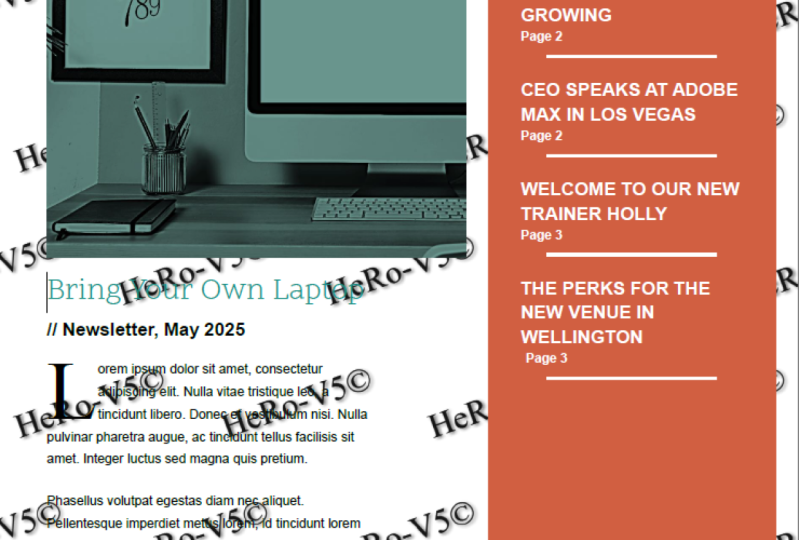
11. Crear un boletín mensual de la empresa: Hola ahí. En este tutorial, vamos a empezar a crear un Boletín Mensual de Empresa. Va a ser alrededor de tres o cuatro páginas y va a verse algo así. Va a ser, supongo, menos de un documento tradicional de Word con cosas por todo el lugar, más de una pieza de diseño. Entonces vamos a aprender todas estas fotos para hacer algo como esto. Vamos a hacerlo. Entonces primera parada, he abierto Word y vamos a ir a “Nuevo” y sólo vamos a empezar con un documento en blanco. Porque estoy trabajando en una versión europea de Word, está configurada en A4, voy a cambiar la mía a la letra estadounidense. Para ello, vamos a ir a “Layout”, luego vamos a ir a “Size”, voy a escoger carta de EU. Vamos a golpear “Guardar” haciendo clic en este pequeño ícono en la parte superior izquierda aquí. Se va a ir a “Guardar como”, voy a dar clic en “Examinar”, voy a poner el mío en Mis Documentos del lado aquí. Tengo esta carpeta ya llamada Word Class File. Abre eso y luego llámelo algo similar al proyecto que hemos hecho antes. Por el membrete, y vamos a hacer esto Traer una laptop a la empresa, y vamos a llamar a este boletín y vamos a llamar a éste Abril 2017, y V1 al final solo para que podamos mantener versiones si necesitamos hacer alguna cambios o cualquier gente vuelve con comentarios, podemos excusar V1, V2, V3. Vamos a darle a “Guardar”. Genial. Lo siguiente que tenemos que hacer es que vamos a trabajar nuestras columnas. Ahora, esta de aquí es mi versión terminada. Entonces quiero esto, es como un diseño de tres columnas donde hay dos directamente por aquí, y hay uno por un lado. Entonces hay dos formas de hacerlo, y la forma en que lo vamos a hacer. Bueno, te mostraré la forma en que podrías hacerlo. Depende de la forma en que vayas a diseñar. Entonces vamos a conseguir un layout. Ve a este, esta son columnas y esta es una y aquí puedes ver este pequeño ícono aquí. Va a hacer lo que queramos. Se puede ver en la parte superior aquí y las guías te dan una indicación de estos dos. Una buena manera de hacer esto bien y un pequeño atajo fresco es si haces igual y luego haces Lorem, se trata de esa manera y luego a corchetes y dentro de eso poner dentro algo así como 50, se va a poner en 50 párrafos, algo así como eso. Entonces justo después [inaudible], se
puede ver que sólo llena un montón de lo que se llama Lorem Ipsum, sólo texto falso. Solo te estoy mostrando esto, eso es genial. Poner en texto de marcapasos. Pero también es bueno solo mostrarte las columnas. Eso funcionaría para esto si no quisiera hacer esta caja roja de fondo. Va a ser más fácil por el momento solo tener una columna y un gran margen a
la derecha y luego simplemente poner esto como un cuadro de texto separado más adelante. Entonces eso es lo que he hecho en este diseño. Puedes decidir si no tienes este gran cuadro rojo y solo tienes texto corriendo por aquí, perfecto para
usar estas columnas a la derecha. Por supuesto que también hay una opción izquierda. Entonces voy a deshacer eso. Entonces voy a, ver las opciones de deshacer aquí arriba. Estoy usando el control Z en un PC. Apenas estoy volviendo así que tengo solo un ancho completo regular. Entonces hay un par de cosas que quiero hacer ahora son columnas y así voy a dejar las columnas tal como están. Lo que quiero hacer es jugar con los márgenes. Entonces veamos eso. Entonces yendo a márgenes, y voy a empezar primero con estrecho. Normal lo empuja bastante lejos de los bordes, pero quiero que el mío sea más una sensación de revista en una revista siento que está un poco cerca de los bordes para que puedas ver el texto empieza un poco cerca del borde. Eso es genial. Por lo que el margen establecido en Estrecho. Lo siguiente que me gustaría hacer es en realidad que me gustaría empujar este margen derecho aquí. Hay un par de cosas que puedes hacer. Bajo márgenes, haga clic en “Márgenes personalizados”. Voy a poner el mío de la derecha aquí a 3.3. El motivo de 3.3 solo lo divide en tres columnas pareadas y voy a jugar con él ante ti. Por lo que podría tener que ajustar la elección ya que está trabajando. Hagamos click en “Ok”. Ya puedes ver mis márgenes ahora van a estar aquí. Entonces, si hago mi fantasía Lorem y voy a teclear 30, puedes ver esto. Ya no son columnas, es solo una página pero tiene un bonito margen derecho grande y gordo para que pueda poner ese cuadro de texto ahí más adelante. Entonces voy a deshacer. Genial. Golpea “Guardar”. A continuación, vamos a traer algún texto. Este es uno puede ser bastante importante, porque hay un par de formas de traer texto para
asegurarse de mantener el formato, perder el formato. Sí, hay un par de opciones. Entonces tengo un texto para que traigas. Doy clic en “Archivo” en la parte superior izquierda, pincho en “Abrir”, y luego vaya a “Examinar”, encuentra los archivos que descargó. Los míos están en mi escritorio. Si no has descargado los Archivos de Ejercicio, habrá un enlace en la página aquí en algún lugar para ellos. Vamos a ir a “Archivos de ejercicios de Word”. Hay uno llamado 02 Newsletter y vamos a traer este boletín de texto página 1. Haga clic en “Abrir”. Entonces voy a agarrar todo esto, y voy a copiarlo. Entonces voy a subir aquí donde dice “Copiar” y ahora la voy a cerrar. Entonces vamos a traer ese texto de aquel que podrías estar copiando y pegando de un correo electrónico, de cualquier cosa, PDF, los principios son los mismos. Ahora, solo podría usar mi atajo Control+V para Pegar, y lo trae a través exactamente como estaba. Eso no es lo que quiero. Hay mucho formato pasando en esto y quiero deshacerme de él. Por lo que hay dos opciones extra. Entonces bajo “Pegar” aquí, este primero, puedes decir simplemente pasar el cursor arriba y te da una pequeña vista previa. ¿ Qué va a hacer? Realmente práctico. Gracias Palabra. Donde dice, “Keep Source Formating”, que es exactamente como lo hicimos. Pero entonces estos son otros dos. Este de aquí va a traer cosas como los encabezados y se puede ver la cursiva está ahí, los negritas están ahí. Por lo que son básicos llanos, lo cual podría ser realmente útil si tienes un documento realmente largo y
hay cursivas y negritas que necesitan permanecer, esta podría ser opción. Para mí sin embargo, quiero traer esta última opción que es como un super limpio claro de todo y solo texto viejo plano. Haga clic en la última opción. Encantador. Sí, así que así es como traer texto, conseguir un par de opciones diferentes. Ahora veamos traer algunas imágenes.
12. Añadir y recortar imágenes: Hola ahí. En este tutorial vamos a ver recortar una imagen en Microsoft Word. Vamos a hacer algo así. Estamos trayendo una imagen grande, luego recortarla para que se vea algo así. Vamos a hacerlo. Primer paso, vamos a poner un retorno justo por encima de nuestras garrapatas a la parte superior aquí toda mi imagen para sentarse justo encima de esto. Insertar una imagen es fácil. Acude al panel de inserción a lo largo de aquí hay uno llamado imágenes. Lo que tenemos que hacer es que necesitamos encontrar en nuestro escritorio, hay Word Exercise Files y O2 Newsletter es uno y la imagen de portada del boletín del acuerdo, traerlo. Cuando traigas una imagen, intentará expandirse para que se ajuste al espacio proporcionado. Ahora caso es el borde de esta columna aquí o el ancho de página. Puedes hacerlo más grande agarrando las esquinas y fácil-peasy, haciéndola más pequeña también. Voy a deshacer. Ahora, cuando estés redimensionando, asegúrate de usar cualquiera de las esquinas. Las esquinas están bien, no importa qué esquina uses Se expande muy bien. Si comienzas a usar estos bordes aquí, cualquiera de estos bordes, estos son malos. ¿ Por qué? Porque mira esto, si los arrastro adentro, imagen machacada, puedes arreglarlo tratando de hacer esto, pero veo tantas imágenes y logotipos o distorsionados y me vuelve loco. Entonces ahora deshacer eso. Tan solo asegúrate de usar estas esquinas aquí. Lo siguiente que vamos a hacer es que vamos a ver recortar esta imagen. El recorte es fácil y podrías estar en Insertar todavía. Tienes un arrastre a este que dice formato, por lo que con la imagen seleccionada, verás esta pequeña opción este es formato y es un montón de cosas aquí. El que yo quiero es muy abajo al final aquí. El tuyo podría verse ligeramente diferente. El tuyo podría estar agrupado en diferentes iconos, pero no te pierdas de vista al que se llama cosecha. Estas pequeñas cositas aparecen de un lado. Todo lo que tenemos que hacer ahora es antes de que dijera que sólo se puede usar el costado. Ahora puedes usar este lado, porque va a hacer lo que queramos. Se va a recortar eso ahí dentro. Entonces lo voy a recortar en esa que podrías estar solo recortando como pedacitos, así que depende de ti cómo quieres trabajarlo, pero también puedes mover el centro de la misma, decidir dónde, esto se va a recortar, así que estoy va a tener mi tipo de algo así cuando hayas terminado, haz clic en Regresar en tu teclado, y lo confirma. Entonces voy a hacer clic en él ahora y arrastrarlo. Por lo que es como el ancho completo de esta columna. Yo sólo voy a alinearlo con esto para que sea bonito gran gráfico en la parte superior. Estos regresan aquí arriba, quiero eliminar,
solo para que se vea todo bien en las esquinas aquí y eso ha tenido un recorte una imagen.
13. Añadir los colores predeterminados: En este video vamos a ver cómo crear un color personalizado, un color corporativo, y luego vamos a editar como los valores predeterminados de palabras cada documento lo tiene en él. Vamos a hacerlo. Lo primero que debes hacer es ir a la pestaña de diseño. A lo largo del borde derecho aquí, hay uno llamado colores, pop eso hacia abajo y aquí está tu línea de color, conseguirás algunos colores predeterminados aquí. Vamos a ajustar esto. Bajar a personalizar el color, se
puede ver crear un nuevo color del tema, y se va a crear un nuevo color del tema. Crea el primero y luego lo pasaremos y lo estableceremos como predeterminado. Vamos a dejar el texto por defecto como negro, pero vamos a usar estos acentos para nuestros colores. Donde dice acento 1, baje eso y ve a más colores. Aquí es donde se llega a poner en sus colores corporativos. Si no tienes idea de cuál es tu color corporativo, vas a tener que averiguar cuál es el valor RGB. A menudo si tienes un manual corporativo o un documento de especificaciones corporativas, tendrá tus colores ahí dentro así que averigüe cuáles son esos RGB. Rojo, verde, azul y los escribes aquí. Algunos mirando el trae tu propia laptop como documento de
especificaciones aquí y dice que tenemos un verde y los valores rojo, verde, azul son: 24, 142 y 128. Ya puedes ver que me da este color verde, da click bien. Siguiente trazaré el siguiente color de acento, más colores, y voy a poner en nuestra tarifa. El rojo es 209, 95 y luego 65, clica bien. Puedo seguir adelante si necesitaba más, pero sólo voy a usar estos acentos 1 y 2. Esto está aquí para este documento. Ahí funciona bien para que pueda seleccionar esto, bajar esto ahora, y se puede ver que están mis dos colores, y algunos otros aleatorios. Estos son mis dos primeros colores y decenas de ese color, que pueden ser bastante útiles. Lo que quieres hacer ahora es establecerlo como predeterminado para todos los documentos nuevos. Porque si creo un nuevo documento ahora y pongo
algo de texto y lo resalto se puede enviar de vuelta a los colores originales ahí. Lo que quiero hacer es, una vez que lo hayas hecho, aquí
hay una opción que dice set como default, así que hagamos clic en set como default y digamos que sí. Ahora antes de hacer tu nuevo documento, subo hasta aquí, ahí está mi precioso verde y mi rojo. Es así como agregar tus colores corporativos a word y luego configurarlo como tu predeterminado.
14. Fijar y colorear imágenes: Hola ahí. En este video, vamos a mirar a corregir tus imágenes, y hacer que se vea más bonito, arreglando el brillo y el contraste, y también vamos a hacer algo como esto donde podamos hacerlo en blanco y negro, añadir nuestro color corporativo a ella y se desvanece, por lo que es una bonita cosa de imagen de bloque grande. Vayamos a hacer eso. En primer lugar, vamos a ver tal vez arreglar la imagen. Esta es bastante buena porque es una imagen de biblioteca de valores. Si el tuyo es tal vez lo has disparado tú mismo en tu teléfono o en una cámara y simplemente no es del todo perfecto. Con la imagen seleccionada, vamos a ir a ésta,
este es Formato, y vamos a ir a ésta que dice Correcciones. El genial de esto es, dependiendo de lo rápido o lento que sea tu computadora, si pasas por encima de ella puedes ver mi imagen real por aquí. Basta con ver esto si me cierro por encima de él. Simplemente puedes trabajar lentamente a tu paso. El mío es un ordenador bastante rápido y sigue siendo bastante lento. Simplemente decides si quieres este más brillante o más oscuro. Este es mi espectro que juega entre contraste y brillo. Ahora, afilar y suavizar. Se puede suavizar en el medio es como no hacerle nada. Si vas por aquí, se pone un poco borrosa. Podría ser porque una imagen de fondo. Agradable y borrosa, y puedes afilar también. Creo que es un poco auto afilado este de aquí. Estas son las correcciones básicas. Lo que quiero hacer es que realmente quiero jugar con el color. Bajo color, me gustaría la saturación aquí. Se puede reventar. Puedes bajar la saturación, simplemente haciéndola más brillante y puedes bajarla hasta cero por ciento. Eso es lo que quiero hacer en cuanto a este blanco y negro. Otros tonos de color, puedes meterte si lo haces. Esto está curvo ahí dentro. Esto solo depende de, si disparas esto dentro en una oficina, a menudo
va a ser bastante azul, así que querrás reventar el extremo de la curva a algo alto que se parece más a la luz del día, y si se dispara afuera y tal vez demasiado brillante, quieres bajarlo un poco, puedes moverlo hacia abajo. El mío es perfecto así que lo voy a dejar como está. también me gustan estas opciones de recolor, y eso es lo que quiero hacer. Yo quiero hacer algo así. Puedes ver que es como un azulado oscuro, pero quiero usar mis colores corporativos reales. Si quieres tener un color específico, obviamente puedes simplemente alearlo y escoger un color aquí. Pero lo que quiero hacer es ir al que dice más variaciones, y se puede ver ahí está mi color. Esto lo editamos en nuestro tutorial anterior cuando lo configuramos como predeterminado. Si no has hecho ese tutorial, consigue un más colores y puedes agregar tu propio color corporativo ahí. Genial. A mí me gusta esto. Pero lo que también me gustaría hacer es oscurecer porque es un poco brillante. Voy a volver a Correcciones, y aquí hay una opción. Brillo y contraste, eso es lo que busco. Sólo puntos de estilo, supongo. Haga clic en ese. Es el color corporativo correcto donde está por lo menos en la zona correcta, y ahora es bonito y oscuro. Eso son correcciones básicas y agregar un color a la parte superior de tu imagen.
15. Instalar nuevas fuentes: Hola, en este video vamos a ver la descarga e instalación de una nueva fuente para usar. Sólo va a ser este tipo. En la parte superior aquí usamos para una marca bateando. Vamos a ver dónde podemos descargarlos y cómo instalarlos. En primer lugar, ¿dónde podemos conseguir fuentes? Ahora puedes pagar por las fuentes. El mejor lugar si quieres comprar una fuente, es algún lugar llamado MyFonts. Ahora si tienes una fuente que necesitas, tu cliente la usa o me refiero a que necesitas comprar otras licencias donde vayas por fuentes pagadas. Se llama myfonts.com. Hay muchos lugares a los que puedes comprar fuentes. Este es probablemente el mejor y el más común al menos. Lo que realmente me gusta de este sitio es que si buscas una nueva fuente, y tienen realmente buena, a veces miras una fuente te gusta, “¿Eso es bueno?” Pero no es hasta que guardes esta fuente aquí, no estoy muy seguro al respecto. No es hasta que realmente lo veas acostado antes de que estés como, “En realidad, esa es una fuente realmente genial”. De acuerdo, entonces me encanta ese sitio por este tipo de cosas que podrías ver como si estuviera la fuente, ahí usa parte de otras fuentes como parte de las imágenes. Es realmente bastante guay. MyFonts es donde vas a comprarlas. Digamos que no tienes presupuesto y como todo el mundo lo hace y tienes que conseguir algunas fuentes gratis. Entonces hay un par de lugares, 1001 freefonts es uno de ellos. fuente Dove es otra. Esos son probablemente los más comunes, los que menos me gustan, principalmente porque ahí hay mucha basura. Solo hay un montón de cosas. Nunca vas a usar estas fuentes con forma de cactos. Ahí hay todo cosas al azar. A mí me gusta saltar a uno de estos dos. Font Ardilla es realmente bonita, está muy bien comisariada, no hay chatarra ahí. También tienen lindas explicaciones mostrándote versiones de la misma antes de descargarla. Probablemente el gimnasio más oculto de comprar fuentes, o obtener fuentes gratis es Google. Entonces font.google.com es un sitio realmente bueno para conseguir fuentes. Entonces te mostraré cómo usaremos este y la técnica es la misma para muchos de ellos. Lo que puedes hacer es, digamos que estás buscando una fuente y es para la traiga tu propia laptop, puedes entrar aquí y es solo empezar a escribir. ¿ Qué es esto? Puedo decir, en realidad quiero saber cómo se ve éste en realidad. Puedes verlo antes de que realmente lo descargues. A veces ves una fuente que se ve genial y te explicará, pero cuando escribes tus datos, vale, podría parecer suficiente. No me gusta esa fuente. Lo que vamos a hacer es que vamos a pasar y recoger una fuente. Ya he echado un vistazo a través. Aquí arriba a la derecha en búsqueda, voy a usar alcance. A mí me gusta este de aquí, alcance uno. Voy a dar click en él. Se pueden ver cosas diferentes, pero eventualmente lo que se quiere hacer es ir a esta que dice seleccionar fuente. sea puedes hacerlo aquí o puedes volver atrás y puedes hacer clic en este pequeño botón más en la esquina
y se lo agrega a este pequeño grupo aquí abajo. Empezando en este pequeño grupo y está destinado a ser utilizado para cosas web, pero lo genial de las fuentes de Google, que puedes descargarlas a tu sistema y usarlas para todo tipo de cosas. Quieres dar click a esta flecha de aquí, lo tengo. Se va a descargar una carpeta. Voy a poner esto en tus archivos de ejercicios o ponerlo en el boletín O2 y te lo voy a meter aquí para ti, para que no tengas que descargarlo si quieres usarlo. Está bien. A veces si estás trabajando en una empresa, a veces no les gusta que descargues cosas. Está bien. Lo que pasa es que baja en este pequeño archivo zip. Voy a hacer doble clic en él para abrirlo. Ahí está, Scopeone-Regular si puede hacer doble clic en ellos. Está bien. Vamos a dar click Instalar. Voy a editar, cool. Eso está instalado. Ahora si has descargado de fuente ardilla o 1001freefonts son iguales. Obtendrás un archivo zip, lo abres, harás doble clic en ellos para instalarlos. Esta fuente sólo tiene un color blanco. Entonces este de aquí regular, pero podrías tener una cursiva más audaz, tal vez
tengas que instalar unas cuantas diferentes, en lugar de solo la que hicimos. Cierro esto y ojalá ahora si vuelvo a saltar a mi documento de Word, puedo subir hasta aquí a mi bateo aquí y puedo decidir que ahora vas a estar en casa. Salta esto hacia abajo, lo que podría tener que hacer es simplemente escribirlo aquí y solo alcance. Ahí está, simpático. Voy a aumentar el tamaño del archivo para mi hitting. ¿ Qué tan grande? Algo así. Es así como descargar e instalar nueva fuente, desde cualquiera de las opciones en línea y sí, luego usar en tu documento de Word. Antes de irnos, sólo voy a ordenar las fuentes. Quiero usar esto, me gustaría usar mi color que instalamos antes, mi verde. ¿ Dónde está? Haga clic en ellos. Hago esto un poco más grande porque vas a cortar por hacer fuentes más grandes. Obviamente, puedes usar esto y es bastante genial. Si no ha seleccionado, puede usar el cambio de control para mantener presionados ambos en el teclado y presionar la tecla de parada completa, y una tecla de coma lo hace más pequeño. Tan a menudo esa es una manera bastante rápida, fácil de ir y hacerlo. En cuanto a mi fuente de copia del cuerpo la voy a dejar como Calibri. En realidad lo que quiero hacer es, voy a cambiarlo a Arial sólo porque mucha gente tiene sus fuentes corporativas como arial. No me gusta. Es sólo un poco llano. Esas van a ser mis fuentes que voy a usar aquí y
podría usar la versión negrita en la parte superior. Si mi newsletter y para mi copia de cuerpo real aquí, lo que voy a hacer son tamaños de fuente. Si estás mirando una revista, cualquier revista, más o
menos el 99 por ciento de ellas están fijados en 10 puntos. Esa es la mayoría del mundo lo puede leer. Es el tamaño de copia de un cuerpo realmente común donde las visiones anteriores se establecían por defecto en 12, las versiones más nuevas lo establecen en 11. Creo que eso sigue siendo demasiado grande. Realmente depende de tu cliente. Si estás tratando con los ancianos o con los discapacitados
visuales y vas a tener un tamaño de fuente, tal vez 12 como un mejor tamaño para ti, pero 10 es funciona para mí. Imprimió cheque y se veía un poco pequeño en pantalla aquí, pero imprimió y comprobarlo, solo para hacerse una idea porque podría estar buscando. El otro es que esto toma dos, puede ver que sólo está mezclado latín. No está roto, es solo colocar garrapatas de titular porque estamos diseñando más de una plantilla aquí, sin contenido real. Desafortunadamente, el corrector ortográfico dinámico se está volviendo loco con líneas rojas en todas partes. Lo que vamos a hacer es simplemente desactivar eso porque me parece feo. Para eliminarlo, salta al archivo. Después baje a opciones. Entonces bajo prueba, solo hay uno aquí que dice, revisa la ortografía mientras escribes y simplemente se deshace de las líneas onduladas correctas. Podemos hacer una revisión ortográfica al final nos meten [inaudible]. Una vez tenemos una copia ahí dentro pero ahora se ve bonita. Eso es todo para este tutorial. Siguiente video vamos a ver sentar estas cosas como el predeterminado. Eso sería impresionante. Vamos a hacer eso ahora.
16. Cómo configurar tus fuentes predeterminadas: Hola allá, maravillosos aprendices de Word. En este tutorial vamos a ver cómo establecer una fuente predeterminada para tu copia corporal cada vez que abras un nuevo documento. Por defecto, es Callibri y las tallas son ya sea 11 o 12 dependiendo de la versión que tengas. Vamos a ir a restablecer eso ahora. Vamos a seleccionar algún texto, en el tutorial anterior, lo
ponemos a Arial como nuestra fuente corporativa, y lo configuramos en tamaños 10 puntos, pero queremos que eso sea cierto de cada nuevo documento porque ahora abres un documento, es establecido a Callibri en 11 así que voy a cerrar. Para hacerlo, ve en tu pestaña de inicio y por aquí donde se agrupan todas estas fuentes. Se puede ver esta es opción de fuente aquí y en la parte inferior derecha está este pequeño menú de archivos. Doy click en eso y me da algunas opciones para que lo pueda pasar por aquí y es recogiendo lo que yo había seleccionado, pero se podría ir y ajustar manualmente eso aquí dentro. Una vez que lo hayas escogido, es exactamente lo que yo quería ser. Puedes verlo dice Guardar como Predeterminado. Haga clic en “Guardar como predeterminado”. Este documento sólo se guardará como el predeterminado obviamente justo aquí. Queremos los viejos documentos jamás hechos. Si voy y me cambio ahora y hago clic en “Ok”, se va a ir. No quiero cambiarlo. ¿ Por qué? Porque como entrenador, necesito que todo sea predeterminado, pero si haces clic en “Ok”, confía en mí. Cambiará el valor predeterminado cuando hagas un nuevo documento y
empieces a pegar y texto será Arial en 10 punto. Es así como cambiar el tamaño de fuente y el estilo de fuente predeterminados en Microsoft Word.
17. Altura de la línea, espacio entre líneas y espacio posterior: En este tutorial, vamos a ver cómo ajustar tu altura de línea, y algo llamado el “espacio después”. Lo vamos a transformar a partir de esto, desde el último tutorial, donde hay un gran hueco gigante debajo de ahí y el tipo está un poco demasiado cerca juntos, también, ¿listo? Donde eso se mete por debajo, hay un poco más de espaciado entre los párrafos. Altura de línea, “espacio después”, vamos a aprender eso. Genial. Echemos un vistazo a la altura de línea frente al “espacio después”. altura de línea es el espacio entre líneas, y el “espacio después” es el espacio entre párrafos. Si quieres abrir esto, lo
cual hago, esta copia corporal aquí solo necesita, quiero que se abra el espacio entre las líneas, vaya a “Inicio” y por aquí, hay una opción, se parece a ese pequeño ícono, bajarlo, puedes flotar arriba. Uno, tal vez quieras apretarlo, puedes seguir haciéndose cada vez más grande y más grande progresivamente. Yo quiero que el mío sea alrededor de 1.5, se ve bien. ¿ A lo mejor 1.2? No, 1.5 para la altura de línea, pero no ha ajustado el espacio entre párrafos. Siento que tiene que haber más espacio aquí ahora, así que eso se llama el “espacio después”. Voy a volver a seleccionar todo esto, y vuelvo a subir a esa misma opción, y hay dos cosas que puedo hacer. Digamos que no te gusta este espacio. Estás usando retornos dobles entre párrafos, pero tienes esta chatarra extra aquí, así que lo que tal vez quieras hacer es, quizá
quieras quitarla, y eso es bastante fácil. Esa misma pequeña opción, ahí está él,
hay una que dice “Quitar espacio después”, se puede ver si me cierro encima de ella, se lo quita. Está despejado por ahí abajo. Lo que quiero hacer es ir a “Opciones de espaciado de líneas”, y quiero jugar. Ver el valor predeterminado se establece en ocho puntos, es
decir, la brecha entre estos dos. Yo quiero hacer mi más grande. Yo quiero hacer el mío, digamos 15, haga clic en “Ok”, y tengo un espacio más grande entre ellos. Es así como ajustar el “espacio después”. Vamos a aprender a agregar algo a nuestro menú usted a lo largo de la parte superior aquí. Lo que me gusta hacer es, siempre estoy jugando con el espaciado. Se puede ver por defecto, este rubro aquí tiene una gran brecha por debajo. Podría estar en uno de estos otros, pero uso tanto “espacio después” que quiero agregarlo al valor predeterminado. Yo puedo hacer eso agarrando a este tipo aquí, puedo “Clic derecho” él,
y decir, “Agregar a Barra de herramientas de acceso rápido”. ¿Dónde aparece? Aparece aquí arriba, así que significa que puedo estar en cualquiera de estos y aún así llegar a mi último “espacio después”. Es una de las cosas que hago. A lo mejor soy un nerd de fuentes. Si eres nerd de la fuente también, puedes sumar cualquier cosa ahí arriba. Digamos que estás jugando con cualquiera de estos tallas, puedes “Clic derecho” y decir “Agregar a la barra de acceso”, y puede estar ahí arriba todo el tiempo. Voy a entrar aquí, y por defecto es de ocho puntos, quiero bajar el mío a cero en realidad después de esto, y puedes empezar a jugar con todos estos ajustes diferentes. Lo que quiero hacer por este tipo es, quiero hacer lo mismo, “Espaciado de líneas”, pero quiero aumentarlo. Esto solo soy yo jugando por ahí ahora, haciendo que las cosas se vean bien.
18. Añadir Mayúsculas: Está bien. En este tutorial, vamos a poner una letra gigante al principio de un párrafo, el cuarto Drop Cap y vamos a ir a hacerlo, y en realidad vamos a escoger un estilo de fuente diferente para que se vea elegante. Muy bien, vamos a hacerlo ahora. Agrega un Drop Cap, está bien, voy a tener mi cursor parpadeando en
cualquier parte de este primer párrafo porque ahí es donde quiero que esté. Puedes tenerlo al principio si realmente quieres, pero en cualquier lugar está bien. Nos vamos a Insertar y todo el camino por aquí es Drop Cap. Así que recuerda si estás usando una versión diferente de Word o en realidad tus tamaños de pantalla son diferentes, podría ser un spot ligeramente diferente. Recuerda que si me encojo
esto, se va a poner un poco atascado aquí y ese es el que estoy buscando. De acuerdo, así que voy a la gran visión y Drop Cap y vamos a, si se cierran arriba, se puede ver, L gigante, ¿de acuerdo?. Margin hace algo tipo de diferente, tipo
lo mete en el lado izquierdo ahí, que no es lo que quiero en este caso, voy a ir a caer. No puedes obtener opciones de Drop Cap y decidir cuántas quieres que caiga. Entonces voy a ir a caer y voy a decidir cuántas líneas. De acuerdo, voy a ir tres, pero voy a escoger una fuente diferente así que quiero escoger, ¿qué voy a escoger? No tengo ni idea. Voy a escoger, “Times New Roman”, así que es un gran tipo de fuente serif, se ve genial, a menudo compensado contra la fuente send serif, que es estos body copy aquí. Fuentes Serif solo para que lo sepas, estos pedacitos para colgar de la parte superior. Estos pequeños pies y cosas que se asoman eso llamaban serifs y manda. Serif envía es latín para, sin. Entonces sin pies pequeños son solo unos pequeños cuadrados que no tienen todos esos pedacitos extra. De todos modos, así es como agregar un Drop Cap en Microsoft Word.
19. Columna o cuadro de texto de color: Hola gente encantadora. En este tutorial, vamos a ver hacer esta cosa de columna de caja roja que se sienta por aquí, bien, con texto de presupuesto, relleno rojo. Vamos a hacer esto. Se llama cuadro de texto. Está bien, entonces lo primero que
tenemos que hacer es tener conciencia de dónde tenemos nuestro cursor parpadeando porque ahí es donde se va a anclar para que realmente no importa. Voy a poner el mío en el inicio de mi título, y veremos con un poco más de detalle después. Entonces el cursor está ahí. Voy a ir a la tecla Insertar. Podrías estar en casa, ve a insertar, y luego vamos a encontrar uno llamado cuadro de texto. Está ahí. De acuerdo, un par de opciones sólo vamos a poner en este sencillo cuadro de texto y va en línea lo cual es un poco raro lo, tipo entra y sólo un poco atascado ahí. Entonces lo siguiente que tenemos que hacer bajo a mucho. Está ahí. ¿ De acuerdo? Lo que vamos a hacer es con ellos seleccionados, hay esta opción de mosca aquí, vale. Se llama opciones de diseño. Entonces tienes que cortar el filo, click en esto, y luego vamos a usar este. Este es el que dice, texto detrás. Simplemente significa que está desligado del flujo del texto y puedo moverlos. Ahora puedo agarrar este borde, subir hasta aquí y alinearlos con esto y arrastrarlos hacia abajo, para
que quede ahí. A lo mejor los voy a mover sólo un poquito ahí. Encantador, puedes usar tus teclas de flecha. Puedes ver en mi teclado bien no puedes ver, vale, pero estoy tentado a tocar mi teclado y quiero hacer un par de cosas ahora quieres quitar el borde y darle un gran color de fondo y jugar con este relleno. Entonces hagámoslo ahora. Entonces lo primero que tenemos que hacer es con este seleccionado,
vale, agarra el borde de la misma. Podrías estar todavía en casa porque hay esta opción que dice formato esa cosa solo aparece cuando tienes el cuadro de texto,
seleccionado, que es ser es así que agarra el borde. Es contextual. De acuerdo, significa que es opcional mark up seleccionado. Para que puedas ver un montón de cosas diferentes. Hay algunos presets. Está bien. Sí. Presets de colores. Ellos algunos textiles. Terrible, estoy deshaciendo. Entonces lo que quiero hacer sin embargo es relleno de forma. Yo quiero escoger mi color corporativo. Si no lo has hecho, puedes escoger cualquier color aquí. Puedes agregar más colores y elegirlos desde aquí o escribirlos si conoces el valor RGB. Tengo unos que por defecto a ese rojo, y donde dice contorno. De acuerdo, voy a ir a no contornos, no
hay línea alrededor del exterior. Lo siguiente que quiero hacer es empujar el relleno lejos, su pedacito demasiado cerca del borde aquí. Entonces con eso seleccionado, de acuerdo, he agarrado el exterior de la misma y subo hasta aquí donde dice, estilos de forma. Hay todo tipo de estilos de formas. Pero ¿puedes ver este pequeño piso me [inaudible]? Estas son realmente importantes, vale, no
se ven muy emocionantes, pero estas cositas te muestran algo de información, si sacas eso, te da mucho más, vale. En nuestro caso, queremos jugar con este último aquí dice, maquetación y propiedades. Vamos al cuadro de texto, y ahí están nuestros márgenes y solo puedes seguir ajustando estos dependiendo de lo que quieras hacer. Ahora ya he pre-escrito mis outs, y así sé lo que quiero hacer. El problema es haberlos anotado en puntos porque yo estaba diseñando este material en una computadora diferente. Ahora, digamos que los tienes. Su momento mi computadora fijó las pulgadas. Genial. Si tienes milímetros sin embargo, o en mi caso, he usado puntos a los estilos. Puedes entrar aquí en seleccionarlos y solo teclear puntos y los convertirá para ti. Es una característica extra genial. Por lo que quería 24. Se puede ver pulgadas esto va a ser demasiado grande. Pero si pongo pt después, se
puede ver que lo ha convertido. Si apunto hacia abajo al siguiente,
es de 0.33 pulgadas bonito. Está bien. Entonces puedes teclear cualquier cosa si quería cinco milímetros, lo convertirá para mí también. Entonces la izquierda y la derecha van a ser lo mismo. Entonces sé que es 0.33. El tipo superior de recordar, lo que era mi, tenía 40 para el pt superior y el inferior va a hacer 40 así 40 pt, gran pequeña conversión. Ahora, cualquier cuadro de texto que veas en cualquier parte de Word, vale, por aquí puedes escribir estos y lo
convertirá para ti sin tener que hacer nada. Entonces así es como ajustar el relleno. De acuerdo, ya hemos hecho el color, vamos a hacer las fuentes que van dentro de esta cosa ahora. Entonces lo que voy a usar es que voy a agarrar este pedacito aquí. Estos son los pedacitos de garrapatas que voy a usar. Yo los voy a cortar. Por lo que corta, esta es opción aquí arriba, lo siento, no se corta, solo hace clic en este botón o Control X. Selecciona este texto elimínalo, pega esto aquí. Entonces ahora voy a hacer algo de formateo básico solo tienes que seleccionar todo el texto. Te voy a recoger. Aquí vamos. Van a ser diez puntos ahora va a ser más grande va a ser 14. Entonces baje. Está bien, y va a ser audaz y va a ser blanco. Lo que quiero hacer es [inaudible] Voy a agarrar la página 2 y decir en realidad, mi blanco va de todos modos. Voy a poner en diez, me gustaría que todos ustedes fueran blancos, ¿verdad? Lo que me gustaría hacer también es quitar el espaciado entre los dos. De acuerdo, se llama espacio después. Entonces con esto seleccionado aquí, puedo ir a mi pequeño desplegable bien, e ir a quitar espacio después. Por lo que salta a su lado. Lo que me gustaría hacer es quizá una línea debajo, pero de una regla horizontal. Entonces voy a poner diez porque hay una brecha entre los dos. Yo quiero poner una regla horizontal para poner nuestra regla horizontal. Ok que va al filo está bajo esta pizarra es [inaudible] a casa. Ahí está este pequeño ícono y hay un montón de cosas diferentes. El que quieres es la línea horizontal. Por defecto, no sé por qué nos
gustaría ponerlo como un poco de sombra de gota debajo de ella. Toma el color de la fuente, por lo que es blanco. Pero si hago doble clic en él, vale, puedo meterlo en algunos ajustes para y definitivamente no quiero que tenga el fondo sombrío, otra vez. Yo quiero usar un color sólido el cual es genial. puede jugar con lo alto que es, lo gruesa que es la línea y sí, y un montón de cosas diferentes. Entonces voy a dar click bien. Eso es lo que quiero genial. Ahora en cuanto al color, voy a hacer doble clic en él otra vez y ahí está el color aquí, blanco.Bonito. Dije que se necesita el color de la fuente. Mentí. Entonces y ese es ese tipo al que voy a meter, así que tengo la línea. De qué podría hacer por éste así como su espacio después entre la línea y fuera de la página 2 con eso seleccionado voy a esto, voy a decir quitar espacio después. Agradable. Enfriar. Por lo que el siguiente bit va a estar saltando repitiendo. Por lo que podría ser un poco aburrido si quieres saltar hasta el final y saltar al siguiente tutorial entrando en eso, si quieres seguirme, voy a poner unos dibujos animados y después de estas páginas, y voy a agarrar esta horizontal fila, Seleccionarlo, Copiarlo, Pegarlo debajo de estos. Debajo de ti, debajo de ti. Genial. Quiero igualar el tamaño y el espacio antes de estas cosas. Entonces un par de cosas que tenemos que hacer. Pues nos fijamos en el formato pintor. Lo vamos a ver con un poco más de detalle más adelante. Pero básicamente lo es. Selecciona el texto que quieras, pulsa Formato Pintor pintado en las cosas para cambiarlas. Actualmente, seleccionado. Aquí vamos. Está bien. Lo mismo con esto, es alguien
que me gustó con un espacio tras colon. ¿ Lo recoge el pintor de formato? Sí lo hace. Genial, podríamos configurar estilos, y vamos a ver un poco los estilos. Por lo que probablemente de manera diferente. Definitivamente quieres hacer eso. Especialmente si esto no es largo, no pasan demasiadas cosas. Entonces qué estilo nosotros para ello probablemente igual de tiempo para hacer lo que acabamos de hacer. Una de las cosas que vamos a hacer es que hay un buen hueco grande en la parte superior, pero este tipo de aquí está en la parte superior es bastante género. Por lo que quiero un espacio cualquiera y puedes totalmente solo para regresar. Sí, nadie te va a encontrar. Te encontraré, ya sabes, no lo estás haciendo correctamente, pero las formas adecuadas es que hemos hecho espacio después, podemos hacer espacio antes también. Entonces con tu cursor en cualquier parte de este bateando aquí, puedo decir éste de aquí. Consiguió un interlineado es uno llamado espacio antes. Entonces, ¿cuánto quiero? A lo mejor 20 puntos, creo. Sí, sólo me da mi espacio ahí. Entonces lo que puedo hacer ahora es usar mi anterior pintura debería hacer esto totalmente antes poner el espacio antes de hacer el primer bit de contenido para mi pintor. Ahora atajo más fresco es que podemos hacer es podemos hacer Control Shift C. Así Control Shift C, copiaré el formato y luego puedo seleccionar esto y ir Control Shift V. Vale, resaltar vista ir a V, Control Shift V. Muy bien, por lo que ese es el formato de este cuadro rojo en el lateral aquí es un cuadro de texto se puede mover. Tenemos algo de rumbo en marcha. Hemos mirado el formato pintando un poco de espacio antes y fila horizontal. Muy bien, pasemos a nuestro próximo video.
20. Crear una disposición/composición/diseño de 2 columnas en la segunda página en Word: Hola ahí. En este video, vamos a ver cómo dividir nuestro documento en dos columnas. Eso es bastante fácil, pero no queremos hacerlo sólo en la primera página y en todas las páginas, queremos empezar más adelante. Nosotros queremos hacer esto donde tengo mi primera página y es muy diferente a mi segunda, que ahora son dos columnas. Yo quiero hacer eso. Vamos a crear dos columnas, pero en la segunda página primero. Lo primero que vamos a hacer es que vamos a añadir un poco más de copia. Sólo tenemos texto, sólo tenemos una página. Vamos a añadir el texto para el resto de las páginas. Al final aquí, voy a poner a cambio, voy a ir a Archivo, Abrir y en nuestros archivos de Ejercicio. Archivos de ejercicio navega en nuestro escritorio denominado Archivos de ejercicio de Word. Si no los tienes, echa un vistazo al enlace de la pantalla aquí en algún lugar, habrá un enlace para descargar estos Archivos de Ejercicio. Después ve a Newsletter y hay Newsletter Texto, página 2 y 3. Abre eso. Selecciónelo todo. Para seleccionarlo todo es “Ctrl A”. Yo hago eso por atajo o simplemente puedes arrastrarlo por
todo y empezar a deslizarte hacia abajo, agarrar en absoluto. Se va a copiar y vamos a cerrar esto. Lo que voy a hacer es volver a casa, hay un par de opciones para pegar. Voy a usar este último aquí es Mantener solo texto. Simplemente texto sin formato viejo. Ahora, eso es genial. Estas cosas son lo que quiero arreglar. Yo quiero arreglar el margen y quiero poner esto en dos columnas. Hagamos las dos columnas primero porque eso es lo que viniste a buscar. Lo que quiero hacer en primer lugar es que quiero empujar esto, por lo que empieza en la siguiente página. Lo que vamos a hacer es justo al frente, justo al inicio de este primer rubro, puedo ir a Insertar y hay uno aquí que se llama Page Break. Simplemente significa que esto va a romper la página y empezar aquí porque esa es mi primera página y ahora, este es el comienzo de mi segunda página. Lo siguiente que me gustaría hacer es dividirlo en dos columnas. Con el cursor en la página que quieres ajustar y no quiero dos columnas en esta primera página. Este va a ser el truco de este video. Si quieres que esté en todas las páginas, solo tienes tu cursor en esta primera página también. Lo voy a tener aquí en mi segunda página, voy a ir a Insertar pestaña y debo ir a la pestaña Diseño y luego voy a ir a Columnas, y voy a dar sólo click en dos. Dos me darán lo que quiero. Pero se va a hacer cada página, así que deshacer eso usando una opción poco deshacer y vaya a Más Columnas, escoja dos y donde diga Todo documento, diga Este punto adelante. Esto significa que dondequiera que esté su cursor y más allá. Ahora, voy a tener esta columna normal, luego ésta de aquí que es de dos columnas. lo único que tal vez no hayas hecho esto con el margen gigante la derecha como tengo aquí y para permitir que este cuadro de texto quepa, así que voy a tener que arreglar eso entrando en Layout, ve a Márgenes y solo voy a escoger Narrow. Se va a salir bien. Bien. Son todas dos columnas, me arreglaron los márgenes. Es así como dividirlo. Ahora, digamos que querías volver a una columna aquí, porque estamos aquí y volvemos a Columnas,
Más Columnas, puedes aplicar, digamos tres de Este punto en adelante, así dos, tres. Yo solo quiero dos, así que voy a ir a deshacer y así es como dividirme en dos columnas, pero no hacerlo en la primera página, podrías
saltarte la página de contenidos, la portada interior, y empezar en la quinta página, tal vez. Pero las técnicas son simples. Está bien. Te veré en el siguiente video.
21. Cómo modificar el estilo de la rúbrica 1 de Word 2016: De acuerdo, en este video tutorial, vamos a ver cómo crear un estilo de encabezado uno y se puede ver aquí arriba, he hecho que sea mi predeterminado, así que llego a deslizar las cosas y aplicarlo fácilmente. Vámonos y hagamos eso ahora. De acuerdo, entonces primero vamos a darle estilo a nuestro rumbo. Todos nuestros encabezamientos van a ser estas cosas ya en mayúsculas para que sea fácil de encontrar. Para los seleccionados puedes usar debajo de casa o puedes ver si resalta cosas obtienes esta opción de menú. De acuerdo, voy a usar nuestro nuevo llamado Alcance uno. Voy a hacer el tamaño hasta 14 y en realidad tal vez incluso un poco más grande, 16. Yo quiero jugar con unas cuantas cosas, quiero que sea nuestro color, podemos forzar negrita encima de él, pero voy a escoger un color. Déjame usar el verde que hemos estado usando y lo voy a hacer aún más grande,
porque no puedo evitarlo . Voy a jugar con el espacio entre líneas, así que voy a ponerlo a cero y eso va a funcionar para mí. Por lo que hemos establecido la fuente, el tamaño, queremos que este sea nuestro encabezado, nuestro encabezado predeterminado aquí arriba se ve así. Entonces voy a deshacer, lo que me gustaría hacer es actualizar el encabezado uno y lo que hay que hacer es con él seleccionado, hacer
clic derecho, encabezando uno y decir actualizar encabezamiento uno para que coincida con la selección. Ahora, ese es el estilo para encabezar uno. Ahora, puedo destacar a este tipo e ir a encabezar uno. Destacar a este tipo encabezando uno. Impresionante, así que esa es la forma de restablecer tu encabezado un estilo. Puedes hacer eso para cualquiera de estos estilos aquí,
solo resáltalo y haz clic con el botón derecho en ellos. Ahora, para acelerar esto, en caso de que tengas un documento largo como el mío, en lugar de tener ese tipo de click todo eso y luego encuéntralo aquí arriba. Se puede golpear “Control+Alt"Y luego uno, es para el rumbo uno, dos es para el rumbo dos. Apenas estoy pasando por seleccionarlo, encontrando mis encabezados y un poco más. Ok por “Control+Alt” uno vamos a conseguir ese rumbo uno, poner ahí bonito y automático como. Entonces lo siguiente que vamos a hacer es que vamos a crear uno nuevo y lo haremos en el siguiente video tutorial. Entonces vamos a hacer eso ahora.
22. Cómo hacer nuestro propio estilo personalizado en Word 2016: Hola ahí. En este video vamos a ver cómo crear tu propio estilo personalizado, no uno de los que ya aparecen en la parte superior. Vamos a hacer las nuestras. ¿Ves ahí dentro? Se llama primer párrafo. Vamos a ser otras cosas lisas y aplicarlas muy rápido. Vamos a hacerlo. Lo primero que tenemos que hacer es que voy a crear un estilo de primer párrafo por lo que quiero hacer es cada vez que después del encabezado hay un estilo de párrafo. Quiero que sea audaz y quiero usar un color rojo. Eso es lo que quiero pasar. Yo quiero decir que esto es un estilo ahora porque lo voy a reutilizar una y otra vez. Con los seleccionados, lo que estamos haciendo es que te estamos buscando y podría tener que volver a hacer clic en esto. Trabajando para que esto aparezca, ves estilos click en eso y voy a decir Crear estilo y uno más cool, primer párrafo y se llama primero para y click OK. Ya verás en la parte superior aquí, tengo esto ahora llamado primero para. Yo puedo pasar y decir: “Tú primer párrafo”. Lo he resaltado y para algunos de ellos y algunos de ellos solo estoy dando click. Realmente no importa cómo quieras hacer eso y que bien entonces. Sí. Eso es todo. Una última cosa antes de irnos, digamos que me gustará, pero después de un rato necesitamos hacer algunos cambios. El cliente regresa y dice: “En realidad, ¿
puedes hacerlo audaz y cursiva?” Con esta seleccionada, podrás realizar cualquier cambio. En mi caso voy a hacer la mía cursiva y lo que puedes hacer
es hacer clic derecho en esto aquí arriba y decir Actualizar. Notarás lo genial de actualizarlo es que puedes ver todas
las demás partes que están usando el mismo nuevo estilo personalizado se actualiza al mismo tiempo, dándote un gran control sobre documento realmente largo. Eso es todo por hacer tu propio estilo personalizado en Microsoft word. Pasemos al siguiente video.
23. Añadir imágenes que no se mueven junto con el texto en Word 2016: Hola ahí. En este tutorial vamos a ver poner en imágenes que estén fijadas a la página y no se muevan,
por lo que este tipo de aquí está arreglado. Mira esto, porque puedo escribir cualquier cosa y todo se queda ahí y no se mueve con el tipo, así que vamos a ver cómo hacer eso. Lo primero que tengo que hacer es colocar la imagen, así que voy a poner un retorno aquí entre estos dos párrafos, y voy a Insertar, y voy a ir a Pictures, y voy a traer. Estos son los archivos que estamos usando bajo el boletín O2, puedes descargar los archivos de ejercicios también de forma gratuita si quieres jugar. Acude a Adobe Max. En realidad, no este es el Curso UX que estamos usando para este. Entra, coincide con el ancho de la columna, puedes redimensionarlo mediante el uso de las esquinas. Recuerda, no uses los lados, porque lo estira pero las esquinas son geniales. Ahora bien, por el momento
aunque, Fluye junto con el texto. Entonces lo que quiero hacer es conseguirlo para que, sí, el texto se mueva y la imagen no. Se queda donde está. Entonces hay un par de maneras, hay esta manera, así que con envoltura. Entonces tengo esta primera opción y hace lo que quiero. Significa que puedo mover a este tipo y te darás cuenta de que, si pongo un retorno aquí no se mueve o no se mueve. ¿ Qué pasa es, con ella seleccionada, ver el punto de anclaje? Ahí es donde está anclado al texto. Entonces, su posición es relativa a esto. Entonces es así de lejos a través y un poco hacia abajo. El problema es, aquí abajo es genial por después del ancla, pero si pongo un retorno y aquí arriba. Fluye junto con el texto todavía. Pero lo que quiero hacer es que quiero esta opción aquí y quiero esto, así que con eso seleccionado y quiero esta opción aquí abajo, dice posición fija en página así que vamos a poner cuadrado y luego vamos a decir fijo. Entonces tenemos algunos ajustes de texto, pero vamos a decir posición fija en la página. Entonces lo que eso va a hacer es que no se moverá. Entonces si selecciono este aquí, y tuve regreso, se
puede ver que el ancla no se mueve, o bien, el ancla sí se mueve, pero la imagen no. Ahí se fija su posición. Entonces eso sería genial si quieres, digamos una cita pull en el medio, o hay un diagrama que simplemente no se puede mover porque es específico para esta página o para uno de estos títulos. Entonces voy a deshacer eso porque lo que quiero en este caso en particular es que quiero que este texto en línea. ¿ Dónde está la siguiente imagen? Entonces Adobe Max, voy a meter, hey no tengo mi primer párrafo. Pongámoslo adentro. Entonces tal vez después de aquí voy a poner en mi siguiente imagen. Entonces ya puedes saltarte, solo
estoy llenando el resto de este documento, para que podamos seguir adelante. Por lo que entra Adobe Max, inserta. Genial. Lo último que quiero hacer antes de seguir adelante es, hay este espacio aleatorio aquí dentro, no
puedo recordar de dónde vino, deshazte de ese tipo. Tengo este bateo que está al final de esta página. Yo quiero empujarlos a la siguiente página. Puedo poner retornos en. Pero esa es, no la forma inteligente de hacerlo porque si agregas diferentes textos o borras textos, todavía no va a funcionar. Podría subir y bajar. Entonces con tu cursor parpadeando justo delante de este encabezado aquí, ve a insertar, hay uno llamado salto de página. Ahora, por alguna razón hice de este tipo mi primer párrafo lo estoy volviendo a normalidad y lo que quiero hacer es hacer salto de página. Es posible que quieras hacer un salto de columna, digamos este de aquí queremos empujar al siguiente, en realidad salto de página volverá a funcionar. Digamos que este de aquí sólo pasa a ser Copiar, Pegar. Es simplemente incómodo abajo aquí, no
quiero un salto de página porque no quiero empujarlo
a la siguiente página, solo quiero un salto de columna. Entonces está en la misma posición. Cursor al principio aquí, ve a insertar, sube a, en lugar de salto de página. Ve al diseño y hay este es uno llamado descansos, y encontrarás salto de página ahí dentro, pero también hay el mío llamado salto de columna. Ahí acaba de ponerlo a la siguiente columna. Entonces depende de ti cómo quieres trabajar. Voy a deshacer porque la mía realmente se veía bien. Voy a Guardarlo. Pasemos a nuestro siguiente video tutorial.
24. Cómo añadir una cita de extracción en Microsoft Word 2016: Hola, ahí. En este video, vamos a ver poner aquí esta cotización de pull. Pon un texto, éste pasa a estar en un círculo, pero puedes ponerlo en cualquier cosa y puedes ver que se fuerza un pequeño agujero en el medio ahí y no fluye junto con el texto, se fija ahí. Vamos a aprender a hacer eso. Lo que voy a hacer es, lo voy a poner en esta tercera página aquí. Por alguna razón, esta fotografía max no está por debajo de la derecha. Mira, me he mezclado un poco. Sólo estoy haciendo clic, sosteniéndolo y arrastrándolo y lo voy a colocar por aquí, el pequeño hueco ahí dentro. En realidad lo que quiero hacer es que lo voy a mover para que se separa aquí arriba. Estoy golpeando de nuevo, borra un poco más de esto solo para darme un poco de espacio porque no
quiero ninguna imagen en la segunda página porque quiero que haya espacio para pero mi gran cotización pull. Vas a tener que ajustar tus tomas y ver tuya va a ser completamente diferente a la mía. Pero de todos modos, hagamos nuestra cotización de pull. En primer lugar, necesitamos nuestro gran círculo. Puede hacer eso, se va a insertar. Aquí hay uno llamado Shapes, no imágenes en línea. Haga clic en “Formas” y voy a usar este óvalo aquí. Ahora cuando estás dibujando un óvalo, puedes dibujarlo a mano alzada. O probablemente lo que quieras hacer es mientras lo estás dibujando, vuelta a Insertar formas, ovalada, es mantener pulsado shift mientras lo estás arrastrando. Mantenga pulsado Shift en el teclado, haga clic en él, mantenga presionado, arrastre el ratón hacia fuera y obtenga un círculo perfecto. ¿ Qué tan grande va a ser éste? Yo quiero que esté en el medio, voy a poner mi Copia dentro de ella. Ahora, en primer lugar, las garrapatas se esconden detrás de ella. En esta pequeña opción aquí, ver Opciones de diseño, quiero hacer esta que dice Square va a poner una plaza grande. Yo quiero que en realidad siga los bordes, así que mantente apretado y va alrededor de los bordes de la misma. También quiero cambiar los colores. Si no estás en Formato, por lo que con eso seleccionado, ve a Formato, debajo de Color de relleno, escoge el color que quieras. Voy a usar ese verde que hemos usado para nuestro corporativo y donde dice Shape Outline, voy a decir No Outline para deshacerme de eso. Genial, así que ese es el círculo. Notarás que encaja muy bien por aquí. Pero no tanto, el círculo es el final de las líneas. Aquí es donde se llega a decidir, posible
que prefiera usar la justificación. No me gusta la justificación, no
me gusta que esto no se alinea, pero tampoco me gusta la justificación, así que depende de ti. Voy a agarrar todo mi texto. Agarra eso, selecciona todo mi texto arrastrando hacia abajo, agarrándolo todo. En cambio alinear a la izquierda, voy a probar este de aquí que dice Justify. Lo que hace Justify se va a forzar a los bordes allá pero se obtiene este lindos lados. Se ve un poco bonito con esta sartén. Ahora lo que estoy tratando de decir, esta cotización pull envuelve aquí por el borde. Voy a deshacer porque no me gusta. Lo que quiero hacer es, el momento ver los puntos de anclaje aquí, si doy vuelta, este tipo se mueve junto con el texto. No quiero que eso pase, miramos en un video anterior. Haga clic en esto, ajuste de texto y diga Fix Position. Significa que cuando golpeo [inaudible] ahora, todavía
se queda en el medio. Queremos agregarle algún texto. Con ella seleccionada, haz clic con el botón derecho en ella, y hay uno aquí que dice Agregar texto y que lo pegará dentro. Lo que me gustaría que hicieras es copiar y pegar nuestra cotización que tenemos. He ido a Archivo, Abrir, se va a navegar,
vamos a encontrar nuestros archivos de Ejercicio en
nuestro escritorio bajo Word Exercise files, bajo 02 Newsletter. Ahí hay uno que se llama Cotización. Abre eso y lo voy a seleccionar. Voy a seleccionar esto primero, voy a copiar eso y lo voy a pegar. Yo lo voy a seleccionar, ya está recogido blanco, lo cual es genial. Cuando se trata de sacar cotizaciones, necesitan ser grandes para que puedas leerlas. Necesita guardarse en letra en cursiva. No tiene por qué serlo, pero por alguna razón, lenguaje
coloquial necesita ser Times New Roman y
tiene que estar en cursiva y hay que poner un poco de comillas. Como los míos en este teclado, están en alguna parte. Ahí están. Eso se siente como si fuera una sentencia coloquial de los días de ustedes porque eso tiene salvos, no sé por qué. Pero esta seleccionada también, voy a ir a Home, y voy a hacerlo centrado y voy a hacerlo un poco más grande. Ahí funciona bien para mí. Una de las cosas que me gustaría hacer antes de seguir adelante es que el texto está realmente apretado contra el filo aquí, así que quiero jugar con eso. En estas opciones aquí, hemos escogido esto apretado y hemos escogido
porque arregla posición y puedes ir a ver más. Lo que me gustaría hacer aquí es que quiero jugar con el ajuste de texto. Ya que ambos lados se puede ver a izquierda y derecha aquí lo está empujando hacia fuera, así que sólo voy a incrementarlo un poco, tal vez 3.3, solo para darle un poco más de espacio por fuera. El último es que el mío está empujado hacia la cima. Es sólo porque aquí hay un retorno en la parte inferior. Si lo borro, puedes ver ahora está totalmente en medio, no enloquecerme. Es así como se hace una cotización de pull. Hemos puesto una cotización en el centro agradable en cursiva y comillas. Lo siguiente que quiero hacer es poner ese nombre de Benjamin Franklin, ese es su cita y lo envuelvo y sigo la curva del círculo, y lo haremos en el próximo video.
25. Cómo poner texto alrededor del borde de una tipografía circular en una trayectoria de Word 2016: Hola ahí, gente de palabra maravillosa. Vamos a ver cómo hacer esto, donde es tipo en un camino o que Benjamin Franklin ahí vaya a envolver por el exterior del círculo. Entonces vamos a ver cómo hacer eso de palabra, ¿verdad? Lo primero que quiero hacer es crear un cuadro de texto. Entonces vamos a necesitar estar bajo Insertar, y esto cambia dependiendo de dónde se encuentre. Si tienes tu cursor parpadeando dentro de una forma y vas a Cuadro de texto, obtienes una opción. Si estás en tu copia corporal regular aquí, tienes cuadros de texto, todas estas opciones. Realmente no importa. Se quiere ir a este que dice “Dibujar caja de texto”. ¿ Dónde lo vamos a dibujar? En cualquier lugar. A lo que me gustaría hacer, en lugar de ser cualquier forma vieja, quiero que sea un cuadrado perfecto. Nos va a ayudar a convertirlo en un círculo perfecto. Mantén presionado Mayús mientras arrastras, así que haz clic y mantén pulsado antes de soltar el mouse click Shift, puedes ver, cuadrado perfecto. Podemos redimensionar esto después. Tengo mi Text Box y lo que me gustaría hacer es que me gustaría hacer un par de cosas. Yo quiero volver a comprobar aquí, que se sienta detrás del texto y está en una posición fija para que podamos entrar y no fluya junto con el texto. Esa es la fase uno, pongamos el nombre de Ben ahí dentro. Con el texto seleccionado, quiero hacer un par de cosas. Yo quería ir a casa. Yo quiero hacerlo, entonces es cursiva y
quiero igualar el Times New Roman que estaba usando. cuanto al tamaño, probablemente voy a bajarlo a algo bastante pequeño, tal vez no este. Yo quiero que el texto sea blanco. No lo haré blanco todavía porque lo perderé y no lo podré ver. Necesito convertirlo en un círculo. Esa es la parte importante aquí. ASÍ Agarra el borde de tu Cuadro de Texto. Adelante al formato, y aquí dentro vamos a ir al que dice, ¿dónde está? Efectos de texto. Haga clic en este. Vamos a bajar a transformarnos y vamos a usar uno de estos, lo
puedes ver en el borde allá. Depende de cuál necesites. Tengan una película por ahí. Yo quiero el mío tipo de ese tipo de forma. Lo que quiero hacer es que quiero ver esta gran rotación aquí? Yo lo voy a girar alrededor para que se sienta en la esquina aquí, estoy agarrando los bordes, quiero que sea más o menos por ahí, es mi cuadrado lo suficientemente grande? Es posible que tengas que hacerlo más grande y más pequeño. Recuerda, mantener el turno mientras lo estás arrastrando, lo hará perfecto. Se trata de lo correcto para mí. Ahora quiero quitar el fondo blanco. Para ello, primero con él seleccionado, ve a la forma, rellena y ve a ningún relleno. Vayamos a dar forma, delinear e ir a nuevo contorno, y luego vamos al relleno de texto y vamos a qué, y ahí está Benjamin Franklin. En el tipo de esquina que hay, quizá quiera hacerlo un poco más grande manteniendo el turno, puedes usar tu teclado para tocarlo. Es así como consigues que algo parezca que está escribiendo un camino para que coincida con un círculo. Podrías conseguir que coincida con un cuadrado, una estrella, cualquier forma que puedas construir bajo Insertar formas, el texto seguirá cualquiera de estas líneas o estas patentes. Un par de cosas antes de irme es que, extrañamente, si intentas enmendar este texto, quiero hacer doble clic en Benjamin Franklin. Te darás cuenta de que termina en la parte superior izquierda. Estás como, “Está roto”. Es justo cuando lo estás editando. Es realmente difícil porque es texto blanco. Por lo que podría tener que ponerlo rojo por un segundo, cambiar el nombre, y ver esto, cuando hago clic fuera, se remonta a donde estaba. También está volviendo al color equivocado. Entonces voy a deshacer, pero eso es algo que pasa mientras estás trabajando en ello. Haga clic una vez, sube ahí, haga clic atrás, atrás hacia donde va. El otro es que quiero editar este texto debajo, el “Dime”, pero sigo consiguiendo a Benjamin. Entonces todo lo que tienes que hacer es arrancarlos y luego empezar a trabajar en este. Una última cosa antes de irnos, si hago clic en esto, se puede ver este es el ancla. Realmente no importa porque, mira esto, puedo mover esto y el texto se queda donde está. Pero si lo elimino, esa es una historia diferente, si hago clic en él, sé que los anclas, está ahí pero si agarro todo eso y lo borro, se
puede ver, aunque no estoy seleccionando esto, solo
estoy seleccionando este bit por aquí. ¿ Puedes ver? Debido a que el ancla queda todo atado ahí dentro, puede volver a ser borrado. Podrías estar trabajando en un documento y luego un día lo miras y dices
: “¿A dónde se fue el ahorcamiento, mi trabajo [inaudible]?” Es porque, desafortunadamente el ancla necesita estar en algún lugar. Si lo vas a poner en alguna parte, yo don; t sé, tal vez ponerlo ahí. Realmente no importa dónde lo pongas porque el texto no cambia. Apenas en algún lugar es poco probable que selecciones y elimines, pero va a pasar, me pasa, nos pasa a todos. Muy bien, pasemos al siguiente tutorial.
26. Cómo dar formato a un informe comercial largo en Microsoft Word 2016: Hola, en este video vamos a ver cómo formatear un documento realmente largo y vamos a empezar por traer todo el texto y jugar con cosas como qué hacer con el formato existente y tu formato actual, y cómo lo despojo;
ese tipo de cosas. Vamos a hacer eso ahora en este video. En primer lugar, voy a abrir Word y después vamos a traer nuestra copia. Vamos a iniciar un nuevo documento y vamos a ir a Layout. Simplemente nos aseguraremos de que el tamaño de página sea correcto. Estamos usando carta estadounidense. Voy a traer algún texto. Ahora, tengo algo de texto, puedes descargar los archivos para jugar junto con este tutorial. Habrá un enlace en esta página aquí en algún lugar. Ahora, voy a File and Open si aún no lo has hecho. Descarga los archivos de ejercicios en nuestro escritorio. A éste se le llama archivos de ejercicios de Word, y a éste de aquí se le llama 03 documento largo. Quiero abrir Texto largo. Este es un documento que me está enviando un cliente o tal vez por mi colega. Lo que quiero hacer es seleccionar ahora todo el texto y moverlo al otro documento. Para seleccionarlo todo, puedo hacer clic y arrastrar. Podrías arrastrar para siempre, es un documento realmente largo por lo que una manera agradable más fácil de
hacerlo es con tu cursor en cualquier parte de este documento, ve Control A en tu teclado, y vamos a hacer clic en Copiar. Muy bien, vamos a
cerrar este y este es el documento en el que quiero meterlo. Traer textos es un par de maneras diferentes. Si solo en la parte superior debajo de Inicio y hago clic en Pegar, lo que hace es por defecto, es que trae a través del texto y trae a través de todo el formato del otro documento. Se puede ver en la parte superior aquí, está actualizado Título y Título también. Depende de ti si querrías que esto suceda, di que es perfecto y te gusta; Control V o golpear este botón Pegar aquí es perfecto. Pero digamos que no quieres nada del formato. Echemos un vistazo a algunas otras opciones. Voy a deshacer. Usa esta pequeña flecha hacia atrás aquí para deshacer. Lo que me gustaría hacer es bajo Paste, esta pequeña flecha aquí, hay un par de opciones diferentes. El primero es lo que acabamos de hacer por defecto, al hacer clic en el botón grande Pegar. Ahora, están estos otros dos. El formato de fusión es un poco raro. Vamos a escapar de él un segundo. Echemos un vistazo a este último, Mantener sólo texto. Guarda solo texto, puedes ver apenas trae a través del texto sin procesar. De lo que no ha hecho como puedes ver, no
es título usado, no
es encabezados usados por lo que es solo texto puro. A menudo me gusta así. A mí me gusta sólo limpiar todo y sólo trabajar de esta manera. Algunos de los problemas aunque es el nombre lo regala dice, "Mantén solo texto”. Se quita cualquier imagen que puedas tener así que si tienes otras partes del documento de Word que quieres traer a través, solo tienes que saber que Keep text only lo va a arrancar y vas a tener que copiar y pegar esas
a través de por separado, lo cual es un poco doloroso. Una de las otras opciones en esto, voy a deshacer de nuevo antes de que todo se haya ido y una de las otras opciones bajo Pegar es este formato de combinación. Parece que hace exactamente lo mismo que Keep text only. Para lo que se utiliza es, digamos que es donde esté tu cursor y el estilo que se aplica a eso. Digamos que aquí tengo un título y lo he convertido en mi título. Tengo subpartida y he usado este rubro dos para ello, y ahora tengo esta lista numerada en marcha. Ahí es donde entra en juego este otro y digo, tengo mi cursor aquí en el título, y voy a esta opción que dice “Fusionar formato”, ¿puedes ver? Doy click en él, lo está poniendo a través todo mi texto como ese título porque ahí estaba mi cursor. Si deshago y si tengo mi cursor en el estilo de subtítulos, y voy a Pegar, entonces voy a Fusionar. Se puede ver que todo el asunto es una subcabeza gigante. Cuando usarías esto es cuando tal vez no estás copiando todo el documento a través. Es cuando estás copiando pequeñas piezas a través. Es muy útil decir, si tienes una bonita mesa grande y tiene
todo tipo de formatos diferentes y poco a poco estás moviendo las cosas a través. Puedes copiar y pegar en la celda y lo hará, si usas el formato
Fusionar, coincidirá donde quiera que vaya. Eso podría ser útil. Si quieres hacer lo último, en este caso es lo que quiero hacer, es que en realidad quiero traer a través de todos los encabezados, pero no quiero que sea esa fea fuente de stencil en el morado y el azul. Yo quiero que se encuentre, y quiero que siga siendo títulos y encabezamientos, pero quiero usar un estilo que existe en este documento. Quiero despojar todo el formato y hacer coincidir el formato que tengo en este documento. Esto lo haremos creando algo llamado “
sit style ” y lo cubriremos en el siguiente video. Vamos a hacer eso ahora.
27. Creación de una plantilla de empresa en Word 2016 mediante conjuntos de estilos: Está bien. En este video, lo que quiero hacer es poder pagar algo, viene con el significado erróneo del documento existente. Pero hay que hacer click ahí en cualquier lugar y decir: “Eres la fuente correcta, eres el tamaño correcto, eres los colores correctos”. Vamos a hacer eso y vamos a establecer algo llamado Style Set. El primero que tengo que hacer es crear un Style Set, ¿de acuerdo? Voy a pasar y en el momento en que puedas ver mi título aquí arriba está ajustado a esta fuente gigante [inaudible] púrpura. Yo quiero ir y cambiar eso por el que quiero consistentemente a través de mis documentos. Yo lo voy a seleccionar y voy a pasar por y nuestra fuente de empresa, va a ser este Tw Cen MT Condensado y no va a ser este morado. Voy a usar este color verde corporativo. Ahora si quieres saber cómo actualizar tus colores de fuente predeterminados, puedes echar un vistazo a un video anterior por el que he pasado y cómo hacerlo. Escogimos verde. Tenemos el tamaño correcto 28 es genial, pero todavía se puede ver aquí arriba que el título está ajustado a ese stents o morado. Lo que voy a hacer es, voy a darle click derecho y decir “Actualizar Título” para que coincida con la selección. Ya verás ahora está esta encantadora Tw Cen y sí, así que significa que puedo pasar y decir: “Tú eres el título, tú eres el título y hace que sea fácil de actualizar. Lo siguiente que quiero hacer es quizá actualizar mi copia corporal, ¿de acuerdo? Se llama normal. De acuerdo, así que tengo un seleccionado es por defecto Calibri. Nuestra empresa utiliza Arial y vamos a usar 10 puntos como nuestro predeterminado y puedes ir y hacer cualquier ajuste ese espacio antes, eliminando cualquiera de esas cosas puedes hacer un ajuste ahora. Cuando estés contento con él y lo tengas seleccionado, haz clic
derecho en “Normal” al igual que hicimos el título y di “Actualizar normal” para que coincida con Selección. [ inaudible] Ya verás que ha pasado por todo mi documento y todo lo demás, porque todos estos tenían normalidad aplicada al mismo, se han ido y actualizado. Genial, lo mismo con mi rumbo uno. Lo mismo viejo, mismo viejo lo
seleccioné, escojo la fuente que vamos a estar usando, que va a ser Tw Cen. El tipo de letra necesita ser un poco más grande. Van a ser 22 y no va a ser rojo, va a ser un rojo diferente. Mi rojo corporativo, está un poco más lavado. Genial. Ahora necesito hacer clic derecho en él y actualizarlo. Ya he ido y hecho eso. Necesito guardar esto como un conjunto de estilo y para hacer eso, íbamos a este llamado diseño, ¿de acuerdo? Ese es el conjunto de estilo que tengo en este momento, este es el de este documento, pero lo que puedo hacer es que puedo hacer clic derecho en él y decir, “Guardar”. Voy a darle un nombre. Voy a llamar a este el Conjunto Estilo de la laptop BYOL. Dale el nombre que quieras. Se pueden compartir estos con la gente. Puedes ir y encontrarlo, está bajo este formato aquí, luego un estilo rápido como podrías tener que hacer una
búsqueda y compartirlo con la gente, ¿de acuerdo? Voy a dar click en “Guardar”. Lo bueno de eso ahora es que si tengo un nuevo documento y lo abro y pego en algún texto. No tengo que hacer nada realmente. Traje a través de todo el formato equivocado. Todo lo que necesito hacer es ir al diseño e ir a este es mi segundo conjunto de estilos aquí llamado BYOL Quick Style Set y se ha ido y ajustar los títulos y se va a ajustar los encabezados dándome consistencia a lo largo de todo este documento. Digamos ahora que quiero ir y actualizar ese estilo consistente, ¿vale? Ya he decidido eso en realidad después de un poco de uso y hemos decidido que el título necesita ser un poco más grande. En lugar de 28, vamos a usar, digamos algo así como 48 y ese va a ser mi tamaño de partida. Tenemos que hacer dos cosas. Tenemos que actualizar este título porque esa es la pequeña fuente aquí. Si hago clic con el botón derecho y digo Actualizar, puedes ver que ahora es la versión más grande y ahora necesitamos volver a guardar este conjunto de estilos. Todo lo que necesitamos hacer es ir a Diseño, click
derecho a esta primera opción de Conjunto de Estilo, ir a Guardar y simplemente darle el mismo nombre. Voy a dar click en Conjunto de Estilo BYOL, haga clic en Guardar, reemplazar, decir que sí y significa ahora si paso por y
creo nuevo documento va a usar este nuevo estilo, que es genial, pero digamos que tengo unos documentos existentes. Voy a saltar a uno que ya tengo y está usando el pequeño tamaño de fuente. puede ver que no se actualiza automáticamente. Lo que necesito hacer es pasar y volver a hacer clic en él. Significa que no va a pasar por todos tus documentos y actualizarlos automáticamente. Establece el clic en el que se llama BYOL Style Set a menudo es el segundo y simplemente pasa el cursor por encima ellos que dan los diferentes nombres y así es como actualizar tus conjuntos de estilos a través de palabra. Para terminar, vamos a crear un nuevo documento y vamos a pegar en nuestros textos y viene a través como
el formato equivocado y todo lo que tenemos que hacer ahora es ir al diseño. Haga clic en nuestro Conjunto de Estilo BYOL y la vida es buena y consistente. ¿ Todo bien? Te veré en el siguiente video.
28. Eliminar el retorno doble, el interlineado doble y los saltos de línea dobles en Word 2016: Hola, ahí. En este video, vamos a ver cómo eliminar todos estos dobles retornos. Hay uno después de este párrafo, y luego hay otro para bajar a éste. Entonces se va a ver así cuando estemos terminados. Vamos a hacerlo. Ahora bien, ¿por qué querríamos usarlo? Es porque hemos establecido algo llamado el espacio después. Ya hay una brecha entre estos dos, y es realmente fácil pasar constantemente por todo el documento y ajustarlo. Se puede ver que está justo debajo de esta pequeña opción aquí llamada interlineado. Hay una llamada opciones de interlineado, y hemos establecido el espaciado después en ocho puntos, o al menos eso es por defecto. Eso es realmente fácil de controlar son muy largo documento. Controlando el doble espaciado, lo que mucha gente hace es
resaltar a este pequeñito y el espacio entre, luego ir y ajustarlo. Eso se puede hacer, se puede ver que lo puedo hacer más grande y lo puedo hacer más pequeño. El problema es si tengo que hacer eso sobre todo
un documento y alguien me pide que lo modifique. En primer lugar, aplicarlo a través de todo un documento lleva eternidad y si
tuviste que cambiarlo, solo dices que no porque es demasiado trabajo porque lo que
haces es terminar teniendo que liderar con doble restricción. Decir que tienes uno de ellos, solo uno ahí para descomponerlo a la siguiente columna, y usar el espacio después. Si buscas meterte más en el espacio después, hay un video que tengo antes en esta serie, ve a revisar ese fuera. Lo que me gustaría hacer es ir y quitarlo. Es bastante fácil. Necesitas estar en “Home”, necesitas encontrar esto abajo en el “Find”. El tuyo podría ser una pantalla ligeramente diferente, tuyo podría estar un poco metido así, pero eventualmente verás a éste llamado “Find”. Haga clic en él, use pequeña flecha desplegable, tome “Find Avanzado”. Lo que vamos a hacer es encontrar y reemplazar, y eso es lo que estamos buscando. Déjenme borrarlo. Para meter esos pedacitos ahí, entonces ¿encontrar qué? Vas a tener que bajar por el fondo que diga especial, y quiero encontrar una marca de párrafo que se considere como un solo retorno al menos. Ese es el pedacito de código que indica un salto de párrafo. Lo que queremos hacer es que queremos encontrar a uno de ellos, en realidad, lo estoy copiando y pegando, así que tenemos dos de ellos. Yo quiero encontrar dos, y reemplazar por uno. Enfriar. Voy a ir “Reemplazar Todo”, click atrás relax, 90 reemplazos hechos. Haga clic en “Cerrar”. Ahora, tengo un bonito documento consistente que no tiene dobles retornos, y significa que ahora puedo pasar y ajustar mi espacio después de muy fácil. Puedo seleccionar todos estos párrafos aquí, ir a esta opción ahora, ir a “Opciones de espaciado de líneas” y aumentarlo de 8 hasta decir algo así como 18, solo para demostrar mi punto. Agradable, y fácil, y consistente. Es así como eliminar saltos de doble línea en Word 2016. Pasemos al siguiente video.
29. Inicio de los números de página en la página 2 o 3 en Microsoft Word: [ Música] En este video, vamos a ver cómo empezar la numeración de páginas en algo distinto de la página 1, podría ser la página 2 o la página 3. Ejemplo aquí, tenemos nuestra primera página, sin numeración de páginas. Tenemos nuestra página vacía. Esta va a ser nuestra página de contenidos, nuestra tabla de contenidos que vamos a hacer un posterior, y la nuestra tercera página tiene la página 1 en ella. Vayamos y aprendamos a hacer eso. Para ello, lo primero que tenemos que hacer es insertar un descanso. Lo que voy a hacer en mi caso es, quiero que esto esté en mi página de título, pero quiero que haya mucho espacio después de esto y que permita espacio para mi encabezado y mi página de contenidos. Esto va a estar en la página 3 ahora. En lugar de poner muchas devoluciones en todos los saltos de página, lo que necesitas hacer es ir con tu cursor justo delante de donde quieres que esté el salto de página. Ve al layout, luego ve al que se llama breaks. Hay muchas opciones diferentes, pero necesitas esta que diga página siguiente. Haga clic en eso. Ese va a ser mi primero. Si quieres que tu numeración de páginas empiece en la página 2, eso es todo lo que necesitas hacer. Voy a dejar eso como mi portada y luego voy a dejar otro espacio para mi página de contenidos. Voy a insertar una segunda. Esta es mi página 1. Esta es mi página 2 la cual se ha ido a mi página de contenidos. Pero esta es la página 3, recuerda quiero que sea la página 1 ahora, porque eso tiene más sentido. Lo que voy a hacer es hacer doble clic en cualquier lugar de esta zona vacía en la parte inferior. Eso me mete en la sección de encabezado y pie de página. Se puede ver aquí arriba herramientas de encabezado y pie de página, incluso se gris. Yo quiero hacer un par de cosas. De lo primero que dice enlace con anterior. Eso sólo significa que se separa de la página 1 y de la página 2. Haga clic en eso. En realidad no pasa nada excepto ahora cuando voy a agregar mi número de página, voy a insertar el mío en la parte inferior de la página. Voy a usar este primero, es sencillo. Todavía dice página 3, pero ahora lo que puedo hacer es entrar en número de página, dar formato a los números de página. Empieza por una, haz clic en “Ok” y ahora si cierro encabezado y pie de página, ojalá si voy a la parte superior ahora, página 1 no tiene números de página en ella. página 3 es ahora la página 1. Pero es exactamente lo que queríamos hacer. Eso es todo para este video. Vayamos a revisar el siguiente.
30. Cómo añadir un salto de página y un salto de columna en Microsoft Word 2016: De acuerdo, en este video, lo que vamos a hacer es que vamos a insertar nuestros saltos de columna. Simplemente significa que los encabezamientos van a empezar en la página correcta. Se puede ver que éste ha sido empujado hacia abajo para comenzar en la misma página, en cambio esa mitad a caballo de una página. También estamos al final aquí, vamos a diseñar nuestra página de inicio. Todo son solo técnicas que ya hemos usado antes. Sí, así que sólo vamos a apretar eso aquí también. Está bien, sigamos con ello. Entonces, en primer lugar, antes de empezar a poner nuestros saltos de columna o nuestros saltos de página, nuestro documento va a ser un diseño de dos columnas. Entonces con mi cursor, así tengo nuestra primera página, tengo nuestra página de contenidos, [inaudible] y luego tengo mi primer trozo de texto. Entonces voy a cambiar esto a una columna de dos. Así que ve a la disposición, haz clic en columnas y haz clic en dos. Si estás siguiendo junto con este tutorial más largo, y entonces eso va a funcionar y estarás bien. Porque por defecto intentará cambiar estas primeras páginas también. Pondrá eso en dos columnas. Entonces, y la única razón por la que no está haciendo eso es en el tutorial anterior tal vez hicimos doble clic aquí a aquí, y dijimos enlace a anterior, y lo apagamos, y ponemos en diferentes secciones que nos permite hacer esto sin demasiado mucha molestia. Si estás saltando a este video sin hacer los anteriores, lo que podría tener que hacer es con tu cursor aquí y vas al diseño,
vas a columnas, en lugar de hacer clic en dos, ve a más columnas, luego escoge dos y decir a partir de este punto en adelante. Porque tengo mi cursor parpadeando en la página 3. Se va a decir, van a ser dos columnas, pero sólo a partir de este punto en adelante. Genial. Entonces de cualquier manera, tenemos nuestro diseño de dos columnas para nuestro documento. Ahora lo que quiero hacer es el nuestro no está tan mal. Tuve un rápido vistazo a través de él. Lo que buscamos es salto de columna. Ver este de aquí se trata de lo peor. Empieza aquí y es más o menos el final de la página. Se puede conseguir más como decir, hay puntos en los que es como que no tiene sentido tener ese inicio aquí. Sería más fácil simplemente empujarlo a la siguiente página. De acuerdo, entonces en nuestro caso, voy a seleccionar este aquí. En realidad, solo voy a poner mi cursor justo al frente y luego me sale un layout, éste llamado breaks. Estamos viendo este que se llama Rotura de columna. Salto de página funcionará igual de bien aquí pero columna sólo porque estamos usando columnas, estamos usando saltos de columna. Por un salto de columna, significa que lo va a empujar a la siguiente página. Entonces solo trabajas a través de tratar de averiguar si hay algún otro mal comienzo o encabezamientos de párrafo. En realidad, los encabezamientos están bien. Todos empiezan a un ritmo razonable. Pero digamos éste de aquí. Ver este párrafo,
no hay razón para que esto deba ser solo dos líneas antes de que se inicie. Tendrá más sentido insertar un salto de columna. No ese Click on Column, sólo va a empujarlo a través, sólo para alinear las cosas. Se llama viudo, o huérfano cuando dejas medio párrafo todo por sí mismo. Entonces me voy a desplazar hacia abajo y sólo a trabajar a mi paso y poner en párrafo y poner en saltos de columna. De acuerdo, ahora, y como ustedes agregan dicen, imágenes y gráficos y cosas así, van a tener que ir a revisitar esto. Tan a menudo lo haré bien al final de un documento como parte de mis comprobaciones finales. No me preocuparé demasiado porque hay demasiados cambios de garrapatas. Si paso y alguien quita mucho texto, así que lo editaron abajo, todavía
tienes esta bonita gran brecha ahora donde ese párrafo podría caber totalmente. Entonces no hagas esto y probablemente hasta el final. Algo que mencionaremos aquí también antes de seguir adelante, es si tengo una vista tratando con tantas páginas aquí como esta no es demasiado larga, tiene 11 páginas, pero imagina que estás lidiando con 50 o un 100 ir a Ver, y vamos a encender este que se llama Panel de navegación. De lo que eso me ayuda a hacer es igual que puedes estar en encabezados páginas y páginas en las que normalmente estoy. Entonces conozco una página que sólo puedo desplazarme hacia abajo y hacer clic en la página 11 en lugar de
tener que desplazarse hacia abajo o desplazarse hacia arriba, o arrastrar este pequeño deslizador. Es bastante fácil usar esto. El otro bonito es aquí arriba donde tengo encabezados, puedes ver estos son en realidad los encabezamientos de los documentos. Ver informe del director. Si hago clic en el informe del director, salta a ahí. Saltamos a esta página. De acuerdo, retrocede a base de opinión. Es una forma realmente bonita de navegar por ahí. A menudo voy a tener eso arriba. También puedes golpear la opción Buscar y solo se deslizará hacia abajo hasta donde necesites que esté también. De acuerdo, voy a cerrarlo por el momento sin embargo. Una última cosa que me gustaría hacer antes de seguir adelante, y esto es sólo un poco de limpieza, es que quiero darle estilo a esta página de inicio aquí o a mi página de título. De acuerdo, así que quiero empujar esto garrapatas hacia abajo. Ahora, si estuviera siendo Dan el maestro, diría que definitivamente entra y asegúrate de que estás usando Layouts, asegúrate de usar márgenes, ve a Márgenes Personalizados, pon la altura que quieras y asegúrate de que es solo para esto selección, por lo que no lo hace para todas las páginas. Entonces si entro y lo pongo [inaudible] pongamos cinco pulgadas. Va a empujar mi margen hacia abajo. Ahora, podrías hacer eso y eso funcionaría. Pero nadie hace eso. Estoy deshaciendo y [inaudible] Sé que no deberías hacerlo de esta manera, pero es la forma en que todo el mundo lo hace. Voy a seleccionar el texto, voy a ir a una casa, voy a hacer que esto se vea más grande. A lo mejor puedes saltarte porque esto solo soy yo jugando. Una de las cosas que quiero hacer es poner una línea por encima y por debajo de esta cosa. Entonces voy a poner en frontera inferior y voy a poner en frontera superior. Por lo que obtenemos una línea arriba y abajo. También quiero jugar con los espacios debajo. Yo quiero empujar un poco este título. Entonces voy a entrar en esta opción, voy a ir a los espacios de línea. Voy a poner el espacio después, y voy a ponerlo en 25. Simplemente hay un hueco debajo. Yo también voy a seleccionar esto. Estas líneas son demasiado cercanas al título para mi gusto. Entonces voy a entrar en estas fronteras, ir a fronteras y sombrear. Aquí hay uno que se llama Opciones. Vamos a poner esto en algo así como 15 en la parte superior, 15 en la parte inferior. Haga clic en Ok. Sí, así es como quiero que sea. Lo siguiente que me gustaría hacer es solo seleccionar todo esto. Apenas [inaudible] seleccionado. Si tienes algo seleccionado y ajustas tus márgenes a un costado aquí, puedes ver que puedo simplemente empujarlo y no afecta al resto del documento. Aquí está bien. A mí me gusta bastante. Lo siguiente que vas a hacer es insertar una imagen que va a seguir sólo en esta página de título. Veremos en poco los encabezados y pies de página. Entonces voy a ir a insertar imagen. Voy a traer de nuestros archivos [inaudible] escritorio bajo documento largo O3. Ahí hay un logotipo de contador. Tráelo adentro. Va en el lugar equivocado. Yo lo voy a agarrar y voy a decir, esta opción aquí voy a decir, detrás de texto. ¿ A dónde se ha ido? Da clic aquí arriba. ¿Dónde está su ancla? En realidad voy a decir, fijar la posición de la página. El ancla que voy a poner sólo para poner en la parte superior ahí. Miramos el anclaje y todo este tipo de archivos. Se necesita detrás de cosas más temprano. Entonces no hemos hecho eso, ve y echa un vistazo. Así es como quiero que sea mi página de inicio. Está bien, eso es todo para este video. Vayamos a revisar el siguiente.
31. Añadir cabecera solo a ciertas páginas en Microsoft Word: Hola, ahí. En este tutorial, lo que vamos a hacer es crear un encabezado y
un pie de página que empiece en una página distinta de la página uno. Se puede ver encabezado, pie de página, pero no hay nada en esta página en blanco, no
hay nada en la página de título, por lo que comienza más adelante en el documento. Vayamos a hacer eso ahora. Para que esto funcione, necesitamos tener lo que se llama secciones en nuestro documento. Ahora bien, si estás siguiendo en este tutorial, ya
hemos creado secciones. Te acordarás, lo hicimos un poco antes. Si no lo has hecho, y solo estás saltando a este tutorial por sí mismo, te voy a mostrar. Digamos que aquí tengo este documento, y lo que necesito hacer es que mi página
o mi pie de encabezado aparezca en algunas de estas otras páginas, no tal vez la primera página o tal vez no la segunda página. En nuestro caso, lo que quiero hacer es que esta va a ser mi primera página. Esta va a ser mi tabla de contenidos así que lo que quiero hacer es solo el frente de tabla de contenidos aquí, voy a decir, Insertar y en realidad voy a ir a Layout, voy a ir a Breaks, voy a decir, yo le gustaría insertar esta cosa llamada Página siguiente. Eso ha roto esto en una sección, y luego a partir de aquí en curso es otra sección. Es así como divides encabezados y pies de página, porque puedes tener encabezados y pies de página específicos por sección. Es necesario que esto suceda. He cortado esto en una sola sección. Voy a hacer dos secciones, así que voy a poner otra aquí, y voy a ir a la página siguiente, cool. Eso es lo que tienes que hacer primero. Cortar estos en secciones. Voy a saltar de nuevo al documento que hemos estado trabajando a lo largo de este tutorial. ¿ Dónde está? Ahí está. Ya lo he hecho para este caso. Página de título, página de contenidos. ¿ Qué va a venir en mi primera página? Lo que necesito hacer, es agregar el encabezado, todo lo que hago es hacer doble clic en esta área aleatoria en la parte superior, es mi área de cabecera. Lo que vamos a hacer es poner una imagen en la parte superior, y vamos a poner un texto en la parte inferior. Para insertar una imagen, bueno, en realidad antes de empezar, esta es la opción aquí. Si hace doble clic para entrar en el encabezado, dice Enlace a Anterior. Esa es la parte que queremos apagarla. No queremos enlazar con los anteriores. Queremos que sea todo por sí mismo. Ahora lo que vamos a hacer es ir a insertar una imagen o imágenes. Esta es la imagen de los archivos de ejercicios de Word que puedes descargar. Habrá un enlace en esta página en algún lugar. Documento 03. Vamos a traer nuestro logo contable. Haga clic en Insertar. Es demasiado grande, lo
voy a hacer más pequeño, y un par de cosas que quiero hacer es, quiero moverlo aquí, no se moverá. Recuerde, haga clic en esto, haga clic en detrás del texto. Yo quiero [inaudible] posición fija. Ahora, a veces cuando estás trabajando dentro del pie de página del encabezado, hay algunas cosas que puedes y no puedes hacer. Voy a volver a hacer clic en él, click en esto, conseguir una posición fija. Si eso te pasa alguna vez, solo tienes que hacer clic en desactivar, volver a hacer clic en. Ahora lo que llego a hacer es que lo mueva a donde quiera, cool. Va a estar ahí arriba en la esquina superior, bonito y pequeño. Abajo en la parte inferior aquí en mi pie de página, lo que me gustaría hacer es, tengo mi número de página aquí del tutorial anterior. Lo que me gustaría hacer ahora es tener el nombre del documento aquí a un costado. Instalado Photoshop. Es bueno saberlo. De lo que voy a hacer es, voy a agarrar este texto aquí de, doble clic, agarrar eso, copiar. Lo que notarás es que puedes ver que no hay
encabezado y pie de página en estas páginas aquí sólo por lo que hice esto. Voy a volver atrás y a hacer doble clic en pie de página, y justo después del número uno, voy a insertar esta pestaña aquí. Dice Insertar pestaña Alineación. Voy a hacer uno a la derecha. Si quieres que el tuyo sea el centro, utilizas Centro. Voy a usar la mía de la derecha. Voy a pegar el texto, pero voy a ir a Inicio,
Pegar, y voy a usar esta última opción, dice pegar solo texto, lo contrario saldrá el formato y será ese color verde realmente grande. Impresionante. Ese es mi pie de encabezado y empieza en su propia página por nuestras secciones, haga doble clic. Ahora, te darás cuenta de que todo está gris. Todo el mundo lo odia, y no hay forma de apagarlo. Ahora sé que hay una manera astuta de hacer que las imágenes destaquen usando el formato multimedia de Windows, algo así. Es realmente difícil de hacer y solo funciona para la imagen. No funciona para el texto. Si alguien sabe de una manera de hacer que todo esto salga bonito y oscuro en lugar de estar gris, eso sería de ayuda. Enviarme una nota en los comentarios. Para todos los demás, solo sepan que cuando se imprime esto, lo imprime a todo color, pesar de que puedo ver, ver
esto, se lava cuando hago clic aquí, y si se lo está enviando a un cliente y simplemente de verdad quieren que sea a todo color, puedes hacer un PDF. Ya hemos cubierto eso en un tutorial anterior, cómo hacer un PDF con Microsoft Word, que pudieras enviar un PDF, y sería bonito y a todo color, o cuando golpees Print, se imprimirá muy bien. Pero hasta entonces, tenemos que vivir con encabezados grisáceos y pies de página. Entonces así es como crear un pie de encabezado que comience en una página diferente a la página uno.
32. Tutorial de la tabla de contenidos de Word 2016: Hola ahí. En este video vamos a ver cómo crear una tabla de contenidos, después vamos a ver cómo actualizar la tabla de contenidos y qué sucede creando algunos estilos, haciéndola a prueba de balas. Vayamos a hacer eso. Hay dos cosas que necesitan estar en su lugar antes de poder hacer una tabla de contenidos. Una es que necesitas un espacio para ponerlo. Tenemos una bonita página en blanco en la Página 2. Si saltas a este tutorial y todo lo que necesitas hacer es tener tu cursor donde quieras la página en blanco, ve a Insertar y ve a un salto de página, y lo otro que necesitas es que necesites configurar encabezado. Entonces tengo algo de texto aquí, y te olvidarás de un hogar, verás que tiene rumbo uno aplicado. Se tira de este estilo para crear la tabla de contenidos. Ya he vuelto a hacer aquí también, está usando el encabezamiento 1, por lo que esos dos necesitan estar en su lugar, luego pon tu cursor donde quieras que vaya tu tabla de contenidos, luego ve a esta pestaña Referencias. El primero aquí es tabla de contenidos. Hay un par de estilos diferentes que puedes escoger, voy a escoger este primero aquí, y bueno, tienes una tabla de contenidos está jalando por el encabezamiento 1 que usé el texto de ella al menos, y es trayendo a través de su número de página. Lo siguiente es que necesito mirar lo que pasa cuando lo actualizo, cambiando los estilos, ese tipo de cosas. Vamos a hacer un par de cosas. Si cambio la numeración de páginas es bastante fácil, di si este título aquí, digamos independencia cambia y yo
decido que entra algún otro contenido y él pasa a otra página. Entonces lo que hago es volver a subir en tabla de contenidos, realmente simple, haga clic dentro Actualizar tabla, y Actualizar sólo los números de página. Ya verás que cambió de cinco, ahora
está en la página 6, y ahora está en 7, 8, 9. Todos empujaron y eso es realmente fácil de hacer. Digamos que es algo diferente en cuanto al cambio de títulos. Este de aquí cambia de base de opinión sólo a la palabra opinión. Voy a borrar todo eso. Eso se ha ido y cambiado. La última técnica que uso no va a funcionar. Vamos a darle estilo a esto porque aquí es donde va a traer un pequeño tema. Si estilo esto y digo que va a ser sólo la fuente un poco más grande, 14, y voy a hacer un espacio después, solo empujarlos el uno del otro, así que voy a hacer tal vez 16 puntos solo para separarlos todos. Yo hago eso bien. Se ve genial y me encanta. Entonces voy a esta de aquí, esta es Actualizar tabla y voy a actualizar toda la tabla porque quiero ese cambio de texto. Entonces en lugar de Fundamento de opinión, quiero que sea Opinión. Vamos a dar click Ok. Notarás que funciona, pero va y deja mi formato y lo reemplaza. Puedo ir a cambiarlo de nuevo eso puede ser un poco tedioso. Lo que voy a hacer es antes de ir y actualizarlo, es que voy a poner eso como estilo, así que voy a seleccionar esta primera opción, y voy a estar en Inicio, y aquí están todos mis estilos. Lo que quiero hacer es crear uno. En tu panel de Estilos, hay este pequeño fly-out en la esquina derecha. Tenemos que figurar tamaños. Era tal vez un poco más pequeño como este, podría estar justo aquí como poco insignificante afinada página cosa su super útil. Haga clic aquí. Lo que vamos a hacer es que los vamos a destacar, hemos hecho algunos cambios. Se va a llamar TOC 1, pero lo que quiero hacer es hacer clic derecho en TOC 1 y decir Actualizar este TOC 1. TOC es Tabla de Contenidos 1. Voy a actualizarlo para que coincida con mi selección. Lo que eso significa es que no va a volver a ese tamaño original. Va a ser la plantilla por defecto. Ahora cuando voy y actualizo toda la tabla, actualiza el texto pero también sigue usando el estilo que se han ido y elegido. Cierra eso ahora. Es así como crear una tabla de contenidos y o bien actualizar los números o pasar y actualizar los títulos también. Muy bien, vamos al siguiente video.
33. Cómo crear listas con viñetas y listas numeradas en Microsoft Word 2016: En este video, vamos a ver cómo crear una lista. Ambos veremos listas numeradas y listas con viñetas, y cómo hacer los ajustes por el espacio entre los bordes aquí y el espacio entre los números y el contenido. Vayamos a hacer eso. Para iniciar nuestra lista, lo que vamos a hacer es poner un retorno aquí y voy a poner en algún texto que me gustaría ser nuestra lista. Voy a seleccionar todo el texto, y arriba arriba aquí debajo de casa, tenemos las dos opciones. Tenemos listas con viñetas o la de al lado, listas numeradas. Si escojo esta lista con viñetas, hay un pequeño triángulo al lado, un pequeño desplegable, y puedo decidir cuáles quiero usar. Digamos que quiero usar garrapatas, y lo mismo con los números y en lugar de tener este punto leído, puedo bajar esto y puedo escoger de diferentes opciones aquí, decir que es éste y luego un corchete. Encantador. Las cosas que tal vez quieras cambiar esto dicen que es la, si selecciono toda la lista, tiene que ver con éstas, qué tan lejos está esto de la izquierda y la distancia entre estos dos. Estos pueden ser importantes. Con ellos seleccionados, verás aquí arriba mi gobernante. Estos son los bits que podemos controlar. Esta primera opción aquí es donde inicia este número uno. Por lo que quieres descansar todo el camino por ahí. Voy a deshacer, o digamos estas otras dos opciones. Estos son los que a veces la gente se confunde. Es realmente difícil hacer clic en estos sólo para que lo sepas, y si encuentras que no está funcionando, ¿
estás encontrando que algo va mal, probablemente
sea solo la forma en que has empezado a hacer clic. Si hago clic en el pequeño triángulo en la parte superior, eso es exactamente lo que quiero hacer. Lo tengo mal, deshacer, incluso yo es realmente difícil hacer clic en estas cosas. Por lo que voy a hacer clic en el triángulo de la parte superior ahí. Si hago clic en el triángulo en la parte superior, puedes ver que se mueve sólo el texto lejos de los números. Pero si accidentalmente, como lo hice hace un segundo, agarro la parte inferior, este pequeño rectángulo blanco, si hago clic en eso y lo arrastro a través, todo viene y tengo que deshacer otra vez. Genial, así es como hacer los ajustes básicos. Una lista multinivel es bastante fácil. Tienes que regresar aquí, y toco tab en mi teclado, me pongo amarillo. Está bien, y puedo pasar y quiero insertar cosas que son amarillas, el sol y los plátanos lo son. Para que estas cosas no sean parte de esta lista multinivel, puedo poner al frente aquí, y puedo sostener Shift y hit tab, y eso lo traerá de vuelta a mi lista original. Tab, lo empuja hacia fuera, Shift Tab lo trae de nuevo dentro. Eso es todo por números y balas. Dejaremos ese ahí. Pongamos al siguiente video.
34. Crear sangrías de primer párrafo en Word 2016: Hola maravillosa gente del mundo. En este tutorial, vamos a ver hacer nuestra sangría de primera línea para nuestro párrafo. Incluso lo vamos a hacer elegante y lucir cursiva, más fantasioso aún lo vamos a convertir en un estilo para que podamos reutilizarlo a través un documento realmente largo una y otra vez. Vamos a hacerlo. Es bastante fácil. Si quieres hacer todo el párrafo, puedes hacer click en cualquier parte de tu primer párrafo. Puedes usar estas opciones aquí, aumentar, disminuir. Bueno, aumentando y lo empuja hacia la derecha, no
es del todo lo que queremos. Lo que queremos hacer es simplemente hacer la primera línea. Cursor en cualquier parte de tu primer párrafo y lo que vamos a hacer es bajo primera profundidad es en realidad, estamos buscando este aquí, espaciado de
líneas y párrafos. Deja esto hacia abajo, ve al que dice interlineado. Por aquí como esta sangría, vamos a usar esta que dice especial, primera línea, y vamos a empujar, ¿puedes verlo? Nos está dando un pequeño adelanto y va a empujar esto. Media pulgada es funciona para mí y luego pulsa Ok. Es así como sangra la primera línea. Esta técnica se usa bastante cuando se trata de documentos largos, solo esto, fácil y visualmente fácil de ver cuando el primer párrafo está bien. Ahí están los títulos, pero esto nos da una cola extra para saber que el mismo primer párrafo. La otra cosa que vamos a hacer y bastante común es que vamos a poner este en cursiva. Voy a usar cursiva. Nosotros también vamos a establecer un estilo de párrafo. Lo que tenemos que hacer es que voy a sacar esto. Voy a decir nuevo estilo en la parte inferior aquí, voy a dar este llamado primer párrafo, primer párrafo. Voy a dar clic en Ok, y luego lo voy a utilizar a lo largo de mi documento. Voy a ir allá y luego dar click primero para, usaremos la opción aquí arriba. Simplemente pasa y conecta todo esto a lo largo de todo el asunto. Eso es todo. Voy a seguir haciendo esto, pero así es como hacer tu sangría de puño. Se puede ver aquí que está empujado en la página equivocada. Hicimos saltos de columna. Lo cual no está funcionando a nuestro favor ahora mismo, así que voy a tener que borrarlo. Tengo estos unidos salto de columna ahora. No estoy seguro de lo que hice en este tutorial para empujarlo hacia abajo. Pero de todos modos, este párrafo cosas emocionantes. Podrás continuar con el siguiente video y ahora voy a terminar esto. Al siguiente video.
35. Cómo utilizar los tabuladores en Microsoft Word 2016: Hola ahí Gente de palabra. En este tutorial, vamos a mirar a Tabs, vamos a hacer algo que se vea
así y vamos a aprender todos los ins y outs. Vamos a aprender por qué son un poco de dolor en el cuello, y cómo moverse por eso. Vamos a hacerlo. En primer lugar, vamos a ir a traer el texto, solo
puedes escribir el tuyo. Voy a ir a Archivo, voy a ir a Abrir y en mi escritorio, hay uno llamado Word Ejercicio Files, hay uno llamado 03 Long Document, abramos pestañas y usaremos ese contenido. Voy a copiar esto, y lo cierro, y dentro de aquí voy a ir a devolverlos pegarlos. Esto está trayendo sólo un poco de textos, no hay pestañas. Si has abierto un documento o te están enviando un documento que ya tiene pestañas y cosas que van terriblemente mal, lo que podría hacer que sea más fácil ver lo que estás haciendo está debajo de Inicio, arriba aquí está este llamado Mostrar ocultar. Da click en eso y solo te muestra todas las características invisibles de un documento de Word. Este icono aquí indica que hay un retorno, y se pueden ver los pequeños puntos entre las palabras. Lo que podrías ver es que hay un montón de pestañas en el medio, así es como se ve una pestaña, esta pequeña flecha de aquí. Es posible que tengas que pasar, tal vez sólo limpiarlos o simplemente para que estés al tanto de dónde están. Lo que voy a hacer en este curso es, voy a poner una pestaña entre Nombre, Duración, y Costo. Entonces voy a ir entre JumpStart, voy a poner tab a un mes y costo. Va a ser el nombre, JumpStart y la duración es de un mes y el costo es de $9. Haz lo mismo para la siguiente línea. Boot-camp y el siguiente va a ser de 12 meses y luego el precio. Voy a apagar estos invisibles está apagado. Solo debes tener uno entre una línea, no uses múltiples pestañas para sacar el contenido, solo causa problemas. Lo que voy a hacer es, voy a seleccionar a todos ustedes chicos. Por defecto Word me ha dado mi primera pestaña. Por defecto normalmente hay media pulgada entre todos, pero este de aquí ha saltado y me da mi primera ficha, este tipo de aquí. Ya puedes ver puedo empezar a arrastrarlo, y luego el siguiente es automático. Si no tienes esa primera pestaña, se va a tratar de hacerlo automáticamente y se ve horrible. A menudo en la nueva versión de Word, al menos, pondremos uno para ti y hay este pequeño l para alinear a la izquierda, consideraremos al menos. Tengo este primero, así que lo que quiero hacer es solo dar clic y arrástrelo. Si terminas haciendo clic y arrastrando algo cerca pero no ahí, y las cosas van mal, significa que has puesto una pestaña extra. Para deshacerme de esta pestaña extra no quiero, voy a hacer clic en Hold y simplemente arrastrarlo hacia abajo. Incluso entonces no lo conseguí, Haga clic y arrastre para bajar aquí a tierra de nadie, se
puede ver que borra. Tengo mi primera pestaña, asegúrate de dar click en ella correctamente. Voy a decidir a dónde va a ir, así que voy a decidir que se encuentre un poco más allá. Esta es mi primera pestaña, mi segunda pestaña no existe aquí, voy a dar click aquí. Se puede ver donde quiera que haga clic, se alinea con, se
puede ver que puedo moverlo,
con uno equivocado otra vez, es muy difícil hacer click en estos tipos. Esas son mis pestañas, puedo ir a ajustarme. Las cosas que quiero ajustar al menos, es que quiero ajustar estas aquí,
porque quiero que se alinearan en un punto decimal, el
momento están alineando a la izquierda, lo cual es genial, pero quiero que se alineen en el punto decimal. Lo que voy a hacer es, voy a dar click en estos dos, no
voy a resaltar ese primero. Por qué, porque no quiero que el punto decimal se alinee, no
quiero que la palabra costo se alinee, porque no tiene un punto decimal. Voy a seleccionar en estos,
en la parte superior aquí en este momento está alineado a la izquierda, puedo hacer doble clic en él. Ahora recuerda, es realmente difícil hacer doble clic en esta cosa, así que ten mucho cuidado donde está tu cursor, y luego entrecerrarlo ahí, hazlo realmente bueno y haz doble clic en ella, lo conseguí. Dice que tengo dos posiciones de pestañas, ahí está esta primera, que es ésta de aquí, a 1.13 pulgadas. Después hay una segunda. Este primero de aquí es un perfecto alineado a la izquierda, el segundo, me gustaría ser punto decimal. Haga clic en Aceptar. Simplemente significa que se puede ver donde esté esto,
se está alineando con un punto decimal. Voy a arrastrarlos un poco solo para encajar con esos costos. En primer lugar, quieres asegurarte de que solo tienes una pestaña entre las cosas. Es encendiendo tus invisibles solo para comprobarlo, y luego puedes ir a hacer cualquier ajuste haciendo click en cualquier lugar aquí arriba. Solo ten cuidado de que no agregues una pestaña extra donde no las necesitemos. Puedo decir seleccionando una lista, tengo una pestaña y una segunda pestaña y esa es mi tabulador de punto decimal. Ajustarlas es hacer doble clic en ellas. Se puede cambiar de alineado a la izquierda, en este caso a nuestro punto decimal. Ahora, al decir que encuentro tablas mucho más fáciles de usar, pero necesitamos aprender todas las cosas que podemos hacer, y todas las cosas que se te lanzarán como usuario de Word. Dejemos eso ahí y entremos al siguiente video.
36. Añadir un gráfico en Microsoft Word 2016: Hola allá, en este video vamos a ver hacer esta bonita gráfica e insertarla en un documento de Word. Entonces vamos a hacer eso ahora. Está bien. En primer lugar, pongamos un retorno dentro. Aquí es donde quiero que vaya mi gráfica y voy a ir a “Insertar”, y Word les llama gráficos no gráficos. Entonces iré a Chart y aquí tienes tus conceptos básicos. Está bien. Entonces tenemos gráficos de columnas,
líneas y circulares. Esos son los que probablemente vas a utilizar más. Dentro de aquí, dicen los gráficos circulares, hay un par de formas diferentes de mostrar estos datos. Entonces decide cuál vas a usar. Voy a usar el gráfico de Columna llano viejo, éste de aquí. Haga clic en “Ok” y lo inserta. Me ha dado este pequeño documento de barra de Excel y aquí se inserta en mi documento. Entonces voy a hacerlo un poco más grande. Se puede ajustar el tamaño. Lo pone en ancho de tu columna o tu página por defecto pero puedes arrastrarla hacia fuera en el tamaño antiguo. Entonces voy a usar este y te está dando algún texto de marcapasos. Ahora podrías simplemente saltar a Excel, copiar los datos, y reemplazarlos aquí. Eso haremos en el siguiente video porque veremos un poco más avanzado usando Excel, conectándolo. Entonces lo que voy a hacer es, sólo voy a pasar y borrar algunas cosas. Voy a seleccionar estos tres y hacer clic derecho en ellos y decir “Eliminar” columnas. Yo quiero deshacerme de esos y se puede ver que ahora es solo gráfico de barras regular. Ahora en lugar de “Serie 1", esto va a ser “
Beneficio Bruto ” y lo que voy a hacer es poner en 2014, 2015. Se puede ver que se están ajustando por aquí. He deletreado mal el beneficio bruto, se puede ver eso también. Agradable. Yo sólo voy a poner algunos datos aquí. Entonces 400,000, 425,000 luego saltamos a un masivo tres cuartos de millón y ahora hemos vuelto atrás. Genial. Entonces tenemos algunos datos ahí dentro. Podemos hacer esto un poco más grande para que puedas empezar a ver si tienes contenido más largo. Entonces las cosas que puedes cambiar que quieres cambiar es que voy a cerrar esto. Entonces lo que le pasa a mucha gente que lo
cierran, quieren ir a cambiar esto. Para ir y cambiarlo después, podrías estar en casa, podría ser el gráfico de alguien más, lo que haces es hacer clic en el gráfico una vez, luego sales junto a “Diseño”, luego éste que dice “Editar Datos”. Haz clic en él y magia, tu pequeña ventana vuelve a aparecer. Si lo pierdes, eso es lo que puedes hacer para abrirlo. Vamos a hacer algunos cambios de estilo. Entonces con ella seleccionada, lo que puedes hacer es hacer doble clic en esta barra verde aquí y puedes empezar a jugar con estas opciones. Entonces “Rellenar”, y hay algunas formas, y aquí está mi gráfico de barras. Entonces lo que quiero hacer es ir realmente a este primero aquí, ir a “Fill”. Es automático. Está usando algunos de mis colores de tema predeterminados. Lo que quiero hacer es, en realidad quiero poner un “
relleno sólido ” y quiero decirle qué hacer. Por lo que puedo escoger cualquiera de mis colores aquí. Escogeré a estos tipos. Hay algunas otras cosas que puedes hacer, así decirlo, variar colores por punto. Mira esto, ves que automáticamente agregaba una clave abajo con los diferentes colores, solo para ayudarte a averiguar qué es qué. Eso podría gustarte, quizá no te guste eso. Podrían ser solo algunas características aquí de tu gráfica que simplemente no quieres y ahí es donde esta pequeña opción abajo aquí es “Filtros de gráficos”. Se puede decir, yo quiero este aquí, el segundo abajo, “Elementos del gráfico”. Digamos que los quiero pero no hago la “Leyenda”, que es la clave porque alguien o quien lo arreglaría. Yo solo quiero los colores porque se ven geniales. Entonces lo he apagado y se puede ver, se
puede encender y apagar todo tipo de cosas diferentes aquí. Bueno, lo último que tal vez quieras hacer con tu gráfica está bajo esta opción, dice “Estilos de gráficos”, hay algunas cosas geniales con las que puedes empezar. Por defecto, se ve bien, se ve perfecto. Podrías pasar por ahí y decir en realidad, me está gustando esta cosa. Puedes empezar desde aquí. Obviamente puedes ajustarlo desde aquí también. Puedes hacer doble clic en ella, hacer doble clic en la frase aquí y pasar y
empezar a ajustar colores y rellenos como lo hiciste antes pero si realmente estás cerca de lo que quieres empezar. Entonces así es como insertar un gráfico usando Word. Vamos a ver atarlo con un documento Excel y un poco más apretado en el siguiente video. Entonces, vamos a entrar en eso.
37. Vinculación de una hoja de cálculo de Excel con Word 2016: Hola ahí. En este tutorial vamos a ver cómo traer documentos de Excel
a tu documento de Word. Vamos a ver cómo traerlo a través. Es sólo vivir en Word. También te mostraremos cómo conectarlo a excel, para que se actualice cuando excel se actualice. También te mostrará cómo traerlo así como una imagen pura y antigua. Está bien. Vayamos a hacer eso. La forma más fácil de obtener datos de Excel en Word es copiarlos y pegarlos. En mi documento Excel aquí, tengo mi reporte y lo que voy a hacer es que voy a seleccionar todo el texto. Lo que también voy a hacer es que voy a seleccionar esta fila inferior aquí. Esto es solo fila blanca en blanco solo para darle algo de relleno en la parte inferior y se mantiene más fácil de hacer esto en Excel de
lo que es intentar poner espaciado en Word después. Yo sólo voy a vaciar celda en blanco por abajo. Voy a ir a copiar. Voy a saltar a la palabra. Significa que éste de aquí ha sido para conectarse en línea. [ inaudible]. ¿Dónde lo voy a poner? Voy a ponerlo justo después de aquí. Ponlo más de 10 y voy a ir a pegar. Hay algunas opciones de pasta diferentes si golpeo pegar, lo pone a través como esta primera opción aquí pero hay un montón de otras opciones, así que voy a deshacer. ¿ Cuáles son mis opciones? El primero aquí, se puede ver la vista previa. Lo pega directamente en palabra, no
hay conexión con Excel, así que es como separado. Podemos actualizarlo aquí en palabra, pero no hay conexión con el original. Estas dos primeras opciones no tienen conexión con Excel. El primero mantiene el formateo el segundo no. Ya puedes ver que es hoja llana ahora. Depende de, si alguien ha hecho algún formato agradable Excel tiene algún formato agradable, así que quiero conservarlo. Qué pasa ahora si hago clic en este de aquí, lo meto y puedo dejar de hacer un medio. En primer lugar, no puedo ver la mitad porque tengo una columna de dos. Lo que puedo hacer es hacer click aquí arriba. Da clic en este rectángulo aquí y vamos a ir al diseño, vamos a maquetar y luego vamos a ir a propiedades y vamos a decir, me gustaría que el texto se envuelva, haga clic en “Ok”. Significa que se va a sacar y el texto va por el exterior. Tengo mi charla aquí. Lo que quiero hacer es del lado derecho aquí está esta casita y puedo arrastrarla en solo lo correcto, encajar un poco mejor con mi documento. Podría tener que jugar con algunas de las células aquí porque no se alinean del todo. Se puede ver que se pueden ajustar estos con bastante facilidad aquí en Word. Ahora, lo que pasa es que si hago cambios aquí en Word, no
cambian el documento de Excel. Puedo entrar aquí y cambiar el formato y
jugar con esto ahora en Word y esta es mi forma preferida de trabajar. El otro modo de trabajar es si elimino a este tipo aquí y ponemos estas opciones, esto es bastante guay. Se ve igual, excepto que, parece que puedes cambiarlo. Mira esto, puedo pasar y cambiar esto a 151. Pero lo que pasa es que si entro y digo guardar este y salto al documento de Excel y voy y cambio esto, guardo que los datos cambian aquí a 130 y le doy a “Guardar. Salto aquí atrás y a la palabra, no
se actualiza automáticamente, pero si lo cierro, lo
guardo y lo intento de reabrir, te llevas esta cosa y esto me molesta mucho. Es genial porque significa que se está actualizando. Si hago clic en sí, significa que va a pasar por una variedad, cualquier cosa que hice en palabra y lo va a usar datos de Excel, puedes ver 130 aquí y te podría encantar eso. Se podría pensar que es una gran idea. A menudo es una gran idea, pero tantas veces que hoja de excel se pierde y no puede encontrar sus datos o alguien los actualiza para la siguiente versión olvida cambiar el nombre del archivo. A veces sólo se pierde en el servidor. Envía a alguien el documento Word y te olvidas de enviarle el documento Excel. En mi opinión, me gusta simplemente vincularlo en Word y si necesito actualizarlo ya que solo voy a copiarlo y pegarlo y actualizarlo. No es gran cosa. Podría gustarte al revés. La última opción que veremos, voy a seleccionar esta. Este es bastante guay también. Voy a volver a Excel, voy a copiarlo, ven aquí amigo, copiando. En aquí mi documento, voy a poner en pasta como la última opción aquí al final la cual se imagina. Hay una opción más. Esto es sólo mantener textos solamente, mientras que la opción de sólo textos es terrible opción. Se puede ver que se deshace de todo el formato y simplemente se convierte en este gran revoltijo de texto. Este de aquí, sólo se convierte en un lanzador y eso es bastante genial porque podrías ser más amable usar una imagen de esto. Mira esto, puedo escalarlo y puedo hacer lo mismo con el ajuste de texto. Puedo decir que me gustaría envolverlo y solo puede ser una bonita imagen grande que atraviesa. Hace una actualización, no se puede cambiar es solo un gráfico. Es así como traer un documento de Excel y pegarlo directamente en Word, usar una imagen, o enlazarlo directamente al documento de Excel. Muy bien, vamos a echar un vistazo al siguiente tutorial.
38. Creación de una infografía, diagrama de flujo o diagrama en Word 2016 - Smart Art: Hola, gente maravillosa. En este video vamos a ver cómo crear diagramas y diagramas de flujo, y cualquier cosa de estilo infográfico que pueda querer hacer. Ahora, Word llama a esto SmartArt y SmartArt es impresionante, y vamos a salir y dejarlo ahora, hagámoslo. Voy a poner la mía en la página cuatro aquí. Tengo un poco de espacio. Te vas a meter en Insertar y estamos buscando este que se llama Smart. Ahora, no vamos a pasar por todas las opciones aquí porque hay montones, y lo genial de ellos es que son realmente fáciles de usar y bastante ajustables y sí, algunas cosas encantadoras para ello, hay listas y ciclos y todo tipo de cosas, lo que vamos a ver. Voy a usar estas Relaciones y vamos a estar usando esta en particular. ¿ Por qué? No sé, sólo
me gusta porque, ¿cuál? Este de aquí, radial básico, y sí, va a
estar ayudándonos a hacer la jerarquía de Bring Your Own Laptop y todos los diferentes componentes a ella. Ahora, puedes hacerlo más grande arrastrando estos bordes, mío va a caber dentro de esta columna aquí, y es realmente fácil de editar, puedes hacer doble clic en ellos y empezar a escribir. Este es Trae Your Own Laptop, ves que el tamaño comienza a ajustarse. Tenemos una versión en español, o puedes editar las tomas a través de este pequeño pop-out aquí de la izquierda. Esto me resulta un poco más fácil, y éste en Irlanda. Puedes golpear a Tab, acabo de presionar a Tab y agregó las Tablas dentro de ahí. Voy a deshacer eso, Trae Your Own Laptop, y hay uno dentro, dónde está el uno, esto en Australia, y luego hay uno en una Versión Online. Enfriar, y esto en uno ellos esto es genial. Ahora, hagamos un par de cosas, así que voy a cerrar eso. Digamos que quiero cambiar los colores, los colores son fáciles. Tienes Diseño y Formato, por lo que el Diseño es la forma, puedes decidir sobre diferentes formas de mostrarlo y hay montones. Se puede barajar a través en términos de esta Relación uno. Voy a volver a la que tenía, ¿dónde está? Está aquí, y ahí este estilo particular que es plano, pero puedes ver puedes ir al 3D completo, quizá te guste. Ahora, bajo formato sin embargo, aquí es donde llegamos a cambiarlo. Ahora, si tienes todo seleccionado y escoge Fill Shape, escoge todo el color de la cosa. Lo que queremos hacer es agarrar a uno de estos chiquitos y decir, tal vez solo el rojo de este tipo o va a hacer click sobre ellos, puedes hacer click en ellos individualmente y cambiar los colores si quieres. Ahora, lo que quiero hacer es, cómo agregarle un estilo, y digamos que queremos agregar algunas características más, con Design, hay Add Shape, si hago click en Agregar Forma, voy a añadir esta, puedes ver que tengo consiguió una quinta opción y puedo entrar aquí y puedo decir que este es Trae Your Own Laptop
to, no sé, dónde más tenemos algo Nueva Zelanda, por
supuesto que sí, encantador. Se puede cambiar el orden de ellos al tener éste seleccionado aquí, y se puede ver que puedo mover éste hacia arriba. Puedes empezar a cambiarlos, como bajar dependiendo de dónde quieras que vayan. Otra cosa bonita que puedes hacer es que los tenemos bastante ordenados. Ahora, todos los gráficos SmartArt bastan para que moviendo estas cosas alrededor, pueda empezar a ajustarlas para decir tal vez Nueva Zelanda, Australia necesitan estar ahí, y el en línea va por aquí por sí mismo y estos dos en Europa, todos estos gráficos SmartArt, no importa cuál estés usando son todos realmente personalizables. Me encanta SmartArt y ojalá tú también. Está bien, eso va a ser todo para SmartArt, vamos al siguiente video.
39. Cómo guardar y reutilizar fragmentos de texto en Microsoft Word 2016 Quick parts: Hola ahí. En este video vamos a ver seleccionar un trozo de cualquiera de los textos o puede ser cualquier cosa en realidad y guardarlo para que podamos reutilizarlo. lugar de estilos es en realidad un bloque y un trozo de texto y se llama Quick Parts. Entonces vamos a ver eso ahora. Entonces, en primer lugar, digamos que hemos pasado mucho tiempo haciendo este título,
este primer párrafo y esta copia corporal y lo
usamos todo a lo largo de los documentos, es nuestro estilo. Entonces con esa seleccionada, me voy a encantar un poco, sólo
voy a poner un subrayado sin razón pero quiero seleccionar todo esto y este primer párrafo aquí. ¿ Por qué? Porque estoy harto de tener que, resaltar el texto, hacer esto, cuando estoy escribiendo directamente en Word. Simplemente quiero volcar el texto entonces y ajustarlo en lugar de tener que aplicar los estilos después. Entonces con todo seleccionado, quiero que vayas a Insertar y vayamos a este llamado Quick Parts. Así que Quick Parts simplemente guarda un trozo de texto con todos los estilos para que puedas reutilizarlo más adelante. Por lo que vamos a dar clic en “Guardar selección”. Voy a darle un nombre. Voy a decir que esto es, Chapter Encabezado y luego hago clic en “Okay” y solo significa que cuando estoy trabajando en cualquier documento nuevo, puedo subir a Insertar, puedo ir a QuickDocs y puedo dar click en este y acabo de tener un trozo de texto listo para salir. Puedo empezar a ajustarlo y editarlo y pegar en las cosas nuevas. Puedes hacer esto con cualquier cosa, pueden
ser tablas, podrían ser tus términos y condiciones, puede
ser tu dirección, podría ser cualquier cosa. Términos de servicio, sólo cosas que terminas poniendo en lotes. Simplemente selecciónalo todo, selecciona “Piezas rápidas”,
guárdelo, dale un nombre y luego puedes hacer clic e insertarlo como quieras, fácil-peasy.
40. Cómo añadir y ajustar comentarios en Word 2016: Hola, maravillosos aprendices de palabras. En este tutorial, vamos a ver agregar comentarios a un documento, y responderlos, y eliminarlos, y ajustarlos, cambiar de nombres, todas esas cosas preciosas. Vamos a hacerlo. ¿Qué vamos a hacer? Vamos a comentar algo. Esta cosa de aquí es la única con un subrayado. Para agregar comentarios, resalta el área sobre la que quieres comentar, y luego subes a revisar y luego puedes agregar nuevo comentario. Voy a añadir un comentario. Este es el único rubro con subrayado. Tan perfecto. Está editado, se usa mi nombre. Si está usando un sitio de nombre extraño, digamos, te has unido a una empresa y está usando alguien más login o alguien más nombre, ve al archivo, baja aquí donde dice cuenta y puedes ir al que dice de mí. Lo que hará es abrir un sitio web y
enlazará a tu cuenta de Office y solo te pedirá que cambies tu nombre y todos tus datos. Eso tal vez lo haga más útil. El comentario está ahí, es genial. puedes ver este pequeño ícono. Puedo abrirla y cerrarla, y decir, tienes muchos comentarios y lo estás revisando. Ya he arrancado esto y ha vuelto con un montón de comentarios. Esta opción aquí arriba bajo revisión mostrar comentarios puede ser útil, por lo que solo puedes deslizarte hacia abajo y solo ver cuándo aplican. Además, puede ser realmente un poco doloroso una vez que hayas arreglado el arrendamiento, así que simplemente apáguelos de la misma manera. Un par de cosas, fáciles, resolverlas, las desgraciaron. Significa que hasta estar arreglado o hemos hecho que ese sea entendido, puedes responderles fácilmente. Una de las cosas que también puedes hacer es eliminar comentarios, por lo que ya no necesitas este. Arriba por aquí, puedes ver este borrar comentarios y este siguiente y anterior solo te permite dar la vuelta, digamos, es un documento realmente largo como este es. Hay media docena, pero sus propias páginas aleatorias. Simplemente puedes seguir haciendo clic en esto y seguirá en bicicleta a través de todos los diferentes comentarios. Entonces mis amigos es cómo agregar comentarios a un documento de Word. A pesar de que no hemos cubierto los cambios de pista en este, lo
haremos en un tutorial posterior. Vamos a ir.
41. Cómo crear una plantilla de empresa en Word 2016: Hola ahí. En este video tutorial, vamos a ver cómo crear una plantilla de empresa. Por lo que hemos pasado por mucho estilo, este reporte y tutoriales anteriores nos gusta. Lo que queremos hacer es asegurarnos de que podamos guardar una versión de la misma que la siguiente persona pueda usar o decir que lo
diseñas como diseñador para una empresa, se lo quiere dar, pero no quieres que puedan sobrescribir el original. Entonces lo que vamos a hacer es que vamos a conseguir un archivo, guardar como, y vamos a guardar algo que se llama en la parte superior aquí, vamos a escoger este de aquí llamado plantilla de Word. Esencialmente todo lo que hace, significa que va a ser un documento que no se
puede guardar fuera de la parte superior es. Voy a darle un nombre. Voy a llamar a este diga informes,
plantilla, asegúrate de que sea un docx, pulsa “Guardar”. Lo que termina pasando es si cierro esto ahora y lo encontraré donde lo pone por defecto. Está en tus documentos y lo pone en este llamado plantillas de oficina
personalizadas y aquí está la plantilla de informe que tengo. Ahora esta cosa de aquí probablemente, copia y pon en la unidad de red si tenemos una y esto es lo que la gente usará para empezar. Cuando el llamado es, digamos intentarlo y abrirlo, lo que termina pasando es, realidad ve
que es documento uno a lo largo de la parte superior. En realidad no es esa plantilla de informe. Se utiliza para iniciar un nuevo documento. También es editable aquí, pero solo significa que si guardo esto y la cierro, esa plantilla de informe, sigue intacta. Pero digamos que sí necesitas actualizar la plantilla. El cliente regresa algunos cambios o necesitas algunos cambios, puedes hacer clic derecho en él y por defecto dice nuevo. Puedes hacer clic derecho y decir abierto. Lo que eso va a hacer es que es muy diferente. Se abrió la plantilla de informe y puedo hacer ajustes a esta plantilla y cerrarla de nuevo hacia abajo. Una última cosa que hacemos antes de irnos es que puedes hacer doble clic en él para abrir un nuevo documento como este. Pero lo que podrías hacer es archivar nuevo. El nuevo aquí hay un montón de plantillas diferentes y estas son las suministradas por word. Ahora, este de aquí es personal estos son los que hemos hecho. Esta es nuestra plantilla de reporte y podemos empezar desde aquí también. Estamos en el mismo efecto. Por lo que tenemos un nuevo documento limpio en el que empezar a trabajar. Realmente no importa si haces doble clic en el archivo o vas a archivo nuevo. Muy bien, así es como crear una plantilla usando Microsoft Word.
42. Creación de una programación de horarios mediante tablas en Word 2016: Hola ahí. En este tutorial vamos a ver hacer una mesa de buen aspecto como esta desde cero. También veremos comenzar con algunas de
las plantillas porque también pueden ser muy prácticos. Vamos a ir. Entonces vamos a empezar, vamos a ir a Word. Ahora antes de empezar y hacer nuestra propia, es genial saber hacer la nuestra, pero muchas veces es realmente bueno simplemente empezar con una plantilla y tantas buenas plantillas están en línea. En Word 2016, cuando empieces, existe esta pequeña opción de búsqueda. Podría tener que ir a archivar nuevo para obtenerlo, y vamos a teclear. Si escribes, tabla de tiempo, llegas a documentos de Excel. Si pones en horario como una palabra, obtienes un par de Visio. Ahora, ya que todo se trata del lenguaje, me llevó un poco trabajar que en realidad horario es que lo que queremos, y encontrarán que en realidad hay cientos de horarios. Podrías simplemente encontrar como este de aquí, para alimentar log, podría no ser exactamente lo que quieres. Entonces está esta tarea wiki. Se puede pasar, tal vez está justo ahí. Tiene los colores alternos que quieres, tiene los días de la semana, pero solo necesitas ir y cambiar algunos de los ajustes. A menudo es fácil empezar aquí, cambiar las fuentes, cambiar los colores, tomar posesión de ella. Pero eso no es lo que estamos aquí para hacer. Estamos aquí para aprender a hacer una mesa por nuestra cuenta. Entonces vamos a hacer un nuevo documento y vamos a ir a Inicio. Voy a dar click Documento en blanco. Genial. Entonces lo primero que voy a hacer es tirar un poco de texto. Taylor puedes acelerar esto un poco para mí. Genial. Entonces tenemos un poco de título en marcha. Ahora vamos a poner en nuestra mesa. Se va a ir a Insertar, por lo que puedes hacer clic en esto y desplegarlo y esto donde se llega a decidir cuántas filas a través,
lo siento, filas hacia abajo y columnas a través. En nuestro caso va a ser cinco a través por seis abajo. Ahí vamos. Genial. Tenemos una mesa realmente básica. Vamos a llenar algunos detalles. Taylor también puede acelerar esto de nuevo. A pesar de que dije cinco por seis, puse seis por cinco otra vez. Entonces vamos a hacer un par de cosas, es que vamos a borrar esta fila. Vamos a dar click dentro de ella, haga clic derecho. Aquí hay uno que dice borrar y en realidad vamos a eliminar esta columna. Genial, aquí abajo podemos hacer clic derecho y podemos ir a Insertar y podemos ir a fila arriba o abajo. Hay otra opción justo a la izquierda aquí afuera, puedes ver, justo fuera de la caja puedes ver este pequeño botón plus solo agrega otra fila también. Este va a ser, que uno realmente entra ahí y Visita de Cliente entra ahí. Genial. Tenemos nuestra mesa, podemos redimensionarla agarrando la esquina aquí. Vamos a hacer un poco de estilo básico. Voy a seleccionar los tres de arriba aquí, y podemos usar este pequeño pop out para darle un color de relleno. Voy a usar mi color corporativo. Voy a darle al texto el color del blanco, entonces quiero alinear a estos tipos para que estén en el centro en lugar de arriba. Lo haces por este diseño en la parte superior aquí y allá está Layout. El diseño es lo que vamos a usar mayormente y por
aquí, están las opciones de dónde quieres que se establezca. Entonces voy a alinear a estos chicos centro. Voy a arrastrarlos hacia arriba igual que, encajar un poco más agradable. Yo también voy a acercar un poco. Entonces vas a conseguir una vista y vamos a Página Ancho. Genial. Yo voy a hacer lo mismo por todos estos. Voy a seleccionar todos estos y voy a ir a Layout. Voy a ir a centrarlo porque se ve bien. Ahora podemos pasar manualmente y ajustar los colores, pero hay algunas opciones aquí en Diseño en las que puedes dar click. Puedes hacer click en esto algunos básicos para empezar. Podrías decidir realmente algo como esto es una buena manera de empezar y puedes ir y ajustarte desde aquí. Voy a deshacer un montón de veces para volver a cómo fue. Lo siguiente es mirar a dividir y abarcar. En este caso, digamos que se
requiere la misma persona para los tres de estos. Una persona de contacto y un nombre. Entonces voy a tratar de unirme a todos estos. Voy a agarrar estos tres y arriba arriba aquí bajo Layout, hay una opción que aquí que dice Merge Cells. Se lo pone a una sola celda. Haz lo mismo con todos estos. A lo mejor quiero seleccionar todos estos y fusionarlos que el nombre de contacto para esta persona sea yo. Pero cubro las tres de estas opciones. Otra cosa que puedes hacer es decir que quieres dividir de nuevo esta copia de seguridad. Digamos que ya no estoy a cargo de la cena. Lo que puedo hacer es ir a Split Cells, y lo voy a dividir en una columna y dos filas. Haga clic en Aceptar. A pesar de que digo dos filas, va y salta e intenta igualar esto, porque realmente no sabe dónde poner esas dos filas. Lo que voy a hacer es quizá unirme a estos dos ahora y ir a terminar. Una de las últimas cosas de estilo es que seleccionemos toda la prueba aquí. Toda la mesa, al menos y aquí arriba dice Borders. Voy a escoger No Borders y se los quita a todos o puedo decidir tal vez sólo para poner unos que estén dentro de la frontera horizontal. Simplemente consigue que las líneas se cruzan. Pero digamos que ahora quieres poner esto como plantilla. Ahora esta no es una opción que solo diga es, usa esta cosa que he hecho como plantilla para la siguiente. Es un poco cojo así. Con la tabla está seleccionada, qué puedes hacer aquí arriba bajo Diseño, puedes usar esta pequeña flecha desplegable aquí, esa última de ese grupo y puedes ir, me gustaría hacer un Nuevo Estilo de Tabla, pero tienes que basar no en la que has creado, sino en una de las que ya existen en las plantillas a lo largo de aquí. El Estilo de tabla normal es el que prácticamente no tiene formato. Lo que puedes hacer es atravesar y trabajar tu camino y ajustar esto. No dediques demasiado tiempo diseñando una mesa si vas a convertirla en plantilla, hazlo aquí. Voy a pasar, y voy a decir, quiero toda la tabla y me gusta tener las líneas a su alrededor y me gustaría que la fila Encabezado tenga este color aplicado. Entonces voy a dar click en eso. Yo quiero que la fuente sea específicamente, quiero que sea Arial para la fila Encabezado, pero quiero que también sea negrita. Puedes pasar y hacer estos estilos, darle un nombre al estilo. Entonces voy a llamar a éste B-Y-O-L. Ahora si voy y hago un nuevo estilo, lo siento, estoy haciendo una mesa nueva y hago una que se vea así. Entonces puedo hacer clic en mi estilo y lo aplica. Tiene las negritas en la parte superior, y el texto regular abajo. Así es como crear un estilo, lo haces después del hecho y lo aplicas ahí. Otra cosa que puedes hacer, y lo que hago a menudo en lugar de configurar el estilo, es que voy a eliminar esta tabla, irme, es sólo algo llamado Quick Parts o en este caso vamos a usar una Quick Table. Selecciona tu mesa agarrando en la esquina superior izquierda. Vamos a insertar y podríamos usar, si lo miraste antes, Piezas rápidas, Guardar selección en Biblioteca de piezas rápidas. Simplemente voy a volcar ese texto en tu página cuando termines. Ya hemos mirado eso. Hay algo muy parecido debajo de las mesas. Si vamos a Tablas Rápidas justo en la parte inferior aquí, Guardar Selección en Tabla Rápida. Voy a llamar a éste mi Estilo de Mesa B-Y-O-L. Se va a guardar en tablas y dar clic en Aceptar. Lo que significa es más adelante cuando estoy trabajando en un say, New Document y necesito que esa mesa tipo de desbaste ahí. Puedo ir a Insertar, ir a tablas y aquí abajo Tablas rápidas. Mi primera, bueno en realidad no mi primera, justo en la parte inferior aquí, trae tu mesa de portátil. Ahora puedo hacer mis ajustes desde aquí. Entonces hasta ti cómo quieres empezar si usas los estilos, o si usas las tablas rápidas. Esa es una descripción general de cómo usar tablas en Microsoft Word.
43. Cómo utilizar el seguimiento de cambios en Microsoft Word 2016: Hola, gente maravillosa. En este tutorial vamos a ver hacer cambios de pista donde obtienes estas líneas locas donde se han borrado las cosas y se han agregado otras cosas. Vamos a ordenar esto, hacer que parezca realmente fácil de usar y hacer un seguimiento de nuestros cambios. El escenario soy yo, Daniel Scott, redactado este horario y necesito enviárselo a una de mis compañeras, Emma y yo queremos que Emma pueda pasar y sólo comprobar y asegurarme de que es correcto y ofrecer cualquier tipo de correcciones. Pero lo que me gustaría que sucediera es que me gustaría rastrear lo que está pasando, qué cambios hace para que pueda estar de acuerdo o al menos solo estar al tanto de lo que se está cambiando. Para ello, tenemos que encenderlo primero. Tenemos que ir a revisar y tenemos que hacer clic en este botón que dice realizar un seguimiento de los cambios. En realidad no pasa nada excepto que ahora está grabando. Yo guardo esto, se lo envío por correo electrónico y le pido que me lo devuelva cuando haya terminado. Ahora, digamos que estoy ahora y entro aquí
y me di cuenta de que [inaudible] usó una parada completa en lugar de un punto y coma, sólo cosita. Probablemente creo que probablemente deberíamos ser más específicos
aquí arriba y quiero usar Bangkok en lugar de solo Tailandia. Te darás cuenta de que mientras estoy trabajando de lado aquí,
aquí están estos pequeños cambios de pista, estas pequeñas barras de colores. Este es uno llamado marcado simple, y probablemente sea la mejor manera de trabajar porque la otra opción es trabajar en todo markup y empieza a ser realmente confuso con bastante rapidez. Este no está tan mal porque acabo de hacer cambios sencillos, pero me puedo poner bastante loco cuidando después de un tiempo. Marcadores simples, genial. Lo que pasa es que puedes hacer click en esto y simplemente comprobar, puedes ver por línea que los cambia sobre y sobre real rápidamente. Ella hace los cambios, lo guarda, me lo envía de vuelta. Abro el documento. Se ve así y puedo subir hasta aquí y mirarlo de manera diferente. Yo puedo decidir que sólo quiero ver todo el marcado porque eso es lo que voy a hacer es comprobar qué ha cambiado. Veo que ha borrado Tailandia y se ha ido a Bangkok y puedo decir que acepto esa. Éste de aquí abajo. Ahora si no estás seguro en cuál está, puedes usar esto es siguiente y anterior. Se puede ver mi cursor resaltando esto siguiente Anterior, siguiente Anterior. Omiro éste de aquí, voy a decir aceptar, estoy de acuerdo, éste estoy de acuerdo, y la eliminación de eso sí, acepto y no hay nada más que revisar. Obviamente se puede rechazar, y decir que no. Voy a dejar que fuera. Mi consejo cuando hayas terminado el documento y ya no
necesitas seguir los cambios apaga eso porque las cosas pueden ponerse desordenadas si la gente abre el documento y están todas marcadas y también hay basura por todas partes. Está bien. Es así como realizar un seguimiento de los cambios en Microsoft Word. Pasemos a nuestro próximo video.
44. Cómo añadir texto encima de una imagen en Microsoft Word 2016: Hey ahi amantes de la palabra. En este tutorial, vamos a hacer textos sobre la parte superior de una imagen, esta va a ser movible y la imagen va a estar en el fondo, y no se va a lavar, vamos a hacer esta caja gris lavada también como parte de ella. Entonces vamos a hacer eso ahora en Microsoft Word. En primer lugar, hay un par de formas de poner en una imagen que el texto puede pasar por encima. El primer camino y la forma más rápida es una marca de agua, y no me gusta, pero solo echa un vistazo, tiene un layout., en realidad, ve al diseño, y todo el camino aquí abajo hay una marca de agua fresca, voy a escoger a medida marca de agua, voy a agarrar mi imagen marca de agua y selecciono la imagen,
y busco archivo , y si
quieres, puedes descargar los archivos de ejercicio, habrá un enlace en esta página, podemos ir a los archivos de ejercicio de palabra, O5 interactivo significaría usar imagen de portada. Haz clic en Insertar, y haces clic en Ok, y es esta cosa de fondo lavado aquí. Podemos hacerle algunos ajustes, así que lava esto y vuelve a entrar ahí ir a marca de agua personalizada, y puedo decir en realidad quiero que no se lave. Haga clic en Ok. Todavía está lavada pero no tanto como lo fue. Es raro. A lo que se refieren con lavado es, se
lavará cuando imprima en este momento porque yo lo un tictac, no quiero imprimirlo, se va a quedar bien. Pero hacia adentro, siempre se va a lavar y realmente no me gusta eso de ello. mí me gusta usar esto [inaudible] Quiero que sea el en producto si sabes a lo que me refiero. No me gustan las marcas de agua, puedes ir a jugar con el tamaño y las cosas aquí dentro, pero voy a quitar esta marca de agua y ver la forma más fácil de hacerlo. Bueno, ahora es la manera más difícil pero la mejor. En primer lugar, lo que tengo que hacer es hacer una portada y luego poner garrapatas debajo. Lo que me gustaría hacer es insertar un salto de página aquí, así que tengo mi otra página. Puedes hacerlo después, pero es un poco duro porque estas imágenes por toda la parte superior y se vuelve un poco duro. Tengo mi segunda página ahí es donde va a ir mi contenido, esta primera página va a ser mi portada, y un par de cosas que quiero hacer antes de pasar es que quiero cambiar el tamaño a letra de
EU y quiero cambiar mis márgenes a algo estrecho sólo porque es lo que hago, y quiero ir a insertar, vamos a traer aquí ahora imagen, imagen portada y entra como te lo imaginas, puedes teclear delante de ella después, pero no puedes ponerte en la cima. Para ponerte en la cima, necesitas hacer dos cosas. Es necesario seleccionar tu imagen, ir a esta opción en la parte superior justo aquí, tienes que decir detrás de los textos. Esta cosa aquí detrás del texto y me gustaría que estuviera en una posición fija en este caso, porque lo que quiero hacer es agarrar los bordes aquí y hacerlo bonito y
grande y ver que se corta por sí mismo fuera del borde de la página, lo cual es genial. Eso es lo que quiero, como una gran imagen de fondo gigante. Ahora quiero poner cuadro de texto sobre la parte superior. Antes de hacer eso, voy a rápidamente, prometo, poner en inserto, voy a ponerlo en forma, voy a ponerlo en un rectángulo, y podrías haberte dado cuenta en el último hay era como un gran rectángulo en el fondo. Eso es lo que quiero hacer aquí también,
así que voy a dar clic en Hold and Drag, lo
voy a arrastrar por este borde, tal vez aquí abajo también, y voy a llenarlo de negro y me gustaría bajar la opacidad de ella. Entonces lo que puedes hacer bajo relleno de forma, puedes bajar a más colores de relleno y donde diga transparencia aquí, voy a bajarlo a 55. Muy exacto. En realidad si hago clic fuera, verás que hay una línea en el exterior de la que quiero deshacerme, así que con lo seleccionado, ve a formato, ve a contornos de forma y ve a nuevo contorno genial. Ahora voy a poner en textos por encima. Para ello, vamos a insertar, y es algo llamado cuadro de texto. De hecho puedes aquí arriba, mi cursor, puedo empezar a escribir este texto, así que eso es todo lo que quieras, usa una imagen y solo quieres empezar a escribir sobre el fondo de inmediato, eso es todo lo que necesitas, lo que voy a hacer es que me gustaría poner en un cuadro de texto, hay algunos prefabricados, no divertidos de la mayoría de estos por eso quiero un cuadro plano, puedes hacerlo haciendo clic en Dibujar cuadro de texto. Voy a dibujar algo que cabe ahí dentro. Tengo alguna copia que puedes usar para este ejercicio y está bajo información del producto en carpeta interactiva LO5, voy a agarrar este trozo, copiarlo, volver a nuestro documento, pegarlo aquí, hay algunas cosas Tengo que hacer. En primer lugar, quiero deshacerme de este fondo blanco. Podrías estar inclinado a estar de vuelta aquí y pensar que solo voy a ir por esta cosa y este relleno y algo raro no es lo que queremos. Lo que me gustaría hacer es hacer clic en el borde y ir al formato y luego usarlo. Es más una forma de lo que es un relleno como vuelve aquí en la ficha de inicio. Entonces bajo relleno de forma, aquí no hay relleno y hay una línea trasera por ahí así que quiero ir a contorno de forma, sin contorno, voy a seleccionar todo el texto y hacer algo de formato básico. Obviamente sabes si te estás siguiendo, puedes detener este video, ya terminaste. Tienes una imagen en el fondo y texto en la parte superior. Lo que voy a hacer ahora es solo un poco de estilo de fuente, voy a escoger una fuente pick a size, solo para que se vea un poco más bonito. Lo que podría hacer es seleccionar todos estos y deshacerme del espacio entre las líneas, aquí dice quitar espacio tras párrafo, apretarlos un poco, seleccionar estos tipos y podría ir justo abajo al interlineado 1. Agradable. Es así como poner textos sobre la parte superior de una imagen de un par de maneras diferentes. Te veré en el siguiente video. Manténgase alrededor, el siguiente video va a ser sobre agregar interactividad, que cosas como hipervínculos y videos, y crear cosas interactivas de tipo PDF. Vamos a hacer eso.
45. Añadir hipervínculos y desactivar el hipervínculo automático en Word 2016: Hola ahí. En este video te vamos a mostrar cómo hacer enlaces que saltarán a un sitio web y cómo almacenarlos para que no sean azules y subrayados,
sino que también trabajen a través de cómo agregar enlaces cuando
salten a una dirección de correo electrónico como esta, y también, lo encantador que vamos a apagar cuando golpees traer tu laptop.com, y golpear retorno, no va a convertirlo automáticamente en un hipervínculo. Vamos a deshabilitar eso. Vayamos y hagamos eso en este tutorial. En primer lugar, vamos a traer algunos tics. Vamos a ir a File Open, y si has descargado los archivos de ejercicio, deberían estar en tu escritorio. ¿ Dónde está tu escritorio? ¿ Dónde están los expedientes de ejercicios? Estoy usando esta cotización O5 interactiva, y la información de mi producto. Lo que quiero es, hemos usado esto ya en la portada, y un agarre estos si no tienes los archivos, habrá un enlace en la pantalla aquí alguna manera de descargarlos. Voy a copiar todo esto lo voy a traer a mi documento, lo voy a pegar. Hay un par de cosas que queremos hacer. Aquí hay algún texto que ya tiene una URL o dirección de sitio web, por lo que vamos a poner en nuestro hiperenlace. Vamos a seleccionarlo solamente, y luego ir a lo largo para insertar. En el medio aquí está nuestro tipo de cosas de enlaces indireccionales gustadas. Vamos a dar click en un hipervínculo. Eso sólo significa ir a enlazar a una página web, donde vamos a enlazar a un archivo o página web existente, esa es la que queremos. Display lleva días y esta es la dirección. Genial. Aquí es donde se puede escribir a veces http://. Simplemente copia y pega eso desde la página web. Si tienes uno más complicado, podría
tener Adobe.com en el sitio. Quiero mostrar texto como justo esto, pero en realidad vinculado a tal vez, algo realmente largo aquí.Podría estar aquí abajo, tal vez inkling, y podría tener todos estos otros bits y piezas. Se ve bien y el texto de visualización, pero sólo tienes esto ociosamente justo en la parte inferior aquí. Voy a dar click Ok, y obtenemos nuestro estilo encantador, puedes decidir sobre cómo darle estilo a este seleccionado. Ve a casa, y decide en realidad solo quiero que esto vuelva a ser negro, y voy a quitar lo subrayado haciendo clic en la opción de subrayado. Seguirá siendo un hipervínculo usado para poder hacer clic en él y seguirá
funcionando cuando hagamos un PDF interactivo y el siguiente video. Lo siguiente que veremos es agregar una dirección de correo electrónico. Voy a dar clic a este tipo, y voy a volver a mi Insertar y tengo un hipervínculo. Aquí hay una opción que dice dirección de correo electrónico. Cuando tengas dirección de correo electrónico aquí, tecleemos en Ventas. Simplemente deja el correo al principio ahí, y Adobe.com, probablemente no quiero maltratado fuente de visualización que hay, pero que se requiere en el tipo de código lado de las cosas. Línea de asunto, así que cuando la gente haga clic en
esto, se va a pre-rellenar esta línea de objetos, entonces lo que va a ser esto, va a ser o a indagar. Mostrará [inaudible] indagación, ese bucle. Voy a dar click Ok. El mismo tipo de cosas. Puedo reiniciarlo, pero cuando eso
sea cobro, va a abrir mi correo electrónico. Ya sea Gmail o Outlook, lo que sea que sea que esté usando mi máquina. Eso son hipervínculos y cómo hacer correos electrónicos. Lo último que me gustaría hacer es, realmente saber cosa que la gente tiene es cuando empiezas a escribir una dirección de correo electrónico, así que empiezas a escribir en mente, trae tu propio laptop.com, y golpeas retorno y obtienes el azul subraya y hace un hipervínculo automáticamente. Ya, eso no me gusta. Lo que quiero hacer es, haber deshecho eso. Voy a apagar eso por defecto. Eso lo haces yendo a Archivo, vas a opciones, vas a la prueba, y luego esta de aquí llamada opciones de autocorrección. Aquí, el que no queremos como Internet y pasaría. Haga clic en Ok, y significa ahora cuando escribo mi dirección web, traiga su laptop.com por regresar [inaudible], no fuerza un hipervínculo. Puedo editarme más adelante si me gusta, pero no está haciendo todo azul y subrayado. Es así como trabajar con hipervínculos en Word 2016.
46. Cómo añadir un video de Youtube o Vimeo a Word 2016: Hola ahí. En este video vamos a ver cómo traer un video de YouTube como este o Vimeo o cualquier otro servicio de video alojado que pudiera desear. Juegan directamente dentro de Word. Nosotros los dados. Vamos a hacer eso. En primer lugar, necesitas averiguar qué video vas a usar. No importa si usas Vimeo o
YouTube o [inaudible] o cualquier otro programa de hospedaje de video. Vamos a usar YouTube porque es lo más común. Encuentra el video, entonces tienes un par de opciones. La forma más fácil es bajar a compartir y agarrar embed. Esto está todo seleccionado, derecho “Haga clic” en él y diga copiar. Vuelve a entrar en tu documento de Word. Olvidé adónde va a ir. Se va a ir justo debajo de aquí. Voy a ir a Insertar, y voy a ir a video online. Aquí están las opciones. Vamos a usar esto a partir de un código de inserción de video. “ Haga clic” aquí, derecha"click”, golpea pegar, y luego golpea esta pequeña flecha aquí. Aquí está mi pequeño video. De acuerdo, voy a hacer que sea del tamaño que quiera. Hit play. Ese soy yo haciendo otros tutoriales. Hey mi nombre es Dan. Voy a cerrarlo. Es así como poner en un clip de YouTube de una manera. Vamos a hacer otra opción rápidamente. Podemos entrar aquí, e ir a Insertar, lugar de tener que ir primero a YouTube. Tengo mi cursor donde quiero que esté. Puedo ir a video online y solo puedo hacer una búsqueda aquí. Yo puedo teclear, como en mi caso, se llamaba algo que ver con la traiga su propia empresa de laptop. Empieza a hacer búsquedas y puedes ver que hay un montón de mis videos, ahí estoy yo. Esta podría no ser una forma realmente inteligente de hacerlo, pero digamos que me voy a deslizar en esta de aquí, y luego “Click' insertar. Si lo vamos a hacer desde Vimeo, es muy similar. Saltemos a Vimeo. En Vimeo, encontré el video que quiero usar. En la parte superior aquí hay un par de opciones. El que quiero es éste aquí llamado share with the piper dot. “ Haga clic” en ese y “Haga clic” en este embed. Derecha “Click” it, ve a copiar. Vuelve a entrar en tu documento de Word. Al igual que hicimos con YouTube, ve a Insertar, video online, donde dice código de inserción, derecho “Click” aquí, “Click” pegar, “Click” la flecha pequeña y allá vamos. Tenemos un pequeño clip de Vimeo. Mi nombre es Dan. Sí. Poner in-video en Word, es bastante fácil. El único problema es que los videos no son en realidad parte del archivo. Se necesita conexión a Internet para salir a agarrar los videos de YouTube o Vimeo. Eso es todo para este tutorial. Pasemos al siguiente donde obtenemos un poco más interactivo tipo PDF.
47. Cómo crear un PDF interactivo con Microsoft Word 2016: En este tutorial, vamos a crear un PDF interactivo. Significa que puedo enviar a alguien un PDF que pueda descargarlo de nuestra página web y hay alguna interacción. En nuestro caso van a ser videos los cuales instalamos en nuestro último tutorial e hipervínculos. Vayamos a hacer eso ahora. Ahora es súper fácil. Vamos a ir a Archivo, vamos a ir a Guardar como. Puedes ver el mío, aquí te dejamos Guardar como Adobe PDF. El tuyo podría no tener eso porque tengo instalado algo llamado Adobe Acrobat. Si tienes eso, entonces puedes ir directamente a esta opción aquí, pero voy a asumir que no la tienes y vamos a Guardar como y vamos a bajar a aquí dice Word documento desplegable eso, vamos a ir a PDF. Realmente no importa de qué manera vayas. Después haces clic en “Guardar”. Ahora el mío predeterminado y se abre en Internet Explorer por alguna razón. El tuyo podría por defecto y abrirse en otra cosa. Vamos a revisar el PDF interactivo. Por defecto los PDF's vienen en directiva. Voy a encontrar mis archivos completados. Están ahí. De abajo aquí está este de aquí que creé. Este es mi archivo PDF. Si hago doble clic en ellos, los va a poner en Internet Explorer. Ahora voy a hacer clic con el botón derecho y decir abrir con, tengo algo un poco más apropiado acróbata. Podría tener Acrobat Reader. Podrían ser todo tipo de cosas que intentarán abrirla. Todos funcionan. Si miro este documento aquí, ¿es mi amigo portada, hermosa? que esta página se puede ver que se está abriendo, hice clic en ella y hay un anuncio de YouTube. Lo mismo con los enlaces aquí. Si hago clic en el Adobe.com va a abrir un navegador y enlazado a eso. Ese es mi PDF. Tiene interacción y todo lo que necesitamos hacer es Archivo Guardar como y cambiarlo a PDF. Pasemos al siguiente video.
48. Cómo compartir documentos de Word 2016 con otros: Hola ahí. En este video, vamos a ver cómo compartir un documento de Word. Ahora, digamos que la situación es que he terminado este documento de Word y le
parece a alguien ya sea por un medio o simplemente para enviárselo porque estoy acabado, y hay un par de formas de hacerlo. Podría simplemente cerrar palabra y tú dices Outlook o Gmail y simplemente adjuntar el archivo y enviárselo a ellos, y eso funciona pero hay algunas otras opciones para compartir un documento que estamos viendo ahora. Entonces vamos a Archivo arriba aquí, vamos a ir a Compartir. El que acabo de describir donde dije solo enviarlo por correo electrónico, puedes ahorrar algo de tiempo aquí yendo compartir email, enviado como archivo adjunto, y eso es realmente bueno si solo estás tratando con una persona, se lo estoy enviando a Margaret. Aquí tienes, ya estoy terminado, puedes empezar a usarlo ahora. Ahora, con esa técnica se pliega hacia abajo es donde necesito enviarla a 10 personas. Aquí tienes, Office, ¿qué piensan todos? Aquí es donde compartir con la gente se vuelve útil. Si hago clic en compartir con la gente, lo va a guardar en algo llamado mi OneDrive. One Drive es una alternativa para Dropbox, si has usado eso antes, si nunca has usado ninguno de esos, es solo un disco duro de almacenamiento en línea, y lo que eso hace es que si lo guardo en eso, llaman lo guarde en la nube. Es que lo guardo en este disco duro en línea y luego puedo enlazar con todas esas 10 personas, y digo que echen un vistazo. El genial de esto es que, digamos que estás agregando comentarios, significa que todos están agregando comentarios al mismo archivo, y significa que si hay un gran error ortográfico evidente justo al principio, no
hay 10 personas advirtiéndome del error ortográfico. A la siguiente persona que lo abra, veremos los comentarios de la otra persona y
diremos, está bien, ya lo hemos cubierto, y un poco de conversación puede ir. Si empiezas a enviarlo a 10 personas vía correo electrónico, obviamente, vas a tener 10 versiones separadas, sin embargo , de
ingresos medios, y sí, vas a tener mucho trabajo que hacer. Así que compartir con la gente, así que compartir con los pueblos en tu One Drive es gratis, bueno, es parte de tu licencia de Microsoft 2016. Voy a golpear save y cuando llegues aquí, click en One Drive. Se lo voy a guardar a este One Drive y le voy a dar un documento promocional de nombre. Voy a pegarle save, algunas cosas pasan, y luego esta cosa aparece por aquí eventualmente, pero compartiendo con gente, voy a ir a compartir con gente que va a compartir con? Voy a escribir aquí algunas direcciones de correo electrónico. Es posible que tengas una empresa más grande y quizá tengas una lista de ellas aquí, solo puedes hacer click en ellas. En mi caso, solo voy a dar click, lo
voy a agregar a taylor@byol.ie, y voy a compartir con él. El chulo al respecto es, yo puedo decidir si edita o puede simplemente ver. Cuando acaba de ver, puede agregar comentarios, pero no puede ir a cambiar el texto, que está bastante cerca. Envíale un mensaje, hit share, y Taylor obtendrá un enlace a este archivo, y podrán agregar sus comentarios y eso podemos hacerle a múltiples personas. Una de las últimas opciones en la opción Compartir y aquí fue ésta de aquí, es posible que no tengas esta opción. Lo tengo porque tengo instalado Adobe Acrobat en mi máquina. Entonces esto aparece si no lo tienes, no lo sudes. Pero este de aquí también es útil, está haciendo exactamente
lo mismo que acabamos de describir, donde lo envías como un archivo adjunto de correo electrónico para comentarios. Esto es solo enviar una versión PDF a la que puedes permitir que las personas agreguen comentarios. Por lo tanto opción muy similar sobre PDF en lugar de un documento de Word. Es así como compartes documentos en Microsoft Word.
49. Cómo hacer un interactivo desde en Microsoft Word 2016: Hola ahí. En este video vamos a ver hacer una forma. Se pueden llenar en Word ser enviados por correo electrónico a nosotros. Entonces un par de cosas que pueden hacer que esta forma se enfríe antes de que vayamos y lo hagamos es que, puedes hacer clic en el nombre de la palabra para que la gente no pueda entrar y ajustar las cosas y destrozar tus líneas y cosas. Pero vinieron de y aquí dice “Click and tap to text”, así puedo poner a mi nombre. Dirección de correo electrónico fácil. También puedo poner en mi real. Si quieres llegar, aquí estoy. Título del curso, esto es bastante fresco para menú desplegable. Por lo que llegaremos a hacer algunos menús desplegables. Fecha de nacimiento, hemos agregado un recolector de fechas. Esta casillas de verificación, puedes encenderla y apagarla comentarios no es muy emocionante. Sólo tienes que añadir alguno o comentarios si te gusta algo. Si pulsas el botón “Enviar” aquí, lo va a meter en un correo electrónico y nos lo envía. Entonces bajémonos y empecemos a hacer nuestro formulario en Microsoft Word. Por lo que voy a traer algún texto, sólo texto viejo plano de mi forma. Entonces “Archivo”, voy a ir a abrir y en sus archivos de ejemplo, hay uno en 06 formularios de tackle. Voy a copiar eso y lo cierro y lo meto en este documento. Entonces lo que no quiero hacer recordar es que no quiero estos subrayados, porque los subrayados hacen esto cuando la gente los escribe y
destruyen nuestro formato y todo salta por ahí. Entonces lo que necesito hacer es que quiero poner solo algunas formas interactivas y necesitamos
ponernos un poco nerdy y no es tan difícil, pero necesitamos encender algo llamado Developer. No tengas miedo. Vamos a conseguir un “Archivo”. Vamos a bajar a “Opciones”. Vamos a bajar a “Personalizar cinta” y vamos a encender “Desarrollador”. Es de como algunas cosas hardcore, raras que escondían y para nosotros los nerds. Pero no es tan difícil, te lo prometo. Desarrollador y yo tenemos mi cursor parpadeando donde quiero mi primer bit de texto, y justo en esta opción, quiero que te limites. Todas estas otras cosas son un poco más aterradoras, pero solo las cosas de aquí. Ahí hay un cuadro de texto rico, voy a poner y el cuadro de texto plano. Entonces voy a poner en este cuadro de texto plano, cuál era su cuadro de texto permite a la gente ponerlo en todas las cosas, imágenes e hipervínculos y cosas. Yo solo quiero forzarlos a un texto plano, así que hago click en ese segundo. Aquí ven que ahora cuando alguien hace clic en él, van a poder teclearlo. Por lo que voy a escribir mi nombre en él. Enfriar. Entonces se ve igual excepto que te puedo restringir y esto y un poco, para que nadie pueda ajustar la palabra nombre. La otra cosa que puedo hacer, es que puedo empezar a formatear esto. Entonces voy a deshacer herramienta. Mis garrapatas se han ido. Entonces, ¿cómo quiero que aparezca en este momento tenerlo seleccionado. Se puede subir a este llamado “Propiedades” y se puede empezar a jugar con ¿
quiero una caja por fuera o simplemente no quiero ninguna? Eso es lo que más me gusta. Puedes empezar a peinar esto con texto de párrafo diferente, puedes crear tu propio estilo para estas formas depende ti y te daré clic en “Aceptar”. Simplemente significa que eso se va a sentar ahí muy bien. Cuando empiezo a escribir, no hay caja en el exterior y la gente puede rellenar su nombre. Entonces yo voy a hacer lo mismo aquí. Te vas a conseguir rico cuadro de texto. Voy a ir a “Propiedades” y voy a apagar. No hay línea ni en el exterior. Ahora título del curso, por lo que las cajas de texto son bastante fáciles. El título del curso va a ser diferente. Va a ser un cuadro desplegable donde la gente pueda escoger de las opciones que les doy. Es éste de aquí. Ellos lo llaman cuadro combinado. Por lo que puedo hacer clic en este aquí llamado cuadro combinado. Sólo hay un artículo ahí dentro por el momento. Entonces vamos a ir a “Propiedades” y abajo aquí abajo, estas son mi lista desplegable. Nos vamos a dejar elegir un artículo porque esa
va a ser la primera opción. Vamos a dar click en “Agregar”. Voy a llamar a este, decir que quieren hacer capacitación en InDesign, con nosotros, o quieren hacer capacitación en Excel. Voy a pasar y añadir un par de opciones, pero muchos cursos, así que estas son las opciones que quiero estar aquí. Lo raro es que si pongo una monja y el cuadro desplegable no funciona, así que lo dejaré como cuadro delimitador y haga clic en “Aceptar”. Lo que sucederá es que la gente entraría ahí, van a elegir un elemento, menú desplegable, escoger InDesign de las opciones. Agradable. Por lo que voy a dejar eso como artículo ahí, fecha de nacimiento. Podríamos simplemente dejar esto como un cuadro de texto y pero vamos a usar el recolector de fechas. Con slick que puedo subir a “Properties” y puedo decidir cómo quiero que se muestre esto. A mí me gusta, así. Entonces tiene el día y el nombre del mes ahí. Siguiente cosa que vamos a hacer, ¿requieres una laptop? Esto va a ser una casilla de verificación. Esto va a ser solo garrapatela si quieres que esto suceda para que puedas verlo. Hay una pequeña casilla de verificación. Bonita y fácil. Da click en él, da esto, me voy a deshacer de frontera por fuera. Como artista, el diseñador en mí, no me gusta la frontera por fuera. Entonces vamos a desmarcar eso o comprobar como necesiten. Comentarios. Nosotros sólo vamos a poner en otro cuadro de texto aquí, porque, ya he terminado, voy a atravesarlo y dividirlo con poca luz. Agradable. Entonces así es como crear un formulario. Ahora tenemos los detalles ahí dentro, pero fue para golpear este problema por donde la gente puede
pasar y cosas que faltan sin formatear. Yo solo quiero que la gente solo sea capaz de teclear estos, sin perderse nada. Entonces lo que vamos a hacer es que vamos a mirar este de aquí. Se trata de “Restringir edición”. Haga clic en él. Voy a editar o restricciones podrían en este de aquí. Yo quisiera decir que esto significa que no se puede cambiar nada. Yo quiero que sean capaces de cambiar nada más que rellenar los formularios. Eventualmente, hay que golpear a éste, eso dice dejar de hacer cumplir la protección. Entonces hago clic en eso. Podría poner una contraseña, no lo hizo para que solo las personas que tienen la contraseña puedan deshacer esto. Simplemente voy a dar clic en “Aceptar” y no poner una contraseña. Las contraseñas siempre terminan siendo un problema para mí. Entonces creo que lo que termina pasando es, puedo salvar este centro a la gente. Pueden descargarlo y a menos que entren en desarrollador, y vayan a edición restringida e vayan a parar la protección, pueden apagarlo dentro, pero 99.9 por ciento de la población no va a saber cómo hacerlo. Aunque lo hagan a quien le importa. Por lo que voy a dejar de protección ahora para poder hacer algo de edición. Entonces eso es lo que puedes hacer. Vuelve atrás y empieza a editar estos bits, pero con él encendido. Llenado de formularios, Detener Protección. Haga clic en “Aceptar”, y significa ver esto. Haga clic en estos, puedo dar click en los nombres. Todo lo que puedo hacer es meterme en mi texto aquí. Tengo una bonita forma que puedo llenar ahora. Correo electrónico. Daniel era artículo, puede recoger en Excel, mi fecha de nacimiento, laptop. Comentarios rápidos. Genial. Entonces ahora ¿qué hacemos cuando queremos que la gente nos lo envíe? Ahora la forma más fácil es conseguir que lo guarden y se lo envíen por correo electrónico,
o que se impriman y se publiquen en correo de caracol. Ahora no es ideal. Hay una forma de conseguirlo, agregándole un botón para que puedas conseguir que se te envíe automáticamente por correo electrónico. Ahí algún problema con los botones automáticos es que necesitamos habilitar algo llamado macros. Lo que pasa es si envío esta palabra doc
a la gente o es descargable de mi sitio web y tiene macros habilitadas. Lo que va a pasar es que mucha gente se va a enloquecer porque las macros sí. Puede contener cosas maliciosas y virus. Entonces lo que la gente tiende a hacer, especialmente para las grandes empresas, no
permiten que la gente trabaje en documentos que tengan macros. También es un poco raro para la gente abriendo el archivo y dice, ¿te
gustaría abrir macros? Macros, ¿te gustaría que las macros habilitaran a mucha gente simplemente no lo hacen. Por lo que tal vez sólo tenga que escribir, por favor envíe este documento al final. Desafortunadamente o imprime el lo pegó e imprimirlo y enviárnoslo. Entonces digamos que vamos a ir todo el cerdo e hicimos la opción de botón. Entonces para conseguir nuestro botón y ahí necesitamos por aquí versus edición restringida. Dejemos de restringirlo por el momento. Vas a tener que usar un otro lugar. ¿ A dónde estaba tu botón quiere ir? Aquí arriba está esta pequeña opción desplegable, y vamos a usar esta de aquí. Botón de comando de llamada de rectángulos, vaya a pick. Ahora si hace doble clic en él, y lo que tiene que entrar aquí como un poco de código. Entonces te he dado un poco de código, voy a volver a la palabra, y voy a ir a archivar abierto en tu escritorio en tus archivos de ejercicio, hay uno, llamados formularios y hay uno en el llamado
formulario de envío código de boton.z Ábrelo, agarra eso, cópialo y pégalo en nuestro Visual Basic. Por lo que esto se abre en segundo plano. No te asustes por ello. Eso da un poco de miedo. Simplemente pega eso entre estas dos líneas aquí aunque cosa
que podríamos cambiar también es el nombre del botón por defecto. tanto que un título llamado, porque llamado botón de comando uno, sólo
llamemos a éste “Enviar”. Voy a cerrarlo y ahora voy al botón “Enviar”. Ahora, para que el botón funcione, necesitamos habilitar nuevamente nuestras restricciones. Por lo que voy a dar click aquí abajo donde vamos a dar click. Antes de dejarme guardar, necesito apagar el modo de diseño que se enciende automáticamente, vuelta a este modo. Vamos a golpear Guardar. Ese hacer cumplir lo que hago es que me tengo que ir y despejar. Tengo un montón de garrapatas que tenía aquí dentro. Entonces porque estoy convirtiendo esto de nuevo en una forma antigua y regular que no tiene mis detalles en ella. Entonces voy a tener que ir a escoger esa primera opción porque me perdí con ella. Entonces tenemos todo aquí dentro, vamos a habilitar nuestra protección. Haga clic en “Aceptar”. Ahora es forma que pueden llenar, y cuando estén listos para golpear “Enviar”, y lo que hará
es, abrirá Outlook ahora porque ya he estado trabajando en este documento antes. Ya he habilitado micros mente funcionando. Lo que pasará para otras personas es que cuando abran este documento, va a
haber mucha advertencia diciendo que se están habilitando las macros. Entonces no es una solución ideal, pero probablemente la mejor es tener una cosita que diga favor de imprimir o por favor adjuntar y enviar a esta dirección de correo electrónico aquí. Es así como hacer un formulario en Microsoft Word.
50. Creación de cartas personalizadas en Word utilizando una hoja de cálculo de Excel Combinación de correspondencia (Mail merge): Hola allá, en este video, vamos a tomar esta lista de Excel, y fusionarla en Word usando la combinación de correspondencia, y lo que va a hacer, va a crear automáticamente páginas en cuanto a nuestra cabeza de carta y se va a poner todo personalizado. Ahí está Daniel, ahí está Greg, ahí está Malcolm, todo sacado de la base de datos y automáticamente hacen este largo documento para nosotros para que podamos imprimirlo súper fácil usando la combinación de correspondencia. Vamos a hacer eso ahora. De acuerdo, entonces en primer lugar, abrió la carta con la que quieres trabajar. En nuestro caso, vamos a utilizar los archivos de ejercicios de Word. Hay una en 07 Merge de correspondencia y vamos a usar esta llamada prospectus. De acuerdo, así que tiene algunas tomas básicas aquí. Lo que quiero hacer ahora es conectarlo a una lista. Ahora la lista que necesitas tener existente. Tengo lista en Excel. Se saca de mi base de datos su tiene: nombre de la gente,
empresa, números de teléfono, direcciones de correo electrónico, direcciones. las cosas que voy a necesitar para esta carta. No necesitas limpiarlo. Simplemente puedes decidir cuál de estas columnas quieres usar. Si no lo tienes ya, necesitas insertar una fila en la parte superior. Eso categoriza las columnas. Lo hace realmente útil en Word, ¿de acuerdo? Empresa, nombre, apellido. Tengo a ese tipo. Yo lo voy a cerrar. No lo necesito ahora. Dentro de este documento, lo que voy a hacer es ir a “mailings” y aquí arriba voy a empezar “mail merge”. Voy a usar una carta y voy a seleccionar “destinatarios”. Voy a usar una lista existente y si me estás siguiendo, en tu escritorio con los archivos de ejercicio, hay uno llamado 07 mail merge y ahí hay un documento Excel. Haga clic en “abrir”. Sólo hay una hoja en este caso, una hoja de cálculo en ese documento. Eso está bien. De acuerdo, así que las cosas que tengo que hacer ahora es mirar poner un par de bits para personalizarlo así que en la parte superior aquí, voy a poner en nombre, apellido. En aquí donde dice “insertar campo fusionado” se puede ver aquí hay. Esta es la lista que realmente saqué de mi documento Excel, recuerda que había empresa, nombre, apellido. También se ven diferentes dependiendo de tu hoja Excel así que
voy a poner en nombre y luego voy a poner en un espacio, y luego voy a poner en apellido así que lo que va a pasar es cuando golpee “Run”, termine fusionar, va a pasar por esa lista y reemplazar el nombre el nombre de la lista y el apellido de esa misma persona. Quiero un poco de espacio entre los dos de lo contrario los nombres estarían atascados. Puedes previsualizar los resultados mientras estás trabajando. Esto no lo está terminando. ¿ Se puede ver aquí “Vista previa de resultados”? Es sólo sacar el primer registro, de mi documento Excel. No está terminado. Es solo un pequeño adelanto así que voy a apagar eso. [ inaudible] Volviendo, voy a poner en la dirección y eso es todo lo que necesitaba en la parte superior. Por aquí, voy a decir “Querido”, y luego meto un espacio, y luego voy a decir, “Querido nombre”, y voy a poner una coma, y luego espacio. Eso es todo lo que voy a usar de esta lista, puedes decidir qué necesitas usar y si hago clic en “Vista previa de resultados”, va a decir, “Greg, " y luego, “Querido Greg”, y cerrar. Voy a tener que hacer algunos cambios ortográficos. Pero se puede recorrer por estas listas, se puede ver aquí. Todavía estoy solo previendo. Solo estoy en bicicleta para ver cómo se ven el resto de los valores en
mi hoja de Excel pero aún no estamos terminados. Sigue diciendo eso, lo sé. Cuando estés listo para irte, aquí
hay esta opción, dice “Finalizar y fusionar”, ¿de acuerdo? Las opciones de impresión es realmente común. Todo lo que haces es hit print y eso es todo. No los va a salvar si sabes a lo que me refiero. No va a crear un documento con un muro ahí dentro. Simplemente los va a mandar todos a la impresora con los nombres correctos en ellos y estar terminado. Si quieres guardarlos y tener una versión impresa de ellos porque de momento, si vuelvo los resultados de vista previa, esto es como una copia de trabajo y tú siempre estás quedando esta y yo guardaré ésta y la guardaré en algún lugar porque es nombre, apellido. Puedo entrar e ir seleccionar “destinatarios” y puedo elegir una lista diferente. Hago esto cada mes, envío un prospecto. Simplemente puedo ir a una lista diferente y usará el mismo formato de este. Pero digamos que sí necesito una copia de esto para enviarle a alguien o solo quiero una copia física, ahí está esta aquí dice, “Editar
Documentos Individuales ” haga clic en este, haga clic en “todos”. ¿ Se puede ver su en realidad un archivo diferente hay mi otro antes, ahí está mi versión de plantilla, se ha creado una versión separada, y lo que se hace es que se puede ver que se hizo una página en todos estos, para todos en diferentes registros listos para ir. Puedo hacer lo que quiera con esto, puedo imprimirlo. Sí, ese es un documento separado de su original. De acuerdo, así es como usar la combinación de correspondencia usando Word y un poco de Excel.
51. El próximo paso: ¿ Qué hacemos a continuación? Lo siguiente que puedes hacer es, me encantaría ver algunos de los proyectos en los que estás trabajando. Captura de pantalla, déjala en los comentarios, publíquela en la sección de proyectos dependiendo de dónde estés viendo este video. El otro es que si quieres, solo deja una reseña, realmente me ayudan. El siguiente, en términos de tal vez su desarrollo profesional, Word es un producto increíble. Me encanta que haya cosas increíbles que puedas hacer, pero es limitado en cuanto al gran esquema de cosas como un diseño gráfico y autoedición. El siguiente paso adelante de este,
es Big Brother es algo llamado Adobe InDesign. Ve a revisar eso. Tengo un curso específicamente para el curso de Adobe InDesign, pero ese es el siguiente salto de Word. Lo que también podrías hacer al crear desarrollo sería algo así como Excel. Excel puede dar miedo, tengo un curso sobre eso también, pero tengo una versión desmitificada de eso en uso
diario de productos de Excel para personas normales. Podrías revisar esa también. Está bien, esto es casi todo, casi el final, esta la hoja de tramposos y ya terminaremos.
52. Atajos y hoja de trucos de Microsoft Word 2016: Tip número 1, he peinado mi primer encabezado, pero tengo que aplicarlo a través de este documento realmente largo. Haga clic en cualquier parte del encabezado, vaya control turno C, haga clic en cualquier lugar de los encabezados que desee que vaya a control turno V. Súper fácil aplicarlo a un montón de cosas diferentes ya que está trabajando a través de un documento. Gracias Microsoft Word, su impresionante. Tip número 2, tengo un PDF. No se puede abrir. Está todo arreglado o puede? Puedo hacer clic derecho en él. Ve a abrir con Microsoft Word. Microsoft Word va a decir ¿te gustaría convertirlo en un documento de palabras? Dices de ninguna manera así. Ahora todo el texto es totalmente editable y cuando termines, puedes presionar Guardar y decidir mantenerlo como documento
de Word o retroceder como PDF. Gracias palabra. Entonces propina número 3, he diseñado una portada,
he hecho mi página de contenidos y estoy a punto de darle estilo a mi copia corporal. Todavía no tengo la copia, así que queremos algún texto de marcador de posición. Entonces en lugar de salir a la suma global dot com, nos encantará ese sitio. Vamos a ir a iguales y vamos a escribir en lorem, y en estos paréntesis aquí vamos a escribir cuántos párrafos queremos. Yo quiero 150. El final aquí, hit return. Santo moly, peasy fácil. Palabras latinas mezcladas que puedo usar como texto marcador de posición hasta obtener mi copia real. Genial, a la siguiente punta. Tip número 4 creo, es quiero este precio y quiero este precio. Entonces trato de arrastrarme a través de ambos, pero agarra todo lo que hay en el medio. ¿ Y si hubiera una forma en que pudiera hacer selecciones aleatorias que esta como la primera, mantenga pulsado el control y el turno y luego haga clic en esta otra. Mira eso y tal vez solo éste por diversión. Hit copy, nuevo documento y se puede ver sólo trae a través de los bits que había seleccionado. Gran propina. Siguiente uno, por favor. Estás trabajando en un documento como este boletín y el tamaño del archivo es realmente grande, así que tienes muchas imágenes en él. Queremos bajar el tamaño de archivo de este documento de Word. Podemos hacer eso haciendo clic en cualquiera de las imágenes, subir a formato en la parte superior. Entonces esta opción que dice imágenes comprimidas. Ahora desmarque el que dice aplicar sólo a este cuadro. Voy a conseguir que se aplique a todas las fotos y elijo una talla. Voy a bajar al tamaño del correo electrónico, haz clic en Ok, pulsa Guardar, y comprueba el tamaño de tu archivo. Será mucho más pequeño. Al siguiente consejo. Punta número 6. Creo que probablemente esta tiene que ver con mediciones, sobre todo cuando se trata de cambios imperiales y métricos todo el tiempo como IM. Entonces sé que esta caja aquí necesita ser de nueve centímetros de alto. Pero si miro bajo formato, puedo ver que es en pulgadas y no tengo idea de cuál es la tasa de conversión. Pero lo que puedo hacer es seleccionar las pulgadas aquí, escribir en nueve cm, justo encima de la parte superior. Puedo dar click en cualquier lugar y ves que hace la conversión por mí. Ahora lo convierte en la medida exacta de pulgadas. Se puede hacer exactamente lo mismo con píxeles o puntos. No solo tiene que ver con la altura y el ancho. Cualquier caja y si tiene alguna medida puedes simplemente escribirla y la convertirá para ti. Gracias Microsoft. El último consejo, y éste es cómo cambiar el tamaño de la fuente. Si selecciono este rubro aquí, puedo golpear turno de control y luego tope completo para
hacerlo más grande y coma para hacerlo más pequeño. Si bien aquí, el control B hace un control audaz Lo hago cursiva. Ese es el final sobre consejos y trucos para Microsoft Word.
 Daniel Scott, Designer & Teacher