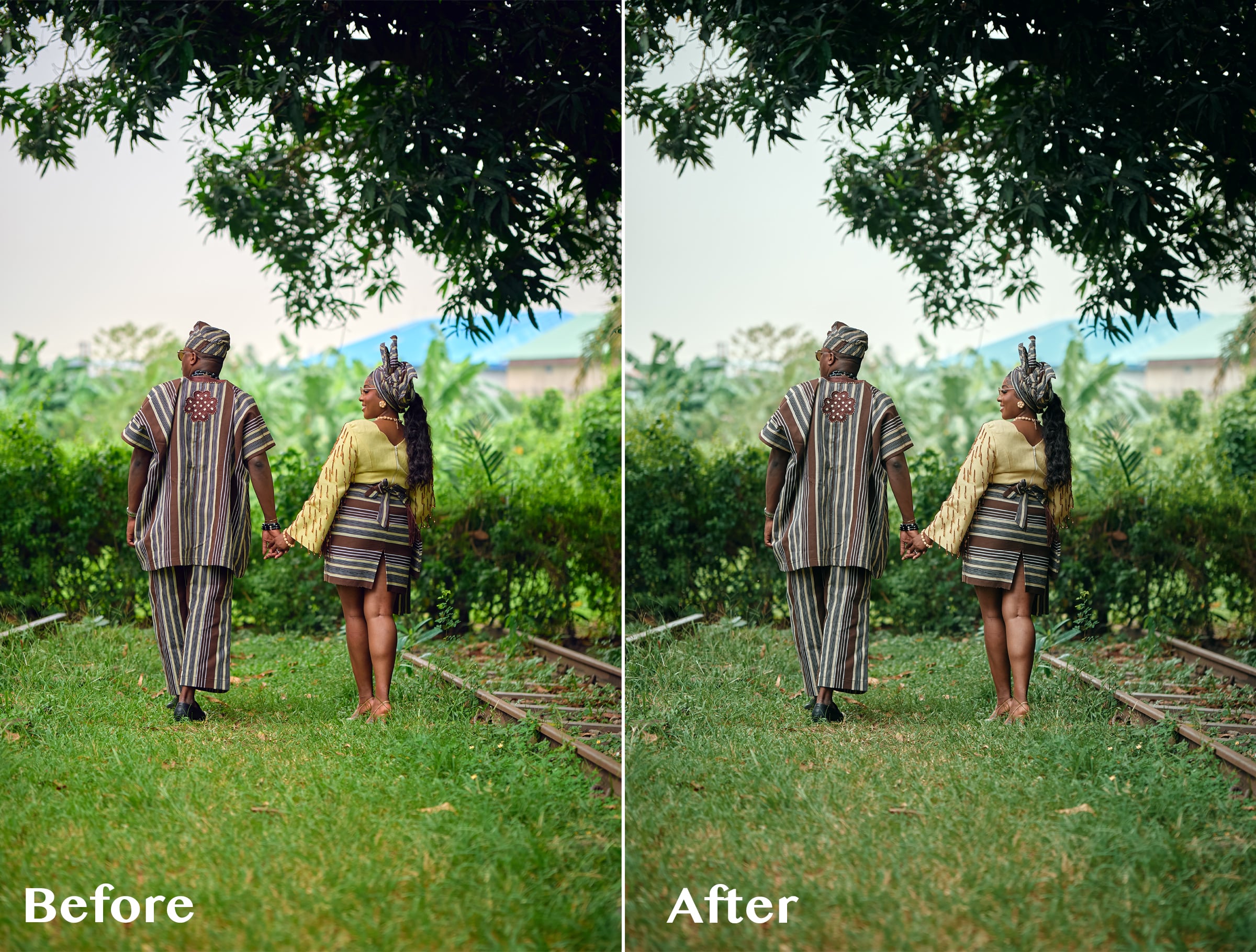

ABIS CINEMATIC 01 — Signature Cinematic LUT
1 mês de Skillshare
Disponível com a compraGrátis
Todas as assinaturas serão cobradas automaticamente de forma recorrente até serem canceladas. Se estiver qualificado para um teste gratuito, cancele antes que o teste termine para evitar cobranças. Oferta válida apenas para novos assinantes pagos. Veja os termos de serviço completos aqui.
Sobre este produto

Olusola Abisagbo
Professional Photographer and Educator
One LUT. Different Images. One Cinematic Starting Point.
You don't always need 20 LUTs to create a beautiful look.
Sometimes, you just need ONE that works as a strong starting point.
ABIS CINEMATIC 01 is a signature cinematic LUT created for photographers who love rich, slightly dark, moody colours without spending too much time trying different presets and LUTs.
I originally created this LUT while working with wedding images with a lot of greenery. I wanted the bright greens to feel deeper, darker and more cinematic instead of overpowering the photograph.
But while testing it, I discovered something interesting.
It wasn't just about the greens.
I tested the LUT on photographs with completely different colours, lighting, environments, and it still gave me a beautiful cinematic base to work from.
The secret is knowing how to adjust it.
THE SIMPLE WORKFLOW
1. Apply ABIS CINEMATIC 01
Start by applying the LUT to your image.
2. Adjust the LUT opacity
You don't have to use the LUT at 100%.
Reduce the opacity until the effect feels right for your photograph.
3. Adjust your Levels
Use Levels to refine the brightness, contrast and overall depth of the image.
4. Adjust Saturation if needed
Want some of the original colours back?
Simply increase the saturation to taste.
That's it.
LUT → Opacity → Levels → Saturation
A simple starting point that you can adapt to your own photograph and editing style.
WHAT MAKES ABIS CINEMATIC 01 DIFFERENT?
I didn't want to create another LUT pack filled with 10, 20 or 50 different looks that you have to keep clicking through.
I wanted one versatile LUT that I could understand, control and use repeatedly.
ABIS CINEMATIC 01 gives you the foundation.
You decide how far you want to take it.
Use a lower opacity for a subtle cinematic finish.
Push it further when you want something darker and moodier.
Add saturation when you want more colour.
Adjust your Levels when you want more depth.
The LUT gives you the look. You remain in control of the final image.
ESPECIALLY BEAUTIFUL ON GREENS 🌿
Although ABIS CINEMATIC 01 can be used across different colour environments, one of my favourite things about it is what it does to bright greens.
Grass, trees and foliage can sometimes become too bright or distracting in wedding and outdoor photography.
ABIS CINEMATIC 01 helps create deeper, muted and more cinematic-looking greens, making it especially useful for outdoor weddings, pre-weddings and portraits.
GREAT FOR
Wedding photography
Pre-wedding photography
Portrait photography
Outdoor photography
Lifestyle photography
Editorial images
Photographers who love cinematic colours
Photographers who prefer dark and moody edits
WHAT YOU'LL RECEIVE
ABIS CINEMATIC 01 LUT (.CUBE)
Plus a simple Quick Start Guide showing you my recommended workflow:
Apply LUT → Adjust Opacity → Levels → Saturation
The .CUBE format makes the LUT usable in compatible photo and video editing software that supports LUTs.
IMPORTANT TO KNOW
ABIS CINEMATIC 01 is designed to give you a cinematic starting point, not replace your entire editing process.
Different photographs have different lighting, exposure, white balance, colours and camera profiles.
For this reason, you may need to adjust the LUT opacity, Levels, saturation, exposure or white balance to achieve your preferred result.
And that's exactly how I use it myself.
Perguntas frequentes
O que são produtos digitais?
Os produtos digitais da Skillshare são ferramentas, recursos e modelos criados por especialistas que estão disponíveis para compra. Com uma ampla gama de recursos para atender a todas as necessidades criativas, eles são acionáveis, tornando sua experiência de aprendizado real e inesquecível.
Como posso comprar um produto digital?
Qualquer pessoa pode comprar um produto digital na Skillshare — clique em Comprar agora para inserir suas informações de pagamento e concluir sua compra. Quando o pagamento for concluído, todos os arquivos estarão disponíveis para download instantaneamente nesta página. Você também receberá um e-mail com um link para baixar seu produto digital após a compra.
Há um limite para quantas vezes eu posso baixar um produto digital?
Não, não há limite para quantas vezes você pode baixar um produto digital. Mesmo que um produto seja removido pelo criador, geralmente você ainda pode acessar a página de download fazendo login na sua conta Skillshare.
Posso obter um reembolso ou cancelar minha compra de produto digital?
Os produtos digitais não são reembolsáveis e não podem ser devolvidos ou cancelados. Para saber mais, consulte nossa política de reembolso no Suporte da Skillshare.
Posso fazer e vender meus próprios produtos digitais?
Com certeza! Visite Como posso vender um produto digital na Skillshare? para saber como você pode criar, listar e vender seus próprios produtos digitais na Skillshare.