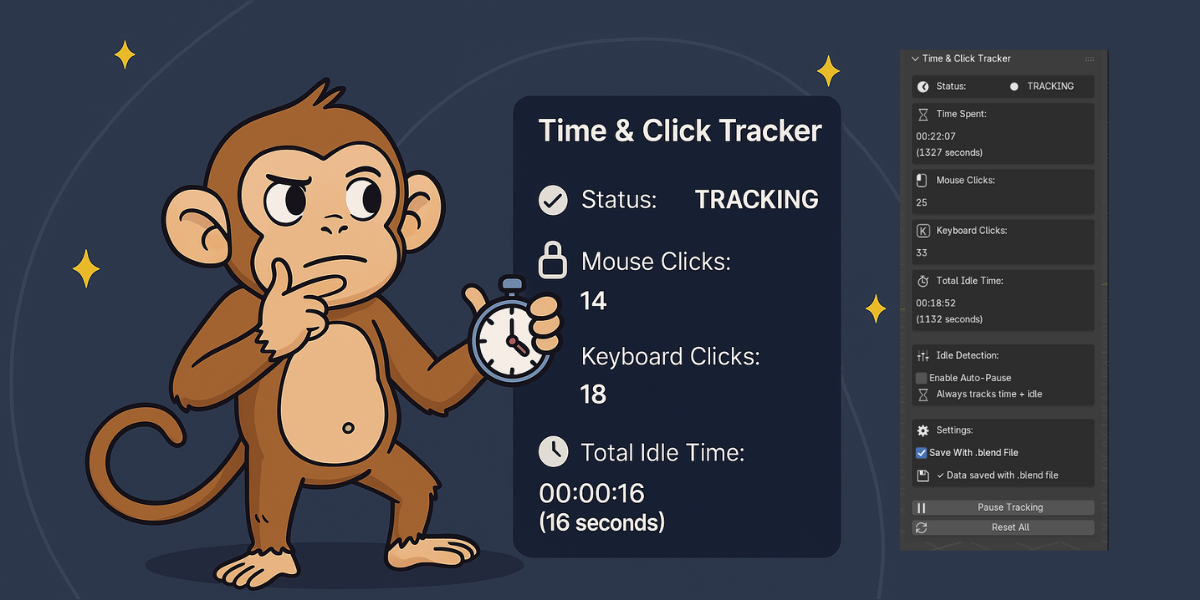
Time & Click Tracker - Break Time Reminder Blender
1 mês de Skillshare
Disponível com a compraGrátis
Todas as assinaturas serão cobradas automaticamente de forma recorrente até serem canceladas. Se estiver qualificado para um teste gratuito, cancele antes que o teste termine para evitar cobranças. Oferta válida apenas para novos assinantes pagos. Veja os termos de serviço completos aqui.
Sobre este produto

Salman Naseem
2d 3D Animator
Track your Blender time and activity — automatically.
Whether you’re a freelancer, a studio artist, or just want to understand how you work, Time & Click Tracker helps you measure your effort, optimize your workflow, and track billable hours — all without lifting a finger.
The add-on runs quietly in the background, logging your working time, mouse and keyboard activity, and idle periods so you always know how much time you really spend creating.
✨ Key Features
⏱ Automatic Time Tracking
Starts tracking the moment you enable it — no buttons or timers.
Records time down to the second.
Perfect for tracking project duration or daily sessions.
🖱 Mouse & Keyboard Activity
Counts every click and keypress in real time.
Helps visualize your activity intensity.
Great for comparing modeling vs scripting workloads.
😴 Smart Idle Detection
Detects inactivity automatically (customizable 10–120s).
Choose between:
Track idle separately – see how long you’ve been away.
Auto-pause – pause timers when you’re not active (ideal for billing).
💾 Save with Your .blend File
Save your stats with the project file.
Keep cumulative project time across multiple sessions.
Or keep it session-based for daily tracking — your choice.
🎮 Simple Controls
Pause / Resume tracking anytime.
Reset all stats instantly with one click.
Visual status indicator (Tracking, Idle, Paused).
Clean, minimal interface that fits Blender perfectly.
🕒 Break Reminder System
Smart Popup Notifications – Gently appears at the center of your screen to remind you to take a break.
Customizable Sound Alerts – Uses your system’s native notification sounds (Windows/macOS/Linux).
Visual Flash Effect – Brief screen highlight to grab attention without being disruptive.
Flexible Intervals – Set reminders anywhere from 5 minutes to 8 hours.
Snooze Anytime – Need a few more minutes? Hit Snooze to delay the reminder by 5 minutes.
Wellness Tips – Learn quick health facts and productivity benefits of taking short breaks.
Live Countdown Timer – Always know how long until your next scheduled break.
Personalized Experience – Toggle sound, flash, or popup effects to match your comfort level.


💡 Common Use Cases
💰 Freelance Billing
Enable Auto-Pause and only track active work.
No guessing, no manual timers — just accurate, client-ready hours.
🧠 Productivity Tracking
Keep Auto-Pause off and record everything — including idle time — to calculate your real efficiency.
Example: (Time – Idle) ÷ Time × 100%
🏗 Project Time Logging
Enable “Save With File” to build a complete log of total project hours.
Perfect for improving time estimates and managing future projects.
🧑🤝🧑 Studio Analytics
Compare daily or weekly data across artists.
Understand who’s doing what, how long it takes, and where workflows can improve.
🔐 Privacy & Performance
100% local data — nothing leaves your computer.
Lightweight: <0.01% CPU usage, no lag or viewport delay.
Cross-platform: Works on Windows, macOS, and Linux.
Tiny footprint: Less than 50KB in size.
⚙️ Technical Details
Blender Version: 4.2 or newer
File Type: .zip (install directly, no extraction needed)
Category: System / Productivity
License: GPL-3.0
Support: Email, documentation
🌟 Why Artists Love It
Unlike external timers or apps that need constant attention, Time & Click Tracker is fully integrated into Blender — no manual start/stop, no forgotten sessions.
It’s the simplest, most accurate way to understand your work habits, calculate billable hours, and visualize how you actually spend your creative time.
Track smarter. Work better. Create more.
🧭 Quick Start
Download time_click_tracker.zip
Open Blender → Edit → Preferences → Add-ons
Click Install..., select the zip file
Enable Time & Click Tracker
Press N → Open the Time Tracker tab
That’s it — tracking starts automatically!
🧰 Perfect For
3D Artists & Modelers
Animators & Riggers
VFX & Motion Graphics Artists
Technical Artists & Coders
Freelancers & Studios
Students & Educators
Built with ❤️ for the Blender community by Salman Naseem.
Perguntas frequentes
O que são produtos digitais?
Os produtos digitais da Skillshare são ferramentas, recursos e modelos criados por especialistas que estão disponíveis para compra. Com uma ampla gama de recursos para atender a todas as necessidades criativas, eles são acionáveis, tornando sua experiência de aprendizado real e inesquecível.
Como posso comprar um produto digital?
Qualquer pessoa pode comprar um produto digital na Skillshare — clique em Comprar agora para inserir suas informações de pagamento e concluir sua compra. Quando o pagamento for concluído, todos os arquivos estarão disponíveis para download instantaneamente nesta página. Você também receberá um e-mail com um link para baixar seu produto digital após a compra.
Há um limite para quantas vezes eu posso baixar um produto digital?
Não, não há limite para quantas vezes você pode baixar um produto digital. Mesmo que um produto seja removido pelo criador, geralmente você ainda pode acessar a página de download fazendo login na sua conta Skillshare.
Posso obter um reembolso ou cancelar minha compra de produto digital?
Os produtos digitais não são reembolsáveis e não podem ser devolvidos ou cancelados. Para saber mais, consulte nossa política de reembolso no Suporte da Skillshare.
Posso fazer e vender meus próprios produtos digitais?
Com certeza! Visite Como posso vender um produto digital na Skillshare? para saber como você pode criar, listar e vender seus próprios produtos digitais na Skillshare.