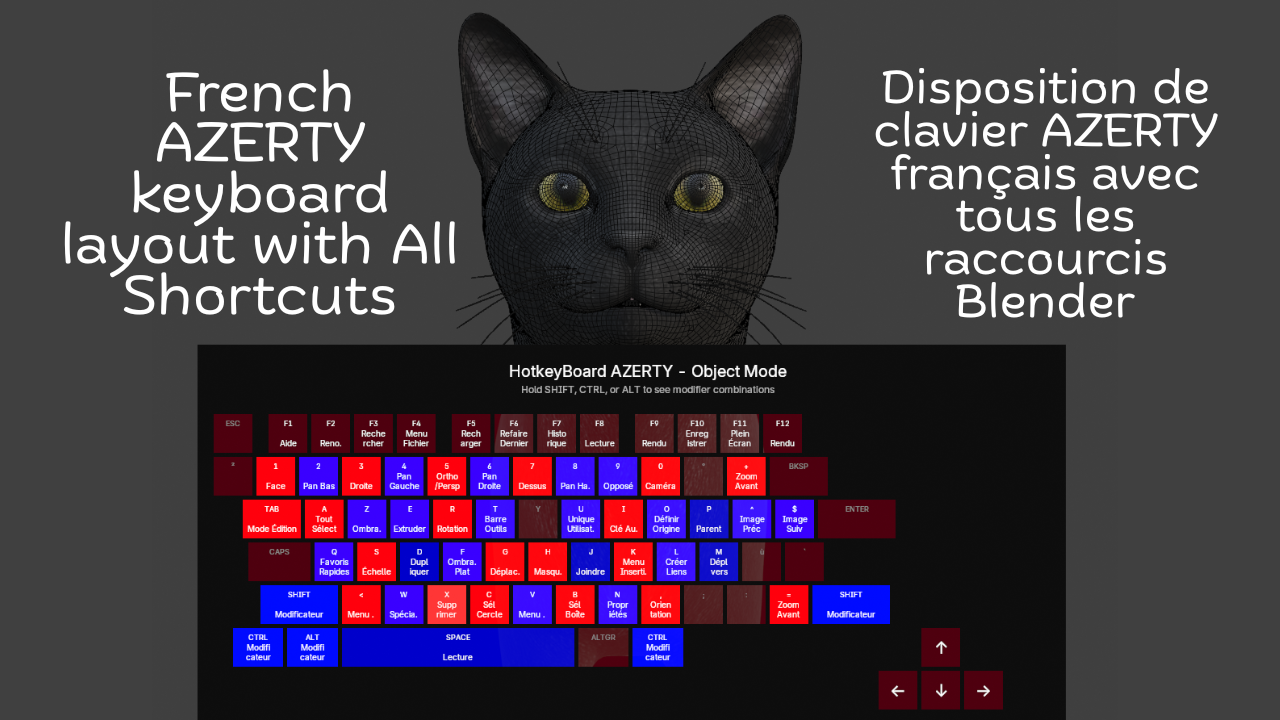
French Keyboard Shortcuts - HotkeyBoard AZERTY
1 mês de Skillshare
Disponível com a compraGrátis
Todas as assinaturas serão cobradas automaticamente de forma recorrente até serem canceladas. Se estiver qualificado para um teste gratuito, cancele antes que o teste termine para evitar cobranças. Oferta válida apenas para novos assinantes pagos. Veja os termos de serviço completos aqui.
Sobre este produto

Salman Naseem
2d 3D Animator
Learning Blender with an AZERTY keyboard shouldn't be harder than with QWERTY. Yet most resources, tutorials, and overlays are designed for QWERTY users, forcing AZERTY users to constantly translate shortcuts in their heads. This slows learning, creates confusion, and breaks creative flow.
HotkeyBoard AZERTY solves this problem completely. It's the first and only Blender addon built specifically for AZERTY keyboards from the ground up. Open it, and you see YOUR keyboard not an adapted QWERTY layout.
Over 500 Blender shortcuts are displayed and color-coded by importance, so you learn systematically: start with blue (essential), add green (common), then orange (advanced). Press any key and watch it light up yellow instant feedback that you hit the right key. This visual learning is 10x faster than memorizing from lists.

Key Features
Core Features:
Complete AZERTY layout (Mac & Windows)
Real-time key highlighting (yellow when pressed)
500+ shortcuts covered (Object, Edit, Sculpt modes)
Color-coded by importance (6 colors)
Modifier combinations (Shift, Ctrl, Alt)
Bilingual interface (English/French)
Custom colors (enabled by default)
Adjustable size (50-150%) and opacity (0-100%)
The addon is fully bilingual. French speakers can switch to see "Déplacer" instead of "Move," "Rotation" instead of "Rotate," and 150+ other shortcuts in their native language. One click in the N panel switches everything instantly.


What You Get
✓ Complete AZERTY layouts for Mac & Windows
✓ 500+ shortcuts color-coded by importance
✓ Real-time yellow highlighting when you press keys
✓ Bilingual interface (English + French)
✓ Automatic platform detection
✓ 6 modes supported (Object, Edit, Sculpt, Paint variants)
✓ Full color customization (7 colors)
✓ Adjustable size (50-150%) and opacity (0-100%)
✓ Custom font sizes
✓ Modifier combination display
✓ Multi-line text wrapping
✓ Zero configuration needed
✓ Minimal performance impact (<1%)
✓ Lifetime updates included


Advanced Features
⚡ Modifier combinations display (Shift, Ctrl, Alt)
⚡ Multi-line text wrapping for long shortcuts
⚡ Smart key highlighting with 250ms decay
⚡ Adjustable scale (50-150%) for any screen
⚡ Opacity control (0-100%) for subtle overlay
⚡ Custom font sizes (8-24px labels, 6-18px shortcuts)
⚡ Settings persist across Blender sessions
⚡ Professional email support included
Compatibility
🖥️ Blender 4.2, 4.3, 4.4, 5.0+
🍎 macOS 11+ (Intel & Apple Silicon)
🪟 Windows 10/11
🐧 Linux (Ubuntu, Fedora, Debian, Arch)
⌨️ All AZERTY keyboards
Perguntas frequentes
O que são produtos digitais?
Os produtos digitais da Skillshare são ferramentas, recursos e modelos criados por especialistas que estão disponíveis para compra. Com uma ampla gama de recursos para atender a todas as necessidades criativas, eles são acionáveis, tornando sua experiência de aprendizado real e inesquecível.
Como posso comprar um produto digital?
Qualquer pessoa pode comprar um produto digital na Skillshare — clique em Comprar agora para inserir suas informações de pagamento e concluir sua compra. Quando o pagamento for concluído, todos os arquivos estarão disponíveis para download instantaneamente nesta página. Você também receberá um e-mail com um link para baixar seu produto digital após a compra.
Há um limite para quantas vezes eu posso baixar um produto digital?
Não, não há limite para quantas vezes você pode baixar um produto digital. Mesmo que um produto seja removido pelo criador, geralmente você ainda pode acessar a página de download fazendo login na sua conta Skillshare.
Posso obter um reembolso ou cancelar minha compra de produto digital?
Os produtos digitais não são reembolsáveis e não podem ser devolvidos ou cancelados. Para saber mais, consulte nossa política de reembolso no Suporte da Skillshare.
Posso fazer e vender meus próprios produtos digitais?
Com certeza! Visite Como posso vender um produto digital na Skillshare? para saber como você pode criar, listar e vender seus próprios produtos digitais na Skillshare.