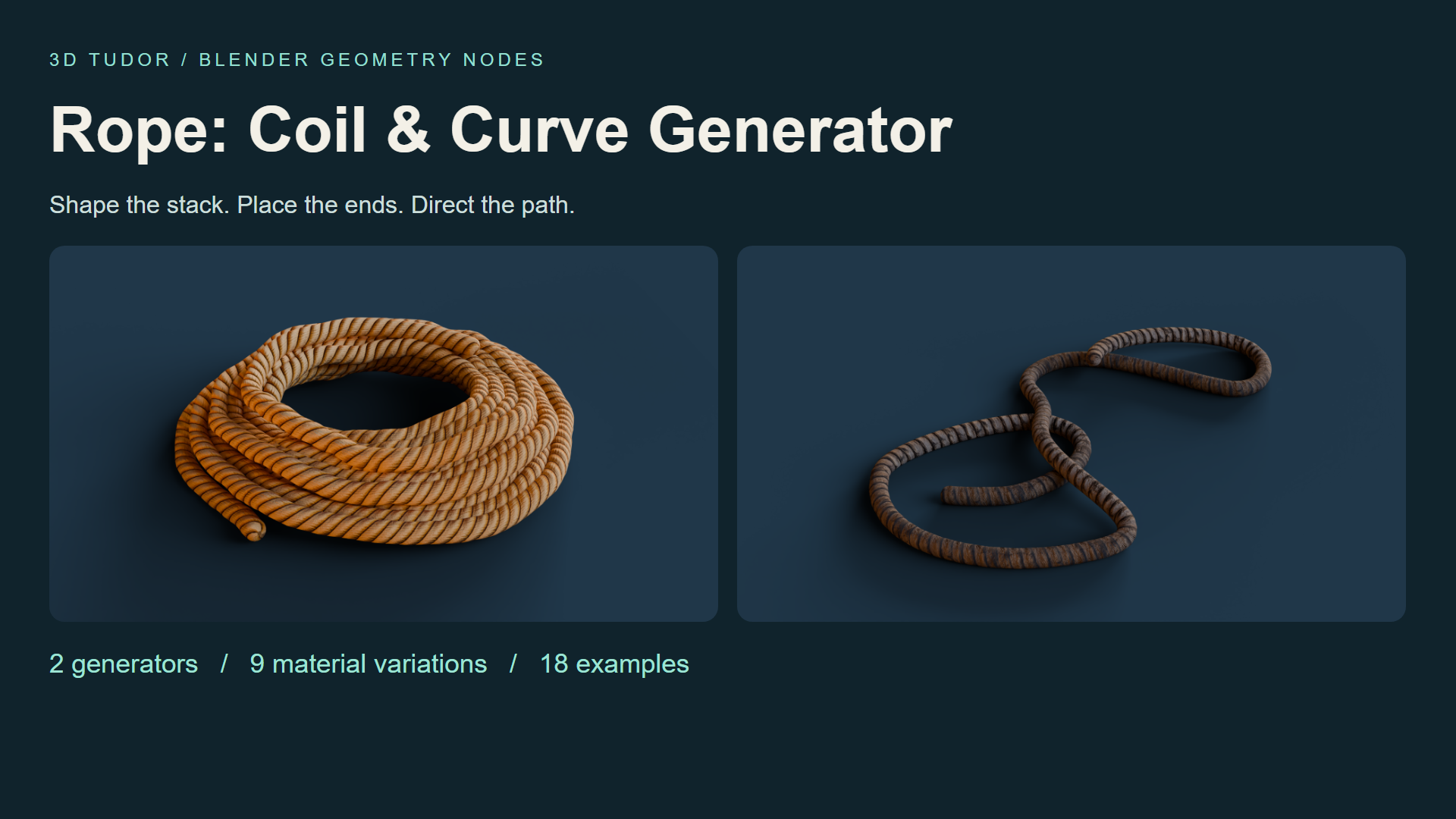
Rope Geometry Nodes: Coil & Curve for Blender
1 mês de Skillshare
Disponível com a compraGrátis
Todas as assinaturas serão cobradas automaticamente de forma recorrente até serem canceladas. Se estiver qualificado para um teste gratuito, cancele antes que o teste termine para evitar cobranças. Oferta válida apenas para novos assinantes pagos. Veja os termos de serviço completos aqui.
Sobre este produto

3D Tudor
Bestselling Blender Author & 3D Educator
Watch Rope Geometry Nodes in action: 3D Tudor’s Blender rope and coil video overview on YouTube.
A rope prop that fits your composition
A coil may look right on its own and still feel wrong beside a crate. The stack is too regular, the opening is too large, or a loose end points away from the scene. Rope Geometry Nodes gives you two Blender workflows for making those choices: shape a coil, or guide rope along an editable curve.
Start from eighteen prepared examples with nine material variations. Keep the supplied objects as references, duplicate one, and adjust the form through its Geometry Nodes modifier.

Build the coil from the outside in
Use Rope Coil to establish layers, thickness and spacing, then refine taper, top inset, variation, seed and organic shape. Compare the outline from your intended camera before working on smaller details.
The upper and lower tails each have visibility, length, angle and tuck settings. Extend one tail towards another prop while keeping the other close. Inner Fill, Inner Wraps and Inner Spacing change the centre arrangement, letting you decide how much ground shows through the coil.

Give loose rope a direction
Rope Along Curve follows an editable Blender curve. Shape a winding length or a series of loose loops, then adjust thickness, end treatment and resolution. The drawing recording shows freehand curve input, giving you another way to establish the route.
Best for: Blender artists arranging workshop, warehouse, dockside or environment props, and anyone who wants an editable starting point for a coil or loose rope in a still scene.

Make the surface suit the shape
The prepared examples include golden, tan, striped, weathered and dark material looks. Choose the finish that fits the scene, then compare Texture Repeat and Texture Rotation before refining seam, around and length offsets. End controls help you adjust the exposed tips.
Keep shape and surface decisions separate: curve and profile resolution affect the geometry; texture controls change how the pattern follows it. Check the result from the working camera before increasing resolution.

Your download includes
Two Geometry Nodes generators in one .blend file; eighteen example objects, split between nine coils and nine curve ropes; nine material variations with packed textures; a getting-started text guide; and three MP4 controls demonstrations.
Rope Coil exposes 32 parameter inputs and Rope Along Curve exposes 13. Some controls are shared between the generators. The recordings cover coil controls, curve controls and curve drawing; they are demonstrations of the setup, not a narrated course.

Before you start
Open the .blend file and duplicate a prepared example. Establish the main coil dimensions or curve path first, refine the tails and centre where relevant, then finish with the material and texture alignment. No add-on installation is required.
The file was opened and its exposed controls inspected in Blender 5.1.2. Cycles is the saved scene engine. Other Blender versions and render engines have not been separately tested. Image textures are packed at 512 × 2048 and 1024 × 512.

What is not included
This is a standalone paid digital product, separate from Skillshare classes. It includes no Unreal Engine or Unity project. Rope paths are arranged manually: there is no gravity or collision simulation, or automatic knot generation. Geometry counts depend on your generator settings.
Until next time, happy modelling, everyone!
Neil - 3D Tudor
Perguntas frequentes
O que são produtos digitais?
Os produtos digitais da Skillshare são ferramentas, recursos e modelos criados por especialistas que estão disponíveis para compra. Com uma ampla gama de recursos para atender a todas as necessidades criativas, eles são acionáveis, tornando sua experiência de aprendizado real e inesquecível.
Como posso comprar um produto digital?
Qualquer pessoa pode comprar um produto digital na Skillshare — clique em Comprar agora para inserir suas informações de pagamento e concluir sua compra. Quando o pagamento for concluído, todos os arquivos estarão disponíveis para download instantaneamente nesta página. Você também receberá um e-mail com um link para baixar seu produto digital após a compra.
Há um limite para quantas vezes eu posso baixar um produto digital?
Não, não há limite para quantas vezes você pode baixar um produto digital. Mesmo que um produto seja removido pelo criador, geralmente você ainda pode acessar a página de download fazendo login na sua conta Skillshare.
Posso obter um reembolso ou cancelar minha compra de produto digital?
Os produtos digitais não são reembolsáveis e não podem ser devolvidos ou cancelados. Para saber mais, consulte nossa política de reembolso no Suporte da Skillshare.
Posso fazer e vender meus próprios produtos digitais?
Com certeza! Visite Como posso vender um produto digital na Skillshare? para saber como você pode criar, listar e vender seus próprios produtos digitais na Skillshare.