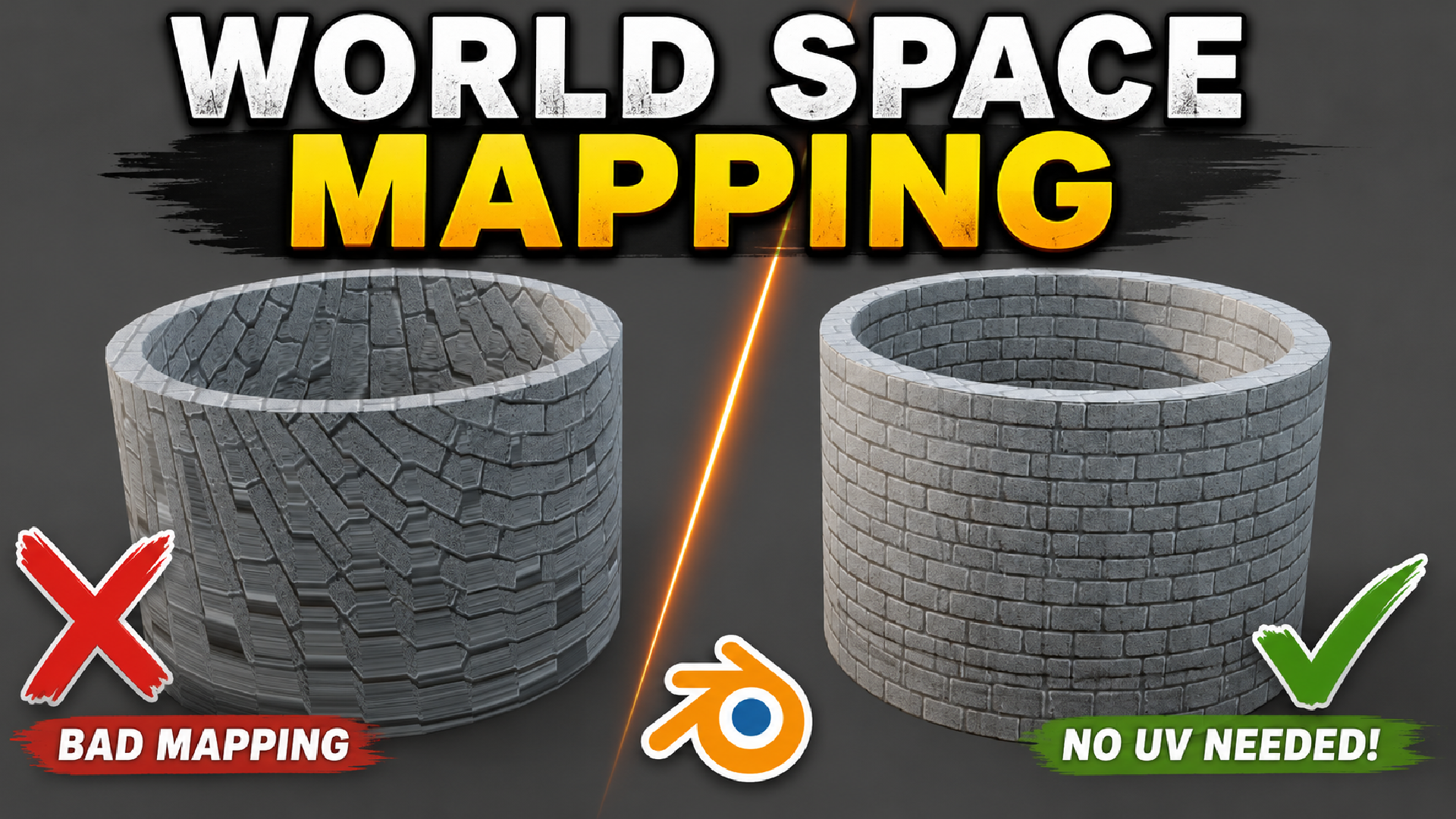
World Space Texture Mapping Blender addon
1 mês de Skillshare
Disponível com a compraGrátis
Todas as assinaturas serão cobradas automaticamente de forma recorrente até serem canceladas. Se estiver qualificado para um teste gratuito, cancele antes que o teste termine para evitar cobranças. Oferta válida apenas para novos assinantes pagos. Veja os termos de serviço completos aqui.
Sobre este produto

Junaid Alam
3D Artist
World Space Texture Mapping adds a Create World Material button to the Shader Editor sidebar. With a single click, it generates a complete Principled BSDF material that uses triplanar world-space projection instead of traditional UV coordinates.
Simply load textures into any of the eight supported channels Base Color, Normal, Roughness, Metallic, Ambient Occlusion, Height, Emission, or Opacity and the addon automatically projects them from three axes without requiring UV unwrapping.
The Problem It Solves
UV unwrapping can be one of the most time-consuming parts of texturing, especially for boolean-heavy hard-surface models, sculpted terrain, scattered rocks, debris, or rapid concept blockouts. Even when UVs already exist, maintaining consistent texture density across multiple objects often requires manually adjusting texture scale on each one.
This addon eliminates those problems by projecting textures directly in world space (or object space if preferred). Whether you're texturing a single rock or hundreds of scattered instances, every object maintains identical texture density automatically.

Who It's For
This addon is ideal for:
Environment artists
Hard-surface and kitbash modelers
Archviz artists
Game asset creators
Prop artists
Anyone scattering rocks, foliage, debris, or terrain while wanting consistent texturing without individual UVs
How It Works
Select one or more supported objects (Mesh, Curve, Surface, Metaball, or Font).
Open the Shader Editor.
Press N and open the Material tab.
Click Create World Material for a new material or Apply World Mapping for an existing one.
Load textures into any of the supported channels.
The addon automatically enables the correct color space (sRGB or Non-Color).
Adjust global Scale, Rotation, and Offset for the entire material, or enable Custom Mapping for individual texture channels.

Why World-Space Mapping?
While Blender allows you to build triplanar shaders manually, creating a robust setup that works correctly on curved surfaces is difficult.
Version 1.4 introduces major improvements, including:
Proper normal map blending across all three projection axes
No visible seams on spheres and rounded meshes
Flat normal maps behave as true no-ops without flattening surface curvature
Cleaner blending with improved projection accuracy
These refinements make the shader production-ready without requiring a complex manual node setup.
Non-Destructive Workflow
The addon is designed to preserve your existing work.
Convert Existing Material detects image textures already connected to a Principled BSDF and automatically converts them to world-space mapping without reloading textures.
Remove World Mapping restores the original shader connections whenever possible or rebuilds a standard UV-based setup while keeping every loaded texture intact.
Nothing is deleted simply because world mapping is disabled.

Key Features
One-click world-space material creation
No UV unwrapping required
Support for 8 texture channels
Global mapping with per-channel overrides
World, Object, and Local projection modes
Triplanar, XYZ, and Planar projection methods
Improved curved-surface normal blending
Convert existing materials automatically
Restore original materials with Remove World Mapping
Randomize textures per object
Built-in procedural Dirt, Moss, Snow, and Edge Wear
Automatic color space detection
Supports PNG, JPG, JPEG, TGA, TIF, TIFF, BMP, EXR, HDR, WEBP, and DDS
Compact card-based interface


Workflow Benefits
Go from an untextured mesh to a finished material in seconds.
Maintain identical texture density across hundreds of objects.
Retopology and boolean edits won't break your texturing.
Experiment safely without losing existing materials.
Add natural variation to scattered assets using Randomize Textures.
Typical Use Cases
Hard-surface sci-fi and mechanical kitbashes
Rock, cliff, and debris scattering
Environment blockouts
Architectural visualization
Sculpted creatures and organic assets
Updating older materials after UV changes
Adding procedural weathering without painting masks
Perguntas frequentes
O que são produtos digitais?
Os produtos digitais da Skillshare são ferramentas, recursos e modelos criados por especialistas que estão disponíveis para compra. Com uma ampla gama de recursos para atender a todas as necessidades criativas, eles são acionáveis, tornando sua experiência de aprendizado real e inesquecível.
Como posso comprar um produto digital?
Qualquer pessoa pode comprar um produto digital na Skillshare — clique em Comprar agora para inserir suas informações de pagamento e concluir sua compra. Quando o pagamento for concluído, todos os arquivos estarão disponíveis para download instantaneamente nesta página. Você também receberá um e-mail com um link para baixar seu produto digital após a compra.
Há um limite para quantas vezes eu posso baixar um produto digital?
Não, não há limite para quantas vezes você pode baixar um produto digital. Mesmo que um produto seja removido pelo criador, geralmente você ainda pode acessar a página de download fazendo login na sua conta Skillshare.
Posso obter um reembolso ou cancelar minha compra de produto digital?
Os produtos digitais não são reembolsáveis e não podem ser devolvidos ou cancelados. Para saber mais, consulte nossa política de reembolso no Suporte da Skillshare.
Posso fazer e vender meus próprios produtos digitais?
Com certeza! Visite Como posso vender um produto digital na Skillshare? para saber como você pode criar, listar e vender seus próprios produtos digitais na Skillshare.