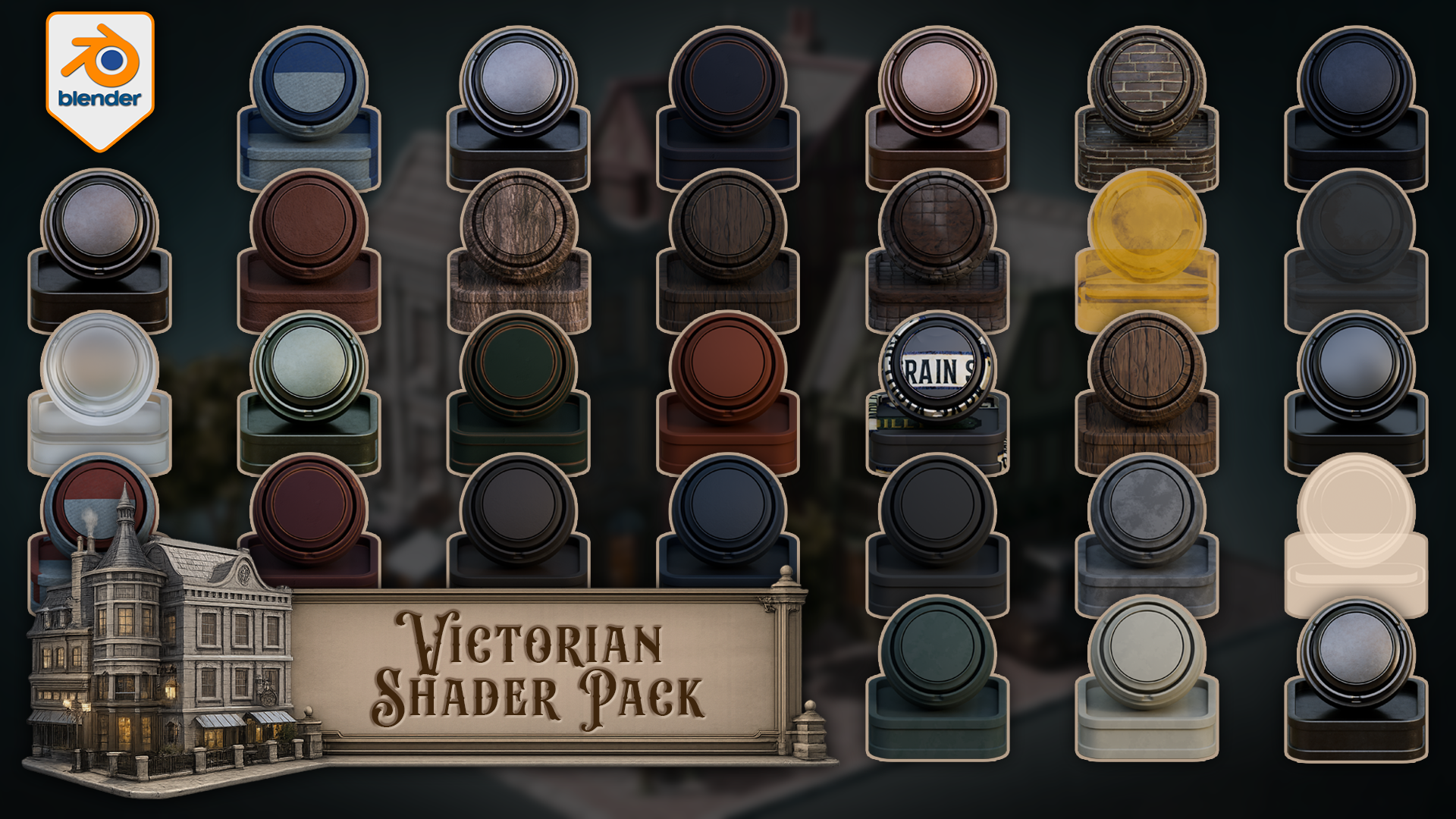
Victorian Shader Pack for Blender 5 Cycles
1 mês de Skillshare
Disponível com a compraGrátis
Todas as assinaturas serão cobradas automaticamente de forma recorrente até serem canceladas. Se estiver qualificado para um teste gratuito, cancele antes que o teste termine para evitar cobranças. Oferta válida apenas para novos assinantes pagos. Veja os termos de serviço completos aqui.
Sobre este produto

3D Tudor
Bestselling Blender Author & 3D Educator
https://youtu.be/aeCjPocOxkk
Build Victorian streets, aged shopfronts, period interiors, darker architectural scenes, and atmospheric environment work with a connected set of Victorian materials and shaders for Blender.
This pack includes one downloadable Blender file with 33 materials and shaders already set up for Blender 5 Cycles. The collection covers painted wood, natural wood, worn metals, brass, stone, roof surfaces, clay, brick, wall finishes, glass, lit windows, curtains, cloth, bark, leaves, leather, rubber, street signs, and a floor shader that blends between three materials using vertex paint.
Every shader has been built around practical scene use. The point is not to give you a folder of disconnected swatches. The point is to give you a Victorian themed shader library that can support a full environment without every material fighting for attention.
Included in the pack
- Floor shader with three-material vertex paint blending
- Car metal blue
- Car metal light
- Light metal
- Blue metal
- Black metal
- Brass metal
- Green metal
- Green painted wood
- Blue painted wood
- Light wood
- Dark wood
- Red painted wood
- Stone
- Roof material
- Second roof material
- Clay
- Rubber
- Leather
- Tree bark
- Leaves with alpha setup
- Blue cloth
- Red cloth
- Track glass
- Basic Glass BSDF material
- Street light glass with emission
- Lit window glass with emission
- Unlit window glass
- Curtains
- Green wall
- Grey wall
- Bricks
- Street signs
Victorian environments need material hierarchy. Some surfaces need to carry age and detail, such as painted wood, brick, brass, roof materials, stone, and signage. Other surfaces need to stay quieter, such as rubber, leather, plain glass, cloth, and wall finishes. That balance is what helps a scene feel designed rather than patched together.
The edge-wear materials are especially useful for period scenes. Painted wood, metal, brass, stone, roof, clay, and wood variants can add controlled wear to the parts of the scene where age matters most: doors, trims, frames, signs, props, railings, shopfronts, roofs, and street details.
The floor shader is the more advanced setup in the pack. It blends between three different materials using vertex paint, giving you a practical way to break up ground surfaces without building a separate masking workflow every time you want variation. This is useful for streets, thresholds, paths, building edges, and worn floor areas.
The glass and window materials give you several scene-support options as well. You get basic glass, track glass, street light glass with emission, lit window glass with emission, unlit window glass, and curtains. That means you can build darker facades, warm lit windows, lamp details, and interior dressing without forcing every window into the same material role.
Created for Blender 5 and built for Cycles.
This pack is not sold as an EEVEE-ready release. Some materials may display in other Blender render workflows, but Cycles is the intended renderer.
You can use the materials directly in the included Blender file, copy preview objects with their materials into your own scene, append the shaders you need into another Blender project, or add them to your own Asset Browser setup for faster reuse.
If you want a practical Victorian shader pack for worn wood, aged metal, brickwork, roof surfaces, lit windows, curtains, signs, darker walls, and vertex-painted floor variation inside Blender, this gives you a clean place to start.
Happy modelling everyone!
Neil – 3D Tudor
Perguntas frequentes
O que são produtos digitais?
Os produtos digitais da Skillshare são ferramentas, recursos e modelos criados por especialistas que estão disponíveis para compra. Com uma ampla gama de recursos para atender a todas as necessidades criativas, eles são acionáveis, tornando sua experiência de aprendizado real e inesquecível.
Como posso comprar um produto digital?
Qualquer pessoa pode comprar um produto digital na Skillshare — clique em Comprar agora para inserir suas informações de pagamento e concluir sua compra. Quando o pagamento for concluído, todos os arquivos estarão disponíveis para download instantaneamente nesta página. Você também receberá um e-mail com um link para baixar seu produto digital após a compra.
Há um limite para quantas vezes eu posso baixar um produto digital?
Não, não há limite para quantas vezes você pode baixar um produto digital. Mesmo que um produto seja removido pelo criador, geralmente você ainda pode acessar a página de download fazendo login na sua conta Skillshare.
Posso obter um reembolso ou cancelar minha compra de produto digital?
Os produtos digitais não são reembolsáveis e não podem ser devolvidos ou cancelados. Para saber mais, consulte nossa política de reembolso no Suporte da Skillshare.
Posso fazer e vender meus próprios produtos digitais?
Com certeza! Visite Como posso vender um produto digital na Skillshare? para saber como você pode criar, listar e vender seus próprios produtos digitais na Skillshare.