Lyfta Usability Study – UX Evaluation
USABILITY STUDY REPORT
Lyfta
Evaluation of a Digital Gym Workout Tracker and Planner
1. IntroductionLyfta is a digital gym workout tracker and planner designed to help lifters plan their routines and log their training sets. It provides features that allow users to find exercises, plan workouts, record training activities, and track their progress.
This usability study was conducted to understand how easily users can navigate and use Lyfta when performing common workout-planning and workout-tracking tasks.
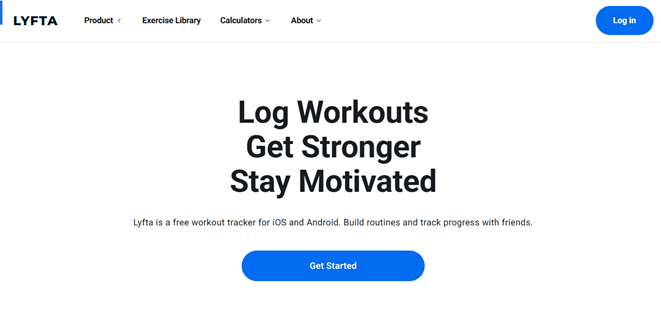
Figure 1: Lyfta Homepage
2. Objective of the StudyThe main objective of this usability study was to evaluate whether users can easily understand Lyfta and complete basic tasks without assistance.
· Understand Lyfta's purpose
· Find exercises
· Find workout routines
· Log workouts
· Check workout progress
· Identify areas of confusion or difficulty
· Collect suggestions for improvement
Research Question: "Can a first-time user easily understand Lyfta's purpose and complete basic workout-planning and workout-tracking tasks without assistance?
3. MethodAn informal usability study was conducted with 5 participants. Each participant was asked to complete five common tasks on Lyfta and provide feedback through a Google Form. Participants were encouraged to think aloud while using the product so that difficulties and expectations could be observed.
4. ParticipantsParticipant
Gym/App Experience
Used Lyfta Before?
P1
Intermediate
No
P2
Beginner
No
P3
Intermediate
No
P4
Experienced
Yes
P5
Never used one
No
5. Usability TasksTask 1 — Understand Lyfta: "Explore Lyfta and tell me what you think this app is designed to do." 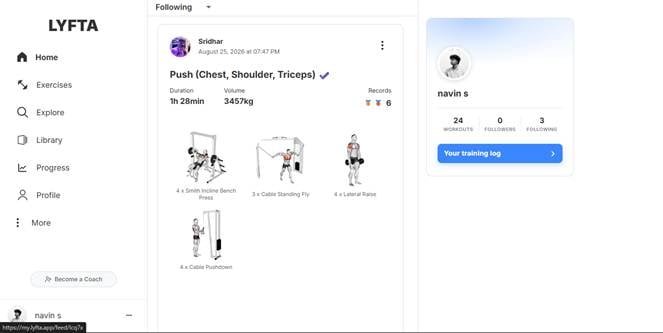
Figure 2: Lyfta Home Screen and Navigation
Task 2 — Find an Exercise: "Find an exercise you would like to use in your workout."
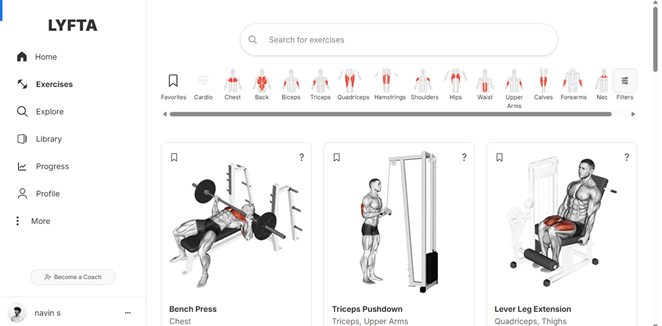
Figure 3: Lyfta Exercise Discovery Interface
Task 3 — Find a Workout Routine: "Find a suitable workout routine for your next gym session."
Task 4 — Log a Workout: "Imagine you have completed today's workout. Show me how you would record your workout and sets."
Task 5 — Check Progress: "Show me where you would go to check your workout progress."
6. Results
Participants rated the usability questions on a 1–5 scale, where 1 = Very difficult and 5 = Very easy. The table below summarizes the average ratings from the submitted responses.
Usability Area
Average Score
How easy was it to understand what Lyfta is used for?
4.2 / 5
How easy was it to find an exercise?
3.2 / 5
How easy was it to find a workout/routine?
4.0 / 5
How easy was it to log a workout?
3.4 / 5
How easy was it to find your progress?
3.2 / 5
Overall, how easy was Lyfta to use?
4.0 / 5
7. Key Usability FindingsNavigation can be confusing — Some participants found it difficult to immediately understand where certain information or features were located. This may cause first-time users to spend additional time exploring the interface.
Progress tracking could be clearer — Participants indicated a need for more detailed progress information and statistics. A clearer progress summary could help users understand their training development more quickly.
Workout logging could be faster — Some participants found the workout logging process less immediately intuitive. Streamlining the logging flow could make regular tracking more convenient.
Beginners may need more guidance — Feedback from less experienced users suggests that clearer instructions or onboarding could make Lyfta easier to learn. 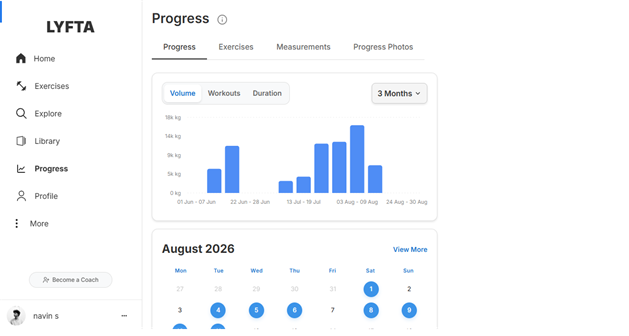
Figure 4: Lyfta Progress Tracking Interface
8. RecommendationsUsability Problem
Recommendation
Simplify navigation
Clarify navigation labels and make important features easier to discover.
Improve progress tracking
Provide clearer progress summaries, statistics, and visual representations of training progress.
Improve workout logging
Make recording exercises, sets, reps, and weights faster and more intuitive.
Add beginner guidance
Introduce a short onboarding experience or contextual guidance for users who are new to workout tracking apps.
Improve workout discovery
Make exercise and workout recommendations easier to find and explore.
9. ConclusionThe usability study showed that Lyfta provides a generally positive user experience, with an overall usability rating of 4.0/5 in the submitted responses. Participants were generally able to understand the purpose of Lyfta and complete key workout-related activities. The main opportunities for improvement were navigation, exercise discovery, workout logging, and progress tracking. Making important features easier to discover and providing clearer guidance for beginners could make Lyfta more intuitive and efficient for a wider range of users.
Note: Findings and scores in this report are based on the participant responses provided in the submitted Google Forms CSV.