
ABIS CINEMATIC 01 — Signature Cinematic LUT
1 mois de Skillshare
Disponible avec l'achatGratuit
Tous les abonnements seront facturés automatiquement de manière récurrente jusqu'à leur résiliation. Si vous pouvez profiter d'un essai gratuit, résiliez avant la fin de l'essai pour éviter une facturation. Offre valable uniquement pour les nouveaux abonnés payants. Consultez l'intégralité des conditions d'utilisation ici.
À propos de ce produit

Olusola Abisagbo
Professional Photographer and Educator
One LUT. Different Images. One Cinematic Starting Point.
You don't always need 20 LUTs to create a beautiful look.
Sometimes, you just need ONE that works as a strong starting point.
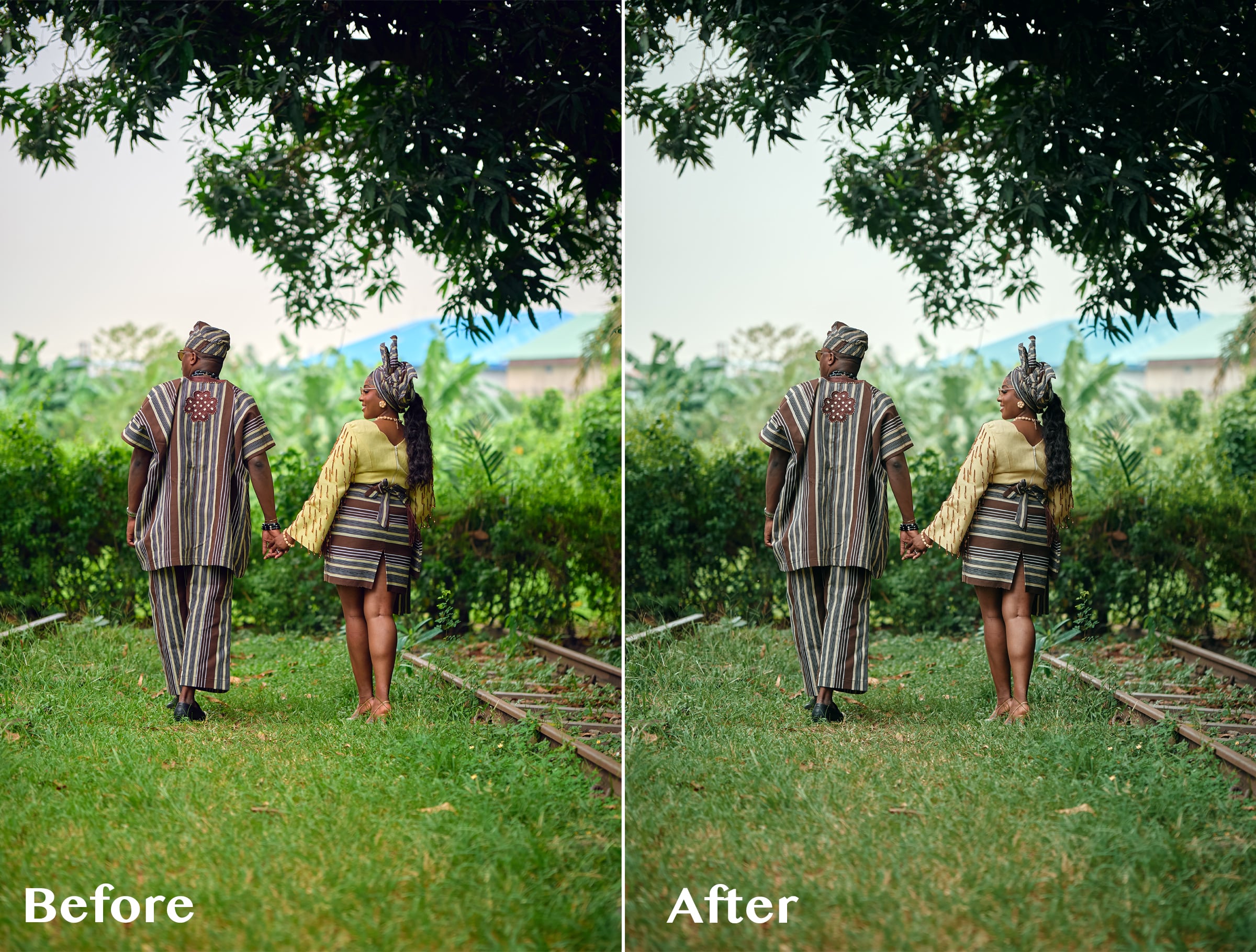
ABIS CINEMATIC 01 is a signature cinematic LUT created for photographers who love rich, slightly dark, moody colours without spending too much time trying different presets and LUTs.
I originally created this LUT while working with wedding images with a lot of greenery. I wanted the bright greens to feel deeper, darker and more cinematic instead of overpowering the photograph.
But while testing it, I discovered something interesting.
It wasn't just about the greens.
I tested the LUT on photographs with completely different colours, lighting, environments, and it still gave me a beautiful cinematic base to work from.
The secret is knowing how to adjust it.
THE SIMPLE WORKFLOW
1. Apply ABIS CINEMATIC 01
Start by applying the LUT to your image.
2. Adjust the LUT opacity
You don't have to use the LUT at 100%.
Reduce the opacity until the effect feels right for your photograph.
3. Adjust your Levels
Use Levels to refine the brightness, contrast and overall depth of the image.
4. Adjust Saturation if needed
Want some of the original colours back?
Simply increase the saturation to taste.
That's it.
LUT → Opacity → Levels → Saturation
A simple starting point that you can adapt to your own photograph and editing style.
WHAT MAKES ABIS CINEMATIC 01 DIFFERENT?
I didn't want to create another LUT pack filled with 10, 20 or 50 different looks that you have to keep clicking through.
I wanted one versatile LUT that I could understand, control and use repeatedly.
ABIS CINEMATIC 01 gives you the foundation.
You decide how far you want to take it.
Use a lower opacity for a subtle cinematic finish.
Push it further when you want something darker and moodier.
Add saturation when you want more colour.
Adjust your Levels when you want more depth.
The LUT gives you the look. You remain in control of the final image.
ESPECIALLY BEAUTIFUL ON GREENS 🌿
Although ABIS CINEMATIC 01 can be used across different colour environments, one of my favourite things about it is what it does to bright greens.
Grass, trees and foliage can sometimes become too bright or distracting in wedding and outdoor photography.
ABIS CINEMATIC 01 helps create deeper, muted and more cinematic-looking greens, making it especially useful for outdoor weddings, pre-weddings and portraits.
GREAT FOR
Wedding photography
Pre-wedding photography
Portrait photography
Outdoor photography
Lifestyle photography
Editorial images
Photographers who love cinematic colours
Photographers who prefer dark and moody edits
WHAT YOU'LL RECEIVE
ABIS CINEMATIC 01 LUT (.CUBE)
Plus a simple Quick Start Guide showing you my recommended workflow:
Apply LUT → Adjust Opacity → Levels → Saturation
The .CUBE format makes the LUT usable in compatible photo and video editing software that supports LUTs.
IMPORTANT TO KNOW
ABIS CINEMATIC 01 is designed to give you a cinematic starting point, not replace your entire editing process.
Different photographs have different lighting, exposure, white balance, colours and camera profiles.
For this reason, you may need to adjust the LUT opacity, Levels, saturation, exposure or white balance to achieve your preferred result.
And that's exactly how I use it myself.
FAQ
Qu'est-ce que les produits numériques ?
Les produits numériques de Skillshare sont des outils, des ressources et des modèles développés par des pros de la création et mis à votre disposition à l'achat. Avec un large éventail de ressources répondant à tous les besoins créatifs, ils sont exploitables, rendant votre expérience d'apprentissage concrète et inoubliable.
Comment puis-je acheter un produit numérique ?
Tout le monde peut acheter un produit numérique sur Skillshare. Cliquez sur Acheter maintenant pour saisir vos informations de paiement et finaliser votre achat. Une fois le paiement effectué, tous les fichiers pourront être téléchargés instantanément à partir de cette page. Vous recevrez également un e-mail contenant un lien pour télécharger votre produit numérique après l'achat.
Y a-t-il une limite au nombre de fois que je peux télécharger un produit numérique ?
Non, il n'y a pas de limite au nombre de fois que vous pouvez télécharger un produit numérique. Même si un produit est supprimé par la personne qui l'a créé, vous pouvez toujours accéder à la page de téléchargement dans la plupart des cas en vous connectant à votre compte Skillshare.
Puis-je obtenir un remboursement ou annuler l'achat de mon produit numérique ?
Les produits numériques ne sont pas remboursables et ne peuvent être ni retournés ni annulés. Pour en savoir plus, consultez notre politique de remboursement dans le centre d'aide Skillshare.
Puis-je créer et vendre mes propres produits numériques ?
Absolument ! Consultez l'article Comment puis-je vendre un produit numérique sur Skillshare ? pour découvrir comment créer, proposer et vendre vos propres produits numériques sur Skillshare.