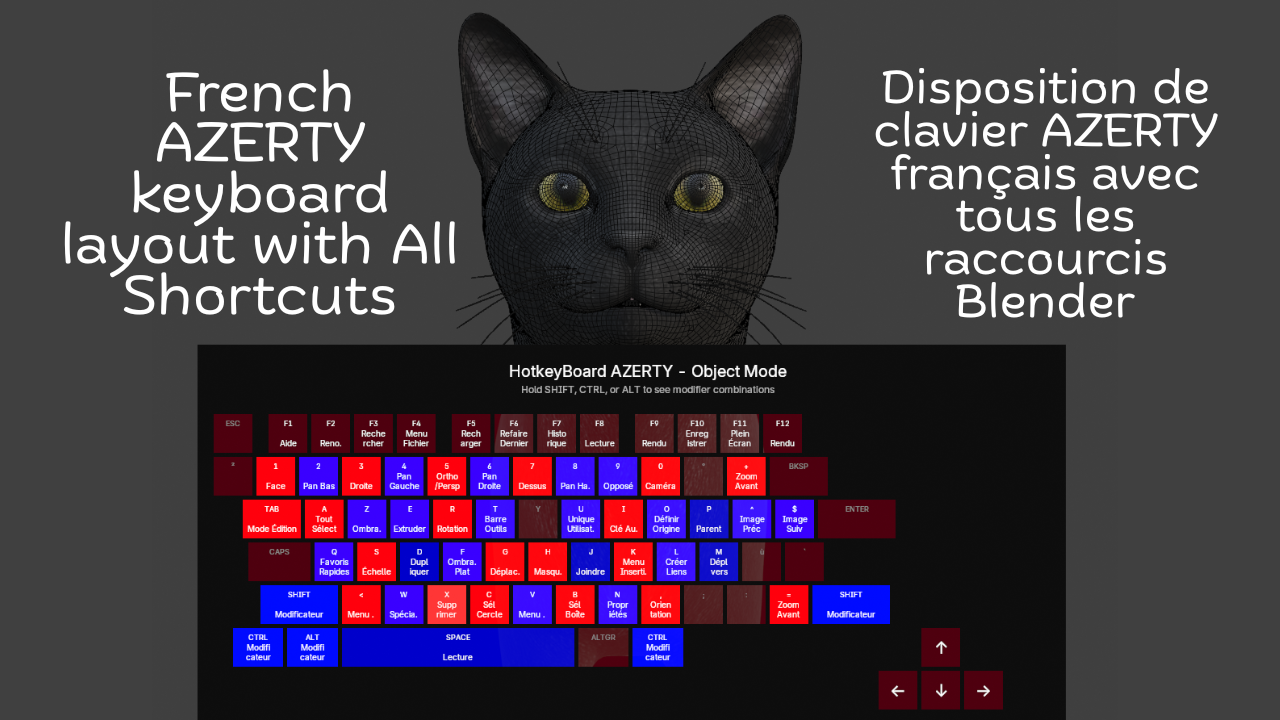
French Keyboard Shortcuts - HotkeyBoard AZERTY
1 mois de Skillshare
Disponible avec l'achatGratuit
Tous les abonnements seront facturés automatiquement de manière récurrente jusqu'à leur résiliation. Si vous pouvez profiter d'un essai gratuit, résiliez avant la fin de l'essai pour éviter une facturation. Offre valable uniquement pour les nouveaux abonnés payants. Consultez l'intégralité des conditions d'utilisation ici.
À propos de ce produit

Salman Naseem
2d 3D Animator
Learning Blender with an AZERTY keyboard shouldn't be harder than with QWERTY. Yet most resources, tutorials, and overlays are designed for QWERTY users, forcing AZERTY users to constantly translate shortcuts in their heads. This slows learning, creates confusion, and breaks creative flow.
HotkeyBoard AZERTY solves this problem completely. It's the first and only Blender addon built specifically for AZERTY keyboards from the ground up. Open it, and you see YOUR keyboard not an adapted QWERTY layout.
Over 500 Blender shortcuts are displayed and color-coded by importance, so you learn systematically: start with blue (essential), add green (common), then orange (advanced). Press any key and watch it light up yellow instant feedback that you hit the right key. This visual learning is 10x faster than memorizing from lists.

Key Features
Core Features:
Complete AZERTY layout (Mac & Windows)
Real-time key highlighting (yellow when pressed)
500+ shortcuts covered (Object, Edit, Sculpt modes)
Color-coded by importance (6 colors)
Modifier combinations (Shift, Ctrl, Alt)
Bilingual interface (English/French)
Custom colors (enabled by default)
Adjustable size (50-150%) and opacity (0-100%)
The addon is fully bilingual. French speakers can switch to see "Déplacer" instead of "Move," "Rotation" instead of "Rotate," and 150+ other shortcuts in their native language. One click in the N panel switches everything instantly.


What You Get
✓ Complete AZERTY layouts for Mac & Windows
✓ 500+ shortcuts color-coded by importance
✓ Real-time yellow highlighting when you press keys
✓ Bilingual interface (English + French)
✓ Automatic platform detection
✓ 6 modes supported (Object, Edit, Sculpt, Paint variants)
✓ Full color customization (7 colors)
✓ Adjustable size (50-150%) and opacity (0-100%)
✓ Custom font sizes
✓ Modifier combination display
✓ Multi-line text wrapping
✓ Zero configuration needed
✓ Minimal performance impact (<1%)
✓ Lifetime updates included


Advanced Features
⚡ Modifier combinations display (Shift, Ctrl, Alt)
⚡ Multi-line text wrapping for long shortcuts
⚡ Smart key highlighting with 250ms decay
⚡ Adjustable scale (50-150%) for any screen
⚡ Opacity control (0-100%) for subtle overlay
⚡ Custom font sizes (8-24px labels, 6-18px shortcuts)
⚡ Settings persist across Blender sessions
⚡ Professional email support included
Compatibility
🖥️ Blender 4.2, 4.3, 4.4, 5.0+
🍎 macOS 11+ (Intel & Apple Silicon)
🪟 Windows 10/11
🐧 Linux (Ubuntu, Fedora, Debian, Arch)
⌨️ All AZERTY keyboards
FAQ
Qu'est-ce que les produits numériques ?
Les produits numériques de Skillshare sont des outils, des ressources et des modèles développés par des pros de la création et mis à votre disposition à l'achat. Avec un large éventail de ressources répondant à tous les besoins créatifs, ils sont exploitables, rendant votre expérience d'apprentissage concrète et inoubliable.
Comment puis-je acheter un produit numérique ?
Tout le monde peut acheter un produit numérique sur Skillshare. Cliquez sur Acheter maintenant pour saisir vos informations de paiement et finaliser votre achat. Une fois le paiement effectué, tous les fichiers pourront être téléchargés instantanément à partir de cette page. Vous recevrez également un e-mail contenant un lien pour télécharger votre produit numérique après l'achat.
Y a-t-il une limite au nombre de fois que je peux télécharger un produit numérique ?
Non, il n'y a pas de limite au nombre de fois que vous pouvez télécharger un produit numérique. Même si un produit est supprimé par la personne qui l'a créé, vous pouvez toujours accéder à la page de téléchargement dans la plupart des cas en vous connectant à votre compte Skillshare.
Puis-je obtenir un remboursement ou annuler l'achat de mon produit numérique ?
Les produits numériques ne sont pas remboursables et ne peuvent être ni retournés ni annulés. Pour en savoir plus, consultez notre politique de remboursement dans le centre d'aide Skillshare.
Puis-je créer et vendre mes propres produits numériques ?
Absolument ! Consultez l'article Comment puis-je vendre un produit numérique sur Skillshare ? pour découvrir comment créer, proposer et vendre vos propres produits numériques sur Skillshare.