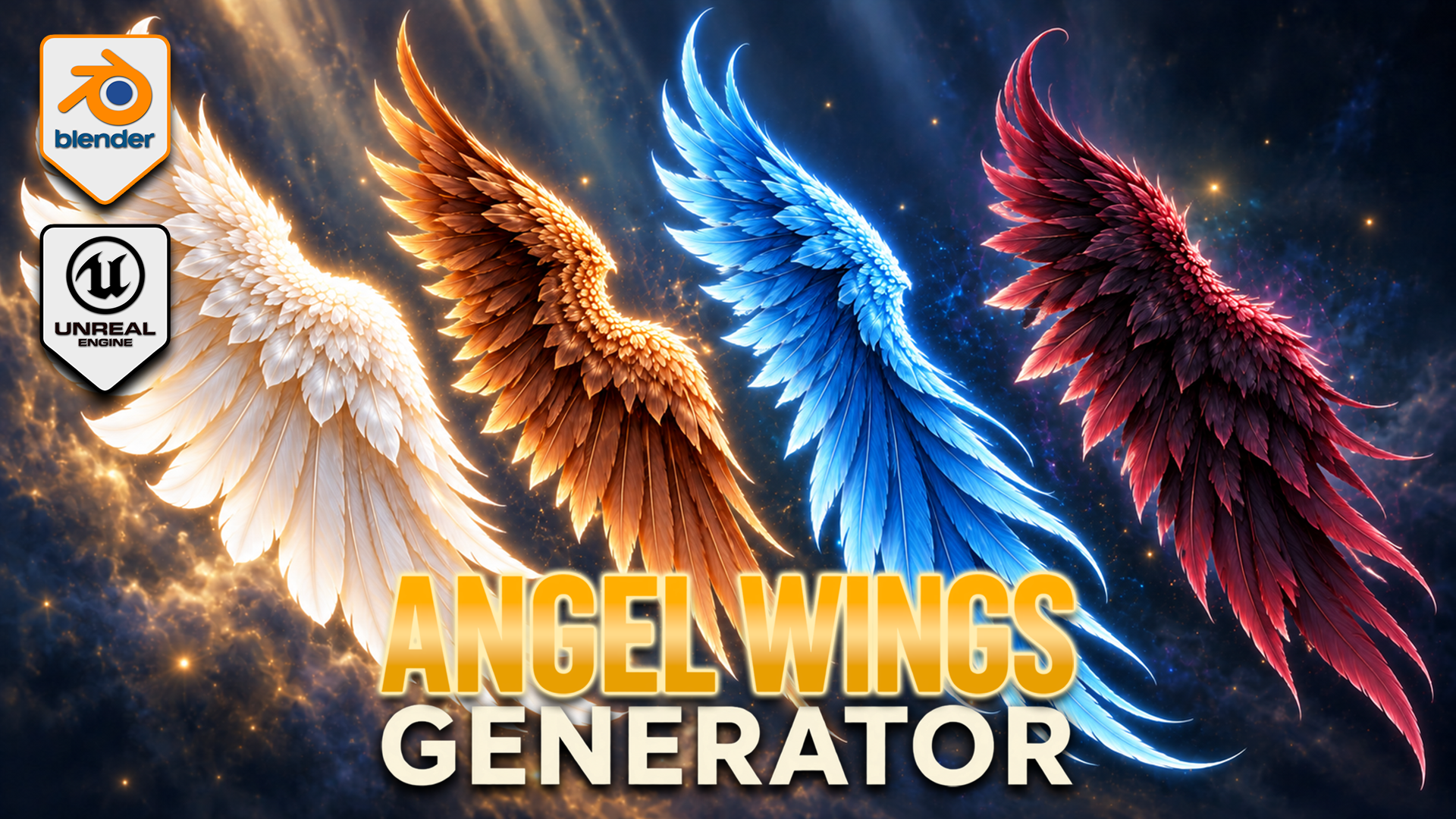
Angel Wings Generator for Blender
1 mois de Skillshare
Disponible avec l'achatGratuit
Tous les abonnements seront facturés automatiquement de manière récurrente jusqu'à leur résiliation. Si vous pouvez profiter d'un essai gratuit, résiliez avant la fin de l'essai pour éviter une facturation. Offre valable uniquement pour les nouveaux abonnés payants. Consultez l'intégralité des conditions d'utilisation ici.
À propos de ce produit

3D Tudor
Bestselling Blender Author & 3D Educator
Build feathered wings around your fantasy character with an editable Blender Geometry Nodes generator. Shape the outline, develop the overlapping feather layers and pose each wing independently, then explore colour and procedural movement within the same setup.
SHAPE FIRST, DETAIL SECOND
Adjust span, height, depth, cupping and sweep to establish the silhouette. Shoulder shape and root placement help fit the wings around your reference. Independent left and right controls support asymmetric poses, with raise, elbow bend, wrist bend, twist and fold settings for the gesture.
DEVELOP THE FEATHER LAYERS
Flight, cover and upper feather layers have controls for length, width, density, fan and roll. Refine curl, camber, taper and tip twist, then use seeded variation to break up repetition. Attachment, fluff and top-wrap sections help develop the root and upper edge.
The twelve feather texture styles are starting forms inside the generator, not twelve fixed finished wing models. Combine the layers and shape controls to develop your own design. Feather colour, variation colour, root tint and vertical tint support pale, dark or vivid fantasy palettes.
POSE AND ANIMATE
Procedural flapping controls include speed and strength, independent timing, wave delay, elbow and wrist follow, recovery fold and feather follow-through. This is a creative wing-motion system, not flight physics or a complete character rig. Draft, Standard and Full settings let you choose the feather-card geometry level for your scene.
YOUR DOWNLOADS
• Blender archive: native wing-generator file, optional exporter v0.13.0 and installation notes.
• Texture archive: twelve feather textures, three scene textures and one environment image.
• Start Here text file: opening instructions.
The native Blender file contains five wing control objects and packed image resources. The main generator has 153 exposed inputs covering shape, pose, feathers, animation and shading. It was inspected in Blender 5.2.2 LTS.
GETTING STARTED
Read Start Here, extract the Blender archive and open the native project. Select a wing control object and establish the broad outline before refining the feather layers. Develop the pose, then colour and motion. Follow the separate installation notes if you want to use the optional exporter.
This is a downloadable tool package, not a Skillshare class. Presentation characters and atmospheric promotional backgrounds illustrate the theme; a separately licensed character asset and those background scenes are not included.
Happy modelling everyone!
Neil – 3D Tudor
FAQ
Qu'est-ce que les produits numériques ?
Les produits numériques de Skillshare sont des outils, des ressources et des modèles développés par des pros de la création et mis à votre disposition à l'achat. Avec un large éventail de ressources répondant à tous les besoins créatifs, ils sont exploitables, rendant votre expérience d'apprentissage concrète et inoubliable.
Comment puis-je acheter un produit numérique ?
Tout le monde peut acheter un produit numérique sur Skillshare. Cliquez sur Acheter maintenant pour saisir vos informations de paiement et finaliser votre achat. Une fois le paiement effectué, tous les fichiers pourront être téléchargés instantanément à partir de cette page. Vous recevrez également un e-mail contenant un lien pour télécharger votre produit numérique après l'achat.
Y a-t-il une limite au nombre de fois que je peux télécharger un produit numérique ?
Non, il n'y a pas de limite au nombre de fois que vous pouvez télécharger un produit numérique. Même si un produit est supprimé par la personne qui l'a créé, vous pouvez toujours accéder à la page de téléchargement dans la plupart des cas en vous connectant à votre compte Skillshare.
Puis-je obtenir un remboursement ou annuler l'achat de mon produit numérique ?
Les produits numériques ne sont pas remboursables et ne peuvent être ni retournés ni annulés. Pour en savoir plus, consultez notre politique de remboursement dans le centre d'aide Skillshare.
Puis-je créer et vendre mes propres produits numériques ?
Absolument ! Consultez l'article Comment puis-je vendre un produit numérique sur Skillshare ? pour découvrir comment créer, proposer et vendre vos propres produits numériques sur Skillshare.