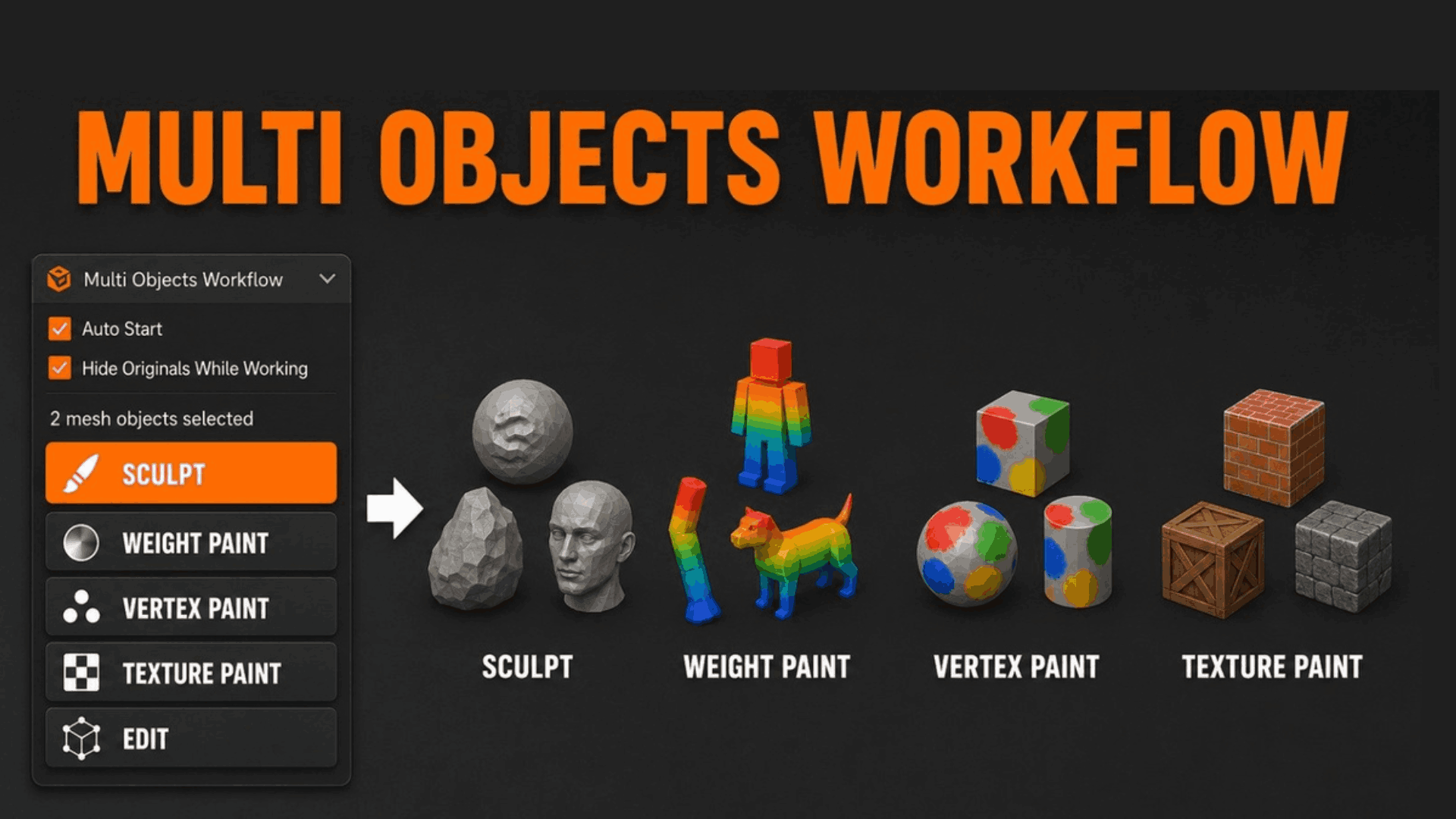
Multi Objects Workflow-Sculpt,Paint & Weight Paint
1 mois de Skillshare
Disponible avec l'achatGratuit
Tous les abonnements seront facturés automatiquement de manière récurrente jusqu'à leur résiliation. Si vous pouvez profiter d'un essai gratuit, résiliez avant la fin de l'essai pour éviter une facturation. Offre valable uniquement pour les nouveaux abonnés payants. Consultez l'intégralité des conditions d'utilisation ici.
À propos de ce produit

Junaid Alam
3D Artist
Blender's sculpting, painting, and weight painting tools operate on a single active object. When your character is split into a body, clothing layers, and armor pieces as virtually every production-ready character is that constraint forces a choice: destructively join your objects, or give up working across mesh boundaries.
Multi Objects Workflow eliminates that choice.
Select any number of mesh objects, start a session, and the addon instantly builds a temporary combined mesh from all of them. Sculpt across seams, blend weight paint across clothing and body in a single stroke, texture paint without borders, or edit topology across multiple parts then return to Object Mode. Your edits transfer back to every original object automatically. The combined mesh is removed. Nothing was ever joined.
This is the workflow that Blender's native toolset doesn't give you built specifically for artists who work at a production level
Key Benefits
Work the way your assets are actually built. Production characters, modular environments, and prop kits are never single meshes. Multi Objects Workflow lets your tools match your asset structure, not the other way around.
Never destructively join again. Joining objects to work across them collapses modifiers, loses per-object UV islands, merges materials, and destroys vertex group organization. This addon preserves all of it on the original objects always.
Zero interruption to your rigging pipeline. Weight painting across body, clothing, hair, and armor objects simultaneously means your deformation pipeline stays clean. No manual weight copying, no proxy meshes, no workarounds.
Shape keys survive every session. Sculpt edits apply to the basis mesh, keeping all existing shape key offsets intact and relative. Your corrective shapes, facial blendshapes, and morph targets are untouched.
Auto-start means zero extra clicks. Enable Auto Start and the session begins the moment you switch mode with multiple objects selected identical to native Blender mode-switching, but across all selected objects at once.
Professional Use Cases
Character Art & Rigging Sculpt secondary forms across body parts without seam artifacts. Weight paint deformation influence across body, clothing, and hair layers in a single pass. Eliminate the need for proxy meshes or manual weight transfers between overlapping mesh objects.
Game Asset Production Paint vertex colors, bake-friendly normal details, and LOD-preparation edits across modular kit pieces simultaneously. Keep each piece as a separate exportable mesh while treating the set as a unified editing surface.
VFX & Feature Animation Work on cloth simulation meshes, body cage meshes, and skin meshes as a unified surface during look development without collapsing the simulation stack. Preserve modifier chains while sculpting final detail passes.
Architectural Visualization Sculpt material variation, weathering detail, or organic deformation across façade elements, terrain patches, and prop clusters without merging geometry that needs to remain separate for instancing, LOD, or material assignment.
Environment Art Detail sculpt across tiling terrain chunks, rock formations, or building modules. Apply vertex color passes across modular environment kits. Maintain each mesh as a discrete object for scene organization, export, or LOD streaming.
Product & Industrial Visualization Refine surface quality and continuity across multi-part assemblies mechanical components, consumer electronics, automotive panels without disrupting the part hierarchy needed for rendering and animation.


Workflow Advantages
Without this addon ------With Multi Objects Workflow
Join objects (destructive) → sculpt/paint → manually separate
Select objects → start session → work → return to Object Mode
Lose modifiers, UV maps, materials on join
All original data preserved on each object
Re-transfer weights manually after joining
Weight paint transfers back automatically to each object
Rebuild shape keys after destructive join
Shape keys preserved; basis updated non-destructively
No way to texture paint across multiple objects
Full multi-object texture paint session in one click
Time saved per character weight painting session: estimated 30–90 minutes no join, no transfer, no cleanup.
Auto Start further reduces friction to zero: with it enabled, switching to Sculpt or Paint mode with multiple objects selected launches the session automatically no sidebar visit required.
FAQ
Qu'est-ce que les produits numériques ?
Les produits numériques de Skillshare sont des outils, des ressources et des modèles développés par des pros de la création et mis à votre disposition à l'achat. Avec un large éventail de ressources répondant à tous les besoins créatifs, ils sont exploitables, rendant votre expérience d'apprentissage concrète et inoubliable.
Comment puis-je acheter un produit numérique ?
Tout le monde peut acheter un produit numérique sur Skillshare. Cliquez sur Acheter maintenant pour saisir vos informations de paiement et finaliser votre achat. Une fois le paiement effectué, tous les fichiers pourront être téléchargés instantanément à partir de cette page. Vous recevrez également un e-mail contenant un lien pour télécharger votre produit numérique après l'achat.
Y a-t-il une limite au nombre de fois que je peux télécharger un produit numérique ?
Non, il n'y a pas de limite au nombre de fois que vous pouvez télécharger un produit numérique. Même si un produit est supprimé par la personne qui l'a créé, vous pouvez toujours accéder à la page de téléchargement dans la plupart des cas en vous connectant à votre compte Skillshare.
Puis-je obtenir un remboursement ou annuler l'achat de mon produit numérique ?
Les produits numériques ne sont pas remboursables et ne peuvent être ni retournés ni annulés. Pour en savoir plus, consultez notre politique de remboursement dans le centre d'aide Skillshare.
Puis-je créer et vendre mes propres produits numériques ?
Absolument ! Consultez l'article Comment puis-je vendre un produit numérique sur Skillshare ? pour découvrir comment créer, proposer et vendre vos propres produits numériques sur Skillshare.