3DT Aztec Shaders for Blender Cycles
1 mois de Skillshare
Disponible avec l'achatGratuit
Tous les abonnements seront facturés automatiquement de manière récurrente jusqu'à leur résiliation. Si vous pouvez profiter d'un essai gratuit, résiliez avant la fin de l'essai pour éviter une facturation. Offre valable uniquement pour les nouveaux abonnés payants. Consultez l'intégralité des conditions d'utilisation ici.
À propos de ce produit

3D Tudor
Bestselling Blender Author & 3D Educator
Build a connected Aztec-inspired surface direction without constructing every material family from scratch.
Environment surfacing often slows down when every stone, clay pot, timber, metal fitting, ground patch and cloth element feels as if it came from a different library. The 3DT Aztec Shaders for Blender Cycles brings 28 stylized materials into one coherent visual range, giving you a practical starting point for ruins, jungle temples, architecture, props and terrain while keeping the individual materials open for inspection and adjustment.
One complete Blender material library
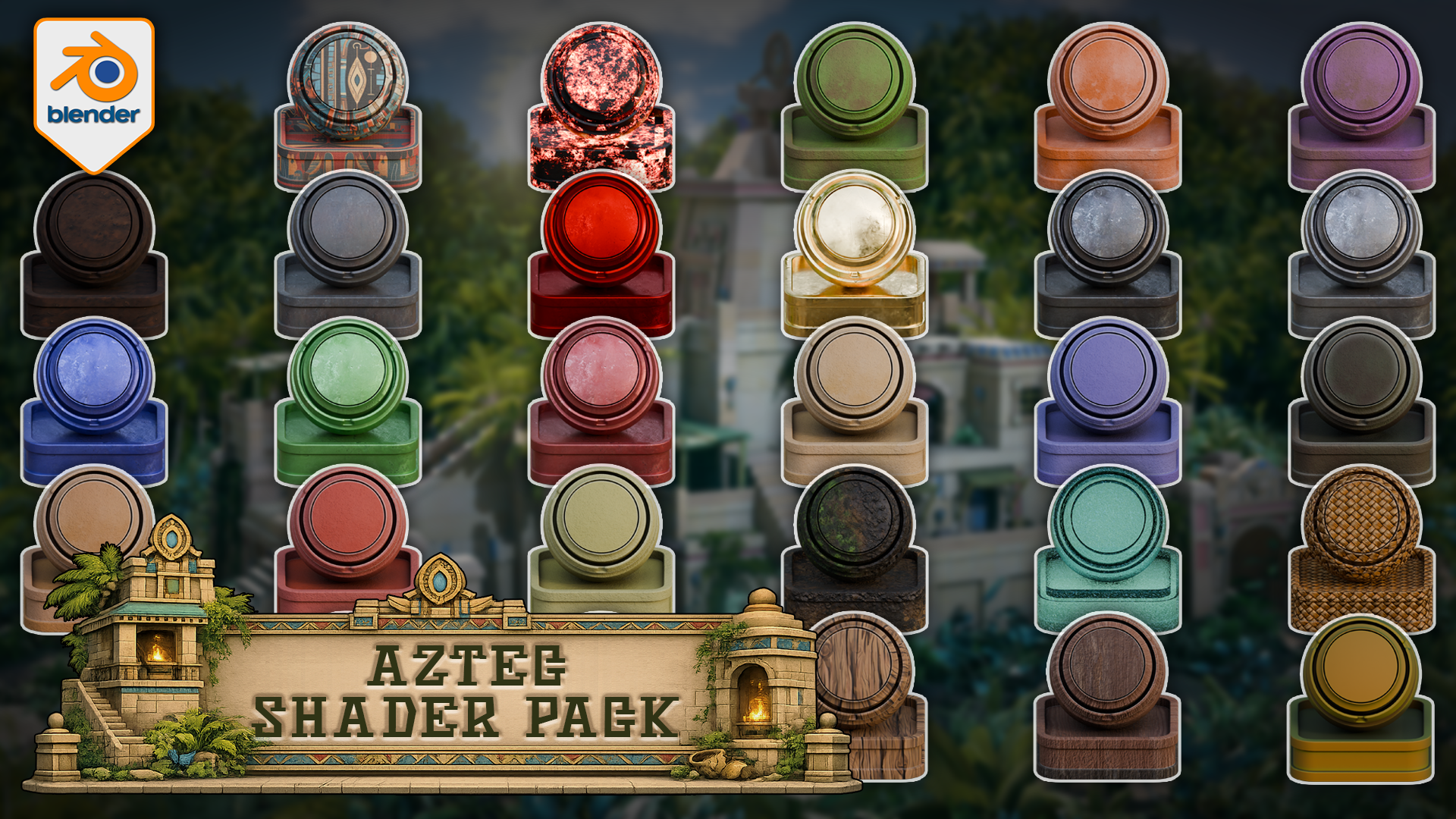
You receive one Blender file containing all 28 materials and 28 same-named preview/application objects. The range covers stone, clay, metal, wood, terrain, cloth, water and supporting surfaces, including Bamboo, Carpet, Charcoal, three clay variations, Dirt, Fabric Cloth Red, Gemstone Red, Gold, Iron Dark, four additional metals, six stones, Terrain, Water, Weave and four woods.
The library contains 26 hybrid materials and 2 procedural materials. It also includes 45 approved loose texture files alongside the Blender file, plus a quick-start README, a visual material reference and Cycles instructions in PDF and HTML formats. This is one complete paid download rather than a set of separate material variants.
 First contact sheet: 14 verified pattern, earth, clay and metal materials from the Aztec Blender library.
 Second contact sheet: stone, terrain, water, weave and wood complete the verified 28-material range.
Why this pack is useful
The value is not simply the number 28. It is the way the surfaces work together. Warm clay, worn metal, varied stone, dark earth, woven fibres, water and timber can all sit inside the same stylized scene direction, reducing the time spent searching across unrelated libraries and then correcting colour or surface mismatch.
Each material has a same-named preview object inside the supplied file, so you can inspect the result before moving it into your own project. Open the Blender file, copy and paste the preview object or material you need, or use Blender's Append workflow. The materials are not preconfigured as Asset Browser assets.
 Stone, clay, metal and wood previews show the connected colour direction of this Blender Cycles library.
Best for
Use the pack for stylized ruin and jungle-temple scenes, architectural surfaces, props, terrain dressing, cloth details, water features and material studies. It is particularly useful when you want a scene to feel deliberately art-directed rather than assembled from disconnected surface sources.
 The full overview shows how all 28 surfaces support one stylized environment direction.
environment direction.
Cycles compatibility
This is a Cycles-only Blender product. All 28 materials completed render proofs in Blender 5.0.1 and Blender 5.1.2. Blender 4.5 is not supported, Blender 5.2 remains unverified, and EEVEE support is not included. No add-on or plug-in is required.
Results on your own meshes can vary with UVs, object scale, topology, mesh density, vertex colours and material settings. The supplied preview objects provide a clear reference for the intended setup, but they do not guarantee identical behaviour on arbitrary geometry.
Not included
This download does not include a temple, jungle environment, model pack, course, add-on, plug-in or ready-made Asset Browser catalogue. The promotional environment is presentation context only. The pack is not described as historically accurate, seamless, fully PBR, game-ready or performance-optimised because those claims are not part of the verified product evidence.
Quick questions
How do I move a material into another Blender project?
Open the supplied file and copy and paste the relevant preview object or material, or use Blender's Append command. The included instructions walk through both routes.
Are the textures packed?
The supplied Blender file was verified with its material texture images packed and no missing external image dependencies. The customer package also includes 45 approved loose texture files for clear access and recovery.
Can I use this in EEVEE?
No. This listing is for Blender Cycles only, with all 28 materials render-proven in Blender 5.0.1 and 5.1.2.
Is this required for a Skillshare class?
No. This is a separate, optional paid product and is not required to complete any class or class project.
If a cohesive Aztec-inspired surface library fits the scene you are building, download the pack, open the material file and start by comparing the supplied preview objects with the surfaces you need.
Until next time, happy modelling, everyone!
Neil - 3D Tudor
For download, access or documented-workflow support, use the support/contact route provided by the Skillshare marketplace.
FAQ
Qu'est-ce que les produits numériques ?
Les produits numériques de Skillshare sont des outils, des ressources et des modèles développés par des pros de la création et mis à votre disposition à l'achat. Avec un large éventail de ressources répondant à tous les besoins créatifs, ils sont exploitables, rendant votre expérience d'apprentissage concrète et inoubliable.
Comment puis-je acheter un produit numérique ?
Tout le monde peut acheter un produit numérique sur Skillshare. Cliquez sur Acheter maintenant pour saisir vos informations de paiement et finaliser votre achat. Une fois le paiement effectué, tous les fichiers pourront être téléchargés instantanément à partir de cette page. Vous recevrez également un e-mail contenant un lien pour télécharger votre produit numérique après l'achat.
Y a-t-il une limite au nombre de fois que je peux télécharger un produit numérique ?
Non, il n'y a pas de limite au nombre de fois que vous pouvez télécharger un produit numérique. Même si un produit est supprimé par la personne qui l'a créé, vous pouvez toujours accéder à la page de téléchargement dans la plupart des cas en vous connectant à votre compte Skillshare.
Puis-je obtenir un remboursement ou annuler l'achat de mon produit numérique ?
Les produits numériques ne sont pas remboursables et ne peuvent être ni retournés ni annulés. Pour en savoir plus, consultez notre politique de remboursement dans le centre d'aide Skillshare.
Puis-je créer et vendre mes propres produits numériques ?
Absolument ! Consultez l'article Comment puis-je vendre un produit numérique sur Skillshare ? pour découvrir comment créer, proposer et vendre vos propres produits numériques sur Skillshare.