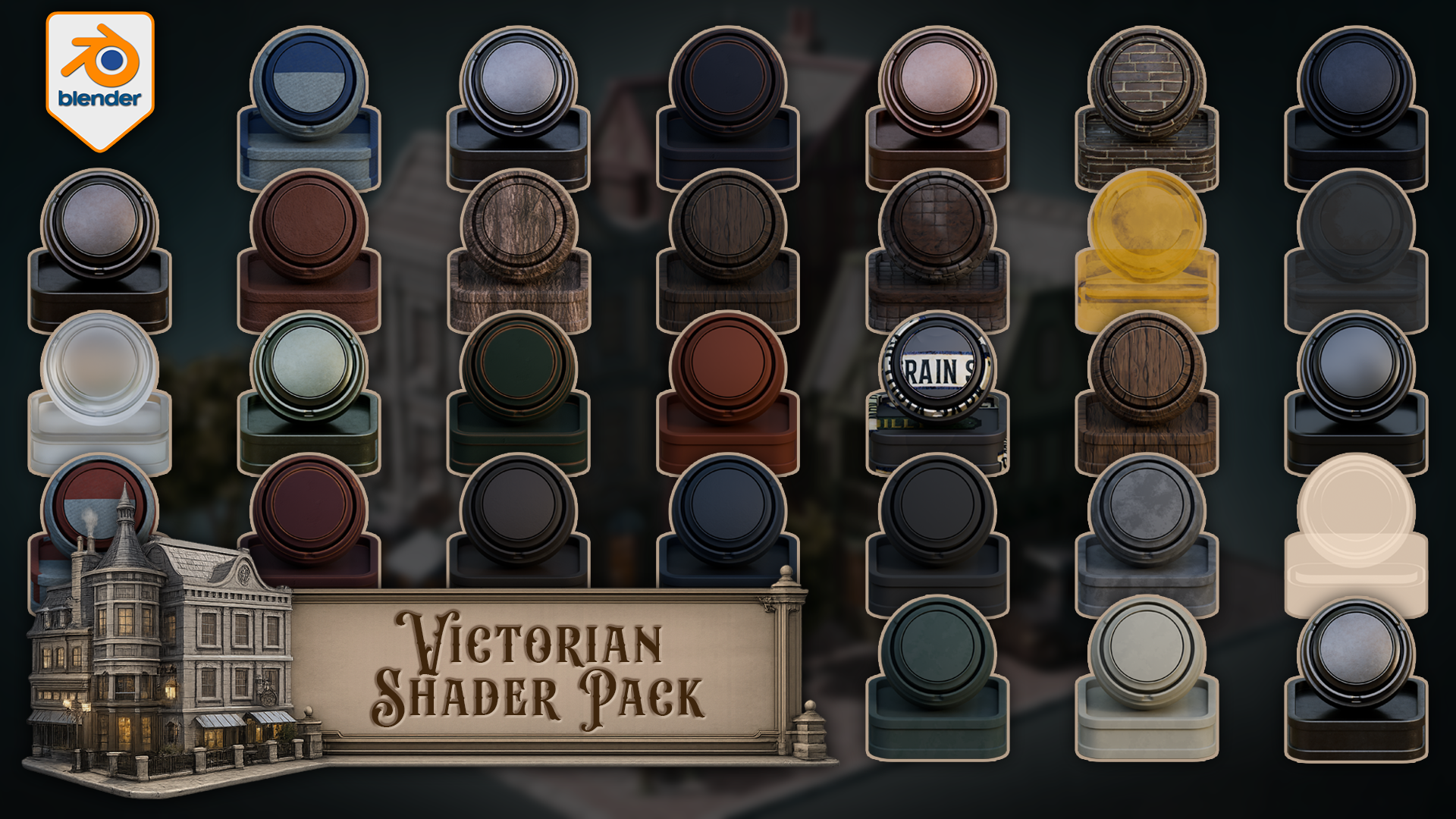
Victorian Shader Pack for Blender 5 Cycles
1 mois de Skillshare
Disponible avec l'achatGratuit
Tous les abonnements seront facturés automatiquement de manière récurrente jusqu'à leur résiliation. Si vous pouvez profiter d'un essai gratuit, résiliez avant la fin de l'essai pour éviter une facturation. Offre valable uniquement pour les nouveaux abonnés payants. Consultez l'intégralité des conditions d'utilisation ici.
À propos de ce produit

3D Tudor
Bestselling Blender Author & 3D Educator
https://youtu.be/aeCjPocOxkk
Build Victorian streets, aged shopfronts, period interiors, darker architectural scenes, and atmospheric environment work with a connected set of Victorian materials and shaders for Blender.
This pack includes one downloadable Blender file with 33 materials and shaders already set up for Blender 5 Cycles. The collection covers painted wood, natural wood, worn metals, brass, stone, roof surfaces, clay, brick, wall finishes, glass, lit windows, curtains, cloth, bark, leaves, leather, rubber, street signs, and a floor shader that blends between three materials using vertex paint.
Every shader has been built around practical scene use. The point is not to give you a folder of disconnected swatches. The point is to give you a Victorian themed shader library that can support a full environment without every material fighting for attention.
Included in the pack
- Floor shader with three-material vertex paint blending
- Car metal blue
- Car metal light
- Light metal
- Blue metal
- Black metal
- Brass metal
- Green metal
- Green painted wood
- Blue painted wood
- Light wood
- Dark wood
- Red painted wood
- Stone
- Roof material
- Second roof material
- Clay
- Rubber
- Leather
- Tree bark
- Leaves with alpha setup
- Blue cloth
- Red cloth
- Track glass
- Basic Glass BSDF material
- Street light glass with emission
- Lit window glass with emission
- Unlit window glass
- Curtains
- Green wall
- Grey wall
- Bricks
- Street signs
Victorian environments need material hierarchy. Some surfaces need to carry age and detail, such as painted wood, brick, brass, roof materials, stone, and signage. Other surfaces need to stay quieter, such as rubber, leather, plain glass, cloth, and wall finishes. That balance is what helps a scene feel designed rather than patched together.
The edge-wear materials are especially useful for period scenes. Painted wood, metal, brass, stone, roof, clay, and wood variants can add controlled wear to the parts of the scene where age matters most: doors, trims, frames, signs, props, railings, shopfronts, roofs, and street details.
The floor shader is the more advanced setup in the pack. It blends between three different materials using vertex paint, giving you a practical way to break up ground surfaces without building a separate masking workflow every time you want variation. This is useful for streets, thresholds, paths, building edges, and worn floor areas.
The glass and window materials give you several scene-support options as well. You get basic glass, track glass, street light glass with emission, lit window glass with emission, unlit window glass, and curtains. That means you can build darker facades, warm lit windows, lamp details, and interior dressing without forcing every window into the same material role.
Created for Blender 5 and built for Cycles.
This pack is not sold as an EEVEE-ready release. Some materials may display in other Blender render workflows, but Cycles is the intended renderer.
You can use the materials directly in the included Blender file, copy preview objects with their materials into your own scene, append the shaders you need into another Blender project, or add them to your own Asset Browser setup for faster reuse.
If you want a practical Victorian shader pack for worn wood, aged metal, brickwork, roof surfaces, lit windows, curtains, signs, darker walls, and vertex-painted floor variation inside Blender, this gives you a clean place to start.
Happy modelling everyone!
Neil – 3D Tudor
FAQ
Qu'est-ce que les produits numériques ?
Les produits numériques de Skillshare sont des outils, des ressources et des modèles développés par des pros de la création et mis à votre disposition à l'achat. Avec un large éventail de ressources répondant à tous les besoins créatifs, ils sont exploitables, rendant votre expérience d'apprentissage concrète et inoubliable.
Comment puis-je acheter un produit numérique ?
Tout le monde peut acheter un produit numérique sur Skillshare. Cliquez sur Acheter maintenant pour saisir vos informations de paiement et finaliser votre achat. Une fois le paiement effectué, tous les fichiers pourront être téléchargés instantanément à partir de cette page. Vous recevrez également un e-mail contenant un lien pour télécharger votre produit numérique après l'achat.
Y a-t-il une limite au nombre de fois que je peux télécharger un produit numérique ?
Non, il n'y a pas de limite au nombre de fois que vous pouvez télécharger un produit numérique. Même si un produit est supprimé par la personne qui l'a créé, vous pouvez toujours accéder à la page de téléchargement dans la plupart des cas en vous connectant à votre compte Skillshare.
Puis-je obtenir un remboursement ou annuler l'achat de mon produit numérique ?
Les produits numériques ne sont pas remboursables et ne peuvent être ni retournés ni annulés. Pour en savoir plus, consultez notre politique de remboursement dans le centre d'aide Skillshare.
Puis-je créer et vendre mes propres produits numériques ?
Absolument ! Consultez l'article Comment puis-je vendre un produit numérique sur Skillshare ? pour découvrir comment créer, proposer et vendre vos propres produits numériques sur Skillshare.