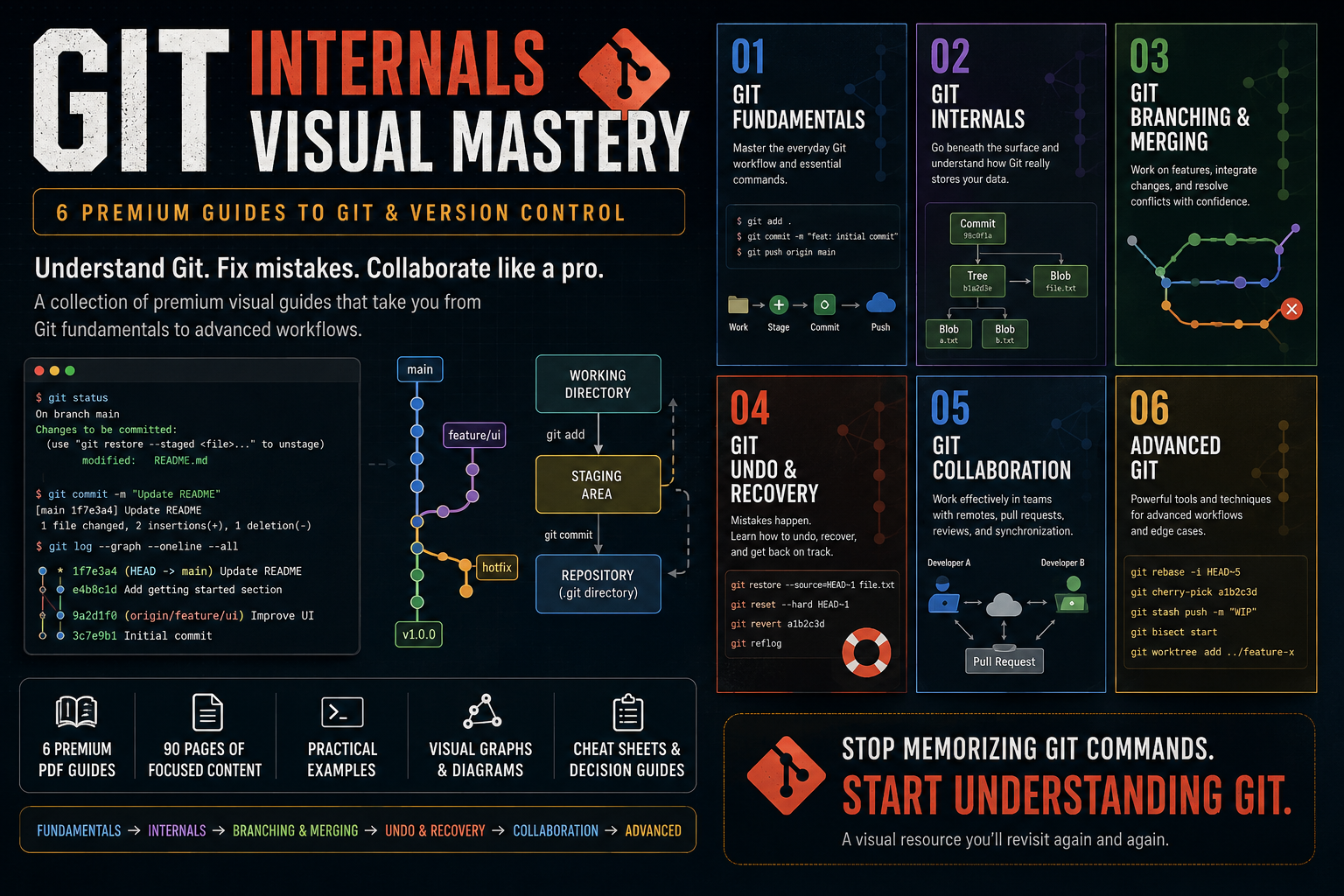
Git Internals Visual Mastery — 6 Premium Guides
1 mes de Skillshare
Disponible para compraGratis
Todas las membresías se facturarán automáticamente de forma recurrente hasta que se cancelen. Si cumples los requisitos para obtener una prueba gratis, cancélala antes de que finalice para evitar que se realice el cobro. Oferta válida solo para nuevos suscriptores pagos. Consulta los Términos de servicio completos aquí
Acerca de este producto

Aymen El Kani
software engineer
Git is easy to use until it isn't.
You can memorize git add, git commit, git push, and git pull without ever developing a real mental model of how Git works or what to do when something goes wrong.
Git Visual Mastery is a collection of premium visual guides designed to help developers understand Git from the fundamentals all the way to advanced workflows.
Instead of giving you another giant Git course filled with endless commands, these guides break Git into focused topics and explain each one through clear diagrams, practical scenarios, Git graphs, terminal examples, and concise explanations.
What's Included
01 — Git Fundamentals
Build a solid foundation with Git's everyday workflow, essential commands, staging, commits, history, branches, and repositories.
02 — Git Internals
Go beneath the surface and understand what Git actually stores.
Learn about commits, branches, HEAD, blobs, trees, hashes, references, and the Git object database.
03 — Git Branching & Merging
Understand how developers work on parallel features and integrate their changes.
Learn branching, merging, merge conflicts, rebasing, and how to choose between merge and rebase.
04 — Git Undo & Recovery
Learn what to do when something goes wrong.
Understand restore, reset, revert, reflog, and how to recover from common Git mistakes.
05 — Git Collaboration
Learn how Git fits into team development.
Understand remote repositories, push/pull/fetch, pull requests, code review, synchronization, and practical team workflows.
06 — Advanced Git
Go beyond everyday Git with powerful tools and techniques including interactive rebase, cherry-pick, stash, bisect, worktrees, and advanced workflows.
Designed for Developers Who Want to Actually Understand Git
These guides focus on the mental models behind Git, not just command memorization.
You'll see concepts explained through:
Visual Git graphs
Architecture diagrams
Before/after workflows
Realistic developer scenarios
Terminal examples
Practical decision guides
Quick-reference cheat sheets
Each guide is intentionally focused on a specific Git problem so you can learn what you need without digging through hundreds of pages.
From Beginner to Advanced
The collection follows a progressive path:
Fundamentals → Internals → Branching & Merging → Undo & Recovery → Collaboration → Advanced Git
You can read the guides sequentially or jump directly to the topic you're struggling with.
What You'll Get
6 premium visual PDF guides
90 pages of focused Git education
Practical examples and workflows
Visual reference material you can revisit anytime
A structured path from Git beginner to advanced user
Whether you're learning Git for the first time, preparing for professional development work, or constantly finding yourself searching for "how do I undo this Git command?", this collection is designed to become a resource you keep coming back to.
Stop memorizing Git commands.
Start understanding Git.
Preguntas frecuentes
¿Qué son los productos digitales?
Los productos digitales de Skillshare son herramientas, recursos y plantillas elaboradas por expertos y desarrolladas por los mejores creativos, que están disponibles para la compra. Con una amplia gama de recursos que se adaptan a todas las necesidades creativas, son prácticos y hacen que tu experiencia de aprendizaje sea real e inolvidable.
¿Cómo puedo comprar un producto digital?
Cualquier persona puede comprar un producto digital en Skillshare — haz clic en Comprar ahora para ingresar tu información de pago y completar tu compra. Una vez completado el pago, todos los archivos estarán disponibles para la descarga al instante desde esta página. También recibirás un correo electrónico con un enlace para descargar tu producto digital después de la compra.
¿Hay un límite en el número de veces que puedo descargar un producto digital?
No, no hay límite en la cantidad de veces que puedes descargar un producto digital. Incluso si el creador elimina un producto, aún puedes acceder a la página de descarga en la mayoría de los casos iniciando sesión en tu cuenta de Skillshare.
¿Puedo obtener un reembolso o cancelar la compra de mi producto digital?
Los productos digitales no son reembolsables y no se pueden devolver ni cancelar. Para obtener más información, consulta nuestra Política de reembolso en el Centro de ayuda de Skillshare.
¿Puedo hacer y vender mis propios productos digitales?
¡Absolutamente! Visita ¿Cómo puedo vender un producto digital en Skillshare? para aprender cómo puedes crear, listar y vender tus propios productos digitales en Skillshare.