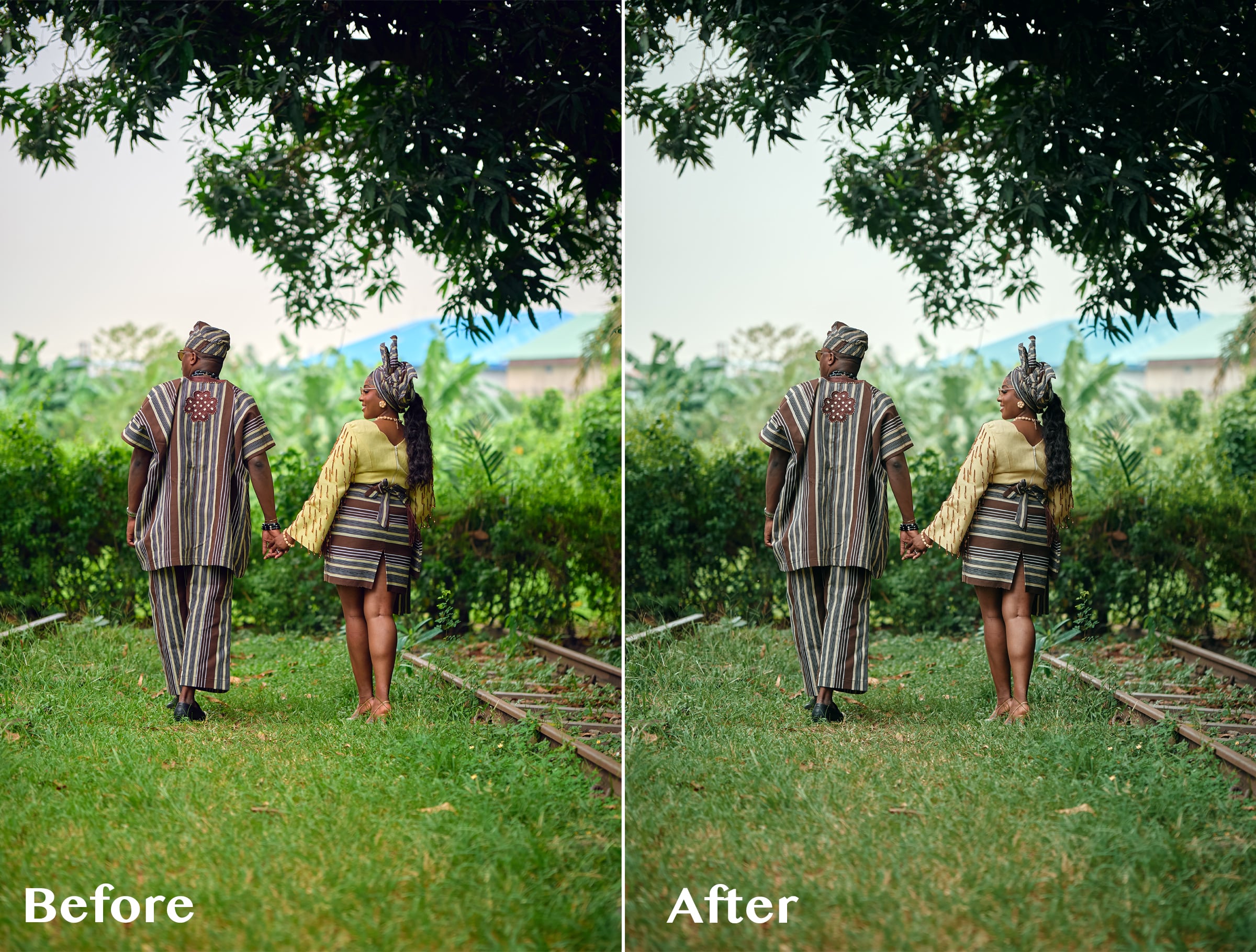

ABIS CINEMATIC 01 — Signature Cinematic LUT
1 mes de Skillshare
Disponible para compraGratis
Todas las membresías se facturarán automáticamente de forma recurrente hasta que se cancelen. Si cumples los requisitos para obtener una prueba gratis, cancélala antes de que finalice para evitar que se realice el cobro. Oferta válida solo para nuevos suscriptores pagos. Consulta los Términos de servicio completos aquí
Acerca de este producto

Olusola Abisagbo
Professional Photographer and Educator
One LUT. Different Images. One Cinematic Starting Point.
You don't always need 20 LUTs to create a beautiful look.
Sometimes, you just need ONE that works as a strong starting point.
ABIS CINEMATIC 01 is a signature cinematic LUT created for photographers who love rich, slightly dark, moody colours without spending too much time trying different presets and LUTs.
I originally created this LUT while working with wedding images with a lot of greenery. I wanted the bright greens to feel deeper, darker and more cinematic instead of overpowering the photograph.
But while testing it, I discovered something interesting.
It wasn't just about the greens.
I tested the LUT on photographs with completely different colours, lighting, environments, and it still gave me a beautiful cinematic base to work from.
The secret is knowing how to adjust it.
THE SIMPLE WORKFLOW
1. Apply ABIS CINEMATIC 01
Start by applying the LUT to your image.
2. Adjust the LUT opacity
You don't have to use the LUT at 100%.
Reduce the opacity until the effect feels right for your photograph.
3. Adjust your Levels
Use Levels to refine the brightness, contrast and overall depth of the image.
4. Adjust Saturation if needed
Want some of the original colours back?
Simply increase the saturation to taste.
That's it.
LUT → Opacity → Levels → Saturation
A simple starting point that you can adapt to your own photograph and editing style.
WHAT MAKES ABIS CINEMATIC 01 DIFFERENT?
I didn't want to create another LUT pack filled with 10, 20 or 50 different looks that you have to keep clicking through.
I wanted one versatile LUT that I could understand, control and use repeatedly.
ABIS CINEMATIC 01 gives you the foundation.
You decide how far you want to take it.
Use a lower opacity for a subtle cinematic finish.
Push it further when you want something darker and moodier.
Add saturation when you want more colour.
Adjust your Levels when you want more depth.
The LUT gives you the look. You remain in control of the final image.
ESPECIALLY BEAUTIFUL ON GREENS 🌿
Although ABIS CINEMATIC 01 can be used across different colour environments, one of my favourite things about it is what it does to bright greens.
Grass, trees and foliage can sometimes become too bright or distracting in wedding and outdoor photography.
ABIS CINEMATIC 01 helps create deeper, muted and more cinematic-looking greens, making it especially useful for outdoor weddings, pre-weddings and portraits.
GREAT FOR
Wedding photography
Pre-wedding photography
Portrait photography
Outdoor photography
Lifestyle photography
Editorial images
Photographers who love cinematic colours
Photographers who prefer dark and moody edits
WHAT YOU'LL RECEIVE
ABIS CINEMATIC 01 LUT (.CUBE)
Plus a simple Quick Start Guide showing you my recommended workflow:
Apply LUT → Adjust Opacity → Levels → Saturation
The .CUBE format makes the LUT usable in compatible photo and video editing software that supports LUTs.
IMPORTANT TO KNOW
ABIS CINEMATIC 01 is designed to give you a cinematic starting point, not replace your entire editing process.
Different photographs have different lighting, exposure, white balance, colours and camera profiles.
For this reason, you may need to adjust the LUT opacity, Levels, saturation, exposure or white balance to achieve your preferred result.
And that's exactly how I use it myself.
Preguntas frecuentes
¿Qué son los productos digitales?
Los productos digitales de Skillshare son herramientas, recursos y plantillas elaboradas por expertos y desarrolladas por los mejores creativos, que están disponibles para la compra. Con una amplia gama de recursos que se adaptan a todas las necesidades creativas, son prácticos y hacen que tu experiencia de aprendizaje sea real e inolvidable.
¿Cómo puedo comprar un producto digital?
Cualquier persona puede comprar un producto digital en Skillshare — haz clic en Comprar ahora para ingresar tu información de pago y completar tu compra. Una vez completado el pago, todos los archivos estarán disponibles para la descarga al instante desde esta página. También recibirás un correo electrónico con un enlace para descargar tu producto digital después de la compra.
¿Hay un límite en el número de veces que puedo descargar un producto digital?
No, no hay límite en la cantidad de veces que puedes descargar un producto digital. Incluso si el creador elimina un producto, aún puedes acceder a la página de descarga en la mayoría de los casos iniciando sesión en tu cuenta de Skillshare.
¿Puedo obtener un reembolso o cancelar la compra de mi producto digital?
Los productos digitales no son reembolsables y no se pueden devolver ni cancelar. Para obtener más información, consulta nuestra Política de reembolso en el Centro de ayuda de Skillshare.
¿Puedo hacer y vender mis propios productos digitales?
¡Absolutamente! Visita ¿Cómo puedo vender un producto digital en Skillshare? para aprender cómo puedes crear, listar y vender tus propios productos digitales en Skillshare.