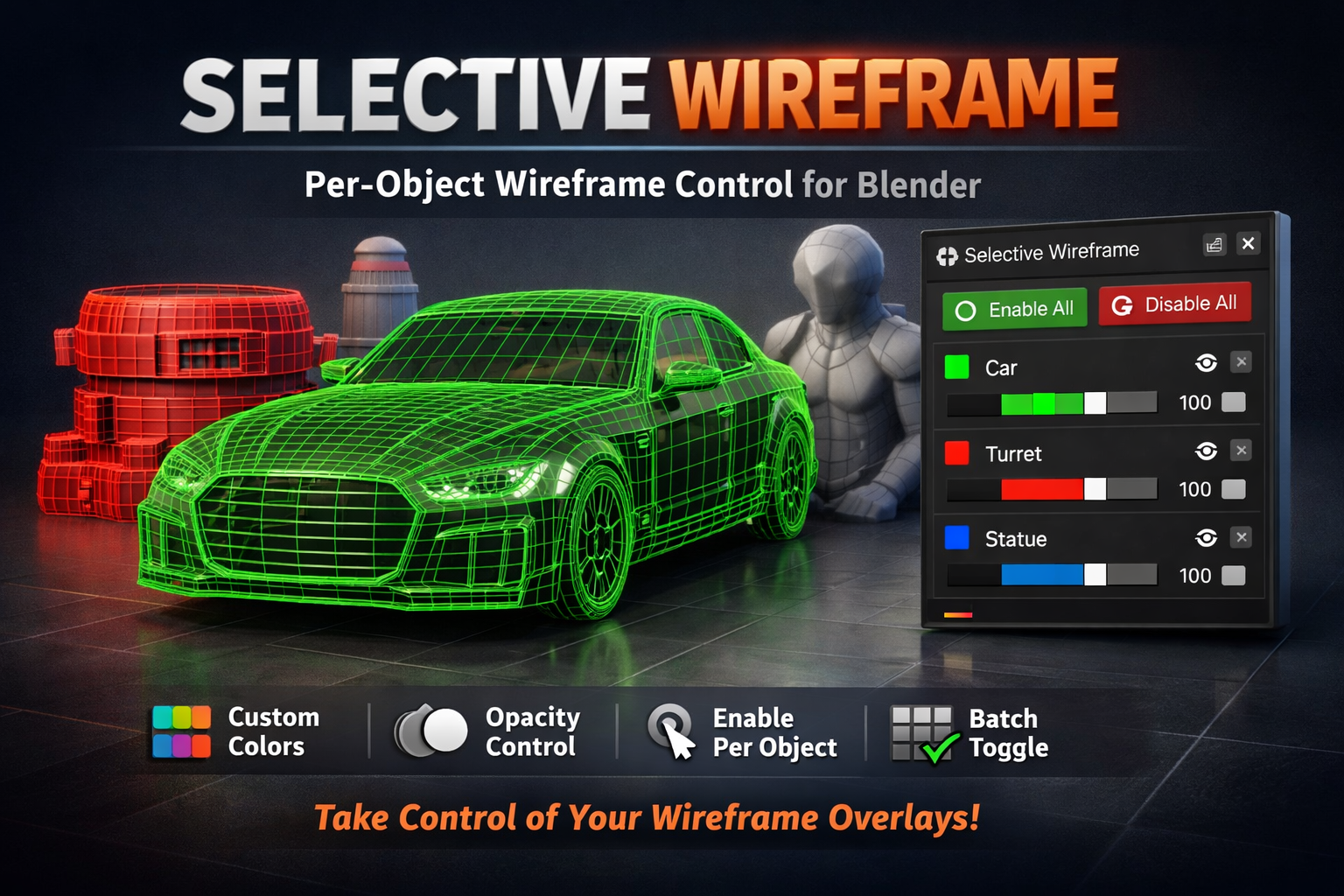
Selective Wireframe - Per-Object Wireframe Control
1 mes de Skillshare
Disponible para compraGratis
Todas las membresías se facturarán automáticamente de forma recurrente hasta que se cancelen. Si cumples los requisitos para obtener una prueba gratis, cancélala antes de que finalice para evitar que se realice el cobro. Oferta válida solo para nuevos suscriptores pagos. Consulta los Términos de servicio completos aquí
Acerca de este producto

Salman Naseem
2d 3D Animator
TAKE COMPLETE CONTROL OF YOUR WIREFRAME OVERLAYS
Selective Wireframe revolutionizes how you work with wireframe overlays in Blender. Unlike the default all-or-nothing wireframe view, this addon gives you precise, per-object control with custom colors and opacity - making your modeling workflow faster, cleaner, and more professional.
THE PROBLEM: Ever needed to highlight just ONE object's wireframe during a design review? Or show a client specific mesh details without cluttering the entire viewport? Blender's native wireframe mode turns on wireframes for EVERYTHING - making it hard to focus on what matters.
THE SOLUTION: Selective Wireframe lets you enable wireframes on individual objects, assign custom colors, and control transparency - all with an intuitive, real-time interface. Perfect for modeling, reviews, presentations, and collaborative work.

🎨 KEY FEATURES
Per-Object Wireframe Control Toggle wireframe overlays on/off for individual mesh objects with a single click. No more cluttered viewports - show only what you need to see.
Custom Colors for Each Object Assign unique RGB colors to each object's wireframe. Use colors to categorize objects, highlight important areas, or match your studio's color coding system.
Opacity/Transparency Control Adjust opacity from 0 (invisible) to 100% (solid) for each object. Perfect for subtle highlights or strong visual emphasis depending on your needs.
Real-Time Updates All changes apply instantly as you adjust colors and opacity. No "Apply" buttons, no waiting - see results immediately as you work.
Batch Operations "Enable All" and "Disable All" buttons let you control wireframes across your entire scene with one click. Great for quick scene-wide visualization or cleanup.
Automatic Viewport Configuration One-click button automatically configures your viewport shading to display wireframe colors correctly. No manual settings required.
Non-Destructive Workflow Original object colors are automatically saved when you enable wireframes and restored when you disable them. Your scene data stays safe.
Clean, Intuitive Interface Simple sidebar panel with clear controls for each object. No complicated menus or hidden settings - everything you need is right there.


💡 PERFECT FOR:
Modeling Workflows Focus on specific areas while modeling. Enable wireframes only on objects you're currently working on, keeping your viewport clean and focused.
Design Reviews Highlight specific mesh details during internal reviews or client presentations. Use colors to categorize issues or areas of interest.
Comparison Work Compare different versions or variations by giving each unique wireframe colors. Easily spot differences at a glance.
Educational Content Create clear tutorial screenshots and videos by highlighting specific objects with colored wireframes while keeping others neutral.
Technical Documentation Generate clean technical drawings and documentation with selective wireframe overlays showing only relevant mesh structure.
Collaborative Projects Use color-coded wireframes to communicate with team members about specific objects or areas that need attention.
🚀 HOW IT WORKS
Selective Wireframe uses Blender's native wireframe display system combined with object color properties. This means:
✓ Lightweight and fast - no performance impact ✓ Works with Blender's standard features ✓ Compatible with other addons ✓ No special viewport tricks or hacks
The addon manages these native properties through a clean interface, adding smart features like color backup/restore, batch operations, and automatic viewport configuration.
Technical Note: Wireframe colors display in Solid shading mode (with Color Type set to "Object"). The addon automatically configures this for you. Wireframe overlays remain visible in Material Preview and Render modes, but will use default colors in those modes since they're controlled by materials.
⚙️ SYSTEM REQUIREMENTS
Blender 4.2.0 or higher
Compatible with Blender 5.0
Works on Windows, macOS, and Linux
Mesh objects only (curves, empties, etc. not supported)
Preguntas frecuentes
¿Qué son los productos digitales?
Los productos digitales de Skillshare son herramientas, recursos y plantillas elaboradas por expertos y desarrolladas por los mejores creativos, que están disponibles para la compra. Con una amplia gama de recursos que se adaptan a todas las necesidades creativas, son prácticos y hacen que tu experiencia de aprendizaje sea real e inolvidable.
¿Cómo puedo comprar un producto digital?
Cualquier persona puede comprar un producto digital en Skillshare — haz clic en Comprar ahora para ingresar tu información de pago y completar tu compra. Una vez completado el pago, todos los archivos estarán disponibles para la descarga al instante desde esta página. También recibirás un correo electrónico con un enlace para descargar tu producto digital después de la compra.
¿Hay un límite en el número de veces que puedo descargar un producto digital?
No, no hay límite en la cantidad de veces que puedes descargar un producto digital. Incluso si el creador elimina un producto, aún puedes acceder a la página de descarga en la mayoría de los casos iniciando sesión en tu cuenta de Skillshare.
¿Puedo obtener un reembolso o cancelar la compra de mi producto digital?
Los productos digitales no son reembolsables y no se pueden devolver ni cancelar. Para obtener más información, consulta nuestra Política de reembolso en el Centro de ayuda de Skillshare.
¿Puedo hacer y vender mis propios productos digitales?
¡Absolutamente! Visita ¿Cómo puedo vender un producto digital en Skillshare? para aprender cómo puedes crear, listar y vender tus propios productos digitales en Skillshare.