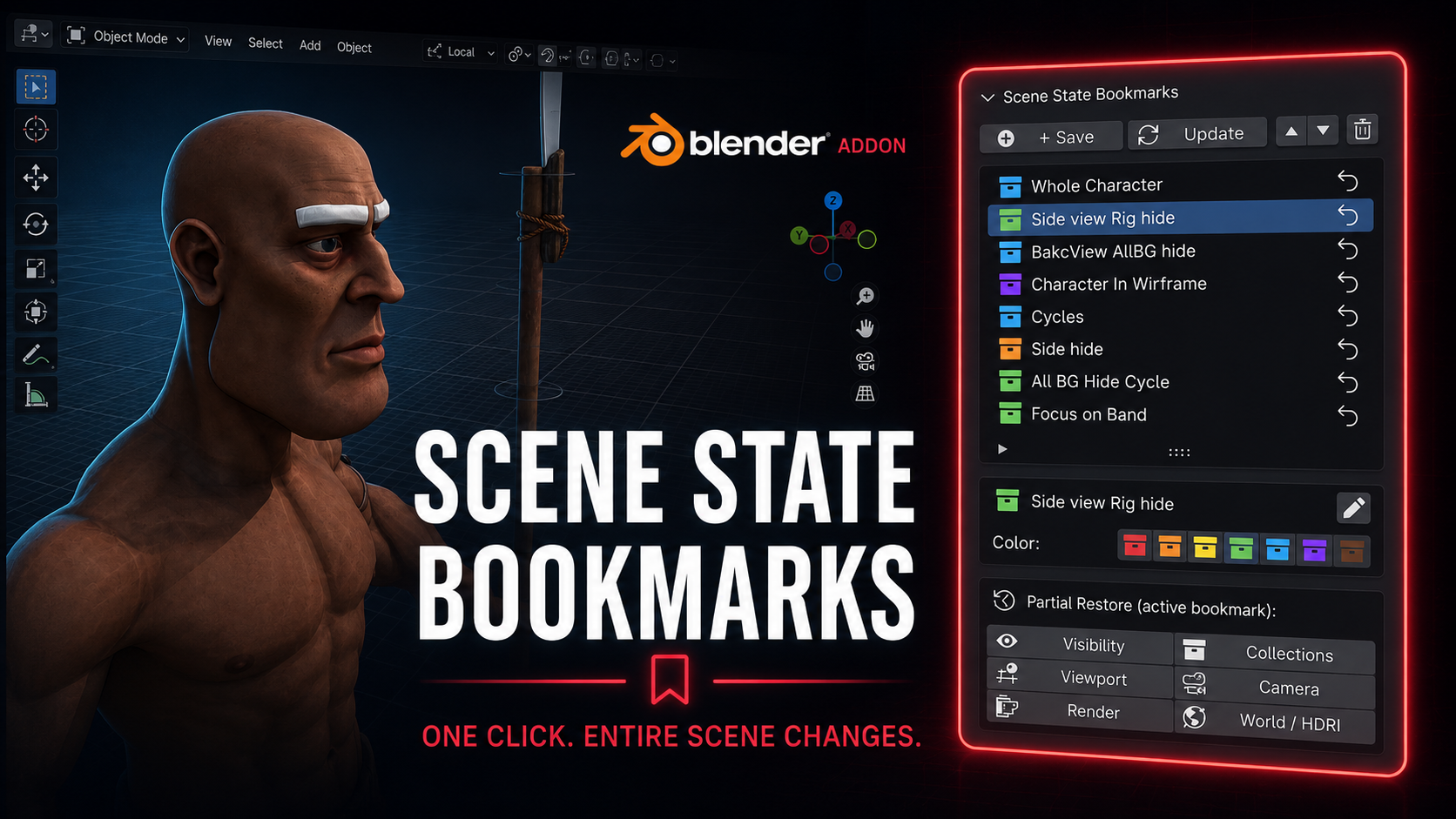
Scene State Bookmarks - Save and Restore
1 mes de Skillshare
Disponible para compraGratis
Todas las membresías se facturarán automáticamente de forma recurrente hasta que se cancelen. Si cumples los requisitos para obtener una prueba gratis, cancélala antes de que finalice para evitar que se realice el cobro. Oferta válida solo para nuevos suscriptores pagos. Consulta los Términos de servicio completos aquí
Acerca de este producto

Salman Naseem
2d 3D Animator
Every animator and 3D artist knows the pain. You spend 3 minutes hiding collections, switching render engines, repositioning the viewport, and setting up the camera just to review one specific shot. Then you need to switch to another setup and do it all over again.
Scene State Bookmarks eliminates that
What it does
With one click you save a complete snapshot of your scene. Every bookmark stores exactly what your scene looks like at that moment including which objects are visible, which collections are active, your viewport position and angle, the active camera, render engine and resolution settings, and your world and HDRI setup.
Restoring that state takes exactly one click.
Who this is for
This addon is built for working artists with real production pressure. If you switch between character close-ups and wide environment shots, between EEVEE previews and Cycles final renders, between wireframe checks and solid shading, this tool will save you hours every single week.
Animators use it to jump between different character poses and camera angles without losing their setup. Riggers use it to toggle between rig-visible and rig-hidden states in one click. Render artists use it to switch between low-resolution preview settings and full 4K Cycles production settings without touching a single property manually.

Full feature list
Save unlimited named bookmarks per scene
Color code bookmarks with 7 colors for instant visual organization
Restore any bookmark in one click from the N panel
Partial restore lets you apply only one layer: visibility only, collections only, viewport only, camera only, render only, or world only
Rename bookmarks at any time without re-saving
Reorder bookmarks up and down to match your workflow
Update any bookmark with new scene state while keeping its name and color
Delete bookmarks you no longer need
All bookmark data is saved inside the blend file so your team gets the same states when they open the file
What gets saved in each bookmark
Object visibility (viewport and render) Collection exclude and hide states Viewport position, rotation, distance and perspective mode Viewport shading type and overlay settings Active camera Render engine (EEVEE or Cycles) Render resolution X and Y Cycles and EEVEE sample counts World and HDRI assignment
Why this is different from other visibility addons
Most visibility tools only toggle object or collection hide states. Scene State Bookmarks captures the full picture: your render settings change, your camera changes, your viewport angle changes, your world changes. It is a complete scene memory system, not just a visibility switcher.
Preguntas frecuentes
¿Qué son los productos digitales?
Los productos digitales de Skillshare son herramientas, recursos y plantillas elaboradas por expertos y desarrolladas por los mejores creativos, que están disponibles para la compra. Con una amplia gama de recursos que se adaptan a todas las necesidades creativas, son prácticos y hacen que tu experiencia de aprendizaje sea real e inolvidable.
¿Cómo puedo comprar un producto digital?
Cualquier persona puede comprar un producto digital en Skillshare — haz clic en Comprar ahora para ingresar tu información de pago y completar tu compra. Una vez completado el pago, todos los archivos estarán disponibles para la descarga al instante desde esta página. También recibirás un correo electrónico con un enlace para descargar tu producto digital después de la compra.
¿Hay un límite en el número de veces que puedo descargar un producto digital?
No, no hay límite en la cantidad de veces que puedes descargar un producto digital. Incluso si el creador elimina un producto, aún puedes acceder a la página de descarga en la mayoría de los casos iniciando sesión en tu cuenta de Skillshare.
¿Puedo obtener un reembolso o cancelar la compra de mi producto digital?
Los productos digitales no son reembolsables y no se pueden devolver ni cancelar. Para obtener más información, consulta nuestra Política de reembolso en el Centro de ayuda de Skillshare.
¿Puedo hacer y vender mis propios productos digitales?
¡Absolutamente! Visita ¿Cómo puedo vender un producto digital en Skillshare? para aprender cómo puedes crear, listar y vender tus propios productos digitales en Skillshare.