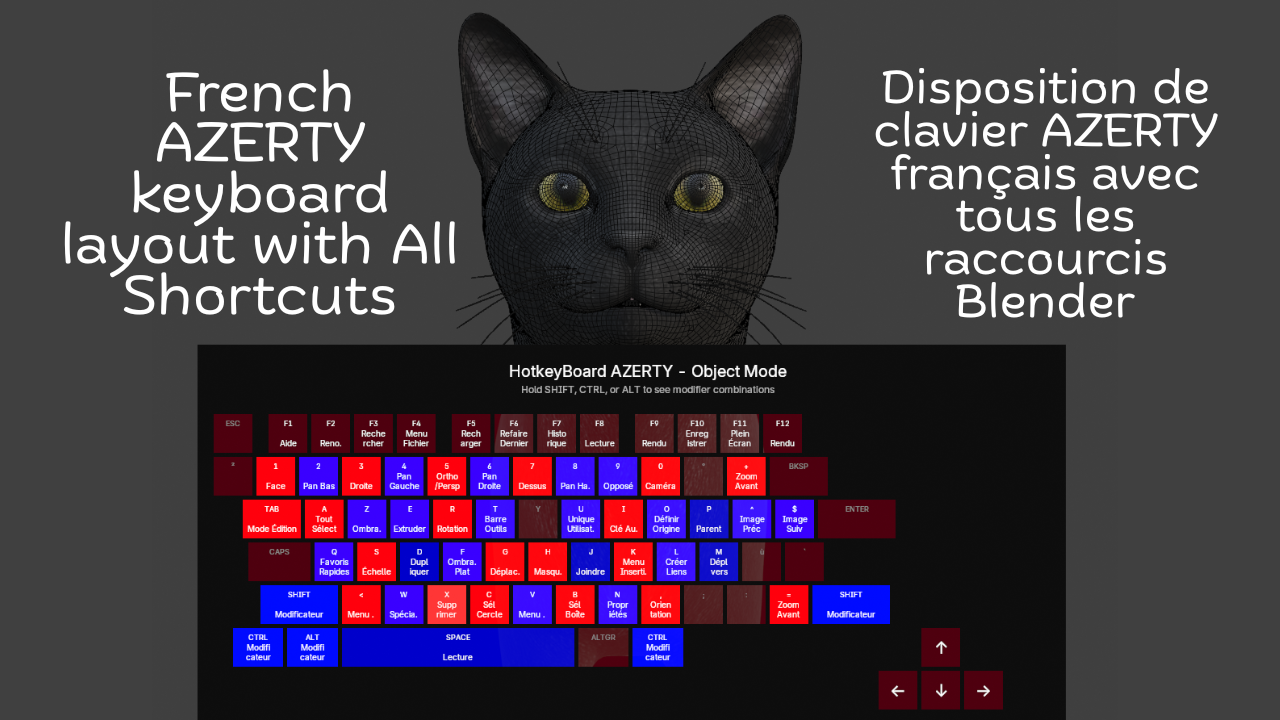
French Keyboard Shortcuts - HotkeyBoard AZERTY
1 mes de Skillshare
Disponible para compraGratis
Todas las membresías se facturarán automáticamente de forma recurrente hasta que se cancelen. Si cumples los requisitos para obtener una prueba gratis, cancélala antes de que finalice para evitar que se realice el cobro. Oferta válida solo para nuevos suscriptores pagos. Consulta los Términos de servicio completos aquí
Acerca de este producto

Salman Naseem
2d 3D Animator
Learning Blender with an AZERTY keyboard shouldn't be harder than with QWERTY. Yet most resources, tutorials, and overlays are designed for QWERTY users, forcing AZERTY users to constantly translate shortcuts in their heads. This slows learning, creates confusion, and breaks creative flow.
HotkeyBoard AZERTY solves this problem completely. It's the first and only Blender addon built specifically for AZERTY keyboards from the ground up. Open it, and you see YOUR keyboard not an adapted QWERTY layout.
Over 500 Blender shortcuts are displayed and color-coded by importance, so you learn systematically: start with blue (essential), add green (common), then orange (advanced). Press any key and watch it light up yellow instant feedback that you hit the right key. This visual learning is 10x faster than memorizing from lists.

Key Features
Core Features:
Complete AZERTY layout (Mac & Windows)
Real-time key highlighting (yellow when pressed)
500+ shortcuts covered (Object, Edit, Sculpt modes)
Color-coded by importance (6 colors)
Modifier combinations (Shift, Ctrl, Alt)
Bilingual interface (English/French)
Custom colors (enabled by default)
Adjustable size (50-150%) and opacity (0-100%)
The addon is fully bilingual. French speakers can switch to see "Déplacer" instead of "Move," "Rotation" instead of "Rotate," and 150+ other shortcuts in their native language. One click in the N panel switches everything instantly.


What You Get
✓ Complete AZERTY layouts for Mac & Windows
✓ 500+ shortcuts color-coded by importance
✓ Real-time yellow highlighting when you press keys
✓ Bilingual interface (English + French)
✓ Automatic platform detection
✓ 6 modes supported (Object, Edit, Sculpt, Paint variants)
✓ Full color customization (7 colors)
✓ Adjustable size (50-150%) and opacity (0-100%)
✓ Custom font sizes
✓ Modifier combination display
✓ Multi-line text wrapping
✓ Zero configuration needed
✓ Minimal performance impact (<1%)
✓ Lifetime updates included


Advanced Features
⚡ Modifier combinations display (Shift, Ctrl, Alt)
⚡ Multi-line text wrapping for long shortcuts
⚡ Smart key highlighting with 250ms decay
⚡ Adjustable scale (50-150%) for any screen
⚡ Opacity control (0-100%) for subtle overlay
⚡ Custom font sizes (8-24px labels, 6-18px shortcuts)
⚡ Settings persist across Blender sessions
⚡ Professional email support included
Compatibility
🖥️ Blender 4.2, 4.3, 4.4, 5.0+
🍎 macOS 11+ (Intel & Apple Silicon)
🪟 Windows 10/11
🐧 Linux (Ubuntu, Fedora, Debian, Arch)
⌨️ All AZERTY keyboards
Preguntas frecuentes
¿Qué son los productos digitales?
Los productos digitales de Skillshare son herramientas, recursos y plantillas elaboradas por expertos y desarrolladas por los mejores creativos, que están disponibles para la compra. Con una amplia gama de recursos que se adaptan a todas las necesidades creativas, son prácticos y hacen que tu experiencia de aprendizaje sea real e inolvidable.
¿Cómo puedo comprar un producto digital?
Cualquier persona puede comprar un producto digital en Skillshare — haz clic en Comprar ahora para ingresar tu información de pago y completar tu compra. Una vez completado el pago, todos los archivos estarán disponibles para la descarga al instante desde esta página. También recibirás un correo electrónico con un enlace para descargar tu producto digital después de la compra.
¿Hay un límite en el número de veces que puedo descargar un producto digital?
No, no hay límite en la cantidad de veces que puedes descargar un producto digital. Incluso si el creador elimina un producto, aún puedes acceder a la página de descarga en la mayoría de los casos iniciando sesión en tu cuenta de Skillshare.
¿Puedo obtener un reembolso o cancelar la compra de mi producto digital?
Los productos digitales no son reembolsables y no se pueden devolver ni cancelar. Para obtener más información, consulta nuestra Política de reembolso en el Centro de ayuda de Skillshare.
¿Puedo hacer y vender mis propios productos digitales?
¡Absolutamente! Visita ¿Cómo puedo vender un producto digital en Skillshare? para aprender cómo puedes crear, listar y vender tus propios productos digitales en Skillshare.