Victorian Shader Pack for Blender 5 Cycles
1 mes de Skillshare
Disponible para compraGratis
Todas las membresías se facturarán automáticamente de forma recurrente hasta que se cancelen. Si cumples los requisitos para obtener una prueba gratis, cancélala antes de que finalice para evitar que se realice el cobro. Oferta válida solo para nuevos suscriptores pagos. Consulta los Términos de servicio completos aquí
Acerca de este producto

3D Tudor
Bestselling Blender Author & 3D Educator
https://youtu.be/aeCjPocOxkk
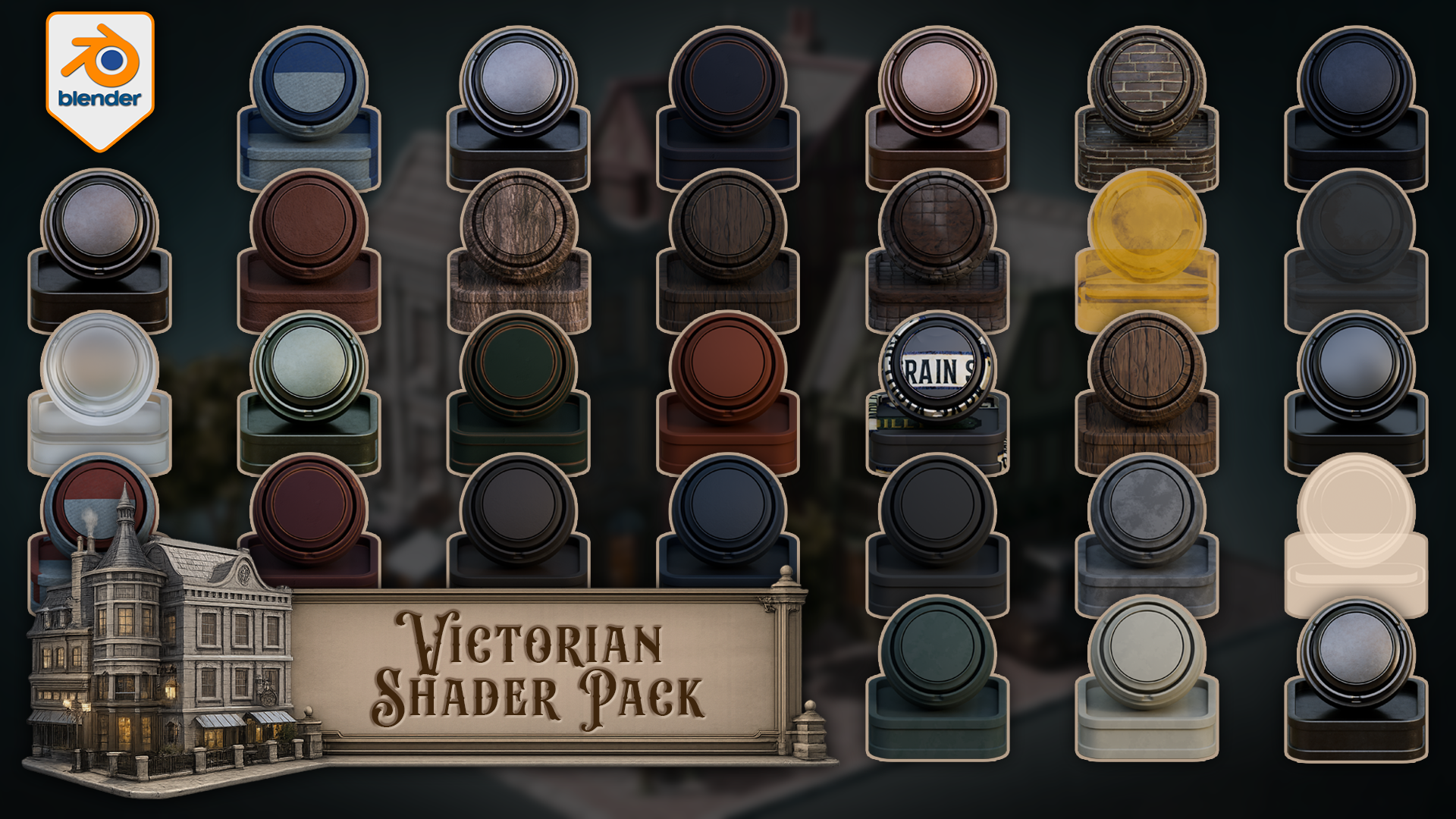
Build Victorian streets, aged shopfronts, period interiors, darker architectural scenes, and atmospheric environment work with a connected set of Victorian materials and shaders for Blender.
This pack includes one downloadable Blender file with 33 materials and shaders already set up for Blender 5 Cycles. The collection covers painted wood, natural wood, worn metals, brass, stone, roof surfaces, clay, brick, wall finishes, glass, lit windows, curtains, cloth, bark, leaves, leather, rubber, street signs, and a floor shader that blends between three materials using vertex paint.
Every shader has been built around practical scene use. The point is not to give you a folder of disconnected swatches. The point is to give you a Victorian themed shader library that can support a full environment without every material fighting for attention.
Included in the pack
- Floor shader with three-material vertex paint blending
- Car metal blue
- Car metal light
- Light metal
- Blue metal
- Black metal
- Brass metal
- Green metal
- Green painted wood
- Blue painted wood
- Light wood
- Dark wood
- Red painted wood
- Stone
- Roof material
- Second roof material
- Clay
- Rubber
- Leather
- Tree bark
- Leaves with alpha setup
- Blue cloth
- Red cloth
- Track glass
- Basic Glass BSDF material
- Street light glass with emission
- Lit window glass with emission
- Unlit window glass
- Curtains
- Green wall
- Grey wall
- Bricks
- Street signs
Victorian environments need material hierarchy. Some surfaces need to carry age and detail, such as painted wood, brick, brass, roof materials, stone, and signage. Other surfaces need to stay quieter, such as rubber, leather, plain glass, cloth, and wall finishes. That balance is what helps a scene feel designed rather than patched together.
The edge-wear materials are especially useful for period scenes. Painted wood, metal, brass, stone, roof, clay, and wood variants can add controlled wear to the parts of the scene where age matters most: doors, trims, frames, signs, props, railings, shopfronts, roofs, and street details.
The floor shader is the more advanced setup in the pack. It blends between three different materials using vertex paint, giving you a practical way to break up ground surfaces without building a separate masking workflow every time you want variation. This is useful for streets, thresholds, paths, building edges, and worn floor areas.
The glass and window materials give you several scene-support options as well. You get basic glass, track glass, street light glass with emission, lit window glass with emission, unlit window glass, and curtains. That means you can build darker facades, warm lit windows, lamp details, and interior dressing without forcing every window into the same material role.
Created for Blender 5 and built for Cycles.
This pack is not sold as an EEVEE-ready release. Some materials may display in other Blender render workflows, but Cycles is the intended renderer.
You can use the materials directly in the included Blender file, copy preview objects with their materials into your own scene, append the shaders you need into another Blender project, or add them to your own Asset Browser setup for faster reuse.
If you want a practical Victorian shader pack for worn wood, aged metal, brickwork, roof surfaces, lit windows, curtains, signs, darker walls, and vertex-painted floor variation inside Blender, this gives you a clean place to start.
Happy modelling everyone!
Neil – 3D Tudor
Preguntas frecuentes
¿Qué son los productos digitales?
Los productos digitales de Skillshare son herramientas, recursos y plantillas elaboradas por expertos y desarrolladas por los mejores creativos, que están disponibles para la compra. Con una amplia gama de recursos que se adaptan a todas las necesidades creativas, son prácticos y hacen que tu experiencia de aprendizaje sea real e inolvidable.
¿Cómo puedo comprar un producto digital?
Cualquier persona puede comprar un producto digital en Skillshare — haz clic en Comprar ahora para ingresar tu información de pago y completar tu compra. Una vez completado el pago, todos los archivos estarán disponibles para la descarga al instante desde esta página. También recibirás un correo electrónico con un enlace para descargar tu producto digital después de la compra.
¿Hay un límite en el número de veces que puedo descargar un producto digital?
No, no hay límite en la cantidad de veces que puedes descargar un producto digital. Incluso si el creador elimina un producto, aún puedes acceder a la página de descarga en la mayoría de los casos iniciando sesión en tu cuenta de Skillshare.
¿Puedo obtener un reembolso o cancelar la compra de mi producto digital?
Los productos digitales no son reembolsables y no se pueden devolver ni cancelar. Para obtener más información, consulta nuestra Política de reembolso en el Centro de ayuda de Skillshare.
¿Puedo hacer y vender mis propios productos digitales?
¡Absolutamente! Visita ¿Cómo puedo vender un producto digital en Skillshare? para aprender cómo puedes crear, listar y vender tus propios productos digitales en Skillshare.