Ancient Egypt Decals for Blender — 50 Designs
1 mes de Skillshare
Disponible para compraGratis
Todas las membresías se facturarán automáticamente de forma recurrente hasta que se cancelen. Si cumples los requisitos para obtener una prueba gratis, cancélala antes de que finalice para evitar que se realice el cobro. Oferta válida solo para nuevos suscriptores pagos. Consulta los Términos de servicio completos aquí
Acerca de este producto

3D Tudor
Bestselling Blender Author & 3D Educator
Give your stone surfaces an Egyptian focal point

See the ornament in context across an obelisk, tablet and temple. The Blender project retains all three example scenes.
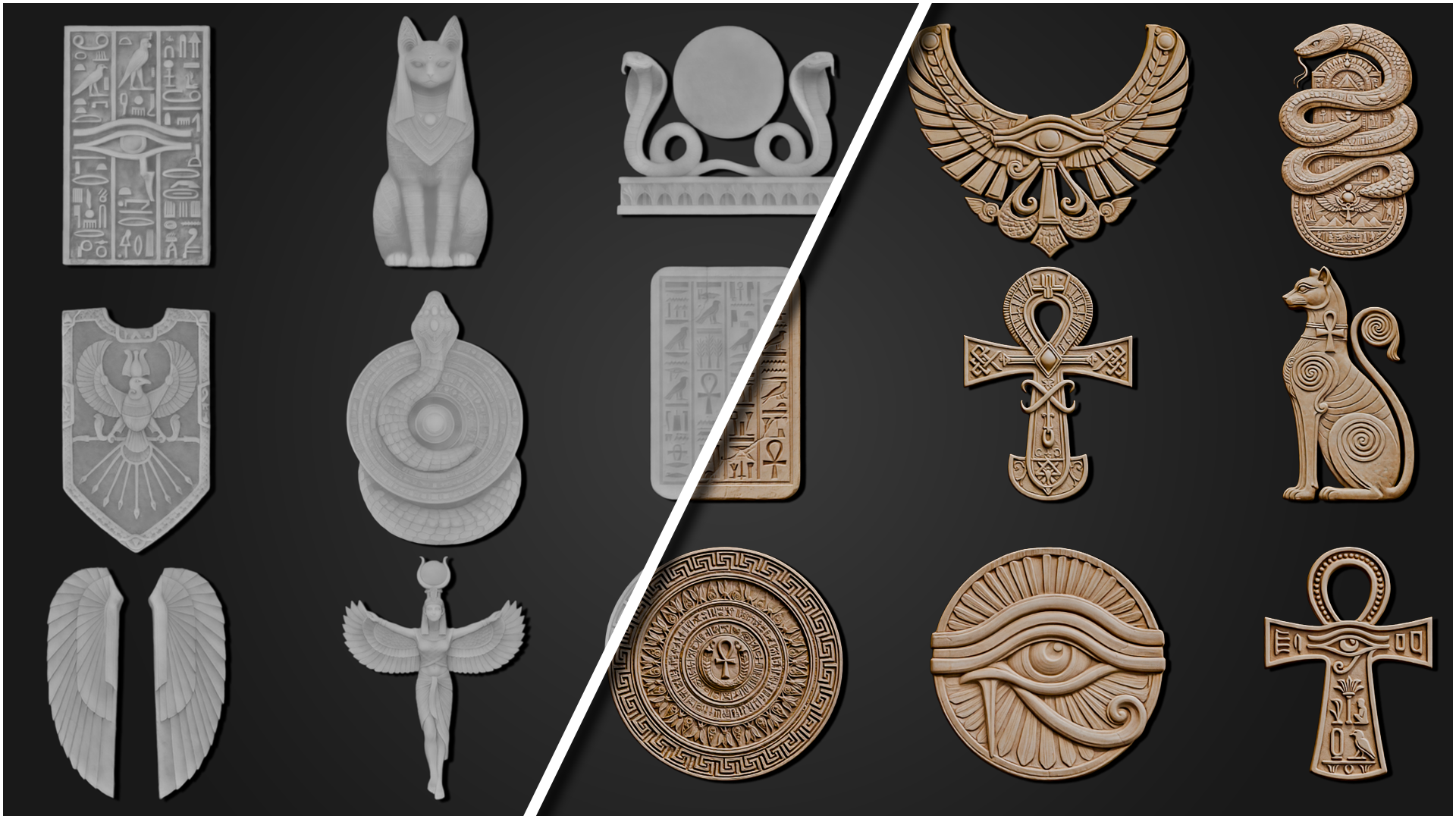
Decorate a temple facade, frame an obelisk or turn a plain tablet into a hero prop. This collection brings together 50 Egyptian-inspired relief designs, separate PNG maps and an enhanced Blender project so you can explore placement, scale and depth in a working scene.
One complete collection
• 50 distinct designs, numbered 01–50.
• 300 PNG textures: Base Color, Height, Normal, Roughness, Ambient Occlusion and Opacity for every design.
• An enhanced Blender file with a labelled gallery, 50 asset-marked decal objects, and the original Obelisk, Tablet and Temple example scenes.
• Packed images and native material controls for relief depth and midlevel. No add-on required.
Preview the full design range

Browse designs 01–25 to choose the symbols and panels that suit your next prop or architectural surface.

Explore designs 26–50, completing the full collection of 50 distinct Egyptian-inspired ornaments.
Start in Blender, then make it your own

All 50 designs are arranged once in the enhanced Blender gallery, with labelled previews and asset-marked decal objects.
Open the gallery, choose an ornament and inspect its material. Study the three example scenes for placement ideas, then adjust the relief to suit your own lighting and camera distance.
Inspect the relief close up

Selected reliefs shown close up on a light stone finish, making the silhouettes and raised detail easier to inspect.

A second selection of ornaments offers more shapes for panels, focal details and decorative arrangements.
Texture and software details
Base Color, Height, Normal, Roughness and Ambient Occlusion maps are 2048 × 2048. Opacity masks are 1024 × 1024. Height maps are 16-bit grayscale PNG; the other maps are 8-bit.
The project was opened and checked in Blender 5.2 LTS with Cycles. The examples preserve their colour, height and opacity shader treatment. Use the separate six-map sets to build your own materials. Earlier Blender versions and other render engines have not been verified.
Your downloads
Two ZIPs are included: the Blender project with a START_HERE guide, and the complete external texture library. Extract both. Images are already packed in the Blender project; the texture ZIP gives you direct access to all 300 PNGs.
Commercial use included
€21.99 includes the full collection for one seat and unlimited projects, including paid client work and shipped games. Source files may not be resold, redistributed or repackaged as another asset library.
Before you buy
Are these 50 different designs? Yes. Alternate shading previews do not add to the design count.
Are the example scenes included? Yes: the gallery, obelisk, tablet and temple are in the Blender download.
What is not included? No native Unreal Engine project, Substance Painter presets, ZBrush brushes or video course. The PNG files can be imported manually into compatible software.
Best for: environment artists and prop makers adding Egyptian-inspired detail to stone architecture and decorative objects. This is a standalone digital product and is not required for any Skillshare class.
Join the 3D Tudor community
Share your work and ask questions.
Discord: https://discord.gg/vdbUGJbAfY
Facebook community: https://www.facebook.com/groups/1152218958467185
Happy modelling!
Neil — 3D Tudor
Preguntas frecuentes
¿Qué son los productos digitales?
Los productos digitales de Skillshare son herramientas, recursos y plantillas elaboradas por expertos y desarrolladas por los mejores creativos, que están disponibles para la compra. Con una amplia gama de recursos que se adaptan a todas las necesidades creativas, son prácticos y hacen que tu experiencia de aprendizaje sea real e inolvidable.
¿Cómo puedo comprar un producto digital?
Cualquier persona puede comprar un producto digital en Skillshare — haz clic en Comprar ahora para ingresar tu información de pago y completar tu compra. Una vez completado el pago, todos los archivos estarán disponibles para la descarga al instante desde esta página. También recibirás un correo electrónico con un enlace para descargar tu producto digital después de la compra.
¿Hay un límite en el número de veces que puedo descargar un producto digital?
No, no hay límite en la cantidad de veces que puedes descargar un producto digital. Incluso si el creador elimina un producto, aún puedes acceder a la página de descarga en la mayoría de los casos iniciando sesión en tu cuenta de Skillshare.
¿Puedo obtener un reembolso o cancelar la compra de mi producto digital?
Los productos digitales no son reembolsables y no se pueden devolver ni cancelar. Para obtener más información, consulta nuestra Política de reembolso en el Centro de ayuda de Skillshare.
¿Puedo hacer y vender mis propios productos digitales?
¡Absolutamente! Visita ¿Cómo puedo vender un producto digital en Skillshare? para aprender cómo puedes crear, listar y vender tus propios productos digitales en Skillshare.