The Optimized Executive Calendar
Portfolio Project Write-Up: The Optimized Executive Calendar
Client Profile:
Sarah Jenkins – Founder & CEO of a Global Tech Agency (Operating across WAT and EST time zones).
The Challenge:
The client was experiencing severe meeting fatigue, double-bookings across time zones, and a backlog of administrative tasks due to a purely reactive scheduling approach. There was no clear boundary between deep project work, team management, and client consultations.
My Strategic Solution:
I completely overhauled the client’s Google Calendar from a simple booking tool into a proactive time-management system designed for executive focus and operational efficiency.
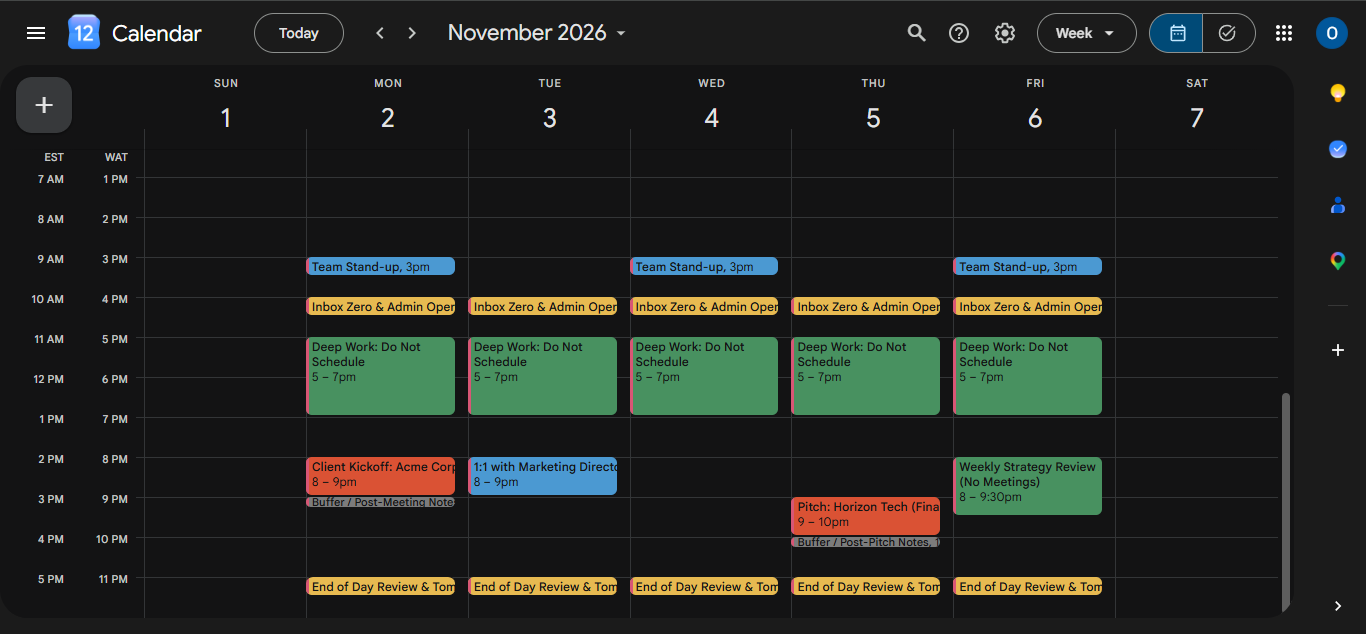
- Global Time Zone Integration: I configured dual time zones (WAT and EST) directly on the calendar axis to flawlessly schedule international client calls and avoid calculation errors during booking.
- Color-Coded Priority Blocks: I implemented a strict visual hierarchy. High-stakes external meetings (Red) are instantly distinguishable from internal team stand-ups (Blue) and non-negotiable Deep Work sessions (Deep Green).
- Proactive Administrative Operations: To maintain workflow, I embedded two daily 30-minute "Inbox Zero & Data Entry" blocks (Yellow). This ensures email management and daily admin tasks are completed systematically rather than interrupting focus periods.
- Frictionless Buffers: I strategically placed 15-minute buffer periods (Gray) after intensive client calls to allow for immediate data entry, meeting note organization, and mental resets before the next appointment.
The Result:
A highly structured, visually intuitive calendar that protects the executive's energy, guarantees administrative tasks are handled daily, and ensures seamless global appointment scheduling.