Course Feedback & Reflection
Student Note:
This course was an excellent refresher for my skills after several years away from Excel. Despite minor differences in software versions or language settings, it is a highly effective course overall. I look forward to continuing with the next videos! Suggestions for Future Improvement:
Exercise Context:
The first part of my practical work followed the final example presented in the last video. The second part was created independently from the ground up, strictly following the practice instructions provided in the lesson to test my understanding of the material. Excel Practice Exercises & Step-by-Step Requirements
This course was an excellent refresher for my skills after several years away from Excel. Despite minor differences in software versions or language settings, it is a highly effective course overall. I look forward to continuing with the next videos! Suggestions for Future Improvement:
- Pre-made Templates: It would be very helpful if the downloadable practice files included pre-made table structures or clear headers indicating the task (e.g., "Total Sum Exercise"). Building tables entirely from scratch slowed down the learning pace, even though pausing the video is an option.
- Worksheet Notes: Adding a dedicated section or tab for student notes within the worksheets would make them even more valuable for future reference.
Assignment Submission:
Exercise Context:
The first part of my practical work followed the final example presented in the last video. The second part was created independently from the ground up, strictly following the practice instructions provided in the lesson to test my understanding of the material. Excel Practice Exercises & Step-by-Step Requirements
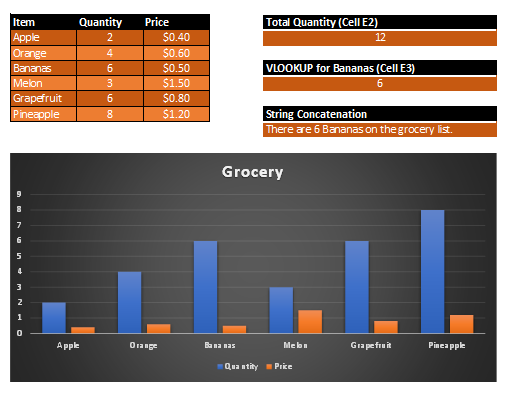
Data Formatting
- Applied borders to the entire data range to improve readability.
- Filled cells A1:C1 with a custom background color to highlight the headers.
Total Quantity Calculation
- Wrote a SUM function in cell E2 to calculate the absolute total of all items.
Data Retrieval (VLOOKUP)
- Wrote a VLOOKUP formula in cell E3 to dynamically retrieve the specific quantity value for "Bananas".
String Concatenation
- Wrote a CONCAT formula in cell E4 referencing cells A4 and B4.
- Generated the automated sentence: "There are # bananas on the shopping list."
Data Visualization
- Generated a clustered column chart mapping out the exact quantity of each item.
- Modified the default visual style using alternative layouts from the 'Chart Design' menu.
First Photo: Example of last video class.
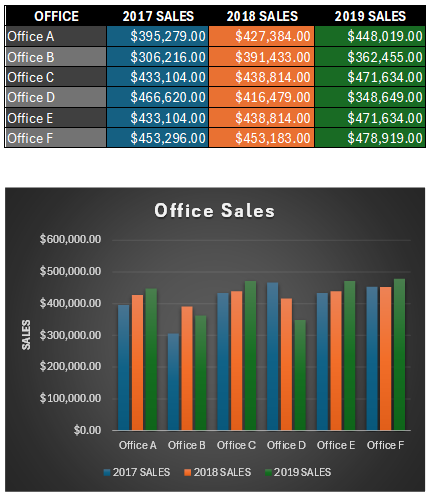
Second Photo: Assignment.