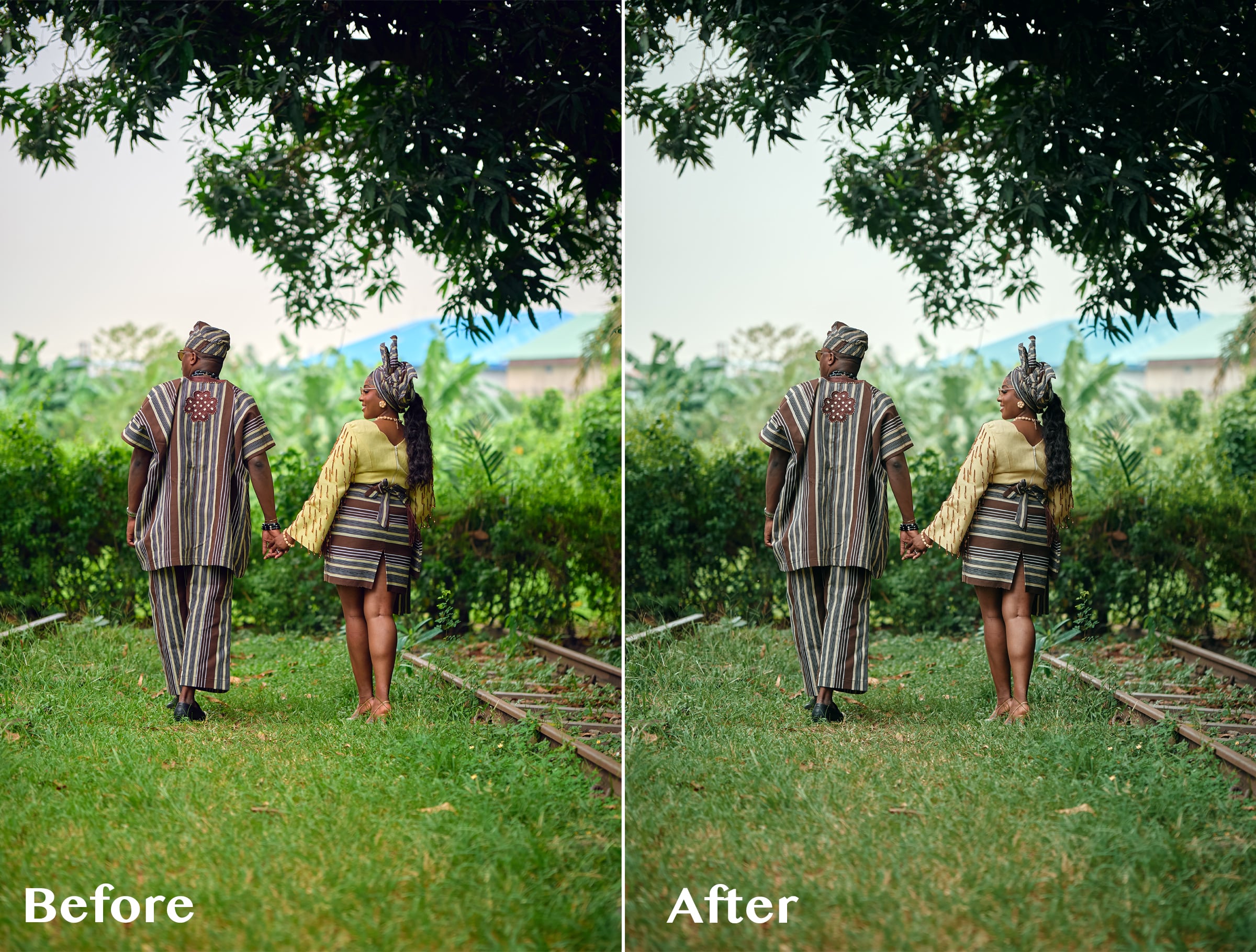

ABIS CINEMATIC 01 — Signature Cinematic LUT
1 month of Skillshare
Available with PurchaseFree
All memberships will be billed automatically on a recurring basis until canceled. If eligible for a free trial, cancel before the trial ends to avoid being charged. Offer only valid for new paid subscribers. See full terms of service here.
About this product

Olusola Abisagbo
Professional Photographer and Educator
One LUT. Different Images. One Cinematic Starting Point.
You don't always need 20 LUTs to create a beautiful look.
Sometimes, you just need ONE that works as a strong starting point.
ABIS CINEMATIC 01 is a signature cinematic LUT created for photographers who love rich, slightly dark, moody colours without spending too much time trying different presets and LUTs.
I originally created this LUT while working with wedding images with a lot of greenery. I wanted the bright greens to feel deeper, darker and more cinematic instead of overpowering the photograph.
But while testing it, I discovered something interesting.
It wasn't just about the greens.
I tested the LUT on photographs with completely different colours, lighting, environments, and it still gave me a beautiful cinematic base to work from.
The secret is knowing how to adjust it.
THE SIMPLE WORKFLOW
1. Apply ABIS CINEMATIC 01
Start by applying the LUT to your image.
2. Adjust the LUT opacity
You don't have to use the LUT at 100%.
Reduce the opacity until the effect feels right for your photograph.
3. Adjust your Levels
Use Levels to refine the brightness, contrast and overall depth of the image.
4. Adjust Saturation if needed
Want some of the original colours back?
Simply increase the saturation to taste.
That's it.
LUT → Opacity → Levels → Saturation
A simple starting point that you can adapt to your own photograph and editing style.
WHAT MAKES ABIS CINEMATIC 01 DIFFERENT?
I didn't want to create another LUT pack filled with 10, 20 or 50 different looks that you have to keep clicking through.
I wanted one versatile LUT that I could understand, control and use repeatedly.
ABIS CINEMATIC 01 gives you the foundation.
You decide how far you want to take it.
Use a lower opacity for a subtle cinematic finish.
Push it further when you want something darker and moodier.
Add saturation when you want more colour.
Adjust your Levels when you want more depth.
The LUT gives you the look. You remain in control of the final image.
ESPECIALLY BEAUTIFUL ON GREENS 🌿
Although ABIS CINEMATIC 01 can be used across different colour environments, one of my favourite things about it is what it does to bright greens.
Grass, trees and foliage can sometimes become too bright or distracting in wedding and outdoor photography.
ABIS CINEMATIC 01 helps create deeper, muted and more cinematic-looking greens, making it especially useful for outdoor weddings, pre-weddings and portraits.
GREAT FOR
Wedding photography
Pre-wedding photography
Portrait photography
Outdoor photography
Lifestyle photography
Editorial images
Photographers who love cinematic colours
Photographers who prefer dark and moody edits
WHAT YOU'LL RECEIVE
ABIS CINEMATIC 01 LUT (.CUBE)
Plus a simple Quick Start Guide showing you my recommended workflow:
Apply LUT → Adjust Opacity → Levels → Saturation
The .CUBE format makes the LUT usable in compatible photo and video editing software that supports LUTs.
IMPORTANT TO KNOW
ABIS CINEMATIC 01 is designed to give you a cinematic starting point, not replace your entire editing process.
Different photographs have different lighting, exposure, white balance, colours and camera profiles.
For this reason, you may need to adjust the LUT opacity, Levels, saturation, exposure or white balance to achieve your preferred result.
And that's exactly how I use it myself.
FAQs
What are digital products?
Digital products at Skillshare are expertly crafted tools, resources, and templates developed by top creatives that are available to you for purchase. With a wide range of resources to suit every creative need, they are actionable, making your learning experience real and unforgettable.
How can I purchase a digital product?
Anyone can purchase a digital product on Skillshare — click Buy now to enter your payment information and complete your purchase. Once payment is complete, all files will be available for download instantly from this page. You'll also receive an email with a link to download your digital product after purchase.
Is there a limit to how many times I can download a digital product?
No, there is no limit to how many times you can download a digital product. Even if a product is removed by the creator, you can still access the download page in most cases by logging in to your Skillshare account.
Can I get a refund or cancel my digital product purchase?
Digital products are non-refundable and cannot be returned or canceled. To learn more, see our refund policy in the Skillshare Help Center.
Can I make and sell my own digital products?
Absolutely! Visit How can I sell a digital product on Skillshare? to learn how you can create, list and sell your own digital products on Skillshare.