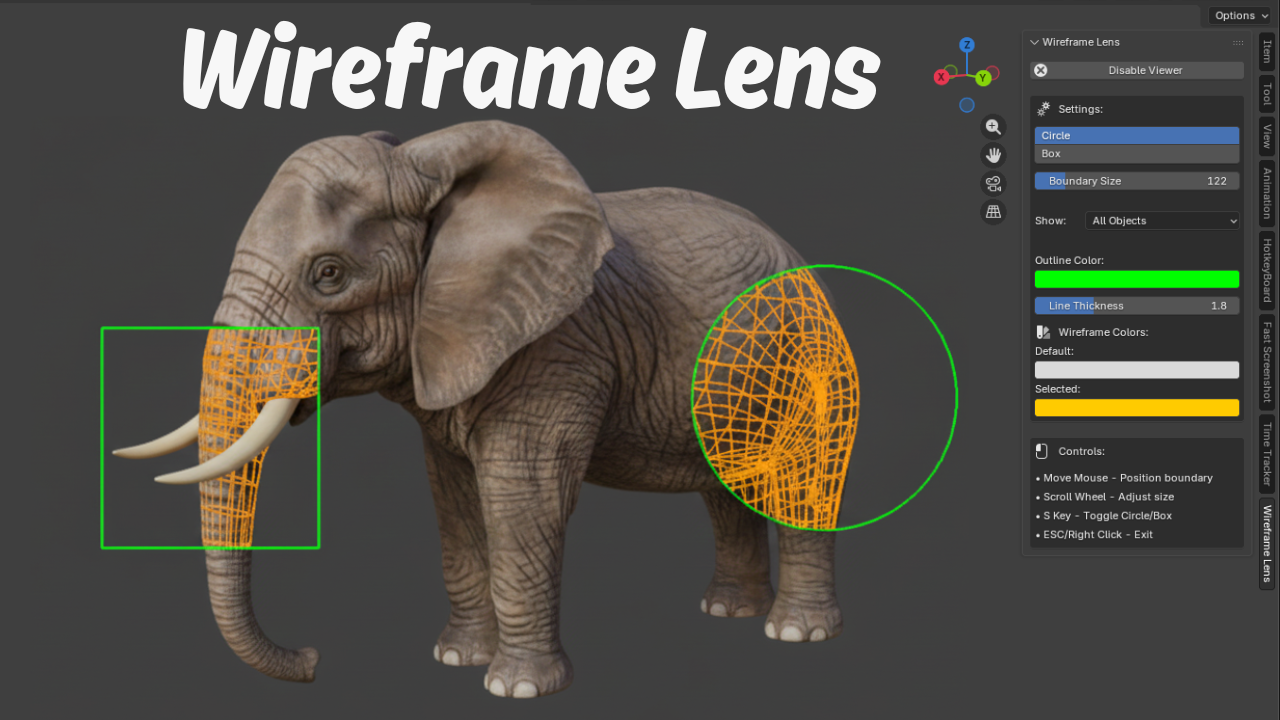
Wireframe Lens -Inspect topology without switching
1 month of Skillshare
Available with PurchaseFree
All memberships will be billed automatically on a recurring basis until canceled. If eligible for a free trial, cancel before the trial ends to avoid being charged. Offer only valid for new paid subscribers. See full terms of service here.
About this product

Salman Naseem
2d 3D Animator
Wireframe Lens - Your Precision Wireframe Inspector for Blender
A revolutionary 2D screen-space overlay tool that transforms how you inspect mesh topology in Blender. Wireframe Lens shows wireframe edges only within a movable circle or box boundary on your screen, allowing you to examine specific areas without switching your entire viewport to wireframe mode.
Think of it as a magnifying glass for your wireframes - move it around with your mouse to inspect different areas, resize it with the scroll wheel, and toggle between circle and box shapes with a single key press.

Perfect For:
- Character modeling and retopology workflows
- Hard surface modeling precision checks
- Multi-object editing and comparison
- Quality control and topology verification
- Edge flow inspection without mode switching

Key Features:
- 2D screen overlay that follows your mouse in real-time
- Circle and box boundary shapes (toggle with S key)
- Selection highlighting - selected objects show in different color
- Display filters - show all, selected only, or unselected only
- Adjustable line thickness for perfect visibility
- Perfect edge clipping - no wireframe overflow
- Customizable colors for boundary and wireframes
- Smooth 60 FPS performance on most hardware
- Works in Solid, Material Preview, and Rendered shading modes


IN short Wireframe Lens gives you the precision and context you need to work faster and smarter.

FAQs
What are digital products?
Digital products at Skillshare are expertly crafted tools, resources, and templates developed by top creatives that are available to you for purchase. With a wide range of resources to suit every creative need, they are actionable, making your learning experience real and unforgettable.
How can I purchase a digital product?
Anyone can purchase a digital product on Skillshare — click Buy now to enter your payment information and complete your purchase. Once payment is complete, all files will be available for download instantly from this page. You'll also receive an email with a link to download your digital product after purchase.
Is there a limit to how many times I can download a digital product?
No, there is no limit to how many times you can download a digital product. Even if a product is removed by the creator, you can still access the download page in most cases by logging in to your Skillshare account.
Can I get a refund or cancel my digital product purchase?
Digital products are non-refundable and cannot be returned or canceled. To learn more, see our refund policy in the Skillshare Help Center.
Can I make and sell my own digital products?
Absolutely! Visit How can I sell a digital product on Skillshare? to learn how you can create, list and sell your own digital products on Skillshare.