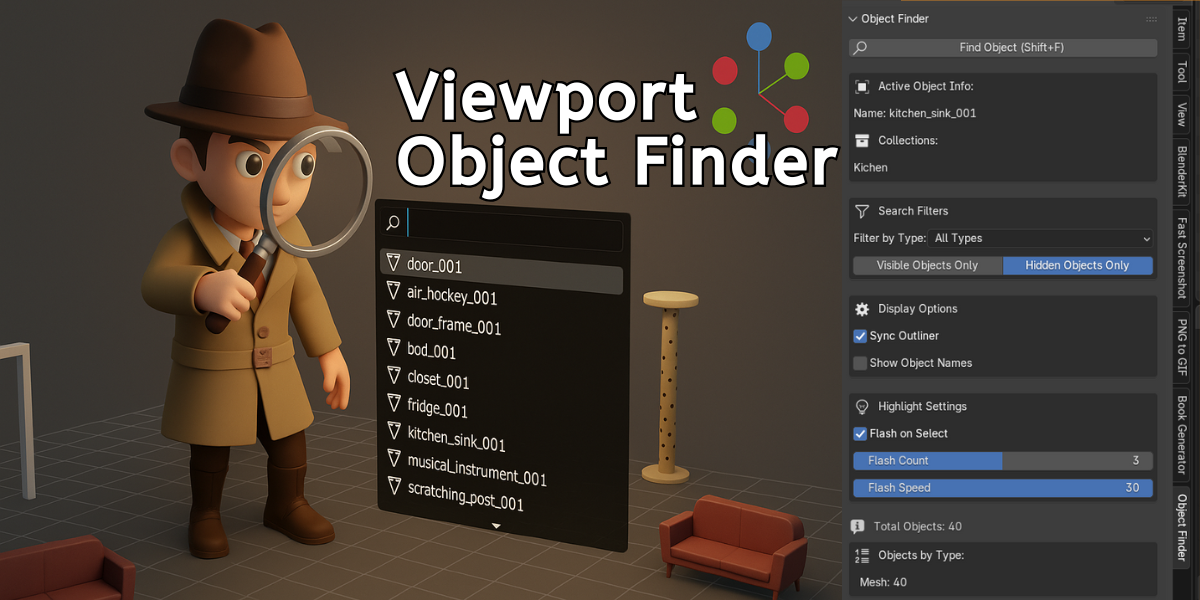
Viewport Object Finder - Instantly Find Any Object
1 month of Skillshare
Available with PurchaseFree
All memberships will be billed automatically on a recurring basis until canceled. If eligible for a free trial, cancel before the trial ends to avoid being charged. Offer only valid for new paid subscribers. See full terms of service here.
About this product

Salman Naseem
2d 3D Animator
The Viewport Object Finder is the essential productivity addon for every Blender artist. If your scene has 10 objects or 10,000, finding the right one should take seconds, not minutes. This addon makes that possible.
Press Shift + F, start typing, and instantly see every matching object in your scene.
It’s lightning-fast, intuitive, and goes far beyond a simple search, it’s a complete object management system built for professionals.


🎯 Core Features
🔍 Instant Live Search
Just hit Shift + F. Type any part of an object name and watch results appear in real time — case-insensitive, partial-match friendly, and blazing fast.
Type cam and instantly find Camera_001, Character_Camera, or main_cam_rig.
🎚 Smart Type Filtering
Quickly isolate Meshes, Curves, Cameras, Lights, Empties, Armatures, Lattices, or Grease Pencil objects.
Combine with live search for precision results.
👁 Visibility Filters
Choose to search only visible or hidden objects — perfect for:
Finding forgotten hidden meshes
Cleaning up cluttered scenes
Debugging visibility issues
⚡ Visual Flash Highlight
When you select an object, it flashes with a customizable wireframe effect.
Never lose track again — even in dense scenes. Adjust flash count (1-5) and speed to fit your workflow.
🧭 Intelligent Outliner Sync
Automatically:
Reveals selected objects in the Outliner
Unhides parents and nested collections
Expands collection hierarchies recursively
No more manual expansion — it’s all handled seamlessly.
🧩 Active Object Info Panel
Instantly view:
Complete parent hierarchy
Full collection path
A visual “map” of where the object lives in your scene
Perfect for understanding complex setups.
💼 Perfect For Every Workflow
Modelers: Instantly find meshes, modifiers, and instances.
Animators: Navigate rigs, IK controls, and constraints easily.
Lighters: Locate specific light types and debug visibility fast.
Scene Managers: Track hidden objects, clean duplicates, and maintain order.
Educators & Students: Visually explore Blender’s hierarchy system.
Technical Artists: Batch-select by type, analyze relationships, and optimize performance.
⚡ Performance That Scales
Handles 1000+ objects effortlessly
Minimal memory use
Zero lag, instant response
Fully compatible with Blender 3.0 – 4.x
🛠 Professional Touches
Customizable flash effect (speed & count)
Toggle-able features — enable only what you need
Persistent smart filters
Seamless Outliner integration
Clean modular Python code
No external dependencies
GPL-3.0 licensed (commercial-use friendly)
⏱ Real Time Savings
If you spend just 30 seconds per hour searching for objects, that’s 16 hours per year wasted.
With Viewport Object Finder, that drops to nearly zero.
Turn those hours into creative time instead of search time.
🎓 Easy to Learn, Powerful to Master
New users: Press Shift + F — that’s all you need.
Power users: Combine filters, labels, and flash settings for full control.
Fast to learn. Hard to live without.
🌟 Why Artists Love It
Viewport Object Finder isn’t just a search bar it’s an object intelligence system for Blender.
It helps you understand, navigate, and master your scene with total control.
Created by a production artist, for production artists every feature solves a real workflow pain point.
No fluff. No bloat. Just pure productivity.
🚀 Get Started in Seconds
Install in 30 seconds
Master in 5 minutes
Benefit for a lifetime
One shortcut. Infinite speed.
Never waste time searching again.
Perfect for: Freelancers, studios, educators, students, and every Blender artist who values efficiency.
FAQs
What are digital products?
Digital products at Skillshare are expertly crafted tools, resources, and templates developed by top creatives that are available to you for purchase. With a wide range of resources to suit every creative need, they are actionable, making your learning experience real and unforgettable.
How can I purchase a digital product?
Anyone can purchase a digital product on Skillshare — click Buy now to enter your payment information and complete your purchase. Once payment is complete, all files will be available for download instantly from this page. You'll also receive an email with a link to download your digital product after purchase.
Is there a limit to how many times I can download a digital product?
No, there is no limit to how many times you can download a digital product. Even if a product is removed by the creator, you can still access the download page in most cases by logging in to your Skillshare account.
Can I get a refund or cancel my digital product purchase?
Digital products are non-refundable and cannot be returned or canceled. To learn more, see our refund policy in the Skillshare Help Center.
Can I make and sell my own digital products?
Absolutely! Visit How can I sell a digital product on Skillshare? to learn how you can create, list and sell your own digital products on Skillshare.