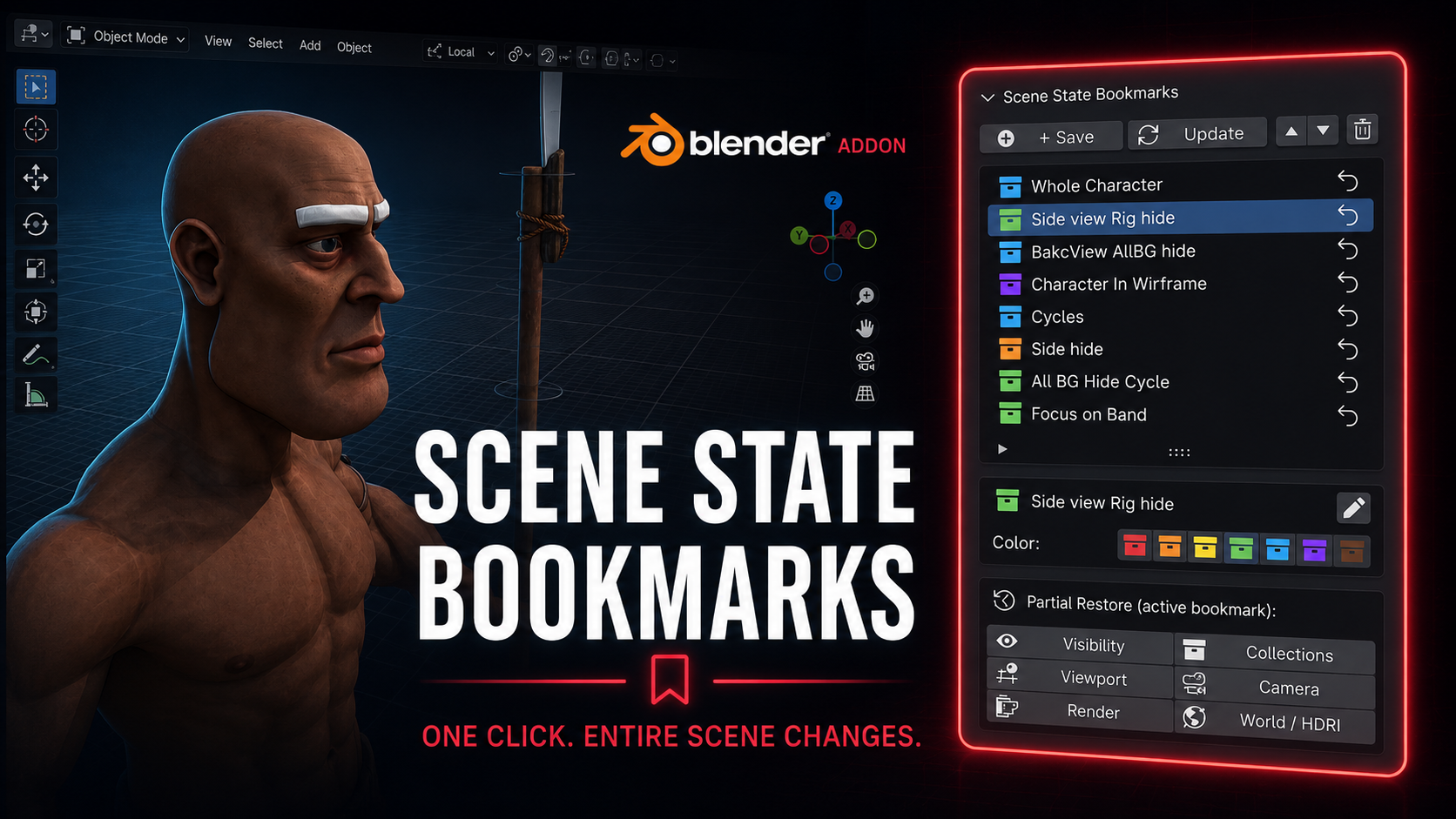
Scene State Bookmarks - Save and Restore
1 month of Skillshare
Available with PurchaseFree
All memberships will be billed automatically on a recurring basis until canceled. If eligible for a free trial, cancel before the trial ends to avoid being charged. Offer only valid for new paid subscribers. See full terms of service here.
About this product

Salman Naseem
2d 3D Animator
Every animator and 3D artist knows the pain. You spend 3 minutes hiding collections, switching render engines, repositioning the viewport, and setting up the camera just to review one specific shot. Then you need to switch to another setup and do it all over again.
Scene State Bookmarks eliminates that
What it does
With one click you save a complete snapshot of your scene. Every bookmark stores exactly what your scene looks like at that moment including which objects are visible, which collections are active, your viewport position and angle, the active camera, render engine and resolution settings, and your world and HDRI setup.
Restoring that state takes exactly one click.
Who this is for
This addon is built for working artists with real production pressure. If you switch between character close-ups and wide environment shots, between EEVEE previews and Cycles final renders, between wireframe checks and solid shading, this tool will save you hours every single week.
Animators use it to jump between different character poses and camera angles without losing their setup. Riggers use it to toggle between rig-visible and rig-hidden states in one click. Render artists use it to switch between low-resolution preview settings and full 4K Cycles production settings without touching a single property manually.

Full feature list
Save unlimited named bookmarks per scene
Color code bookmarks with 7 colors for instant visual organization
Restore any bookmark in one click from the N panel
Partial restore lets you apply only one layer: visibility only, collections only, viewport only, camera only, render only, or world only
Rename bookmarks at any time without re-saving
Reorder bookmarks up and down to match your workflow
Update any bookmark with new scene state while keeping its name and color
Delete bookmarks you no longer need
All bookmark data is saved inside the blend file so your team gets the same states when they open the file
What gets saved in each bookmark
Object visibility (viewport and render) Collection exclude and hide states Viewport position, rotation, distance and perspective mode Viewport shading type and overlay settings Active camera Render engine (EEVEE or Cycles) Render resolution X and Y Cycles and EEVEE sample counts World and HDRI assignment
Why this is different from other visibility addons
Most visibility tools only toggle object or collection hide states. Scene State Bookmarks captures the full picture: your render settings change, your camera changes, your viewport angle changes, your world changes. It is a complete scene memory system, not just a visibility switcher.
FAQs
What are digital products?
Digital products at Skillshare are expertly crafted tools, resources, and templates developed by top creatives that are available to you for purchase. With a wide range of resources to suit every creative need, they are actionable, making your learning experience real and unforgettable.
How can I purchase a digital product?
Anyone can purchase a digital product on Skillshare — click Buy now to enter your payment information and complete your purchase. Once payment is complete, all files will be available for download instantly from this page. You'll also receive an email with a link to download your digital product after purchase.
Is there a limit to how many times I can download a digital product?
No, there is no limit to how many times you can download a digital product. Even if a product is removed by the creator, you can still access the download page in most cases by logging in to your Skillshare account.
Can I get a refund or cancel my digital product purchase?
Digital products are non-refundable and cannot be returned or canceled. To learn more, see our refund policy in the Skillshare Help Center.
Can I make and sell my own digital products?
Absolutely! Visit How can I sell a digital product on Skillshare? to learn how you can create, list and sell your own digital products on Skillshare.