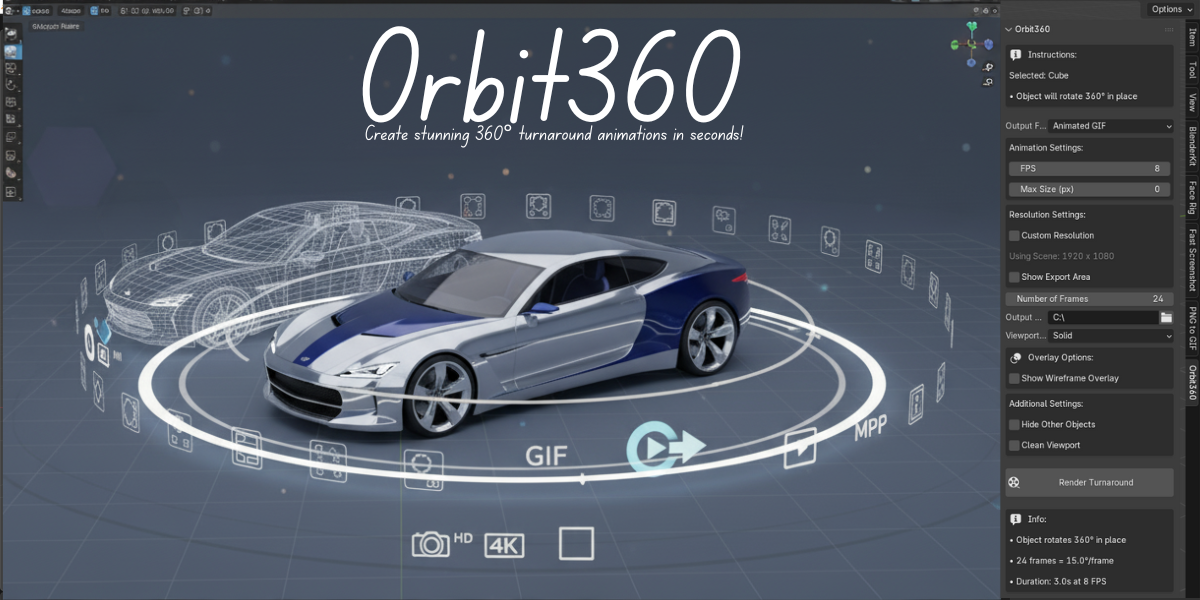
Orbit360 - One Click Turnaround Animation Export
1 month of Skillshare
Available with PurchaseFree
All memberships will be billed automatically on a recurring basis until canceled. If eligible for a free trial, cancel before the trial ends to avoid being charged. Offer only valid for new paid subscribers. See full terms of service here.
About this product

Salman Naseem
2d 3D Animator
Orbit360 is the ultimate Blender add-on for creating 360° turnaround animations instantly. Whether you’re showcasing models for your portfolio, product demos, client reviews, or e-commerce stores, Orbit360 helps you create professional animations with just a few clicks.
No more manual camera setups or complicated exports Orbit360 automates the entire process while giving you complete control over quality, resolution, shading modes, and export formats.
🎯 Perfect For
Portfolio Presentations – Showcase your models in style
Product Visualization – Create engaging product turntables
Social Media Sharing – GIFs and videos for Instagram, Twitter, ArtStation
Client Reviews – Quick turnaround previews for approval
Technical Documentation – Clean reference turnarounds for assets
E-commerce – 360° product spins for online stores
✨ Key Features
🔹 Multiple Export Formats
PNG Sequence – Individual frames with maximum flexibility
Animated GIF – Web-ready and social media friendly
MP4 Video (H.264) – High-quality video export with smart encoding
🔹 Smart & Reliable MP4 Export
Triple fallback system ensures your export never fails:
imageio – Fast & modern (auto-installed)
FFmpeg – Industry-standard encoder
Blender Sequencer – Built-in compositor as backup
🔹 Instant Resolution Presets
One-click output sizes for any need:
1080p (1920×1080) – Standard HD
720p (1280×720) – Web optimized
4K (3840×2160) – Ultra-high quality
Square 1K (1024×1024) – Instagram-ready
Square 2K (2048×2048) – High-resolution square
🔹 All Viewport Shading Modes
Render in any style you prefer:
Wireframe – With custom colors for technical looks
Solid – Fast and clean shading
Material Preview – Quick material visualization
Rendered – Full-quality render engine output
🔹 Professional Wireframe Control
Custom viewport background color
Custom wireframe line color
Overlay wireframe on shaded views
Perfect for blueprints, tech art, and documentation
🔹 Clean, Professional Output
Hide grid, axes, and floor automatically
Export border preview before rendering
Smart object hiding (preserves hierarchy)
🚀 How It Works
Creating a professional 360° turnaround is as easy as five steps:
1️⃣ Select Your Object – Pick the model you want to showcase in the viewport
2️⃣ Position Your Camera – Frame the subject exactly how you want it
3️⃣ Choose Output Format – Export as GIF, MP4, or PNG sequence
4️⃣ Configure Settings – Resolution, frame count, shading mode & more
5️⃣ Click "Render Turnaround" – Orbit360 does the rest automatically


🖼️ Why Choose Orbit360?
✔ Save hours of setup time
✔ Always get reliable exports with fallback system
✔ Optimized for professionals and content creators
✔ Perfect balance of speed, control, and quality
FAQs
What are digital products?
Digital products at Skillshare are expertly crafted tools, resources, and templates developed by top creatives that are available to you for purchase. With a wide range of resources to suit every creative need, they are actionable, making your learning experience real and unforgettable.
How can I purchase a digital product?
Anyone can purchase a digital product on Skillshare — click Buy now to enter your payment information and complete your purchase. Once payment is complete, all files will be available for download instantly from this page. You'll also receive an email with a link to download your digital product after purchase.
Is there a limit to how many times I can download a digital product?
No, there is no limit to how many times you can download a digital product. Even if a product is removed by the creator, you can still access the download page in most cases by logging in to your Skillshare account.
Can I get a refund or cancel my digital product purchase?
Digital products are non-refundable and cannot be returned or canceled. To learn more, see our refund policy in the Skillshare Help Center.
Can I make and sell my own digital products?
Absolutely! Visit How can I sell a digital product on Skillshare? to learn how you can create, list and sell your own digital products on Skillshare.