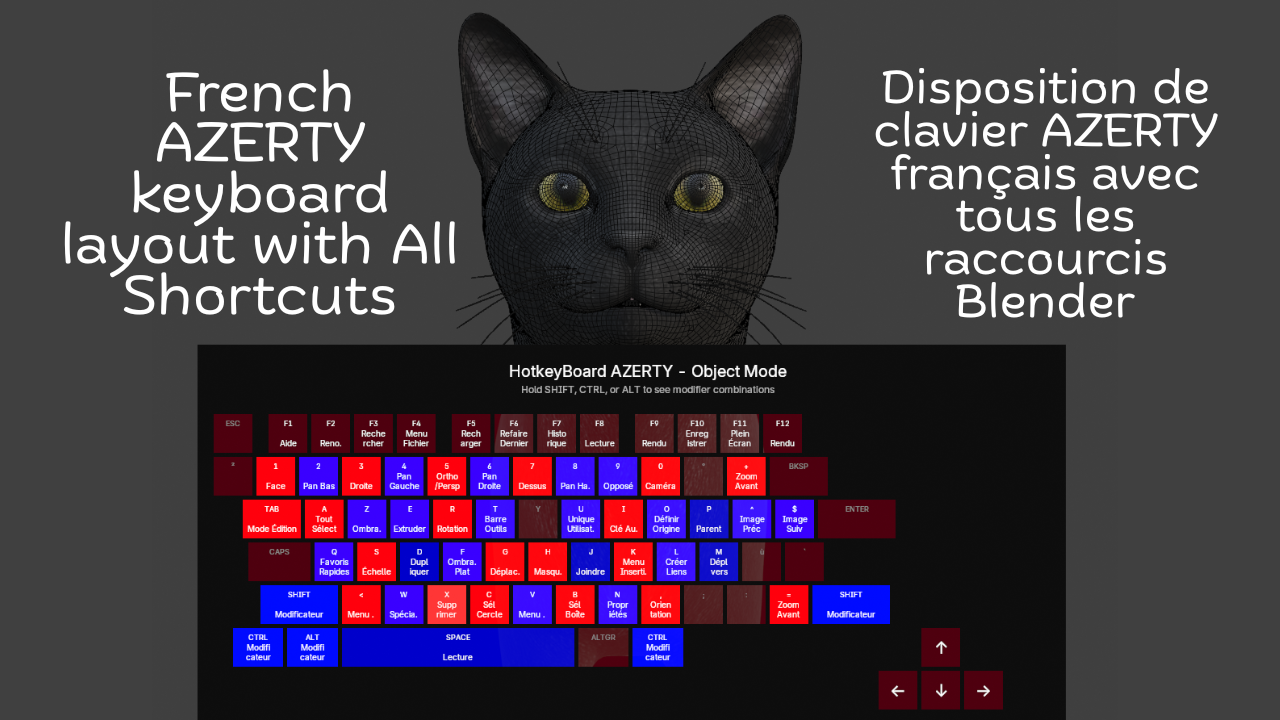
French Keyboard Shortcuts - HotkeyBoard AZERTY
1 month of Skillshare
Available with PurchaseFree
All memberships will be billed automatically on a recurring basis until canceled. If eligible for a free trial, cancel before the trial ends to avoid being charged. Offer only valid for new paid subscribers. See full terms of service here.
About this product

Salman Naseem
2d 3D Animator
Learning Blender with an AZERTY keyboard shouldn't be harder than with QWERTY. Yet most resources, tutorials, and overlays are designed for QWERTY users, forcing AZERTY users to constantly translate shortcuts in their heads. This slows learning, creates confusion, and breaks creative flow.
HotkeyBoard AZERTY solves this problem completely. It's the first and only Blender addon built specifically for AZERTY keyboards from the ground up. Open it, and you see YOUR keyboard not an adapted QWERTY layout.
Over 500 Blender shortcuts are displayed and color-coded by importance, so you learn systematically: start with blue (essential), add green (common), then orange (advanced). Press any key and watch it light up yellow instant feedback that you hit the right key. This visual learning is 10x faster than memorizing from lists.

Key Features
Core Features:
Complete AZERTY layout (Mac & Windows)
Real-time key highlighting (yellow when pressed)
500+ shortcuts covered (Object, Edit, Sculpt modes)
Color-coded by importance (6 colors)
Modifier combinations (Shift, Ctrl, Alt)
Bilingual interface (English/French)
Custom colors (enabled by default)
Adjustable size (50-150%) and opacity (0-100%)
The addon is fully bilingual. French speakers can switch to see "Déplacer" instead of "Move," "Rotation" instead of "Rotate," and 150+ other shortcuts in their native language. One click in the N panel switches everything instantly.


What You Get
✓ Complete AZERTY layouts for Mac & Windows
✓ 500+ shortcuts color-coded by importance
✓ Real-time yellow highlighting when you press keys
✓ Bilingual interface (English + French)
✓ Automatic platform detection
✓ 6 modes supported (Object, Edit, Sculpt, Paint variants)
✓ Full color customization (7 colors)
✓ Adjustable size (50-150%) and opacity (0-100%)
✓ Custom font sizes
✓ Modifier combination display
✓ Multi-line text wrapping
✓ Zero configuration needed
✓ Minimal performance impact (<1%)
✓ Lifetime updates included


Advanced Features
⚡ Modifier combinations display (Shift, Ctrl, Alt)
⚡ Multi-line text wrapping for long shortcuts
⚡ Smart key highlighting with 250ms decay
⚡ Adjustable scale (50-150%) for any screen
⚡ Opacity control (0-100%) for subtle overlay
⚡ Custom font sizes (8-24px labels, 6-18px shortcuts)
⚡ Settings persist across Blender sessions
⚡ Professional email support included
Compatibility
🖥️ Blender 4.2, 4.3, 4.4, 5.0+
🍎 macOS 11+ (Intel & Apple Silicon)
🪟 Windows 10/11
🐧 Linux (Ubuntu, Fedora, Debian, Arch)
⌨️ All AZERTY keyboards
FAQs
What are digital products?
Digital products at Skillshare are expertly crafted tools, resources, and templates developed by top creatives that are available to you for purchase. With a wide range of resources to suit every creative need, they are actionable, making your learning experience real and unforgettable.
How can I purchase a digital product?
Anyone can purchase a digital product on Skillshare — click Buy now to enter your payment information and complete your purchase. Once payment is complete, all files will be available for download instantly from this page. You'll also receive an email with a link to download your digital product after purchase.
Is there a limit to how many times I can download a digital product?
No, there is no limit to how many times you can download a digital product. Even if a product is removed by the creator, you can still access the download page in most cases by logging in to your Skillshare account.
Can I get a refund or cancel my digital product purchase?
Digital products are non-refundable and cannot be returned or canceled. To learn more, see our refund policy in the Skillshare Help Center.
Can I make and sell my own digital products?
Absolutely! Visit How can I sell a digital product on Skillshare? to learn how you can create, list and sell your own digital products on Skillshare.