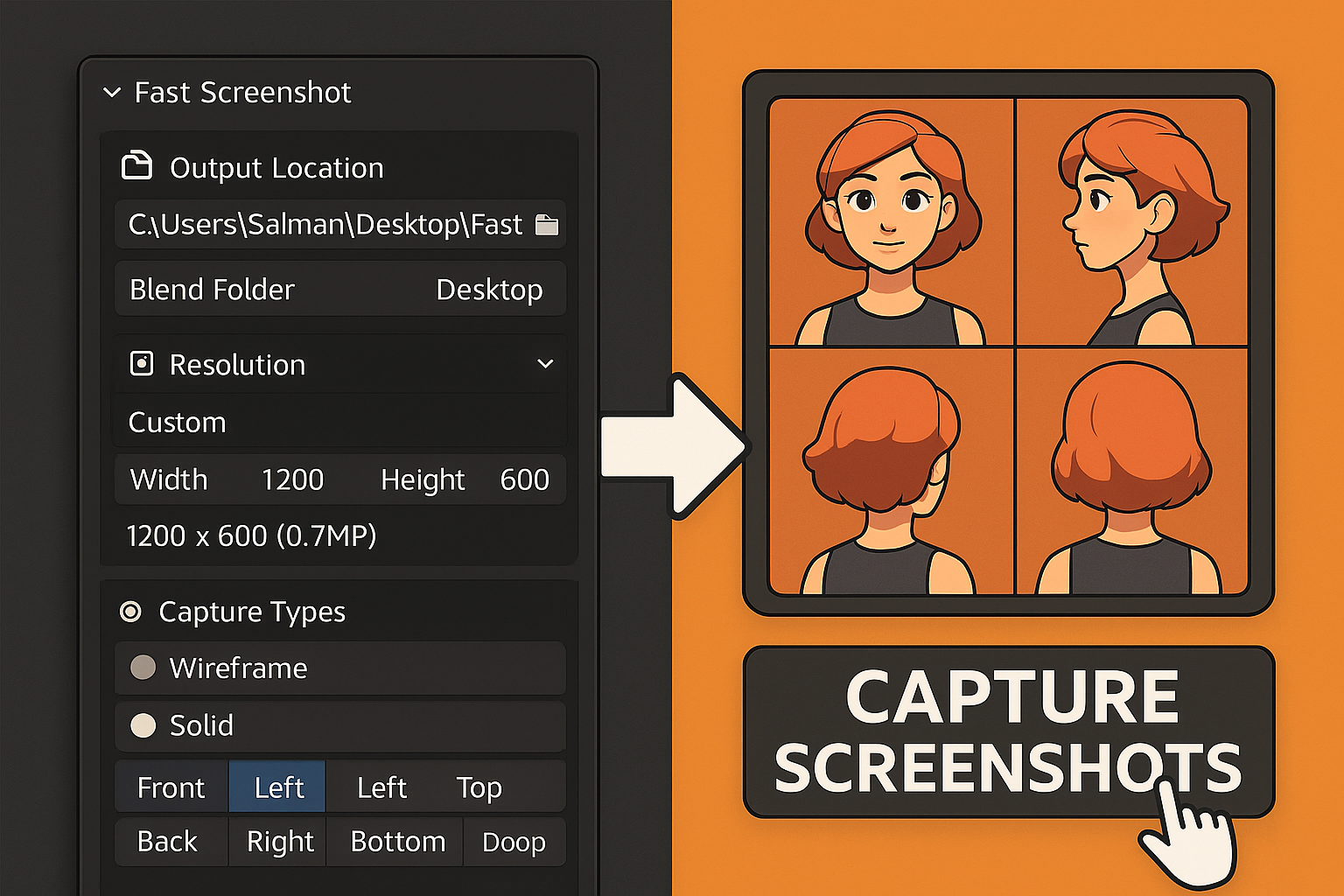
Fast Screenshot Addon for Blender
1 month of Skillshare
Available with PurchaseFree
All memberships will be billed automatically on a recurring basis until canceled. If eligible for a free trial, cancel before the trial ends to avoid being charged. Offer only valid for new paid subscribers. See full terms of service here.
About this product

Salman Naseem
2d 3D Animator
Tired of setting up cameras and angles manually every time you need character previews or portfolio shots? The Fast Screenshot Addon makes it super easy to capture high-quality character screenshots in Blender with just a few clicks.
With this addon, you can:
✅ Take instant screenshots from multiple angles
✅ Create clean character turnarounds
✅ Save time when preparing portfolio or client previews
✅ Get consistent results every time


🚀 How to Use Fast Screenshot
Enable the Addon
Open Blender → Edit → Preferences → Add-ons
Search for Fast Screenshot and enable it.
You’ll now find it in the N-Panel → Fast Screenshot tab.
Select Your Objects
Choose the character or model you want to capture in the 3D Viewport.
Set Your Options
Output Location: Choose between saving to the Blend file folder or your Desktop.
Resolution: Pick from presets (HD, Full HD, 2K, 4K) or enter custom dimensions.
Zoom Factor: Adjust framing (1.0 = tight, 2.0 = more space).
Capture Modes: Select Wireframe, Solid, and/or Material Preview.
Camera Views: Pick one or multiple (Front, Back, Left, Right, Top, Bottom).
Capture Screenshots
Click CAPTURE.
Fast Screenshot will instantly generate clean, organized screenshots of your model.
Find Your Images
Screenshots are saved automatically with smart naming:
MyCharacter_Character_front_wireframe.png
Example Screenshot captured using Addon


FAQs
What are digital products?
Digital products at Skillshare are expertly crafted tools, resources, and templates developed by top creatives that are available to you for purchase. With a wide range of resources to suit every creative need, they are actionable, making your learning experience real and unforgettable.
How can I purchase a digital product?
Anyone can purchase a digital product on Skillshare — click Buy now to enter your payment information and complete your purchase. Once payment is complete, all files will be available for download instantly from this page. You'll also receive an email with a link to download your digital product after purchase.
Is there a limit to how many times I can download a digital product?
No, there is no limit to how many times you can download a digital product. Even if a product is removed by the creator, you can still access the download page in most cases by logging in to your Skillshare account.
Can I get a refund or cancel my digital product purchase?
Digital products are non-refundable and cannot be returned or canceled. To learn more, see our refund policy in the Skillshare Help Center.
Can I make and sell my own digital products?
Absolutely! Visit How can I sell a digital product on Skillshare? to learn how you can create, list and sell your own digital products on Skillshare.