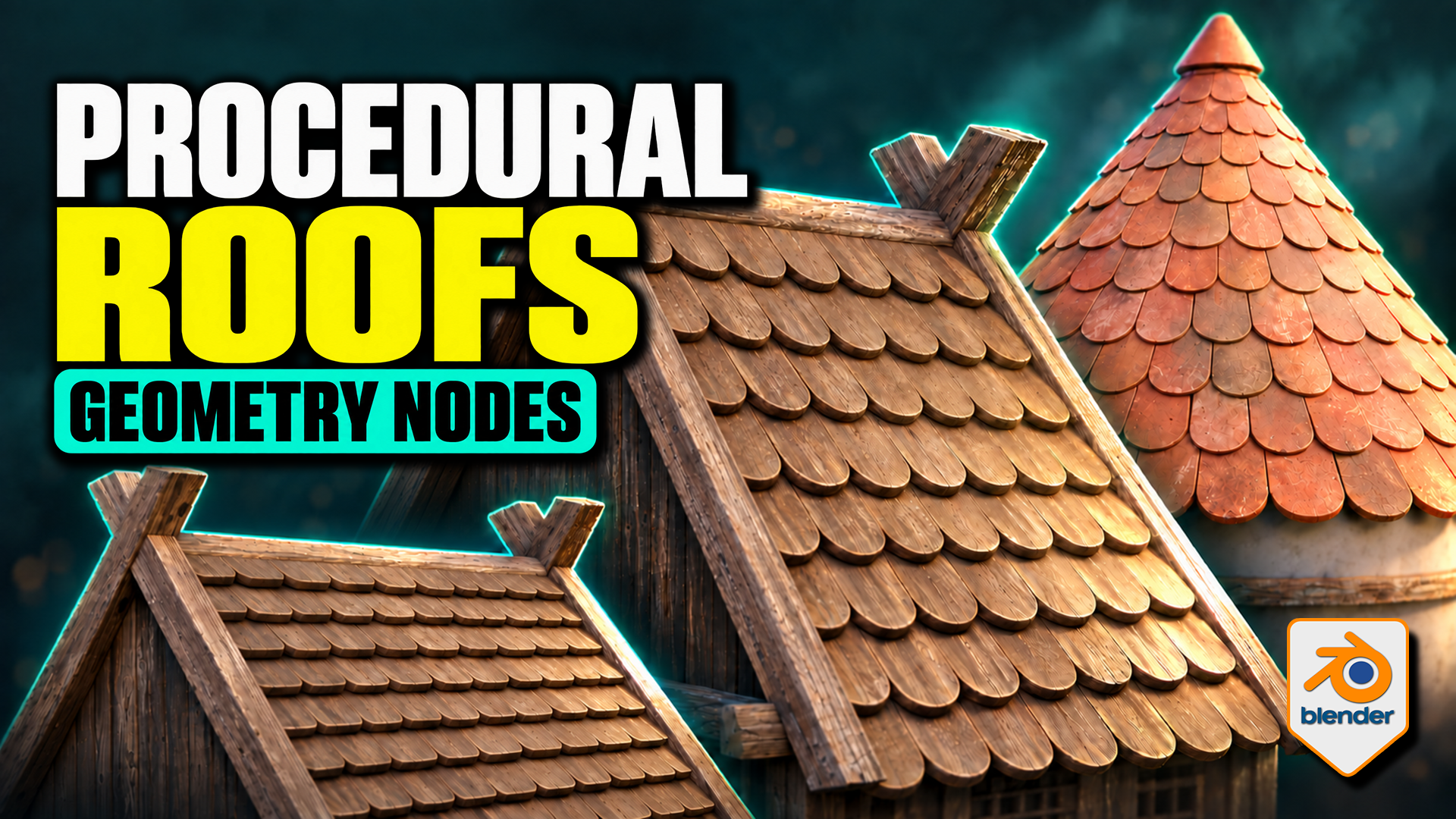
Roof Tiles Generator for Blender
1 month of Skillshare
Available with PurchaseFree
All memberships will be billed automatically on a recurring basis until canceled. If eligible for a free trial, cancel before the trial ends to avoid being charged. Offer only valid for new paid subscribers. See full terms of service here.
About this product

3D Tudor
Bestselling Blender Author & 3D Educator
Turn a tile design into an editable roof pattern. This 3D Tudor Geometry Nodes product lets you use a single tile object or a collection of tile meshes across flat and pitched roofs, domes and spires. Bring your own prepared tile designs or start with the included Wood, Stone and Ceramic sources.
Overlapping tiles follow the pitched roof on this timber building example made with the 3D Tudor roof-tile setup.
Choose the workflow for your roof
Flat and Pitched: adjust tile amount, overlap, row offset, surface clearance and seating. Refine the bottom, side and top overhangs, then introduce rotation or size variation where it suits the building.
Terracotta-coloured tiles narrow towards the top of the conical roof, with a separate cap finishing the crown.
Shape a dome or spire
Radius, height and midpoint width define the curved roof. Switch Spire on for a straight-sided cone. Refine the upper rows with Top Tile Size, use Dome Crown Fit for the dome crown, and finish with a separate cap object.
Use your own tile meshes
Both generators provide Tile Object and Tile Collection inputs. For Flat and Pitched, local X is width, local Y points uphill and local Z is thickness. Collection members should have matching local origins, orientations and approximate sizes. The supplied meshes provide useful references; custom tiles may need preparation.
Wood, stone and ceramic tile sources provide references for preparing your own objects and matching collection variants.
What is in the download?
- Two native Blender files: seven prepared roof setups and three building compositions.
- Twelve clean source tiles: Wood, Stone and Ceramic in four shapes each, plus an eleven-object Ceramic Damage Mix.
- Packed 1024 × 1024 base-colour, normal and roughness textures for the three tile materials.
- A Getting Started guide for the files, custom tile inputs and layout controls.
- Six silent videos: three building turntables and full flat/pitched, dome/spire and material demonstrations.
Surface appearance and requirements
The supplied compatible shaders expose tint, contrast, per-tile colour variation, roughness, normals, edge wear, AO colour, moss and UV controls. Custom materials need their own setup; edge wear is intended for Cycles.
Checked in Blender 5.1.2 with Cycles. No add-on installation is required. Earlier versions and other render engines have not been verified. The buildings are supplied example meshes; the procedural tools arrange the roof tiles.
Extract the Blender Files and Guide ZIP, open START HERE, then begin with a roof in the Setups file. Download the separate Silent Demonstrations ZIP to follow the controls at your own pace.
FAQs
What are digital products?
Digital products at Skillshare are expertly crafted tools, resources, and templates developed by top creatives that are available to you for purchase. With a wide range of resources to suit every creative need, they are actionable, making your learning experience real and unforgettable.
How can I purchase a digital product?
Anyone can purchase a digital product on Skillshare — click Buy now to enter your payment information and complete your purchase. Once payment is complete, all files will be available for download instantly from this page. You'll also receive an email with a link to download your digital product after purchase.
Is there a limit to how many times I can download a digital product?
No, there is no limit to how many times you can download a digital product. Even if a product is removed by the creator, you can still access the download page in most cases by logging in to your Skillshare account.
Can I get a refund or cancel my digital product purchase?
Digital products are non-refundable and cannot be returned or canceled. To learn more, see our refund policy in the Skillshare Help Center.
Can I make and sell my own digital products?
Absolutely! Visit How can I sell a digital product on Skillshare? to learn how you can create, list and sell your own digital products on Skillshare.