Arabian Market Shader Pack: Cohesive Blender Surfa
1 month of Skillshare
Available with PurchaseFree
All memberships will be billed automatically on a recurring basis until canceled. If eligible for a free trial, cancel before the trial ends to avoid being charged. Offer only valid for new paid subscribers. See full terms of service here.
About this product

3D Tudor
Bestselling Blender Author & 3D Educator
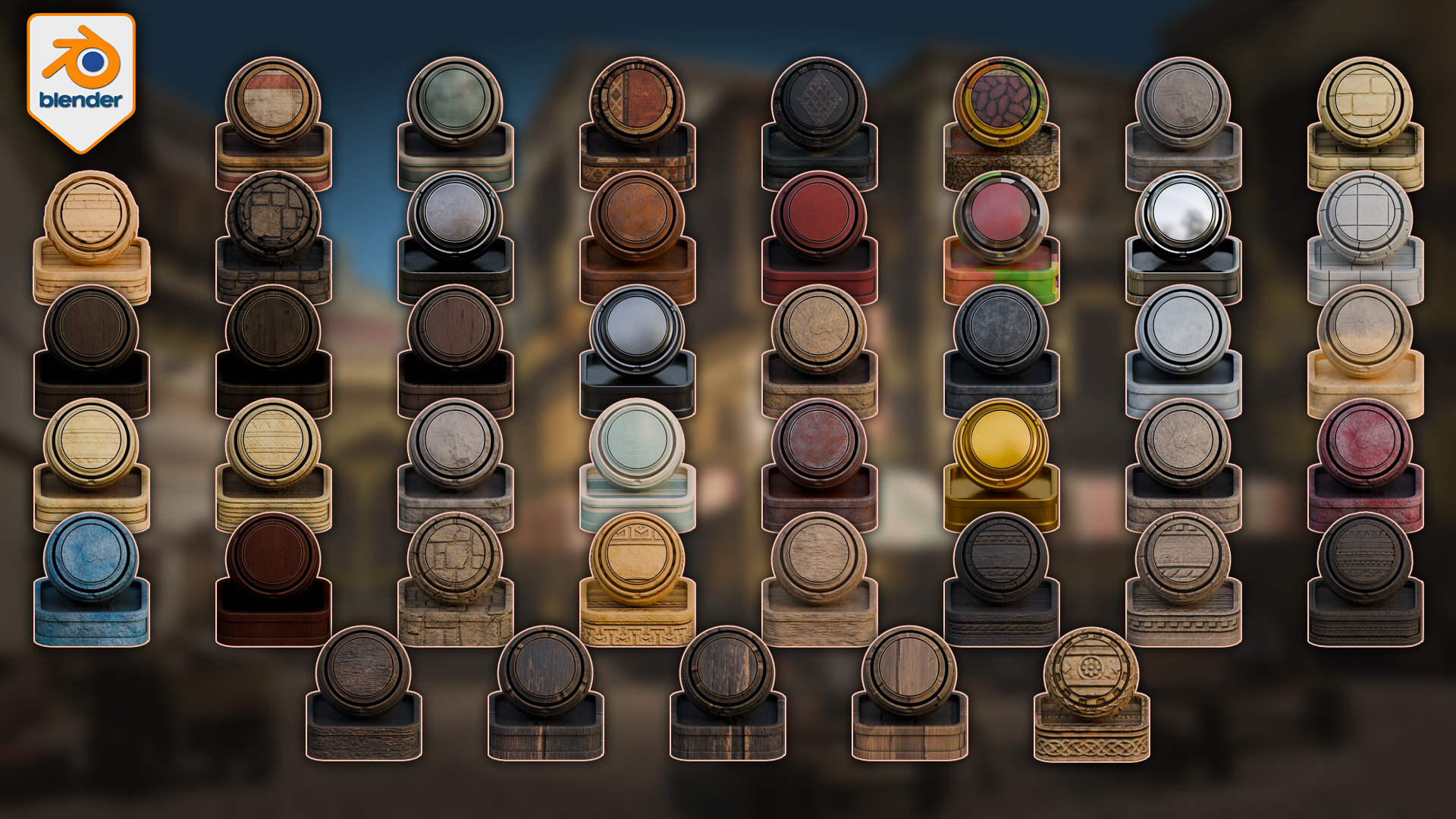
The full surface set previewed on swatch spheres in Blender, shown across two overview sheets so every material reads under one consistent light.
Build the first surface pass of a stylized Arabian market in Blender, with 50 ready-to-use materials made for souk, bazaar, and old-world village builds.
This pack is built around one idea: every surface should look like it has stood on the same sun-baked street for the same fifty years. A plaster wall, a carved sandstone arch, an aged-wood stall, and a hanging rug share one warm light and one grime level, so the scene reads as a place instead of a pile of downloads. I kept testing the surfaces next to each other while building the pack, not in isolation, so the main building materials feel connected before you start dressing the scene.
The trim sheets, cloth and fruit atlases, carpets, and crack decals add extra surface variety for market stalls, washing lines, weathered walls, and stylized village builds.


What is included
50 configured Blender materials/shaders to inspect and apply.
50 preview/application objects, one per material, plus a set of use-case example objects showing the materials applied.
124 texture maps, packed inside the Blender file and also included as loose 2048x2048 / 2K PNGs in a Textures folder.
Blender 5.1.2 and Cycles are the confirmed working context.
A focused Arabian market / souk material direction for stylized environment work.
Plaster, sandstone, aged wood, stone paving, canvas, carpet, cloth, metal, and glass coverage for a coherent market pass.
Carved balcony-wood trim beside a woven rug — the relief comes from height and normal maps, not modelled geometry.
The detail layer is where a market earns its character. The carved trim sheets are seamless along their length, so a single strip runs across any beam, arch, or wall top without a visible join. The cloth and produce atlases carry alpha, so you can use them flat on planes, push them with the height maps, or build them into simple 3D pieces. The crack and grime decals are alpha sheets made to overlay onto painted plaster.
.png)
Every surface is a real Blender shader you can open and tune, here the carpet rug graph driving its applied swatch.
Every surface is a real Blender shader you can open and adjust. To build a market wall, lay down the plaster base, add a carved trim where the arches need ornament, drop a crack or grime decal where weather wears a wall, then use the vertex-paint blend between the clean and weathered plaster to break up the repeat.
The fruit, vegetable, and cloth atlases used as plane and 3D props for stalls and washing lines, shown in the Blender viewport and shading view.
Scope
This is a Blender material/shader pack. It is not a complete Arabian market model, full souk scene, addon, plugin, course, or game-ready optimized asset pack. Eevee support is not included here. Treat this as a Blender 5 Cycles pack unless future testing confirms a wider support route.
Some materials use image texture maps, some use simpler shader setups, some use procedural texture-node construction, and some use alpha atlases or vertex-paint blends. Do not read this as a claim that every material is fully PBR or built for every render engine. The checked loose main texture maps are 2K PNGs, and the Blender file is the confirmed working route.
If you are building a stylized Arabian market, souk, or bazaar scene in Blender and want the main surfaces to feel connected before the prop pass begins, this pack is built for that first material direction stage.
Happy modelling everyone!
Neil - 3D Tudor
FAQs
What are digital products?
Digital products at Skillshare are expertly crafted tools, resources, and templates developed by top creatives that are available to you for purchase. With a wide range of resources to suit every creative need, they are actionable, making your learning experience real and unforgettable.
How can I purchase a digital product?
Anyone can purchase a digital product on Skillshare — click Buy now to enter your payment information and complete your purchase. Once payment is complete, all files will be available for download instantly from this page. You'll also receive an email with a link to download your digital product after purchase.
Is there a limit to how many times I can download a digital product?
No, there is no limit to how many times you can download a digital product. Even if a product is removed by the creator, you can still access the download page in most cases by logging in to your Skillshare account.
Can I get a refund or cancel my digital product purchase?
Digital products are non-refundable and cannot be returned or canceled. To learn more, see our refund policy in the Skillshare Help Center.
Can I make and sell my own digital products?
Absolutely! Visit How can I sell a digital product on Skillshare? to learn how you can create, list and sell your own digital products on Skillshare.