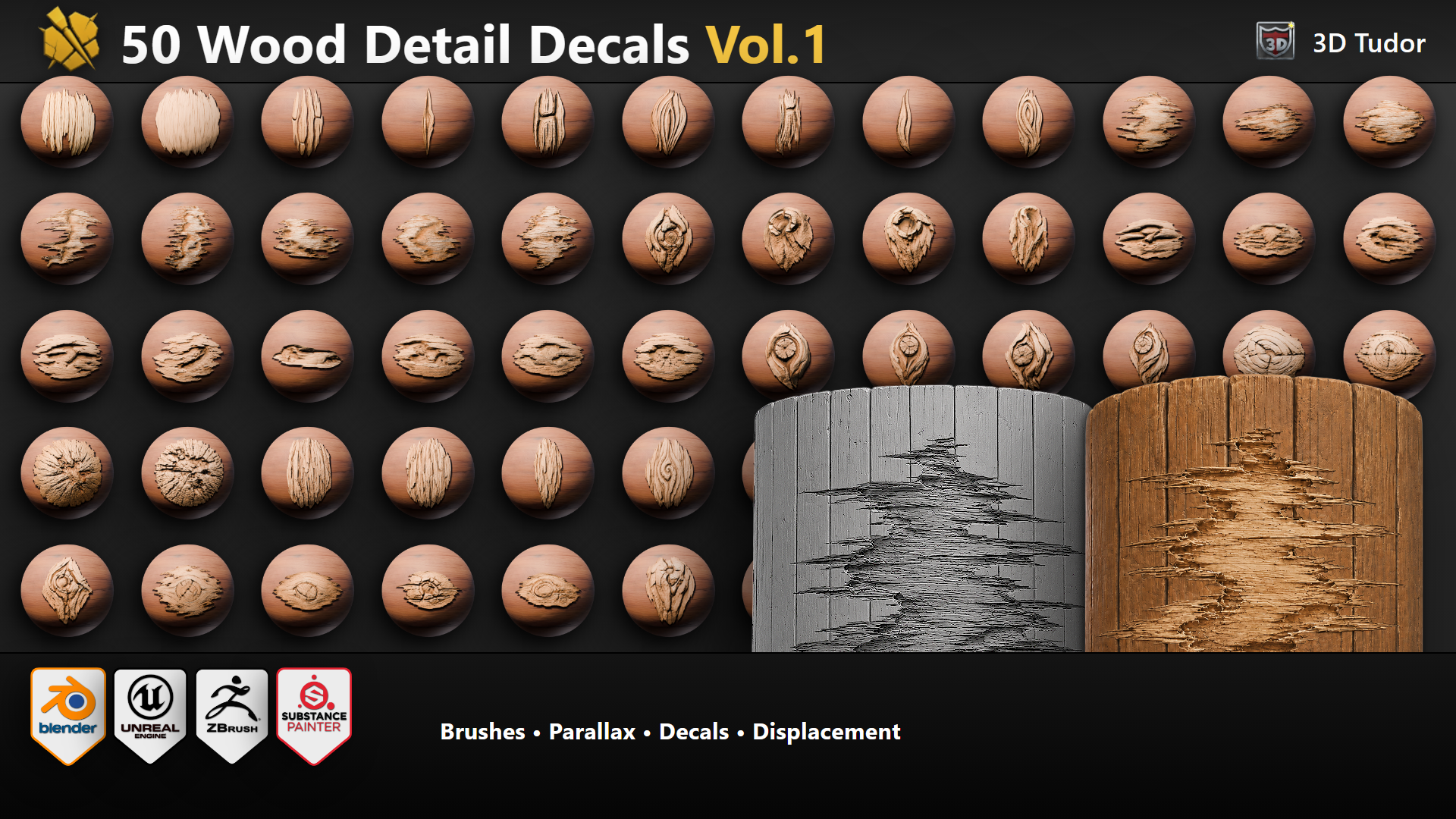
Surface Wood Detail Brush & Decal Pack Vol.1 - 50
1 month of Skillshare
Available with PurchaseFree
All memberships will be billed automatically on a recurring basis until canceled. If eligible for a free trial, cancel before the trial ends to avoid being charged. Offer only valid for new paid subscribers. See full terms of service here.
About this product

3D Tudor
Bestselling Blender Author & 3D Educator
The WoodDetail Decal Pack Vol.1 is a 50-design wood surface detail library, built for production use across Blender, Substance 3D Painter, Unreal Engine 5, and ZBrush. Every design works four ways — as a flat alpha-cut decal, a parallax-shader fake-depth material, real geometry displacement, or as an alpha sculpt brush.


WHAT YOU GET
• 50 unique wood detail designs covering the variety artists actually reach for: fibre patches for broken and worn timber, knots for branches and seamless texture breakup, log-end pieces for big timber sections, deformities where wood sticks out, and smaller pieces for corner-breakup detail.
• Universal 2K PNG PBR maps for every design: BaseColor, Normal (OpenGL), Roughness, Height, AmbientOcclusion, Opacity.
• Blender master .blend with four ready-made use-mode scenes (decal / parallax / displacement / sculpt brush), a studio cyclorama, a 3-sun lighting rig, a showcase scene matching the marketing artwork, asset-marked sculpt brushes in the Asset Browser, and N-panel helpers for swapping decals on preview spheres.
• Substance Painter Stencil tool presets (.sppr) with embedded thumbnails.
• Unreal Engine 5 Environment Preset project (.uproject + demo .umap + deferred decal actors + Nanite displacement materials + POM materials). The colour-curve setup is pre-wired on the master materials — tune one MaterialInstance to your target wood tone and copy the parameters across the other 49.
• ZBrush alpha brush presets (.zbp) set to Zadd by default, switch to Zsub for sunken / carved-in marks.
• 13-page pack-specific Brush Guide PDF + per-software HTML guides covering install, workflow, and cross-software tips.
TIERS
• 5 Designs — All-Software Starter ($4.99): sample tier across all 4 software for trying the workflow before committing.
• 20 Designs — Single Software ($9.99): half pack in your choice of Blender, Substance Painter, UE5, or ZBrush.
• 50 Designs — Single Software ($19.99): complete Vol.1 in your choice of software.
• 50 Designs — All-Software Creator Bundle ($34.99): complete 50-design set across all four software. Best value for cross-software workflows.
• Studio / Team License ($49.99): same files as the bundle with internal multi-user access for up to 10 users inside one company or team.


USE-MODES BY CAMERA DISTANCE
Background distance — flat decal. Cheapest. No geometry cost. Works in all four software.
Mid-shot — parallax. Shader-driven fake depth, no extra geometry. Blender Cycles and Eevee, Unreal Engine 5 POM materials.
Hero close-up — real displacement. Real silhouette, reads from any angle. Needs Blender Cycles or Unreal Engine 5 with Nanite.
Sculpted hero asset — sculpt brush. Detail baked into the mesh, works in any renderer. Blender Asset Browser and ZBrush.
WHY STYLIZED REALISM
Designed to read clearly at game distance and pair well with hand-painted or PBR-stylized environments. Not 3D scans. Production-clean, controllable, fast to use. Built for the moment where you know your wood surface needs more of an organic touch — a knot here, a fibre patch there, a chipped log end on the corner — but you do not want the detail to look like a random stamp pasted over the top.

ALL 50 ARE SET UP AT THE SAME COLOUR
So once you tune your wood tone, you can copy the same parameters across every decal and they will all sit in the scene together. Especially useful in Substance Painter (where you can adjust the colour tone tint) and in Unreal Engine (where the colour curve is already wired on the master material).
COMMERCIAL USE
Commercial use is included in every paid tier for one creator. Choose the Studio / Team License only if multiple people inside a company or team need internal access to the files.
Permitted: The pack is for using the assets in your own artwork, games, films, client work, portfolio work, and commercial projects.
Prohibited: The source files may not be resold, redistributed, repackaged, uploaded publicly, or included as raw downloadable resources inside another template, tool, brush pack, decal pack, texture pack, or marketplace product.
SOFTWARE COMPATIBILITY
• Blender 4.0+
• Substance 3D Painter 9.0+
• Unreal Engine 5.3+
• ZBrush 2022+
• The universal PNG PBR maps work in any DCC or engine that accepts standard PBR textures (Marmoset, Houdini, Maya, 3ds Max, Unity, Godot, etc.).
ROADMAP
Vol.2 is planned as a follow-up surface detail pack. Vol.1 buyers will receive an exclusive launch discount when Vol.2 releases.
— Neil, 3D Tudor
FAQs
What are digital products?
Digital products at Skillshare are expertly crafted tools, resources, and templates developed by top creatives that are available to you for purchase. With a wide range of resources to suit every creative need, they are actionable, making your learning experience real and unforgettable.
How can I purchase a digital product?
Anyone can purchase a digital product on Skillshare — click Buy now to enter your payment information and complete your purchase. Once payment is complete, all files will be available for download instantly from this page. You'll also receive an email with a link to download your digital product after purchase.
Is there a limit to how many times I can download a digital product?
No, there is no limit to how many times you can download a digital product. Even if a product is removed by the creator, you can still access the download page in most cases by logging in to your Skillshare account.
Can I get a refund or cancel my digital product purchase?
Digital products are non-refundable and cannot be returned or canceled. To learn more, see our refund policy in the Skillshare Help Center.
Can I make and sell my own digital products?
Absolutely! Visit How can I sell a digital product on Skillshare? to learn how you can create, list and sell your own digital products on Skillshare.